Skip to content
  • Categories
  • Recent
  • Tags
  • Popular
  • Users
  • Groups
Collapse
Brand Logo

ModalAI Forum

  1. ModalAI Support Forum
  2. Ask your questions right here!
  3. Camera not working after Upgrading VOXL SDK

Camera not working after Upgrading VOXL SDK

Scheduled Pinned Locked Moved Ask your questions right here!
7 Posts 2 Posters 1.1k Views 2 Watching
  • Oldest to Newest
  • Newest to Oldest
  • Most Votes
Reply
  • Reply as topic
Log in to reply
This topic has been deleted. Only users with topic management privileges can see it.
  • R Offline
    R Offline
    Rupesh
    Contributor
    wrote on last edited by
    #1

    Hi,
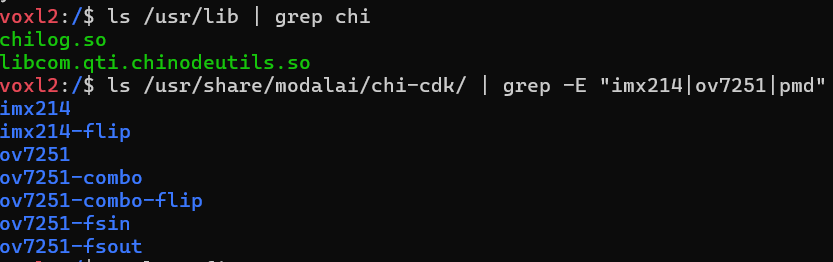
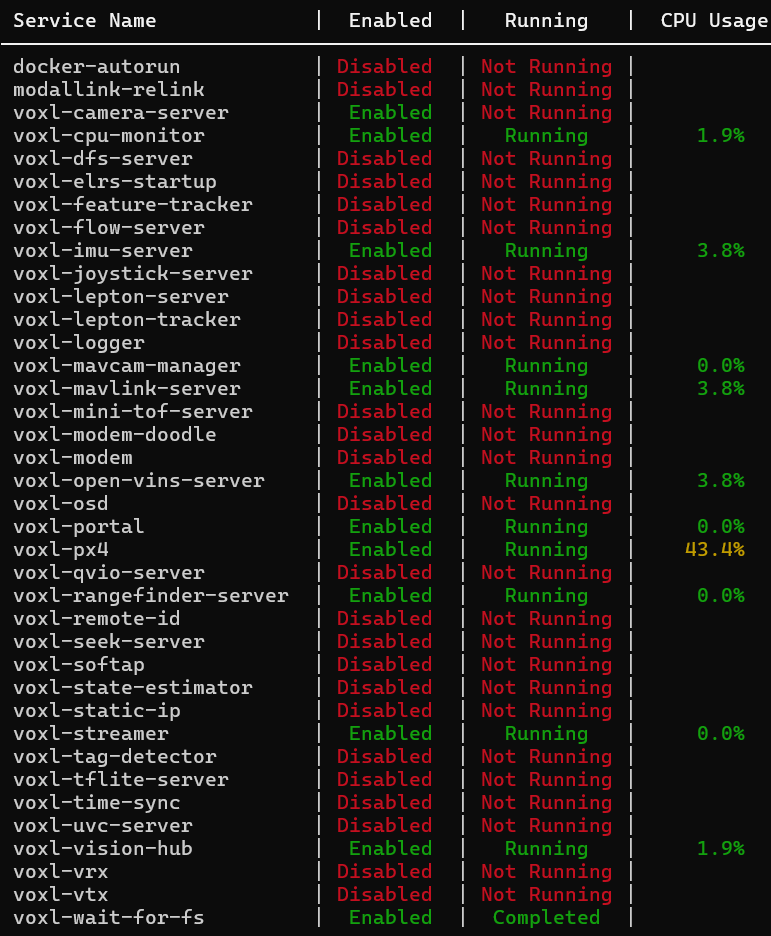
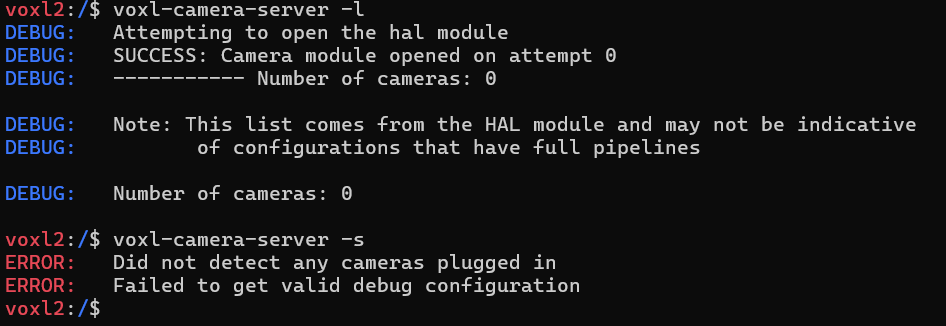
    I'm using a Starling 2 Max drone with ToF. After I installed the VOXL SDK 1.5.0, all the cameras stopped working.
    73e72c75-43e3-429c-9738-78b530e87e2c-Screenshot 2025-09-03 110100.png
    ac046f56-b619-4b1a-8c4a-66028315f7d6-Screenshot 2025-09-03 110300.png
    a4a57a8d-971e-4f74-9124-2c30b9973018-Screenshot 2025-09-03 111133.png
    Can anyone please help me solve this issue?

    Alex KushleyevA 1 Reply Last reply
    0
    • R Rupesh

      Hi,
      I'm using a Starling 2 Max drone with ToF. After I installed the VOXL SDK 1.5.0, all the cameras stopped working.
      73e72c75-43e3-429c-9738-78b530e87e2c-Screenshot 2025-09-03 110100.png
      ac046f56-b619-4b1a-8c4a-66028315f7d6-Screenshot 2025-09-03 110300.png
      a4a57a8d-971e-4f74-9124-2c30b9973018-Screenshot 2025-09-03 111133.png
      Can anyone please help me solve this issue?

      Alex KushleyevA Offline
      Alex KushleyevA Offline
      Alex Kushleyev
      ModalAI Team
      wrote on last edited by
      #2

      @Rupesh , you should run voxl-configure-mpa or at least voxl-configure-cameras and make sure you select the correct camera configuration for Starling 2 Max, which could be C27, C28, C29 etc. The camera configuration is in the drone's SKU.

      Please try. Let us know if you need any additional clarification.

      Alex

      R 1 Reply Last reply
      0
      • Alex KushleyevA Alex Kushleyev

        @Rupesh , you should run voxl-configure-mpa or at least voxl-configure-cameras and make sure you select the correct camera configuration for Starling 2 Max, which could be C27, C28, C29 etc. The camera configuration is in the drone's SKU.

        Please try. Let us know if you need any additional clarification.

        Alex

        R Offline
        R Offline
        Rupesh
        Contributor
        wrote on last edited by
        #3

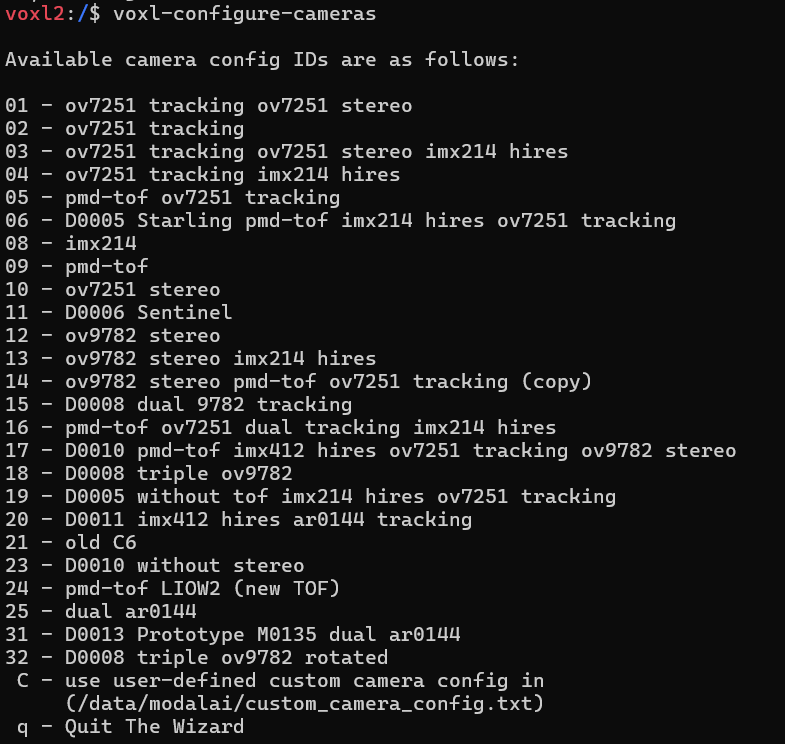
        @Alex-Kushleyev Thank you for your reply. I did voxl-configure-mpa multiple times, but every time it fails to make the camera work. Also, I've tried multiple options in voxl-configure-cameras like 06, 02, 03, 19, but still won't work. I know that mine is D00012, but can't find it the options. I also cannot find C27, C28, C29 etc. in the options.
        dfb839ad-f817-4625-894a-6fcb2f2ef4d2-Screenshot 2025-09-04 145307.png

        e60ca4b4-b0d8-4cc3-a927-f6258c9b6961-Screenshot 2025-09-04 145218.png

        Alex KushleyevA 1 Reply Last reply
        0
        • R Rupesh

          @Alex-Kushleyev Thank you for your reply. I did voxl-configure-mpa multiple times, but every time it fails to make the camera work. Also, I've tried multiple options in voxl-configure-cameras like 06, 02, 03, 19, but still won't work. I know that mine is D00012, but can't find it the options. I also cannot find C27, C28, C29 etc. in the options.
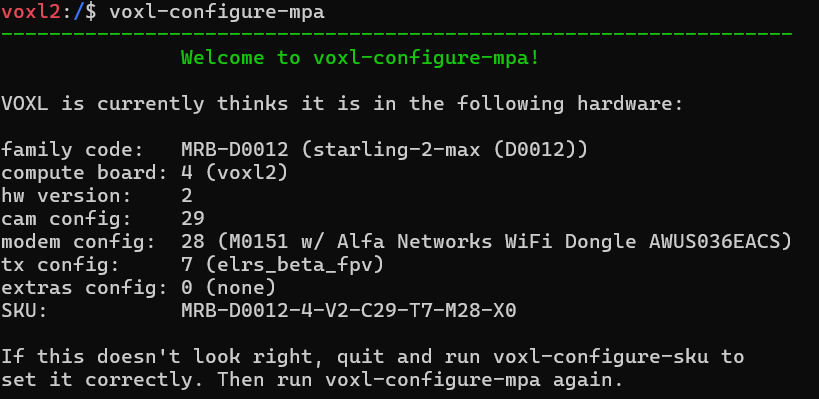
          dfb839ad-f817-4625-894a-6fcb2f2ef4d2-Screenshot 2025-09-04 145307.png

          e60ca4b4-b0d8-4cc3-a927-f6258c9b6961-Screenshot 2025-09-04 145218.png

          Alex KushleyevA Offline
          Alex KushleyevA Offline
          Alex Kushleyev
          ModalAI Team
          wrote on last edited by
          #4

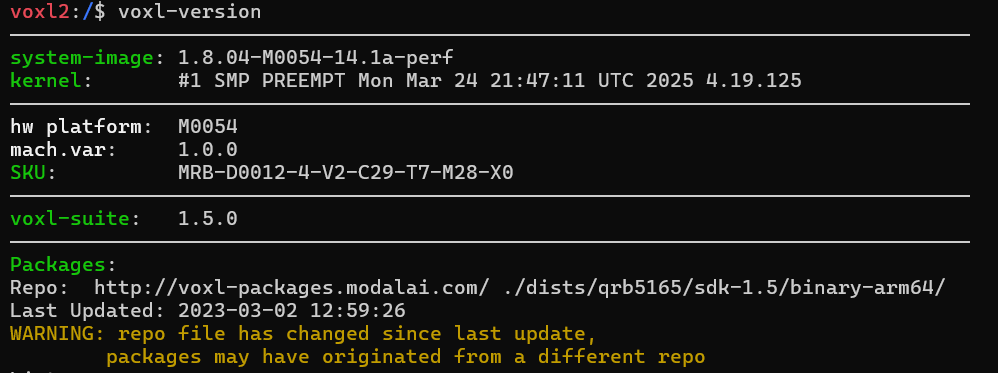
          @Rupesh , can you run “voxl-version” and check which mach var (variant of the hardware / kernel) you have? It should be 1.0.1, not 1.0.0. When you install the sdk, you have to select the correct one, which installs the correct Linux Kernel and enables the camera configs for Starling drones, which use the M0173 camera front end.

          Please double check this.

          Alex

          R 1 Reply Last reply
          0
          • Alex KushleyevA Alex Kushleyev

            @Rupesh , can you run “voxl-version” and check which mach var (variant of the hardware / kernel) you have? It should be 1.0.1, not 1.0.0. When you install the sdk, you have to select the correct one, which installs the correct Linux Kernel and enables the camera configs for Starling drones, which use the M0173 camera front end.

            Please double check this.

            Alex

            R Offline
            R Offline
            Rupesh
            Contributor
            wrote on last edited by
            #5

            @Alex-Kushleyev Do you mean the mach. var.? Mine seems to be 1.0.0. So, which latest SDK version should I be installing?
            f6716494-6c48-4c7b-9c2c-86d5a619190c-Screenshot 2025-09-04 150629.png

            Alex KushleyevA 1 Reply Last reply
            0
            • R Rupesh

              @Alex-Kushleyev Do you mean the mach. var.? Mine seems to be 1.0.0. So, which latest SDK version should I be installing?
              f6716494-6c48-4c7b-9c2c-86d5a619190c-Screenshot 2025-09-04 150629.png

              Alex KushleyevA Offline
              Alex KushleyevA Offline
              Alex Kushleyev
              ModalAI Team
              wrote on last edited by
              #6

              @Rupesh , you need to reinstall the same sdk and select the correct variant during the initial stage of the SDK install.

              Alex

              R 1 Reply Last reply
              0
              • Alex KushleyevA Alex Kushleyev

                @Rupesh , you need to reinstall the same sdk and select the correct variant during the initial stage of the SDK install.

                Alex

                R Offline
                R Offline
                Rupesh
                Contributor
                wrote on last edited by
                #7

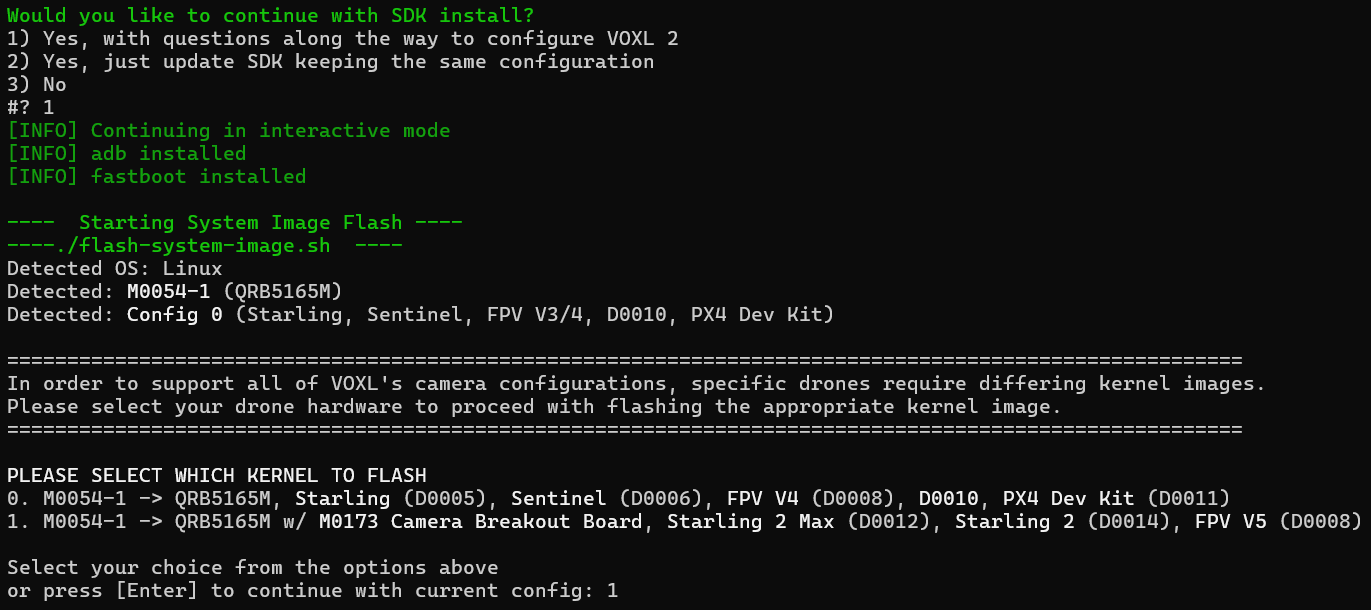
                @Alex-Kushleyev Thank you so much. Now the camera is working. Previously, during the installation, I selected a second option of continuing the installation process with the option to keep the same configuration, which was wrong decision. It did not gave me an option to choose my drone name before. But, now that i selected the first option that give questions along the way, i was able to select the correct options for my drone as shown in picture below.
                e5761ce3-3a28-4d66-b2dd-eed62fffdf42-Screenshot 2025-09-04 160830.png

                1 Reply Last reply
                0
                • Alex KushleyevA Alex Kushleyev referenced this topic on

                Hello! It looks like you're interested in this conversation, but you don't have an account yet.

                Getting fed up of having to scroll through the same posts each visit? When you register for an account, you'll always come back to exactly where you were before, and choose to be notified of new replies (either via email, or push notification). You'll also be able to save bookmarks and upvote posts to show your appreciation to other community members.

                With your input, this post could be even better 💗

                Register Login
                Reply
                • Reply as topic
                Log in to reply
                • Oldest to Newest
                • Newest to Oldest
                • Most Votes


                ModalAI
                Categories Recent Tags ModalAI.com Docs
                © 2026 ModalAI® · Accelerating autonomy for smaller, smarter, safer drones · Powered by NodeBB
                • Login

                • Don't have an account? Register

                • Login or register to search.
                • First post
                  Last post
                0
                • Categories
                • Recent
                • Tags
                • Popular
                • Users
                • Groups