
Starling 2 Max Crashes in Position Hold Mode After Disabling Magnetometer for Indoor Flight
-
We’re encountering an issue while trying to fly our Starling 2 Max drone indoors inside a netted cage using PX4. Initially, we were getting a “magnetometer interference” error, which prevented arming. To bypass this, we changed the following parameters:
EKF2_MAG_TYPE = 5
SYS_HAS_MAG = 0This allowed us to arm the drone and take off using our VIO setup (we are flying without GPS or magnetometer, relying solely on visual-inertial odometry). However, after takeoff, when switching to Position Hold mode, the drone began to ascend uncontrollably, didn’t respond to RC inputs, hit the ceiling, and crashed. Has anyone faced this issue before? We’re wondering:
-
What might be causing the drone to ignore RC input in Position Hold mode?
-
Are there other parameters we should configure to properly use VIO indoors without a GPS or magnetometer?
-
What’s the correct setup for stable, autonomous indoor flight on PX4 with VIO?
Any help or guidance would be greatly appreciated. We’re aiming to safely fly indoors autonomously with the Starling 2 Max and want to make sure our configuration is correct.
Thanks in advance!
-
-
We’re encountering an issue while trying to fly our Starling 2 Max drone indoors inside a netted cage using PX4. Initially, we were getting a “magnetometer interference” error, which prevented arming. To bypass this, we changed the following parameters:
EKF2_MAG_TYPE = 5
SYS_HAS_MAG = 0This allowed us to arm the drone and take off using our VIO setup (we are flying without GPS or magnetometer, relying solely on visual-inertial odometry). However, after takeoff, when switching to Position Hold mode, the drone began to ascend uncontrollably, didn’t respond to RC inputs, hit the ceiling, and crashed. Has anyone faced this issue before? We’re wondering:
-
What might be causing the drone to ignore RC input in Position Hold mode?
-
Are there other parameters we should configure to properly use VIO indoors without a GPS or magnetometer?
-
What’s the correct setup for stable, autonomous indoor flight on PX4 with VIO?
Any help or guidance would be greatly appreciated. We’re aiming to safely fly indoors autonomously with the Starling 2 Max and want to make sure our configuration is correct.
Thanks in advance!
@berayksl What version of the SDK are you running? Can you please provide a log of the flight? When you say it didn't respond to RC inputs are you referring to stick input or trying to switch flight modes out of position hold?
-
-
@berayksl What version of the SDK are you running? Can you please provide a log of the flight? When you say it didn't respond to RC inputs are you referring to stick input or trying to switch flight modes out of position hold?
@Eric-Katzfey I'm running SDK version 1.4.3.
Where can I find the log file of the flight?
The drone didn't respond to stick input, which it should have in the position hold mode.
-
@Eric-Katzfey I'm running SDK version 1.4.3.
Where can I find the log file of the flight?
The drone didn't respond to stick input, which it should have in the position hold mode.
@berayksl Flight logs are in /data/px4/log
-
@berayksl Flight logs are in /data/px4/log
@Eric-Katzfey here is the log of the flight: https://review.px4.io/plot_app?log=a2686aeb-913d-49aa-8f21-b9802b28ec02
-
@Eric-Katzfey here is the log of the flight: https://review.px4.io/plot_app?log=a2686aeb-913d-49aa-8f21-b9802b28ec02
@berayksl Hi there. being 1.4.3, you may want check the parameter in
/etc/modalai/voxl-vision-hub.confthat:
"en_vio": true,Also, on some setups we noticed added latency that triggers the PX4's EV timeout and could explain the "invalid setpoint" log message. In PX4 please set
EKF2_NOAID_TOUTparameter in QGC to8000000.Checking the above and before your next test flight, perform a hand test as follows:
- startup voxl portal & connect to the drone (web browser w/ip addr of the drone as the url--wifi must be running)
- goto the "vio" tab in portal
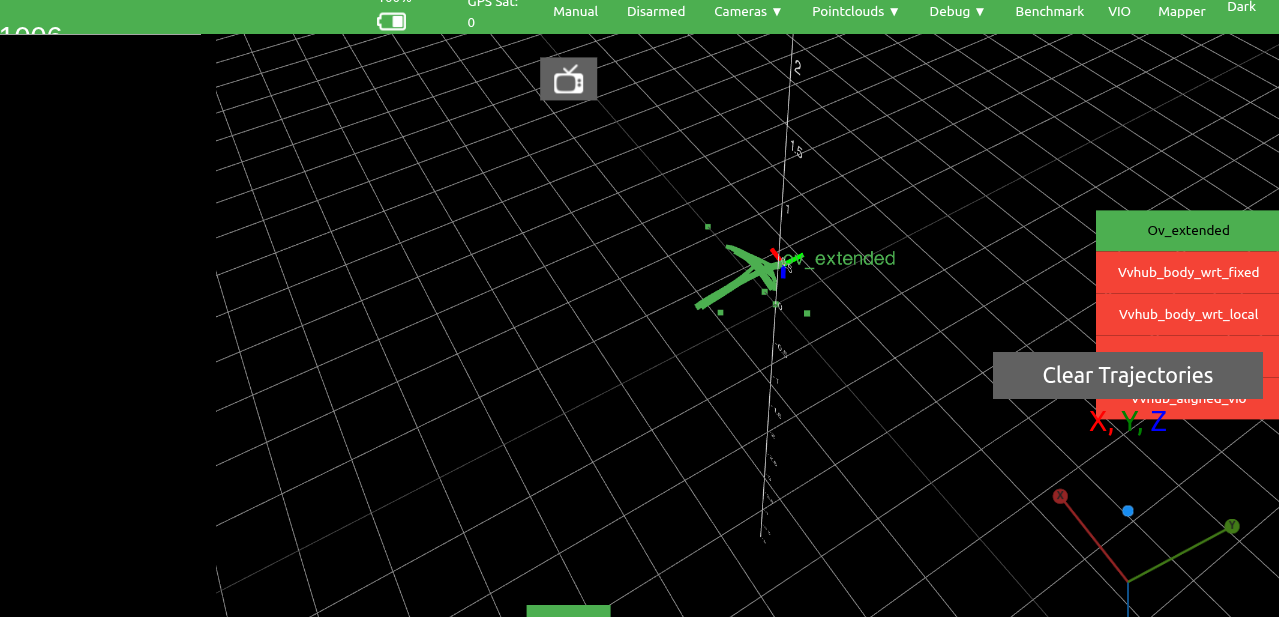
- pick up the drone and move it back and forth, then left and right. You should get something close to a "plus" trajectory in the portal screen (see attached). If it "flies away" then good chance calibration (imu, or camera, extrinsics) is off. If it stays frozen/unresponsive then there's a SDK configuration error.
- If you can repeat what is shown in the image, that confirms VIO is working properly and likely the above NOAID issue..
--
--
if you're still having issues on take off, then you can modify in
/etc/modalai/voxl-open-vins-server.confand try the blind takeoff option by setting"en_vio_always_on": false, but note VIO will not report any movements (vio position will report as if frozen) until you arm the drone. -
@berayksl Hi there. being 1.4.3, you may want check the parameter in
/etc/modalai/voxl-vision-hub.confthat:
"en_vio": true,Also, on some setups we noticed added latency that triggers the PX4's EV timeout and could explain the "invalid setpoint" log message. In PX4 please set
EKF2_NOAID_TOUTparameter in QGC to8000000.Checking the above and before your next test flight, perform a hand test as follows:
- startup voxl portal & connect to the drone (web browser w/ip addr of the drone as the url--wifi must be running)
- goto the "vio" tab in portal
- pick up the drone and move it back and forth, then left and right. You should get something close to a "plus" trajectory in the portal screen (see attached). If it "flies away" then good chance calibration (imu, or camera, extrinsics) is off. If it stays frozen/unresponsive then there's a SDK configuration error.
- If you can repeat what is shown in the image, that confirms VIO is working properly and likely the above NOAID issue..
--
--
if you're still having issues on take off, then you can modify in
/etc/modalai/voxl-open-vins-server.confand try the blind takeoff option by setting"en_vio_always_on": false, but note VIO will not report any movements (vio position will report as if frozen) until you arm the drone.@Cliff-Wong said in Starling 2 Max Crashes in Position Hold Mode After Disabling Magnetometer for Indoor Flight:
8000000
Hi Cliff,
Thank you for your response. I checked the config file and "en_vio" was set to 'true'.
Also I tried moving the drone inside the drone cage and was able to get a trajectory similar to yours initially:
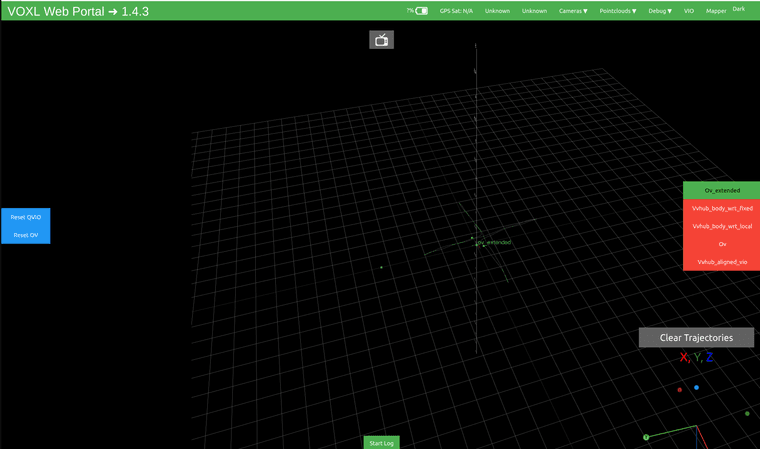
However, the results are inconsistent. Sometimes the trajectory is inaccurate, and the drone drifts away in the portal view:
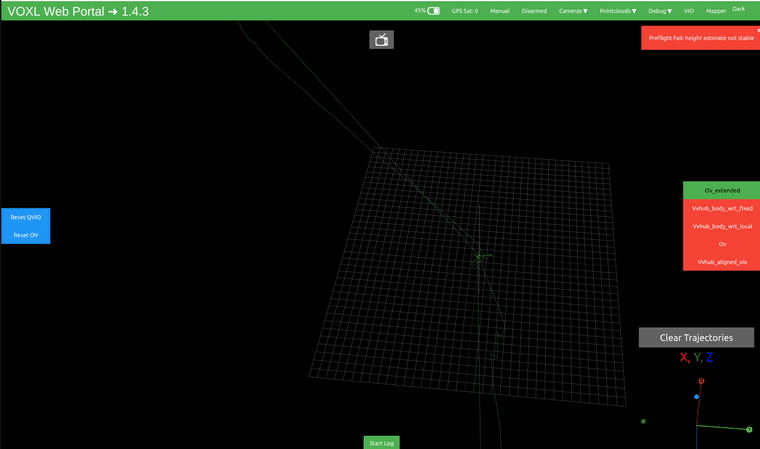
Could this be related to calibration issues, or is VIO inherently unreliable in some cases? Could the drift be due to a lack of visual features in the environment?
Also, do you think it's safe to fly indoors without the magnetometer? (I had to disable it because I was getting an interference error that prevented arming)
Are there any other PX4 parameters I should adjust to ensure safe indoor flight? I want to double-check that everything is set up correctly before attempting another test because I don't want to crash the drone like last time.
Lastly, is there a way to test the VIO setup in a HITL simulation before performing an actual flight, just to verify that everything works as expected?
Thanks again for your help!
-
@berayksl Hi there. being 1.4.3, you may want check the parameter in
/etc/modalai/voxl-vision-hub.confthat:
"en_vio": true,Also, on some setups we noticed added latency that triggers the PX4's EV timeout and could explain the "invalid setpoint" log message. In PX4 please set
EKF2_NOAID_TOUTparameter in QGC to8000000.Checking the above and before your next test flight, perform a hand test as follows:
- startup voxl portal & connect to the drone (web browser w/ip addr of the drone as the url--wifi must be running)
- goto the "vio" tab in portal
- pick up the drone and move it back and forth, then left and right. You should get something close to a "plus" trajectory in the portal screen (see attached). If it "flies away" then good chance calibration (imu, or camera, extrinsics) is off. If it stays frozen/unresponsive then there's a SDK configuration error.
- If you can repeat what is shown in the image, that confirms VIO is working properly and likely the above NOAID issue..
--
--
if you're still having issues on take off, then you can modify in
/etc/modalai/voxl-open-vins-server.confand try the blind takeoff option by setting"en_vio_always_on": false, but note VIO will not report any movements (vio position will report as if frozen) until you arm the drone. -
@Cliff-Wong @Eric-Katzfey Any updates?
@berayksl
Hi there,- Since you were able to run a limited bench test, having it fly away after a couple movements indicates 3 possibilities:
- extrinsics are incorrect -- either bad imu_apps to cam# values or camera outputs are flipped.
- intrinsics are incorrect (bad camera calibrations)
-
yes you can run without mag enabled. Should work normally if (of course) VIO is running normally.
-
As for PX4 parameters, VIO enabling can be setup applying this param file.
My thinking is the camera extrinsics maybe off or mismatched to the camera ID. If you can only enabling one camera at a time and run the bench/hand test as if like a single camera vio setup, hopefully it will reveal the misconfigured camera (if all then we have an imu issue).
-
@berayksl
Hi there,- Since you were able to run a limited bench test, having it fly away after a couple movements indicates 3 possibilities:
- extrinsics are incorrect -- either bad imu_apps to cam# values or camera outputs are flipped.
- intrinsics are incorrect (bad camera calibrations)
-
yes you can run without mag enabled. Should work normally if (of course) VIO is running normally.
-
As for PX4 parameters, VIO enabling can be setup applying this param file.
My thinking is the camera extrinsics maybe off or mismatched to the camera ID. If you can only enabling one camera at a time and run the bench/hand test as if like a single camera vio setup, hopefully it will reveal the misconfigured camera (if all then we have an imu issue).
@Cliff-Wong Thanks for your response. How can I enable only one camera at a time? If the camera calibration is bad, how can I recalibrate them? Lastly, is there a way to test the VIO setup in a HITL simulation before performing an actual flight, just to verify that everything works as expected?
-
@Cliff-Wong Thanks for your response. How can I enable only one camera at a time? If the camera calibration is bad, how can I recalibrate them? Lastly, is there a way to test the VIO setup in a HITL simulation before performing an actual flight, just to verify that everything works as expected?
@berayksl Hi there,
In the VOXL2 file
/etc/modalai/vio_cams.confall the cameras should be listed as a JSON record. the top-leveldisableattribute of each record can be edited to turn cameras on and off (makefronttrue and the others false for just the front camera).On calibration, instructions can be found here.
If the camera's physical positions changed from delivered, then you'll need to update the extrinsics.
-
@berayksl Hi there,
In the VOXL2 file
/etc/modalai/vio_cams.confall the cameras should be listed as a JSON record. the top-leveldisableattribute of each record can be edited to turn cameras on and off (makefronttrue and the others false for just the front camera).On calibration, instructions can be found here.
If the camera's physical positions changed from delivered, then you'll need to update the extrinsics.
@Cliff-Wong I applied the param file you provided and did some test flights recently. Before the flight, I checked the VIO accuracy by moving the drone around in my hand while monitoring the trajectory in the VIO tab on the portal, and it seemed to be working fine.
During the first flight, I put the drone in “Position Hold” mode. It was holding its position quite well initially. I moved it around and rotated it, and it continued to hold position accurately when I released the sticks.
However, after landing and taking it for another test flight a short while later (same area), it wasn’t able to hold its position well in the z-axis. The drone kept ascending and didn’t respond to RC inputs, so I had to trigger the kill switch for safety.
I noticed that VIO performance seems to vary even when flying in the same area, making it unreliable at times. Additionally, I occasionally get a “Yaw estimate error” message on the portal, but there are no corresponding errors on the QGroundControl terminal, and it still allows me to arm.
Do you have any suggestions on what might be causing:
- The inconsistent VIO performance between flights
- The drone ignoring RC inputs during the second flight
- The “Yaw estimate error” message (should I be concerned if QGC shows no error)?
I also tried calibrating the cameras (even though I haven’t changed their locations since delivery) by following the link you provided. I was able to calibrate the front camera successfully, but when I try to calibrate the downward-facing camera, the camera feed on the portal becomes extremely laggy, and the calibration app becomes unresponsive after a while, requiring me to reboot the drone each time.
-
@Cliff-Wong I applied the param file you provided and did some test flights recently. Before the flight, I checked the VIO accuracy by moving the drone around in my hand while monitoring the trajectory in the VIO tab on the portal, and it seemed to be working fine.
During the first flight, I put the drone in “Position Hold” mode. It was holding its position quite well initially. I moved it around and rotated it, and it continued to hold position accurately when I released the sticks.
However, after landing and taking it for another test flight a short while later (same area), it wasn’t able to hold its position well in the z-axis. The drone kept ascending and didn’t respond to RC inputs, so I had to trigger the kill switch for safety.
I noticed that VIO performance seems to vary even when flying in the same area, making it unreliable at times. Additionally, I occasionally get a “Yaw estimate error” message on the portal, but there are no corresponding errors on the QGroundControl terminal, and it still allows me to arm.
Do you have any suggestions on what might be causing:
- The inconsistent VIO performance between flights
- The drone ignoring RC inputs during the second flight
- The “Yaw estimate error” message (should I be concerned if QGC shows no error)?
I also tried calibrating the cameras (even though I haven’t changed their locations since delivery) by following the link you provided. I was able to calibrate the front camera successfully, but when I try to calibrate the downward-facing camera, the camera feed on the portal becomes extremely laggy, and the calibration app becomes unresponsive after a while, requiring me to reboot the drone each time.
@berayksl : I had similar behavior on a Starling2: after arming on position mode, sometimes it would fly fine, other times it would take off vertically at fast speed and only option to stop it would be the kill switch.
Have you tried to set the parameter SYS_HAS_GPS to "disable" in QGroundControl ? In my case it made a huge difference. If you are flying indoors (no GPS) but keep the GPS active on EKF2, it seems to deteriorate the sensor fusion, leading to inconsistent estimates of altitude that can lead to instability in the vertical axis. -
@berayksl : I had similar behavior on a Starling2: after arming on position mode, sometimes it would fly fine, other times it would take off vertically at fast speed and only option to stop it would be the kill switch.
Have you tried to set the parameter SYS_HAS_GPS to "disable" in QGroundControl ? In my case it made a huge difference. If you are flying indoors (no GPS) but keep the GPS active on EKF2, it seems to deteriorate the sensor fusion, leading to inconsistent estimates of altitude that can lead to instability in the vertical axis.@Hector-Gutierrez Hi Hector,
Thanks for your reply. Yes, I have set the parameter 'SYS_HAS_GPS' to 0 (disable) but still had the same issue. Did yours fly fine consistently after disabling the GPS? Did you do anything else to resolve the issue? -
@Hector-Gutierrez Hi Hector,
Thanks for your reply. Yes, I have set the parameter 'SYS_HAS_GPS' to 0 (disable) but still had the same issue. Did yours fly fine consistently after disabling the GPS? Did you do anything else to resolve the issue?@berayksl : IN my case the problem has not appeared again (fingers crossed !) since I deactivated GPS from the EKF2.
From what you described above, it seems you also deactivated the magnetometer (SYS_HAS_MAG = 0), have you tried to enable that ?
Lack of magnetometer may lead to unstable EKF2 sensor fusion ? -
@berayksl : IN my case the problem has not appeared again (fingers crossed !) since I deactivated GPS from the EKF2.
From what you described above, it seems you also deactivated the magnetometer (SYS_HAS_MAG = 0), have you tried to enable that ?
Lack of magnetometer may lead to unstable EKF2 sensor fusion ?@Hector-Gutierrez The magnetometer was enabled by default but I was getting 'magnetometer interference' error, which prevented arming the drone. One of the devs told me it's okay to disable magnetometer for indoor flights. I guess the interference was caused by the drone cage that I was flying in. What kind of environment are you flying your drone in?
-
@Hector-Gutierrez The magnetometer was enabled by default but I was getting 'magnetometer interference' error, which prevented arming the drone. One of the devs told me it's okay to disable magnetometer for indoor flights. I guess the interference was caused by the drone cage that I was flying in. What kind of environment are you flying your drone in?
@berayksl - we have an indoor lab . There is a large steel table on one side of the room that affects the magnetometer. The drone has to stay away from that object to be able to arm. Large ferromagnetic objects definitely affect the magnetometer. Can you arm and fly position mode in a regular room with magnetometer enabled and GPS disabled ?
-
@Hector-Gutierrez The magnetometer was enabled by default but I was getting 'magnetometer interference' error, which prevented arming the drone. One of the devs told me it's okay to disable magnetometer for indoor flights. I guess the interference was caused by the drone cage that I was flying in. What kind of environment are you flying your drone in?
@berayksl : If your problem is with the height estimate and your VIO is working well and gives you good estimates of altitude, try disabling the barometer as well: SYS_HAS_BARO = disable, SYS_HAS_GPS = disable.
-
@berayksl - we have an indoor lab . There is a large steel table on one side of the room that affects the magnetometer. The drone has to stay away from that object to be able to arm. Large ferromagnetic objects definitely affect the magnetometer. Can you arm and fly position mode in a regular room with magnetometer enabled and GPS disabled ?
@Hector-Gutierrez Unfortunately, I have to fly the drone inside the drone cage due to safety reasons. I haven't tried disabling the barometer yet but I've already set the EKF height reference to visual odometry as suggested by the devs. I used this param file.
Starling 2 Max also comes with a downward facing range finder sensor. Maybe I can also use that sensor for altitude reference.
-
@Cliff-Wong I applied the param file you provided and did some test flights recently. Before the flight, I checked the VIO accuracy by moving the drone around in my hand while monitoring the trajectory in the VIO tab on the portal, and it seemed to be working fine.
During the first flight, I put the drone in “Position Hold” mode. It was holding its position quite well initially. I moved it around and rotated it, and it continued to hold position accurately when I released the sticks.
However, after landing and taking it for another test flight a short while later (same area), it wasn’t able to hold its position well in the z-axis. The drone kept ascending and didn’t respond to RC inputs, so I had to trigger the kill switch for safety.
I noticed that VIO performance seems to vary even when flying in the same area, making it unreliable at times. Additionally, I occasionally get a “Yaw estimate error” message on the portal, but there are no corresponding errors on the QGroundControl terminal, and it still allows me to arm.
Do you have any suggestions on what might be causing:
- The inconsistent VIO performance between flights
- The drone ignoring RC inputs during the second flight
- The “Yaw estimate error” message (should I be concerned if QGC shows no error)?
I also tried calibrating the cameras (even though I haven’t changed their locations since delivery) by following the link you provided. I was able to calibrate the front camera successfully, but when I try to calibrate the downward-facing camera, the camera feed on the portal becomes extremely laggy, and the calibration app becomes unresponsive after a while, requiring me to reboot the drone each time.
@berayksl said in Starling 2 Max Crashes in Position Hold Mode After Disabling Magnetometer for Indoor Flight:
@Cliff-Wong I applied the param file you provided and did some test flights recently. Before the flight, I checked the VIO accuracy by moving the drone around in my hand while monitoring the trajectory in the VIO tab on the portal, and it seemed to be working fine.
During the first flight, I put the drone in “Position Hold” mode. It was holding its position quite well initially. I moved it around and rotated it, and it continued to hold position accurately when I released the sticks.
However, after landing and taking it for another test flight a short while later (same area), it wasn’t able to hold its position well in the z-axis. The drone kept ascending and didn’t respond to RC inputs, so I had to trigger the kill switch for safety.
I noticed that VIO performance seems to vary even when flying in the same area, making it unreliable at times. Additionally, I occasionally get a “Yaw estimate error” message on the portal, but there are no corresponding errors on the QGroundControl terminal, and it still allows me to arm.
Do you have any suggestions on what might be causing:
- The inconsistent VIO performance between flights
- The drone ignoring RC inputs during the second flight
- The “Yaw estimate error” message (should I be concerned if QGC shows no error)?
I also tried calibrating the cameras (even though I haven’t changed their locations since delivery) by following the link you provided. I was able to calibrate the front camera successfully, but when I try to calibrate the downward-facing camera, the camera feed on the portal becomes extremely laggy, and the calibration app becomes unresponsive after a while, requiring me to reboot the drone each time.
@Eric-Katzfey can you help me with this as @Cliff-Wong was last online 14 days ago?



Reading along? Create a free ModalAI Forum account to join in.
With an account you can reply, ask your own question, get an email when a ModalAI engineer answers, and mark the reply that solved it. Your place in each thread is saved between visits.
Questions about VOXL, Flight Core, ESCs and ModalAI drones are answered here by the engineers who build them.
Register Login