
VOXL2/ROS2 Drone Runs Figure 8 Offboard Program Instead of My Program
-
Hello,
I recently started working with a Starling drone with VOXL2 and ROS2, and I am having a bit of trouble trying to run a sample offboard program I found from the PX4 website. I followed the steps on the website to upload and run a program that allows the drone to send setpoints, enter offboard mode, arm, fly five meters into the air, and finally wait. However, when attempting to run the program, the default Figure 8 program on the drone runs instead. This is the link to the guide I followed: https://docs.px4.io/main/en/ros2/offboard_control.html
Additionally, I also ran the command voxl-vision-hub in the terminal with some of the outputted information shown below:
=================================================================
Parameters as loaded from config file:
config_file_version: 1MAVROS / MAVSDK
en_localhost_mavlink_udp 0
localhost_udp_port_number: 14551VIO
en_vio: 1
vio_pipe: qvio
secondary_vio_pipe: ov
en_reset_vio_if_initialized_inverted: 1
vio_warmup_s: 3.000000
send_odom_while_failed: 1MISC FEATURES
horizon_cal_tolerance: 0.500000
OFFBOARD MODE
offboard_mode: figure_eight
follow_tag_id: 0
figure_eight_move_home: 1
robot_radius: 0.300000
collision_sampling_dt: 0.100000
max_lookahead_distance: 1.000000
FIXED FRAME RELOCALIZATION
en_tag_fixed_frame: 0
fixed_frame_filter_len: 5
en_transform_mavlink_pos_setpoints_from_fixed_frame:0It should be noted that the drone has Ubuntu 18.04 and ROS2 foxy. The PX4 and Mavlink services are also enabled and running. I'm wondering if there is a step I'm missing or some software that I am missing. Anything helps. Thank you.
@GlennTee You will want to configure voxl-vision-hub to not send offboard commands if you are trying to use offboard commands from ROS2. Set
offboard_mode: offin the configuration file/etc/modalai/voxl-vision-hub.conf. -
@GlennTee You will want to configure voxl-vision-hub to not send offboard commands if you are trying to use offboard commands from ROS2. Set
offboard_mode: offin the configuration file/etc/modalai/voxl-vision-hub.conf.@Eric-Katzfey Thank you, I will try that!
-
@GlennTee You will want to configure voxl-vision-hub to not send offboard commands if you are trying to use offboard commands from ROS2. Set
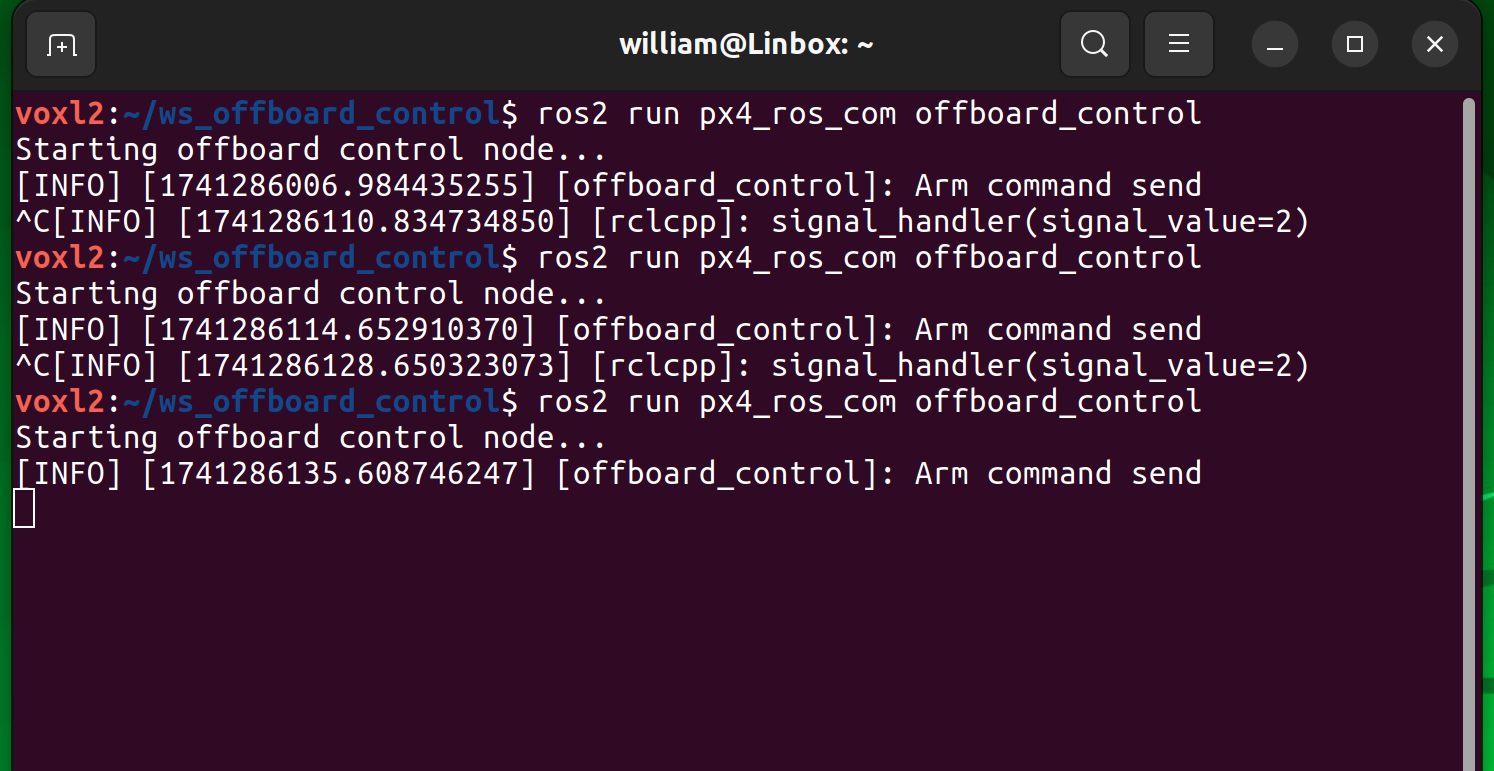
offboard_mode: offin the configuration file/etc/modalai/voxl-vision-hub.conf.@Eric-Katzfey Hi again. I just tried flying it again and the drone did not default to running the Figure Eight program this time, but instead it did nothing once I swapped the controller to offboard mode. It did not arm, the props did not spin, or anything like that, but did absolutely nothing. I made sure to set "offboard_mode": "off" in voxl-vision-hub. I've attached a screenshot of my terminal below.
-
@Eric-Katzfey Hi again. I just tried flying it again and the drone did not default to running the Figure Eight program this time, but instead it did nothing once I swapped the controller to offboard mode. It did not arm, the props did not spin, or anything like that, but did absolutely nothing. I made sure to set "offboard_mode": "off" in voxl-vision-hub. I've attached a screenshot of my terminal below.
@GlennTee Okay, then probably some issue with connectivity between ROS2 and PX4. Doesn't seem like anything from ROS2 is getting to PX4. I'll ask some team members who have some experience with ROS2 what they think.
-
@Eric-Katzfey Hi again. I just tried flying it again and the drone did not default to running the Figure Eight program this time, but instead it did nothing once I swapped the controller to offboard mode. It did not arm, the props did not spin, or anything like that, but did absolutely nothing. I made sure to set "offboard_mode": "off" in voxl-vision-hub. I've attached a screenshot of my terminal below.
@GlennTee So that example requires you have the MicroDDS installed and running to communicate with PX4 (guide here).
Alternatively, you can run offboard commands via mavsdk (example here). If you do it this way, make sure to edit that example to connect on port 14551 and set en_localhost_mavlink_udp to true in 'etc/modalai/voxl-vision-hub.conf'.
Let me know if that helps.
-
@GlennTee So that example requires you have the MicroDDS installed and running to communicate with PX4 (guide here).
Alternatively, you can run offboard commands via mavsdk (example here). If you do it this way, make sure to edit that example to connect on port 14551 and set en_localhost_mavlink_udp to true in 'etc/modalai/voxl-vision-hub.conf'.
Let me know if that helps.
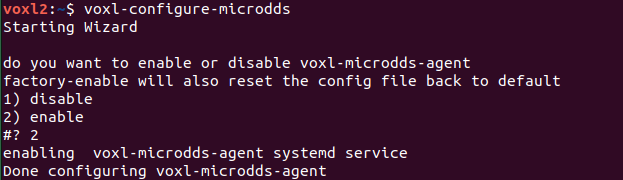
@teddy-zaremba Thank you. I installed MicroDDS and am running the agent in VOXL2. I just enabled it and made sure the necessary services are running, but it looks like I got the same result as before, where nothing would happen after supposedly the Arm command was sent. Is there anything else I could be missing?

-
@teddy-zaremba Thank you. I installed MicroDDS and am running the agent in VOXL2. I just enabled it and made sure the necessary services are running, but it looks like I got the same result as before, where nothing would happen after supposedly the Arm command was sent. Is there anything else I could be missing?
@GlennTee What do you see when you run ros2 topic list?
Have you run "apt-get install voxl-ros2-foxy && apt-get install voxl-mpa-to-ros2" followed by "voxl-configure-mpa-to-ros2".
-
@GlennTee What do you see when you run ros2 topic list?
Have you run "apt-get install voxl-ros2-foxy && apt-get install voxl-mpa-to-ros2" followed by "voxl-configure-mpa-to-ros2".
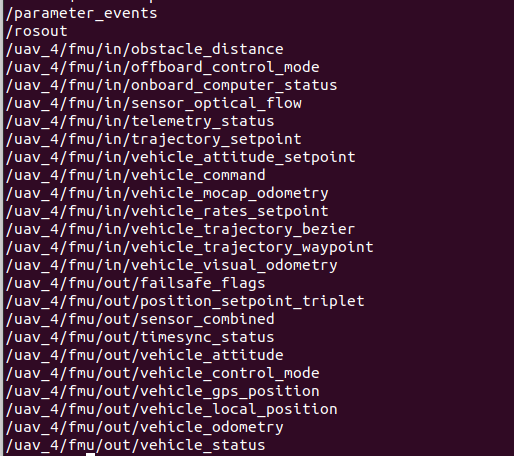
@teddy-zaremba Sorry for the late reply, I've already run both of those commands in that order. This is what comes up when I run "ros2 topic list"
-
@teddy-zaremba Sorry for the late reply, I've already run both of those commands in that order. This is what comes up when I run "ros2 topic list"
@GlennTee the problem lies in a mismatch between the topics which you see using "ros2 topic list" and the publishers from the offboard_control node.
The ros2 node has publishers defined as follows:
	OffboardControl() : Node("offboard_control")
	{

		offboard_control_mode_publisher_ = this->create_publisher<OffboardControlMode>("/fmu/in/offboard_control_mode", 10);
		trajectory_setpoint_publisher_ = this->create_publisher<TrajectorySetpoint>("/fmu/in/trajectory_setpoint", 10);
		vehicle_command_publisher_ = this->create_publisher<VehicleCommand>("/fmu/in/vehicle_command", 10);
Do you know where you changed the prefix uav_4?
I can't remember where to configure it.So, you can change the ROS2 code, rebuild and it should work. Or remove the uav_4 prefix
-
@GlennTee the problem lies in a mismatch between the topics which you see using "ros2 topic list" and the publishers from the offboard_control node.
The ros2 node has publishers defined as follows:
	OffboardControl() : Node("offboard_control")
	{

		offboard_control_mode_publisher_ = this->create_publisher<OffboardControlMode>("/fmu/in/offboard_control_mode", 10);
		trajectory_setpoint_publisher_ = this->create_publisher<TrajectorySetpoint>("/fmu/in/trajectory_setpoint", 10);
		vehicle_command_publisher_ = this->create_publisher<VehicleCommand>("/fmu/in/vehicle_command", 10);
Do you know where you changed the prefix uav_4?
I can't remember where to configure it.So, you can change the ROS2 code, rebuild and it should work. Or remove the uav_4 prefix
-
@Kessie The good news is that removing the prefix allows the px4 to see the messages and arm. Thank you! The bad news is that we weren't sure this would work so the drone wasn't in our flying lab and we had to physically grab it and disconnect the battery.
We tried powering on the RC controller to push the kill switch, but even though it connected to the receiver, the drone didn't respond to any of the RC controls including the mode and motor disable switches.
How do we operate in offboard mode while preserving the ability to take over manually? Would it have worked if we powered on the drone in manual or position hold and then switched to offboard? Do we launch our code before or after the mode change?
-
@Kessie The good news is that removing the prefix allows the px4 to see the messages and arm. Thank you! The bad news is that we weren't sure this would work so the drone wasn't in our flying lab and we had to physically grab it and disconnect the battery.
We tried powering on the RC controller to push the kill switch, but even though it connected to the receiver, the drone didn't respond to any of the RC controls including the mode and motor disable switches.
How do we operate in offboard mode while preserving the ability to take over manually? Would it have worked if we powered on the drone in manual or position hold and then switched to offboard? Do we launch our code before or after the mode change?
@claw You'll need to change the parameter COM_RC_OVERRIDE to also allow overriding offboard mode.
Reference link : https://docs.px4.io/main/en/advanced_config/parameter_reference.html#COM_RC_OVERRIDE
-
@claw You'll need to change the parameter COM_RC_OVERRIDE to also allow overriding offboard mode.
Reference link : https://docs.px4.io/main/en/advanced_config/parameter_reference.html#COM_RC_OVERRIDE
-
@claw You'll need to change the parameter COM_RC_OVERRIDE to also allow overriding offboard mode.
Reference link : https://docs.px4.io/main/en/advanced_config/parameter_reference.html#COM_RC_OVERRIDE
@Kessie Hi again, we just changed COM_RC_OVERRIDE to allow for overriding offboard mode and we were able to cut the motors while the drone was operating in offboard mode. We modified the PX4 ROS 2 Offboard Control Example code to only enable offboard mode and arm the drone, but we noticed that once the drone armed, it had a lot of throttle. I'm guessing there is a setting maybe in QGroundControl to modify the throttle somehow, or is there another way to fix this?
-
@Kessie Hi again, we just changed COM_RC_OVERRIDE to allow for overriding offboard mode and we were able to cut the motors while the drone was operating in offboard mode. We modified the PX4 ROS 2 Offboard Control Example code to only enable offboard mode and arm the drone, but we noticed that once the drone armed, it had a lot of throttle. I'm guessing there is a setting maybe in QGroundControl to modify the throttle somehow, or is there another way to fix this?
I just ran into another problem where I believe after running "voxl-configure-microdds" again, it seems some of my changes were reset as I noticed "offboard_mode" defaulted back to "figure_eight" while looking in the vision-hub config file. However, I did notice that my changes with the node publishers were not changed.

I thought I have reverted everything to how it was before, but the drone is now back to not flying at all. I also noticed that my list of ros2 topics has also shrunk down as well.

-
I just ran into another problem where I believe after running "voxl-configure-microdds" again, it seems some of my changes were reset as I noticed "offboard_mode" defaulted back to "figure_eight" while looking in the vision-hub config file. However, I did notice that my changes with the node publishers were not changed.
I thought I have reverted everything to how it was before, but the drone is now back to not flying at all. I also noticed that my list of ros2 topics has also shrunk down as well.
@GlennTee said in VOXL2/ROS2 Drone Runs Figure 8 Offboard Program Instead of My Program:
I thought I have reverted everything to how it was before, but the drone is now back to not flying at all. I also noticed that my list of ros2 topics has also shrunk down as well.
This likely means that those topics got populated from the offboard script not the px4-ros bridge. Could you check that voxl-microdds-agent is running when you see this happen.
Check with "voxl-inspect-services"

-
I just ran into another problem where I believe after running "voxl-configure-microdds" again, it seems some of my changes were reset as I noticed "offboard_mode" defaulted back to "figure_eight" while looking in the vision-hub config file. However, I did notice that my changes with the node publishers were not changed.
I thought I have reverted everything to how it was before, but the drone is now back to not flying at all. I also noticed that my list of ros2 topics has also shrunk down as well.
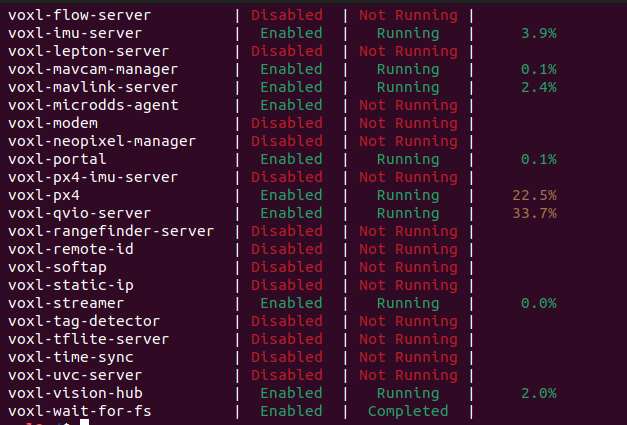
@teddy-zaremba Hi, I just checked using that command and it appears the agent is enabled, but it is not running.
-
@teddy-zaremba Hi, I just checked using that command and it appears the agent is enabled, but it is not running.
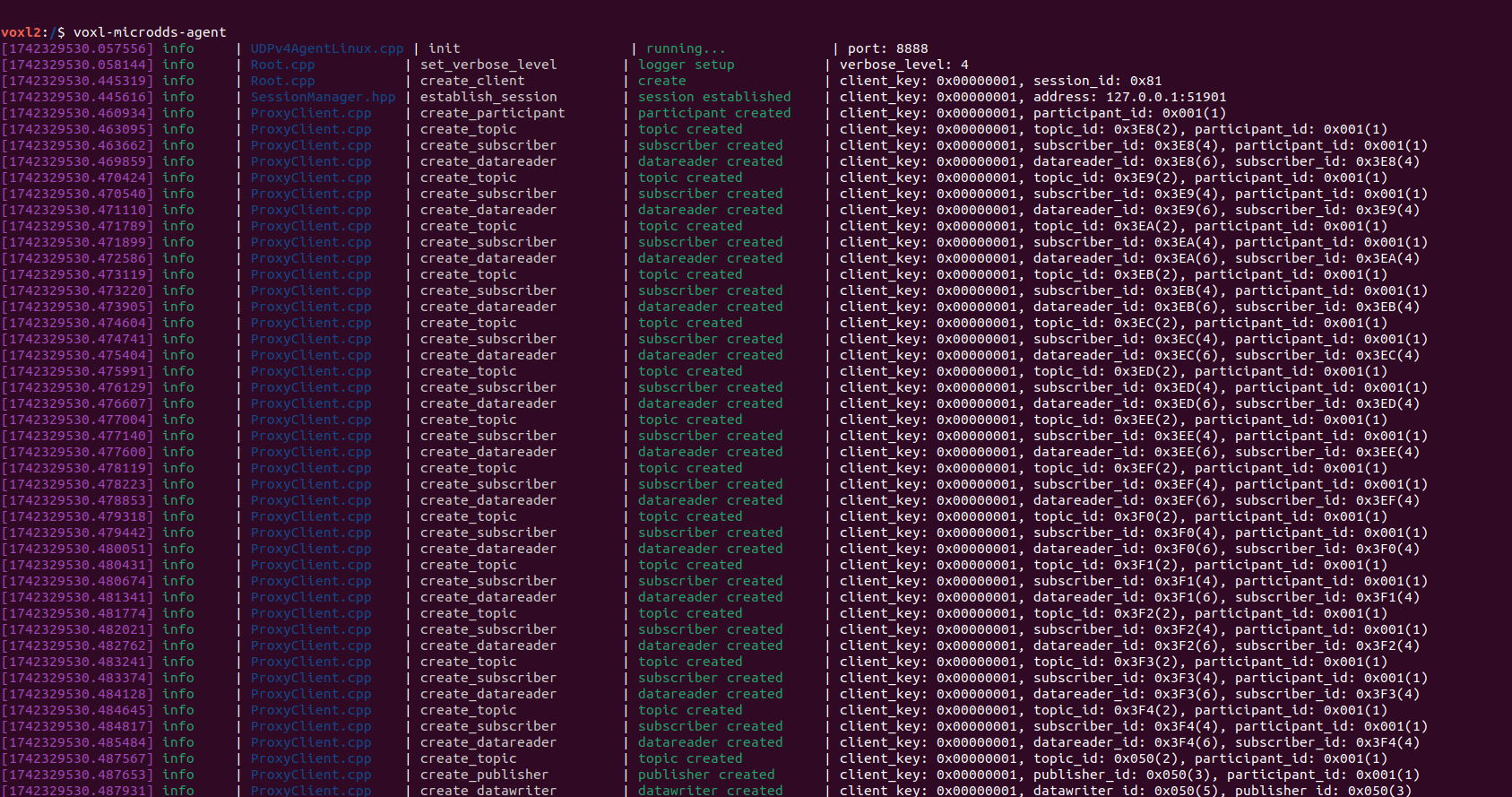
@GlennTee Can you run the command "voxl-microdds-agent" and share your output please?
-
@GlennTee Can you run the command "voxl-microdds-agent" and share your output please?
@teddy-zaremba said in VOXL2/ROS2 Drone Runs Figure 8 Offboard Program Instead of My Program:
voxl-microdds-agent"
This is what I get:
-
@teddy-zaremba said in VOXL2/ROS2 Drone Runs Figure 8 Offboard Program Instead of My Program:
voxl-microdds-agent"
This is what I get:
@GlennTee This looks fine to me if it's not running I'd suggest just restarting the service via "systemctl restart voxl-microdds-agent" and then double check that it's running with "voxl-inspect-services"

Reading along? Create a free ModalAI Forum account to join in.
With an account you can reply, ask your own question, get an email when a ModalAI engineer answers, and mark the reply that solved it. Your place in each thread is saved between visits.
Questions about VOXL, Flight Core, ESCs and ModalAI drones are answered here by the engineers who build them.
Register Login