
Starling 2 VIO - how many cameras used?
-
Hello,
I'm new! I have a starling 2 drone with 3 tracking cameras. Position mode flight is working fine - most of the time anyway. When viewing QVIO overlay on the web portal, or when viewing voxl-inspect-qvio --feature depth, I only see 1 camera (front facing) listed/shown with tracking points. Is the system only using 1 tracking camera for VIO? I expected it would use 3 since it has 3 tracking cameras.
Can anyone shine some light on this topic for me? I would like to use more of the cameras for tracking in case 1 camera is pointing at a blank wall for example, then the other cameras could continue to locate the drone. Please link me to resources that could help me understand the system, and options/alternatives/adjustments I can make.
Cheers!
-
Hello,
I'm new! I have a starling 2 drone with 3 tracking cameras. Position mode flight is working fine - most of the time anyway. When viewing QVIO overlay on the web portal, or when viewing voxl-inspect-qvio --feature depth, I only see 1 camera (front facing) listed/shown with tracking points. Is the system only using 1 tracking camera for VIO? I expected it would use 3 since it has 3 tracking cameras.
Can anyone shine some light on this topic for me? I would like to use more of the cameras for tracking in case 1 camera is pointing at a blank wall for example, then the other cameras could continue to locate the drone. Please link me to resources that could help me understand the system, and options/alternatives/adjustments I can make.
Cheers!
-
@star123 Yes it is only using one tracking camera by default. Our next SDK release will switch VIO from QVIO to VINS which will use multi-cam input by default.
-
@tom thank you for your response! Is there a planned date for the next SDK release? Is it possible to test a pre-release / dev version?
@star123 Probably a couple weeks out.
We have nightly SDK's built with the latest off of the
devbranch of each repo, here is last night's: https://storage.googleapis.com/platform-nightlies/voxl2/voxl2_SDK_nightly_20241118.tar.gzYou can find a new one published each day via date.
These are completely untested so can't guarantee any functionality but this will represent the tip of our development.
-
@star123 Probably a couple weeks out.
We have nightly SDK's built with the latest off of the
devbranch of each repo, here is last night's: https://storage.googleapis.com/platform-nightlies/voxl2/voxl2_SDK_nightly_20241118.tar.gzYou can find a new one published each day via date.
These are completely untested so can't guarantee any functionality but this will represent the tip of our development.
-
@tom As we start our testing cycle and get close to release we will also start releasing "beta" SDKs which can be downloaded from the "platform-releases" bucket
@tom thank you for the information. I've been flying with one of the nightly builds using VINS and 3 tracking cameras enabled which is great!
Question about the extrinsics for Starling 2 - I'm working on moving one of the cameras for a custom setup, and through the process of understanding the extrinsics.conf I've found the measurements in the exiting configuration don't make sense with the CAD model.
These are the tracking camera extrinsics in extrinsics.conf:
"name":	"D0014_Starling_2",
	"extrinsics": [{
			"parent": "imu_apps",
			"child":  "tracking_front",
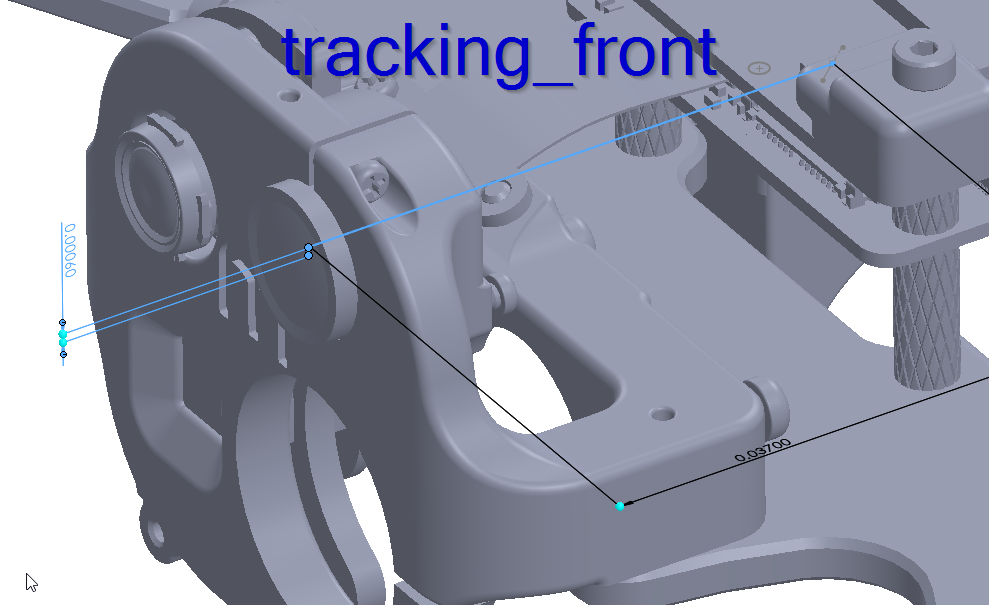
			"T_child_wrt_parent": [0.037, 0.000, 0.0006],
			"RPY_parent_to_child":    [0, 90, 90]
		}, {
			"parent": "imu_apps",
			"child":  "tracking_down",
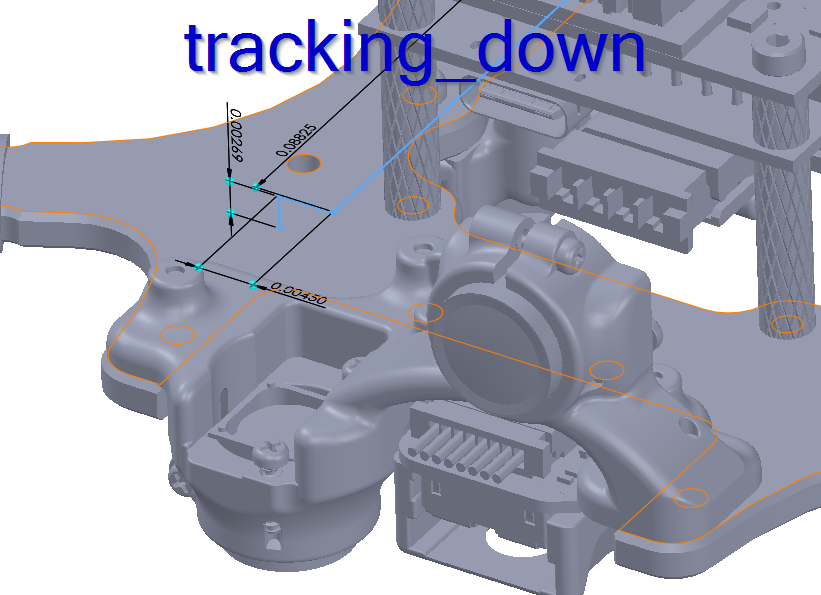
			"T_child_wrt_parent": [-0.08825, -0.0045, 0.00269],
			"RPY_parent_to_child":    [0, 0, 180]
		}, {
			"parent": "imu_apps",
			"child":  "tracking_rear",
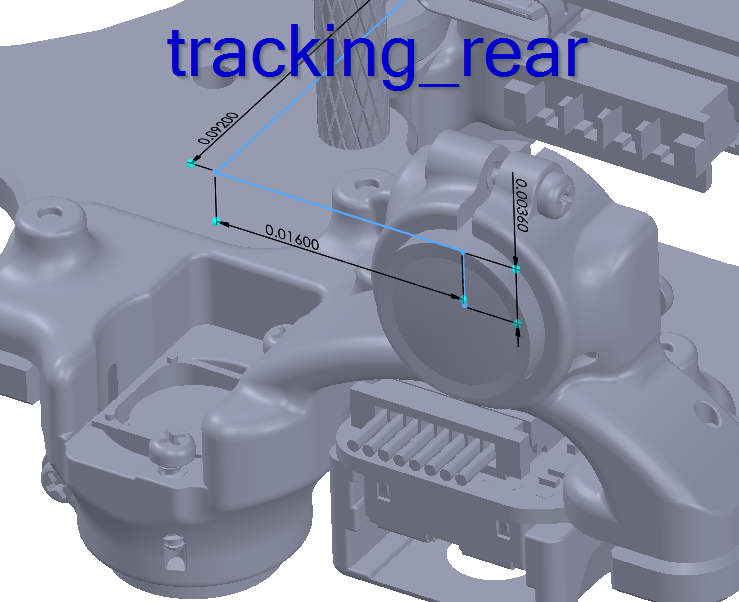
			"T_child_wrt_parent": [-0.092, 0.016, 0.0036],
			"RPY_parent_to_child":    [0, -90, -90]
		}
The RPY rotations make sense. The translation vectors appear to be inconsistent when measuring in CAD. I think an extra zero was added on the tracking_down Z translation in the D0014_Starling_2 configuration (See attached screenshots). Can you verify if I'm understanding this correctly?
That leads me to another question: where exactly on the camera is the translation measuring to? Its seems to point somewhere in the middle of the lens but I cant find any documentation on where on the camera is the origin for the extrinsics. Thank you!
-------------------------------------------------------------------------------- system-image: 1.8.02-M0054-14.1a-perf-20241121 kernel: #1 SMP PREEMPT Fri Nov 22 04:58:23 UTC 2024 4.19.125 -------------------------------------------------------------------------------- hw platform: M0054 mach.var: 1.0.1 -------------------------------------------------------------------------------- voxl-suite: 1.4.0-202411212200 -------------------------------------------------------------------------------- no current network connection -------------------------------------------------------------------------------- -
@tom thank you for the information. I've been flying with one of the nightly builds using VINS and 3 tracking cameras enabled which is great!
Question about the extrinsics for Starling 2 - I'm working on moving one of the cameras for a custom setup, and through the process of understanding the extrinsics.conf I've found the measurements in the exiting configuration don't make sense with the CAD model.
These are the tracking camera extrinsics in extrinsics.conf:
"name":	"D0014_Starling_2",
	"extrinsics": [{
			"parent": "imu_apps",
			"child":  "tracking_front",
			"T_child_wrt_parent": [0.037, 0.000, 0.0006],
			"RPY_parent_to_child":    [0, 90, 90]
		}, {
			"parent": "imu_apps",
			"child":  "tracking_down",
			"T_child_wrt_parent": [-0.08825, -0.0045, 0.00269],
			"RPY_parent_to_child":    [0, 0, 180]
		}, {
			"parent": "imu_apps",
			"child":  "tracking_rear",
			"T_child_wrt_parent": [-0.092, 0.016, 0.0036],
			"RPY_parent_to_child":    [0, -90, -90]
		}
The RPY rotations make sense. The translation vectors appear to be inconsistent when measuring in CAD. I think an extra zero was added on the tracking_down Z translation in the D0014_Starling_2 configuration (See attached screenshots). Can you verify if I'm understanding this correctly?
That leads me to another question: where exactly on the camera is the translation measuring to? Its seems to point somewhere in the middle of the lens but I cant find any documentation on where on the camera is the origin for the extrinsics. Thank you!
-------------------------------------------------------------------------------- system-image: 1.8.02-M0054-14.1a-perf-20241121 kernel: #1 SMP PREEMPT Fri Nov 22 04:58:23 UTC 2024 4.19.125 -------------------------------------------------------------------------------- hw platform: M0054 mach.var: 1.0.1 -------------------------------------------------------------------------------- voxl-suite: 1.4.0-202411212200 -------------------------------------------------------------------------------- no current network connection --------------------------------------------------------------------------------@star123 I'll validate the extrinsics and check back with you in a bit. I know the rear camera was moved between starling Max Rev 1&2, I'll double check the little starling too.
The point inside the lens used is what the lens manufacturer claims is the optical center of the lens, 1.7mm inward from the front of the glass.
-
@tom As we start our testing cycle and get close to release we will also start releasing "beta" SDKs which can be downloaded from the "platform-releases" bucket
@tom what is the best way to navigate the "platform-releases" bucket, or the nightly builds, to see a list of what files are there? I am only able to download the files from the link you provided above, but can't navigate any of the folder structure, so i'm not sure how I would know when a beta SDK is released.
I'm also wondering if there is any way to access the open-vins service code. I've been looking through gitlab but I can't find it https://gitlab.com/voxl-public/voxl-sdk/services.
-
@tom what is the best way to navigate the "platform-releases" bucket, or the nightly builds, to see a list of what files are there? I am only able to download the files from the link you provided above, but can't navigate any of the folder structure, so i'm not sure how I would know when a beta SDK is released.
I'm also wondering if there is any way to access the open-vins service code. I've been looking through gitlab but I can't find it https://gitlab.com/voxl-public/voxl-sdk/services.
-
@star123 Hmm I'm not sure if viewing the folder structure is possible without full perms to the buckets.
As for voxl-open-vins-server, just made it public: https://gitlab.com/voxl-public/voxl-sdk/services/voxl-open-vins-server
-
@star123 You'll want to take a look at the
devbranch to see what is built into the nightly SDKs@tom thank you. I've been looking through the code. I'd like to test masking areas of non-interest in my tracking cameras. From the voxl-open-vins-server.conf file and from common.h image_data struct it seems like this feature exists, but I cannot find where I can put the masks, or define where they are. Do you know if this is implemented already? Maybe I'm looking in the wrong place?


Reading along? Create a free ModalAI Forum account to join in.
With an account you can reply, ask your own question, get an email when a ModalAI engineer answers, and mark the reply that solved it. Your place in each thread is saved between visits.
Questions about VOXL, Flight Core, ESCs and ModalAI drones are answered here by the engineers who build them.
Register Login