Skip to content
  • Categories
  • Recent
  • Tags
  • Popular
  • Users
  • Groups
Collapse
Brand Logo

ModalAI Forum

  1. ModalAI Support Forum
  2. Ask your questions right here!
  3. Starling drone shut down mid flight

Starling drone shut down mid flight

Scheduled Pinned Locked Moved Ask your questions right here!
30 Posts 4 Posters 6.4k Views 2 Watching
  • Oldest to Newest
  • Newest to Oldest
  • Most Votes
Reply
  • Reply as topic
Log in to reply
This topic has been deleted. Only users with topic management privileges can see it.
  • Alex KushleyevA Alex Kushleyev

    @Shivam-Sehgal , are you able to ADB into VOXL2 and download the PX4 log from the flight?

    Also, what SDK version were you using?

    Shivam SehgalS Offline
    Shivam SehgalS Offline
    Shivam Sehgal
    Contributor
    wrote on last edited by
    #3

    @Alex-Kushleyev , I am unable to ADB into VOXL2 today but I did download the flight controller log file after I was able to log in again that day from QGC.

    https://review.px4.io/plot_app?log=81e3f3cc-1cf2-419a-8202-073a9dd46c3e link to flight review for the log file. I don't remember the sdk version.

    1 Reply Last reply
    1
    • Alex KushleyevA Alex Kushleyev

      @Shivam-Sehgal , are you able to ADB into VOXL2 and download the PX4 log from the flight?

      Also, what SDK version were you using?

      Shivam SehgalS Offline
      Shivam SehgalS Offline
      Shivam Sehgal
      Contributor
      wrote on last edited by Shivam Sehgal
      #4

      @Alex-Kushleyev My Voxl SDK version is 1.1.2.

      -------------------------------------------------------------------------------
      system-image: 1.7.1-M0054-14.1a-perf-nightly-20231025
      kernel:       #1 SMP PREEMPT Thu Oct 26 03:25:38 UTC 2023 4.19.125
      --------------------------------------------------------------------------------
      hw version:   M0054
      --------------------------------------------------------------------------------
      voxl-suite:   1.1.2
      --------------------------------------------------------------------------------
      Packages:
      Repo:  http://voxl-packages.modalai.com/ ./dists/qrb5165/sdk-1.1/binary-arm64/
      Last Updated: 2024-05-07 02:01:12
      List:
      	libmodal-cv                 0.4.0
      	libmodal-exposure           0.1.0
      	libmodal-journal            0.2.2
      	libmodal-json               0.4.3
      	libmodal-pipe               2.9.2
      	libqrb5165-io               0.4.2
      	libvoxl-cci-direct          0.2.1
      	libvoxl-cutils              0.1.1
      	mv-voxl                     0.1-r0
      	qrb5165-bind                0.1-r0
      	qrb5165-dfs-server          0.2.0
      	qrb5165-imu-server          1.0.1
      	qrb5165-rangefinder-server  0.1.1
      	qrb5165-slpi-test-sig       01-r0
      	qrb5165-system-tweaks       0.2.3
      	qrb5165-tflite              2.8.0-2
      	voxl-bind-spektrum          0.1.0
      	voxl-camera-calibration     0.5.3
      	voxl-camera-server          1.8.9.1
      	voxl-configurator           0.4.8
      	voxl-cpu-monitor            0.4.7
      	voxl-docker-support         1.3.0
      	voxl-elrs                   0.1.3
      	voxl-esc                    1.3.7
      	voxl-feature-tracker        0.3.2
      	voxl-flow-server            0.3.3
      	voxl-gphoto2-server         0.0.10
      	voxl-jpeg-turbo             2.1.3-5
      	voxl-lepton-server          1.2.0
      	voxl-libgphoto2             0.0.4
      	voxl-libuvc                 1.0.7
      	voxl-logger                 0.3.5
      	voxl-mavcam-manager         0.5.3
      	voxl-mavlink                0.1.1
      	voxl-mavlink-server         1.3.2
      	voxl-microdds-agent         2.4.1-0
      	voxl-modem                  1.0.8
      	voxl-mongoose               7.7.0-1
      	voxl-mpa-to-ros             0.3.7
      	voxl-mpa-to-ros2            0.0.2
      	voxl-mpa-tools              1.1.3
      	voxl-neopixel-manager       0.0.3
      	voxl-opencv                 4.5.5-2
      	voxl-portal                 0.6.3
      	voxl-px4                    1.14.0-2.0.63
      	voxl-px4-imu-server         0.1.2
      	voxl-px4-params             0.3.3
      	voxl-qvio-server            1.0.0
      	voxl-remote-id              0.0.9
      	voxl-ros2-foxy              0.0.1
      	voxl-streamer               0.7.4
      	voxl-suite                  1.1.2
      	voxl-tag-detector           0.0.4
      	voxl-tflite-server          0.3.2
      	voxl-utils                  1.3.3
      	voxl-uvc-server             0.1.6
      	voxl-vision-hub             1.7.3
      	voxl2-system-image          1.7.1-r0
      	voxl2-wlan                  1.0-r0
      --------------------------------------------------------------------------------
      
      
      Alex KushleyevA 1 Reply Last reply
      1
      • Shivam SehgalS Shivam Sehgal

        @Alex-Kushleyev My Voxl SDK version is 1.1.2.

        -------------------------------------------------------------------------------
        system-image: 1.7.1-M0054-14.1a-perf-nightly-20231025
        kernel:       #1 SMP PREEMPT Thu Oct 26 03:25:38 UTC 2023 4.19.125
        --------------------------------------------------------------------------------
        hw version:   M0054
        --------------------------------------------------------------------------------
        voxl-suite:   1.1.2
        --------------------------------------------------------------------------------
        Packages:
        Repo:  http://voxl-packages.modalai.com/ ./dists/qrb5165/sdk-1.1/binary-arm64/
        Last Updated: 2024-05-07 02:01:12
        List:
        	libmodal-cv                 0.4.0
        	libmodal-exposure           0.1.0
        	libmodal-journal            0.2.2
        	libmodal-json               0.4.3
        	libmodal-pipe               2.9.2
        	libqrb5165-io               0.4.2
        	libvoxl-cci-direct          0.2.1
        	libvoxl-cutils              0.1.1
        	mv-voxl                     0.1-r0
        	qrb5165-bind                0.1-r0
        	qrb5165-dfs-server          0.2.0
        	qrb5165-imu-server          1.0.1
        	qrb5165-rangefinder-server  0.1.1
        	qrb5165-slpi-test-sig       01-r0
        	qrb5165-system-tweaks       0.2.3
        	qrb5165-tflite              2.8.0-2
        	voxl-bind-spektrum          0.1.0
        	voxl-camera-calibration     0.5.3
        	voxl-camera-server          1.8.9.1
        	voxl-configurator           0.4.8
        	voxl-cpu-monitor            0.4.7
        	voxl-docker-support         1.3.0
        	voxl-elrs                   0.1.3
        	voxl-esc                    1.3.7
        	voxl-feature-tracker        0.3.2
        	voxl-flow-server            0.3.3
        	voxl-gphoto2-server         0.0.10
        	voxl-jpeg-turbo             2.1.3-5
        	voxl-lepton-server          1.2.0
        	voxl-libgphoto2             0.0.4
        	voxl-libuvc                 1.0.7
        	voxl-logger                 0.3.5
        	voxl-mavcam-manager         0.5.3
        	voxl-mavlink                0.1.1
        	voxl-mavlink-server         1.3.2
        	voxl-microdds-agent         2.4.1-0
        	voxl-modem                  1.0.8
        	voxl-mongoose               7.7.0-1
        	voxl-mpa-to-ros             0.3.7
        	voxl-mpa-to-ros2            0.0.2
        	voxl-mpa-tools              1.1.3
        	voxl-neopixel-manager       0.0.3
        	voxl-opencv                 4.5.5-2
        	voxl-portal                 0.6.3
        	voxl-px4                    1.14.0-2.0.63
        	voxl-px4-imu-server         0.1.2
        	voxl-px4-params             0.3.3
        	voxl-qvio-server            1.0.0
        	voxl-remote-id              0.0.9
        	voxl-ros2-foxy              0.0.1
        	voxl-streamer               0.7.4
        	voxl-suite                  1.1.2
        	voxl-tag-detector           0.0.4
        	voxl-tflite-server          0.3.2
        	voxl-utils                  1.3.3
        	voxl-uvc-server             0.1.6
        	voxl-vision-hub             1.7.3
        	voxl2-system-image          1.7.1-r0
        	voxl2-wlan                  1.0-r0
        --------------------------------------------------------------------------------
        
        
        Alex KushleyevA Offline
        Alex KushleyevA Offline
        Alex Kushleyev
        ModalAI Team
        wrote on last edited by
        #5

        @Shivam-Sehgal , I have reviewed the log and unfortunately do not see any issues. The log terminates prematurely (before the crash), which may suggest that the PX4 process crashed (as opposed to a sensor issue or ESC issue, causing motor to stop, for example). But this is just a guess.

        SDK 1.1.2 is quite old, we recommend using latest SDK if possible, since we always make improvements and fixes.

        My recommendation is to get the vehicle back up and running and try to migrate to SDK 1.3.

        Shivam SehgalS 1 Reply Last reply
        0
        • Alex KushleyevA Alex Kushleyev

          @Shivam-Sehgal , I have reviewed the log and unfortunately do not see any issues. The log terminates prematurely (before the crash), which may suggest that the PX4 process crashed (as opposed to a sensor issue or ESC issue, causing motor to stop, for example). But this is just a guess.

          SDK 1.1.2 is quite old, we recommend using latest SDK if possible, since we always make improvements and fixes.

          My recommendation is to get the vehicle back up and running and try to migrate to SDK 1.3.

          Shivam SehgalS Offline
          Shivam SehgalS Offline
          Shivam Sehgal
          Contributor
          wrote on last edited by
          #6

          @Alex-Kushleyev i can update the system but I am unable to connect to voxl 2. How can I update the system?

          Alex KushleyevA 1 Reply Last reply
          1
          • Shivam SehgalS Shivam Sehgal

            @Alex-Kushleyev i can update the system but I am unable to connect to voxl 2. How can I update the system?

            Alex KushleyevA Offline
            Alex KushleyevA Offline
            Alex Kushleyev
            ModalAI Team
            wrote on last edited by
            #7

            @Shivam-Sehgal , quick question.. So after the crash, were you able to connect to VOXL2 (how? ADB or wifi) to get the log from it? And now it no longer connects using ADB?

            Here is unbricking procedure for VOX2 https://docs.modalai.com/voxl2-unbricking/, however that is typically done when a software update fails or the file system.

            Can you please clarify whether you were able to use VOXL2 between the time after crash and now?

            Shivam SehgalS 2 Replies Last reply
            0
            • Alex KushleyevA Alex Kushleyev

              @Shivam-Sehgal , quick question.. So after the crash, were you able to connect to VOXL2 (how? ADB or wifi) to get the log from it? And now it no longer connects using ADB?

              Here is unbricking procedure for VOX2 https://docs.modalai.com/voxl2-unbricking/, however that is typically done when a software update fails or the file system.

              Can you please clarify whether you were able to use VOXL2 between the time after crash and now?

              Shivam SehgalS Offline
              Shivam SehgalS Offline
              Shivam Sehgal
              Contributor
              wrote on last edited by Shivam Sehgal
              #8

              @Alex-Kushleyev Yes I was able to connect to drone both via wifi and adb that day, then next day I wasn't able to do so.

              (Some Observation if it helps)
              Also, I have 3 other starling drone in all of them there are four blue lights on the ESC that constantly flash.
              In the one that does not connect there is no flashing.

              1 Reply Last reply
              1
              • Alex KushleyevA Alex Kushleyev

                @Shivam-Sehgal , quick question.. So after the crash, were you able to connect to VOXL2 (how? ADB or wifi) to get the log from it? And now it no longer connects using ADB?

                Here is unbricking procedure for VOX2 https://docs.modalai.com/voxl2-unbricking/, however that is typically done when a software update fails or the file system.

                Can you please clarify whether you were able to use VOXL2 between the time after crash and now?

                Shivam SehgalS Offline
                Shivam SehgalS Offline
                Shivam Sehgal
                Contributor
                wrote on last edited by
                #9

                @Alex-Kushleyev should I follow the unbricking process?

                Alex KushleyevA 1 Reply Last reply
                0
                • Shivam SehgalS Shivam Sehgal

                  @Alex-Kushleyev should I follow the unbricking process?

                  Alex KushleyevA Offline
                  Alex KushleyevA Offline
                  Alex Kushleyev
                  ModalAI Team
                  wrote on last edited by
                  #10

                  @Shivam-Sehgal , Yes, you should try it, however i am not sure whether the recovery attempt will be successful. Typically unbricking is required when something goes wrong during SDK update or something like that, when the system is left in incomplete state. In your case, the drone was flying and stopped responding after a crash. The fact that it shut off during flight could mean there was a pre-existing issue (before the crash) which may be causing the board not to boot now. However, it is worth to try the unbricking and if does not work, please contact our RMA department, they will help you out.

                  Alex

                  Shivam SehgalS 1 Reply Last reply
                  0
                  • Alex KushleyevA Alex Kushleyev

                    @Shivam-Sehgal , Yes, you should try it, however i am not sure whether the recovery attempt will be successful. Typically unbricking is required when something goes wrong during SDK update or something like that, when the system is left in incomplete state. In your case, the drone was flying and stopped responding after a crash. The fact that it shut off during flight could mean there was a pre-existing issue (before the crash) which may be causing the board not to boot now. However, it is worth to try the unbricking and if does not work, please contact our RMA department, they will help you out.

                    Alex

                    Shivam SehgalS Offline
                    Shivam SehgalS Offline
                    Shivam Sehgal
                    Contributor
                    wrote on last edited by
                    #11

                    @Alex-Kushleyev I did not unbrick it it had opened the voxl2 board and I was able to connect to it, then when I closed it it did not connect again.
                    What I found out is when the hires and tracking camera are connected to the board I am unable to connect to the drone. What could be the reason for this?

                    Alex KushleyevA 1 Reply Last reply
                    0
                    • Shivam SehgalS Shivam Sehgal

                      @Alex-Kushleyev I did not unbrick it it had opened the voxl2 board and I was able to connect to it, then when I closed it it did not connect again.
                      What I found out is when the hires and tracking camera are connected to the board I am unable to connect to the drone. What could be the reason for this?

                      Alex KushleyevA Offline
                      Alex KushleyevA Offline
                      Alex Kushleyev
                      ModalAI Team
                      wrote on last edited by
                      #12

                      @Shivam-Sehgal , most likely one of the camera flex cables is broken and it is shorting one of the power rails to ground, which prevents voxl2 from booting. I suggest trying to connect one camera at a time to narrow down the issue to a specific camera and then inspect the “bad” camera’s flex cable or extension flex cable.

                      Shivam SehgalS 1 Reply Last reply
                      0
                      • Alex KushleyevA Alex Kushleyev

                        @Shivam-Sehgal , most likely one of the camera flex cables is broken and it is shorting one of the power rails to ground, which prevents voxl2 from booting. I suggest trying to connect one camera at a time to narrow down the issue to a specific camera and then inspect the “bad” camera’s flex cable or extension flex cable.

                        Shivam SehgalS Offline
                        Shivam SehgalS Offline
                        Shivam Sehgal
                        Contributor
                        wrote on last edited by
                        #13

                        @Alex-Kushleyev I connected both cameras to the other connector on which tof sensor was connected. I could connect to the board. Also the tof sensor worked on the other board.

                        But I could not connect to the tracking and hires camera, I could only connected to TOF sensor.

                        Shivam SehgalS 1 Reply Last reply
                        0
                        • Shivam SehgalS Shivam Sehgal

                          @Alex-Kushleyev I connected both cameras to the other connector on which tof sensor was connected. I could connect to the board. Also the tof sensor worked on the other board.

                          But I could not connect to the tracking and hires camera, I could only connected to TOF sensor.

                          Shivam SehgalS Offline
                          Shivam SehgalS Offline
                          Shivam Sehgal
                          Contributor
                          wrote on last edited by
                          #14

                          @Shivam-Sehgal I connected the cameras back in their basic configration that it is shipped with.

                          Then I ran voxl-camera-cameras and set it to 06 - D0005 Starling pmd-tof imx214 hires ov7251 tracking.

                          voxl2:/$ voxl-configure-cameras 
                          
                          Available camera config IDs are as follows:
                          
                          01 - ov7251 tracking ov7251 stereo
                          02 - ov7251 tracking
                          03 - ov7251 tracking ov7251 stereo imx214 hires
                          04 - ov7251 tracking imx214 hires
                          05 - pmd-tof ov7251 tracking
                          06 - D0005 Starling pmd-tof imx214 hires ov7251 tracking
                          08 - imx214
                          09 - pmd-tof
                          10 - ov7251 stereo
                          11 - D0006 Sentinel
                          12 - ov9782 stereo
                          13 - ov9782 stereo imx214 hires
                          14 - ov9782 stereo pmd-tof ov7251 tracking (copy)
                          15 - D0008 dual 9782 tracking
                          16 - pmd-tof ov7251 dual tracking imx214 hires
                          17 - D0010 pmd-tof imx412 hires ov7251 tracking ov9782 stereo
                          18 - D0008 triple ov9782
                          19 - D0005 without tof imx214 hires ov7251 tracking
                          20 - D0011 imx412 hires ar0144 tracking
                          21 - old C6
                          22 - D0013 imx412 flipped ov7251
                          23 - D0010 without stereo
                           C - use user-defined custom camera config in
                               (/data/modalai/custom_camera_config.txt)
                           q - Quit The Wizard
                          
                          selection: 6
                          Selected numerical camera config
                          Camera Configuration: 6
                          
                          camera server config helper list:
                          tof:pmd-tof:0:
                          hires:imx214:1:
                          tracking:ov7251:2:
                          
                          driver binary list:
                          /usr/share/modalai/chi-cdk/irs1645/com.qti.sensormodule.irs1645_0.bin
                          /usr/share/modalai/chi-cdk/imx214/com.qti.sensormodule.imx214_2.bin
                          /usr/share/modalai/chi-cdk/ov7251/com.qti.sensormodule.ov7251_3.bin
                          
                          calling camera-server-config-helper tof:pmd-tof:0: hires:imx214:1: tracking:ov7251:2:
                          detected system image 1.7.1
                          using new imx214 defaults
                          successfully wrote this camera config to disk:
                          =================================================================
                          configuration for 3 cameras:
                          
                          cam #0
                              name:                tof
                              sensor type:         pmd-tof
                              isEnabled:           1
                              camId:               0
                              camId2:              -1
                              fps:                 5
                              en_rotate:           0
                              en_rotate2:          0
                          
                              en_preview:          1
                              pre_width:           224
                              pre_height:          1557
                              en_raw_preview:      1
                          
                              en_small_video:      0
                              small_video_width:   -1
                              small_video_height:  -1
                          
                              en_large_video:      0
                              large_video_width:   -1
                              large_video_height:  -1
                          
                              en_snapshot:         0
                              snap_width:          -1
                              snap_height:         -1
                          
                              ae_mode:             off
                              standby_enabled:     0
                              decimator:           5
                              independent_exposure:0
                          
                          cam #1
                              name:                hires
                              sensor type:         imx214
                              isEnabled:           1
                              camId:               1
                              camId2:              -1
                              fps:                 30
                              en_rotate:           0
                              en_rotate2:          0
                          
                              en_preview:          0
                              pre_width:           640
                              pre_height:          480
                              en_raw_preview:      0
                          
                              en_small_video:      1
                              small_video_width:   1024
                              small_video_height:  768
                          
                              en_large_video:      1
                              large_video_width:   4208
                              large_video_height:  3120
                          
                              en_snapshot:         1
                              snap_width:          4208
                              snap_height:         3120
                          
                              ae_mode:             isp
                              standby_enabled:     0
                              decimator:           1
                              independent_exposure:0
                          
                          cam #2
                              name:                tracking
                              sensor type:         ov7251
                              isEnabled:           1
                              camId:               2
                              camId2:              -1
                              fps:                 30
                              en_rotate:           0
                              en_rotate2:          0
                          
                              en_preview:          1
                              pre_width:           640
                              pre_height:          480
                              en_raw_preview:      1
                          
                              en_small_video:      0
                              small_video_width:   -1
                              small_video_height:  -1
                          
                              en_large_video:      0
                              large_video_width:   -1
                              large_video_height:  -1
                          
                              en_snapshot:         0
                              snap_width:          -1
                              snap_height:         -1
                          
                              ae_mode:             lme_msv
                              standby_enabled:     0
                              decimator:           1
                              independent_exposure:0
                          
                          =================================================================
                          camera_server_config_helper is done
                          copying required camera drivers in place
                          /usr/share/modalai/chi-cdk/irs1645/com.qti.sensormodule.irs1645_0.bin
                          /usr/share/modalai/chi-cdk/imx214/com.qti.sensormodule.imx214_2.bin
                          /usr/share/modalai/chi-cdk/ov7251/com.qti.sensormodule.ov7251_3.bin
                          enabling voxl-camera-server
                          
                          ------------------------------------------------------------------
                          Done Configuring Cameras
                          Please power cycle VOXL to load new drivers
                          camera server will start on next reboot
                          ------------------------------------------------------------------
                          

                          After this I manually restarted the voxl-camera-server and the connection broke after the output below.

                          voxl2:/$ voxl-camera-server 
                          detected system image 1.7.1
                          using new imx214 defaults
                          =================================================================
                          configuration for 3 cameras:
                          
                          cam #0
                              name:                tof
                              sensor type:         pmd-tof
                              isEnabled:           1
                              camId:               0
                              camId2:              -1
                              fps:                 5
                              en_rotate:           0
                              en_rotate2:          0
                          
                              en_preview:          1
                              pre_width:           224
                              pre_height:          1557
                              en_raw_preview:      1
                          
                              en_small_video:      0
                              small_video_width:   -1
                              small_video_height:  -1
                          
                              en_large_video:      0
                              large_video_width:   -1
                              large_video_height:  -1
                          
                              en_snapshot:         0
                              snap_width:          -1
                              snap_height:         -1
                          
                              ae_mode:             off
                              standby_enabled:     0
                              decimator:           5
                              independent_exposure:0
                          
                          cam #1
                              name:                hires
                              sensor type:         imx214
                              isEnabled:           1
                              camId:               1
                              camId2:              -1
                              fps:                 30
                              en_rotate:           0
                              en_rotate2:          0
                          
                              en_preview:          0
                              pre_width:           640
                              pre_height:          480
                              en_raw_preview:      0
                          
                              en_small_video:      1
                              small_video_width:   1024
                              small_video_height:  768
                          
                              en_large_video:      1
                              large_video_width:   4208
                              large_video_height:  3120
                          
                              en_snapshot:         1
                              snap_width:          4208
                              snap_height:         3120
                          
                              ae_mode:             isp
                              standby_enabled:     0
                              decimator:           1
                              independent_exposure:0
                          
                          cam #2
                              name:                tracking
                              sensor type:         ov7251
                              isEnabled:           1
                              camId:               2
                              camId2:              -1
                              fps:                 30
                              en_rotate:           0
                              en_rotate2:          0
                          
                              en_preview:          1
                              pre_width:           640
                              pre_height:          480
                              en_raw_preview:      1
                          
                              en_small_video:      0
                              small_video_width:   -1
                              small_video_height:  -1
                          
                              en_large_video:      0
                              large_video_width:   -1
                              large_video_height:  -1
                          
                              en_snapshot:         0
                              snap_width:          -1
                              snap_height:         -1
                          
                              ae_mode:             lme_msv
                              standby_enabled:     0
                              decimator:           1
                              independent_exposure:0
                          
                          =================================================================
                          GPS server Connected 
                          Starting Camera: tof (id #0)
                          Using gain limits min: 54 max: 8000
                          gbm_create_device(156): Info: backend name is: msm_drm
                          Starting Camera: hires (id #1)
                          Using gain limits min: 54 max: 431
                          WARNING: Port Def 0:
                          	Count Min: 8
                          	Count Actual: 16
                          	Size: 0x180000
                          	Buffers Contiguous: Yes
                          	Buffer Alignment: 0
                          WARNING: Port Def 1:
                          	Count Min: 4
                          	Count Actual: 16
                          	Size: 0x5a0000
                          	Buffers Contiguous: No
                          	Buffer Alignment: 0
                          gbm_create_device(156): Info: backend name is: msm_drm
                          gbm_create_device(156): Info: backend name is: msm_drm
                          gbm_create_device(156): Info: backend name is: msm_drm
                          gbm_create_device(156): Info: backend name is: msm_drm
                          gbm_create_device(156): Info: backend name is: msm_drm
                          gbm_create_device(156): Info: backend name is: msm_drm
                          gbm_create_device(156): Info: backend name is: msm_drm
                          gbm_create_device(156): Info: backend name is: msm_drm
                          gbm_create_device(156): Info: backend name is: msm_drm
                          gbm_create_device(156): Info: backend name is: msm_drm
                          gbm_create_device(156): Info: backend name is: msm_drm
                          gbm_create_device(156): Info: backend name is: msm_drm
                          gbm_create_device(156): Info: backend name is: msm_drm
                          gbm_create_device(156): Info: backend name is: msm_drm
                          gbm_create_device(156): Info: backend name is: msm_drm
                          gbm_create_device(156): Info: backend name is: msm_drm
                          WARNING: Port Def 0:
                          	Count Min: 8
                          	Count Actual: 16
                          	Size: 0x17a0000
                          	Buffers Contiguous: Yes
                          	Buffer Alignment: 0
                          WARNING: Port Def 1:
                          	Count Min: 4
                          	Count Actual: 16
                          	Size: 0x5ec000
                          	Buffers Contiguous: No
                          	Buffer Alignment: 0
                          gbm_create_device(156): Info: backend name is: msm_drm
                          gbm_create_device(156): Info: backend name is: msm_drm
                          gbm_create_device(156): Info: backend name is: msm_drm
                          gbm_create_device(156): Info: backend name is: msm_drm
                          gbm_create_device(156): Info: backend name is: msm_drm
                          gbm_create_device(156): Info: backend name is: msm_drm
                          gbm_create_device(156): Info: backend name is: msm_drm
                          gbm_create_device(156): Info: backend name is: msm_drm
                          gbm_create_device(156): Info: backend name is: msm_drm
                          gbm_create_device(156): Info: backend name is: msm_drm
                          gbm_create_device(156): Info: backend name is: msm_drm
                          gbm_create_device(156): Info: backend name is: msm_drm
                          gbm_create_device(156): Info: backend name is: msm_drm
                          gbm_create_device(156): Info: backend name is: msm_drm
                          gbm_create_device(156): Info: backend name is: msm_drm
                          gbm_create_device(156): Info: backend name is: msm_drm
                          Starting Camera: tracking (id #2)
                          Using gain limits min: 54 max: 3451
                          setting ov7251 BLC register for cam id 2
                          
                          ------ voxl-camera-server: Started 3 of 3 cameras
                          
                          ------ voxl-camera-server: Camera server is now running
                          
                          
                          Alex KushleyevA 1 Reply Last reply
                          0
                          • Shivam SehgalS Shivam Sehgal

                            @Shivam-Sehgal I connected the cameras back in their basic configration that it is shipped with.

                            Then I ran voxl-camera-cameras and set it to 06 - D0005 Starling pmd-tof imx214 hires ov7251 tracking.

                            voxl2:/$ voxl-configure-cameras 
                            
                            Available camera config IDs are as follows:
                            
                            01 - ov7251 tracking ov7251 stereo
                            02 - ov7251 tracking
                            03 - ov7251 tracking ov7251 stereo imx214 hires
                            04 - ov7251 tracking imx214 hires
                            05 - pmd-tof ov7251 tracking
                            06 - D0005 Starling pmd-tof imx214 hires ov7251 tracking
                            08 - imx214
                            09 - pmd-tof
                            10 - ov7251 stereo
                            11 - D0006 Sentinel
                            12 - ov9782 stereo
                            13 - ov9782 stereo imx214 hires
                            14 - ov9782 stereo pmd-tof ov7251 tracking (copy)
                            15 - D0008 dual 9782 tracking
                            16 - pmd-tof ov7251 dual tracking imx214 hires
                            17 - D0010 pmd-tof imx412 hires ov7251 tracking ov9782 stereo
                            18 - D0008 triple ov9782
                            19 - D0005 without tof imx214 hires ov7251 tracking
                            20 - D0011 imx412 hires ar0144 tracking
                            21 - old C6
                            22 - D0013 imx412 flipped ov7251
                            23 - D0010 without stereo
                             C - use user-defined custom camera config in
                                 (/data/modalai/custom_camera_config.txt)
                             q - Quit The Wizard
                            
                            selection: 6
                            Selected numerical camera config
                            Camera Configuration: 6
                            
                            camera server config helper list:
                            tof:pmd-tof:0:
                            hires:imx214:1:
                            tracking:ov7251:2:
                            
                            driver binary list:
                            /usr/share/modalai/chi-cdk/irs1645/com.qti.sensormodule.irs1645_0.bin
                            /usr/share/modalai/chi-cdk/imx214/com.qti.sensormodule.imx214_2.bin
                            /usr/share/modalai/chi-cdk/ov7251/com.qti.sensormodule.ov7251_3.bin
                            
                            calling camera-server-config-helper tof:pmd-tof:0: hires:imx214:1: tracking:ov7251:2:
                            detected system image 1.7.1
                            using new imx214 defaults
                            successfully wrote this camera config to disk:
                            =================================================================
                            configuration for 3 cameras:
                            
                            cam #0
                                name:                tof
                                sensor type:         pmd-tof
                                isEnabled:           1
                                camId:               0
                                camId2:              -1
                                fps:                 5
                                en_rotate:           0
                                en_rotate2:          0
                            
                                en_preview:          1
                                pre_width:           224
                                pre_height:          1557
                                en_raw_preview:      1
                            
                                en_small_video:      0
                                small_video_width:   -1
                                small_video_height:  -1
                            
                                en_large_video:      0
                                large_video_width:   -1
                                large_video_height:  -1
                            
                                en_snapshot:         0
                                snap_width:          -1
                                snap_height:         -1
                            
                                ae_mode:             off
                                standby_enabled:     0
                                decimator:           5
                                independent_exposure:0
                            
                            cam #1
                                name:                hires
                                sensor type:         imx214
                                isEnabled:           1
                                camId:               1
                                camId2:              -1
                                fps:                 30
                                en_rotate:           0
                                en_rotate2:          0
                            
                                en_preview:          0
                                pre_width:           640
                                pre_height:          480
                                en_raw_preview:      0
                            
                                en_small_video:      1
                                small_video_width:   1024
                                small_video_height:  768
                            
                                en_large_video:      1
                                large_video_width:   4208
                                large_video_height:  3120
                            
                                en_snapshot:         1
                                snap_width:          4208
                                snap_height:         3120
                            
                                ae_mode:             isp
                                standby_enabled:     0
                                decimator:           1
                                independent_exposure:0
                            
                            cam #2
                                name:                tracking
                                sensor type:         ov7251
                                isEnabled:           1
                                camId:               2
                                camId2:              -1
                                fps:                 30
                                en_rotate:           0
                                en_rotate2:          0
                            
                                en_preview:          1
                                pre_width:           640
                                pre_height:          480
                                en_raw_preview:      1
                            
                                en_small_video:      0
                                small_video_width:   -1
                                small_video_height:  -1
                            
                                en_large_video:      0
                                large_video_width:   -1
                                large_video_height:  -1
                            
                                en_snapshot:         0
                                snap_width:          -1
                                snap_height:         -1
                            
                                ae_mode:             lme_msv
                                standby_enabled:     0
                                decimator:           1
                                independent_exposure:0
                            
                            =================================================================
                            camera_server_config_helper is done
                            copying required camera drivers in place
                            /usr/share/modalai/chi-cdk/irs1645/com.qti.sensormodule.irs1645_0.bin
                            /usr/share/modalai/chi-cdk/imx214/com.qti.sensormodule.imx214_2.bin
                            /usr/share/modalai/chi-cdk/ov7251/com.qti.sensormodule.ov7251_3.bin
                            enabling voxl-camera-server
                            
                            ------------------------------------------------------------------
                            Done Configuring Cameras
                            Please power cycle VOXL to load new drivers
                            camera server will start on next reboot
                            ------------------------------------------------------------------
                            

                            After this I manually restarted the voxl-camera-server and the connection broke after the output below.

                            voxl2:/$ voxl-camera-server 
                            detected system image 1.7.1
                            using new imx214 defaults
                            =================================================================
                            configuration for 3 cameras:
                            
                            cam #0
                                name:                tof
                                sensor type:         pmd-tof
                                isEnabled:           1
                                camId:               0
                                camId2:              -1
                                fps:                 5
                                en_rotate:           0
                                en_rotate2:          0
                            
                                en_preview:          1
                                pre_width:           224
                                pre_height:          1557
                                en_raw_preview:      1
                            
                                en_small_video:      0
                                small_video_width:   -1
                                small_video_height:  -1
                            
                                en_large_video:      0
                                large_video_width:   -1
                                large_video_height:  -1
                            
                                en_snapshot:         0
                                snap_width:          -1
                                snap_height:         -1
                            
                                ae_mode:             off
                                standby_enabled:     0
                                decimator:           5
                                independent_exposure:0
                            
                            cam #1
                                name:                hires
                                sensor type:         imx214
                                isEnabled:           1
                                camId:               1
                                camId2:              -1
                                fps:                 30
                                en_rotate:           0
                                en_rotate2:          0
                            
                                en_preview:          0
                                pre_width:           640
                                pre_height:          480
                                en_raw_preview:      0
                            
                                en_small_video:      1
                                small_video_width:   1024
                                small_video_height:  768
                            
                                en_large_video:      1
                                large_video_width:   4208
                                large_video_height:  3120
                            
                                en_snapshot:         1
                                snap_width:          4208
                                snap_height:         3120
                            
                                ae_mode:             isp
                                standby_enabled:     0
                                decimator:           1
                                independent_exposure:0
                            
                            cam #2
                                name:                tracking
                                sensor type:         ov7251
                                isEnabled:           1
                                camId:               2
                                camId2:              -1
                                fps:                 30
                                en_rotate:           0
                                en_rotate2:          0
                            
                                en_preview:          1
                                pre_width:           640
                                pre_height:          480
                                en_raw_preview:      1
                            
                                en_small_video:      0
                                small_video_width:   -1
                                small_video_height:  -1
                            
                                en_large_video:      0
                                large_video_width:   -1
                                large_video_height:  -1
                            
                                en_snapshot:         0
                                snap_width:          -1
                                snap_height:         -1
                            
                                ae_mode:             lme_msv
                                standby_enabled:     0
                                decimator:           1
                                independent_exposure:0
                            
                            =================================================================
                            GPS server Connected 
                            Starting Camera: tof (id #0)
                            Using gain limits min: 54 max: 8000
                            gbm_create_device(156): Info: backend name is: msm_drm
                            Starting Camera: hires (id #1)
                            Using gain limits min: 54 max: 431
                            WARNING: Port Def 0:
                            	Count Min: 8
                            	Count Actual: 16
                            	Size: 0x180000
                            	Buffers Contiguous: Yes
                            	Buffer Alignment: 0
                            WARNING: Port Def 1:
                            	Count Min: 4
                            	Count Actual: 16
                            	Size: 0x5a0000
                            	Buffers Contiguous: No
                            	Buffer Alignment: 0
                            gbm_create_device(156): Info: backend name is: msm_drm
                            gbm_create_device(156): Info: backend name is: msm_drm
                            gbm_create_device(156): Info: backend name is: msm_drm
                            gbm_create_device(156): Info: backend name is: msm_drm
                            gbm_create_device(156): Info: backend name is: msm_drm
                            gbm_create_device(156): Info: backend name is: msm_drm
                            gbm_create_device(156): Info: backend name is: msm_drm
                            gbm_create_device(156): Info: backend name is: msm_drm
                            gbm_create_device(156): Info: backend name is: msm_drm
                            gbm_create_device(156): Info: backend name is: msm_drm
                            gbm_create_device(156): Info: backend name is: msm_drm
                            gbm_create_device(156): Info: backend name is: msm_drm
                            gbm_create_device(156): Info: backend name is: msm_drm
                            gbm_create_device(156): Info: backend name is: msm_drm
                            gbm_create_device(156): Info: backend name is: msm_drm
                            gbm_create_device(156): Info: backend name is: msm_drm
                            WARNING: Port Def 0:
                            	Count Min: 8
                            	Count Actual: 16
                            	Size: 0x17a0000
                            	Buffers Contiguous: Yes
                            	Buffer Alignment: 0
                            WARNING: Port Def 1:
                            	Count Min: 4
                            	Count Actual: 16
                            	Size: 0x5ec000
                            	Buffers Contiguous: No
                            	Buffer Alignment: 0
                            gbm_create_device(156): Info: backend name is: msm_drm
                            gbm_create_device(156): Info: backend name is: msm_drm
                            gbm_create_device(156): Info: backend name is: msm_drm
                            gbm_create_device(156): Info: backend name is: msm_drm
                            gbm_create_device(156): Info: backend name is: msm_drm
                            gbm_create_device(156): Info: backend name is: msm_drm
                            gbm_create_device(156): Info: backend name is: msm_drm
                            gbm_create_device(156): Info: backend name is: msm_drm
                            gbm_create_device(156): Info: backend name is: msm_drm
                            gbm_create_device(156): Info: backend name is: msm_drm
                            gbm_create_device(156): Info: backend name is: msm_drm
                            gbm_create_device(156): Info: backend name is: msm_drm
                            gbm_create_device(156): Info: backend name is: msm_drm
                            gbm_create_device(156): Info: backend name is: msm_drm
                            gbm_create_device(156): Info: backend name is: msm_drm
                            gbm_create_device(156): Info: backend name is: msm_drm
                            Starting Camera: tracking (id #2)
                            Using gain limits min: 54 max: 3451
                            setting ov7251 BLC register for cam id 2
                            
                            ------ voxl-camera-server: Started 3 of 3 cameras
                            
                            ------ voxl-camera-server: Camera server is now running
                            
                            
                            Alex KushleyevA Offline
                            Alex KushleyevA Offline
                            Alex Kushleyev
                            ModalAI Team
                            wrote on last edited by
                            #15

                            @Shivam-Sehgal , sorry, can we please take one step back and clarify something..

                            Does the VOXL2 board now boot with all the cameras plugged into the original configuration?

                            Also, when you say After this I manually restarted the voxl-camera-server and the connection broke after the output below. -- which connection are you referring to?

                            If you are able to connect all cameras to their original slots, but something is still not working, i suggest that you test with only one camera enabled at a time and figure out if there is still one camera that is not working.

                            Alex

                            Shivam SehgalS 2 Replies Last reply
                            0
                            • Alex KushleyevA Alex Kushleyev

                              @Shivam-Sehgal , sorry, can we please take one step back and clarify something..

                              Does the VOXL2 board now boot with all the cameras plugged into the original configuration?

                              Also, when you say After this I manually restarted the voxl-camera-server and the connection broke after the output below. -- which connection are you referring to?

                              If you are able to connect all cameras to their original slots, but something is still not working, i suggest that you test with only one camera enabled at a time and figure out if there is still one camera that is not working.

                              Alex

                              Shivam SehgalS Offline
                              Shivam SehgalS Offline
                              Shivam Sehgal
                              Contributor
                              wrote on last edited by
                              #16

                              @Alex-Kushleyev I hope this clears somethings out, its confusing for me too.

                              no it does not boot now with all the camera's plugged in original physical connections.
                              It was not about the physical connections, but when the camera service started then the connection broke.

                              First I shifted the physical connections of the camera's as mentioned above, after which I could boot but the hires and tracking camera did not work or start. (https://forum.modalai.com/post/19383)

                              Then restored the original physical connnections, set the voxl-configure-camera to it original configuration it's shipped with and then restarted the voxl-camera-server.

                              When I started the service this the output of it, after this output the adb and ssh connection broke and I was unable to connection to the voxl2 board.

                              voxl2:/$ voxl-camera-server 
                              detected system image 1.7.1
                              using new imx214 defaults
                              =================================================================
                              configuration for 3 cameras:
                              
                              cam #0
                                  name:                tof
                                  sensor type:         pmd-tof
                                  isEnabled:           1
                                  camId:               0
                                  camId2:              -1
                                  fps:                 5
                                  en_rotate:           0
                                  en_rotate2:          0
                              
                                  en_preview:          1
                                  pre_width:           224
                                  pre_height:          1557
                                  en_raw_preview:      1
                              
                                  en_small_video:      0
                                  small_video_width:   -1
                                  small_video_height:  -1
                              
                                  en_large_video:      0
                                  large_video_width:   -1
                                  large_video_height:  -1
                              
                                  en_snapshot:         0
                                  snap_width:          -1
                                  snap_height:         -1
                              
                                  ae_mode:             off
                                  standby_enabled:     0
                                  decimator:           5
                                  independent_exposure:0
                              
                              cam #1
                                  name:                hires
                                  sensor type:         imx214
                                  isEnabled:           1
                                  camId:               1
                                  camId2:              -1
                                  fps:                 30
                                  en_rotate:           0
                                  en_rotate2:          0
                              
                                  en_preview:          0
                                  pre_width:           640
                                  pre_height:          480
                                  en_raw_preview:      0
                              
                                  en_small_video:      1
                                  small_video_width:   1024
                                  small_video_height:  768
                              
                                  en_large_video:      1
                                  large_video_width:   4208
                                  large_video_height:  3120
                              
                                  en_snapshot:         1
                                  snap_width:          4208
                                  snap_height:         3120
                              
                                  ae_mode:             isp
                                  standby_enabled:     0
                                  decimator:           1
                                  independent_exposure:0
                              
                              cam #2
                                  name:                tracking
                                  sensor type:         ov7251
                                  isEnabled:           1
                                  camId:               2
                                  camId2:              -1
                                  fps:                 30
                                  en_rotate:           0
                                  en_rotate2:          0
                              
                                  en_preview:          1
                                  pre_width:           640
                                  pre_height:          480
                                  en_raw_preview:      1
                              
                                  en_small_video:      0
                                  small_video_width:   -1
                                  small_video_height:  -1
                              
                                  en_large_video:      0
                                  large_video_width:   -1
                                  large_video_height:  -1
                              
                                  en_snapshot:         0
                                  snap_width:          -1
                                  snap_height:         -1
                              
                                  ae_mode:             lme_msv
                                  standby_enabled:     0
                                  decimator:           1
                                  independent_exposure:0
                              
                              =================================================================
                              GPS server Connected 
                              Starting Camera: tof (id #0)
                              Using gain limits min: 54 max: 8000
                              gbm_create_device(156): Info: backend name is: msm_drm
                              Starting Camera: hires (id #1)
                              Using gain limits min: 54 max: 431
                              WARNING: Port Def 0:
                              	Count Min: 8
                              	Count Actual: 16
                              	Size: 0x180000
                              	Buffers Contiguous: Yes
                              	Buffer Alignment: 0
                              WARNING: Port Def 1:
                              	Count Min: 4
                              	Count Actual: 16
                              	Size: 0x5a0000
                              	Buffers Contiguous: No
                              	Buffer Alignment: 0
                              gbm_create_device(156): Info: backend name is: msm_drm
                              gbm_create_device(156): Info: backend name is: msm_drm
                              gbm_create_device(156): Info: backend name is: msm_drm
                              gbm_create_device(156): Info: backend name is: msm_drm
                              gbm_create_device(156): Info: backend name is: msm_drm
                              gbm_create_device(156): Info: backend name is: msm_drm
                              gbm_create_device(156): Info: backend name is: msm_drm
                              gbm_create_device(156): Info: backend name is: msm_drm
                              gbm_create_device(156): Info: backend name is: msm_drm
                              gbm_create_device(156): Info: backend name is: msm_drm
                              gbm_create_device(156): Info: backend name is: msm_drm
                              gbm_create_device(156): Info: backend name is: msm_drm
                              gbm_create_device(156): Info: backend name is: msm_drm
                              gbm_create_device(156): Info: backend name is: msm_drm
                              gbm_create_device(156): Info: backend name is: msm_drm
                              gbm_create_device(156): Info: backend name is: msm_drm
                              WARNING: Port Def 0:
                              	Count Min: 8
                              	Count Actual: 16
                              	Size: 0x17a0000
                              	Buffers Contiguous: Yes
                              	Buffer Alignment: 0
                              WARNING: Port Def 1:
                              	Count Min: 4
                              	Count Actual: 16
                              	Size: 0x5ec000
                              	Buffers Contiguous: No
                              	Buffer Alignment: 0
                              gbm_create_device(156): Info: backend name is: msm_drm
                              gbm_create_device(156): Info: backend name is: msm_drm
                              gbm_create_device(156): Info: backend name is: msm_drm
                              gbm_create_device(156): Info: backend name is: msm_drm
                              gbm_create_device(156): Info: backend name is: msm_drm
                              gbm_create_device(156): Info: backend name is: msm_drm
                              gbm_create_device(156): Info: backend name is: msm_drm
                              gbm_create_device(156): Info: backend name is: msm_drm
                              gbm_create_device(156): Info: backend name is: msm_drm
                              gbm_create_device(156): Info: backend name is: msm_drm
                              gbm_create_device(156): Info: backend name is: msm_drm
                              gbm_create_device(156): Info: backend name is: msm_drm
                              gbm_create_device(156): Info: backend name is: msm_drm
                              gbm_create_device(156): Info: backend name is: msm_drm
                              gbm_create_device(156): Info: backend name is: msm_drm
                              gbm_create_device(156): Info: backend name is: msm_drm
                              Starting Camera: tracking (id #2)
                              Using gain limits min: 54 max: 3451
                              setting ov7251 BLC register for cam id 2
                              
                              ------ voxl-camera-server: Started 3 of 3 cameras
                              
                              ------ voxl-camera-server: Camera server is now running
                              
                              
                              1 Reply Last reply
                              0
                              • Alex KushleyevA Alex Kushleyev

                                @Shivam-Sehgal , sorry, can we please take one step back and clarify something..

                                Does the VOXL2 board now boot with all the cameras plugged into the original configuration?

                                Also, when you say After this I manually restarted the voxl-camera-server and the connection broke after the output below. -- which connection are you referring to?

                                If you are able to connect all cameras to their original slots, but something is still not working, i suggest that you test with only one camera enabled at a time and figure out if there is still one camera that is not working.

                                Alex

                                Shivam SehgalS Offline
                                Shivam SehgalS Offline
                                Shivam Sehgal
                                Contributor
                                wrote on last edited by Shivam Sehgal
                                #17

                                @Alex-Kushleyev I was able to point out maybe it's the hires camera that's the issue. I don't know why but I was singly able to run all other camera's but not the hires camera.

                                What defect should I look for?

                                Also, while doing all that I broke the tracking camera's connector and the 2 in 1 camera boards. I will be ordering those. How can I remove the 2 in 1 camera board from the voxl2 board?

                                Shivam SehgalS 1 Reply Last reply
                                0
                                • Shivam SehgalS Shivam Sehgal

                                  @Alex-Kushleyev I was able to point out maybe it's the hires camera that's the issue. I don't know why but I was singly able to run all other camera's but not the hires camera.

                                  What defect should I look for?

                                  Also, while doing all that I broke the tracking camera's connector and the 2 in 1 camera boards. I will be ordering those. How can I remove the 2 in 1 camera board from the voxl2 board?

                                  Shivam SehgalS Offline
                                  Shivam SehgalS Offline
                                  Shivam Sehgal
                                  Contributor
                                  wrote on last edited by
                                  #18

                                  @Alex-Kushleyev any update?
                                  How can can I remove the 2 in 1 camera board?

                                  Alex KushleyevA 1 Reply Last reply
                                  0
                                  • Shivam SehgalS Shivam Sehgal

                                    @Alex-Kushleyev any update?
                                    How can can I remove the 2 in 1 camera board?

                                    Alex KushleyevA Offline
                                    Alex KushleyevA Offline
                                    Alex Kushleyev
                                    ModalAI Team
                                    wrote on last edited by
                                    #19

                                    @Shivam-Sehgal , sorry for the delay!

                                    Can you please contact our RMA department and send them the pictures of the current state of the board and camera adapter interposers. Our production team can evaluate the pictures. On some products the interposer boards may be glued in place for robustness, so they can suggest best way to handle it.

                                    In general, here is a diagram from the Hirose's product manual that shows how typically you should remove these connnectors:
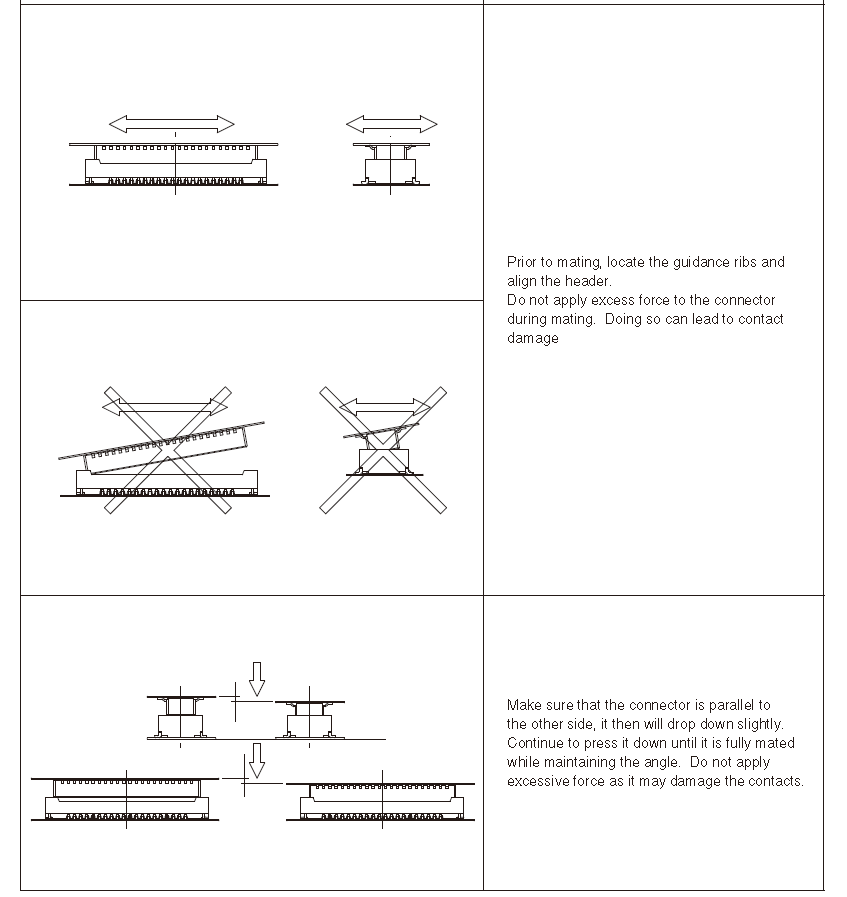
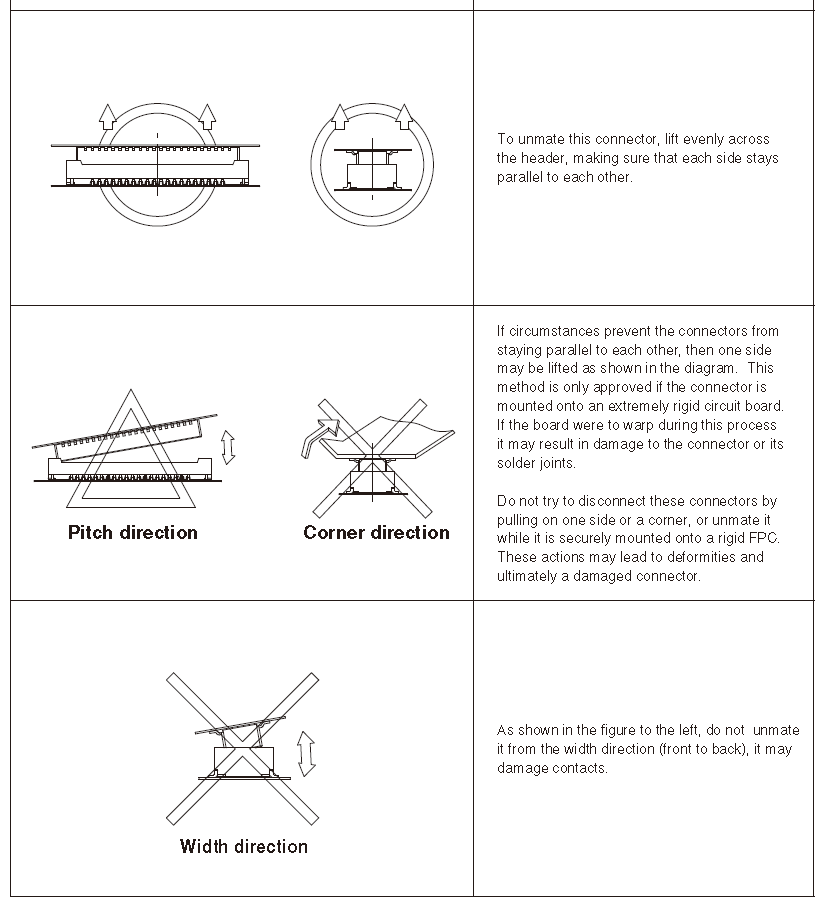
                                    image (25).png

                                    image (26).png

                                    Alex

                                    Shivam SehgalS 1 Reply Last reply
                                    0
                                    • Alex KushleyevA Alex Kushleyev

                                      @Shivam-Sehgal , sorry for the delay!

                                      Can you please contact our RMA department and send them the pictures of the current state of the board and camera adapter interposers. Our production team can evaluate the pictures. On some products the interposer boards may be glued in place for robustness, so they can suggest best way to handle it.

                                      In general, here is a diagram from the Hirose's product manual that shows how typically you should remove these connnectors:

                                      image (25).png

                                      image (26).png

                                      Alex

                                      Shivam SehgalS Offline
                                      Shivam SehgalS Offline
                                      Shivam Sehgal
                                      Contributor
                                      wrote on last edited by
                                      #20

                                      @Alex-Kushleyev Yes Alex, it's glued to the board. Sorry, how can I connect with RMA department?

                                      Alex KushleyevA 1 Reply Last reply
                                      0
                                      • Shivam SehgalS Shivam Sehgal

                                        @Alex-Kushleyev Yes Alex, it's glued to the board. Sorry, how can I connect with RMA department?

                                        Alex KushleyevA Offline
                                        Alex KushleyevA Offline
                                        Alex Kushleyev
                                        ModalAI Team
                                        wrote on last edited by
                                        #21

                                        @Shivam-Sehgal

                                        Link Preview Image
                                        Repair Merchandise Authorization

                                        All of our products are thoroughly tested both functionally and physically prior to shipment. For a copy of your products test records, please message at contact@modalai.com with the serial number.  For troubleshooting and software functionality questions, please refer to our forum. View our terms and conditions. If an

                                        favicon

                                        ModalAI, Inc. (www.modalai.com)

                                        Shivam SehgalS 1 Reply Last reply
                                        0
                                        • Alex KushleyevA Alex Kushleyev

                                          @Shivam-Sehgal

                                          Link Preview Image
                                          Repair Merchandise Authorization

                                          All of our products are thoroughly tested both functionally and physically prior to shipment. For a copy of your products test records, please message at contact@modalai.com with the serial number.  For troubleshooting and software functionality questions, please refer to our forum. View our terms and conditions. If an

                                          favicon

                                          ModalAI, Inc. (www.modalai.com)

                                          Shivam SehgalS Offline
                                          Shivam SehgalS Offline
                                          Shivam Sehgal
                                          Contributor
                                          wrote on last edited by
                                          #22

                                          @Alex-Kushleyev It's a form to send my drone for repair, can't I repair it myself? I have already ordered all the parts required. I just need to understand how to remove the glue.

                                          tomT Jeremy SchmidtJ 2 Replies Last reply
                                          0

                                          Hello! It looks like you're interested in this conversation, but you don't have an account yet.

                                          Getting fed up of having to scroll through the same posts each visit? When you register for an account, you'll always come back to exactly where you were before, and choose to be notified of new replies (either via email, or push notification). You'll also be able to save bookmarks and upvote posts to show your appreciation to other community members.

                                          With your input, this post could be even better 💗

                                          Register Login
                                          Reply
                                          • Reply as topic
                                          Log in to reply
                                          • Oldest to Newest
                                          • Newest to Oldest
                                          • Most Votes


                                          ModalAI
                                          Categories Recent Tags ModalAI.com Docs
                                          © 2026 ModalAI® · Accelerating autonomy for smaller, smarter, safer drones · Powered by NodeBB
                                          • Login

                                          • Don't have an account? Register

                                          • Login or register to search.
                                          • First post
                                            Last post
                                          0
                                          • Categories
                                          • Recent
                                          • Tags
                                          • Popular
                                          • Users
                                          • Groups
