
Quectel 5G-Modem doesn't work at all
-
Hi, I followed 5G Modem User Guide
voxl2:/$ voxl-configure-modem
Starting interactive mode

What type of modem are you using?

1) v2	      3) dtc	    5) quectel
2) microhard  4) doodle	    6) em9191
#? 5

Are you attempting to connect to ModalLink? (not common)
1) yes
2) no
#? 2

Which APN is correct for your SIM card?

AT&T - IoT device - APN: m2m.com.attz
AT&T - Laptop or Tablet - APN: broadband
AT&T - Smartphone - APN: phone
T-Mobile - APN: fast.t-mobile.com
Verizon - APN: vzwinternet
Google Fi - APN: h2g2

1) m2m.com.attz	      4) fast.t-mobile.com  7) Custom
2) broadband	      5) vzwinternet
3) phone	      6) googlefi
#? 7
Please enter a custom APN
nxtgenphone

Select modem region:
1) Americas
2) Europe/Middle-East/Asia
#? 1

qrb5165 based device detected
reloading systemd services
enabling voxl-modem systemd service
starting voxl-modem systemd service
DONE configuring voxl-modem
and it always failed with:
voxl2:/$ systemctl status -l voxl-modem
● voxl-modem.service - Modem Initialization
   Loaded: loaded (/etc/systemd/system/voxl-modem.service; enabled; vendor preset: enabled)
   Active: active (running) since Sun 2024-09-08 07:03:55 UTC; 14s ago
  Process: 3019 ExecStartPre=/bin/sleep 2 (code=exited, status=0/SUCCESS)
 Main PID: 3020 (voxl-modem-star)
    Tasks: 2 (limit: 4915)
   CGroup: /system.slice/voxl-modem.service
           └─3020 /bin/bash /usr/bin/voxl-modem-start

Sep 08 07:03:56 m0054 voxl-modem-start[3020]: [09-08_07:03:56:955] qmidevice_detect failed
Sep 08 07:03:56 m0054 voxl-modem-start[3020]: [09-08_07:03:56:956] Quectel_QConnectManager_Linux_V1.6.0.24
Sep 08 07:03:56 m0054 voxl-modem-start[3020]: [09-08_07:03:56:957] network interface '' or qmidev '' is not exist
Sep 08 07:03:56 m0054 voxl-modem-start[3020]: [09-08_07:03:56:957] qmidevice_detect failed
Sep 08 07:03:56 m0054 voxl-modem-start[3020]: [09-08_07:03:56:961] Quectel_QConnectManager_Linux_V1.6.0.24
Sep 08 07:03:56 m0054 voxl-modem-start[3020]: [09-08_07:03:56:961] network interface '' or qmidev '' is not exist
Sep 08 07:03:56 m0054 voxl-modem-start[3020]: [09-08_07:03:56:961] qmidevice_detect failed
Sep 08 07:03:56 m0054 voxl-modem-start[3020]: [09-08_07:03:56:963] Quectel_QConnectManager_Linux_V1.6.0.24
Sep 08 07:03:56 m0054 voxl-modem-start[3020]: [09-08_07:03:56:963] network interface '' or qmidev '' is not exist
Sep 08 07:03:56 m0054 voxl-modem-start[3020]: [09-08_07:03:56:963] qmidevice_detect failed
I checked this forum and tried the following command
$ quectel-CM -s nxtgenphone
[09-08_07:06:58:832] Quectel_QConnectManager_Linux_V1.6.0.24
[09-08_07:06:58:832] network interface '' or qmidev '' is not exist
[09-08_07:06:58:832] qmidevice_detect failed
[09-08_07:06:58:833] qmidevice_detect failed
The result was still the same.
I tried the latest voxl-modem and still no luck.
I purchased Sentinel with 5G LTE modem without touching anything. I double checked the Quectel modem after inserting the SIM and confirmed it is secured as before.
Can anybody help resolve this issue?
-
Hi, I followed 5G Modem User Guide
voxl2:/$ voxl-configure-modem
Starting interactive mode

What type of modem are you using?

1) v2	      3) dtc	    5) quectel
2) microhard  4) doodle	    6) em9191
#? 5

Are you attempting to connect to ModalLink? (not common)
1) yes
2) no
#? 2

Which APN is correct for your SIM card?

AT&T - IoT device - APN: m2m.com.attz
AT&T - Laptop or Tablet - APN: broadband
AT&T - Smartphone - APN: phone
T-Mobile - APN: fast.t-mobile.com
Verizon - APN: vzwinternet
Google Fi - APN: h2g2

1) m2m.com.attz	      4) fast.t-mobile.com  7) Custom
2) broadband	      5) vzwinternet
3) phone	      6) googlefi
#? 7
Please enter a custom APN
nxtgenphone

Select modem region:
1) Americas
2) Europe/Middle-East/Asia
#? 1

qrb5165 based device detected
reloading systemd services
enabling voxl-modem systemd service
starting voxl-modem systemd service
DONE configuring voxl-modem
and it always failed with:
voxl2:/$ systemctl status -l voxl-modem
● voxl-modem.service - Modem Initialization
   Loaded: loaded (/etc/systemd/system/voxl-modem.service; enabled; vendor preset: enabled)
   Active: active (running) since Sun 2024-09-08 07:03:55 UTC; 14s ago
  Process: 3019 ExecStartPre=/bin/sleep 2 (code=exited, status=0/SUCCESS)
 Main PID: 3020 (voxl-modem-star)
    Tasks: 2 (limit: 4915)
   CGroup: /system.slice/voxl-modem.service
           └─3020 /bin/bash /usr/bin/voxl-modem-start

Sep 08 07:03:56 m0054 voxl-modem-start[3020]: [09-08_07:03:56:955] qmidevice_detect failed
Sep 08 07:03:56 m0054 voxl-modem-start[3020]: [09-08_07:03:56:956] Quectel_QConnectManager_Linux_V1.6.0.24
Sep 08 07:03:56 m0054 voxl-modem-start[3020]: [09-08_07:03:56:957] network interface '' or qmidev '' is not exist
Sep 08 07:03:56 m0054 voxl-modem-start[3020]: [09-08_07:03:56:957] qmidevice_detect failed
Sep 08 07:03:56 m0054 voxl-modem-start[3020]: [09-08_07:03:56:961] Quectel_QConnectManager_Linux_V1.6.0.24
Sep 08 07:03:56 m0054 voxl-modem-start[3020]: [09-08_07:03:56:961] network interface '' or qmidev '' is not exist
Sep 08 07:03:56 m0054 voxl-modem-start[3020]: [09-08_07:03:56:961] qmidevice_detect failed
Sep 08 07:03:56 m0054 voxl-modem-start[3020]: [09-08_07:03:56:963] Quectel_QConnectManager_Linux_V1.6.0.24
Sep 08 07:03:56 m0054 voxl-modem-start[3020]: [09-08_07:03:56:963] network interface '' or qmidev '' is not exist
Sep 08 07:03:56 m0054 voxl-modem-start[3020]: [09-08_07:03:56:963] qmidevice_detect failed
I checked this forum and tried the following command
$ quectel-CM -s nxtgenphone
[09-08_07:06:58:832] Quectel_QConnectManager_Linux_V1.6.0.24
[09-08_07:06:58:832] network interface '' or qmidev '' is not exist
[09-08_07:06:58:832] qmidevice_detect failed
[09-08_07:06:58:833] qmidevice_detect failed
The result was still the same.
I tried the latest voxl-modem and still no luck.
I purchased Sentinel with 5G LTE modem without touching anything. I double checked the Quectel modem after inserting the SIM and confirmed it is secured as before.
Can anybody help resolve this issue?
-
@Jerry-Lin What do you see with
lsusbandlsusb -t?Hi @tom, here are the outputs:
voxl2:/$ lsusb Bus 002 Device 001: ID 1d6b:0003 Linux Foundation 3.0 root hub Bus 001 Device 001: ID 1d6b:0002 Linux Foundation 2.0 root hub voxl2:/$ lsusb -t /: Bus 02.Port 1: Dev 1, Class=root_hub, Driver=xhci-hcd/1p, 10000M /: Bus 01.Port 1: Dev 1, Class=root_hub, Driver=xhci-hcd/1p, 480M -
Hi @tom, here are the outputs:
voxl2:/$ lsusb Bus 002 Device 001: ID 1d6b:0003 Linux Foundation 3.0 root hub Bus 001 Device 001: ID 1d6b:0002 Linux Foundation 2.0 root hub voxl2:/$ lsusb -t /: Bus 02.Port 1: Dev 1, Class=root_hub, Driver=xhci-hcd/1p, 10000M /: Bus 01.Port 1: Dev 1, Class=root_hub, Driver=xhci-hcd/1p, 480MThis post is deleted! -
The weird thing is every time I insert the SIM card, my WiFi will be gone without even the blue flash light from the WiFi module.
Then, it took me long to get WiFi back by reconnecting the wire, touching around Quectel module, restarting
dhcpcdand disablingvoxl-modem, anything I can think of related towlan0.After having WiFi,
lsusbwould output:Bus 002 Device 002: ID 0424:5744 Standard Microsystems Corp. Bus 002 Device 001: ID 1d6b:0003 Linux Foundation 3.0 root hub Bus 001 Device 004: ID 0424:2740 Standard Microsystems Corp. Bus 001 Device 003: ID 0bda:0811 Realtek Semiconductor Corp. Bus 001 Device 002: ID 0424:2744 Standard Microsystems Corp. Bus 001 Device 001: ID 1d6b:0002 Linux Foundation 2.0 root hubWhile having more USB devices, I tried
voxl-configure-modemwithout the SIM card, I still got$ quectel-CM -s nxtgenphone [09-08_07:06:58:832] Quectel_QConnectManager_Linux_V1.6.0.24 [09-08_07:06:58:832] network interface '' or qmidev '' is not exist [09-08_07:06:58:832] qmidevice_detect failed [09-08_07:06:58:833] qmidevice_detect failed -
The weird thing is every time I insert the SIM card, my WiFi will be gone without even the blue flash light from the WiFi module.
Then, it took me long to get WiFi back by reconnecting the wire, touching around Quectel module, restarting
dhcpcdand disablingvoxl-modem, anything I can think of related towlan0.After having WiFi,
lsusbwould output:Bus 002 Device 002: ID 0424:5744 Standard Microsystems Corp. Bus 002 Device 001: ID 1d6b:0003 Linux Foundation 3.0 root hub Bus 001 Device 004: ID 0424:2740 Standard Microsystems Corp. Bus 001 Device 003: ID 0bda:0811 Realtek Semiconductor Corp. Bus 001 Device 002: ID 0424:2744 Standard Microsystems Corp. Bus 001 Device 001: ID 1d6b:0002 Linux Foundation 2.0 root hubWhile having more USB devices, I tried
voxl-configure-modemwithout the SIM card, I still got$ quectel-CM -s nxtgenphone [09-08_07:06:58:832] Quectel_QConnectManager_Linux_V1.6.0.24 [09-08_07:06:58:832] network interface '' or qmidev '' is not exist [09-08_07:06:58:832] qmidevice_detect failed [09-08_07:06:58:833] qmidevice_detect failed -
Sure,
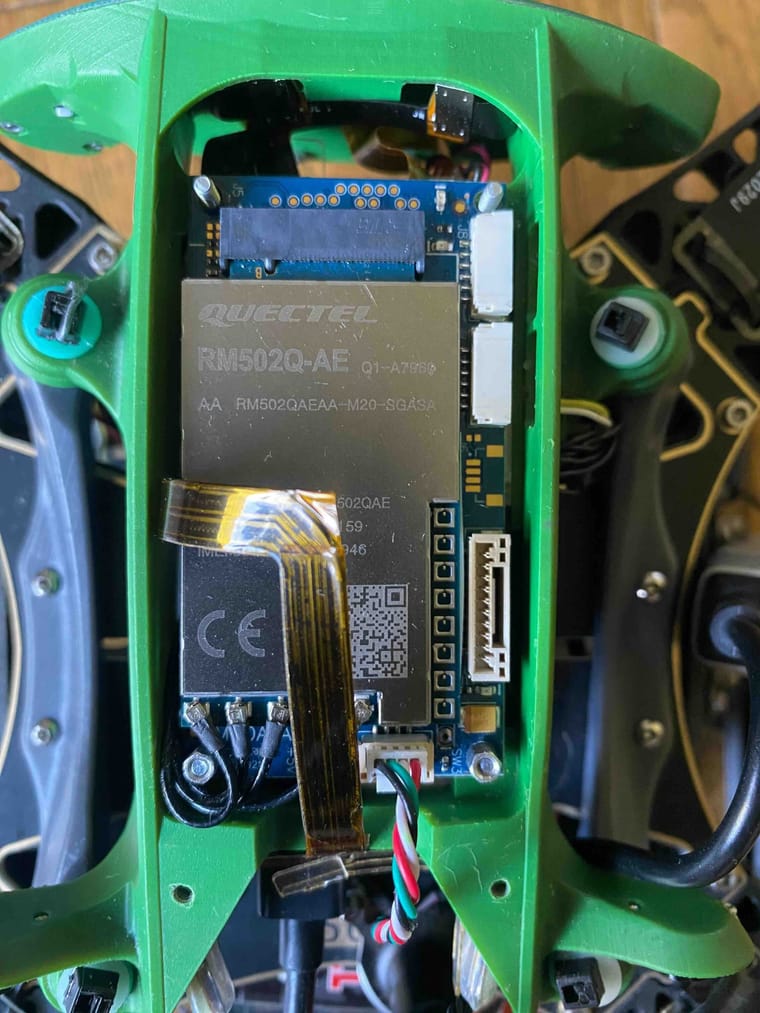
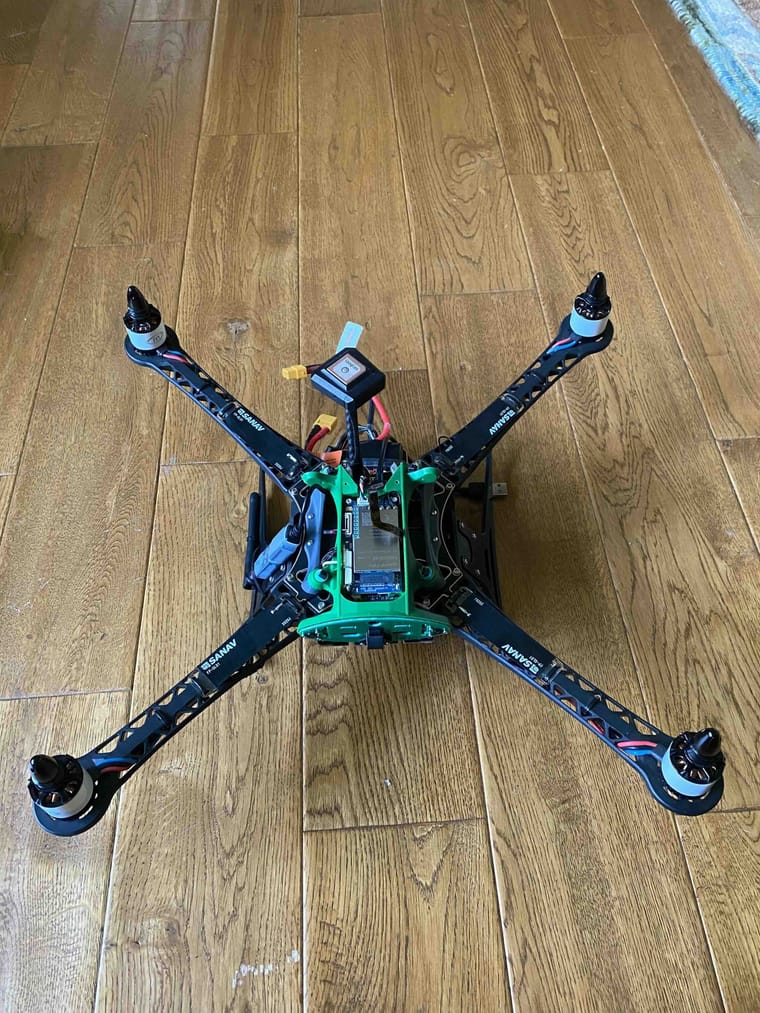
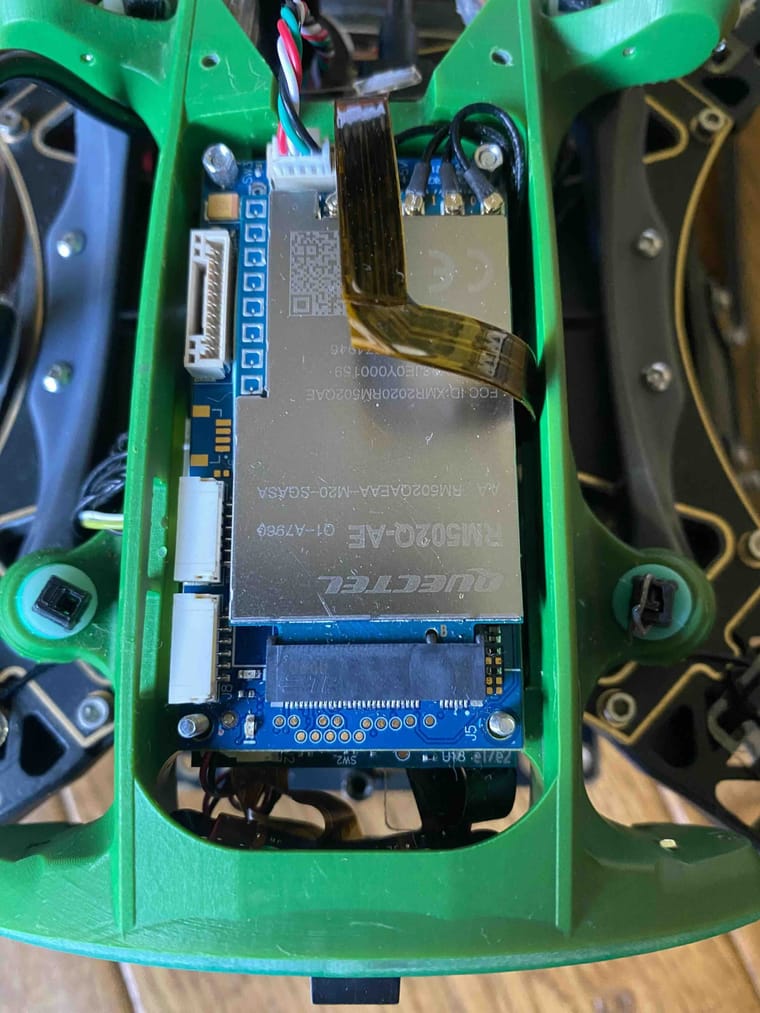
I didn't touch anything except for opening the cover, unscrewing the nuts and inserting the SIM card.
-
@Jerry-Lin Are you sure that the add-on board is fully seated onto the VOXL 2? There are two connectors that need to be fully seated
-
Hi @tom I am not sure and don't know how.
Can you show me some pictures so I can have the clue which modules are needed take apart for checking and making sure.
@Jerry-Lin If you looks at the diagram here: https://docs.modalai.com/5G-Modem-datasheet/#block-diagrams
both J4 and J2 need to fully inserted into J5 and J3 of VOXL 2, seen here: https://docs.modalai.com/voxl2-connectors/#connector-callouts -
Super cool, after all unscrewed and the modem taken out, I saw the connectors. Knowing how they connect, I pressed hard to make sure fully seated and the
qmidevice_detect failedwent away with the WiFi working!!!The output of
lsusblooks more devices now:voxl2:~$ lsusb Bus 002 Device 003: ID 2c7c:0800 Bus 002 Device 002: ID 0424:5744 Standard Microsystems Corp. Bus 002 Device 001: ID 1d6b:0003 Linux Foundation 3.0 root hub Bus 001 Device 004: ID 0424:2740 Standard Microsystems Corp. Bus 001 Device 003: ID 0bda:0811 Realtek Semiconductor Corp. Bus 001 Device 002: ID 0424:2744 Standard Microsystems Corp. Bus 001 Device 001: ID 1d6b:0002 Linux Foundation 2.0 root hubThe output of
quectel-CMis now totally different:voxl2:~$ quectel-CM -s nxtgenphone [09-10_01:27:54:793] Quectel_QConnectManager_Linux_V1.6.0.24 [09-10_01:27:54:795] Find /sys/bus/usb/devices/2-1.1 idVendor=0x2c7c idProduct=0x800, bus=0x002, dev=0x003 [09-10_01:27:54:795] Auto find qmichannel = /dev/cdc-wdm0 [09-10_01:27:54:795] Auto find usbnet_adapter = wwan0 [09-10_01:27:54:795] netcard driver = qmi_wwan, driver version = 22-Aug-2005 [09-10_01:27:54:796] Modem works in QMI mode [09-10_01:27:54:828] /proc/3149/fd/7 -> /dev/cdc-wdm0 [09-10_01:27:54:828] /proc/3149/exe -> /usr/bin/quectel-CM [09-10_01:27:56:830] cdc_wdm_fd = 7 [09-10_01:27:56:905] Get clientWDS = 1 [09-10_01:28:26:908] QmiWwanGetClientID message timeout [09-10_01:28:26:921] Get clientNAS = 4 [09-10_01:28:26:953] Get clientUIM = 1 [09-10_01:28:26:985] Get clientWDA = 1 [09-10_01:28:26:985] QMIType 2 has no clientID [09-10_01:28:26:985] requestBaseBandVersion err = -19 [09-10_01:28:41:321] QmiWwanThread read=-1 errno: 2 (No such file or directory) [09-10_01:28:56:987] requestSetEthMode message timeout [09-10_01:28:56:987] requestSetEthMode err = 110 [09-10_01:29:26:989] requestGetSIMStatus message timeout [09-10_01:29:26:990] requestGetSIMStatus err = 110 [09-10_01:29:26:990] requestSetProfile[1] nxtgenphone///0 [09-10_01:29:27:081] QmiWwanThread read=-1 errno: 2 (No such file or directory) [09-10_01:29:57:051] requestGetProfile message timeout [09-10_01:29:57:051] requestGetProfile err = 110 [09-10_01:29:57:064] QmiWwanThread read=-1 errno: 2 (No such file or directory) [09-10_01:30:27:054] requestRegistrationState2 message timeout [09-10_01:30:27:055] requestRegistrationState2 err = 110 [09-10_01:30:57:056] requestQueryDataCall message timeout [09-10_01:30:57:057] requestQueryDataCall err = 110 [09-10_01:30:57:057] ifconfig wwan0 0.0.0.0 [09-10_01:30:57:083] ifconfig wwan0 down [09-10_01:30:57:129] requestRegistrationState2 MCC: 310, MNC: 410, PS: Attached, DataCap: LTE [09-10_01:32:57:130] requestSetupDataCall message timeout [09-10_01:32:57:130] requestSetupDataCall err = 110 [09-10_01:32:57:130] try to requestSetupDataCall 5 second later [09-10_01:35:02:132] requestSetupDataCall message timeout [09-10_01:35:02:133] requestSetupDataCall err = 110 [09-10_01:35:02:133] try to requestSetupDataCall 10 second later [09-10_01:35:12:170] requestSetupDataCall QMUXResult = 0x1, QMUXError = 0x1a [09-10_01:35:12:170] try to requestSetupDataCall 20 second later [09-10_01:35:32:200] requestSetupDataCall QMUXResult = 0x1, QMUXError = 0x1a [09-10_01:35:32:200] try to requestSetupDataCall 40 second later [09-10_01:38:12:226] requestSetupDataCall message timeout [09-10_01:38:12:228] requestSetupDataCall err = 110 [09-10_01:38:12:228] try to requestSetupDataCall 60 second later [09-10_01:41:12:274] requestSetupDataCall message timeout [09-10_01:41:12:277] requestSetupDataCall err = 110 [09-10_01:41:12:277] try to requestSetupDataCall 60 second later [09-10_01:44:12:304] requestSetupDataCall message timeout [09-10_01:44:12:304] requestSetupDataCall err = 110 [09-10_01:44:12:304] try to requestSetupDataCall 60 second later [09-10_01:45:12:357] requestSetupDataCall QMUXResult = 0x1, QMUXError = 0x1a [09-10_01:45:12:357] try to requestSetupDataCall 60 second later [09-10_01:46:12:424] QmiWwanThread read=-1 errno: 2 (No such file or directory) [09-10_01:48:12:391] requestSetupDataCall message timeout [09-10_01:48:12:391] requestSetupDataCall err = 110 [09-10_01:48:12:392] try to requestSetupDataCall 60 second later [09-10_01:49:12:454] requestSetupDataCall QMUXResult = 0x1, QMUXError = 0x1a [09-10_01:49:12:454] try to requestSetupDataCall 60 second later [09-10_01:52:12:486] requestSetupDataCall message timeout [09-10_01:52:12:486] requestSetupDataCall err = 110 [09-10_01:52:12:486] try to requestSetupDataCall 60 second later [09-10_01:55:12:530] requestSetupDataCall message timeout [09-10_01:55:12:533] requestSetupDataCall err = 110 [09-10_01:55:12:533] try to requestSetupDataCall 60 second later [09-10_01:56:12:582] QmiWwanThread read=-1 errno: 2 (No such file or directory) [09-10_01:58:12:576] requestSetupDataCall message timeout [09-10_01:58:12:576] requestSetupDataCall err = 110 [09-10_01:58:12:576] try to requestSetupDataCall 60 second later [09-10_01:59:12:615] requestSetupDataCall QMUXResult = 0x1, QMUXError = 0x1a [09-10_01:59:12:615] try to requestSetupDataCall 60 second laterHowever, it takes forever to finish. I googled around my AT&T APN, it looks right using
nxtgenphone:If you have an:
LTE device: Set your settings to NXTGENPHONE
Data device: Set your settings to Broadband
5G Smartphone: Set your settings to ENHANCEDPHONENot sure what is going wrong this time.
-
Super cool, after all unscrewed and the modem taken out, I saw the connectors. Knowing how they connect, I pressed hard to make sure fully seated and the
qmidevice_detect failedwent away with the WiFi working!!!The output of
lsusblooks more devices now:voxl2:~$ lsusb Bus 002 Device 003: ID 2c7c:0800 Bus 002 Device 002: ID 0424:5744 Standard Microsystems Corp. Bus 002 Device 001: ID 1d6b:0003 Linux Foundation 3.0 root hub Bus 001 Device 004: ID 0424:2740 Standard Microsystems Corp. Bus 001 Device 003: ID 0bda:0811 Realtek Semiconductor Corp. Bus 001 Device 002: ID 0424:2744 Standard Microsystems Corp. Bus 001 Device 001: ID 1d6b:0002 Linux Foundation 2.0 root hubThe output of
quectel-CMis now totally different:voxl2:~$ quectel-CM -s nxtgenphone [09-10_01:27:54:793] Quectel_QConnectManager_Linux_V1.6.0.24 [09-10_01:27:54:795] Find /sys/bus/usb/devices/2-1.1 idVendor=0x2c7c idProduct=0x800, bus=0x002, dev=0x003 [09-10_01:27:54:795] Auto find qmichannel = /dev/cdc-wdm0 [09-10_01:27:54:795] Auto find usbnet_adapter = wwan0 [09-10_01:27:54:795] netcard driver = qmi_wwan, driver version = 22-Aug-2005 [09-10_01:27:54:796] Modem works in QMI mode [09-10_01:27:54:828] /proc/3149/fd/7 -> /dev/cdc-wdm0 [09-10_01:27:54:828] /proc/3149/exe -> /usr/bin/quectel-CM [09-10_01:27:56:830] cdc_wdm_fd = 7 [09-10_01:27:56:905] Get clientWDS = 1 [09-10_01:28:26:908] QmiWwanGetClientID message timeout [09-10_01:28:26:921] Get clientNAS = 4 [09-10_01:28:26:953] Get clientUIM = 1 [09-10_01:28:26:985] Get clientWDA = 1 [09-10_01:28:26:985] QMIType 2 has no clientID [09-10_01:28:26:985] requestBaseBandVersion err = -19 [09-10_01:28:41:321] QmiWwanThread read=-1 errno: 2 (No such file or directory) [09-10_01:28:56:987] requestSetEthMode message timeout [09-10_01:28:56:987] requestSetEthMode err = 110 [09-10_01:29:26:989] requestGetSIMStatus message timeout [09-10_01:29:26:990] requestGetSIMStatus err = 110 [09-10_01:29:26:990] requestSetProfile[1] nxtgenphone///0 [09-10_01:29:27:081] QmiWwanThread read=-1 errno: 2 (No such file or directory) [09-10_01:29:57:051] requestGetProfile message timeout [09-10_01:29:57:051] requestGetProfile err = 110 [09-10_01:29:57:064] QmiWwanThread read=-1 errno: 2 (No such file or directory) [09-10_01:30:27:054] requestRegistrationState2 message timeout [09-10_01:30:27:055] requestRegistrationState2 err = 110 [09-10_01:30:57:056] requestQueryDataCall message timeout [09-10_01:30:57:057] requestQueryDataCall err = 110 [09-10_01:30:57:057] ifconfig wwan0 0.0.0.0 [09-10_01:30:57:083] ifconfig wwan0 down [09-10_01:30:57:129] requestRegistrationState2 MCC: 310, MNC: 410, PS: Attached, DataCap: LTE [09-10_01:32:57:130] requestSetupDataCall message timeout [09-10_01:32:57:130] requestSetupDataCall err = 110 [09-10_01:32:57:130] try to requestSetupDataCall 5 second later [09-10_01:35:02:132] requestSetupDataCall message timeout [09-10_01:35:02:133] requestSetupDataCall err = 110 [09-10_01:35:02:133] try to requestSetupDataCall 10 second later [09-10_01:35:12:170] requestSetupDataCall QMUXResult = 0x1, QMUXError = 0x1a [09-10_01:35:12:170] try to requestSetupDataCall 20 second later [09-10_01:35:32:200] requestSetupDataCall QMUXResult = 0x1, QMUXError = 0x1a [09-10_01:35:32:200] try to requestSetupDataCall 40 second later [09-10_01:38:12:226] requestSetupDataCall message timeout [09-10_01:38:12:228] requestSetupDataCall err = 110 [09-10_01:38:12:228] try to requestSetupDataCall 60 second later [09-10_01:41:12:274] requestSetupDataCall message timeout [09-10_01:41:12:277] requestSetupDataCall err = 110 [09-10_01:41:12:277] try to requestSetupDataCall 60 second later [09-10_01:44:12:304] requestSetupDataCall message timeout [09-10_01:44:12:304] requestSetupDataCall err = 110 [09-10_01:44:12:304] try to requestSetupDataCall 60 second later [09-10_01:45:12:357] requestSetupDataCall QMUXResult = 0x1, QMUXError = 0x1a [09-10_01:45:12:357] try to requestSetupDataCall 60 second later [09-10_01:46:12:424] QmiWwanThread read=-1 errno: 2 (No such file or directory) [09-10_01:48:12:391] requestSetupDataCall message timeout [09-10_01:48:12:391] requestSetupDataCall err = 110 [09-10_01:48:12:392] try to requestSetupDataCall 60 second later [09-10_01:49:12:454] requestSetupDataCall QMUXResult = 0x1, QMUXError = 0x1a [09-10_01:49:12:454] try to requestSetupDataCall 60 second later [09-10_01:52:12:486] requestSetupDataCall message timeout [09-10_01:52:12:486] requestSetupDataCall err = 110 [09-10_01:52:12:486] try to requestSetupDataCall 60 second later [09-10_01:55:12:530] requestSetupDataCall message timeout [09-10_01:55:12:533] requestSetupDataCall err = 110 [09-10_01:55:12:533] try to requestSetupDataCall 60 second later [09-10_01:56:12:582] QmiWwanThread read=-1 errno: 2 (No such file or directory) [09-10_01:58:12:576] requestSetupDataCall message timeout [09-10_01:58:12:576] requestSetupDataCall err = 110 [09-10_01:58:12:576] try to requestSetupDataCall 60 second later [09-10_01:59:12:615] requestSetupDataCall QMUXResult = 0x1, QMUXError = 0x1a [09-10_01:59:12:615] try to requestSetupDataCall 60 second laterHowever, it takes forever to finish. I googled around my AT&T APN, it looks right using
nxtgenphone:If you have an:
LTE device: Set your settings to NXTGENPHONE
Data device: Set your settings to Broadband
5G Smartphone: Set your settings to ENHANCEDPHONENot sure what is going wrong this time.
Hi @Jerry-Lin
Glad Tom was able to help you and you are making progress.
For future note, please re-install the nut hardware on these screws or the boards can become separated again leading to more failures.
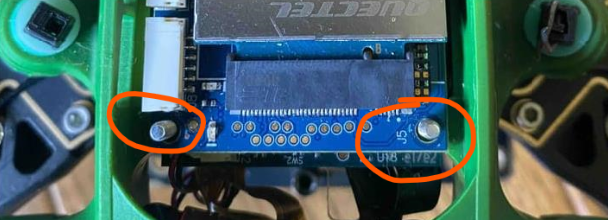
Please be careful to ensure they do not contact any of the circuit components on the PCB.
Thanks! -
Super cool, after all unscrewed and the modem taken out, I saw the connectors. Knowing how they connect, I pressed hard to make sure fully seated and the
qmidevice_detect failedwent away with the WiFi working!!!The output of
lsusblooks more devices now:voxl2:~$ lsusb Bus 002 Device 003: ID 2c7c:0800 Bus 002 Device 002: ID 0424:5744 Standard Microsystems Corp. Bus 002 Device 001: ID 1d6b:0003 Linux Foundation 3.0 root hub Bus 001 Device 004: ID 0424:2740 Standard Microsystems Corp. Bus 001 Device 003: ID 0bda:0811 Realtek Semiconductor Corp. Bus 001 Device 002: ID 0424:2744 Standard Microsystems Corp. Bus 001 Device 001: ID 1d6b:0002 Linux Foundation 2.0 root hubThe output of
quectel-CMis now totally different:voxl2:~$ quectel-CM -s nxtgenphone [09-10_01:27:54:793] Quectel_QConnectManager_Linux_V1.6.0.24 [09-10_01:27:54:795] Find /sys/bus/usb/devices/2-1.1 idVendor=0x2c7c idProduct=0x800, bus=0x002, dev=0x003 [09-10_01:27:54:795] Auto find qmichannel = /dev/cdc-wdm0 [09-10_01:27:54:795] Auto find usbnet_adapter = wwan0 [09-10_01:27:54:795] netcard driver = qmi_wwan, driver version = 22-Aug-2005 [09-10_01:27:54:796] Modem works in QMI mode [09-10_01:27:54:828] /proc/3149/fd/7 -> /dev/cdc-wdm0 [09-10_01:27:54:828] /proc/3149/exe -> /usr/bin/quectel-CM [09-10_01:27:56:830] cdc_wdm_fd = 7 [09-10_01:27:56:905] Get clientWDS = 1 [09-10_01:28:26:908] QmiWwanGetClientID message timeout [09-10_01:28:26:921] Get clientNAS = 4 [09-10_01:28:26:953] Get clientUIM = 1 [09-10_01:28:26:985] Get clientWDA = 1 [09-10_01:28:26:985] QMIType 2 has no clientID [09-10_01:28:26:985] requestBaseBandVersion err = -19 [09-10_01:28:41:321] QmiWwanThread read=-1 errno: 2 (No such file or directory) [09-10_01:28:56:987] requestSetEthMode message timeout [09-10_01:28:56:987] requestSetEthMode err = 110 [09-10_01:29:26:989] requestGetSIMStatus message timeout [09-10_01:29:26:990] requestGetSIMStatus err = 110 [09-10_01:29:26:990] requestSetProfile[1] nxtgenphone///0 [09-10_01:29:27:081] QmiWwanThread read=-1 errno: 2 (No such file or directory) [09-10_01:29:57:051] requestGetProfile message timeout [09-10_01:29:57:051] requestGetProfile err = 110 [09-10_01:29:57:064] QmiWwanThread read=-1 errno: 2 (No such file or directory) [09-10_01:30:27:054] requestRegistrationState2 message timeout [09-10_01:30:27:055] requestRegistrationState2 err = 110 [09-10_01:30:57:056] requestQueryDataCall message timeout [09-10_01:30:57:057] requestQueryDataCall err = 110 [09-10_01:30:57:057] ifconfig wwan0 0.0.0.0 [09-10_01:30:57:083] ifconfig wwan0 down [09-10_01:30:57:129] requestRegistrationState2 MCC: 310, MNC: 410, PS: Attached, DataCap: LTE [09-10_01:32:57:130] requestSetupDataCall message timeout [09-10_01:32:57:130] requestSetupDataCall err = 110 [09-10_01:32:57:130] try to requestSetupDataCall 5 second later [09-10_01:35:02:132] requestSetupDataCall message timeout [09-10_01:35:02:133] requestSetupDataCall err = 110 [09-10_01:35:02:133] try to requestSetupDataCall 10 second later [09-10_01:35:12:170] requestSetupDataCall QMUXResult = 0x1, QMUXError = 0x1a [09-10_01:35:12:170] try to requestSetupDataCall 20 second later [09-10_01:35:32:200] requestSetupDataCall QMUXResult = 0x1, QMUXError = 0x1a [09-10_01:35:32:200] try to requestSetupDataCall 40 second later [09-10_01:38:12:226] requestSetupDataCall message timeout [09-10_01:38:12:228] requestSetupDataCall err = 110 [09-10_01:38:12:228] try to requestSetupDataCall 60 second later [09-10_01:41:12:274] requestSetupDataCall message timeout [09-10_01:41:12:277] requestSetupDataCall err = 110 [09-10_01:41:12:277] try to requestSetupDataCall 60 second later [09-10_01:44:12:304] requestSetupDataCall message timeout [09-10_01:44:12:304] requestSetupDataCall err = 110 [09-10_01:44:12:304] try to requestSetupDataCall 60 second later [09-10_01:45:12:357] requestSetupDataCall QMUXResult = 0x1, QMUXError = 0x1a [09-10_01:45:12:357] try to requestSetupDataCall 60 second later [09-10_01:46:12:424] QmiWwanThread read=-1 errno: 2 (No such file or directory) [09-10_01:48:12:391] requestSetupDataCall message timeout [09-10_01:48:12:391] requestSetupDataCall err = 110 [09-10_01:48:12:392] try to requestSetupDataCall 60 second later [09-10_01:49:12:454] requestSetupDataCall QMUXResult = 0x1, QMUXError = 0x1a [09-10_01:49:12:454] try to requestSetupDataCall 60 second later [09-10_01:52:12:486] requestSetupDataCall message timeout [09-10_01:52:12:486] requestSetupDataCall err = 110 [09-10_01:52:12:486] try to requestSetupDataCall 60 second later [09-10_01:55:12:530] requestSetupDataCall message timeout [09-10_01:55:12:533] requestSetupDataCall err = 110 [09-10_01:55:12:533] try to requestSetupDataCall 60 second later [09-10_01:56:12:582] QmiWwanThread read=-1 errno: 2 (No such file or directory) [09-10_01:58:12:576] requestSetupDataCall message timeout [09-10_01:58:12:576] requestSetupDataCall err = 110 [09-10_01:58:12:576] try to requestSetupDataCall 60 second later [09-10_01:59:12:615] requestSetupDataCall QMUXResult = 0x1, QMUXError = 0x1a [09-10_01:59:12:615] try to requestSetupDataCall 60 second laterHowever, it takes forever to finish. I googled around my AT&T APN, it looks right using
nxtgenphone:If you have an:
LTE device: Set your settings to NXTGENPHONE
Data device: Set your settings to Broadband
5G Smartphone: Set your settings to ENHANCEDPHONENot sure what is going wrong this time.
@Jerry-Lin Awesome seems as though the hardware is working as expected now. I can't tell you what the correct APN is for your network, it very much depends on your plan, provider, etc. It's possible you need a SIM card specifically for IOT devices from your carrier
-
Sure, will do.
Sorry that I was trying to insert the SIM card and realized unable to do it unless lifting the modem module. After inserting the SIM card, I didn't push hard worrying breaking anything because the drone is super expensive.
Thanks to Tom for helping me understand how the modules are connected. I think inserting the SIM card is a very frequent activity and it would be nice to make it very accessible by a hole like others on the side. It took me hours to figure out how to access the SIM card socket. Anyway, now I learned how to secure the connections and not a problem for me anymore.
BTW, any idea about my last "timeout and trying forever" issue? I have tried two SIM cards without a success.
-
@tom said in Quectel 5G-Modem doesn't work at all:
It's possible you need a SIM card specifically for IOT devices from your carrier
So, did you mean normal phone SIM cards are not compatible with the Quectel modem and the "5G LTE" is not the same protocol our phones use as advertised "Connectivity: 4G/5G"?
Then, what are requirements should I provide to my carrier (located in Pennsylvania, USA) for this kind of SIM card to get the drone Internet access?
-
@tom said in Quectel 5G-Modem doesn't work at all:
It's possible you need a SIM card specifically for IOT devices from your carrier
So, did you mean normal phone SIM cards are not compatible with the Quectel modem and the "5G LTE" is not the same protocol our phones use as advertised "Connectivity: 4G/5G"?
Then, what are requirements should I provide to my carrier (located in Pennsylvania, USA) for this kind of SIM card to get the drone Internet access?
-
Cool, my carriers are AT&T and Xfinity Mobile. What I should I mention to them for my application? Just
IoTor any specs that you know about?So, the log:
voxl2:~$ quectel-CM -s nxtgenphone
[09-10_01:27:54:793] Quectel_QConnectManager_Linux_V1.6.0.24
[09-10_01:27:54:795] Find /sys/bus/usb/devices/2-1.1 idVendor=0x2c7c idProduct=0x800, bus=0x002, dev=0x003
[09-10_01:27:54:795] Auto find qmichannel = /dev/cdc-wdm0
[09-10_01:27:54:795] Auto find usbnet_adapter = wwan0
...
[09-10_01:58:12:576] requestSetupDataCall message timeout
[09-10_01:58:12:576] requestSetupDataCall err = 110
[09-10_01:58:12:576] try to requestSetupDataCall 60 second later
[09-10_01:59:12:615] requestSetupDataCall QMUXResult = 0x1, QMUXError = 0x1a
[09-10_01:59:12:615] try to requestSetupDataCall 60 second later
looks a SIM card issue to you? Or what else (e.g. commands or wiring) can I try to get 5G connected?
-
Cool, my carriers are AT&T and Xfinity Mobile. What I should I mention to them for my application? Just
IoTor any specs that you know about?So, the log:
voxl2:~$ quectel-CM -s nxtgenphone
[09-10_01:27:54:793] Quectel_QConnectManager_Linux_V1.6.0.24
[09-10_01:27:54:795] Find /sys/bus/usb/devices/2-1.1 idVendor=0x2c7c idProduct=0x800, bus=0x002, dev=0x003
[09-10_01:27:54:795] Auto find qmichannel = /dev/cdc-wdm0
[09-10_01:27:54:795] Auto find usbnet_adapter = wwan0
...
[09-10_01:58:12:576] requestSetupDataCall message timeout
[09-10_01:58:12:576] requestSetupDataCall err = 110
[09-10_01:58:12:576] try to requestSetupDataCall 60 second later
[09-10_01:59:12:615] requestSetupDataCall QMUXResult = 0x1, QMUXError = 0x1a
[09-10_01:59:12:615] try to requestSetupDataCall 60 second later
looks a SIM card issue to you? Or what else (e.g. commands or wiring) can I try to get 5G connected?
-
OK, will get to carries to see if I can move forward with the existing SIM cards. If not, will try Google Fi IoT SIM cards.
Thanks for the advice!!!
-
I
- checked with an AT&T store and they provide SIM card for phone only.
- then googled around and found several attempts using Quectel MODEM with AT&T SIM card and AT commands were used for debugging.
- searched in ModalAI Forum and found some AT commands for the model.
- tried but got only
ERRORvoxl2:~$ echo -ne "AT+QNWPREFCFG="mode_pref",LTE:NR5G\r" | busybox microcom /dev/ttyUSB2
AT+QNWPREFCFG=mode_pref,LTE:NR5G
ERROR - did
voxl-configure-modemagain to see if AT commands can be used and found the same command:Sep 25 02:41:22 m0054 voxl-modem-start[8392]: qrb5165 based hardware detected...
Sep 25 02:41:22 m0054 voxl-modem-start[8392]: \Setting mode preference to LTE / 5G
Sep 25 02:41:22 m0054 voxl-modem-start[8392]: AT+QNWPREFCFG="mode_pref",LTE:NR5G
Sep 25 02:41:22 m0054 voxl-modem-start[8392]: OK
Sep 25 02:41:23 m0054 voxl-modem-start[8392]: Initalizing cellular connection... - After 7 minutes I saw:
no lease, failing. Well, at least, it tried to lease.Sep 25 02:48:49 m0054 voxl-modem-start[8392]: udhcpc: started, v1.27.2
Sep 25 02:48:49 m0054 voxl-modem-start[8392]: No resolv.conf for interface wwan0.udhcpc
Sep 25 02:48:49 m0054 voxl-modem-start[8392]: udhcpc: sending discover
Sep 25 02:48:52 m0054 voxl-modem-start[8392]: udhcpc: sending discover
Sep 25 02:48:55 m0054 voxl-modem-start[8392]: udhcpc: sending discover
Sep 25 02:48:58 m0054 voxl-modem-start[8392]: udhcpc: sending discover
Sep 25 02:49:01 m0054 voxl-modem-start[8392]: udhcpc: sending discover
Sep 25 02:49:04 m0054 udhcpc[10399]: wwan0: configuration failed: leasefail:
Sep 25 02:49:04 m0054 voxl-modem-start[8392]: udhcpc: no lease, failing - All of sudden, I saw lease obtained with an IP provided:
Sep 25 02:49:04 m0054 voxl-modem-start[8392]: udhcpc: started, v1.27.2
Sep 25 02:49:05 m0054 voxl-modem-start[8392]: No resolv.conf for interface wwan0.udhcpc
Sep 25 02:49:05 m0054 voxl-modem-start[8392]: udhcpc: sending discover
Sep 25 02:49:05 m0054 voxl-modem-start[8392]: udhcpc: sending select for 10.194.135.84
Sep 25 02:49:05 m0054 voxl-modem-start[8392]: udhcpc: lease of 10.194.135.84 obtained, lease time 7200
Sep 25 02:49:05 m0054 voxl-modem-start[8392]: Too few arguments.
Sep 25 02:49:05 m0054 voxl-modem-start[8392]: Too few arguments. - I was not sure about the impact of
Too few argumentserror, though.
Well, with an IP address, I tried to:
- ping
- ssh
Unfortunately only responded with timeout messages.
Wondering if I really have the Internet access, I didifconfig wlan0 downand theping google.comfromvoxl. It was still responded !!!Hmm, how about continue Connecting to QGC over 5G instructions?
- With Tailscale VPN installed, I was able to ssh to the drone using the VPN IP address!!!
- With QGroundControl setup, I was able to see the drone statuses and statistics using the VPN IP address!!!
That means I can control the drone even it is hundreds of miles away!!!
Millions of thanks for great help @tom and @Vinny !!!!!!!!!!!
Still with
Too few argumentserror, I am not sure how good the 4G/5G connection would be. Will experiment more to figure out. However, if you guys know anything can be improved, please let me know.



Reading along? Create a free ModalAI Forum account to join in.
With an account you can reply, ask your own question, get an email when a ModalAI engineer answers, and mark the reply that solved it. Your place in each thread is saved between visits.
Questions about VOXL, Flight Core, ESCs and ModalAI drones are answered here by the engineers who build them.
Register Login