
AT commands to a Sierra Wireless EM9291
-
hey have made some good progress on the drivers - still curious about the docker question but because they are mounted, does it not matter which side of the docker (inside or outside) I change them?
anyways other question:

I see in the repo README it discusses debug messages, and I can see debug msgs in the code for drivers like below:

How can I print these out/where are they printed so I can read thru them?
@groupo , it does not matter where you edit the files (inside the docker container or the host). On the host side, there will be a new folder created for the kernel source files (
workspace), where you can find all the source files and build output. In the docker container, the same files will be in/home/user/build_mount, as specified here : https://gitlab.com/voxl-public/system-image-build/qrb5165-kernel-build-docker/-/blob/qrb5165-ubun1.0-14.1a/docker-run-image.sh?ref_type=heads#L9If you build the kernel in debug mode, you can use
dmesgcommand to print out all the kernel messages. Even with non-debug kernel, there will be some essential messages from kernel there. If you are looking for a particular string, you can use grep to filter the messages:dmesg -w | grep "Num Interfaces"If the messages from your driver have some common string, you can use that string to filter the
dmesgoutput.Alex
-
@groupo , it does not matter where you edit the files (inside the docker container or the host). On the host side, there will be a new folder created for the kernel source files (
workspace), where you can find all the source files and build output. In the docker container, the same files will be in/home/user/build_mount, as specified here : https://gitlab.com/voxl-public/system-image-build/qrb5165-kernel-build-docker/-/blob/qrb5165-ubun1.0-14.1a/docker-run-image.sh?ref_type=heads#L9If you build the kernel in debug mode, you can use
dmesgcommand to print out all the kernel messages. Even with non-debug kernel, there will be some essential messages from kernel there. If you are looking for a particular string, you can use grep to filter the messages:dmesg -w | grep "Num Interfaces"If the messages from your driver have some common string, you can use that string to filter the
dmesgoutput.Alex
Thanks for the explanation - I am still getting the hang of Docker.
I think logging was turned off in all the drivers I am curious about. I think I just turned it on.
Do i need to run ./qrb-clean.sh every time before I run ./qrb-build.sh? I see you use it in the example on the documentation, but I am unclear if its necessary for what I am doing (make changes -> build -> flash -> repeat if not working)
-
Thanks for the explanation - I am still getting the hang of Docker.
I think logging was turned off in all the drivers I am curious about. I think I just turned it on.
Do i need to run ./qrb-clean.sh every time before I run ./qrb-build.sh? I see you use it in the example on the documentation, but I am unclear if its necessary for what I am doing (make changes -> build -> flash -> repeat if not working)
When in doubt, it is better to do a full clean before re-building. Especially when you are changing configuration like debug or non-debug version of the kernel.
For simple changes inside your kernel module / driver, you can test by trial and error to see if you need to re-build when you make a small code change. Once you have the debug prints working, this will be easy to test.
Alex
-
@groupo , it does not matter where you edit the files (inside the docker container or the host). On the host side, there will be a new folder created for the kernel source files (
workspace), where you can find all the source files and build output. In the docker container, the same files will be in/home/user/build_mount, as specified here : https://gitlab.com/voxl-public/system-image-build/qrb5165-kernel-build-docker/-/blob/qrb5165-ubun1.0-14.1a/docker-run-image.sh?ref_type=heads#L9If you build the kernel in debug mode, you can use
dmesgcommand to print out all the kernel messages. Even with non-debug kernel, there will be some essential messages from kernel there. If you are looking for a particular string, you can use grep to filter the messages:dmesg -w | grep "Num Interfaces"If the messages from your driver have some common string, you can use that string to filter the
dmesgoutput.Alex
Some further investigation, I grep'd inside the docker for one of the driver files I am trying to edit (qcserial.c) and find it in a few locations, all of which are in the build_mount.
I vim'd all files and none of them reflect the changes I made to qcserial.c located in qrb5165-kernel-v1.1.7.4.... am I changing this file in the wrong place?
Again, my process is
-
Change files in mydir/qrb5165-kernel-v1.1.7.4
-
Enter mydir/qrb5165-kernel-build-docker-qrb5165-ubun1.0-14.1a
-
run ./docker-run-image.sh
-
(in docker) run ./qrb5165-build.sh
-
once that is done, I follow the steps listed here https://docs.modalai.com/voxl2-kernel-build-guide/#flashing-guide
I assume I am not changing qcserial in the right place?
Also, one of the places Grep returns is in patches. I can see you guys have made edits to that driver too. Will the version in patches override anything else I try to do?
-
-
Some further investigation, I grep'd inside the docker for one of the driver files I am trying to edit (qcserial.c) and find it in a few locations, all of which are in the build_mount.
I vim'd all files and none of them reflect the changes I made to qcserial.c located in qrb5165-kernel-v1.1.7.4.... am I changing this file in the wrong place?
Again, my process is
-
Change files in mydir/qrb5165-kernel-v1.1.7.4
-
Enter mydir/qrb5165-kernel-build-docker-qrb5165-ubun1.0-14.1a
-
run ./docker-run-image.sh
-
(in docker) run ./qrb5165-build.sh
-
once that is done, I follow the steps listed here https://docs.modalai.com/voxl2-kernel-build-guide/#flashing-guide
I assume I am not changing qcserial in the right place?
Also, one of the places Grep returns is in patches. I can see you guys have made edits to that driver too. Will the version in patches override anything else I try to do?
@groupo , I will ask my colleagues to help answer this question..
Are the changes that you are making being undone after you run the build? This will tell you if the build process is patching the files again, but i would assume that the patching step (
/qrb5165-patch.sh) applies the patches and no more patching is done.You can look at what the patch is doing and modify the file that is the patch is patching. and then clean and rebuild.
Another way to check if your change is being compiled or not, is to modify the .c source file and add something with a syntax error (some stray characters), so that the build should fail. If the build does not fail, then your changes are not being compiled.
Alex
-
-
@groupo , I will ask my colleagues to help answer this question..
Are the changes that you are making being undone after you run the build? This will tell you if the build process is patching the files again, but i would assume that the patching step (
/qrb5165-patch.sh) applies the patches and no more patching is done.You can look at what the patch is doing and modify the file that is the patch is patching. and then clean and rebuild.
Another way to check if your change is being compiled or not, is to modify the .c source file and add something with a syntax error (some stray characters), so that the build should fail. If the build does not fail, then your changes are not being compiled.
Alex
@Alex-Kushleyev No there are no changes to the files in mydir/qrb5165-kernel-v1.1.7.4
I am not sure what my drone shipped with, but I assume 1.1.3 or 1.2 as we received them in May. I did have to reflash at one point and grabbed SDK 1.3.0. I followed the kernel build guide to the letter, which has steps for 1.1.3 and tags 1.7.4. I assume this is another issue of mine. It looks like I need tag 1.7.8 for SDK 1.3.0... can you confirm? Do all the steps defined in kernel-build-guide still hold save the tag differnece?
the c syntax error is a good idea. I will try that once I get back to a workable state
for clariity here is what my start up screen says
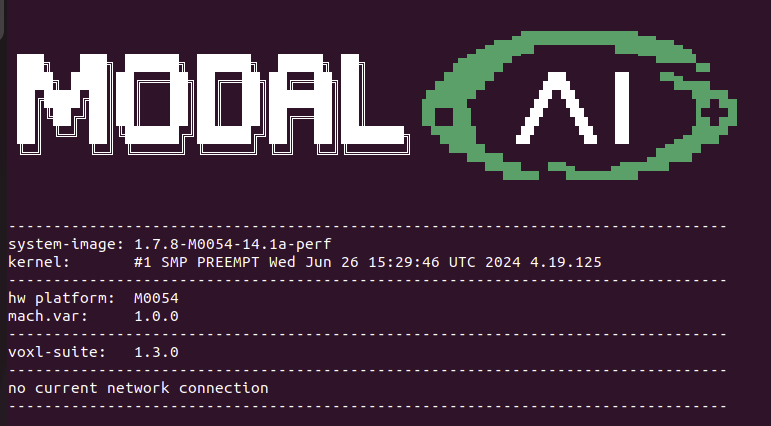
looks like my image and voxl-suite are good, but I def followed the kernel steps for 1.7.4 so that kernel I just put on there I believe is outdated - if you think that would matter. -
@Alex-Kushleyev No there are no changes to the files in mydir/qrb5165-kernel-v1.1.7.4
I am not sure what my drone shipped with, but I assume 1.1.3 or 1.2 as we received them in May. I did have to reflash at one point and grabbed SDK 1.3.0. I followed the kernel build guide to the letter, which has steps for 1.1.3 and tags 1.7.4. I assume this is another issue of mine. It looks like I need tag 1.7.8 for SDK 1.3.0... can you confirm? Do all the steps defined in kernel-build-guide still hold save the tag differnece?
the c syntax error is a good idea. I will try that once I get back to a workable state
for clariity here is what my start up screen says
looks like my image and voxl-suite are good, but I def followed the kernel steps for 1.7.4 so that kernel I just put on there I believe is outdated - if you think that would matter.@Alex-Kushleyev You can ignore most of my last post - I believe I understand now that running qrb-sync just pulls all assets (qrb5165-kernel, voxl2, etc.). I pulled them myself and had them sitting outside the docker on my host machine making changes assuming somehow your build script was mounting them. I am running out of time today but I do believe that when I went through through the kernel build steps and flashed the drone it did not work properly. I want to repeat the drone flashing process again to ensure I am not missing something before I broach this though
-
@groupo jumping in a bit and hopefully am in context.
We do mount from host to docker here:
https://gitlab.com/voxl-public/system-image-build/qrb5165-kernel-build-docker/-/blob/qrb5165-ubun1.0-14.1a/docker-run-image.sh?ref_type=heads#L9During the build, you'll get 'copies' of everything at something like:
qrb5165-build-docker/workspace/qrb5165-ubun-1-0_amss_oem/lu.um.1.2.1/apps_proc/build-qti-distro-ubuntu-fullstack-perf/Don't edit those...
If you edit files in say this dir directly:
apps_proc/src/kernel/msm-qrb5165-4.19/drivers/Then they should get picked up by the build. Easy way to tell, throw a compiler error on purpose in a file and try to build it.
-
@groupo jumping in a bit and hopefully am in context.
We do mount from host to docker here:
https://gitlab.com/voxl-public/system-image-build/qrb5165-kernel-build-docker/-/blob/qrb5165-ubun1.0-14.1a/docker-run-image.sh?ref_type=heads#L9During the build, you'll get 'copies' of everything at something like:
qrb5165-build-docker/workspace/qrb5165-ubun-1-0_amss_oem/lu.um.1.2.1/apps_proc/build-qti-distro-ubuntu-fullstack-perf/Don't edit those...
If you edit files in say this dir directly:
apps_proc/src/kernel/msm-qrb5165-4.19/drivers/Then they should get picked up by the build. Easy way to tell, throw a compiler error on purpose in a file and try to build it.
-
@groupo
/dev/ttyUSB0only enumerates if the driver recognizes the hardware of having said capability. In this case, the driver that controls that port doesn't recognize that modem hardware, likely the driver is from before that hardware existed.In these cases we usually have to make custom tweaks to the linux kernel drivers in order to add the support for the hardware.
If you'd like to experiment with doing that you can, building custom kernels allows adding custom support for new or existing hardware.
You can read more about building a custom kernel here: https://docs.modalai.com/voxl2-kernel-build-guide/
hey not sure if this is an @tom or @modaltb inquiry, but when following the steps for the kernel build guide, stuff is off with the drone. It boots up and I can adb fine, but there are issues with the wifi, similar to another post Tom helped me with two weeks ago, but for definitely not the same hardware-related reason. The wifi adaptable does not turn on and when you run voxl-wifi the mac address is undefined. I remember stepping through those scripts while troubleshooting the hardware issues and recall that script queries to find its mac address, which must be returning something invalid.
I have tested this with both of my drones. I can very easily flash them back with https://docs.modalai.com/sentinel-factory-reset/ and they operate as expected. While my desire is to edit part of the usb driver scripts, the kernel I am attempting to put on the drone is the unchanged version following the steps here https://docs.modalai.com/voxl2-kernel-build-guide/. The only deviation from the guide is that the guide is written for SDK 1.1.3. I have put 1.3.0 on both of my drones, and from my understanding the docker scripts pull the default branch of each repo which has the same commit tags as 1.7.8. I have included the output of dmesg for both the 1.3.0 image available from the downloads page, and the results when following the custom kernel build steps.
https://drive.google.com/drive/folders/14L5gLbAOfF2OcSW2rHFTI4VIoREkTCFJ?usp=sharing




Reading along? Create a free ModalAI Forum account to join in.
With an account you can reply, ask your own question, get an email when a ModalAI engineer answers, and mark the reply that solved it. Your place in each thread is saved between visits.
Questions about VOXL, Flight Core, ESCs and ModalAI drones are answered here by the engineers who build them.
Register Login