
VOXL2 RTSP decoding fails
-
@Alex-Kushleyev Can you try to play the same python file which I have attached above?
@Aaky, sure i will try it later today
-
@Aaky, sure i will try it later today
@Alex-Kushleyev Thanks. One more observation, I tried setting FPS to 30 in the rtsp_rx_mpa_pub python script and those faults have stopped for moment. Is the FPS or any other parameter important in the RTSP MPA -> Tflite -> streamer pipeline?
-
@Alex-Kushleyev Thanks. One more observation, I tried setting FPS to 30 in the rtsp_rx_mpa_pub python script and those faults have stopped for moment. Is the FPS or any other parameter important in the RTSP MPA -> Tflite -> streamer pipeline?
@Alex-Kushleyev Update: FPS changing dosent help. Still I am facing failure. On my above google drive I have uploaded my latest failing rtsp decoding python script, voxl-opencv debian, my startup service for kickstarting the RTSP decoding script and also voxl-mpa-tools debian. Please install them and see if there is any problem over SDK 1.1.3. voxl-mpa-tools I have cloned from here with branch pympa-experimental and voxl-opencv I have downloaded from this thread. There is some incompatibility causing this failure. Please let me know your analysis.
I even tried with tracking camera skipping RTSP decoding entirely and providing tracking camera feed to tflite model and then RTSP streaming, that is also having hard time. I am clueless about these failures. Also VOXL keeps rebooting and never comes out of reboot cycle randomly when tflite is active. Please help.
-
@Alex-Kushleyev Update: FPS changing dosent help. Still I am facing failure. On my above google drive I have uploaded my latest failing rtsp decoding python script, voxl-opencv debian, my startup service for kickstarting the RTSP decoding script and also voxl-mpa-tools debian. Please install them and see if there is any problem over SDK 1.1.3. voxl-mpa-tools I have cloned from here with branch pympa-experimental and voxl-opencv I have downloaded from this thread. There is some incompatibility causing this failure. Please let me know your analysis.
I even tried with tracking camera skipping RTSP decoding entirely and providing tracking camera feed to tflite model and then RTSP streaming, that is also having hard time. I am clueless about these failures. Also VOXL keeps rebooting and never comes out of reboot cycle randomly when tflite is active. Please help.
-
@Alex-Kushleyev This issue is extremely urgent for me for some demonstration. My request is if you can provide me solution for this problem as soon as possible it would be really helpful.
@Alex-Kushleyev One more update in this respect, I am using libmodal-pipe version 2.10.0 on my SDK 1.1.3, this version of libmodal-pipe is I guess supported on next SDK 1.2.0. Can this be a problem? This came as dependency while installing voxl-mpa-tools I guess.
Say I update to SSDK 1.2.0, what should be exact voxl-opencv and voxl-mpa-tools version to be installed? I think they are conflicting somewhere leading to hardfaults.
-
@Alex-Kushleyev One more update in this respect, I am using libmodal-pipe version 2.10.0 on my SDK 1.1.3, this version of libmodal-pipe is I guess supported on next SDK 1.2.0. Can this be a problem? This came as dependency while installing voxl-mpa-tools I guess.
Say I update to SSDK 1.2.0, what should be exact voxl-opencv and voxl-mpa-tools version to be installed? I think they are conflicting somewhere leading to hardfaults.
-
@Alex-Kushleyev One more update in this respect, I am using libmodal-pipe version 2.10.0 on my SDK 1.1.3, this version of libmodal-pipe is I guess supported on next SDK 1.2.0. Can this be a problem? This came as dependency while installing voxl-mpa-tools I guess.
Say I update to SSDK 1.2.0, what should be exact voxl-opencv and voxl-mpa-tools version to be installed? I think they are conflicting somewhere leading to hardfaults.
-
@Aaky The source of truth for SDK 1.2 packages can be found here: http://voxl-packages.modalai.com/dists/qrb5165/sdk-1.2/binary-arm64/
@Aaky , sorry for the delay.
You can see what packages are shipped with each SDK here : https://docs.modalai.com/sdk-1.1-release-notes/#sdk-113-package-list (link is pointing to SDK 1.1.3). Tom also provided the address above where all the packages are available for download for each major release. Also, you can see the tags in the actual git repo for each package, for example here:
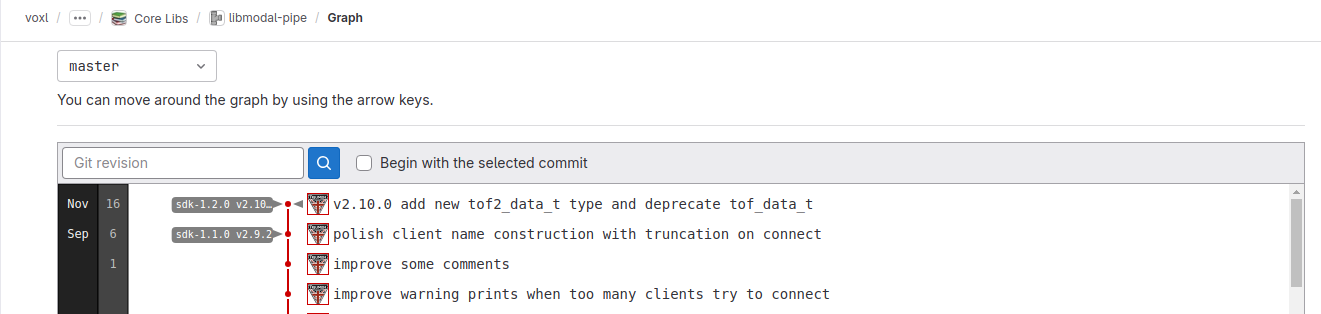
You can see that SDK-1.1.0 released version v2.9.2 and the only other release was for SDK 1.2.0.When I originally made the post with pympa tools (including the rtsp example), i was using SDK 1.1.3 and everything was working fine. I used the libmodal-pipe that shipped with SDK.
I just installed SDK 1.2.0 and then on top of that i installed the opencv with python and voxl-mpa-tools i posted before, i am re-posting the links for clarity:
https://storage.googleapis.com/modalai_public/temp/voxl2-misc-packages/voxl-opencv_4.5.5-3_arm64.deb
https://storage.googleapis.com/modalai_public/temp/voxl2-misc-packages/voxl-mpa-tools_1.1.5_arm64.debThen i connected OV7251 tracking camera to my VOXL2 with the basic
voxl-camera-server.confwhich just publishes raw8 640x480 image.Next, i ran
voxl-streamer -i trackingto encode and create an rtsp stream for from the raw8 images.Finally, i just updated the rtsp address (just
stream_url = 'rtsp://127.0.0.1:8900/live') in the modifiedrtsp_rx_mpa_pub.pyscript that you shared.And the last part is i started voxl-portal to view the rtsp stream that is re-published back to mpa as
rtsp-debugmpa channel.So.. everything is working fine, no issues, no reboots.
Doing further investigation, i looked at
dmesg -woutput while the script is running and i saw messages like the following:[ 2306.392927] msm_vidc: err : 00000002: h264d: qbuf cache ops failed: CAPTURE: idx 15 fd 74 off 0 daddr dc900000 size 786432 filled 0 flags 0x0 ts 0 refcnt 2 mflags 0x1, extradata: fd 80 off 245760 daddr de7bc000 size 16384 filled 0 refcnt 2 [ 2306.424439] msm_vidc: err : 00000002: h264d: dqbuf cache ops failed: CAPTURE: idx 16 fd 76 off 0 daddr dc800000 size 786432 filled 786432 flags 0x10 ts 11920339000 refcnt 2 mflags 0x0, extradata: fd 80 off 262144 daddr de7c0000 size 16384 filled 16384 refcnt 2 [ 2306.426040] msm_vidc: err : 00000002: h264d: qbuf cache ops failed: CAPTURE: idx 16 fd 76 off 0 daddr dc800000 size 786432 filled 0 flags 0x0 ts 0 refcnt 2 mflags 0x1, extradata: fd 80 off 262144 daddr de7c0000 size 16384 filled 0 refcnt 2 [ 2306.457763] msm_vidc: err : 00000002: h264d: dqbuf cache ops failed: CAPTURE: idx 17 fd 78 off 0 daddr dc700000 size 786432 filled 786432 flags 0x10 ts 11953488000 refcnt 2 mflags 0x0, extradata: fd 80 off 278528 daddr de7c4000 size 16384 filled 16384 refcnt 2 [ 2306.461468] msm_vidc: err : 00000002: h264d: qbuf cache ops failed: CAPTURE: idx 17 fd 78 off 0 daddr dc700000 size 786432 filled 0 flags 0x0 ts 0 refcnt 2 mflags 0x1, extradata: fd 80 off 278528 daddr de7c4000 size 16384 filled 0 refcnt 2 [ 2306.491300] msm_vidc: err : 00000002: h264d: dqbuf cache ops failed: CAPTURE: idx 0 fd 44 off 0 daddr dd800000 size 786432 filled 786432 flags 0x10 ts 11987146000 refcnt 2 mflags 0x0, extradata: fd 80 off 0 daddr de780000 size 16384 filled 16384 refcnt 2 [ 2306.492874] ion_sgl_sync_range: 291 callbacks suppressed [ 2306.492878] Partial cmo only supported with 1 segment is dma_set_max_seg_size being set on dev:kgsl-3d0 [ 2306.492892] msm_vidc: err : 00000002: h264d: qbuf cache ops failed: CAPTURE: idx 0 fd 44 off 0 daddr dd800000 size 786432 filled 0 flags 0x0 ts 0 refcnt 2 mflags 0x1, extradata: fd 80 off 0 daddr de780000 size 16384 filled 0 refcnt 2 [ 2306.524454] Partial cmo only supported with 1 segment is dma_set_max_seg_size being set on dev:kgsl-3d0 [ 2306.524479] msm_vidc: err : 00000002: h264d: dqbuf cache ops failed: CAPTURE: idx 1 fd 46 off 0 daddr dd700000 size 786432 filled 786432 flags 0x10 ts 12020491000 refcnt 2 mflags 0x0, extradata: fd 80 off 16384 daddr de784000 size 16384 filled 16384 refcnt 2 [ 2306.526015] kgsl_iommu_fault_handler: 141 callbacks suppressed [ 2306.526025] kgsl kgsl-3d0: GPU PAGE FAULT: addr = 500211000 pid= 10785 name=python3 [ 2306.526052] kgsl kgsl-3d0: context=gfx3d_user TTBR0=0x30001c873f000 CIDR=0x2a21 (read translation fault) [ 2306.526096] kgsl kgsl-3d0: FAULTING BLOCK: UCHE: TP [ 2306.526111] kgsl kgsl-3d0: ---- nearby memory ---- [ 2306.526134] kgsl kgsl-3d0: [0000000500130000 - 0000000500211000] (pid = 10785) (2d) ..so there are actually two issues going on here (it seems)
- error messages from the decoder (h264d)
- some sort of GPU page fault (GPU is used for doing image format conversion / resize). Note that a page fault is not necessarily an issue, but I am not sure if this is a normal page fault or something that should not be occurring (read translation fault).
With these errors, my VOXL2 is not crashing, but still these are probably not good messages to see..
I changed the stream string in the test script to use software decoder and the errors are no longer printed in
dmesg:stream = 'gst-launch-1.0 rtspsrc location=' + stream_url + ' latency=0 ! queue ! rtph264depay ! h264parse config-interval=-1 ! avdec_h264 ! autovideoconvert ! appsink'Additinally, using HW decoder but sw-based videoconvert, also works without any errors in
dmesg(note usingvideoconvertinstead ofautovideoconvert. I believeautovideoconvertuses GPU to do the format conversion)stream = 'gst-launch-1.0 rtspsrc location=' + stream_url + ' latency=0 ! queue ! rtph264depay ! h264parse config-interval=-1 ! qtivdec turbo=true ! videoconvert ! appsink'You can try these basic tests to see if you also see the errors in
dmesgand if the errors and crash goes away after changingn to SW decoder or SW-basedvideoconvert.Regarding the error printed in
dmesg, i am not sure what is actually causing it. It is not coming from ModalAI software, so we should try to work around the issue.With all that being said.. none of the tests that i ran results in a crash or reboot of VOXL2.. I suggest that you run
dmesg -win a separate window before running your test and see what is printed right before the system reboots. This can help. If you cannot see anything ondmegs -woutput via adb, you can also check/var/log/kern.logto see the messages from previous boot (at the end of the log.. note that the log can be large as it saves previous kernel logs).Alex
-
@Aaky , sorry for the delay.
You can see what packages are shipped with each SDK here : https://docs.modalai.com/sdk-1.1-release-notes/#sdk-113-package-list (link is pointing to SDK 1.1.3). Tom also provided the address above where all the packages are available for download for each major release. Also, you can see the tags in the actual git repo for each package, for example here:
You can see that SDK-1.1.0 released version v2.9.2 and the only other release was for SDK 1.2.0.When I originally made the post with pympa tools (including the rtsp example), i was using SDK 1.1.3 and everything was working fine. I used the libmodal-pipe that shipped with SDK.
I just installed SDK 1.2.0 and then on top of that i installed the opencv with python and voxl-mpa-tools i posted before, i am re-posting the links for clarity:
https://storage.googleapis.com/modalai_public/temp/voxl2-misc-packages/voxl-opencv_4.5.5-3_arm64.deb
https://storage.googleapis.com/modalai_public/temp/voxl2-misc-packages/voxl-mpa-tools_1.1.5_arm64.debThen i connected OV7251 tracking camera to my VOXL2 with the basic
voxl-camera-server.confwhich just publishes raw8 640x480 image.Next, i ran
voxl-streamer -i trackingto encode and create an rtsp stream for from the raw8 images.Finally, i just updated the rtsp address (just
stream_url = 'rtsp://127.0.0.1:8900/live') in the modifiedrtsp_rx_mpa_pub.pyscript that you shared.And the last part is i started voxl-portal to view the rtsp stream that is re-published back to mpa as
rtsp-debugmpa channel.So.. everything is working fine, no issues, no reboots.
Doing further investigation, i looked at
dmesg -woutput while the script is running and i saw messages like the following:[ 2306.392927] msm_vidc: err : 00000002: h264d: qbuf cache ops failed: CAPTURE: idx 15 fd 74 off 0 daddr dc900000 size 786432 filled 0 flags 0x0 ts 0 refcnt 2 mflags 0x1, extradata: fd 80 off 245760 daddr de7bc000 size 16384 filled 0 refcnt 2 [ 2306.424439] msm_vidc: err : 00000002: h264d: dqbuf cache ops failed: CAPTURE: idx 16 fd 76 off 0 daddr dc800000 size 786432 filled 786432 flags 0x10 ts 11920339000 refcnt 2 mflags 0x0, extradata: fd 80 off 262144 daddr de7c0000 size 16384 filled 16384 refcnt 2 [ 2306.426040] msm_vidc: err : 00000002: h264d: qbuf cache ops failed: CAPTURE: idx 16 fd 76 off 0 daddr dc800000 size 786432 filled 0 flags 0x0 ts 0 refcnt 2 mflags 0x1, extradata: fd 80 off 262144 daddr de7c0000 size 16384 filled 0 refcnt 2 [ 2306.457763] msm_vidc: err : 00000002: h264d: dqbuf cache ops failed: CAPTURE: idx 17 fd 78 off 0 daddr dc700000 size 786432 filled 786432 flags 0x10 ts 11953488000 refcnt 2 mflags 0x0, extradata: fd 80 off 278528 daddr de7c4000 size 16384 filled 16384 refcnt 2 [ 2306.461468] msm_vidc: err : 00000002: h264d: qbuf cache ops failed: CAPTURE: idx 17 fd 78 off 0 daddr dc700000 size 786432 filled 0 flags 0x0 ts 0 refcnt 2 mflags 0x1, extradata: fd 80 off 278528 daddr de7c4000 size 16384 filled 0 refcnt 2 [ 2306.491300] msm_vidc: err : 00000002: h264d: dqbuf cache ops failed: CAPTURE: idx 0 fd 44 off 0 daddr dd800000 size 786432 filled 786432 flags 0x10 ts 11987146000 refcnt 2 mflags 0x0, extradata: fd 80 off 0 daddr de780000 size 16384 filled 16384 refcnt 2 [ 2306.492874] ion_sgl_sync_range: 291 callbacks suppressed [ 2306.492878] Partial cmo only supported with 1 segment is dma_set_max_seg_size being set on dev:kgsl-3d0 [ 2306.492892] msm_vidc: err : 00000002: h264d: qbuf cache ops failed: CAPTURE: idx 0 fd 44 off 0 daddr dd800000 size 786432 filled 0 flags 0x0 ts 0 refcnt 2 mflags 0x1, extradata: fd 80 off 0 daddr de780000 size 16384 filled 0 refcnt 2 [ 2306.524454] Partial cmo only supported with 1 segment is dma_set_max_seg_size being set on dev:kgsl-3d0 [ 2306.524479] msm_vidc: err : 00000002: h264d: dqbuf cache ops failed: CAPTURE: idx 1 fd 46 off 0 daddr dd700000 size 786432 filled 786432 flags 0x10 ts 12020491000 refcnt 2 mflags 0x0, extradata: fd 80 off 16384 daddr de784000 size 16384 filled 16384 refcnt 2 [ 2306.526015] kgsl_iommu_fault_handler: 141 callbacks suppressed [ 2306.526025] kgsl kgsl-3d0: GPU PAGE FAULT: addr = 500211000 pid= 10785 name=python3 [ 2306.526052] kgsl kgsl-3d0: context=gfx3d_user TTBR0=0x30001c873f000 CIDR=0x2a21 (read translation fault) [ 2306.526096] kgsl kgsl-3d0: FAULTING BLOCK: UCHE: TP [ 2306.526111] kgsl kgsl-3d0: ---- nearby memory ---- [ 2306.526134] kgsl kgsl-3d0: [0000000500130000 - 0000000500211000] (pid = 10785) (2d) ..so there are actually two issues going on here (it seems)
- error messages from the decoder (h264d)
- some sort of GPU page fault (GPU is used for doing image format conversion / resize). Note that a page fault is not necessarily an issue, but I am not sure if this is a normal page fault or something that should not be occurring (read translation fault).
With these errors, my VOXL2 is not crashing, but still these are probably not good messages to see..
I changed the stream string in the test script to use software decoder and the errors are no longer printed in
dmesg:stream = 'gst-launch-1.0 rtspsrc location=' + stream_url + ' latency=0 ! queue ! rtph264depay ! h264parse config-interval=-1 ! avdec_h264 ! autovideoconvert ! appsink'Additinally, using HW decoder but sw-based videoconvert, also works without any errors in
dmesg(note usingvideoconvertinstead ofautovideoconvert. I believeautovideoconvertuses GPU to do the format conversion)stream = 'gst-launch-1.0 rtspsrc location=' + stream_url + ' latency=0 ! queue ! rtph264depay ! h264parse config-interval=-1 ! qtivdec turbo=true ! videoconvert ! appsink'You can try these basic tests to see if you also see the errors in
dmesgand if the errors and crash goes away after changingn to SW decoder or SW-basedvideoconvert.Regarding the error printed in
dmesg, i am not sure what is actually causing it. It is not coming from ModalAI software, so we should try to work around the issue.With all that being said.. none of the tests that i ran results in a crash or reboot of VOXL2.. I suggest that you run
dmesg -win a separate window before running your test and see what is printed right before the system reboots. This can help. If you cannot see anything ondmegs -woutput via adb, you can also check/var/log/kern.logto see the messages from previous boot (at the end of the log.. note that the log can be large as it saves previous kernel logs).Alex
@Alex-Kushleyev Thanks for all the information Alex. Actually I got it solved, the problem was with my VOXL Power cable coming from VOXLPM. After changing this wire the reboot stopped. I am wondering if there was some loose connection which was causing the problem when GPU acceleration started over VOXL. I was monitoring the current consumption of my system with voxl-inspect-battery and I noted, that before running ML model it was 0.9 Amps and after ML acceleration it was rising to 1.2 Amps.
Few observations from voxl-inspect-cpu while ML acceleration started was temperature rising from 70 (No ML acceleration) to 80 (with ML acceleration). I am using YoloV5 over GPU and 50% GPU consumption I was able to see post acceleration. Maybe my video decoding is also hardware based with some GPU usage over there causing more GPU usage. -
@Alex-Kushleyev Thanks for all the information Alex. Actually I got it solved, the problem was with my VOXL Power cable coming from VOXLPM. After changing this wire the reboot stopped. I am wondering if there was some loose connection which was causing the problem when GPU acceleration started over VOXL. I was monitoring the current consumption of my system with voxl-inspect-battery and I noted, that before running ML model it was 0.9 Amps and after ML acceleration it was rising to 1.2 Amps.
Few observations from voxl-inspect-cpu while ML acceleration started was temperature rising from 70 (No ML acceleration) to 80 (with ML acceleration). I am using YoloV5 over GPU and 50% GPU consumption I was able to see post acceleration. Maybe my video decoding is also hardware based with some GPU usage over there causing more GPU usage.@Aaky , I am glad you figured it out. Most of the time the unexpected reboots are due to some sort of power issue, that is why I originally asked about the source of power - sometimes if a Power supply is used to power VOXL2, if the power supply cannot provide sufficient current, the system will reset. But sometimes, cabling is the issue.
Alex
-
@Aaky , I am glad you figured it out. Most of the time the unexpected reboots are due to some sort of power issue, that is why I originally asked about the source of power - sometimes if a Power supply is used to power VOXL2, if the power supply cannot provide sufficient current, the system will reset. But sometimes, cabling is the issue.
Alex
@Alex-Kushleyev One quick information I wanted to have on this feature. I have this script running over my VOXL2 and it is in its default form always decoding and publishing the frames. I want it to be smart and subscriber based whereas if any mpa subscriber once gets connected to the pipe been published only then I should start to decode. The reason been if I am not listening to this stream, it keeps consuming CPU cycles. Any quick python based sample code would work. I am searching for the same but will save my time if you can point me to right location.
-
@Alex-Kushleyev One quick information I wanted to have on this feature. I have this script running over my VOXL2 and it is in its default form always decoding and publishing the frames. I want it to be smart and subscriber based whereas if any mpa subscriber once gets connected to the pipe been published only then I should start to decode. The reason been if I am not listening to this stream, it keeps consuming CPU cycles. Any quick python based sample code would work. I am searching for the same but will save my time if you can point me to right location.
-
@Eric-Katzfey Can you provide me some guidance on my above query?
@Aaky, I see what you are asking.
What is needed is the python binding to the C function
int pipe_server_get_num_clients(int ch), which is defined herepympa_create_pubalready is set up to return the MPA channel number, so we would just need to use that channel number of checking the number of clients.I can implement this, but it will need to wait a few days. That is a good feature to have. If you would like to try implementing it yourself, you can add the bindings to :
- https://gitlab.com/voxl-public/voxl-sdk/utilities/voxl-mpa-tools/-/blob/pympa-experimental/tools/pympa.cpp (add call to
pipe_server_get_num_clients) in a similar way how other functions are called. - add the actual python wrapper to: https://gitlab.com/voxl-public/voxl-sdk/utilities/voxl-mpa-tools/-/blob/pympa-experimental/tools/python/pympa.py
- then finally, when you call
pympa_create_pub, save the pipe id and then pass it to check for clients.
Alex
- https://gitlab.com/voxl-public/voxl-sdk/utilities/voxl-mpa-tools/-/blob/pympa-experimental/tools/pympa.cpp (add call to


Reading along? Create a free ModalAI Forum account to join in.
With an account you can reply, ask your own question, get an email when a ModalAI engineer answers, and mark the reply that solved it. Your place in each thread is saved between visits.
Questions about VOXL, Flight Core, ESCs and ModalAI drones are answered here by the engineers who build them.
Register Login