
motor not responding to throttle
-
Hello,
I am working on two "Qualcomm Flight RB5 5G Platform Drones Reference Design - Qualcomm Flight RB5 5G Drone w/o Modem", bought in march of 2022. They were no used until now. While setting them up I encountered some errors.
First of all I flashed both drones with the appropriate VOXL SDK as mentioned on the guide. After installing Qgroundcontrol I was conducting pre-flight tests and encountered problems with both drones:
-For the first drone, the LED on the GPS module is flashing red however no error is being detected on Qgroundcontrol and all VOXL services are working fine. I suspect this might be due to not having a RC remote and being unable to manually arm the drone but I am not sure. I am also getting a missing parameter message: "missing params: 1:SDLOG_MOD". Other than that the drone seems to be working fine.
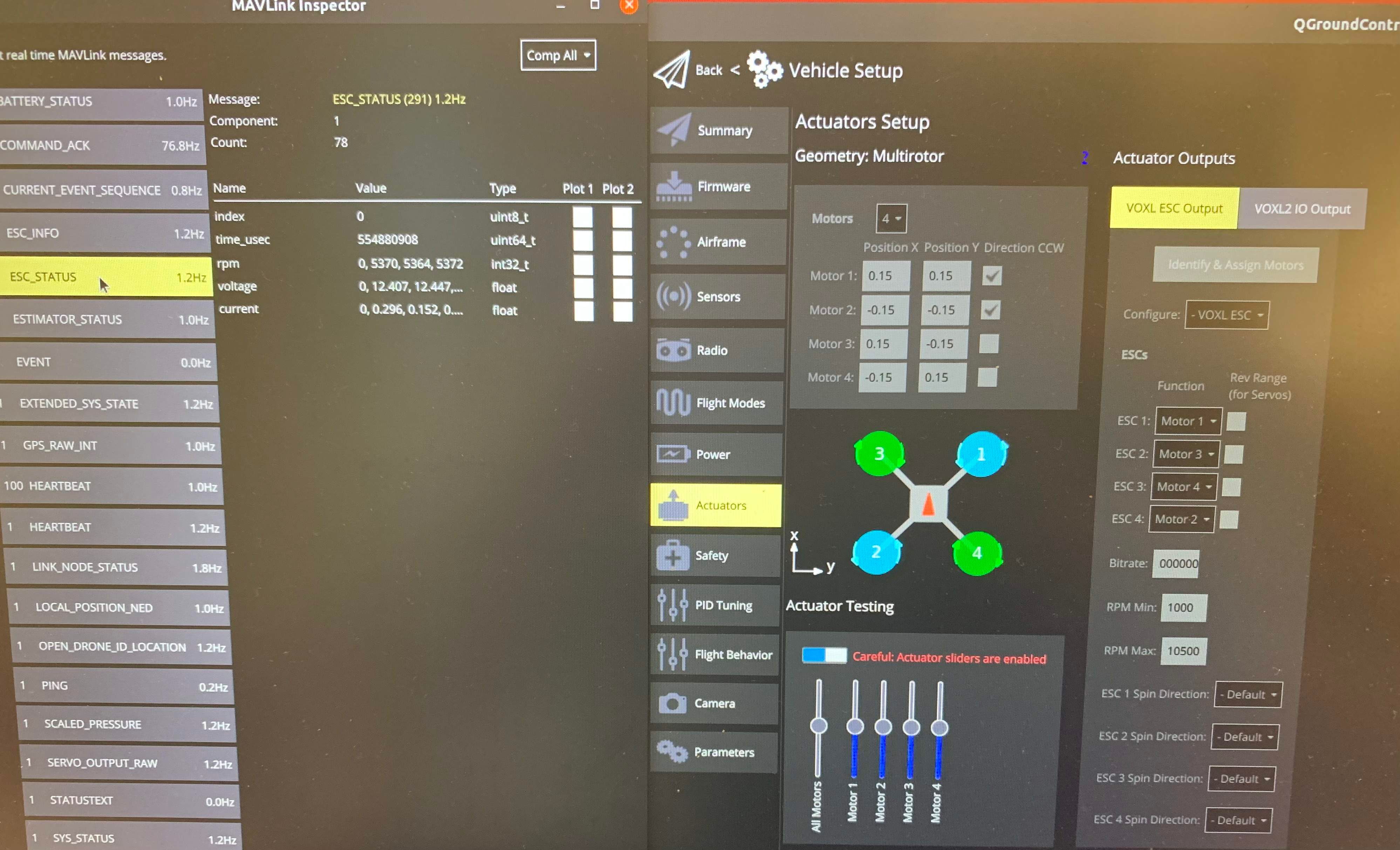
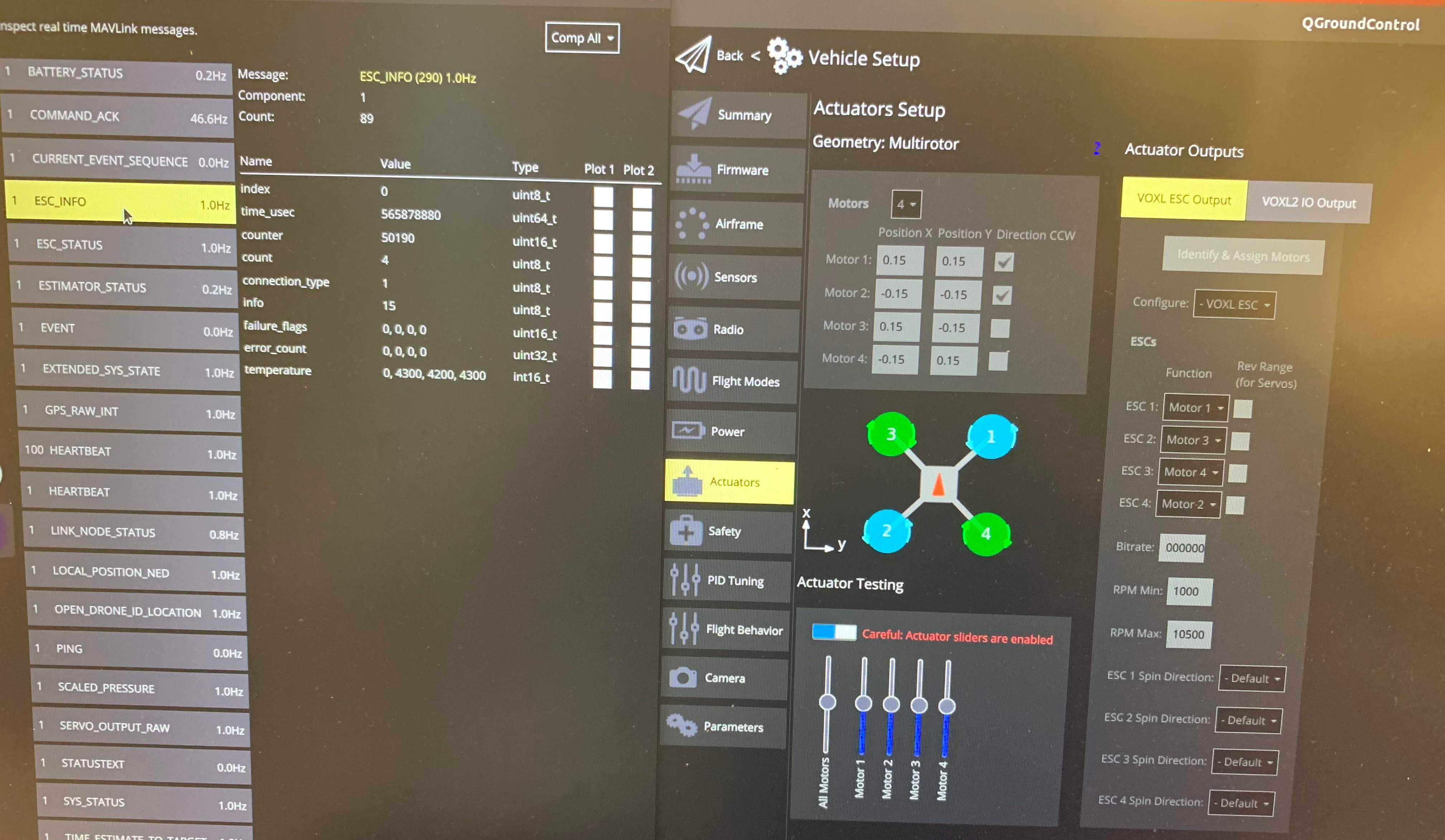
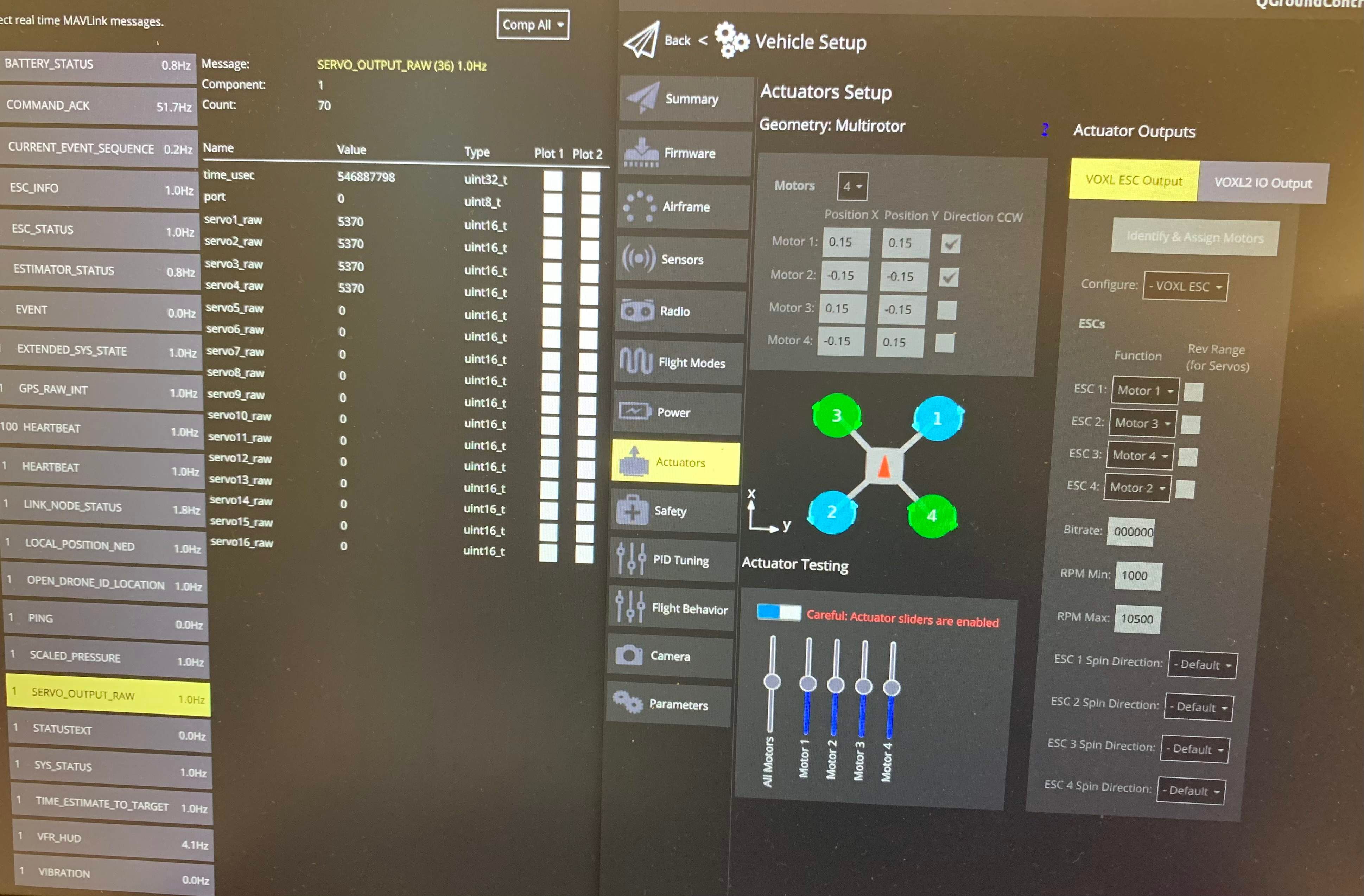
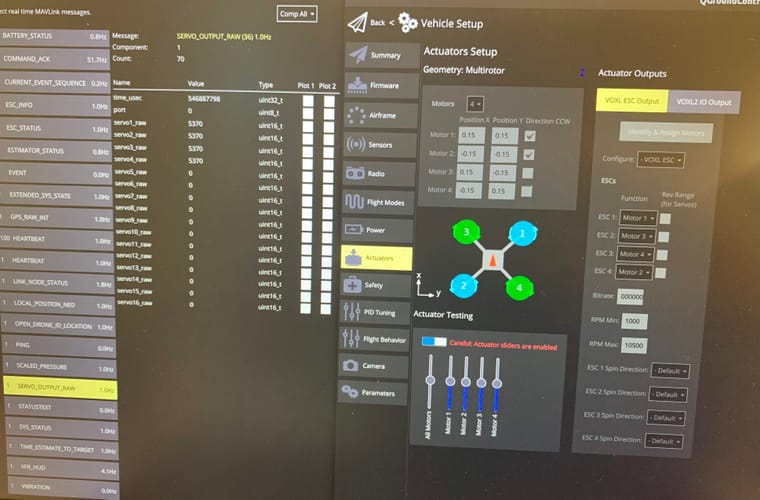
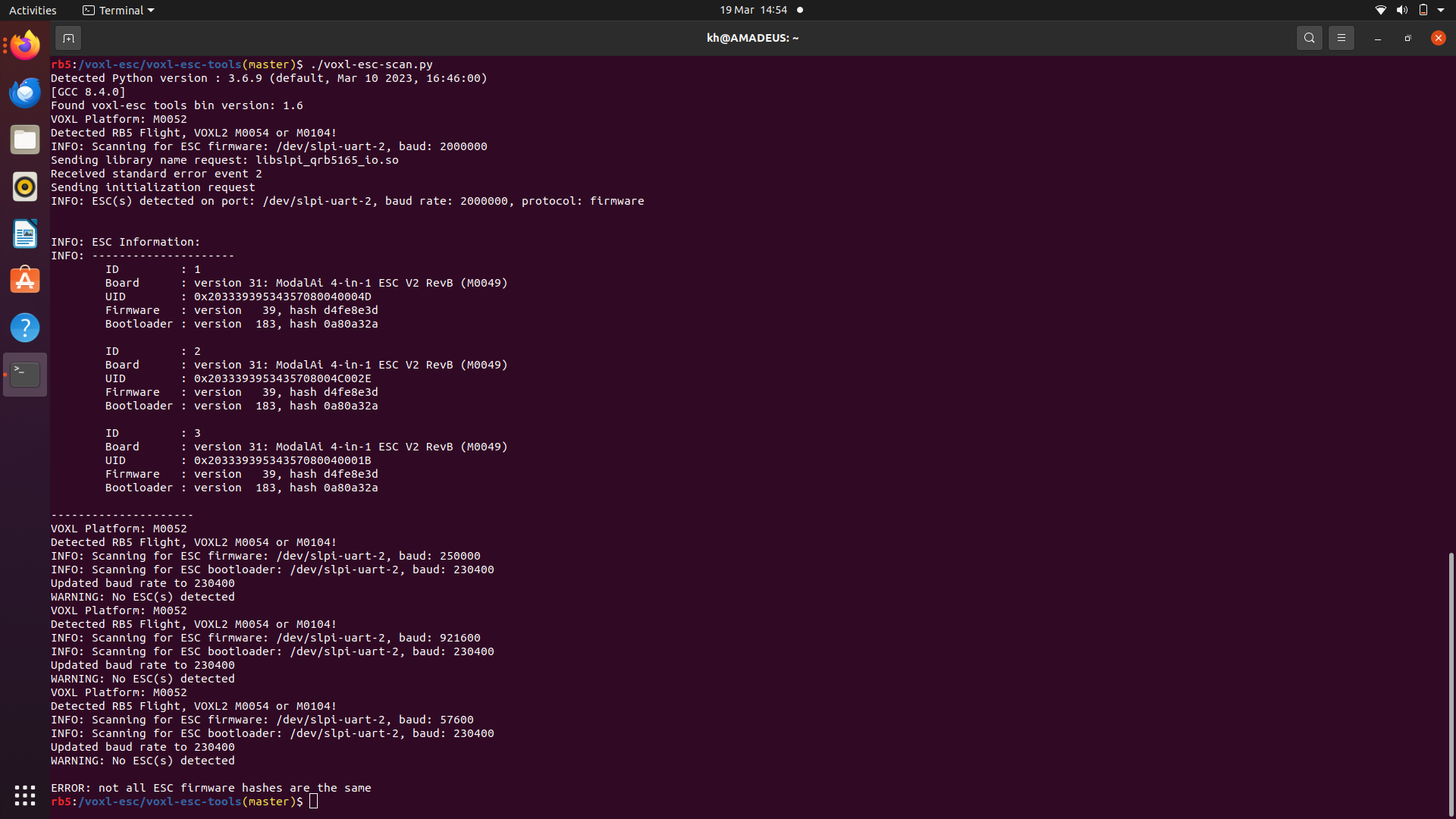
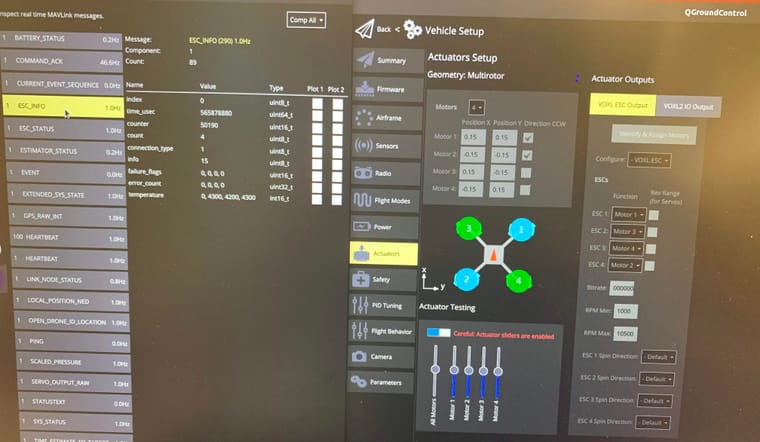
-For the second drone however, it also exhibits the same problems as the first drone but it also has a motor failure. One of the motors is not responsive and exhibits no rotation at all when tests are conducted but no error arises on Qgroundcontrol. As shown in the attached images, while running a motor test one of the ESC's has an output of 0 in all parameters, but the servo output channel shows that they are all operating. Again as shown there is no error count or message displayed. -
Hello,
I am working on two "Qualcomm Flight RB5 5G Platform Drones Reference Design - Qualcomm Flight RB5 5G Drone w/o Modem", bought in march of 2022. They were no used until now. While setting them up I encountered some errors.
First of all I flashed both drones with the appropriate VOXL SDK as mentioned on the guide. After installing Qgroundcontrol I was conducting pre-flight tests and encountered problems with both drones:
-For the first drone, the LED on the GPS module is flashing red however no error is being detected on Qgroundcontrol and all VOXL services are working fine. I suspect this might be due to not having a RC remote and being unable to manually arm the drone but I am not sure. I am also getting a missing parameter message: "missing params: 1:SDLOG_MOD". Other than that the drone seems to be working fine.
-For the second drone however, it also exhibits the same problems as the first drone but it also has a motor failure. One of the motors is not responsive and exhibits no rotation at all when tests are conducted but no error arises on Qgroundcontrol. As shown in the attached images, while running a motor test one of the ESC's has an output of 0 in all parameters, but the servo output channel shows that they are all operating. Again as shown there is no error count or message displayed. -
@kham that software is really old. can you please start by upgrading the software? https://docs.modalai.com/Qualcomm-Flight-RB5-voxl-sdk-upgrade-guide/
-
@kham that software is really old. can you please start by upgrading the software? https://docs.modalai.com/Qualcomm-Flight-RB5-voxl-sdk-upgrade-guide/
-
@Moderatorthank you for the response, however as mentioned before I already followed the guide and both drones are already upgraded and running the latest version of the VOXL SDK released for the RB5 flight.
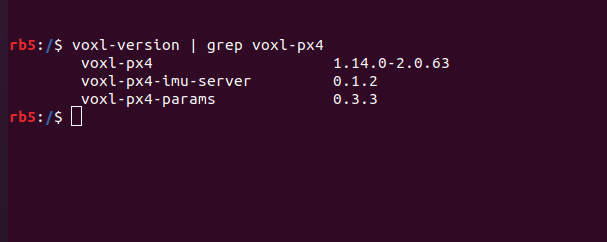
@kham , can you please let us know which version of px4 you are using?
voxl-version | grep voxl-px4Also in your plot above, i see the ESC reports temperatures as [0, 4300, 4200, 4300], for some reason the first ESC is not reporting temperature, there may be a configuration error of the ESC.
Please try the following:
#stop px4
systemctl stop voxl-px4

#scan for ESCs
cd /usr/share/modalai/voxl-esc-tools/
./voxl-esc-scan.py
And let me know what the ESC scan outputs. Thanks!
-
@kham , can you please let us know which version of px4 you are using?
voxl-version | grep voxl-px4Also in your plot above, i see the ESC reports temperatures as [0, 4300, 4200, 4300], for some reason the first ESC is not reporting temperature, there may be a configuration error of the ESC.
Please try the following:
#stop px4
systemctl stop voxl-px4

#scan for ESCs
cd /usr/share/modalai/voxl-esc-tools/
./voxl-esc-scan.py
And let me know what the ESC scan outputs. Thanks!
@Alex-Kushleyev
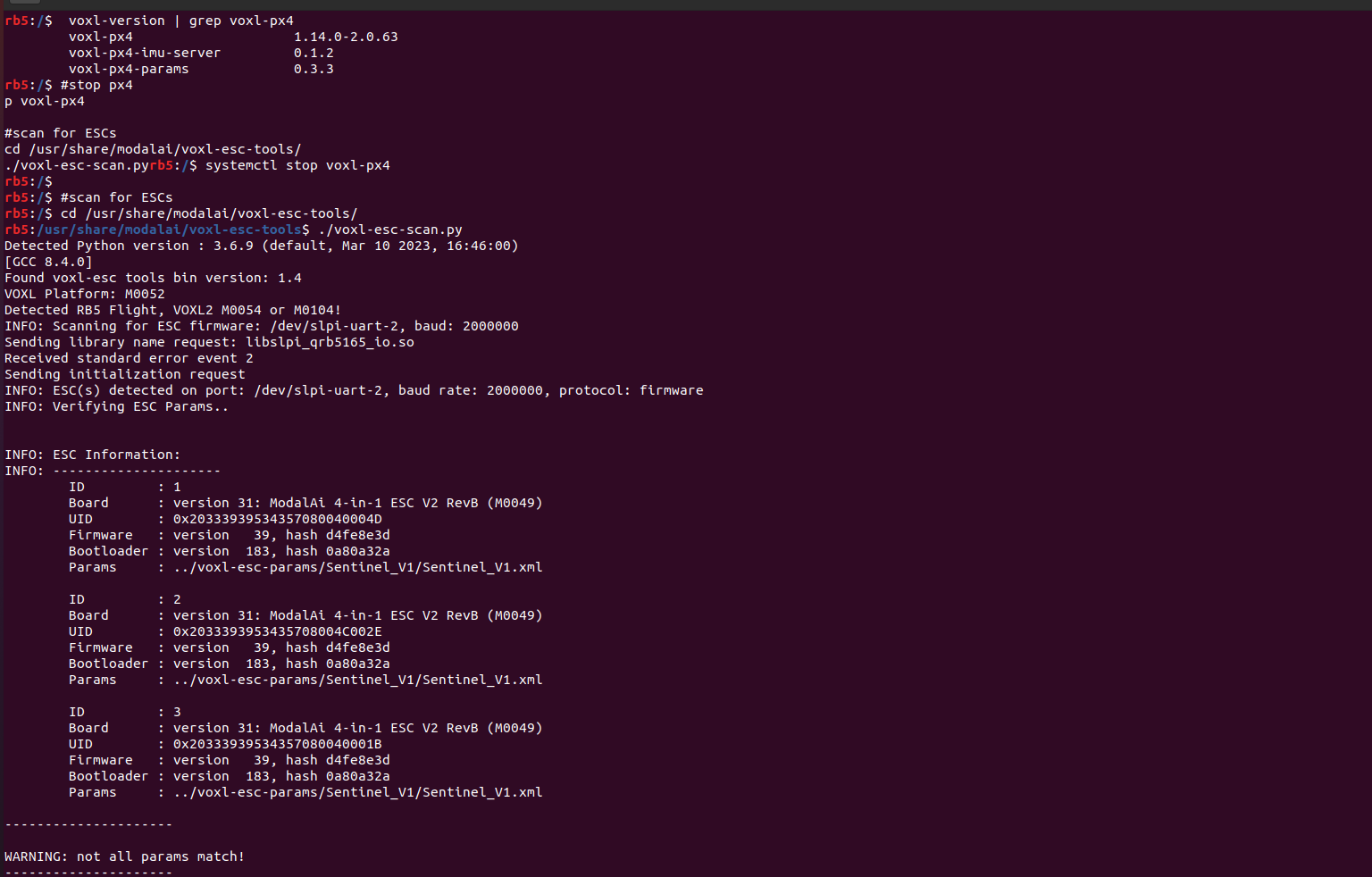
I ran the scan and it seems that one of the ESC's is not appearing on the scan. -
@Alex-Kushleyev
I ran the scan and it seems that one of the ESC's is not appearing on the scan.@kham , yes i see and the results of the scan are consistent with the lack of status report in PX4 ESC status.
Let's try two more things:
- when you power on the vehicle / esc, do you see all 4 ESC channels flash the blue LEDs quickly for 1 second (that is bootloader) and then several slow flashes? Do the motor sounds all sound the same or is one of the ESCs sounds / flashes differently (the ID0)?
- can you please try to do the same esc scan but use the latest
voxl-esctools from the dev branch : https://gitlab.com/voxl-public/voxl-sdk/utilities/voxl-esc/-/tree/dev . the latest tools will scan all baud rates if not all of the ESCs are found. I wonder if the params are out of sync on the 4 ESC channels.
If you do find the ESC0 is using a different baud rate, you can follow this procedure to bring the ESC to a good state with latest firmware : https://gitlab.com/voxl-public/voxl-sdk/utilities/voxl-esc/-/blob/dev/voxl-esc-tools/recovery.md
Thanks!
-
@kham , yes i see and the results of the scan are consistent with the lack of status report in PX4 ESC status.
Let's try two more things:
- when you power on the vehicle / esc, do you see all 4 ESC channels flash the blue LEDs quickly for 1 second (that is bootloader) and then several slow flashes? Do the motor sounds all sound the same or is one of the ESCs sounds / flashes differently (the ID0)?
- can you please try to do the same esc scan but use the latest
voxl-esctools from the dev branch : https://gitlab.com/voxl-public/voxl-sdk/utilities/voxl-esc/-/tree/dev . the latest tools will scan all baud rates if not all of the ESCs are found. I wonder if the params are out of sync on the 4 ESC channels.
If you do find the ESC0 is using a different baud rate, you can follow this procedure to bring the ESC to a good state with latest firmware : https://gitlab.com/voxl-public/voxl-sdk/utilities/voxl-esc/-/blob/dev/voxl-esc-tools/recovery.md
Thanks!
@Alex-Kushleyev thank you for the response
-
When powering on the vehicle only 3 ESC channels flash blue and continuously maintain a fast flashing rate ( they do not flash slowly after the boot).
-
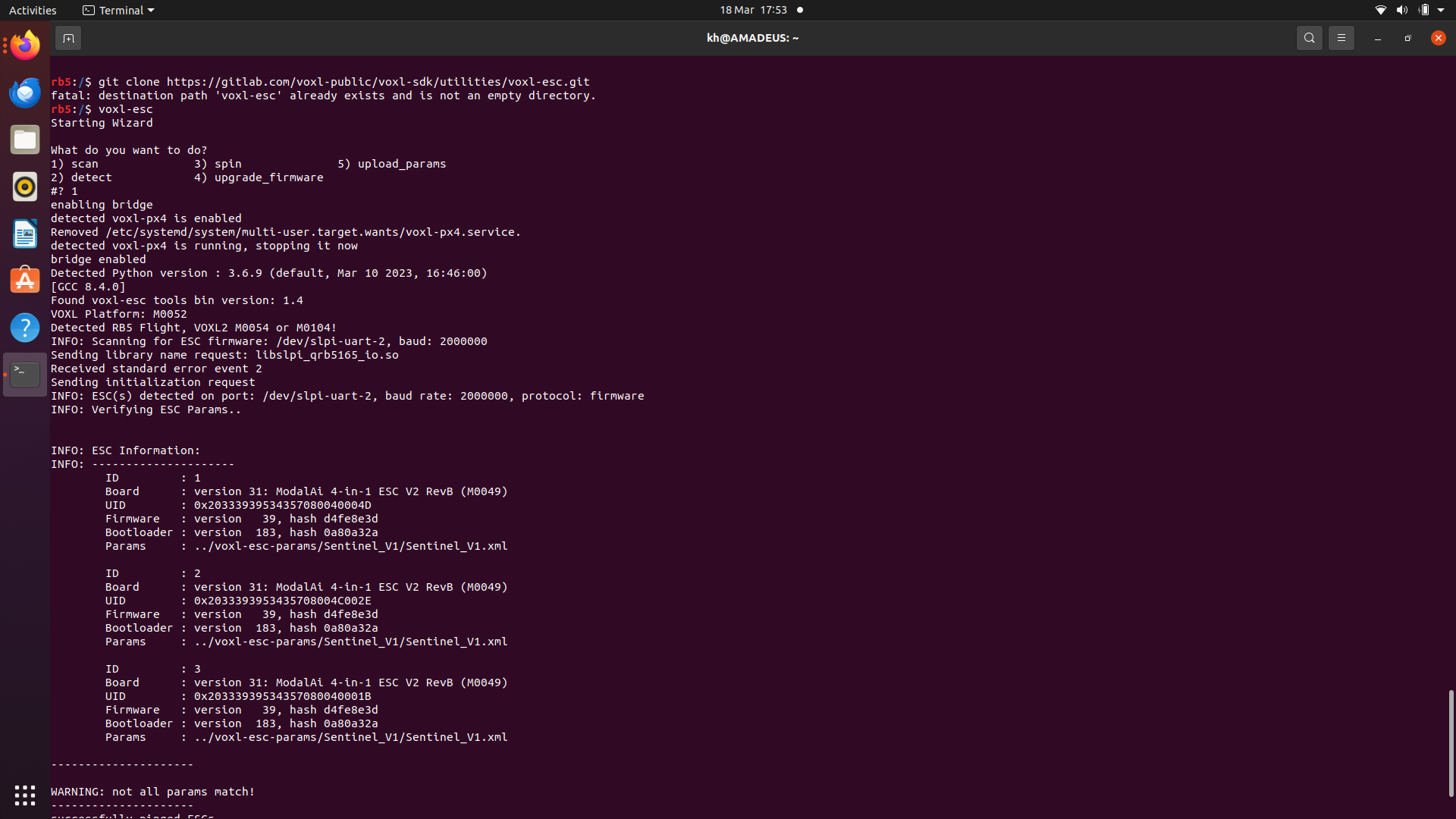
As you can see , i ran the recent versions of the voxl-esc tools pulled from the gitlab repo and the scan remains the same as before.
-
@Alex-Kushleyev thank you for the response
-
When powering on the vehicle only 3 ESC channels flash blue and continuously maintain a fast flashing rate ( they do not flash slowly after the boot).
-
As you can see , i ran the recent versions of the voxl-esc tools pulled from the gitlab repo and the scan remains the same as before.
Please check your output, the
git clonecommand did not work because the directory already existed. Also, you did not specify the branch name. Please do the clone in another location.The correct command is:
git clone https://gitlab.com/voxl-public/voxl-sdk/utilities/voxl-esc.git -b dev

#stop px4 and scan
systemctl stop voxl-px4
cd voxl-esc/voxl-esc-tools
./voxl-esc-scan.py
(essentially, the first few steps of the document i referenced in my previous post: https://gitlab.com/voxl-public/voxl-sdk/utilities/voxl-esc/-/blob/dev/voxl-esc-tools/recovery.md)
Now, you said that only three blue LEDs flash on the ESC - does the 4th blue LED every light up?
Thank you
Alex
-
-
Please check your output, the
git clonecommand did not work because the directory already existed. Also, you did not specify the branch name. Please do the clone in another location.The correct command is:
git clone https://gitlab.com/voxl-public/voxl-sdk/utilities/voxl-esc.git -b dev

#stop px4 and scan
systemctl stop voxl-px4
cd voxl-esc/voxl-esc-tools
./voxl-esc-scan.py
(essentially, the first few steps of the document i referenced in my previous post: https://gitlab.com/voxl-public/voxl-sdk/utilities/voxl-esc/-/blob/dev/voxl-esc-tools/recovery.md)
Now, you said that only three blue LEDs flash on the ESC - does the 4th blue LED every light up?
Thank you
Alex
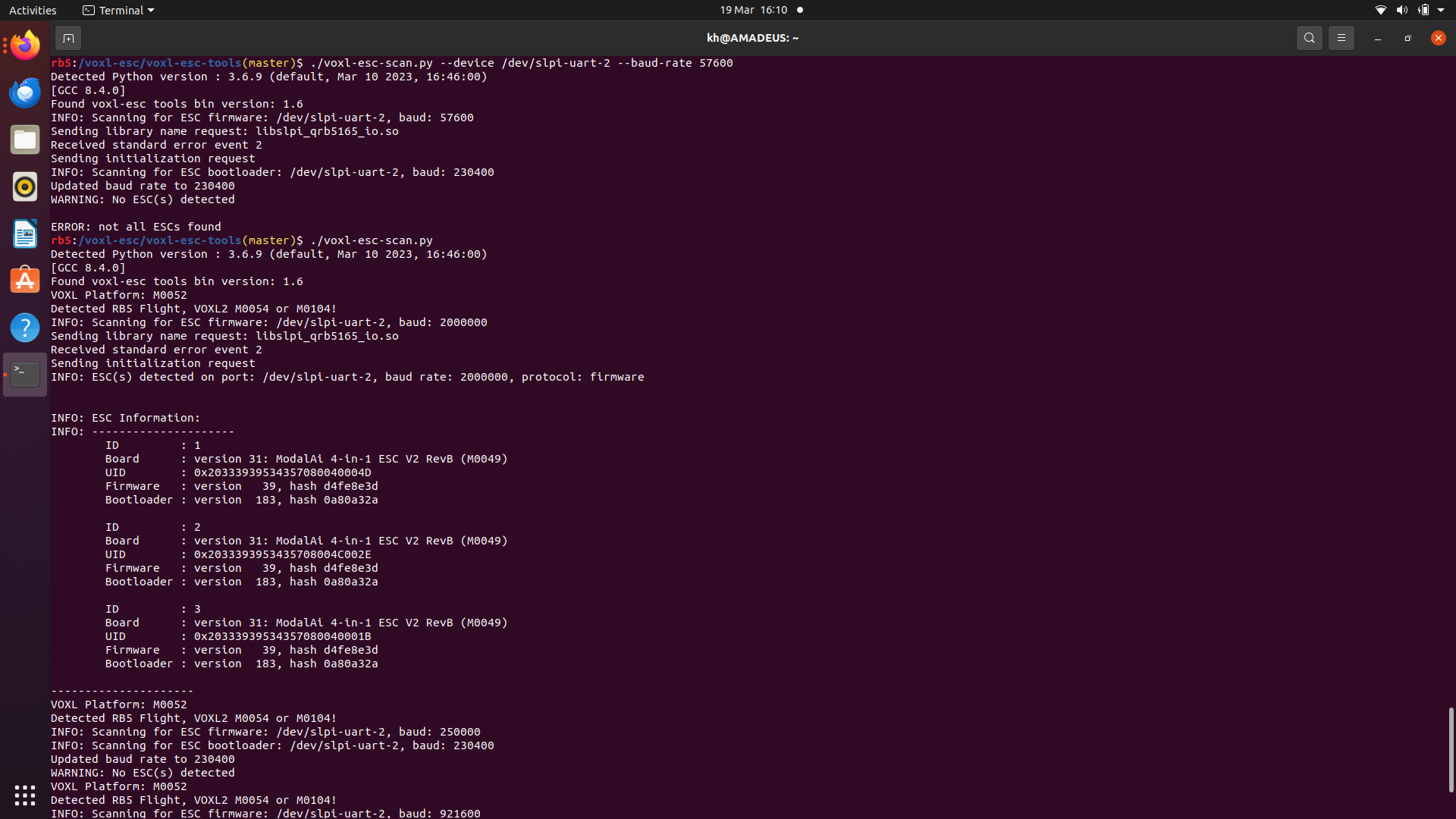
@Alex-Kushleyev thank you for the clarification, i ran the code as instructed and the output is still consistent.
As for the blue LED's the forth one only flashes at the beginning for 1 second with the other LED's (when i plug-in the battery) after that they all turn off and then only 3 LED's continuously flash blue.
-
@Alex-Kushleyev thank you for the clarification, i ran the code as instructed and the output is still consistent.
As for the blue LED's the forth one only flashes at the beginning for 1 second with the other LED's (when i plug-in the battery) after that they all turn off and then only 3 LED's continuously flash blue.
@kham , thank you for the details.
The fact that ESC ID0 also flashes at the beginning for 1 second and then the led turns off means that the bootloader starts up, runs for 1 second, verifies the firmware and start executing the firmware. So the last thing that could be wrong on ESC ID0 are the ESC params that have potentially got corrupted. I am not sure why the scan does not detect it though.
Has the ESC worked fine in the past with all 4 channels working? Perhaps something happened during an SDK upgrade when ESC firmware and params were updated? (sometimes an error happens during this process, causing ESC params to fail to upload)
Can you please try again and run this several times just to make sure.. forcing the baud rate to 57600 which is the fallback baud rate if the params on ESC are not valid (the baud rate is part of params, so if params are corrupt, ESC will default to 57600 baud rate).
./voxl-esc-scan.py --device /dev/slpi-uart-2 --baud-rate 57600you can also try forcing to install params this way:
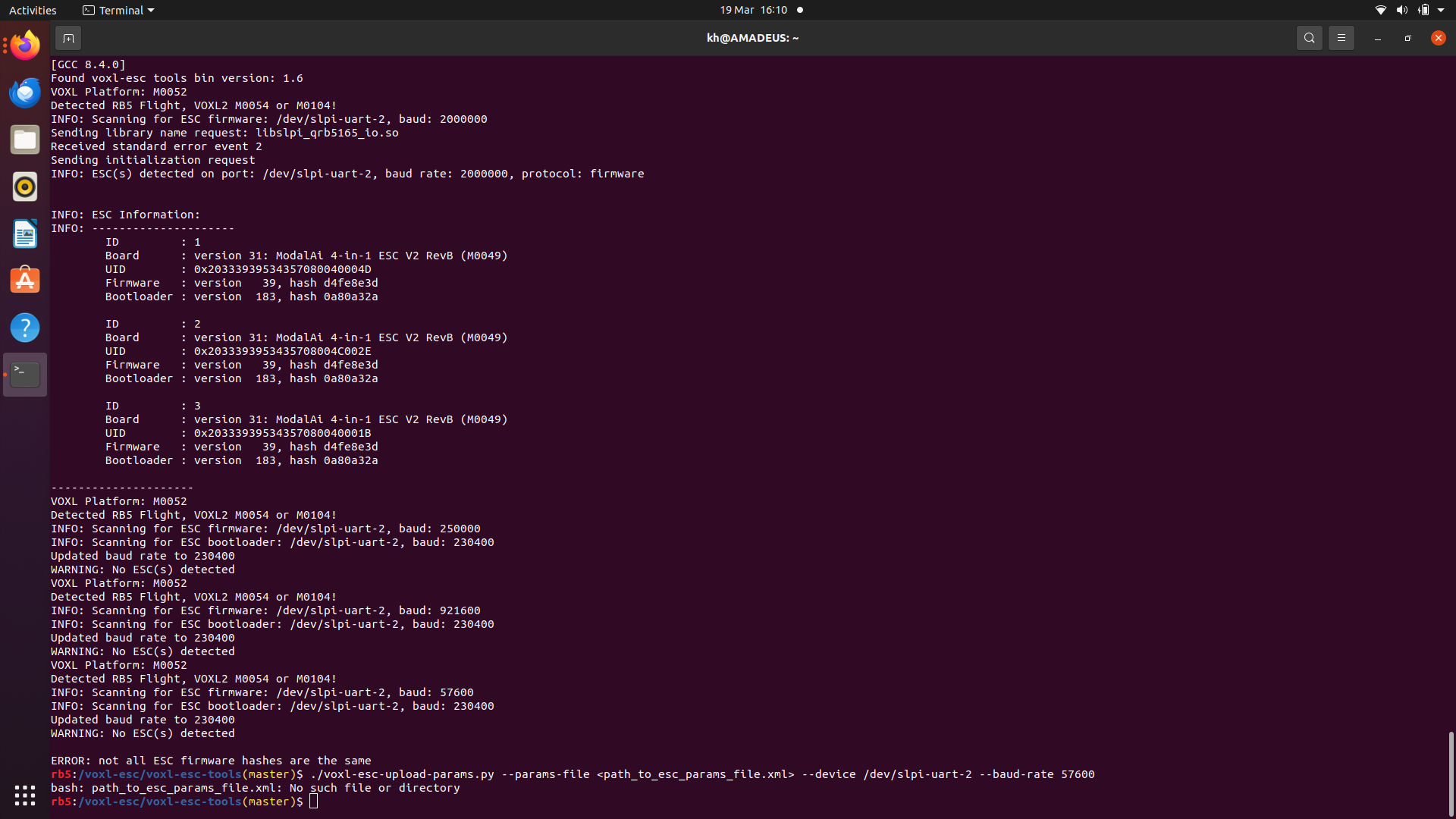
./voxl-esc-upload-params.py --params-file <path_to_esc_params_file.xml> --device /dev/slpi-uart-2 --baud-rate 57600thank you
-
@Alex-Kushleyev thank you for the clarification, i ran the code as instructed and the output is still consistent.
As for the blue LED's the forth one only flashes at the beginning for 1 second with the other LED's (when i plug-in the battery) after that they all turn off and then only 3 LED's continuously flash blue.
-
@kham thank you for the reply, i ran the scan multiple times and was met with the same output. I ran the baud update but still got the same output. I tried to force install but it didn't work.
@kham OK, thank you. can you please let me know if ID0 used to work (meaning, all 4 motors working / spinning) and something happened or it never worked on this ESC board?
-
@kham OK, thank you. can you please let me know if ID0 used to work (meaning, all 4 motors working / spinning) and something happened or it never worked on this ESC board?
This post is deleted! -
@kham OK, thank you. can you please let me know if ID0 used to work (meaning, all 4 motors working / spinning) and something happened or it never worked on this ESC board?
@Alex-Kushleyev I was the first to use the drones after they were bought and after updating the drone and setting up the SDK the motor didn't work, so no there was no time were all the motors were working. Also we do not have a radio controller so all testing is done through Qgroundcontrol.
-
@Alex-Kushleyev I was the first to use the drones after they were bought and after updating the drone and setting up the SDK the motor didn't work, so no there was no time were all the motors were working. Also we do not have a radio controller so all testing is done through Qgroundcontrol.
@kham , thank you for the information. Since the ESC originally cam in a drone, then it was originally working, so at least that is good.
Do you think you would be able to take a short video of the 4 blue LEDs on the ESC for several seconds after you apply the power to the ESC and until the LEDs just shut off. No need to run PX4.
-
@kham , thank you for the information. Since the ESC originally cam in a drone, then it was originally working, so at least that is good.
Do you think you would be able to take a short video of the 4 blue LEDs on the ESC for several seconds after you apply the power to the ESC and until the LEDs just shut off. No need to run PX4.
If we are not able to resolve this soon, i would recommend replacing the ESC, you could then submit RMA form : https://www.modalai.com/pages/rma .
In majority of cases, the scanning script should find the ESC even if it is missing firmware or params, so I am slightly confused why this is happening. It could be a hardware issue on the ESC.
The ESC you have now is board version M0049, which is older than the current version of the ESC and is no longer in production. If you are going to request a replacement of the ESC, you will most likely receive M0134-1 which is just a newer revision (not really better or worse, the functionality is the same). https://www.modalai.com/products/voxl-esc
In order to rule our the RB5 UART issues, if you are open to continuing to debug, i would recommend making an adapter using a USB-to-serial adapter and Hirose DF13 6-pin connector, then you could use
voxl-esctools on a PC and there is more flexibility in debugging. Please let me know if you would like to explore this option.


Reading along? Create a free ModalAI Forum account to join in.
With an account you can reply, ask your own question, get an email when a ModalAI engineer answers, and mark the reply that solved it. Your place in each thread is saved between visits.
Questions about VOXL, Flight Core, ESCs and ModalAI drones are answered here by the engineers who build them.
Register Login