
USB tethering with VOXL
-
Hi,
I have been following this thread https://forum.modalai.com/topic/851/rndis-connection?_=1704780402514.
I have a Jetson nano and a Voxl flight deck with the base Linux Yocto Jethro with 3.18 kernel System Image but my jetson nano does not have any Ethernet port and wireless adapter.
I was planning to reverse USB tether so that the network from voxl can extend to the jetson nano.By default, the jetson nano have a usb0 virtual Ethernet interface and I verify it by connecting my PC (host) and jetson nano (device).
https://jetbot.org/master/software_setup/wifi_setup.html.However, there is no interface when i try to connect my voxl (host) to jetson nano (device).
From the guide, https://docs.modalai.com/voxl-as-usb-host , i suspect it is my OTG cable being incompatible.With that, i am considering setting up rndis for the voxl flight such that i can do jetson nano (host) and voxl (device) instead.
Is there a guide on how to do so? Or will it be less pain to just get different cables and retry. -
Hi,
I have been following this thread https://forum.modalai.com/topic/851/rndis-connection?_=1704780402514.
I have a Jetson nano and a Voxl flight deck with the base Linux Yocto Jethro with 3.18 kernel System Image but my jetson nano does not have any Ethernet port and wireless adapter.
I was planning to reverse USB tether so that the network from voxl can extend to the jetson nano.By default, the jetson nano have a usb0 virtual Ethernet interface and I verify it by connecting my PC (host) and jetson nano (device).
https://jetbot.org/master/software_setup/wifi_setup.html.However, there is no interface when i try to connect my voxl (host) to jetson nano (device).
From the guide, https://docs.modalai.com/voxl-as-usb-host , i suspect it is my OTG cable being incompatible.With that, i am considering setting up rndis for the voxl flight such that i can do jetson nano (host) and voxl (device) instead.
Is there a guide on how to do so? Or will it be less pain to just get different cables and retry. -
Dear @Moderator,
That is true but we are expecting a data rate much higher than what UART is able to provide.
-
Dear @Moderator,
That is true but we are expecting a data rate much higher than what UART is able to provide.
@skl1g14 , can you please confirm that you are using VOXL1 or VOXL2?
-
@skl1g14 , can you please confirm that you are using VOXL1 or VOXL2?
-
@Alex-Kushleyev
voxl1@skl1g14 , thank you for confirming
Yes if you would like to use VOXL1 as host via OTG connector, you need to have a special cable.
A few other options:
- since VOXL1 has on-board wifi, can you just plug in a wifi dongle into your Jetson Nano (VOXL1 can be a wifi AP or station)
- this seems like the option requiring least amount of adapters!
- using USB expander board (https://docs.modalai.com/usb-to-ethernet-with-voxl/) you could add USB-to-ethernet adapter to VOXL and plug in another USB-ethernet adapter into Jetson Nano .. and connect it all together using an ethernet cable.. too many adapters though!
I don't think we ever tried to do USB tethering with VOXL. That would also require enabling a usb gadget kernel module : https://linuxlink.timesys.com/docs/wiki/engineering/HOWTO_Use_USB_Gadget_Ethernet
- since VOXL1 has on-board wifi, can you just plug in a wifi dongle into your Jetson Nano (VOXL1 can be a wifi AP or station)
-
@skl1g14 , thank you for confirming
Yes if you would like to use VOXL1 as host via OTG connector, you need to have a special cable.
A few other options:
- since VOXL1 has on-board wifi, can you just plug in a wifi dongle into your Jetson Nano (VOXL1 can be a wifi AP or station)
- this seems like the option requiring least amount of adapters!
- using USB expander board (https://docs.modalai.com/usb-to-ethernet-with-voxl/) you could add USB-to-ethernet adapter to VOXL and plug in another USB-ethernet adapter into Jetson Nano .. and connect it all together using an ethernet cable.. too many adapters though!
I don't think we ever tried to do USB tethering with VOXL. That would also require enabling a usb gadget kernel module : https://linuxlink.timesys.com/docs/wiki/engineering/HOWTO_Use_USB_Gadget_Ethernet
Hi Alex, thanks for the quick response.
For now we are going option A with a wifi adapter. That works well.In the meantime I am moving on to other stuff.
I tried recompiling the kernel with https://gitlab.com/voxl-public/system-image-build/meta-voxl/-/tree/master?ref_type=heads enabling the usb_gadget flag but no luck so far.
Apparently yocto does not have a simple way to just "make menuconfig"Will keep this post updated if i manage to get it.
- since VOXL1 has on-board wifi, can you just plug in a wifi dongle into your Jetson Nano (VOXL1 can be a wifi AP or station)
-
Hi Alex, thanks for the quick response.
For now we are going option A with a wifi adapter. That works well.In the meantime I am moving on to other stuff.
I tried recompiling the kernel with https://gitlab.com/voxl-public/system-image-build/meta-voxl/-/tree/master?ref_type=heads enabling the usb_gadget flag but no luck so far.
Apparently yocto does not have a simple way to just "make menuconfig"Will keep this post updated if i manage to get it.
Here is the hack if anyone needs it.
The latest platform image have the RNDIS host flag set. https://gitlab.com/voxl-public/system-image-build/meta-voxl/-/blob/master/recipes-kernel/linux-quic/files/enable_RNDIS_HOST.cfg?ref_type=heads
-
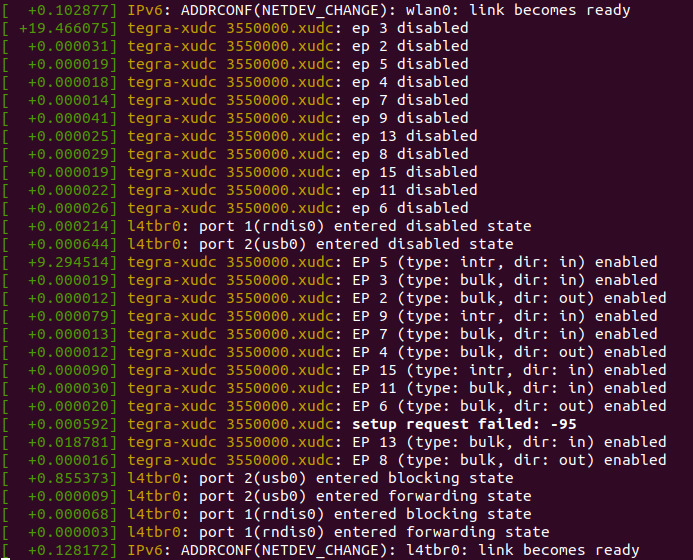
First step is to get a compatible OTG cable. I got an off-brand one that works. Run dmesg -wH on your jetson carrier board. If there are the usb0/rndis0/l4tbr0 means the connection is solid.
-
In voxl, save the following script somewhere. /home/root/usb_tethering.sh is a good choice.
#!/bin/bash # Enable IP forwarding echo 1 > /proc/sys/net/ipv4/ip_forward # Bring up usb0 interface ifconfig usb0 up # Assign IP address to usb0 ifconfig usb0 192.168.55.2 netmask 255.255.255.0 # Add route for USB network route add -net 192.168.55.0 netmask 255.255.255.0 dev usb0 # Set up iptables rules for NAT iptables -A FORWARD -o wlan0 -i usb0 -s 192.168.55.0/24 -m conntrack --ctstate NEW -j ACCEPT iptables -A FORWARD -m conntrack --ctstate ESTABLISHED,RELATED -j ACCEPT iptables -t nat -A POSTROUTING -o wlan0 -j MASQUERADE- Make it persistent by creating a systemd service. Save it at /etc/systemd/system/tethering.service
[Unit] Description=USB Tethering Service After=network.target [Service] Type=simple ExecStart=/home/root/usb_tethering.sh [Install] WantedBy=default.target- Run the following
sudo systemctl daemon-reload sudo systemctl enable tethering.service-
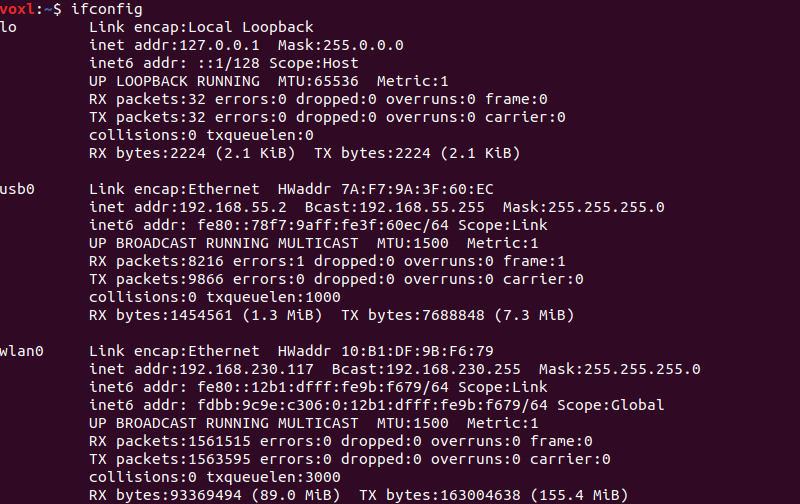
Check with ifconfig on voxl (should have a static addr 192.168.55.2 for usb0 interface)
-
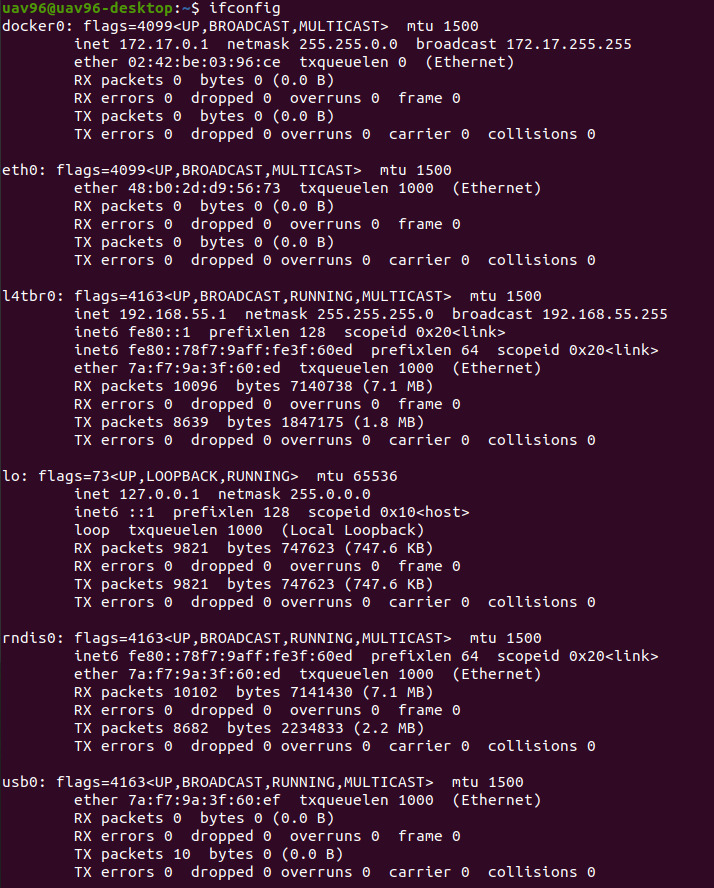
Check with ifconfig on jetson carrier board (the l4tbr0 default addr should be 192.168.55.1)
-
Try pinging each other (optional)
-
In voxl, set to station mode and connect to a access point. For jetson carrier board, check if it is possible to connect to a public web.
ping google.com
- In jetson, the dns nameserver for the l4tbr0 interface may need to change to 8.8.8.8.
Check with
systemd-resolve --status- Alternatively, change globally by modifying the nameserver address to 8.8.8.8 at /etc/resolv.conf
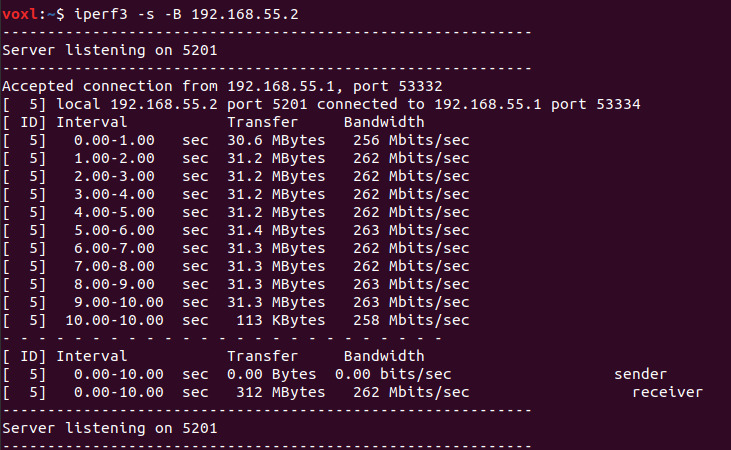
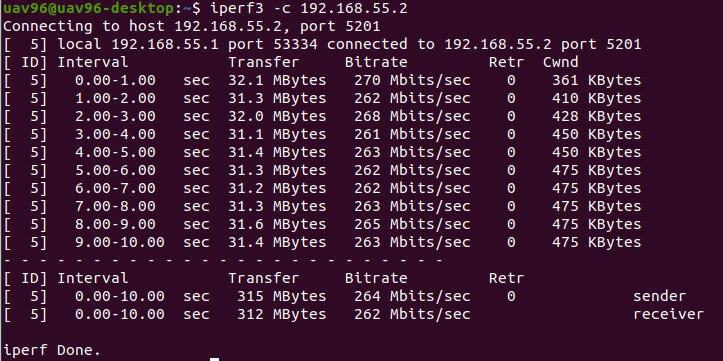
Bandwidth ~ 265 Mbps which should be expected from a usb2.0 controller (max 480 Mbps) and the overhead from the interfaces.
-
-
Here is the hack if anyone needs it.
The latest platform image have the RNDIS host flag set. https://gitlab.com/voxl-public/system-image-build/meta-voxl/-/blob/master/recipes-kernel/linux-quic/files/enable_RNDIS_HOST.cfg?ref_type=heads
-
First step is to get a compatible OTG cable. I got an off-brand one that works. Run dmesg -wH on your jetson carrier board. If there are the usb0/rndis0/l4tbr0 means the connection is solid.
-
In voxl, save the following script somewhere. /home/root/usb_tethering.sh is a good choice.
#!/bin/bash # Enable IP forwarding echo 1 > /proc/sys/net/ipv4/ip_forward # Bring up usb0 interface ifconfig usb0 up # Assign IP address to usb0 ifconfig usb0 192.168.55.2 netmask 255.255.255.0 # Add route for USB network route add -net 192.168.55.0 netmask 255.255.255.0 dev usb0 # Set up iptables rules for NAT iptables -A FORWARD -o wlan0 -i usb0 -s 192.168.55.0/24 -m conntrack --ctstate NEW -j ACCEPT iptables -A FORWARD -m conntrack --ctstate ESTABLISHED,RELATED -j ACCEPT iptables -t nat -A POSTROUTING -o wlan0 -j MASQUERADE- Make it persistent by creating a systemd service. Save it at /etc/systemd/system/tethering.service
[Unit] Description=USB Tethering Service After=network.target [Service] Type=simple ExecStart=/home/root/usb_tethering.sh [Install] WantedBy=default.target- Run the following
sudo systemctl daemon-reload sudo systemctl enable tethering.service-
Check with ifconfig on voxl (should have a static addr 192.168.55.2 for usb0 interface)
-
Check with ifconfig on jetson carrier board (the l4tbr0 default addr should be 192.168.55.1)
-
Try pinging each other (optional)
-
In voxl, set to station mode and connect to a access point. For jetson carrier board, check if it is possible to connect to a public web.
ping google.com- In jetson, the dns nameserver for the l4tbr0 interface may need to change to 8.8.8.8.
Check with
systemd-resolve --status- Alternatively, change globally by modifying the nameserver address to 8.8.8.8 at /etc/resolv.conf
Bandwidth ~ 265 Mbps which should be expected from a usb2.0 controller (max 480 Mbps) and the overhead from the interfaces.
@skl1g14 , very nice!! Thank you for documenting your configuration and results!!
-


Reading along? Create a free ModalAI Forum account to join in.
With an account you can reply, ask your own question, get an email when a ModalAI engineer answers, and mark the reply that solved it. Your place in each thread is saved between visits.
Questions about VOXL, Flight Core, ESCs and ModalAI drones are answered here by the engineers who build them.
Register Login