Skip to content
  • Categories
  • Recent
  • Tags
  • Popular
  • Users
  • Groups
Collapse
Brand Logo

ModalAI Forum

  1. ModalAI Support Forum
  2. VOXL Compute & Autopilot
  3. VOXL Flight
  4. ADB devices not found on after following "boot camp" on wsl windows 10

ADB devices not found on after following "boot camp" on wsl windows 10

Scheduled Pinned Locked Moved VOXL Flight
12 Posts 3 Posters 3.1k Views 1 Watching
  • Oldest to Newest
  • Newest to Oldest
  • Most Votes
Reply
  • Reply as topic
Log in to reply
This topic has been deleted. Only users with topic management privileges can see it.
  • rdjarvisR rdjarvis

    I followed all instructions in the "boot camp" section and after all updates/installs, kill-server, start-server...etc.
    No ADB devices are visible in wsl.
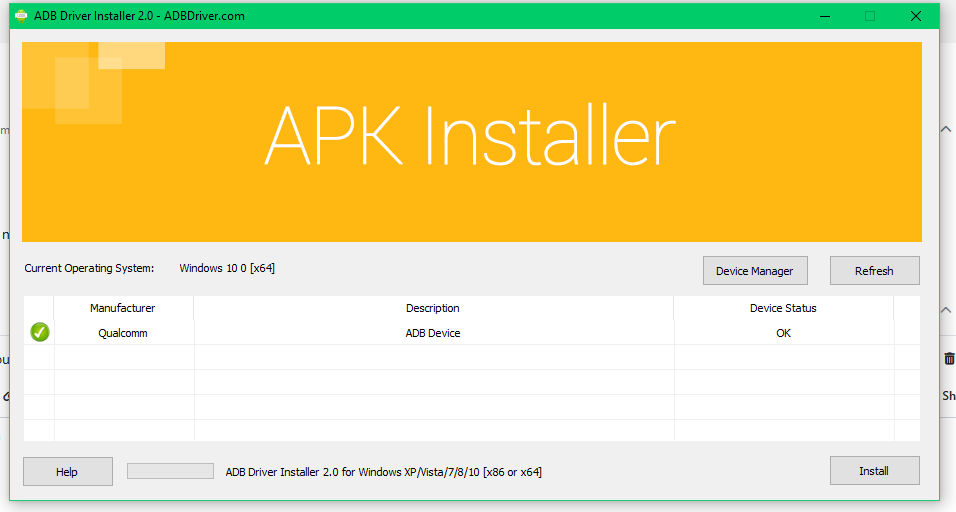
    VOXL is visible when running ADB Driver 2.0 on the PC, but cannot see devices in wsl.

    Suggestions?

    Thanks,
    RDJ

    tomT Offline
    tomT Offline
    tom
    admin
    wrote on last edited by
    #2

    @rdjarvis Our resident WSL expert says to do the following:

    In normal windows command prompt (outside of WSDL)

    adb kill-server
    
    adb start-server
    

    then check in WSL

    rdjarvisR 2 Replies Last reply
    0
    • tomT tom

      @rdjarvis Our resident WSL expert says to do the following:

      In normal windows command prompt (outside of WSDL)

      adb kill-server
      
      adb start-server
      

      then check in WSL

      rdjarvisR Offline
      rdjarvisR Offline
      rdjarvis
      Regular
      wrote on last edited by
      #3

      @tom Ill try that right now!

      1 Reply Last reply
      0
      • tomT tom

        @rdjarvis Our resident WSL expert says to do the following:

        In normal windows command prompt (outside of WSDL)

        adb kill-server
        
        adb start-server
        

        then check in WSL

        rdjarvisR Offline
        rdjarvisR Offline
        rdjarvis
        Regular
        wrote on last edited by
        #4

        @tom this is what windows command prompt tells me when running "adb kill-server"
        'adb' is not recognized as an internal or external command,
        operable program or batch file.

        tomT 1 Reply Last reply
        0
        • rdjarvisR rdjarvis

          @tom this is what windows command prompt tells me when running "adb kill-server"
          'adb' is not recognized as an internal or external command,
          operable program or batch file.

          tomT Offline
          tomT Offline
          tom
          admin
          wrote on last edited by
          #5

          @rdjarvis I was under the impression that "VOXL is visible when running ADB Driver 2.0 on the PC" meant you were able to access adb on your normal command prompt

          rdjarvisR 1 Reply Last reply
          0
          • tomT tom

            @rdjarvis I was under the impression that "VOXL is visible when running ADB Driver 2.0 on the PC" meant you were able to access adb on your normal command prompt

            rdjarvisR Offline
            rdjarvisR Offline
            rdjarvis
            Regular
            wrote on last edited by
            #6

            @tom sorry for the confusion. Here is a screenshot. Screenshot (5).png

            tomT 1 Reply Last reply
            0
            • rdjarvisR rdjarvis

              @tom sorry for the confusion. Here is a screenshot. Screenshot (5).png

              tomT Offline
              tomT Offline
              tom
              admin
              wrote on last edited by
              #7

              @rdjarvis I'm not familiar with that tool unfortunately, I would follow the instructions here starting with the section titled "How to set up ADB on Microsoft Windows" with the Android SDK installed from https://dl.google.com/android/repository/platform-tools-latest-windows.zip

              rdjarvisR 1 Reply Last reply
              0
              • tomT tom

                @rdjarvis I'm not familiar with that tool unfortunately, I would follow the instructions here starting with the section titled "How to set up ADB on Microsoft Windows" with the Android SDK installed from https://dl.google.com/android/repository/platform-tools-latest-windows.zip

                rdjarvisR Offline
                rdjarvisR Offline
                rdjarvis
                Regular
                wrote on last edited by
                #8

                @tom thank you, I will get started

                VinnyV 1 Reply Last reply
                0
                • rdjarvisR rdjarvis

                  @tom thank you, I will get started

                  VinnyV Offline
                  VinnyV Offline
                  Vinny
                  ModalAI Team
                  wrote on last edited by
                  #9

                  Hi @rdjarvis ,
                  Once you have adb tools installed on your PC, I've successfully used WSL as Tom mentioned only after trying the kill and restart commands in command window/prompt. Sometimes it may take a few tries in the command prompt, but once I get Windows command prompt to see the adb device, WSL always sees it.
                  I cannot speak to other utilities, but command prompt always works for me.
                  I tried the reverse and it doesn't work, so I think some configurations require Windows to see the adb device first before it let's WSL see it.
                  Hope that helps.

                  rdjarvisR 1 Reply Last reply
                  0
                  • VinnyV Vinny

                    Hi @rdjarvis ,
                    Once you have adb tools installed on your PC, I've successfully used WSL as Tom mentioned only after trying the kill and restart commands in command window/prompt. Sometimes it may take a few tries in the command prompt, but once I get Windows command prompt to see the adb device, WSL always sees it.
                    I cannot speak to other utilities, but command prompt always works for me.
                    I tried the reverse and it doesn't work, so I think some configurations require Windows to see the adb device first before it let's WSL see it.
                    Hope that helps.

                    rdjarvisR Offline
                    rdjarvisR Offline
                    rdjarvis
                    Regular
                    wrote on last edited by
                    #10

                    @Vinny thanks, just got into the office and will start over. I wasnt successful with the ADB platform tools.....yet

                    1 Reply Last reply
                    0
                    • rdjarvisR Offline
                      rdjarvisR Offline
                      rdjarvis
                      Regular
                      wrote on last edited by
                      #11

                      UPDATE
                      ADB Devices are now visible in Windows CMD after I updated the system path in environment variables.

                      Now the fun begins

                      tomT 1 Reply Last reply
                      0
                      • rdjarvisR rdjarvis

                        UPDATE
                        ADB Devices are now visible in Windows CMD after I updated the system path in environment variables.

                        Now the fun begins

                        tomT Offline
                        tomT Offline
                        tom
                        admin
                        wrote on last edited by
                        #12

                        @rdjarvis Woot! Enjoy!

                        1 Reply Last reply
                        0

                        Hello! It looks like you're interested in this conversation, but you don't have an account yet.

                        Getting fed up of having to scroll through the same posts each visit? When you register for an account, you'll always come back to exactly where you were before, and choose to be notified of new replies (either via email, or push notification). You'll also be able to save bookmarks and upvote posts to show your appreciation to other community members.

                        With your input, this post could be even better 💗

                        Register Login
                        Reply
                        • Reply as topic
                        Log in to reply
                        • Oldest to Newest
                        • Newest to Oldest
                        • Most Votes


                        ModalAI
                        Categories Recent Tags ModalAI.com Docs
                        © 2026 ModalAI® · Accelerating autonomy for smaller, smarter, safer drones · Powered by NodeBB
                        • Login

                        • Don't have an account? Register

                        • Login or register to search.
                        • First post
                          Last post
                        0
                        • Categories
                        • Recent
                        • Tags
                        • Popular
                        • Users
                        • Groups