
Voxl Streamer Config
-
I'm trying to get an RTSP stream to start at a certain port and using the qvio overlay pipe on bootup, but it always defaults to hires pipe at the default 8900 port. I've edited the /etc/modal/voxl_streamer.config file to reflect my changes but they never take when I just run voxl-streamer afterwards. I also tried to run the voxl-configure-streamer command but it will overwrite the config to the defaults. Even when I add arguments to the voxl-configure-streamer command, if I then go run voxl-streamer, they will use default arguments. The only way to open the custom stream is to do voxl-streamer command but with arguments but I'd like this to happen by default on boot. Any thoughts??
-
I'm trying to get an RTSP stream to start at a certain port and using the qvio overlay pipe on bootup, but it always defaults to hires pipe at the default 8900 port. I've edited the /etc/modal/voxl_streamer.config file to reflect my changes but they never take when I just run voxl-streamer afterwards. I also tried to run the voxl-configure-streamer command but it will overwrite the config to the defaults. Even when I add arguments to the voxl-configure-streamer command, if I then go run voxl-streamer, they will use default arguments. The only way to open the custom stream is to do voxl-streamer command but with arguments but I'd like this to happen by default on boot. Any thoughts??
-
@bendraper That doesn't sound like things are working as expected.
What software release are you using? Can you post the output of
voxl-version?Can we also see your full voxl-streamer conf file:
cat /etc/modalai/voxl-streamer.confOutput of voxl-version
--------------------------------------------------------------------------------
system-image: 1.4.1-M0054-14.1a-perf
kernel:       #1 SMP PREEMPT Thu Oct 13 17:48:16 UTC 2022 4.19.125
--------------------------------------------------------------------------------
hw version:   M0054
--------------------------------------------------------------------------------
voxl-suite:   0.9.4
--------------------------------------------------------------------------------
Packages:
Repo:  http://voxl-packages.modalai.com/ ./dists/qrb5165/sdk-0.9/binary-arm64/
Last Updated: 2022-09-06 03:18:50
WARNING: repo file has changed since last update,
        packages may have originated from a different repo
List:
        libmodal-cv              0.2.3
        libmodal-exposure        0.0.7
        libmodal-journal         0.2.1
        libmodal-json            0.4.3
        libmodal-pipe            2.6.0
        libqrb5165-io            0.1.0
        libvoxl-cci-direct       0.1.5
        libvoxl-cutils           0.1.1
        mv-voxl                  0.1-r0
        qrb5165-bind             0.1-r0
        qrb5165-dfs-server       0.1.0
        qrb5165-imu-server       0.5.0
        qrb5165-slpi-test-sig    01-r0
        qrb5165-system-tweaks    0.1.5
        qrb5165-tflite           2.8.0-2
        voxl-bind                0.0.1
        voxl-camera-calibration  0.2.3
        voxl-camera-server       1.3.5
        voxl-cpu-monitor         0.3.0
        voxl-docker-support      1.2.4
        voxl-gphoto2-server      0.0.10
        voxl-jpeg-turbo          2.1.3-4
        voxl-libgphoto2          0.0.4
        voxl-libuvc              1.0.7
        voxl-logger              0.3.4
        voxl-mavlink             0.1.0
        voxl-mavlink-server      0.2.0
        voxl-modem               0.16.1
        voxl-mongoose            7.7.0-1
        voxl-mpa-to-ros          0.3.6
        voxl-mpa-tools           0.7.6
        voxl-opencv              4.5.5-1
        voxl-portal              0.4.2
        voxl-px4                 1.12.31
        voxl-px4-imu-server      0.1.2
        voxl-qvio-server         0.8.2
        voxl-remote-id           0.0.5
        voxl-streamer            0.4.1
        voxl-suite               0.9.4
        voxl-tag-detector        0.0.4
        voxl-tflite-server       0.3.1
        voxl-utils               1.2.2
        voxl-uvc-server          0.1.3
        voxl-vision-px4          1.4.0
        voxl2-system-image       1.4.1-r0
        voxl2-wlan               1.0-r0
--------------------------------------------------------------------------------
and voxl-streamer.config
{ "input-pipe": "qvio_overlay", "bitrate": 1000000, "decimator": 2, "port": 554, "rotation": 0 } -
I'm trying to get an RTSP stream to start at a certain port and using the qvio overlay pipe on bootup, but it always defaults to hires pipe at the default 8900 port. I've edited the /etc/modal/voxl_streamer.config file to reflect my changes but they never take when I just run voxl-streamer afterwards. I also tried to run the voxl-configure-streamer command but it will overwrite the config to the defaults. Even when I add arguments to the voxl-configure-streamer command, if I then go run voxl-streamer, they will use default arguments. The only way to open the custom stream is to do voxl-streamer command but with arguments but I'd like this to happen by default on boot. Any thoughts??
-
Output of voxl-version
--------------------------------------------------------------------------------
system-image: 1.4.1-M0054-14.1a-perf
kernel:       #1 SMP PREEMPT Thu Oct 13 17:48:16 UTC 2022 4.19.125
--------------------------------------------------------------------------------
hw version:   M0054
--------------------------------------------------------------------------------
voxl-suite:   0.9.4
--------------------------------------------------------------------------------
Packages:
Repo:  http://voxl-packages.modalai.com/ ./dists/qrb5165/sdk-0.9/binary-arm64/
Last Updated: 2022-09-06 03:18:50
WARNING: repo file has changed since last update,
        packages may have originated from a different repo
List:
        libmodal-cv              0.2.3
        libmodal-exposure        0.0.7
        libmodal-journal         0.2.1
        libmodal-json            0.4.3
        libmodal-pipe            2.6.0
        libqrb5165-io            0.1.0
        libvoxl-cci-direct       0.1.5
        libvoxl-cutils           0.1.1
        mv-voxl                  0.1-r0
        qrb5165-bind             0.1-r0
        qrb5165-dfs-server       0.1.0
        qrb5165-imu-server       0.5.0
        qrb5165-slpi-test-sig    01-r0
        qrb5165-system-tweaks    0.1.5
        qrb5165-tflite           2.8.0-2
        voxl-bind                0.0.1
        voxl-camera-calibration  0.2.3
        voxl-camera-server       1.3.5
        voxl-cpu-monitor         0.3.0
        voxl-docker-support      1.2.4
        voxl-gphoto2-server      0.0.10
        voxl-jpeg-turbo          2.1.3-4
        voxl-libgphoto2          0.0.4
        voxl-libuvc              1.0.7
        voxl-logger              0.3.4
        voxl-mavlink             0.1.0
        voxl-mavlink-server      0.2.0
        voxl-modem               0.16.1
        voxl-mongoose            7.7.0-1
        voxl-mpa-to-ros          0.3.6
        voxl-mpa-tools           0.7.6
        voxl-opencv              4.5.5-1
        voxl-portal              0.4.2
        voxl-px4                 1.12.31
        voxl-px4-imu-server      0.1.2
        voxl-qvio-server         0.8.2
        voxl-remote-id           0.0.5
        voxl-streamer            0.4.1
        voxl-suite               0.9.4
        voxl-tag-detector        0.0.4
        voxl-tflite-server       0.3.1
        voxl-utils               1.2.2
        voxl-uvc-server          0.1.3
        voxl-vision-px4          1.4.0
        voxl2-system-image       1.4.1-r0
        voxl2-wlan               1.0-r0
--------------------------------------------------------------------------------
and voxl-streamer.config
{ "input-pipe": "qvio_overlay", "bitrate": 1000000, "decimator": 2, "port": 554, "rotation": 0 }@bendraper Well we could dig into this further but I'm actually going to recommend that you upgrade to VOXL SDK 1.0.0 (released yesterday).
This will be a massive upgrade from your current release and will be much easier to work with.
See here for the download: https://developer.modalai.com/asset/2
Release notes here: https://docs.modalai.com/sdk-1.0-release-notes/
I do know that
voxl-streameris one of the many services that gets big updates in this release -
@bendraper Well we could dig into this further but I'm actually going to recommend that you upgrade to VOXL SDK 1.0.0 (released yesterday).
This will be a massive upgrade from your current release and will be much easier to work with.
See here for the download: https://developer.modalai.com/asset/2
Release notes here: https://docs.modalai.com/sdk-1.0-release-notes/
I do know that
voxl-streameris one of the many services that gets big updates in this release -
@bendraper Well we could dig into this further but I'm actually going to recommend that you upgrade to VOXL SDK 1.0.0 (released yesterday).
This will be a massive upgrade from your current release and will be much easier to work with.
See here for the download: https://developer.modalai.com/asset/2
Release notes here: https://docs.modalai.com/sdk-1.0-release-notes/
I do know that
voxl-streameris one of the many services that gets big updates in this release -
@bendraper As long as bash / adb / fastboot are available then I would think it's possible. Although it's not something we've tried / officially support so I can't say that I would recommend it.
Wouldn't hurt to try though if it saves you some time
-
@bendraper As long as bash / adb / fastboot are available then I would think it's possible. Although it's not something we've tried / officially support so I can't say that I would recommend it.
Wouldn't hurt to try though if it saves you some time
@tom Hey Tom. So I tried doing it in WSL but I can only get as far as this screen
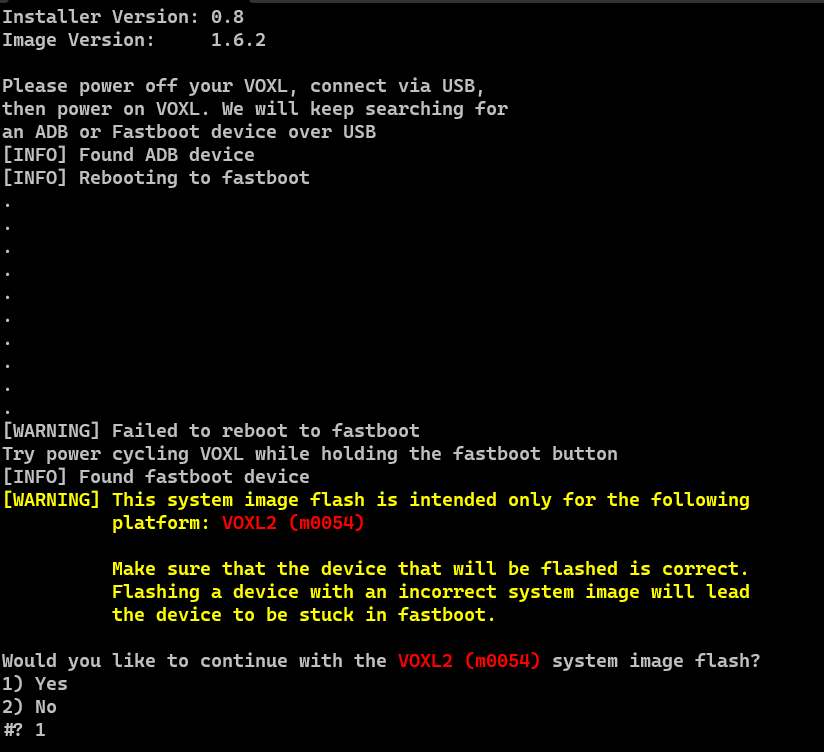
After hitting that last prompt, it just hangs there indefinitely. Obviously since you haven't tried this method I don't expect there to be a solution, but I was wondering if this is a symptom of something you've seen before that may help in debugging further. If I cancel the flash the Voxl does not get bricked and I can use it as normal on the old SDK. There's also no LED indicators that may suggest its getting flash and obviously no visual indicators in the console that it's getting flashed so I don't think its getting very far in the flash process.

Reading along? Create a free ModalAI Forum account to join in.
With an account you can reply, ask your own question, get an email when a ModalAI engineer answers, and mark the reply that solved it. Your place in each thread is saved between visits.
Questions about VOXL, Flight Core, ESCs and ModalAI drones are answered here by the engineers who build them.
Register Login