
Hi @markmst email me at devops @ modalai. com and I can get you a link/info.
We've not validated SDK1.6.5+ on some targets so haven't released publicly to avoid folks loading on untested SKU.
 M
M
modaltb
@modaltb
Posts
-
voxl2 Mini SDK 1.6.5 and 1.6.6 not available on modalai.filecloudonline.com -
Issue Reading GPIO 1146 (Pin 6 on J10) on VOXL2Hi @Amir-Avni,
Does your silkscreen on VOXL2 show M0154 or M0054?
If M0054, it's 'hard coded' as an output only... behind a uni-directional level shifter.....
If it's M0154, there's a directional level shifter in front of that GPIO that allows us to (with a kernel tweak) switch between UART and SPI.
By default we are configured for UART use case, and the level shifter is set to allow an INPUT, by setting GPIO 67 low (as default), which is setup in device tree here, see "67" in
modalai,gpio-init-output-low
https://gitlab.com/voxl-public/system-image-build/meta-voxl2-bsp/-/blob/v1.8.02/recipes-kernel/linux-msm/files/dts/common/m0xxx-modalai-gpio.dtsi?ref_type=tags#L12To enable VOXL2 J10 pin6 (gpio46) as an input, make sure gpio67 is set to low
-
Invalid Remote ID Serial NumberHey @Andrew-Martin thanks for reporting, I also saw the gitlab issue. Have you tried increasing that buffer size and rebuilding ? We could try to provide you a test deb.
We just got the MVP of remote ID in place and kept this open source so we can fix as needed...
-
VOXL2 vlanHey @jcai ,
Are you building a "debug" or "perf" kernel?
There's a little slop I have with voxl-gpio-mod and voxl-platform-mod.... they're being built out of tree and shipping in the rootfs... which if you load a debug kernel, causes problems like above....
By default the build is 'perf':
https://gitlab.com/voxl-public/system-image-build/qrb5165-kernel-build-docker/-/blob/qrb5165-ubun1.0-14.1a/bin/qrb5165-build.sh?ref_type=heads#L13If you are using 'perf' and still having issues please let me know.
I want to move these two modules IN TREE, then this can go away... we're planning on doing this in future (major) release.
-
Using wireguard on VOXL 2@smilon we're still working on it but slower than I had originally planned. we're using it on a feature light product right now without camera support, once we have camera support in place I'll try to get some preview releases in place, 'hoping' that's in Q1/Q2 but as an optimistic engineer speaking

-
PWM Servo IO BoardA bit hidden but it's /dev/ttyHS2
https://docs.modalai.com/voxl2-linux-user-guide/#devttyhs2---hsb2b-connector-uart
We ship a little helper tool that you can do a loop back test real quick if you make a cable that shorts pins 2/3:
qrb5165io-uart-test -d /dev/ttyHS2 -
Starling 2 Thermal Camera SuggestionsHi @wifa799 ,
For FLIR Lepton.
This one would work off the M0173 J6 connector:
https://groupgets.com/products/purethermal-breakout-boardI need to update the M0173 data sheet... but a here's pinout for that connector for now for reference, for Lepton 3.5 BTW:
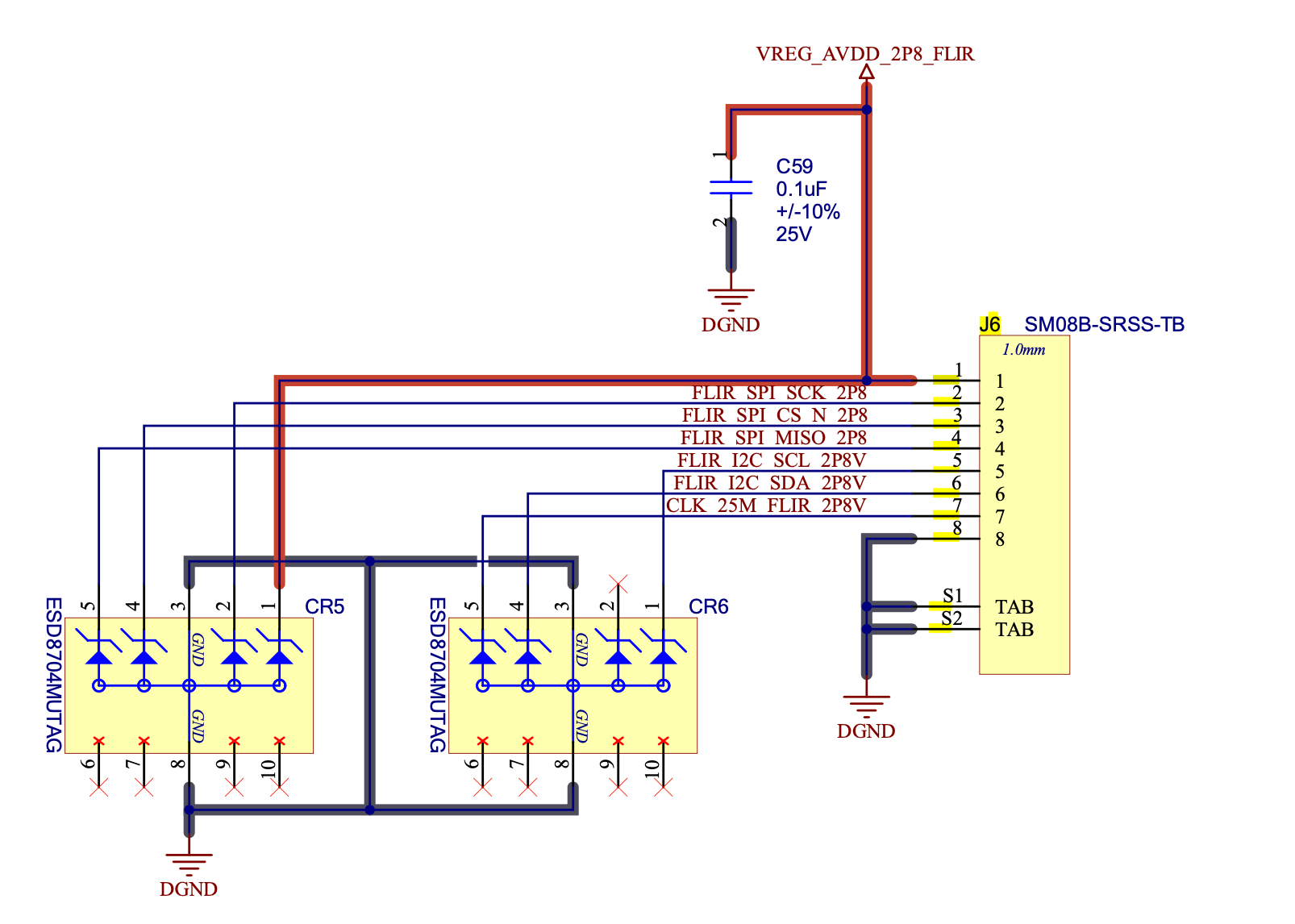
For FLIR Boson.
MIPI Boson:
The M0153-1 is intended for a MIPI based Boson. Currently, the only way to get BOSON into MIPI mode (as shown on the link you provided), is to use a USB backpack (M0153-2) first to put the sensor into MIPI mode (along with other settings). Also, when buying a Boson with MIPI support, it needs to be a Boson+. You will receive it and need to use M0153-2 over USB to connect to it to a Windows machine and then setup for MIPI which can then be used with VOXL using MIPI camera ports, and use VOXL Camera ServerUSBC Boson:
The VOXL2 hardware needs to have M0154 on the silkscreen (not M0054) for the USBC port to work as a host. I just validated a USBC backback on a Boson to the USBC port on VOXL2.Using the USB2.0 port (e.g. where the WiFi dongle is plugged in) would work for the USB2.0 backback. VOXL UVC server would be used here for the USB cameras.
Please keep hitting me with questions here if not clear!
-
VOXL2 Camera Configuration not found@jcai are you using a single IMX412 off M0173 J5?
C28 will setup a additional 4 sensors that likely will create some 'noise' in the logs when they fail to probe (assuming above sentence is accurate).
The sensor off J5 is "sensor ID 2", so we will want to use something like
com.qti.sensormodule.imx412_fpv_2.bin:E.g.
cp /usr/share/modalai/chi-cdk/imx412-fpv/com.qti.sensormodule.imx412_fpv_2.bin /usr/lib/cameraIf only a single sensor off J5, you won't want other com.qti.sensormodule*.bins in /usr/lib/camera/
After copying the .bin above to /usr/lib/camera, If you run
voxl-camera-server -l, do you get a single sensor? -
voxl2 mini, ov9782 + hires on J6Hi @Trinadh
Can you confirm (using voxl-version) what version you have?
e.g. should paste this info:
--------------------------------------------------------------------------------
system-image:
kernel:
--------------------------------------------------------------------------------
hw platform:
mach.var:
--------------------------------------------------------------------------------
voxl-suite:
--------------------------------------------------------------------------------
To confirm, you are using:
VOXL2 Mini -> J6 -> M0135 --> JL for ov9282, and JU for IMX214?We don't have a binary setup for IMX214 or ov9782 on J6 upper, which is "ID 1".
ls /usr/share/modalai/chi-cdk/ov9782
com.qti.sensormodule.ov9782_0.bin  com.qti.sensormodule.ov9782_2.bin  com.qti.sensormodule.ov9782_3.bin  com.qti.sensormodule.ov9782_4.bin
voxl2:/usr/lib/camera$ ls /usr/share/modalai/chi-cdk/imx214 com.qti.sensormodule.imx214_0.bin com.qti.sensormodule.imx214_2.bin com.qti.sensormodule.imx214_3.bin com.qti.sensormodule.imx214_4.binSo it seems like you would need a binary built for imx214 on "slot1", correct?
-
Camera not recognizedHi @TomP ,
The last image you have shows correct orientation, you can find "pin1" and align to that:
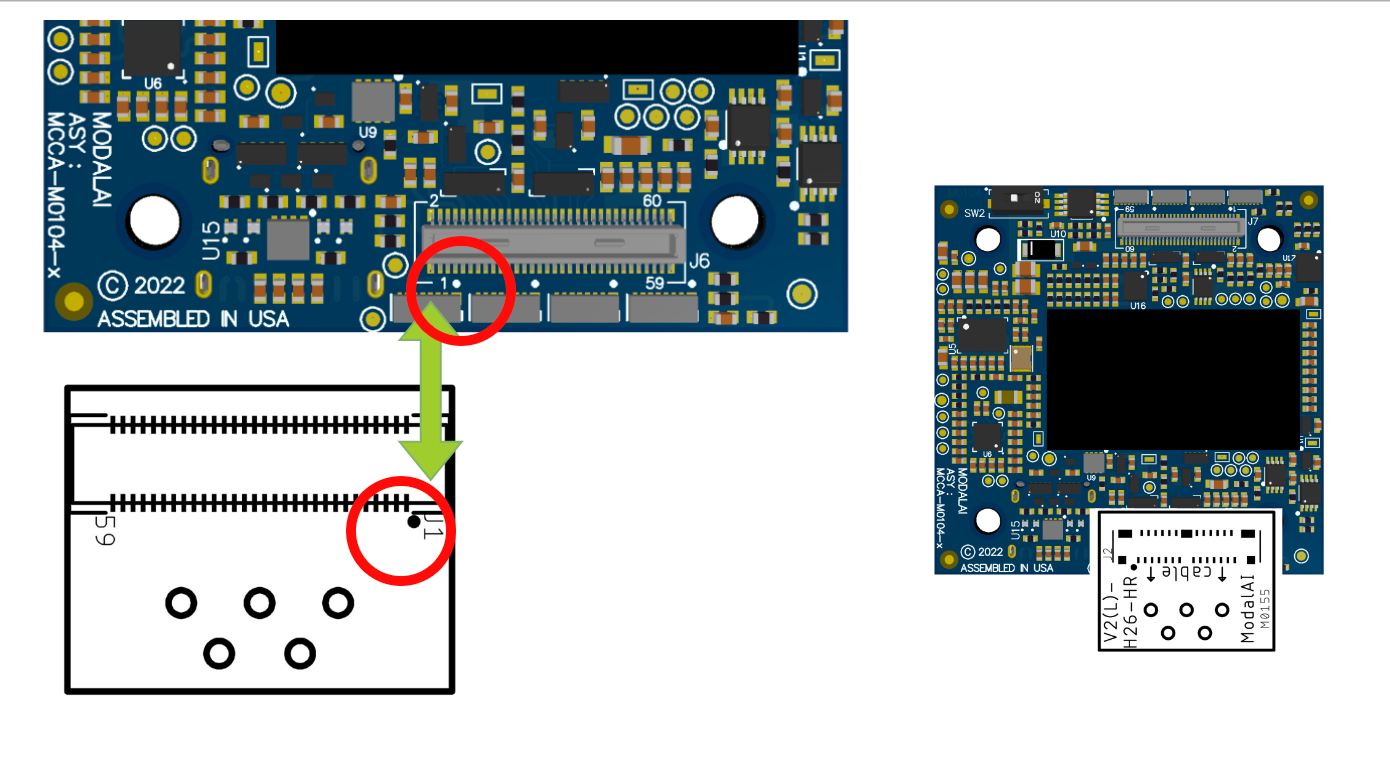
For SW configuration, you want to have /usr/lib/camera/com.qti.sensormodule.imx412_fpv_0.bin for this setup off J6. Reach back out if you get stuck here.
-
VOXL2 Camera Configuration not foundHi @jcai ,
Please build the kernel using the argument to specify a 'variant' of the kernel:
./qrb5165-build.sh -m M0054 -v var00.1I'm using this
var00.1variable to pull in these device tree files basically:
https://gitlab.com/voxl-public/system-image-build/meta-voxl2-bsp/-/tree/qrb5165-ubun1.0-14.1a/recipes-kernel/linux-msm/files/dts/variant/m0054/var00.1
Specifically for cameras:
https://gitlab.com/voxl-public/system-image-build/meta-voxl2-bsp/-/blob/qrb5165-ubun1.0-14.1a/recipes-kernel/linux-msm/files/dts/variant/m0054/var00.1/m0054-modalai-camera.dtsi?ref_type=heads#L4
This happens here:
https://gitlab.com/voxl-public/system-image-build/meta-voxl2-bsp/-/blob/qrb5165-ubun1.0-14.1a/recipes-kernel/linux-msm/linux-msm_4.19.bbappend?ref_type=heads#L187For reference, the kernel tracks and exports info about itself to filesystem using this:
https://gitlab.com/voxl-public/system-image-build/meta-voxl2/-/tree/qrb5165-ubun1.0-14.1a/recipes-kernel/voxl-platform-mod-Travis
-
Starling 2 Image Sensor Front-end Adapter M0173 support on VOXL2 miniHi @waqaskhan2000 ,
The M0173 was brought into our lineup to support our Starling2 product lines.
We haven't released a reference drone (yet) using VOXL2 mini so the internal requirement to create one hasn't come up.
We will likely create something similar but we don't have a timeline right now for that....
-
VOXL 2 Developer Test Board For Purchase?Hi @Janelletran ,
Because this board exposes pins directly from the 865 SIP, we make it kind of hard to find so folks know it will be easier to damage the VOXL2 product with this add on if you're not careful.This board:
https://docs.modalai.com/voxl2-dev-test-board/Has a hidden purchase link here:
https://www.modalai.com/pages/beta-voxl-2-b2b-breakout-boardHappy hacking!
-
Intergrating VL53L1x Range Finder with VOXL2@Jetson-Nano not at this time and not with QVIO. We are working on multi cam VIO but can't provide any details or release dates really at this time.
-
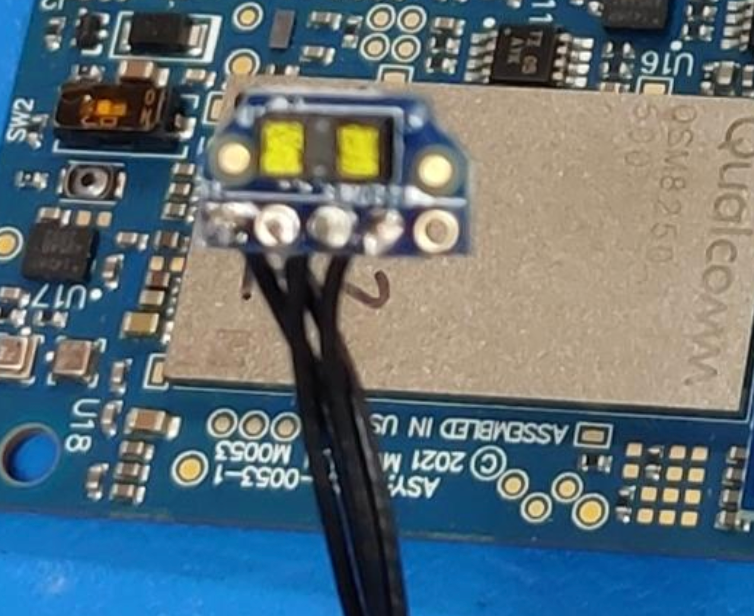
Intergrating VL53L1x Range Finder with VOXL2@Jetson-Nano can you take a picture? for example, we make a M0070 board that has this sensor on it. Are you making your own carrier board for the sensor?
-
Intergrating VL53L1x Range Finder with VOXL2@Jetson-Nano what is the VL53L1X on?
-
Doodle Add-on board for VOXL2You can use option 1:
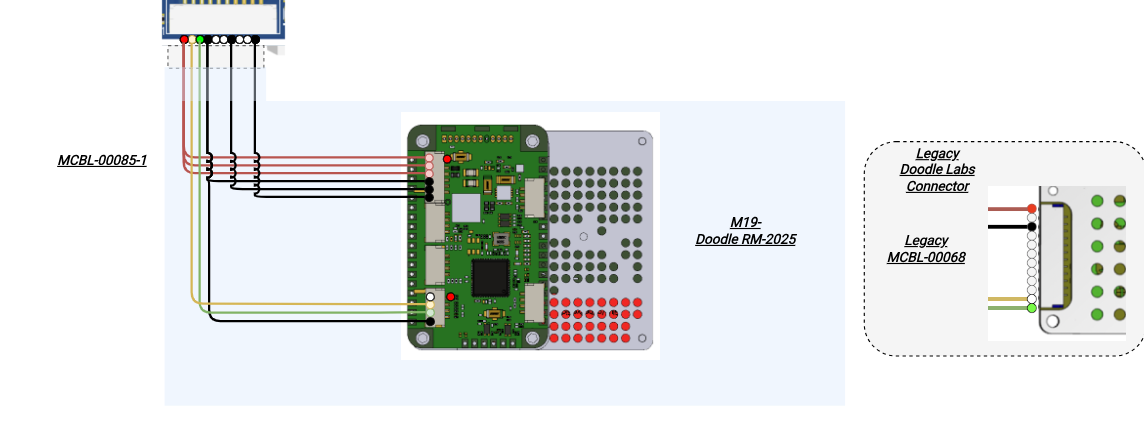
Note, we've seen two connection types from Doodle (legacy and the newer one with multiple JST connectors).
We use this on another product of ours, and from USB3 port, MCBL-00085-1 should suffice:
-
Intergrating VL53L1x Range Finder with VOXL2@Jetson-Nano are you using our M0070 board like this? https://docs.modalai.com/rangefinders/#single-rangefinder-using-m0141-expansion-board
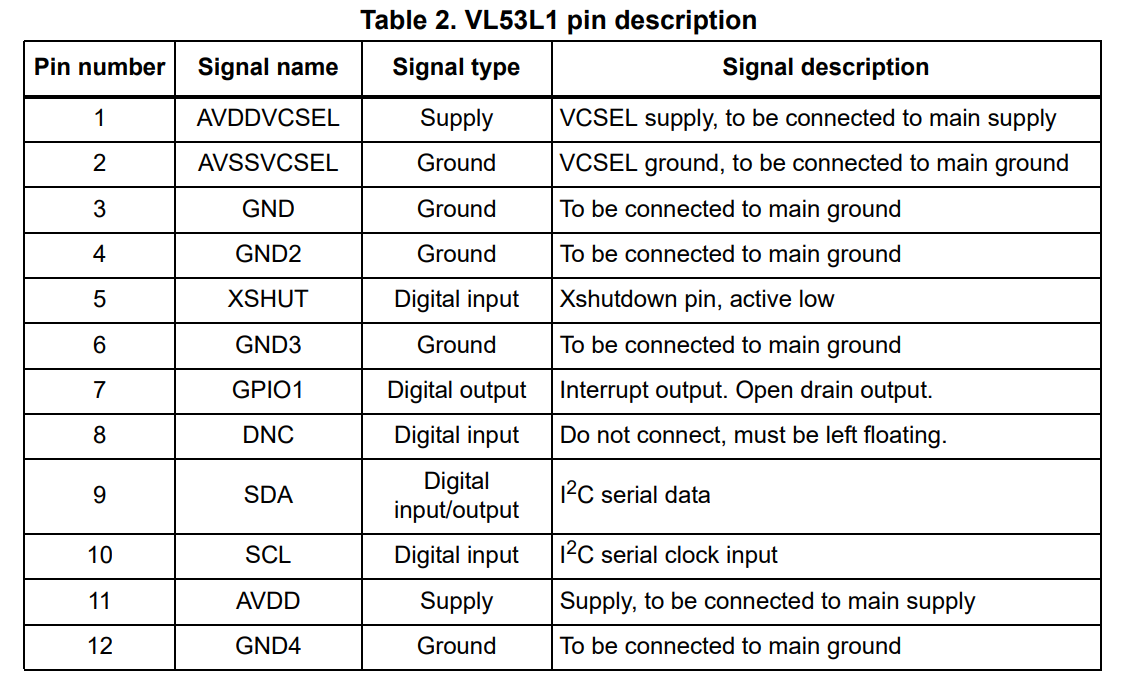
Or custom? If custom check pin 5, which on our M0070 board is pulled up to 3.3VDC.
-
XACTIC Gimbal Integration with Sentinel@SMRazaRizvi we honestly don't have any gimbals on our products at this time so hard for me to say as I would want to have a working reference..... the gremsy gimbals are super nice and if they have a MAVLink interface, but to get this controlled straight from VOXL2 at this point would be some custom coding as we don't have a reference at this time...
-
Vision sensors not detected in VOXL2@Jetson-Nano If you've reverted back to original config, run voxl-configure-cameras and select the D0005 Starling option.
When you want to use ov9782, you need to copy the correct binary into /usr/lib/camera and also update config file?
A high level helper is here:
https://gitlab.com/voxl-public/voxl-sdk/services/voxl-camera-server/-/blob/master/misc_files/usr/share/modalai/voxl-camera-server/custom_camera_config.txt?ref_type=headsYou can then use voxl-configure-cameras -c to use custom setup, after you've setup the above file into correct place (see top of the file for direction).
see this for logic of setting up proper bins:
https://gitlab.com/voxl-public/voxl-sdk/services/voxl-camera-server/-/blob/master/scripts/qrb5165-configure-camerassee https://docs.modalai.com/voxl2-image-sensors/ for more info, but since we support a lot of different configs and, because of I2C clashes if we have all binaries in /usr/lib/camera, we copy bins into place using camera-server wizard.