Skip to content
  • Categories
  • Recent
  • Tags
  • Popular
  • Users
  • Groups
Collapse
Brand Logo

ModalAI Forum

M

m1baldwin

@m1baldwin
Contributor
Unfollow Follow
About
Posts
47
Topics
25
Shares
0
Groups
1
Followers
0
Following
0

Posts

Recent Best Controversial

  • Image Metadata from Snahsopt doesn't match Camera Specs from Datasheet
    M m1baldwin

    We use the snapshot feature of voxl-camera-server to capture images while the drone is flying.

    As far as I understood the camera specs are encoded in this file: https://gitlab.com/voxl-public/voxl-sdk/services/voxl-camera-server/-/blob/master/misc_files/usr/share/modalai/voxl-camera-server/camera_config.xml?ref_type=heads

    We use IMX412, and it has 2.7mm focal length

    But for example, we see the following when analze the exif data from an image (focal length is 2.2mm, fnumber is 2.4 but should be 3.2)

    File Type : JPEG
    File Type Extension : jpg
    MIME Type : image/jpeg
    JFIF Version : 1.01
    Exif Byte Order : Big-endian (Motorola, MM)
    Make : QTI-AA
    Camera Model Name : QCAM-AA
    Orientation : Horizontal (normal)
    X Resolution : 72
    Y Resolution : 72
    Resolution Unit : inches
    Modify Date : 2025:02:18 06:15:38
    Y Cb Cr Positioning : Centered
    Exposure Time : 1/133
    F Number : 2.4
    Exposure Program : Manual
    ISO : 100
    Exif Version : 0220
    Date/Time Original : 2025:02:18 06:15:38
    Create Date : 2025:02:18 06:15:38
    Components Configuration : Y, Cb, Cr, -
    Shutter Speed Value : 1/133
    Aperture Value : 2.4
    Brightness Value : 4.67
    Exposure Compensation : 0
    Max Aperture Value : 2.4
    Metering Mode : Average
    Light Source : D65
    Flash : Off, Did not fire
    Focal Length : 2.2 mm
    User Comment :
    Sub Sec Time : 407662
    Sub Sec Time Original : 407662
    Sub Sec Time Digitized : 407662
    Flashpix Version : 0100
    Color Space : sRGB
    Exif Image Width : 4056
    Exif Image Height : 3040
    Sensing Method : Not defined
    Exposure Mode : Manual
    White Balance : Manual
    Focal Length In 35mm Format : 2 mm
    Scene Capture Type : Standard
    Interoperability Index : R98 - DCF basic file (sRGB)
    Compression : JPEG (old-style)
    Thumbnail Offset : 2206
    Thumbnail Length : 21199
    Image Width : 4056
    Image Height : 3040
    Encoding Process : Baseline DCT, Huffman coding
    Bits Per Sample : 8
    Color Components : 3
    Y Cb Cr Sub Sampling : YCbCr4:2:0 (2 2)
    Aperture : 2.4
    Image Size : 4056x3040
    Megapixels : 12.3
    Scale Factor To 35 mm Equivalent: 0.9
    Shutter Speed : 1/133
    Create Date : 2025:02:18 06:15:38.407662
    Date/Time Original : 2025:02:18 06:15:38.407662
    Modify Date : 2025:02:18 06:15:38.407662
    Thumbnail Image : (Binary data 21199 bytes, use -b option to extract)
    Circle Of Confusion : 0.033 mm
    Field Of View : 167.3 deg
    Focal Length : 2.2 mm (35 mm equivalent: 2.0 mm)
    Hyperfocal Distance : 0.06 m
    Light Value : 9.6

    VOXL SDK

  • What wavelength does ir-cut filter cover on the imx577/412 camera w/ filter?
    M m1baldwin

    Referring to this variant:

    Link Preview Image
    404 Not Found

    ModalAI develops sUAS, drone and robotics autonomous computer vision, flight control and communications systems, and manufactures in the USA. ModalAI's VOXL platform advances Qualcomm Flight, combining ROS and PX4 for Obstacle Avoidance and GPS-Denied indoor navigation, in ready for development to upgrade your drone.

    favicon

    ModalAI, Inc. (www.modalai.com)

    Image Sensors

  • Recent updates to m0054 variants camera power supply configs
    M m1baldwin

    Came across this commit in the voxl2 bsp source tree: https://gitlab.com/voxl-public/system-image-build/meta-voxl2-bsp/-/commit/944b83b80a3633f684ae8abdcd2357cfbde16a26

    What is this fix addressing? Is there some potential instability on the existing power supply config for voxl2 bsp versions pre-dating this ? In my own work, we've occasionally seen the front facing imx412 sensor either a) drop out or b) seemingly not start correctly on a couple of our starling platforms. Just wondering if this might be related?

    VOXL 2

  • Fatal SLPI error causing system restart on Voxl 2
    M m1baldwin

    Hi @tom just an update after the weekend. Sort of surprisingly, we cannot now recreate the SLPI error on the boards. Both with and without the voxl-px4 service enabled, both boards are booting up and staying alive.

    We've done a couple boot cycles with voxl-px4 enabled and things seem stable. We are putting these boards into a larger enclosure and so I'll wait till the team tests that to declare victory 🙂

    Just out of curiosity, is it a Modal SDK process that was triggering that board reboot before, or something lower level?

    VOXL 2

  • Fatal SLPI error causing system restart on Voxl 2
    M m1baldwin

    @tom for the boards we tested, we tested one fresh out of the package with nothing else connected and this error. The other, we tried different combinations of cameras plugged in, along with nothing plugged in, and still saw this.

    On the question of whether this goes away when disabling and stopping voxl-px4 service, we did try this once but still saw the issue. However, the time we tried it we did not give the “sync” command after stopping the service. But we did give the systemctl stop and saw the error happen right after. There’s only a window of about 30 seconds after boot to get in and give any command, it’s a bit tricky.

    Could completely reflashing starting with the qdl tool be an option here?

    @viralp for visibility

    VOXL 2

  • Fatal SLPI error causing system restart on Voxl 2
    M m1baldwin

    Sure, I will check and send the information. Strangely, we actually ordered 3 and a second of the three is also having this issue. The third is working fine.

    VOXL 2

  • Fatal SLPI error causing system restart on Voxl 2
    M m1baldwin

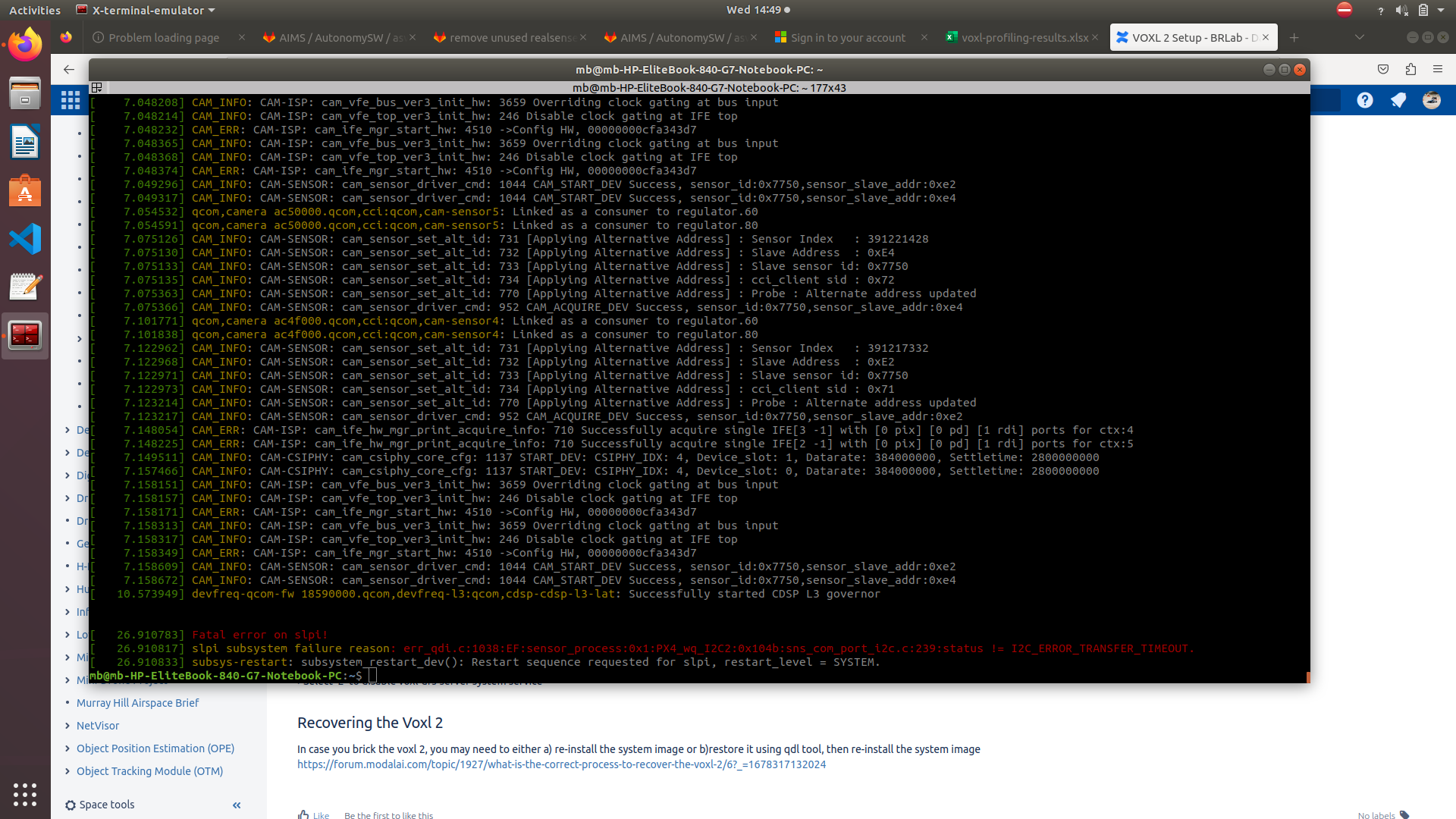
    I've got a fresh Voxl 2 board which I powered on for the first time. The board powers on and seems to start in a good state, but some 26seconds after boot the device is crashing and reporting some slpi error with px4.

    Screenshot from 2023-03-15 14-49-36.png

    VOXL 2

  • What is the correct process to recover the voxl 2?
    M m1baldwin

    @tom That qdl reset did the trick, thanks!

    VOXL 2

  • What is the correct process to recover the voxl 2?
    M m1baldwin

    Yes, SW2 is in "off" state, so looks like voxl 2 is bricked. I'll try out the qdl instructions and come back with updates.

    VOXL 2

  • What is the correct process to recover the voxl 2?
    M m1baldwin

    Output from lsusb when voxl2 has been placed in fastboot mode:

    mb@mb-HP-EliteBook-840-G7-Notebook-PC:~/Downloads/voxl2_platform_0.9$ lsusb
    Bus 004 Device 001: ID 1d6b:0003 Linux Foundation 3.0 root hub
    Bus 003 Device 001: ID 1d6b:0002 Linux Foundation 2.0 root hub
    Bus 002 Device 017: ID 18d1:d00d Google Inc.
    Bus 002 Device 001: ID 1d6b:0003 Linux Foundation 3.0 root hub
    Bus 001 Device 003: ID 06cb:00df Synaptics, Inc.
    Bus 001 Device 002: ID 04f2:b6bf Chicony Electronics Co., Ltd
    Bus 001 Device 004: ID 8087:0026 Intel Corp.
    Bus 001 Device 001: ID 1d6b:0002 Linux Foundation 2.0 root hub

    Lsusb after the flashing and while the script waits for adb to come back up
    mb@mb-HP-EliteBook-840-G7-Notebook-PC:~/Downloads/voxl2_platform_0.9$ lsusb
    Bus 004 Device 001: ID 1d6b:0003 Linux Foundation 3.0 root hub
    Bus 003 Device 001: ID 1d6b:0002 Linux Foundation 2.0 root hub
    Bus 002 Device 018: ID 05c6:901d Qualcomm, Inc.
    Bus 002 Device 001: ID 1d6b:0003 Linux Foundation 3.0 root hub
    Bus 001 Device 003: ID 06cb:00df Synaptics, Inc.
    Bus 001 Device 002: ID 04f2:b6bf Chicony Electronics Co., Ltd
    Bus 001 Device 004: ID 8087:0026 Intel Corp.
    Bus 001 Device 001: ID 1d6b:0002 Linux Foundation 2.0 root hub

    dmesg output for fastboot mode:
    [755391.801828] usb 2-1: new SuperSpeed Gen 1 USB device number 17 using xhci_hcd
    [755391.823072] usb 2-1: New USB device found, idVendor=18d1, idProduct=d00d, bcdDevice= 1.00
    [755391.823082] usb 2-1: New USB device strings: Mfr=1, Product=2, SerialNumber=3
    [755391.823087] usb 2-1: Product: Android
    [755391.823092] usb 2-1: Manufacturer: Google
    [755391.823096] usb 2-1: SerialNumber: 9ce13470

    dmesg for after fastboot, while waiting for adb to become available:
    [755509.829081] usb 2-1: new SuperSpeed Gen 1 USB device number 18 using xhci_hcd
    [755509.856499] usb 2-1: New USB device found, idVendor=05c6, idProduct=901d, bcdDevice= 0.00
    [755509.856508] usb 2-1: New USB device strings: Mfr=1, Product=2, SerialNumber=3
    [755509.856513] usb 2-1: Product: QUSB_BULK_SN:A07D5C7A
    [755509.856517] usb 2-1: Manufacturer: Qualcomm CDMA Technologies MSM
    [755509.856520] usb 2-1: SerialNumber: 9ce13470

    VOXL 2

  • What is the correct process to recover the voxl 2?
    M m1baldwin

    The instructions on the documentation for re-flashing the system image on the voxl 2 doesn't quite match what the latest scripts from the voxl2 platform 0.9 image tar provide. The package provides an "install.sh" script as the entry point for re-flashing. The instructions mention there should be a "flash-full.sh" script.

    Assuming the above is supposed to be the correct script, I did try putting my voxl 2 into fastboot state and running the install script. It was able to identify the partition and reset the board, but it hangs at the "Waiting for ADB" step. The voxl 2 is showing up in dmesg as a Qualcomm device, but adb doesn't show it as available, hence it hanging at the waiting for adb step.

    Any ideas on what to try?

    VOXL 2

  • Is it still the case we shouldn't run voxl-configure-docker-support on VOXL 2?
    M m1baldwin

    Thanks! this is helpful confirmation

    VOXL 2

  • Is it still the case we shouldn't run voxl-configure-docker-support on VOXL 2?
    M m1baldwin

    Re: voxl2 is not booting after using docker

    This was discussed previously but it's not really clear on the documentation site what the latest is with this.

    VOXL 2

  • List of potentially supported cameras with voxl-sdk
    M m1baldwin

    Just going through the included .so files in /usr/lib on the latest voxl 1 platform image, it looks like there may be a number of camera sensors which could be supported by voxl-camera-server (though I imagine the .so is just one part of the puzzle). Could someone from the team comment on whether this list is accurate:

    • imx214 (already known and used, m0024, m0025)
    • ar1335 (similar to see3 camera sensor?)
    • imx230
    • imx274
    • imx296
    • imx377 (already known, m0026)
    • imx378
    • imx412
    • imx477
    • ov7251 (this is the sensor used for the tracking camera and stereo cameras)
    • ov9281
    • ov9782

    Does anyone from the community have experience picking a camera sensor from this list from another vendor and integrating it with either the voxl 1 or voxl 2?

    Software Development

  • Overheating Issues with the Seeker - Looking for Guidance
    M m1baldwin

    @Chad-Sweet Thanks; any comment on what temperatures you or the team have seen trying to stream higher than vga resolution through voxl-streamer? Interested if you are seeing the same using 1080p or the full resolution of the sensor, for example.

    Seeker

  • Overheating Issues with the Seeker - Looking for Guidance
    M m1baldwin

    Yes, it has even happened when it is in air. Before we started using voxl-streamer to get the video off the platform, we had been using our own fork of mpa_to_ros running in a container and that had been causing much worse overheating problems, possibly because of the image compression happening (we were using the turbojpeg to create the ros image_transport/compressed topic on a large resolution.

    Anyway, that was a less efficient than how we are doing it now, but we'd still like to reduce the heating risk further.

    Have you had any issues streaming 1080p, 2k, or 4k video with voxl-streamer while the drone is in flight and seen temperatures spike to over 70 C?

    Also, it seems like qvio can run off when the thermal throttling happens; have you ever observed this?

    Seeker

  • Overheating Issues with the Seeker - Looking for Guidance
    M m1baldwin

    We've been working with the seeker for about a month and a half and often run into overheating issues with the seeker drone. The use-case we are targeting requires 1080p video streaming from the drone, in an indoor use-case.

    We've set up our vision pipeline to take advantage of voxl-streamer - and the hardware acceleration for encoding - to reduce the stress on the CPU so that we don't hit the thermal limits as quickly. In general though, this only ends up delaying the inevitable. The software load we run on the drone doesn't take more than 50-60% of the CPU, so it's a climb up to the thermal limits where throttling starts to happen. I think part of the problem here is we're using 1080p resolution and higher, when the defaults for the seeker are VGA resolution

    Are there any options from modal ai for improving the thermal management on the Seeker? There's no active cooling on the platform, and the heat-sink doesn't expose much surface area to really cool the platform. Maybe a different heat-sink design - a little bigger would be okay, we're willing to sacrifice some flight time if it means the drone stays in the air and doesn't run off due to overheating.

    Seeker

  • Issues with takeoff in offboard mode w/ MAVROS & Voxl Flight Deck
    M m1baldwin

    I've been having a strange issue lately where trying to control a drone we've built with the Voxl Flight Deck (VFD) is unable to takeoff correctly in offboard mode.

    The context is: I'm working on an indoor use case and have been testing both the Seeker and an in-house drone built with the VFD for our target use case. I am using an autonomy stack implemented in ROS which uses mavros to control the drone in offboard mode.

    Previously, we used a pixhawk-based flight controller running v1.12.3 of the px4firmware and there are no issues.

    In our current tests, I have tested the same ROS autonomy stack with both the Seeker and the VFD-based drone.

    What I have found is the Seeker can takeoff and fly the mission no problem, but when the VFD tries to takeoff, it seems to hit an "invisible ceiling" where it tries to take off to 1m - I can see the setpoint in the flight logs - but at around 1-2' off the ground, the drone rapidly decelerates, levels off, then begins to descend.

    Some observations I have when it does this:

    • The flight mode is remaining in offboard, and the setpoints we stream at 20Hz to the fcu are not dropping
    • We have tried different hover thrust values in the px4 firmware, nothing changed
    • We are running v1.12.3-0.0.9 from the modal ai github, because we are using a rangefinder for altitude estimate and in 1.11.3 version of px4 firmware there was a bug with the fusion for altitude estimate that eventually was fixed in 1.12.0+.
    • The same issue happens in v1.11.3, plus there is also altitude estimate issues with that version (in general I don't use VIO for altitude estimates given they ten to be less reliable than an old-fashioned range finder if you can fit it 🙂
    • The same software works fine with Seeker
    • We've tried different controller tunings as well and whether the velocity or position control is aggressive or loose we see this behavior.

    Here are some flight review charts:

    • https://review.px4.io/plot_app?log=ec434132-f042-426b-941c-0db05166a7ba
    • https://review.px4.io/plot_app?log=11251846-f284-4837-82b7-a5d23f9e4a70

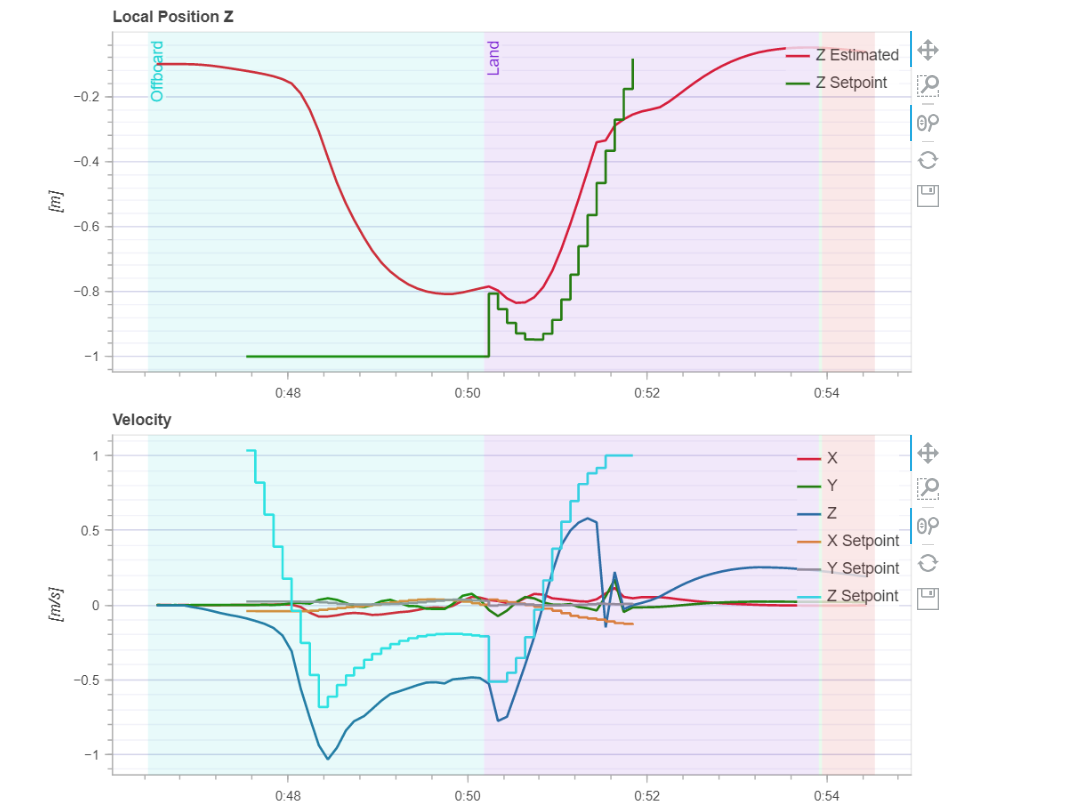
    Here's a snippet from the second link which I think illustrates the point a bit:
    3d6738d2-af97-4136-9a63-1636431c8f30-image.png

    You can see a setpoint is set in z-axis position - we don't use velocity or acceleration setpoints, only position and yaw - and the drone doesn't achieve the z-axis setpoint. Altitude levels out around 0.8m and then I have to switch to land as we need to abort the mission. Any comments or ideas on what to look into would really be appreciated! There's only so much I can include in this initial post but I can follow up with more details in the comments.

    Software Development

  • Does the VOXL Flight Deck have an EU marking label?
    M m1baldwin

    I've got a colleague in France I sent a voxl flight deck to and I just wanted to check, is the product compliant with European importation rules, I.E. does it have the EU marking label ?

    VOXL Flight Deck

  • Garbage attitude control
    M m1baldwin

    I saw something similar with PX4 version 1.13.1; I don't have a VOXL2, but I had an issue where with VOXL 1 Flight Deck with PX4 1.13.1 did not work well for me on a standard airframe.

    I downgraded to 1.11.3 sub-version 0.2.3 - I think this is a Modal AI sub-version? - and had better luck, maybe try an earlier version of px4

    Ask your questions right here!
  • Login

  • Don't have an account? Register

  • Login or register to search.
  • First post
    Last post
0
  • Categories
  • Recent
  • Tags
  • Popular
  • Users
  • Groups