Hardware: (board / drone / SKU, serial # if you have it)
VOXL2 (Custom drone)
Software version: (paste the output of voxl-version)
dpkg-query: package 'voxl-suite' is not installed and no information is available
Use dpkg --info (= dpkg-deb --info) to examine archive files,
and dpkg --contents (= dpkg-deb --contents) to list their contents.
--------------------------------------------------------------------------------
system-image: 1.8.02-M0054-14.1a-perf
kernel:       #1 SMP PREEMPT Mon Nov 11 22:47:44 UTC 2024 4.19.125
--------------------------------------------------------------------------------
hw platform:  M0054
mach.var:     1.0.1
--------------------------------------------------------------------------------
voxl-suite:
--------------------------------------------------------------------------------
Packages:
Repo:  http://voxl-packages.modalai.com/ qrb5165 sdk-1.6
Last Updated: 2026-09-08 20:00:54
List:
kernel-module-voxl-fsync-mod-4.19.125     1.0-r0
kernel-module-voxl-gpio-mod-4.19.125      1.0-r0
kernel-module-voxl-platform-mod-4.19.125  1.0-r0
libfc-sensor                              1.0.12-202603311017
libmodal-cv                               0.6.1
libmodal-exposure                         0.1.5
libmodal-flow                             1.0.5
libmodal-journal                          0.2.7
libmodal-json                             0.4.8
libmodal-pipe                             2.14.12
libqrb5165-io                             0.6.3
libvoxl-cci-direct                        0.4.0
libvoxl-codec                             0.1.1
libvoxl-cutils                            0.1.6
modalai-slpi                              1.2.3-202604071122
mv-voxl                                   0.1-r0
qrb5165-bind                              0.1-r0
qrb5165-dfs-server                        0.2.0
qrb5165-imu-server                        1.2.4
qrb5165-mini-tof-server                   0.2.2-apoorv
qrb5165-rangefinder-server                0.1.6
qrb5165-slpi-test-sig                     01-r0
qrb5165-system-tweaks                     0.3.4
qrb5165-tflite                            2.8.0-2
voxl-bind-spektrum                        0.1.1
voxl-camera-calibration                   0.6.2
voxl-camera-server                        2.2.29
voxl-ceres-solver                         2:2.0.0-3
voxl-configurator                         1.1.35
voxl-cpu-monitor                          0.7.7
voxl-docker-support                       1.3.1
voxl-elrs                                 1.1.7
voxl-esc                                  1.6.3
voxl-esptool                              0.2.1
voxl-fsync-mod                            1.0-r0
voxl-gphoto2-server                       0.0.10
voxl-gpio-mod                             1.0-r0
voxl-io-server                            0.1.3
voxl-jpeg-turbo                           2.1.3-7
voxl-lepton-server                        1.4.1
voxl-libgeographic                        1.0.0
voxl-libgphoto2                           0.0.4
voxl-libuvc                               1.0.7
voxl-logger                               0.6.5-202607281100
voxl-mapper                               0.2.4
voxl-mavcam-manager                       0.6.1
voxl-mavlink                              0.1.6
voxl-mavlink-server                       1.4.16
voxl-microdds-agent                       3.0.0-0
voxl-modem                                1.2.5
voxl-mongoose                             7.19.0-1
voxl-mpa-to-ros2                          0.0.7-202511100959
voxl-mpa-tools                            1.5.8
voxl-nlopt                                2.5.0-5
voxl-open-vins-server                     0.6.2
voxl-opencv                               4.5.5-3
voxl-osd                                  0.4.12
voxl-platform-mod                         1.0-r0
voxl-portal                               0.9.4
voxl-px4                                  1.14.0-2.0.134
voxl-px4-imu-server                       0.1.2
voxl-px4-params                           0.9.15
voxl-remote-id                            0.0.9
voxl-reset-slpi                           0.0.4-202603311011
voxl-ros2-foxy                            0.0.1-202511141235
voxl-streamer                             0.8.1
voxl-tag-detector                         0.1.0-custom
voxl-tflite-server                        0.5.1
voxl-utils                                1.4.4
voxl-uvc-server                           0.1.8
voxl-vision-hub                           1.9.21
voxl-voxblox                              1.1.5
voxl-vtx                                  2.2.42
voxl2-io                                  0.0.3
voxl2-system-image                        1.8.02-r0
voxl2-wlan                                1.0-r0
--------------------------------------------------------------------------------
Configuration / services: (paste the output of voxl-inspect-services)
voxl2:~$ voxl-inspect-services
Scanning services...

 Service Name             |  Enabled  |   Running   |  CPU Usage
-------------------------------------------------------------------
 docker-autorun           | Disabled  | Not Running |
 modallink-relink         | Disabled  | Not Running |
 voxl-camera-server       |  Enabled  | Not Running |
 voxl-cpu-monitor         |  Enabled  |   Running   |     1.2%
 voxl-dfs-server          | Disabled  | Not Running |
 voxl-imu-server          |  Enabled  |   Running   |     3.1%
 voxl-io-server           | Disabled  | Not Running |
 voxl-lepton-server       | Disabled  | Not Running |
 voxl-logger-auto         | Disabled  | Not Running |
 voxl-logger              | Disabled  | Not Running |
 voxl-mapper              | Disabled  | Not Running |
 voxl-mavcam-manager      | Disabled  | Not Running |
 voxl-mavlink-server      |  Enabled  |   Running   |     3.1%
 voxl-microdds-agent      |  Enabled  |   Running   |     6.5%
 voxl-mini-tof-server     | Disabled  | Not Running |
 voxl-modem-doodle        | Disabled  | Not Running |
 voxl-modem               | Disabled  | Not Running |
 voxl-mpa-to-ros2         |  Enabled  |   Running   |     0.0%
 voxl-open-vins-server    | Disabled  | Not Running |
 voxl-osd                 | Disabled  | Not Running |
 voxl-portal              |  Enabled  |   Running   |     0.1%
 voxl-px4-imu-server      | Disabled  | Not Running |
 voxl-px4                 |  Enabled  |   Running   |    44.4%
 voxl-rangefinder-server  | Disabled  | Not Running |
 voxl-remote-id           | Disabled  | Not Running |
 voxl-softap              | Disabled  | Not Running |
 voxl-static-ip           | Disabled  | Not Running |
 voxl-streamer            |  Enabled  |   Running   |     0.0%
 voxl-tag-detector        |  Enabled  |   Running   |     0.0%
 voxl-tflite-server       | Disabled  | Not Running |
 voxl-time-sync           | Disabled  | Not Running |
 voxl-uvc-server          | Disabled  | Not Running |
 voxl-vision-hub          |  Enabled  |   Running   |     2.2%
 voxl-vrx                 | Disabled  | Not Running |
 voxl-vtx                 | Disabled  | Not Running |
 voxl-wait-for-fs         |  Enabled  |  Completed  |
What I am trying to do:
Run a tracking down and tracking front camera
What actually happens: (error messages, behavior)
When running voxl-camera-server, the service just aborts, log below:
voxl2:~$ voxl-camera-server
Setting MISP AWB to Auto
MISP channels enabled in defaults : 0
MISP channels enabled in config file: 0
Setting MISP AWB to Auto
MISP channels enabled in defaults : 0
MISP channels enabled in config file: 0
=================================================================
configuration for 2 cameras:

cam #0
    name:                tracking_front
    type:                ar0144
    bayer_type:          0
    enabled:             1
    camera_id:           0
    camera_id_second:    -1
    fps:                 30
    en_rotate:           0
    en_rotate2:          0

    en_preview:          1
    en_raw_preview:      1
    preview_width:       1280
    preview_height:      800

    en_misp:             1
    misp_width:          1280
    misp_height:         800
    demosaic:            auto

    en_small_video:      0
    small_video_width:   -1
    small_video_height:  -1

    en_large_video:      0
    large_video_width:   -1
    large_video_height:  -1

    en_snapshot:         0
    snap_width:          -1
    snap_height:         -1
    exif_focal_length:   0.000000
    exif_focal_len_35mm_format:0
    exif_fnumber:        0.000000

    ae_mode:             lme_msv
    msv_exposure_min_us: 20
    msv_exposure_max_us: 12000
    gain_min           : 54
    gain_max           : 8000
    standby_enabled:     0
    decimator:           1
    independent_exposure:0

cam #1
    name:                tracking_down
    type:                ar0144
    bayer_type:          0
    enabled:             1
    camera_id:           1
    camera_id_second:    -1
    fps:                 30
    en_rotate:           0
    en_rotate2:          0

    en_preview:          1
    en_raw_preview:      1
    preview_width:       1280
    preview_height:      800

    en_misp:             1
    misp_width:          1280
    misp_height:         800
    demosaic:            auto

    en_small_video:      0
    small_video_width:   -1
    small_video_height:  -1

    en_large_video:      0
    large_video_width:   -1
    large_video_height:  -1

    en_snapshot:         0
    snap_width:          -1
    snap_height:         -1
    exif_focal_length:   0.000000
    exif_focal_len_35mm_format:0
    exif_fnumber:        0.000000

    ae_mode:             lme_msv
    msv_exposure_min_us: 20
    msv_exposure_max_us: 12000
    gain_min           : 54
    gain_max           : 8000
    standby_enabled:     0
    decimator:           1
    independent_exposure:0

fsync_en:            0
fsync_gpio:          109
=================================================================
Cam idx: 0, Cam slot: 1, Slave Address: 0x0030, Sensor Id: 0x0356
Cam idx: 1, Cam slot: 6, Slave Address: 0x0030, Sensor Id: 0x0356
thread is locked to cores: 4 5 6 7
connected to mavlink pipe
Connected to cpu-monitor
Starting Camera: tracking_front (id #0)
ModalExposureMSV: initializing for camera name tracking_front type ar0144
gbm_create_device(156): Info: backend name is: msm_drm
MISP Initializing for camera tracking_front
 Detected 1 platform(s)
 Detected 1 GPU device(s)
Estimated imu dt = 0.000977s
ERROR in json_from_yaml, failed to open file
MISP: Loading intrinsics cal file tracking_front_intrinsics.yml for camera tracking_front, ret -1
WARNING: Lens calibration for camera tracking_front is missing (tracking_front_intrinsics.yml). Using defaults:
Creating VOXL Video Encoder: 1280x800 H265, CH_OUT: -1776841196, numInputBufs: 16
gbm_create_device(156): Info: backend name is: msm_drm
WARNING: OMX SetTargetBitrate: H265 CBR requires bps >= 3.0Mbit (1200000 bps provided). Using FPS hack. scale = 2.500000
Starting Camera: tracking_down (id #1)
ModalExposureMSV: initializing for camera name tracking_down type ar0144
MISP Initializing for camera tracking_down
ERROR in json_from_yaml, failed to open file
MISP: Loading intrinsics cal file tracking_down_intrinsics.yml for camera tracking_down, ret -1
WARNING: Lens calibration for camera tracking_down is missing (tracking_down_intrinsics.yml). Using defaults:
Creating VOXL Video Encoder: 1280x800 H265, CH_OUT: -1759368012, numInputBufs: 16
gbm_create_device(156): Info: backend name is: msm_drm
WARNING: OMX SetTargetBitrate: H265 CBR requires bps >= 3.0Mbit (1200000 bps provided). Using FPS hack. scale = 2.500000

------ voxl-camera-server: Started 2 of 2 cameras

------ voxl-camera-server: Camera server is now running
Aborted
The last Aborted comes after a couple of seconds
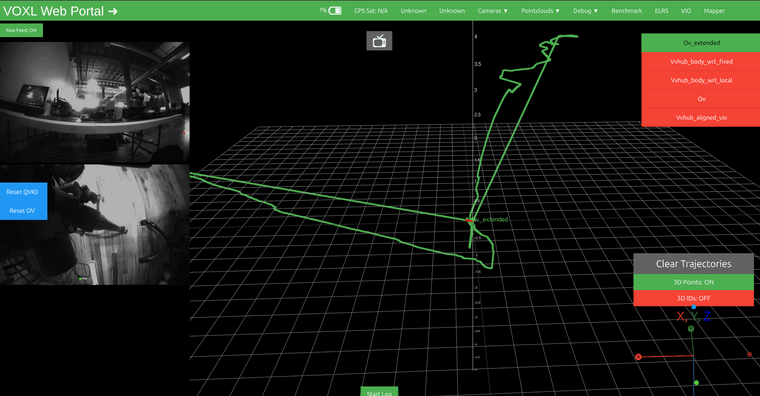
What is interesting to note, is that the camera server start working after a couple of systemctl restart voxl-camera-server commands, both the tracking down and tracking front camera feeds show up in voxl-portal
Steps to reproduce:
Heres how my /data/modalai/custom_acmera_config.txt is defined:
#!/bin/bash

################################################################################
#
# This file allows setting of custom camera configurations by defining what
# sensors are plugged into which port.
#
# There is no guarantee that any arbitrary configuration will work. Only the
# predefined camera configs at https://docs.modalai.com/voxl2-camera-configs/
# are supported.
#
# each slot can be one of the following sensors:
#
# pmd-tof
# pmd-tof-liow2
# ov7251
# ov7251-combo
# ov9782
# ov9782-combo
# ar0144
# ar0144-fsin (for use with m0173 and Starling 2 only)
# ar0144-fsin-combo (for use with m0173 and Starling 2 only)
# ar0144-12bit
# ar0144-12bit-fsin (for use with m0173 and Starling 2 only)
# ar0144-12bit-fsin-combo (for use with m0173 and Starling 2 only)
# imx214
# imx412
# imx412-fpv (low latency mode)
# imx678
#
#
# When using a combo mode pair, you must also add a JX_COMBO_MODE field which
# specifies is the pair is to be set up as either a stereo pair ordered
# left-right, right-left, or treated as two independent cameras. If you are
# using a combo-mode flex but only physically connect one of the two cameras
# then select "single" it does not matter which one you connect.
#
# For example:
# J6_LOWER_COMBO_MODE="left-right"
# J6_LOWER_COMBO_MODE="right-left"
# J6_LOWER_COMBO_MODE="independent"
# J6_LOWER_COMBO_MODE="single"
#
# when running "independent" combo mode, also add a NAME2 field for the second cam
# e.g J6_LOWER_NAME2="tracking_rear"
#
# for all sensors except TOF, you can specify a "rotate" flag to
# rotate the image 180 degrees e.g. J6_LOWER_ROTATE="true" or "false"
# for stereo pairs (e.g. ov7251 combo or ar0144-slave-strereo) you can specify
# "rotate-first-only" or "rotate-second-only" to only rotate one, other wise
# when setting the rotate option to "true" both will be rotated.
#
#
# Once configured, this file should live in /data/modalai/custom_camera-config.txt
# then run voxl-configure-cameras custom to load it in
#
#
# cp /usr/share/modalai/voxl-camera-server/custom_camera_config.txt /data/modalai/
#
# We also suggest changing your /data/modalai/sku.txt file to have a camera
# config term "CC" such as MRB-D0005-4-V2-CC
################################################################################


J6_LOWER_SENSOR=""
J6_LOWER_NAME=""
J6_LOWER_ROTATE="false"


J6_UPPER_SENSOR="ar0144"
J6_UPPER_NAME="tracking_front"
J6_UPPER_ROTATE="false"

J6_LOWER_COMBO1_SENSOR="ar0144-fsin-combo"
J6_LOWER_COMBO1_NAME="tracking_down"
J6_LOWER_COMBO1_ROTATE="false"


J7_LOWER_SENSOR=""
J7_LOWER_NAME=""
J7_LOWER_ROTATE="false"


J7_UPPER_SENSOR=""
J7_UPPER_NAME=""
J7_UPPER_ROTATE="false"


J8_LOWER_SENSOR=""
J8_LOWER_NAME=""
J8_LOWER_ROTATE="false"


J8_UPPER_SENSOR=""
J8_UPPER_NAME=""
J8_UPPER_ROTATE="false"
Logs / pictures: (attach files; PX4 logs -> https://logs.px4.io)
Heres how the voxl-camera-server.conf is defined:
/**
 * voxl-camera-server Configuration File
 *
 * Each camera has configurations for up to 4 HAL3 streams:
 *    - `preview` stream for raw unprocessed images from CV cameras
 *    - `small_video` 720p (ish) h264/h265 compressed for fpv video streaming
 *    - `large_video` 4k (ish) h264/h265 for onboard video recording to disk
 *    - `snapshot` ISP-processed JPG snapshots that get saved to disk
 *
 * on QRB5165 platforms (VOXL2 and VOXL2 mini) you can only have 3 of the 4 enabled
 *
 * This file is generated from default values by voxl-configure-cameras.
 * Do not expect arbitrary resolutions to work, the ISP and video compression
 * pipelines only support very specific resolutions.
 *
 * The default video compression mode is cqp or Constant Quantization Parameter
 *
 *
 *
 */
{
	"version":	0.1,
	"fsync_en":	false,
	"fsync_gpio":	109,
	"cameras":	[{
			"type":	"ar0144",
			"name":	"tracking_front",
			"enabled":	true,
			"camera_id":	0,
			"fps":	30,
			"en_rotate":	false,
			"en_preview":	true,
			"preview_width":	1280,
			"preview_height":	800,
			"en_raw_preview":	true,
			"en_misp":	true,
			"misp_width":	1280,
			"misp_height":	800,
			"misp_venc_enable":	true,
			"misp_venc_mode":	"h265",
			"misp_venc_br_ctrl":	"cbr",
			"misp_venc_Qfixed":	38,
			"misp_venc_Qmin":	15,
			"misp_venc_Qmax":	50,
			"misp_venc_nPframes":	9,
			"misp_venc_irPeriod":	0,
			"misp_venc_irPeriodType":	1,
			"misp_venc_mbps":	1.2,
			"misp_awb":	"auto",
			"misp_gamma":	1,
			"misp_zoom":	1,
			"demosaic":	"auto",
			"ae_mode":	"lme_msv",
			"gain_min":	54,
			"gain_max":	8000,
			"ae_desired_msv":	60,
			"exposure_min_us":	20,
			"exposure_max_us":	12000,
			"exposure_soft_min_us":	5000,
			"ae_filter_alpha":	0.6,
			"ae_ignore_fraction":	0.2,
			"ae_slope":	0.05,
			"ae_exposure_period":	1,
			"ae_gain_period":	1
		}, {
			"type":	"ar0144",
			"name":	"tracking_down",
			"enabled":	true,
			"camera_id":	1,
			"fps":	30,
			"en_rotate":	false,
			"en_preview":	true,
			"preview_width":	1280,
			"preview_height":	800,
			"en_raw_preview":	true,
			"en_misp":	true,
			"misp_width":	1280,
			"misp_height":	800,
			"misp_venc_enable":	true,
			"misp_venc_mode":	"h265",
			"misp_venc_br_ctrl":	"cbr",
			"misp_venc_Qfixed":	38,
			"misp_venc_Qmin":	15,
			"misp_venc_Qmax":	50,
			"misp_venc_nPframes":	9,
			"misp_venc_irPeriod":	0,
			"misp_venc_irPeriodType":	1,
			"misp_venc_mbps":	1.2,
			"misp_awb":	"auto",
			"misp_gamma":	1,
			"misp_zoom":	1,
			"demosaic":	"auto",
			"ae_mode":	"lme_msv",
			"gain_min":	54,
			"gain_max":	8000,
			"ae_desired_msv":	60,
			"exposure_min_us":	20,
			"exposure_max_us":	12000,
			"exposure_soft_min_us":	5000,
			"ae_filter_alpha":	0.6,
			"ae_ignore_fraction":	0.2,
			"ae_slope":	0.05,
			"ae_exposure_period":	1,
			"ae_gain_period":	1
		}]
}