Skip to content
  • Categories
  • Recent
  • Tags
  • Popular
  • Users
  • Groups
Collapse
Brand Logo

ModalAI Forum

  1. ModalAI Support Forum
  2. Ask your questions right here!
  3. How to install and configure OpenVPN?

How to install and configure OpenVPN?

Scheduled Pinned Locked Moved Ask your questions right here!
37 Posts 2 Posters 9.8k Views 1 Watching
  • Oldest to Newest
  • Newest to Oldest
  • Most Votes
Reply
  • Reply as topic
Log in to reply
This topic has been deleted. Only users with topic management privileges can see it.
  • D Offline
    D Offline
    Djalma Ribeiro
    Contributor
    wrote on last edited by
    #1

    How to install and configure OpenVPN on Qualcomm Flight RB5?

    I'm following the documentation but I'm having a lot of trouble.

    I have the etc/openvpn folder and I have already copied the ovpn file into it.

    When I run the command "openvpn --script-security 2 --config myfile.ovpn" nothing happens.

    When I run "systemctl enable vpn-start.service" I see the message: Failed to enable unit: Unit file vpn-start.service does not exist. Because there is no vpn-start file in the /etc/systemd/system folder

    Does anyone know what I should do?

    1 Reply Last reply
    0
    • tomT Offline
      tomT Offline
      tom
      admin
      wrote on last edited by
      #2

      @Djalma-Ribeiro Can you post a link to the page in the docs that you are referencing? It's possible it is outdated and needs updating. How are you connecting to the internet? 5G? WiFi?

      1 Reply Last reply
      0
      • D Offline
        D Offline
        Djalma Ribeiro
        Contributor
        wrote on last edited by
        #3

        I'm using this one: https://docs.modalai.com/Qualcomm-Flight-RB5-user-guide-connect-network/#connecting-to-5g-network

        I'm using an LTE chip. I already configured it using the rb5-modem-configure command.

        The systemctl status -l rb5-modem command gives the following output:
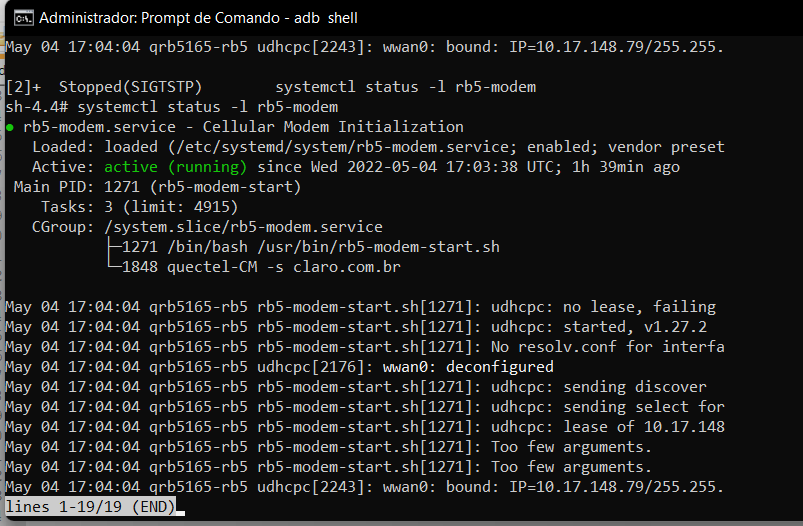
        Captura de tela 2022-05-04 144334.png

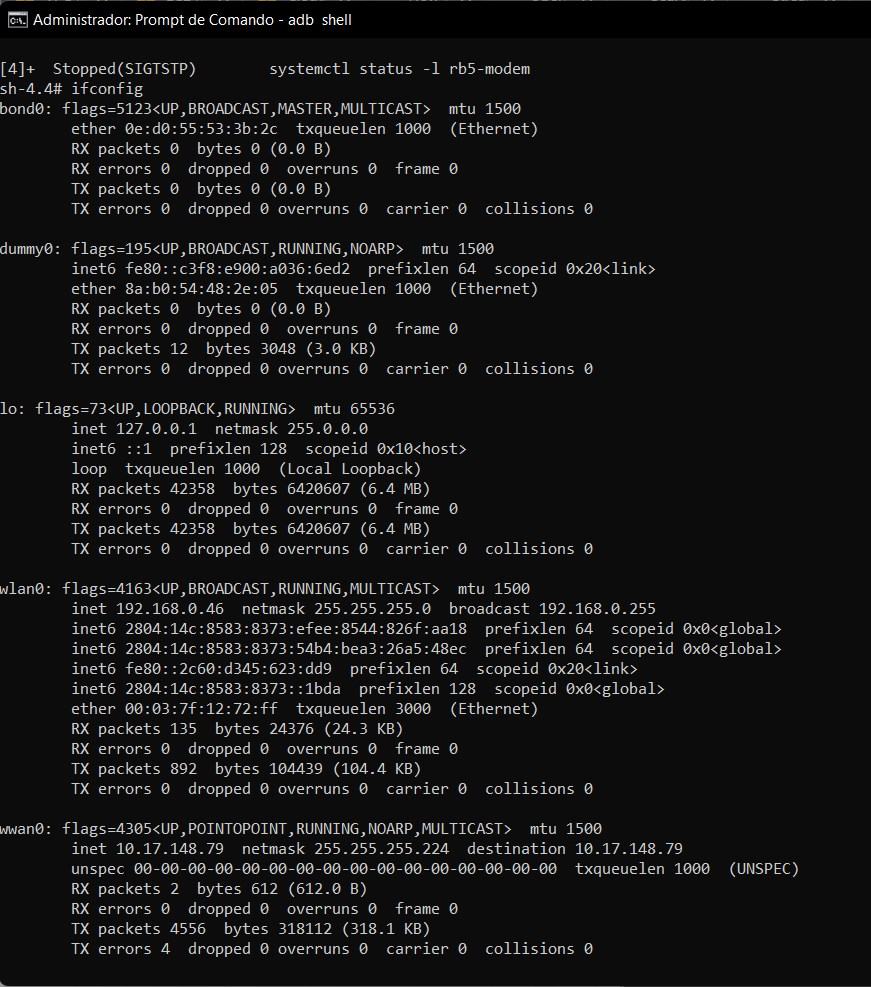
        ifconfig:
        Captura de tela 2022-05-04 144524.png

        1 Reply Last reply
        0
        • D Offline
          D Offline
          Djalma Ribeiro
          Contributor
          wrote on last edited by
          #4

          Command "systemctl enable rb5-flight-modem"
          Result: Failed to enable unit: Unit file rb5-flight-modem.service does not exist.

          1 Reply Last reply
          0
          • tomT Offline
            tomT Offline
            tom
            admin
            wrote on last edited by
            #5

            @Djalma-Ribeiro Okay from the rb5-modem service it looks like you are connecting via. LTE just fine.

            The rb5-flight-modem service you're looking for has since been renamed to rb5-modem so that's why you're not seeing it.

            Can you do a ping test to verify that the internet is working? i.e. ping google.com

            D 1 Reply Last reply
            0
            • tomT tom

              @Djalma-Ribeiro Okay from the rb5-modem service it looks like you are connecting via. LTE just fine.

              The rb5-flight-modem service you're looking for has since been renamed to rb5-modem so that's why you're not seeing it.

              Can you do a ping test to verify that the internet is working? i.e. ping google.com

              D Offline
              D Offline
              Djalma Ribeiro
              Contributor
              wrote on last edited by
              #6

              @tom

              sh-4.4# ping google.com
              PING google.com (142.250.79.238): 56 data bytes
              64 bytes from 142.250.79.238: icmp_seq=0 ttl=114 time=63.395 ms
              64 bytes from 142.250.79.238: icmp_seq=1 ttl=114 time=63.037 ms
              64 bytes from 142.250.79.238: icmp_seq=2 ttl=114 time=62.547 ms
              64 bytes from 142.250.79.238: icmp_seq=3 ttl=114 time=66.664 ms
              64 bytes from 142.250.79.238: icmp_seq=4 ttl=114 time=63.391 ms
              64 bytes from 142.250.79.238: icmp_seq=5 ttl=114 time=64.499 ms
              64 bytes from 142.250.79.238: icmp_seq=6 ttl=114 time=68.028 ms
              64 bytes from 142.250.79.238: icmp_seq=7 ttl=114 time=75.665 ms
              ^C--- google.com ping statistics ---
              8 packets transmitted, 8 packets received, 0% packet loss
              round-trip min/avg/max/stddev = 62.547/65.903/75.665/4.099 ms
              
              1 Reply Last reply
              0
              • tomT Offline
                tomT Offline
                tom
                admin
                wrote on last edited by
                #7

                @Djalma-Ribeiro Okay perfect, now what is the output when you attempt to connect to the VPN with openvpn --script-security 2 --config myfile.ovpn

                D 1 Reply Last reply
                0
                • tomT tom

                  @Djalma-Ribeiro Okay perfect, now what is the output when you attempt to connect to the VPN with openvpn --script-security 2 --config myfile.ovpn

                  D Offline
                  D Offline
                  Djalma Ribeiro
                  Contributor
                  wrote on last edited by
                  #8

                  @tom

                  Options error: In [CMD-LINE]:1: Error opening configuration file: /etc/openvpn/connector01_sao_paulo.ovpn
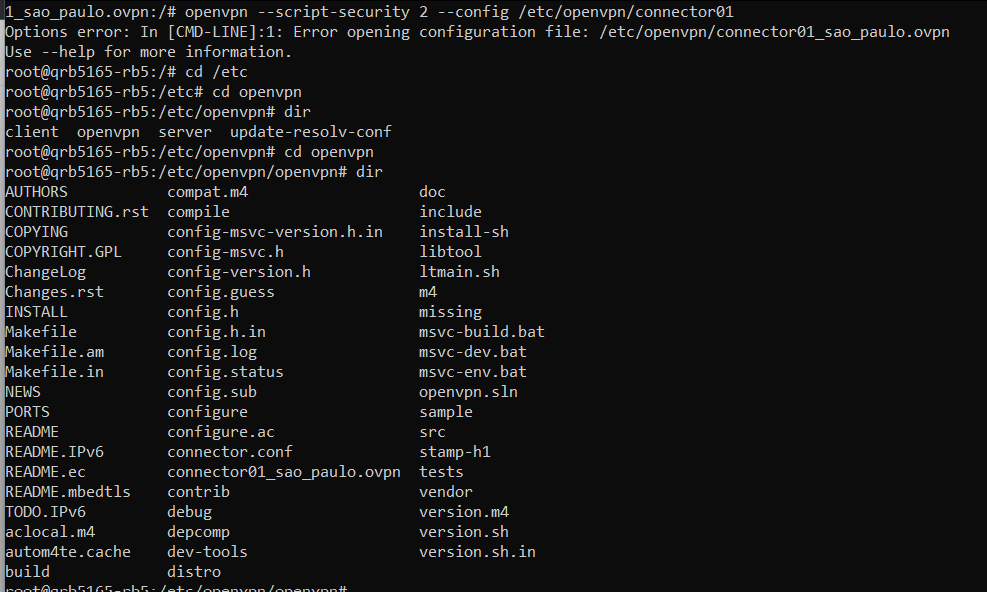
                  

                  Captura de tela 2022-05-04 150743.png

                  1 Reply Last reply
                  0
                  • tomT Offline
                    tomT Offline
                    tom
                    admin
                    wrote on last edited by
                    #9

                    @Djalma-Ribeiro Looks like your path is wrong, you're in /etc/openvpn/openvpn

                    D 1 Reply Last reply
                    0
                    • tomT tom

                      @Djalma-Ribeiro Looks like your path is wrong, you're in /etc/openvpn/openvpn

                      D Offline
                      D Offline
                      Djalma Ribeiro
                      Contributor
                      wrote on last edited by
                      #10

                      @tom Hmm!!! Very well observed. I thought that was normal.

                      I copied the files to the openvpn folder and ran the command. Result:

                      /connector01_sao_paulo.ovpnpn# openvpn --script-security 2 --config /etc/openvpn/
                      Wed May  4 19:14:41 2022 OpenVPN 2.4.6 [git:HEAD/b3a7f452206607fb] aarch64-unknown-linux-gnu [SSL (OpenSSL)] [LZ4] [EPOLL] [MH/PKTINFO] [AEAD] built on May  3 2022
                      Wed May  4 19:14:41 2022 library versions: OpenSSL 1.1.1  11 Sep 2018
                      Wed May  4 19:14:41 2022 Outgoing Control Channel Authentication: Using 256 bit message hash 'SHA256' for HMAC authentication
                      Wed May  4 19:14:41 2022 Incoming Control Channel Authentication: Using 256 bit message hash 'SHA256' for HMAC authentication
                      Wed May  4 19:14:49 2022 TCP/UDP: Preserving recently used remote address: [AF_INET]209.14.3.200:1194
                      Wed May  4 19:14:49 2022 Socket Buffers: R=[1048576->1048576] S=[1048576->1048576]
                      Wed May  4 19:14:49 2022 NOTE: setsockopt TCP_NODELAY=1 failed
                      Wed May  4 19:14:49 2022 UDP link local: (not bound)
                      Wed May  4 19:14:49 2022 UDP link remote: [AF_INET]209.14.3.200:1194
                      Wed May  4 19:14:49 2022 TLS: Initial packet from [AF_INET]209.14.3.200:1194, sid=02821386 53542aca
                      Wed May  4 19:14:50 2022 VERIFY OK: depth=1, CN=CloudVPN Prod CA
                      Wed May  4 19:14:50 2022 VERIFY KU OK
                      Wed May  4 19:14:50 2022 Validating certificate extended key usage
                      Wed May  4 19:14:50 2022 ++ Certificate has EKU (str) TLS Web Server Authentication, expects TLS Web Server Authentication
                      Wed May  4 19:14:50 2022 VERIFY EKU OK
                      Wed May  4 19:14:50 2022 VERIFY OK: depth=0, CN=br-gru-dc2-b1.cloud.openvpn.net
                      Wed May  4 19:14:50 2022 Control Channel: TLSv1.3, cipher TLSv1.3 TLS_AES_256_GCM_SHA384, 2048 bit RSA
                      Wed May  4 19:14:50 2022 [br-gru-dc2-b1.cloud.openvpn.net] Peer Connection Initiated with [AF_INET]209.14.3.200:1194
                      Wed May  4 19:14:51 2022 SENT CONTROL [br-gru-dc2-b1.cloud.openvpn.net]: 'PUSH_REQUEST' (status=1)
                      Wed May  4 19:14:51 2022 PUSH: Received control message: 'PUSH_REPLY,route-gateway 100.96.1.33,ifconfig 100.96.1.34 255.255.255.240,ifconfig-ipv6 fd:0:0:8102::2/64 fd:0:0:8102::1,client-ip 200.173.248.124,ping 8,ping-restart 40,reneg-sec 3600,cipher AES-256-GCM,compress stub-v2,peer-id 71,topology subnet,explicit-exit-notify,remote-cache-lifetime 86400,block-outside-dns,route 100.96.0.0 255.224.0.0,route-ipv6 fd:0:0:8000::/49,route 100.80.0.0 255.240.0.0,route-ipv6 fd:0:0:4000::/50,dhcp-option DNS 100.96.1.33,auth-tokenSESS_ID,auth-token-user b25lc29sdmUvY29ubmVjdG9yL2I5YzdiMDVhLTY2ODUtNDNlMS05NTU5LTFkNTdhZWFjYzM4Nl9kY2M3ODY2Ny1hNDFkLTRiNWYtYWE1Ni02MGEwZjE3NzNiYjI='
                      Wed May  4 19:14:51 2022 Options error: Unrecognized option or missing or extra parameter(s) in [PUSH-OPTIONS]:4: client-ip (2.4.6)
                      Wed May  4 19:14:51 2022 Options error: option 'reneg-sec' cannot be used in this context ([PUSH-OPTIONS])
                      Wed May  4 19:14:51 2022 Options error: Unrecognized option or missing or extra parameter(s) in [PUSH-OPTIONS]:13: remote-cache-lifetime (2.4.6)
                      Wed May  4 19:14:51 2022 Options error: Unrecognized option or missing or extra parameter(s) in [PUSH-OPTIONS]:14: block-outside-dns (2.4.6)
                      Wed May  4 19:14:51 2022 Options error: Unrecognized option or missing or extra parameter(s) in [PUSH-OPTIONS]:21: auth-token-user (2.4.6)
                      Wed May  4 19:14:51 2022 OPTIONS IMPORT: timers and/or timeouts modified
                      Wed May  4 19:14:51 2022 OPTIONS IMPORT: explicit notify parm(s) modified
                      Wed May  4 19:14:51 2022 OPTIONS IMPORT: compression parms modified
                      Wed May  4 19:14:51 2022 OPTIONS IMPORT: --ifconfig/up options modified
                      Wed May  4 19:14:51 2022 OPTIONS IMPORT: route options modified
                      Wed May  4 19:14:51 2022 OPTIONS IMPORT: route-related options modified
                      Wed May  4 19:14:51 2022 OPTIONS IMPORT: --ip-win32 and/or --dhcp-option options modified
                      Wed May  4 19:14:51 2022 OPTIONS IMPORT: peer-id set
                      Wed May  4 19:14:51 2022 OPTIONS IMPORT: adjusting link_mtu to 1624
                      Wed May  4 19:14:51 2022 OPTIONS IMPORT: data channel crypto options modified
                      Wed May  4 19:14:51 2022 Data Channel: using negotiated cipher 'AES-256-GCM'
                      Wed May  4 19:14:51 2022 Outgoing Data Channel: Cipher 'AES-256-GCM' initialized with 256 bit key
                      Wed May  4 19:14:51 2022 Incoming Data Channel: Cipher 'AES-256-GCM' initialized with 256 bit key
                      Wed May  4 19:14:51 2022 ROUTE_GATEWAY 10.46.46.117/255.255.255.248 IFACE=wwan0 HWADDR=00:00:00:00:00:00
                      Wed May  4 19:14:51 2022 GDG6: remote_host_ipv6=n/a
                      Wed May  4 19:14:51 2022 ROUTE6_GATEWAY fe80::6802:b8ff:fede:bb0a IFACE=wlan0
                      Wed May  4 19:14:51 2022 TUN/TAP device tun0 opened
                      Wed May  4 19:14:51 2022 TUN/TAP TX queue length set to 100
                      Wed May  4 19:14:51 2022 do_ifconfig, tt->did_ifconfig_ipv6_setup=1
                      Wed May  4 19:14:51 2022 /sbin/ifconfig tun0 100.96.1.34 netmask 255.255.255.240 mtu 1500 broadcast 100.96.1.47
                      Wed May  4 19:14:51 2022 /sbin/ifconfig tun0 add fd:0:0:8102::2/64
                      Wed May  4 19:14:51 2022 /sbin/route add -net 100.96.0.0 netmask 255.224.0.0 gw 100.96.1.33
                      Wed May  4 19:14:51 2022 /sbin/route add -net 100.80.0.0 netmask 255.240.0.0 gw 100.96.1.33
                      Wed May  4 19:14:51 2022 add_route_ipv6(fd:0:0:8000::/49 -> fd:0:0:8102::1 metric -1) dev tun0
                      Wed May  4 19:14:51 2022 /sbin/route -A inet6 add fd:0:0:8000::/49 dev tun0
                      Wed May  4 19:14:51 2022 add_route_ipv6(fd:0:0:4000::/50 -> fd:0:0:8102::1 metric -1) dev tun0
                      Wed May  4 19:14:51 2022 /sbin/route -A inet6 add fd:0:0:4000::/50 dev tun0
                      Wed May  4 19:14:51 2022 WARNING: this configuration may cache passwords in memory -- use the auth-nocache option to prevent this
                      Wed May  4 19:14:51 2022 Initialization Sequence Completed
                      
                      1 Reply Last reply
                      0
                      • tomT Offline
                        tomT Offline
                        tom
                        admin
                        wrote on last edited by
                        #11

                        @Djalma-Ribeiro That looks promising! If you do an ifconfig in another terminal do you see a tun0 network interface? If so then you're all connected.

                        D 1 Reply Last reply
                        0
                        • tomT tom

                          @Djalma-Ribeiro That looks promising! If you do an ifconfig in another terminal do you see a tun0 network interface? If so then you're all connected.

                          D Offline
                          D Offline
                          Djalma Ribeiro
                          Contributor
                          wrote on last edited by
                          #12

                          @tom

                          tun0: flags=4305<UP,POINTOPOINT,RUNNING,NOARP,MULTICAST>  mtu 1500
                                  inet 100.96.1.34  netmask 255.255.255.240  destination 100.96.1.34
                                  inet6 fd:0:0:8102::2  prefixlen 64  scopeid 0x0<global>
                                  inet6 fe80::da89:cbe9:b217:1ed7  prefixlen 64  scopeid 0x20<link>
                                  unspec 00-00-00-00-00-00-00-00-00-00-00-00-00-00-00-00  txqueuelen 100  (UNSPEC)
                                  RX packets 0  bytes 0 (0.0 B)
                                  RX errors 0  dropped 0  overruns 0  frame 0
                                  TX packets 7  bytes 336 (336.0 B)
                                  TX errors 0  dropped 0 overruns 0  carrier 0  collisions 0
                          

                          But shouldn't I see the drone in the device list on the OpenVPN website?

                          1 Reply Last reply
                          0
                          • D Offline
                            D Offline
                            Djalma Ribeiro
                            Contributor
                            wrote on last edited by
                            #13

                            What else do I need to do to complete the OpenVPN setup? Do I need to send any certificate for the drone?

                            I also couldn't find how to connect the QGC to the drone using VPN. How to find the address to use etc.

                            1 Reply Last reply
                            0
                            • tomT Offline
                              tomT Offline
                              tom
                              admin
                              wrote on last edited by
                              #14

                              @Djalma-Ribeiro So the .ovpn file you used is the certificate that your drone is now using to connect to the VPN. You will also need to connect to the VPN with a different certificate using your ground control station that is running QGC.

                              1 Reply Last reply
                              0
                              • tomT Offline
                                tomT Offline
                                tom
                                admin
                                wrote on last edited by
                                #15

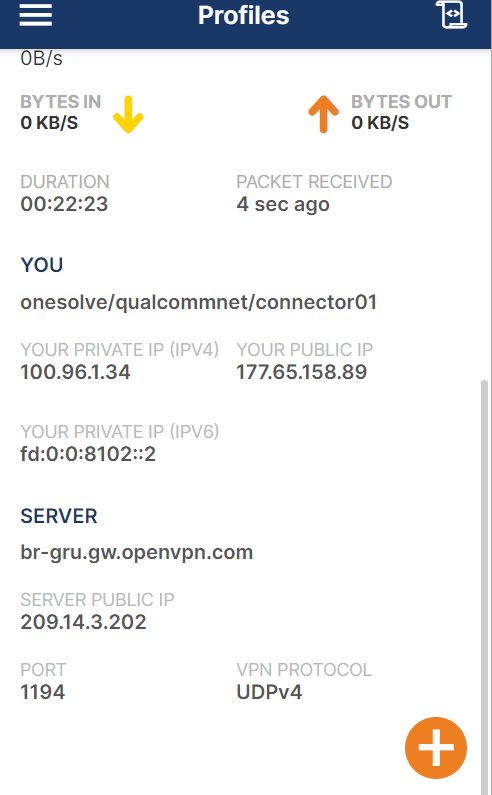
                                @Djalma-Ribeiro By looking at the tun0 interface you can see that the IP of your drone on the VPN is now 100.96.1.34

                                When you connect using your ground control station / PC you will also receive an IP there and those are the IPs you will use to communicate via. the VPN server

                                D 2 Replies Last reply
                                0
                                • tomT tom

                                  @Djalma-Ribeiro By looking at the tun0 interface you can see that the IP of your drone on the VPN is now 100.96.1.34

                                  When you connect using your ground control station / PC you will also receive an IP there and those are the IPs you will use to communicate via. the VPN server

                                  D Offline
                                  D Offline
                                  Djalma Ribeiro
                                  Contributor
                                  wrote on last edited by
                                  #16

                                  @tom Captura de tela 2022-05-04 154616.png

                                  1 Reply Last reply
                                  0
                                  • tomT tom

                                    @Djalma-Ribeiro By looking at the tun0 interface you can see that the IP of your drone on the VPN is now 100.96.1.34

                                    When you connect using your ground control station / PC you will also receive an IP there and those are the IPs you will use to communicate via. the VPN server

                                    D Offline
                                    D Offline
                                    Djalma Ribeiro
                                    Contributor
                                    wrote on last edited by
                                    #17

                                    @tom Is this not my computer's ip?Captura de tela 2022-05-04 154832.png

                                    1 Reply Last reply
                                    0
                                    • tomT Offline
                                      tomT Offline
                                      tom
                                      admin
                                      wrote on last edited by tom
                                      #18

                                      @Djalma-Ribeiro The fact that the IP is the same on that OpenVPN screenshot makes me think that you're attempting to use the same key file here as you are on your drone. If that's true, it won't work and the devices will keep kicking each other off the network. You need to use a unique key for each device.

                                      The first test before you try to connect to QGC would be to connect both devices to the VPN with their unique keys and then attempt to ping from the drone to your pc or from pc to drone. That way you can ensure the two can communicate with each other before you try getting PX4 / QGC involved.

                                      Once you have the pinging working, you can set the IP of the ground station on your drone in /etc/modalai/qgc-ip.cfg(file name may be slightly different)

                                      1 Reply Last reply
                                      0
                                      • D Offline
                                        D Offline
                                        Djalma Ribeiro
                                        Contributor
                                        wrote on last edited by
                                        #19

                                        Now I understand a little more! By the way, thank you very much for your help.

                                        I have both the pc and the drone online on OpenVPN:
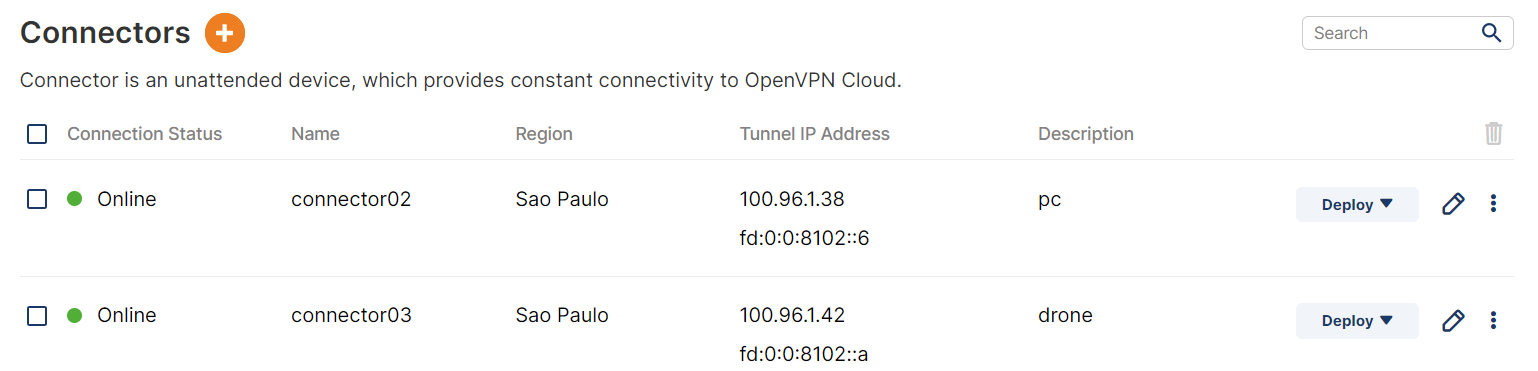
                                        Captura de tela 2022-05-04 164903.png

                                        But neither can find the other by ping.

                                        Is there anything else I'm forgetting?

                                        1 Reply Last reply
                                        0
                                        • tomT Offline
                                          tomT Offline
                                          tom
                                          admin
                                          wrote on last edited by
                                          #20

                                          @Djalma-Ribeiro Are you using a windows machine? All of our devices use Ubuntu 18.04 so I don't have much experience with it.

                                          However on Windows, I know that some of our customers have had to disable all their firewalls in order to allow the traffic to come through.

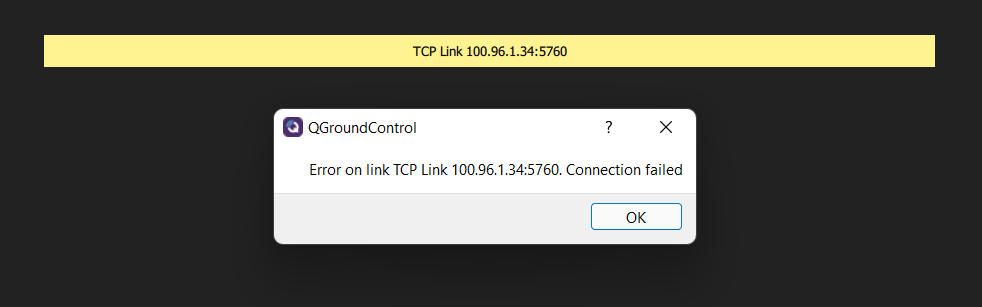
                                          D 1 Reply Last reply
                                          0

                                          Hello! It looks like you're interested in this conversation, but you don't have an account yet.

                                          Getting fed up of having to scroll through the same posts each visit? When you register for an account, you'll always come back to exactly where you were before, and choose to be notified of new replies (either via email, or push notification). You'll also be able to save bookmarks and upvote posts to show your appreciation to other community members.

                                          With your input, this post could be even better 💗

                                          Register Login
                                          Reply
                                          • Reply as topic
                                          Log in to reply
                                          • Oldest to Newest
                                          • Newest to Oldest
                                          • Most Votes


                                          ModalAI
                                          Categories Recent Tags ModalAI.com Docs
                                          © 2026 ModalAI® · Accelerating autonomy for smaller, smarter, safer drones · Powered by NodeBB
                                          • Login

                                          • Login or register to search.
                                          • First post
                                            Last post
                                          0
                                          • Categories
                                          • Recent
                                          • Tags
                                          • Popular
                                          • Users
                                          • Groups