
QGC GPS Speed Error
-
Hello!
I have a Qualcomm Flight RB5 that I have been working on to try to get it flying. When I try to arm the drone, however, arming fails because it fails the preflight checks. I get the error of
Preflight Fail: GPS Horizontal Pos Error too highorGPS Speed Accuracy too lowfrom QGC. Does anyone have any suggestions for fixes for this?Other possibly relevant info:
- The MAV has never been flying before (because of these issues)
- I have tried this in 4 different (albeit indoor) locations and keep getting the same 2 errors
- Under sensor status in QGC AHRS, GPS, & Pre-Arm Check all have errors (when in the Arm menu)
- I have also tried removing & reinserting & playing with the GPS connection into the flight controller (and tried arming it without the GPS but this had the Magnetometer fail)
Thank you so much for the help, let me know if there is anything that may come to mind, or any information that I may need to add to help troubleshoot this.
Thanks again,
Frank -
Those errors are all related to not having GPS signal. Can you take it outside and see if this error goes away?
-
@Frank-Doyle we added some instructions for just flying with VIO indoors here which will hopefully help
As always, please be careful! Flying indoors can be dangerous, we have safety tips here
-
@Chad-Sweet, thank you so much for the response.
After trying the MAV outside, the error does not go away, and even when inside, the error pops up while QGC shows that there the MAV is being seen by 8-11 satellites. We, also, would like to fly inside so we can use motion capture to record ground-truth data to compare with the VIO data & our state-estimation algorithms, so being able to fly inside is important. (We have been following every guideline and more to make sure everything is safe, though)
Is there any way that we would be able to disable the GPS requirement/functionality before flight? Just removing the connector does not work since the MAV then gives an error about the magnetometer not reading correctly. Thank you so much again!
-
@Chad-Sweet, thank you so much for the response.
After trying the MAV outside, the error does not go away, and even when inside, the error pops up while QGC shows that there the MAV is being seen by 8-11 satellites. We, also, would like to fly inside so we can use motion capture to record ground-truth data to compare with the VIO data & our state-estimation algorithms, so being able to fly inside is important. (We have been following every guideline and more to make sure everything is safe, though)
Is there any way that we would be able to disable the GPS requirement/functionality before flight? Just removing the connector does not work since the MAV then gives an error about the magnetometer not reading correctly. Thank you so much again!
@Frank-Doyle said in QGC GPS Speed Error:
@Chad-Sweet, thank you so much for the response.
After trying the MAV outside, the error does not go away, and even when inside, the error pops up while QGC shows that there the MAV is being seen by 8-11 satellites. We, also, would like to fly inside so we can use motion capture to record ground-truth data to compare with the VIO data & our state-estimation algorithms, so being able to fly inside is important. (We have been following every guideline and more to make sure everything is safe, though)
Is there any way that we would be able to disable the GPS requirement/functionality before flight? Just removing the connector does not work since the MAV then gives an error about the magnetometer not reading correctly. Thank you so much again!
I'm also having this problem. Did you manage to resolve this?
-
I have not flown the RB5 and I am still new to using PX4, but on a similar platform I recommend checking parameters in QGC and look for
EKF2_Aid_Mask. You can toggle to:
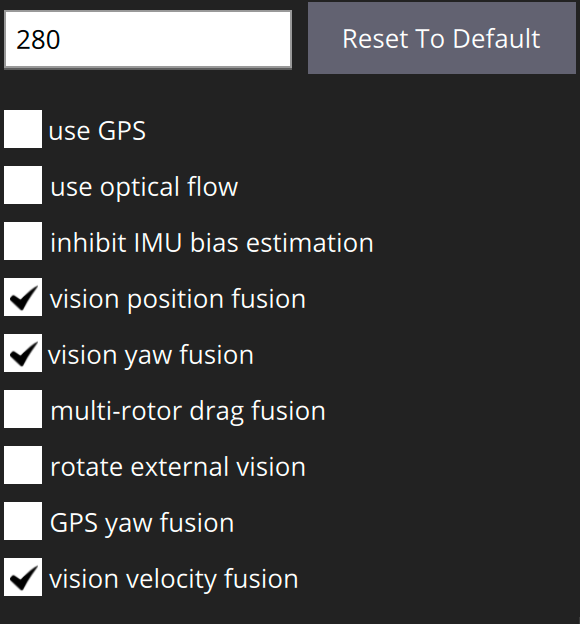
Which should disable GPS inputs and allow you to fly indoors. Just remember to set it back to use GPS when you want to fly outdoors. As Modal mentions, take appropriate safety precautions whens flying indoors even with VIO enabled.



Reading along? Create a free ModalAI Forum account to join in.
With an account you can reply, ask your own question, get an email when a ModalAI engineer answers, and mark the reply that solved it. Your place in each thread is saved between visits.
Questions about VOXL, Flight Core, ESCs and ModalAI drones are answered here by the engineers who build them.
Register Login