
Issues with controller and drone
-
I have a starling 2 that was working a week ago, today I plugged in the Titan battery and despite being connected on QGround Control and showing that its connected on the controller as well the joystick inputs will not read. The arm and disarm are reading along with the switches and the joysticks are reading in the calibration page on QGroundControl. What can I do to get the drone flying?
-
I have a starling 2 that was working a week ago, today I plugged in the Titan battery and despite being connected on QGround Control and showing that its connected on the controller as well the joystick inputs will not read. The arm and disarm are reading along with the switches and the joysticks are reading in the calibration page on QGroundControl. What can I do to get the drone flying?
@daniellee Are you using a joystick or an RC transmitter? What do you mean by "the joystick inputs will not read"?
-
@daniellee Are you using a joystick or an RC transmitter? What do you mean by "the joystick inputs will not read"?
@Eric-Katzfey Hello Eric, I am using the Commando RC transmitter, and the joystick are the sticks on it sorry if I phrased that weird but essentially on Q Ground Control I am getting a reading from the RC controller and when I move the sticks I see it moving on Q Ground Control. Another issue I found was that I ran a voxl-esc check on the Starling 2 and it wasnt detecting any ESCs. I then swapped the current ESC with a new ESC and a new data cable and when it started I heard a different chirp and then ran the voxl-esc command again and this was the output:
starling2 (D0014):/$ voxl-esc
What do you want to do?
- scan 3) spin 5) upload_params
- detect 4) upgrade_firmware
#? 1
enabling bridge
detected voxl-px4 is enabled
Removed /etc/systemd/system/multi-user.target.wants/voxl-px4.service.
detected voxl-px4 is running, stopping it now
Sending kill slpi command!
bridge enabled
Detected Python version : 3.6.9 (default, May 22 2025, 20:54:22)
[GCC 8.4.0]
Found voxl-esc tools bin version: 1.9
VOXL Platform: M0054
Detected RB5 Flight, VOXL2 M0054 or M0104!
INFO: Scanning for ESC firmware: /dev/slpi-uart-2, baud: 2000000
Sending library name request: libslpi_qrb5165_io.so
Sending initialization request
INFO: Scanning for ESC bootloader: /dev/slpi-uart-2, baud: 230400
ERROR: voxl_uart_read_bytes: Bus '12' is not initialized
Updated baud rate to 230400
WARNING: No ESC(s) detected
VOXL Platform: M0054
Detected RB5 Flight, VOXL2 M0054 or M0104!
INFO: Scanning for ESC firmware: /dev/slpi-uart-2, baud: 250000
INFO: Scanning for ESC bootloader: /dev/slpi-uart-2, baud: 230400
Updated baud rate to 230400
WARNING: No ESC(s) detected
VOXL Platform: M0054
Detected RB5 Flight, VOXL2 M0054 or M0104!
INFO: Scanning for ESC firmware: /dev/slpi-uart-2, baud: 921600
INFO: Scanning for ESC bootloader: /dev/slpi-uart-2, baud: 230400
Updated baud rate to 230400
WARNING: No ESC(s) detected
VOXL Platform: M0054
Detected RB5 Flight, VOXL2 M0054 or M0104!
INFO: Scanning for ESC firmware: /dev/slpi-uart-2, baud: 57600
INFO: Scanning for ESC bootloader: /dev/slpi-uart-2, baud: 230400
Updated baud rate to 230400
WARNING: No ESC(s) detected
ERROR: not all ESCs found
FAILED to ping ESCs when calling scan script
disabling bridge
Sending kill slpi command!
re-enabling voxl-px4
Created symlink /etc/systemd/system/multi-user.target.wants/voxl-px4.service → /etc/systemd/system/voxl-px4.service.
restarting voxl-px4
bridge disabled
DONEI don't think the ESC and the VOXL are communicating from my limited understanding of the output; am I right to assume that?
-
@daniellee Are you using a joystick or an RC transmitter? What do you mean by "the joystick inputs will not read"?
@Eric-Katzfey Eric let me clear some things up. I have a Starling 2 that has a new esc and a new cable that connects the ESC to the Voxl and I have another self made drone made using parts from a starling 2 (lets call this drone the personal drone). Right now the personal drone's ESC is working and is also connected to the Commando 8 controller BUT. this drone is not receiving inputs from the RC despite being connected. Q Ground Control IS still seeing the connection and seeing the switches on the Commando controller being moved. Please advise! Thank you.
-
@daniellee Are you using a joystick or an RC transmitter? What do you mean by "the joystick inputs will not read"?
@Eric-Katzfey Hello again Eric! It seems the PX4s servers arent running.
voxl2:/$ systemctl stop voxl-px4
voxl2:/$ /usr/bin/voxl-px4-start
AIRFRAME:
GPS:
RC:
ESC:
POWER MANAGER:
AIRSPEED SENSOR:
DISTANCE SENSOR:
OSD:
ARTIFACT_MODE:
EXTRA STEPS:
Running on M0054
ERROR [px4] PX4 server not running
ERROR [px4] PX4 server not running
Starting IMU driver with no rotation
ERROR [px4] PX4 server not running
ERROR [px4] PX4 server not running
ERROR [px4] PX4 server not running
Looking for qmc5883l magnetometer
ERROR [px4] PX4 server not running
Looking for ist8310 magnetometer
ERROR [px4] PX4 server not running
Looking for ist8308 magnetometer
ERROR [px4] PX4 server not running
ERROR [px4] PX4 server not running
Looking for ncp5623c RGB LED
ERROR [px4] PX4 server not running
ERROR [px4] PX4 server not running
ERROR [px4] PX4 server not running
No ESC type specified, not starting an ESC driver
ERROR [px4] PX4 server not running
ERROR [px4] PX4 server not running
/usr/bin/voxl-px4-start: line 199: [: =: unary operator expected
ERROR [px4] PX4 server not running
ERROR [px4] PX4 server not running
ERROR [px4] PX4 server not running
ERROR [px4] PX4 server not running
ERROR [px4] PX4 server not running
ERROR [px4] PX4 server not running
ERROR [px4] PX4 server not running
ERROR [px4] PX4 server not running
ERROR [px4] PX4 server not running
ERROR [px4] PX4 server not running
ERROR [px4] PX4 server not running
ERROR [px4] PX4 server not running
ERROR [px4] PX4 server not running
ERROR [px4] PX4 server not running
ERROR [px4] PX4 server not running
ERROR [px4] PX4 server not running
ERROR [px4] PX4 server not running
ERROR [px4] PX4 server not running
ERROR [px4] PX4 server not running
ERROR [px4] PX4 server not running -
@Eric-Katzfey Hello again Eric! It seems the PX4s servers arent running.
voxl2:/$ systemctl stop voxl-px4
voxl2:/$ /usr/bin/voxl-px4-start
AIRFRAME:
GPS:
RC:
ESC:
POWER MANAGER:
AIRSPEED SENSOR:
DISTANCE SENSOR:
OSD:
ARTIFACT_MODE:
EXTRA STEPS:
Running on M0054
ERROR [px4] PX4 server not running
ERROR [px4] PX4 server not running
Starting IMU driver with no rotation
ERROR [px4] PX4 server not running
ERROR [px4] PX4 server not running
ERROR [px4] PX4 server not running
Looking for qmc5883l magnetometer
ERROR [px4] PX4 server not running
Looking for ist8310 magnetometer
ERROR [px4] PX4 server not running
Looking for ist8308 magnetometer
ERROR [px4] PX4 server not running
ERROR [px4] PX4 server not running
Looking for ncp5623c RGB LED
ERROR [px4] PX4 server not running
ERROR [px4] PX4 server not running
ERROR [px4] PX4 server not running
No ESC type specified, not starting an ESC driver
ERROR [px4] PX4 server not running
ERROR [px4] PX4 server not running
/usr/bin/voxl-px4-start: line 199: [: =: unary operator expected
ERROR [px4] PX4 server not running
ERROR [px4] PX4 server not running
ERROR [px4] PX4 server not running
ERROR [px4] PX4 server not running
ERROR [px4] PX4 server not running
ERROR [px4] PX4 server not running
ERROR [px4] PX4 server not running
ERROR [px4] PX4 server not running
ERROR [px4] PX4 server not running
ERROR [px4] PX4 server not running
ERROR [px4] PX4 server not running
ERROR [px4] PX4 server not running
ERROR [px4] PX4 server not running
ERROR [px4] PX4 server not running
ERROR [px4] PX4 server not running
ERROR [px4] PX4 server not running
ERROR [px4] PX4 server not running
ERROR [px4] PX4 server not running
ERROR [px4] PX4 server not running
ERROR [px4] PX4 server not running@daniellee Okay, there's a lot going on here. Let's try to focus on one thing at a time. Why did you issue
systemctl stop voxl-px4? When you do that you need to wait a few seconds before trying to restart voxl-px4. Then use the commandvoxl-px4 -d, don't try to start it with/usr/bin/voxl-px4-start. Orsystemctl start voxl-px4. But why were you doing that in the first place? -
@daniellee Okay, there's a lot going on here. Let's try to focus on one thing at a time. Why did you issue
systemctl stop voxl-px4? When you do that you need to wait a few seconds before trying to restart voxl-px4. Then use the commandvoxl-px4 -d, don't try to start it with/usr/bin/voxl-px4-start. Orsystemctl start voxl-px4. But why were you doing that in the first place?@Eric-Katzfey Hello Eric! Thank you for replying, we were doing that because it was what chatgpt asked and recommended us to do to try to reboot the PX4 system.
-
@daniellee Okay, there's a lot going on here. Let's try to focus on one thing at a time. Why did you issue
systemctl stop voxl-px4? When you do that you need to wait a few seconds before trying to restart voxl-px4. Then use the commandvoxl-px4 -d, don't try to start it with/usr/bin/voxl-px4-start. Orsystemctl start voxl-px4. But why were you doing that in the first place?@Eric-Katzfey The desicion to use systemctl start voxl-px4 was because from what i understand it is that the system boots and services necessary to flight should be enabled and running once a preflight has passed. Our preflight was showing pass but the systems never enabled even though the preset is enabled.
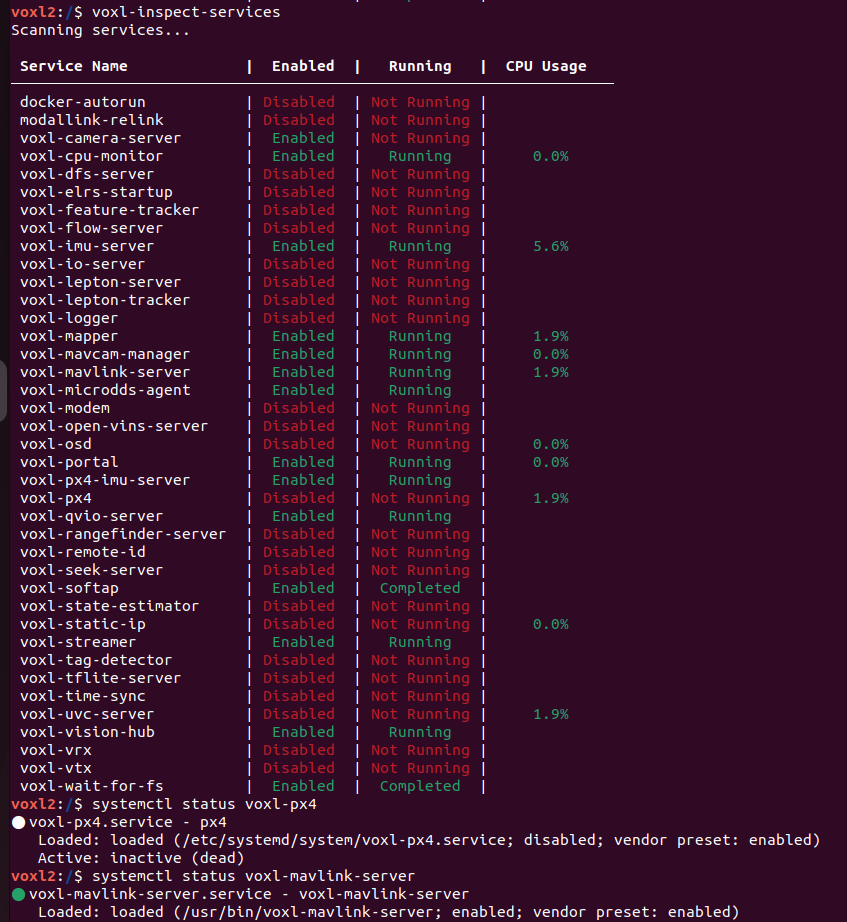
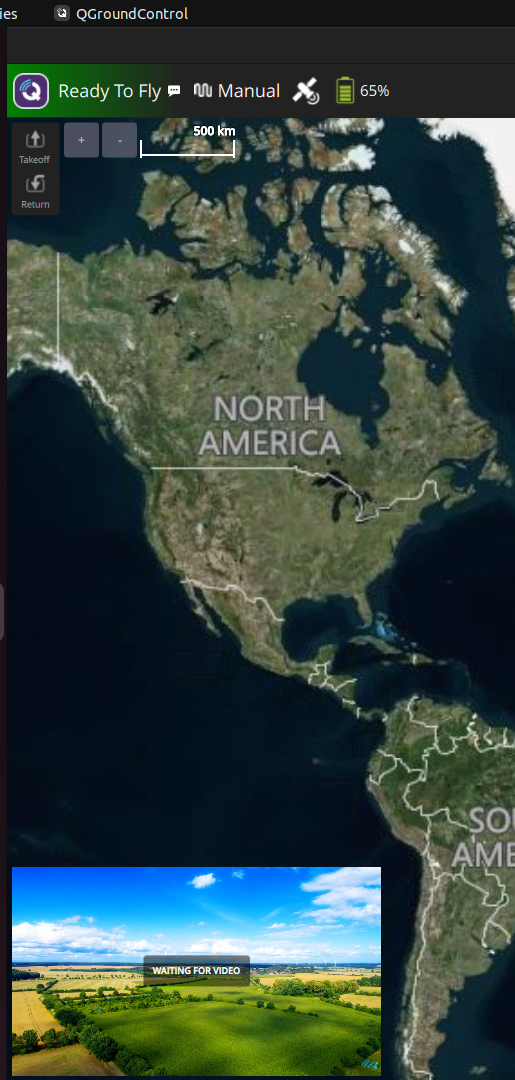
So I am trying to force it to start.When I force it to start I can run the following commands to verify that my preflight has failed in the px4.
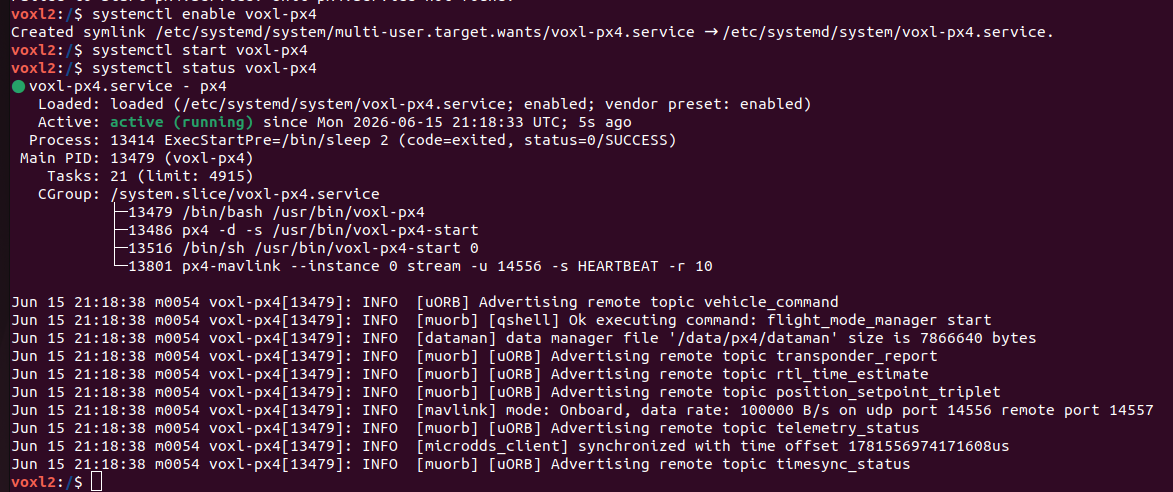
Now the system is up and running
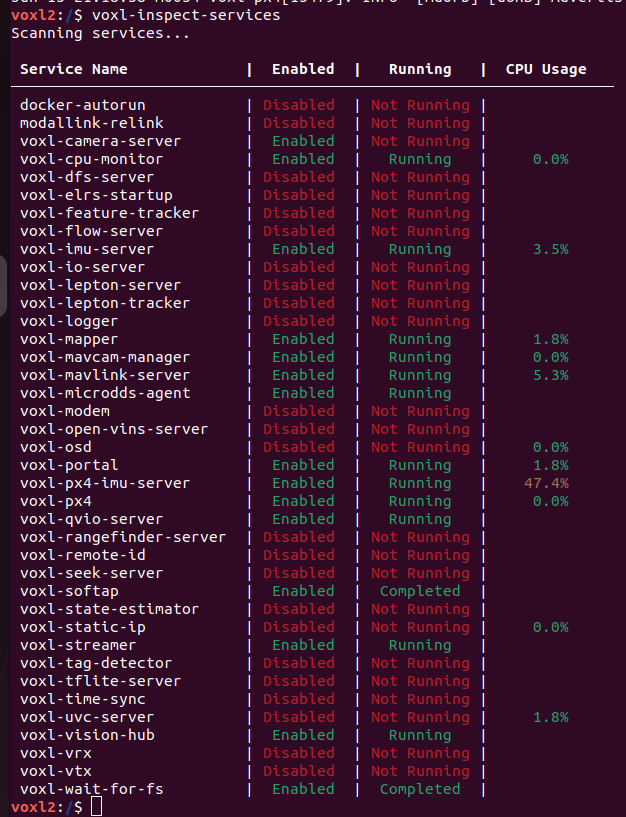
Now to check the preflight status:
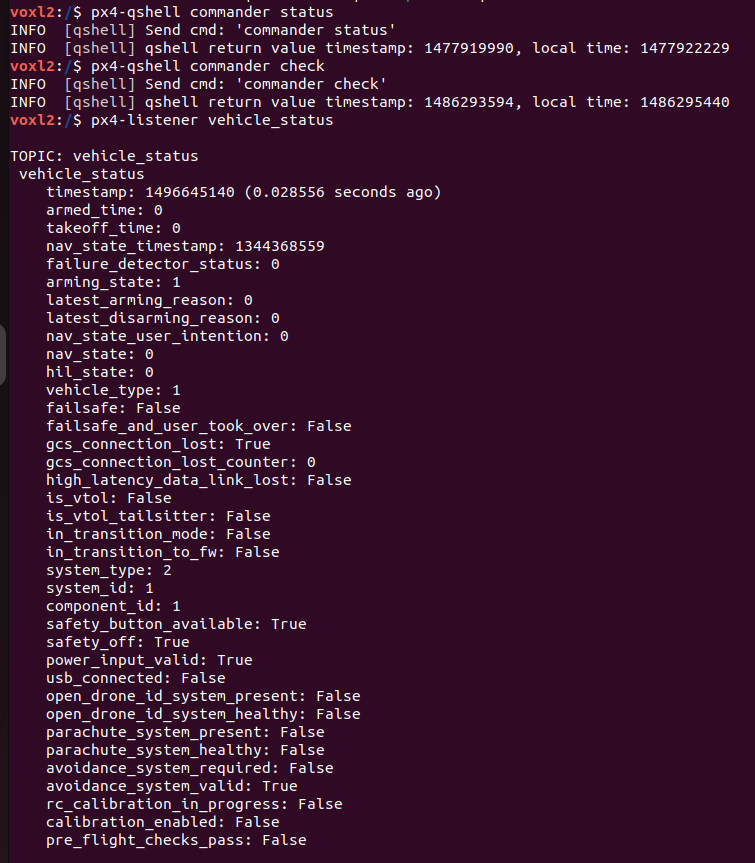
Here the preflight has failed but in QGround Control its stating a pass and that we are ready to fly.
-
@Eric-Katzfey Hello Eric! Thank you for replying, we were doing that because it was what chatgpt asked and recommended us to do to try to reboot the PX4 system.
@daniellee Okay, well I would have just recommended power cycling the drone. Let's look at your personal drone now. Seems that the RC is working fine since you can see it in QGC. Why do you say it is not receiving inputs from the RC? What are you doing that convinces you of that?
-
@daniellee said in Issues with controller and drone:
Our preflight was showing pass but the systems never enabled even though the preset is enabled.
What do you mean that the systems never enabled? What systems? How are you trying to enable them? What is the preset you are talking about? Looking at the QGC screen it looks like it is ready to arm. Can you arm it via QGC?
-
@daniellee Okay, well I would have just recommended power cycling the drone. Let's look at your personal drone now. Seems that the RC is working fine since you can see it in QGC. Why do you say it is not receiving inputs from the RC? What are you doing that convinces you of that?
@Eric-Katzfey That is the problem. Every time I power cycle the system, it does not keep the services necessary for flight enabled. I will power cycle the drone to show that it does not stay enabled. After power cycling I enabled the px4 service because it was not enable on start up so that I can view the vehicle status.
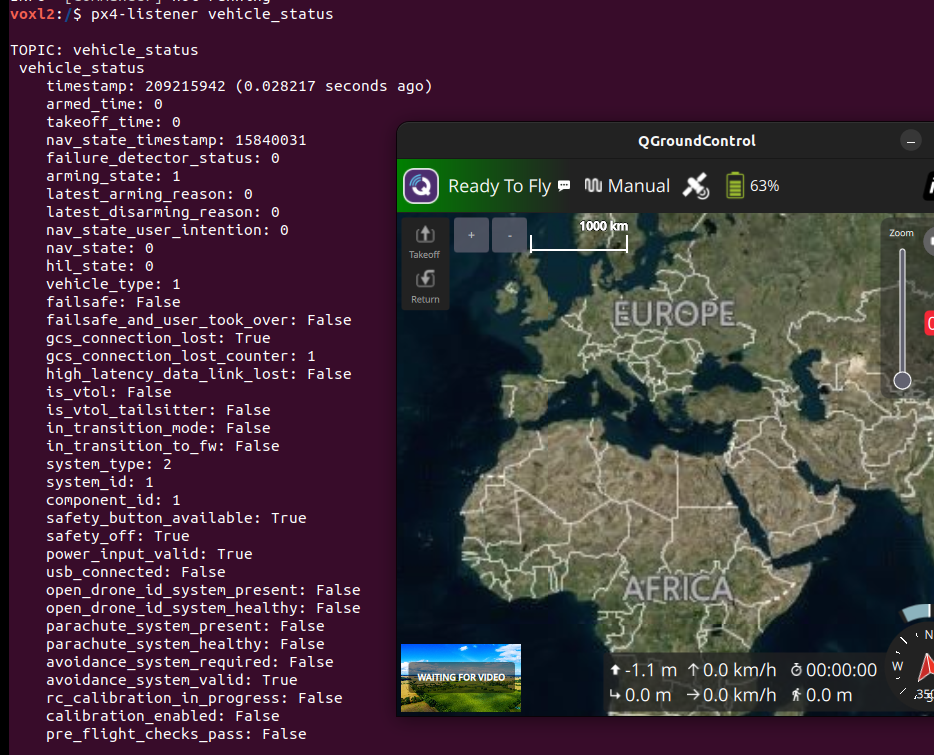
The preflight failed in the adb shell. But is passing in QGC.I can see the radio RC transmitter moving the joysticks in QGC but the drone does NOT take off. So movement commands sent via the controller are being seen but not used by the drone.
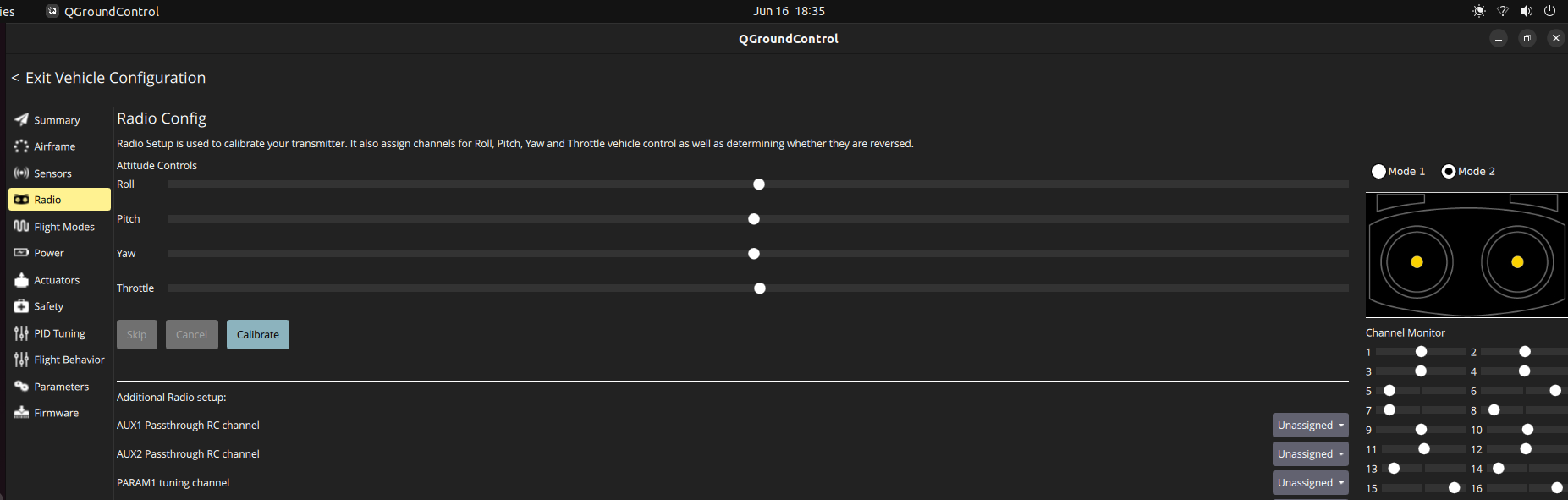
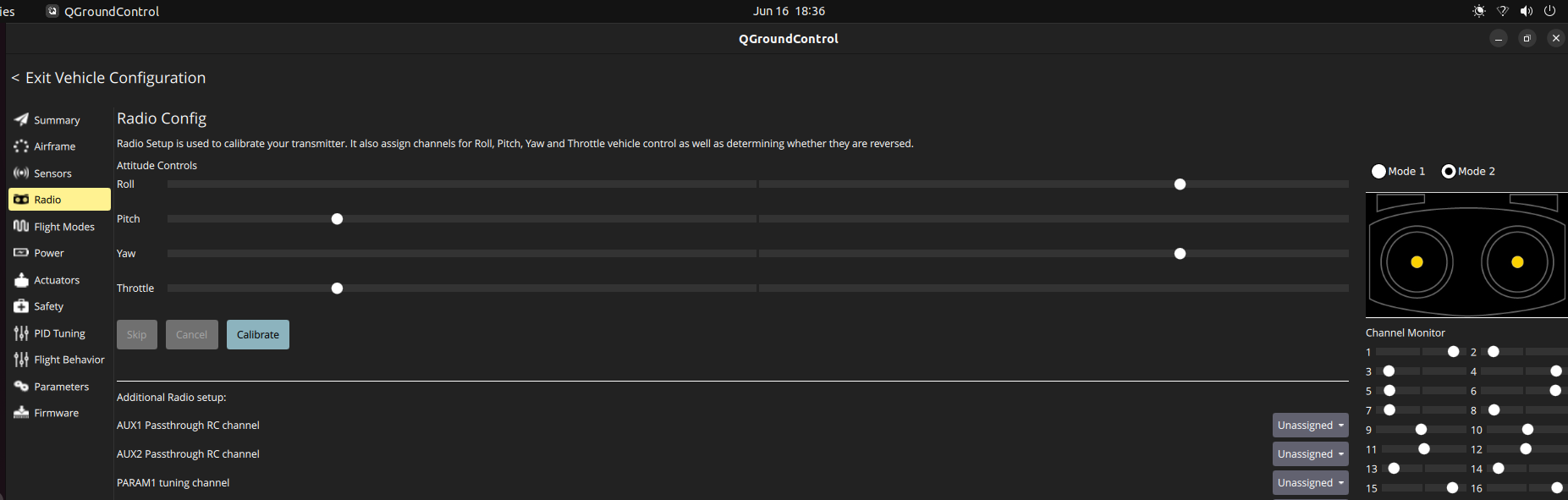
This is what I mean by the joystick inputs not working. These photos show that the controller is connected and the inputs are being read. However, the drone is not using them. -
@Eric-Katzfey That is the problem. Every time I power cycle the system, it does not keep the services necessary for flight enabled. I will power cycle the drone to show that it does not stay enabled. After power cycling I enabled the px4 service because it was not enable on start up so that I can view the vehicle status.
The preflight failed in the adb shell. But is passing in QGC.I can see the radio RC transmitter moving the joysticks in QGC but the drone does NOT take off. So movement commands sent via the controller are being seen but not used by the drone.
This is what I mean by the joystick inputs not working. These photos show that the controller is connected and the inputs are being read. However, the drone is not using them.@daniellee So when you power cycle the drone and then adb in and do
voxl-inspect-serviceswhich services are not enabled and running that you think should be? In your earlier screen shotvoxl-px4, andvoxl-mavlink-serverwere both enabled and running. What other services do you think you need for flight? That's all that should be required for manual flight mode. -
@daniellee So when you power cycle the drone and then adb in and do
voxl-inspect-serviceswhich services are not enabled and running that you think should be? In your earlier screen shotvoxl-px4, andvoxl-mavlink-serverwere both enabled and running. What other services do you think you need for flight? That's all that should be required for manual flight mode.@Eric-Katzfey I understand that but do you know why the controller inputs arent being received by the drone? We have no idea what is causing this.
-
@Eric-Katzfey I understand that but do you know why the controller inputs arent being received by the drone? We have no idea what is causing this.
@daniellee I don't know what that means. If you can see the RC sticks / switches at QGC then PX4 has to be seeing them. What happens when you try to arm the drone from QGC?
-
@daniellee I don't know what that means. If you can see the RC sticks / switches at QGC then PX4 has to be seeing them. What happens when you try to arm the drone from QGC?
@Eric-Katzfey It gets armed but the drone does not fly/respond to the controller inputs.
-
@Eric-Katzfey It gets armed but the drone does not fly/respond to the controller inputs.
@daniellee Ah, okay, now we're getting somewhere. If it is arming that means you see the propellers spinning? Can you send me the log file from px4? (Look in
/data/px4/logs). -
@daniellee Ah, okay, now we're getting somewhere. If it is arming that means you see the propellers spinning? Can you send me the log file from px4? (Look in
/data/px4/logs).@Eric-Katzfey Hi Eric Im not at the computer right now and the px4 logs are the same as the ones above, the props arent spinning even when armed on QGroundControl.
-
@Eric-Katzfey Hi Eric Im not at the computer right now and the px4 logs are the same as the ones above, the props arent spinning even when armed on QGroundControl.
@daniellee I don't see any log files attached in this thread.
-
@daniellee I don't see any log files attached in this thread.
@Eric-Katzfey I have the PX4 log files in a zipped folder but I do not see a way to upload them to the forum.
-
@daniellee I don't see any log files attached in this thread.
@Eric-Katzfey Hello Eric I have downloaded the PX4 logs- I managed to get a link for one of the logs, the internal timestamp is messed up and I believe this is the most recent one. Here is the link : https://logs.px4.io/plot_app?log=db2c6cd3-f6c9-4bf8-b5bc-dc5ac185c752

Reading along? Create a free ModalAI Forum account to join in.
With an account you can reply, ask your own question, get an email when a ModalAI engineer answers, and mark the reply that solved it. Your place in each thread is saved between visits.
Questions about VOXL, Flight Core, ESCs and ModalAI drones are answered here by the engineers who build them.
Register Login