
HDMI output from Seeker Vision FPV Goggles
-
I need to get some instructions on how to plug in a USB-C to HDMI adapter to the Seeker Vision FPV Blue goggles received with our Stinger Vision 3.5 FPV kit, for exporting the video stream to external viewers: Can someone please send me a PDF or short written instructions on where on the VRX/Orga goggles set to plug the adapter into, along with any change in settings or other setup items to view the FPV video, like you did when our technical team came to your facility last fall to see your demonstrations?
-
I need to get some instructions on how to plug in a USB-C to HDMI adapter to the Seeker Vision FPV Blue goggles received with our Stinger Vision 3.5 FPV kit, for exporting the video stream to external viewers: Can someone please send me a PDF or short written instructions on where on the VRX/Orga goggles set to plug the adapter into, along with any change in settings or other setup items to view the FPV video, like you did when our technical team came to your facility last fall to see your demonstrations?
@David-Avery See the following graphic.
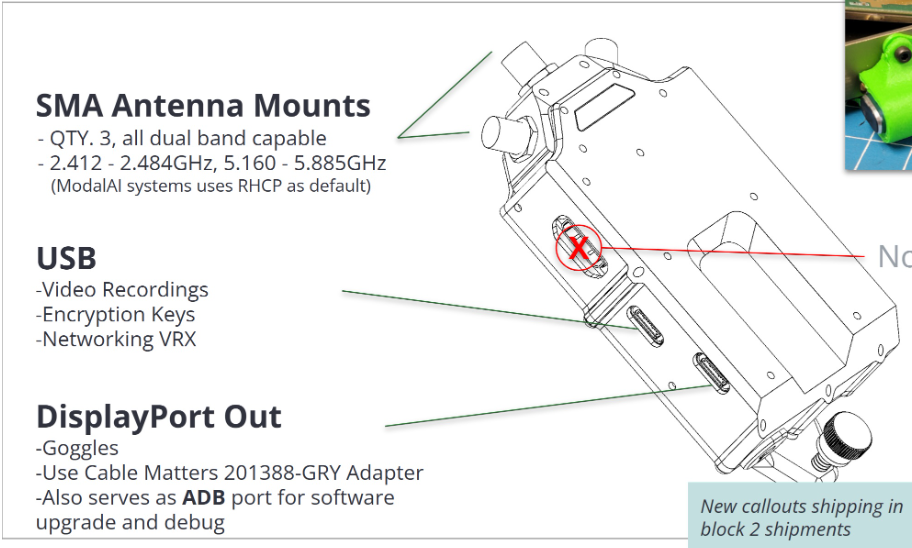
You can connect a USB-C to hdmi adapter to the USB-C labeled "DisplayPort Out"
I recommend using the following adapter: https://www.amazon.com/Cable-Matters-48Gbps-Adapter-Supporting/dp/B08MSWMXT4?th=1
No software configuration changes are needed.
-
@David-Avery See the following graphic.
You can connect a USB-C to hdmi adapter to the USB-C labeled "DisplayPort Out"
I recommend using the following adapter: https://www.amazon.com/Cable-Matters-48Gbps-Adapter-Supporting/dp/B08MSWMXT4?th=1
No software configuration changes are needed.
@tom Thank you!


Reading along? Create a free ModalAI Forum account to join in.
With an account you can reply, ask your own question, get an email when a ModalAI engineer answers, and mark the reply that solved it. Your place in each thread is saved between visits.
Questions about VOXL, Flight Core, ESCs and ModalAI drones are answered here by the engineers who build them.
Register Login