
Starling 2 not following navigation path
-
Hello ModalAI Team,
I am still trying to get the navigation working with my team's Starling 2.
system-image: 1.8.06-M0054-14.1a-perf
kernel: #1 SMP PREEMPT Wed Oct 22 04:13:18 UTC 2025 4.19.125
hw platform: M0054
mach.var: 1.0.1
SKU: MRB-D0014-4-V1-C27-T8-M22-X0
voxl-suite: 1.6.2I have updated the drone to the latest voxl version 1.6.2. I am able to fly the drone in position mode and figure 8 mode.
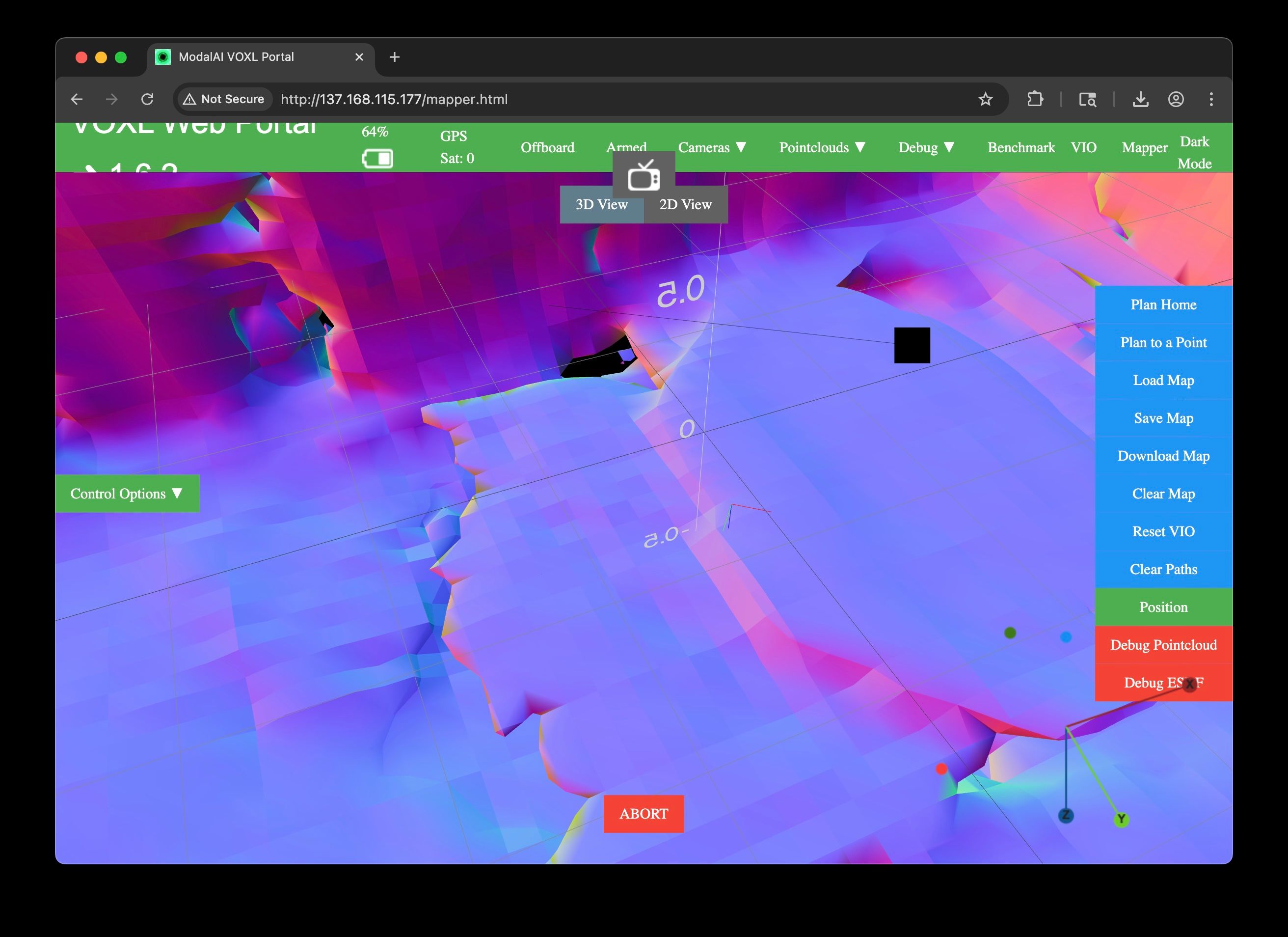
I few the drone around for a couple of minutes in our testing room gathering map data. I then switched the drone into offboard_mode: trajectory. I planned a point and saw the projected path drawing a simple straight line. There are not obstacles in the way to navigate around/avoid. The drone just flew directly at the grown instead of following the path. Is there anything I should try software/settings-wise to try and get navigation working? Is there anything about the layout/appearance of a room that could cause this? Please see the attached image.
-
Hello ModalAI Team,
Please let me know if there is any further information needed. So far, I haven't had the drone successfully navigate in trajectory in any version of the VOXL SDK I've tried (1.4/1.5/1.6).
-
Hello ModalAI Team,
Please let me know if there is any further information needed. So far, I haven't had the drone successfully navigate in trajectory in any version of the VOXL SDK I've tried (1.4/1.5/1.6).
Hey @greg_s,
Can you post your voxl-logs and flight logs?Thanks
-
Hey @greg_s,
Can you post your voxl-logs and flight logs?Thanks
Hello @ApoorvThapliyal,
I put the log file here: log100.ulg on Filebin.net
I also put the the output fromvoxl-vision-hub --debug_offboardsuggested by @Cliff-Wong in another post in another upload here voxl-vision-hub-log.txt on Filebin.net.When I attempted the flight, the drone appeared to fly to the correct X and Z coordinates, but it was close to the floor and well below the correct Y coordinate.
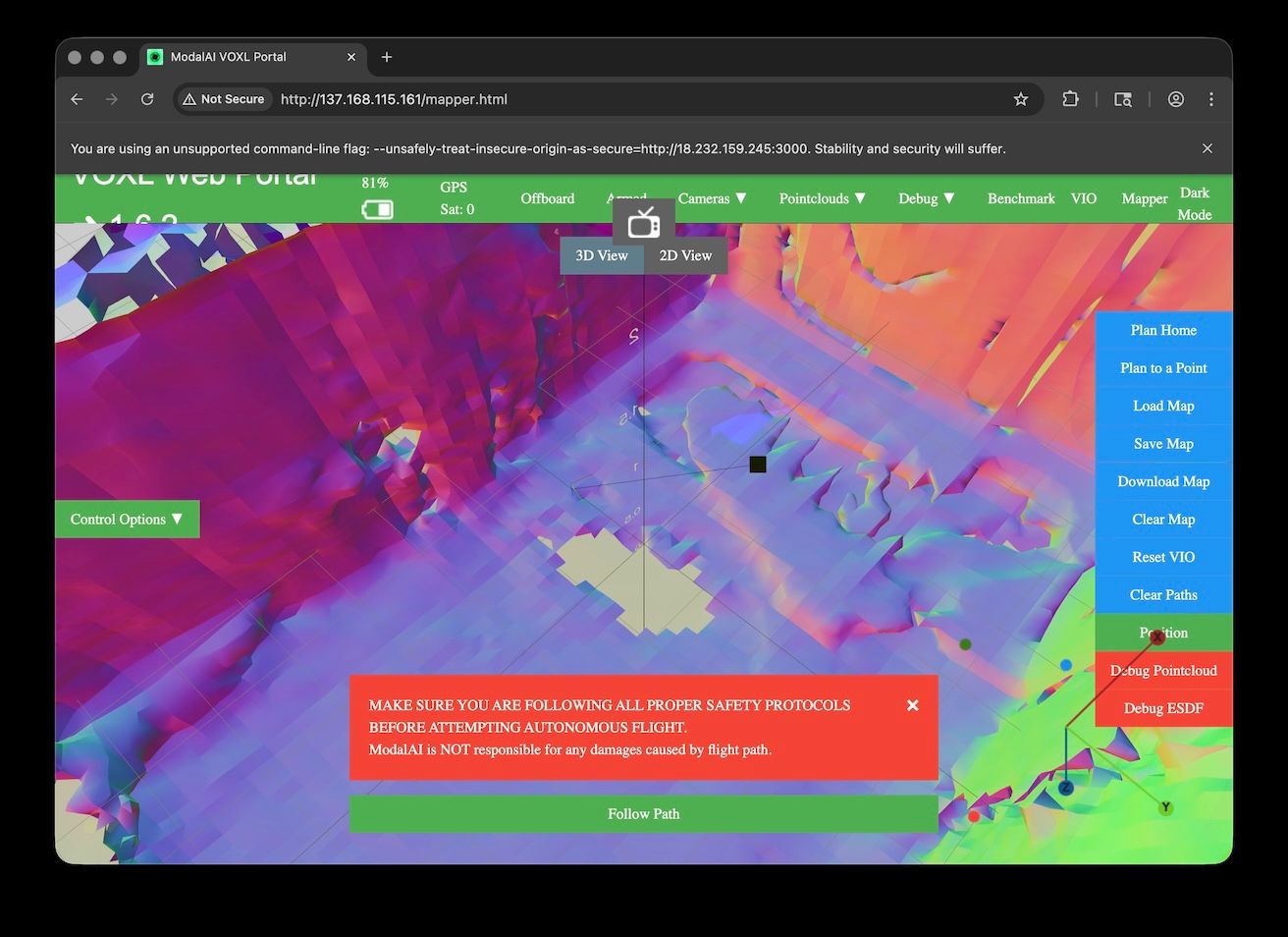
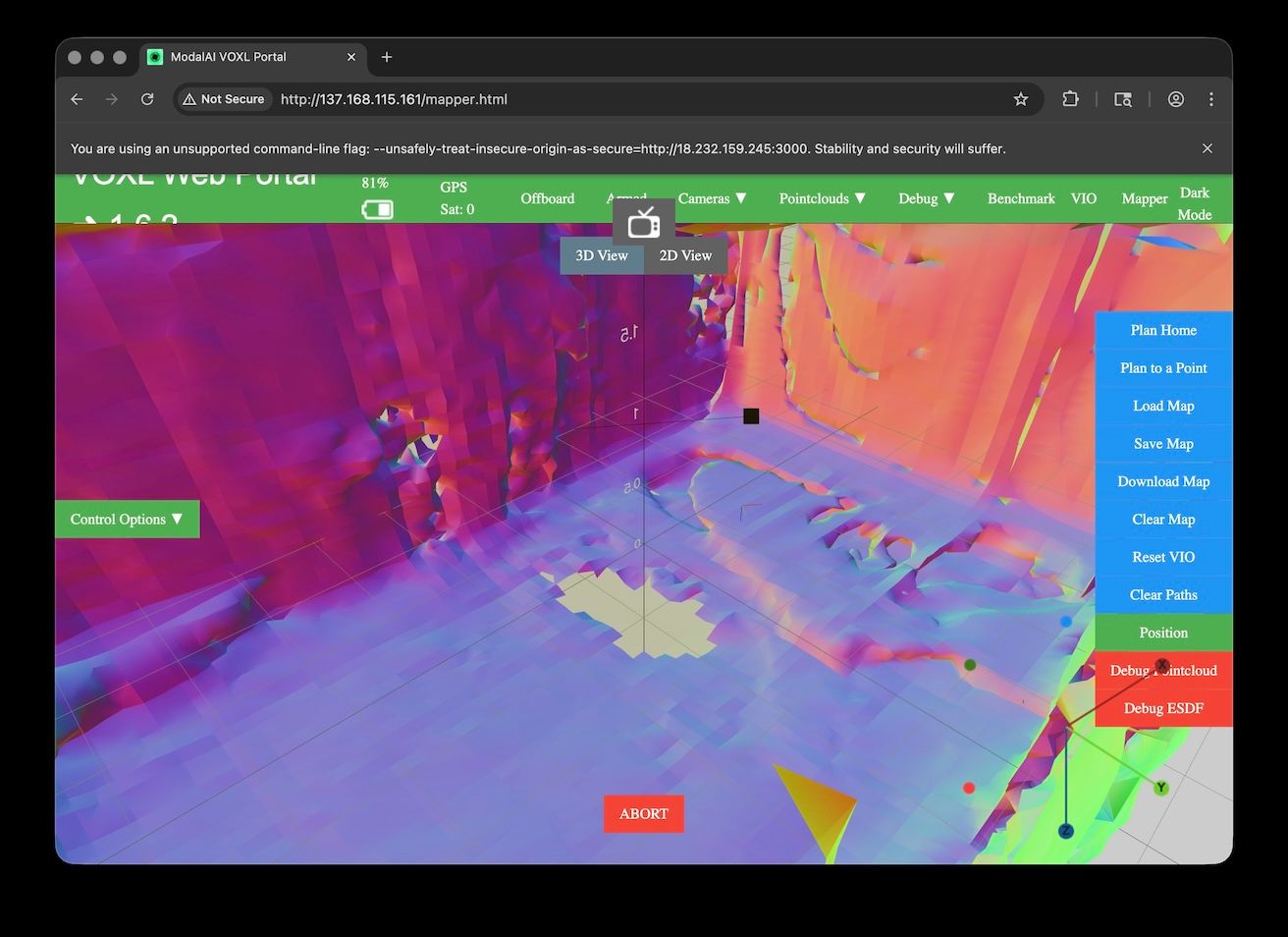
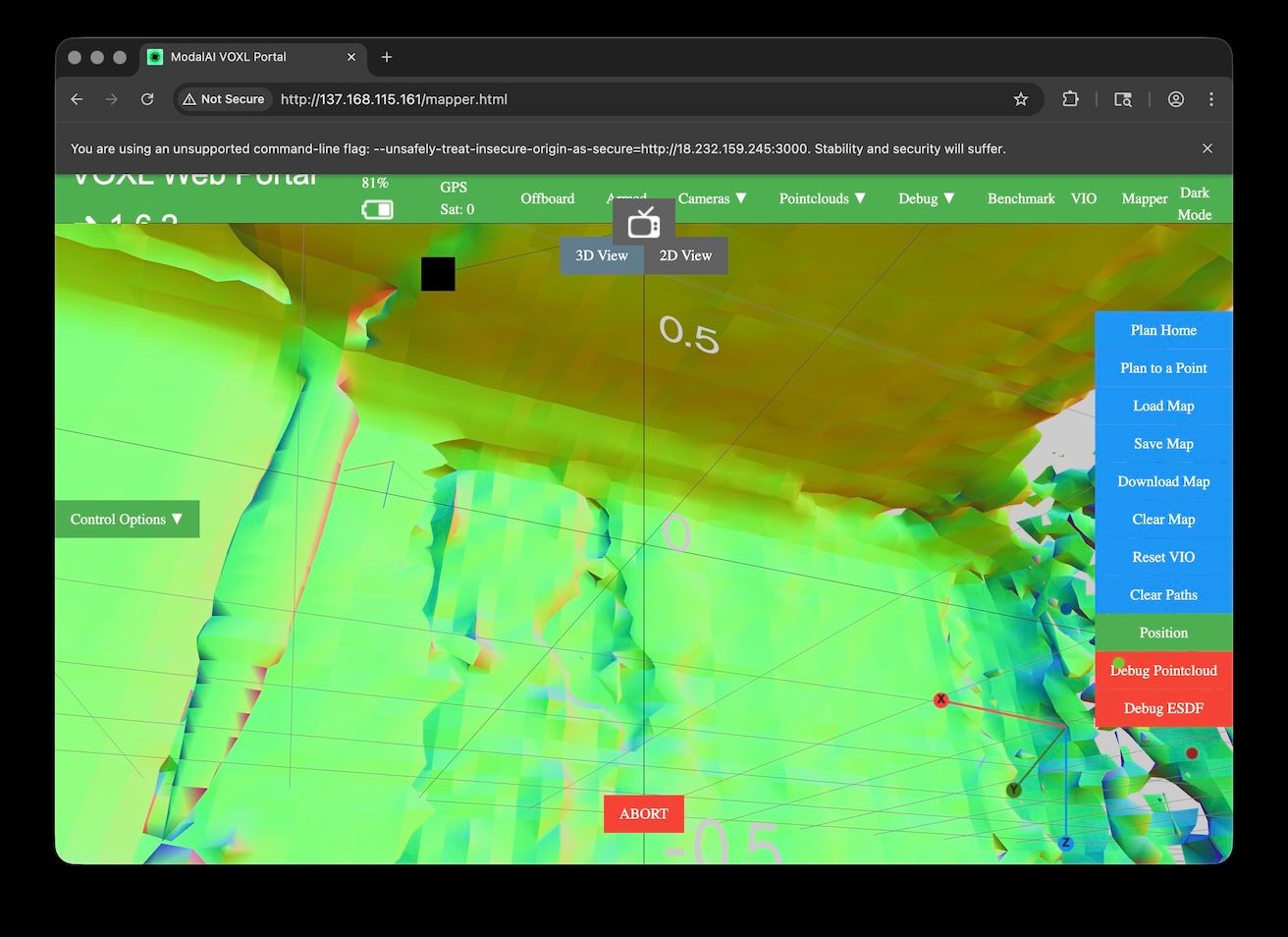
Here are a couple of picture of the map and projected route:
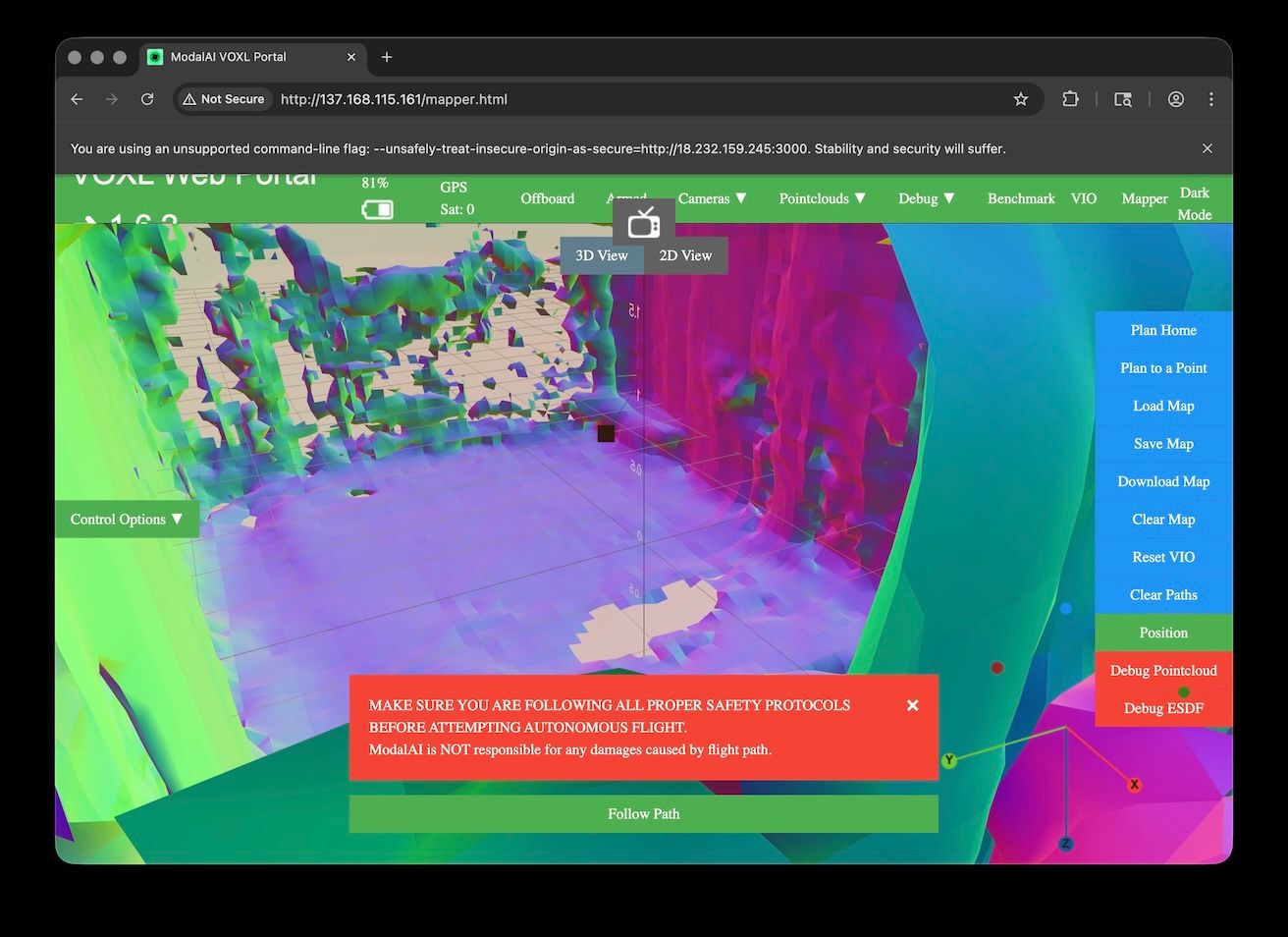
And a couple of the map after the drone tried to navigate and ended up below the point:
-
For convenience I took out the section that has the trajectory from the voxl-vision-hub logs:
commanding: XYZ -0.4 -0.2 -1.8 yaw: 0.3
commanding: XYZ -0.4 -0.2 -1.8 yaw: 0.3
commanding: XYZ -0.4 -0.2 -1.8 yaw: 0.3
commanding: XYZ -0.4 -0.2 -1.8 yaw: 0.3
commanding: XYZ -0.4 -0.2 -1.8 yaw: 0.3
commanding: XYZ -0.4 -0.2 -1.8 yaw: 0.3
commanding: XYZ -0.4 -0.2 -1.8 yaw: 0.3
commanding: XYZ -0.4 -0.2 -1.8 yaw: 0.3
commanding: XYZ -0.4 -0.2 -1.8 yaw: 0.3
commanding: XYZ -0.4 -0.2 -1.8 yaw: 0.3
commanding: XYZ -0.4 -0.2 -1.8 yaw: 0.3
commanding: XYZ -0.4 -0.2 -1.8 yaw: 0.3
commanding: XYZ -0.4 -0.2 -1.8 yaw: 0.3
commanding: XYZ -0.4 -0.2 -1.8 yaw: 0.3
commanding: XYZ -0.4 -0.2 -1.8 yaw: 0.3
commanding: XYZ -0.4 -0.2 -1.8 yaw: 0.3
commanding: XYZ -0.4 -0.2 -1.8 yaw: 0.3
commanding: XYZ -0.4 -0.2 -1.8 yaw: 0.3
commanding: XYZ -0.4 -0.2 -1.8 yaw: 0.3
commanding: XYZ -0.4 -0.2 -1.8 yaw: 0.3
commanding: XYZ -0.4 -0.2 -1.8 yaw: 0.3
commanding: XYZ -0.4 -0.2 -1.8 yaw: 0.3
commanding: XYZ -0.4 -0.2 -1.8 yaw: 0.3
commanding: XYZ -0.4 -0.2 -1.8 yaw: 0.3
commanding: XYZ -0.4 -0.2 -1.8 yaw: 0.3
commanding: XYZ -0.4 -0.2 -1.8 yaw: 0.3
commanding: XYZ -0.4 -0.2 -1.8 yaw: 0.3
commanding: XYZ -0.4 -0.2 -1.8 yaw: 0.3
commanding: XYZ -0.4 -0.2 -1.8 yaw: 0.3
commanding: XYZ -0.4 -0.2 -1.8 yaw: 0.3
commanding: XYZ -0.4 -0.2 -1.8 yaw: 0.3
commanding: XYZ -0.4 -0.2 -1.8 yaw: 0.3
commanding: XYZ -0.4 -0.2 -1.8 yaw: 0.3
commanding: XYZ -0.4 -0.2 -1.8 yaw: 0.3
commanding: XYZ -0.4 -0.2 -1.8 yaw: 0.3
commanding: XYZ -0.4 -0.2 -1.8 yaw: 0.3
commanding: XYZ -0.4 -0.2 -1.8 yaw: 0.3
commanding: XYZ -0.4 -0.2 -1.8 yaw: 0.3
commanding: XYZ -0.4 -0.2 -1.8 yaw: 0.3
commanding: XYZ -0.4 -0.2 -1.8 yaw: 0.3
commanding: XYZ -0.4 -0.2 -1.8 yaw: 0.3
commanding: XYZ -0.4 -0.2 -1.8 yaw: 0.3
commanding: XYZ -0.4 -0.2 -1.8 yaw: 0.3
commanding: XYZ -0.4 -0.2 -1.8 yaw: 0.3
commanding: XYZ -0.4 -0.2 -1.8 yaw: 0.3
commanding: XYZ -0.4 -0.2 -1.8 yaw: 0.3
commanding: XYZ -0.4 -0.2 -1.8 yaw: 0.3
commanding: XYZ -0.4 -0.2 -1.8 yaw: 0.3
commanding: XYZ -0.4 -0.2 -1.8 yaw: 0.3
commanding: XYZ -0.4 -0.2 -1.8 yaw: 0.3
commanding: XYZ -0.4 -0.2 -1.8 yaw: 0.3
commanding: XYZ -0.4 -0.2 -1.7 yaw: 0.3
commanding: XYZ -0.4 -0.2 -1.7 yaw: 0.3
commanding: XYZ -0.4 -0.2 -1.7 yaw: 0.3
commanding: XYZ -0.4 -0.2 -1.7 yaw: 0.3
commanding: XYZ -0.4 -0.2 -1.7 yaw: 0.3
Received trajectory has duration 1.953539 seconds
Received load and start command.
commanding: XYZ -0.4 -0.2 -1.0 yaw: 0.7 V: 0.0 0.0 -0.0 A: 0.1 0.0 -0.0
commanding: XYZ -0.4 -0.2 -1.0 yaw: 0.7 V: 0.0 0.0 -0.0 A: 0.2 0.2 -0.0
commanding: XYZ -0.4 -0.2 -1.0 yaw: 0.7 V: 0.0 0.0 -0.0 A: 0.3 0.3 -0.0
commanding: XYZ -0.4 -0.2 -1.0 yaw: 0.7 V: 0.0 0.0 -0.0 A: 0.5 0.5 -0.0
commanding: XYZ -0.4 -0.2 -1.0 yaw: 0.7 V: 0.0 0.0 -0.0 A: 0.7 0.6 0.0
commanding: XYZ -0.4 -0.2 -1.0 yaw: 0.7 V: 0.1 0.1 -0.0 A: 0.9 0.7 0.0
commanding: XYZ -0.3 -0.2 -1.0 yaw: 0.7 V: 0.1 0.1 0.0 A: 1.0 0.9 0.0
commanding: XYZ -0.3 -0.2 -1.0 yaw: 0.7 V: 0.1 0.1 0.0 A: 1.1 0.9 0.0
commanding: XYZ -0.3 -0.2 -1.0 yaw: 0.7 V: 0.2 0.2 0.0 A: 1.1 1.0 0.0
commanding: XYZ -0.3 -0.2 -1.0 yaw: 0.7 V: 0.2 0.2 0.0 A: 1.2 1.0 0.0
commanding: XYZ -0.3 -0.2 -1.0 yaw: 0.7 V: 0.3 0.2 0.0 A: 1.2 1.0 0.0
commanding: XYZ -0.3 -0.2 -1.0 yaw: 0.7 V: 0.3 0.3 0.0 A: 1.2 1.0 0.0
commanding: XYZ -0.3 -0.1 -1.0 yaw: 0.7 V: 0.3 0.3 0.0 A: 1.2 1.0 0.0
commanding: XYZ -0.3 -0.1 -1.0 yaw: 0.7 V: 0.4 0.3 0.0 A: 1.1 1.0 0.0
commanding: XYZ -0.3 -0.1 -1.0 yaw: 0.7 V: 0.4 0.4 0.0 A: 1.1 1.0 0.0
commanding: XYZ -0.3 -0.1 -1.0 yaw: 0.7 V: 0.4 0.4 0.0 A: 1.1 1.0 0.0
Received trajectory has duration 1.452853 seconds
Received insert command.
commanding: XYZ -0.3 -0.1 -1.0 yaw: 0.7 V: 0.5 0.4 0.0 A: 1.1 0.9 0.0
commanding: XYZ -0.2 -0.1 -1.0 yaw: 0.7 V: 0.5 0.4 0.0 A: 1.0 0.9 0.0
commanding: XYZ -0.2 -0.1 -1.0 yaw: 0.7 V: 0.5 0.5 0.0 A: 1.0 0.9 0.0
commanding: XYZ -0.2 -0.1 -1.0 yaw: 0.7 V: 0.6 0.5 0.0 A: 0.9 0.8 0.0
commanding: XYZ -0.2 -0.0 -1.0 yaw: 0.7 V: 0.6 0.5 0.0 A: 0.8 0.7 0.1
commanding: XYZ -0.2 -0.0 -1.0 yaw: 0.7 V: 0.6 0.6 0.0 A: 0.8 0.6 0.1
commanding: XYZ -0.1 0.0 -1.0 yaw: 0.7 V: 0.7 0.6 0.0 A: 0.7 0.5 0.1
commanding: XYZ -0.1 0.0 -1.0 yaw: 0.7 V: 0.7 0.6 0.0 A: 0.6 0.5 0.1
commanding: XYZ -0.1 0.0 -1.0 yaw: 0.7 V: 0.7 0.6 0.0 A: 0.5 0.4 0.1
commanding: XYZ -0.1 0.1 -1.0 yaw: 0.7 V: 0.7 0.6 0.0 A: 0.4 0.3 0.0
commanding: XYZ -0.0 0.1 -1.0 yaw: 0.7 V: 0.7 0.6 0.0 A: 0.3 0.2 0.0
commanding: XYZ -0.0 0.1 -1.0 yaw: 0.7 V: 0.7 0.6 0.0 A: 0.2 0.1 0.0
commanding: XYZ 0.0 0.1 -1.0 yaw: 0.7 V: 0.7 0.6 0.0 A: 0.0 0.0 0.0
Received trajectory has duration 0.510237 seconds
Received insert command.
commanding: XYZ 0.0 0.1 -1.0 yaw: 0.7 V: 0.7 0.6 0.0 A: -0.1 -0.1 0.0
commanding: XYZ 0.1 0.2 -1.0 yaw: 0.7 V: 0.7 0.6 0.0 A: -0.2 -0.2 0.0
commanding: XYZ 0.1 0.2 -1.0 yaw: 0.7 V: 0.6 0.5 0.0 A: -0.2 -0.2 0.0
commanding: XYZ 0.1 0.2 -1.0 yaw: 0.7 V: 0.6 0.5 0.0 A: -0.3 -0.2 0.0
commanding: XYZ 0.1 0.2 -1.0 yaw: 0.7 V: 0.6 0.5 0.0 A: -0.4 -0.3 -0.0
commanding: XYZ 0.1 0.2 -1.0 yaw: 0.7 V: 0.6 0.5 0.0 A: -0.5 -0.4 -0.0
commanding: XYZ 0.2 0.3 -1.0 yaw: 0.7 V: 0.6 0.5 0.0 A: -0.6 -0.5 -0.0
commanding: XYZ 0.2 0.3 -1.0 yaw: 0.7 V: 0.6 0.5 0.0 A: -0.7 -0.6 -0.0
commanding: XYZ 0.2 0.3 -1.0 yaw: 0.7 V: 0.5 0.5 0.0 A: -0.7 -0.6 -0.0
commanding: XYZ 0.2 0.3 -1.0 yaw: 0.7 V: 0.5 0.4 0.0 A: -0.7 -0.6 -0.0
commanding: XYZ 0.2 0.3 -1.0 yaw: 0.7 V: 0.5 0.4 0.0 A: -0.8 -0.7 -0.0
commanding: XYZ 0.2 0.3 -1.0 yaw: 0.7 V: 0.5 0.4 0.0 A: -0.8 -0.7 -0.0
commanding: XYZ 0.3 0.3 -1.0 yaw: 0.7 V: 0.4 0.4 0.0 A: -0.8 -0.7 -0.0
commanding: XYZ 0.3 0.4 -1.0 yaw: 0.7 V: 0.4 0.3 0.0 A: -0.8 -0.7 -0.0
commanding: XYZ 0.3 0.4 -1.0 yaw: 0.7 V: 0.4 0.3 0.0 A: -0.8 -0.7 -0.0
commanding: XYZ 0.3 0.4 -1.0 yaw: 0.7 V: 0.4 0.3 0.0 A: -0.7 -0.6 -0.0
commanding: XYZ 0.3 0.4 -1.0 yaw: 0.7 V: 0.3 0.3 0.0 A: -0.5 -0.5 -0.0
commanding: XYZ 0.3 0.4 -1.0 yaw: 0.7 V: 0.3 0.3 0.0 A: -0.4 -0.3 0.0
commanding: XYZ 0.3 0.4 -1.0 yaw: 0.7 V: 0.3 0.3 0.0 A: -0.3 -0.3 0.0
commanding: XYZ 0.3 0.4 -1.0 yaw: 0.7 V: 0.3 0.2 0.0 A: -0.4 -0.4 0.0
commanding: XYZ 0.3 0.4 -1.0 yaw: 0.7 V: 0.3 0.2 0.0 A: -0.6 -0.5 -0.0
commanding: XYZ 0.4 0.4 -1.0 yaw: 0.7 V: 0.2 0.2 0.0 A: -0.8 -0.7 -0.0
commanding: XYZ 0.4 0.4 -1.0 yaw: 0.7 V: 0.2 0.2 0.0 A: -1.1 -0.9 -0.1
commanding: XYZ 0.4 0.4 -1.0 yaw: 0.7 V: 0.2 0.1 0.0 A: -1.3 -1.1 -0.1
commanding: XYZ 0.4 0.4 -1.0 yaw: 0.7 V: 0.1 0.1 0.0 A: -1.4 -1.1 -0.1
commanding: XYZ 0.4 0.4 -1.0 yaw: 0.7 V: 0.1 0.1 0.0 A: -1.3 -1.1 -0.1
commanding: XYZ 0.4 0.4 -1.0 yaw: 0.7 V: 0.0 0.0 0.0 A: -1.0 -0.9 -0.1
commanding: XYZ 0.4 0.4 -1.0 yaw: 0.7 V: 0.0 0.0 0.0 A: -0.7 -0.6 -0.1
commanding: XYZ 0.4 0.4 -1.0 yaw: 0.7 V: 0.0 0.0 0.0 A: -0.3 -0.2 -0.0
commanding: XYZ 0.4 0.4 -1.0 yaw: 0.7 V: 0.0 0.0 0.0 A: -0.0 -0.0 -0.0
commanding: XYZ 0.4 0.4 -1.0 yaw: 0.7 V: -0.0 -0.0 0.0 A: -0.0 -0.0 0.0
FINISHED TRAJECTORY
commanding: XYZ 0.4 0.4 -1.0 yaw: 0.7
commanding: XYZ 0.4 0.4 -1.0 yaw: 0.7
commanding: XYZ 0.4 0.4 -1.0 yaw: 0.7
commanding: XYZ 0.4 0.4 -1.0 yaw: 0.7
commanding: XYZ 0.4 0.4 -1.0 yaw: 0.7
commanding: XYZ 0.4 0.4 -1.0 yaw: 0.7
commanding: XYZ 0.4 0.4 -1.0 yaw: 0.7
commanding: XYZ 0.4 0.4 -1.0 yaw: 0.7
commanding: XYZ 0.4 0.4 -1.0 yaw: 0.7
commanding: XYZ 0.4 0.4 -1.0 yaw: 0.7
commanding: XYZ 0.4 0.4 -1.0 yaw: 0.7
commanding: XYZ 0.4 0.4 -1.0 yaw: 0.7
commanding: XYZ 0.4 0.4 -1.0 yaw: 0.7
commanding: XYZ 0.4 0.4 -1.0 yaw: 0.7
commanding: XYZ 0.4 0.5 -1.0 yaw: 0.7
commanding: XYZ 0.4 0.5 -1.0 yaw: 0.7
commanding: XYZ 0.4 0.5 -1.0 yaw: 0.7
commanding: XYZ 0.4 0.5 -1.0 yaw: 0.7
commanding: XYZ 0.4 0.5 -1.0 yaw: 0.7 -
@ApoorvThapliyal, if you/your team needs anymore information or data, do let me know. Thank you.
-
@ApoorvThapliyal, if you/your team needs anymore information or data, do let me know. Thank you.
Hey @greg_s
I just wanted to confirm, are you dragging the planned point to the height desired? By default, simply clicking on the map will generate a point at height 0.
Let me know, thanks -
Hey @greg_s
I just wanted to confirm, are you dragging the planned point to the height desired? By default, simply clicking on the map will generate a point at height 0.
Let me know, thanksHello @ApoorvThapliyal,
Yes, I am dragging the point up and panning the camera around to ensure it is roughly the same height as the drone. The line drawn for the path is pretty straight and at the correctly level. The drone just ends up flying down below the point after I have move it.
-
Hey @greg_s
I just wanted to confirm, are you dragging the planned point to the height desired? By default, simply clicking on the map will generate a point at height 0.
Let me know, thanksHello @ApoorvThapliyal,
Is there anything more your teams need to investigate/troubleshoot the issue? Thanks.
-
Hello @ApoorvThapliyal,
Is there anything more your teams need to investigate/troubleshoot the issue? Thanks.
Hey @greg_s
I was able to reproduce the issue where the drone does not fly correctly toward the setpoint. I think reviewing theextrinsics.conffile is a good next step, as there may be an incorrect transform defined there. -
Hey @greg_s
I was able to reproduce the issue where the drone does not fly correctly toward the setpoint. I think reviewing theextrinsics.conffile is a good next step, as there may be an incorrect transform defined there.Hey @ApoorvThapliyal,
Here is the output of the extrinsics:
voxl2:~$ voxl-inspect-extrinsics --all
name: D0014_Starling_2
#0:
parent: imu_apps
child: tracking_front
T_child_wrt_parent: 0.037 0.000 0.001
RPY_parent_to_child: 0.0 90.0 90.0
R_child_to_parent: 0.000 -0.000 1.000
1.000 0.000 -0.000
-0.000 1.000 0.000#1:
parent: imu_apps
child: tracking_down
T_child_wrt_parent: -0.088 -0.004 0.027
RPY_parent_to_child: 0.0 0.0 180.0
R_child_to_parent: -1.000 -0.000 0.000
0.000 -1.000 -0.000
0.000 0.000 1.000#2:
parent: imu_apps
child: tracking_rear
T_child_wrt_parent: -0.092 0.016 0.004
RPY_parent_to_child: 0.0 -90.0 -90.0
R_child_to_parent: 0.000 0.000 -1.000
-1.000 0.000 -0.000
0.000 1.000 0.000#3:
parent: imu_apps
child: hires
T_child_wrt_parent: 0.039 0.000 0.019
RPY_parent_to_child: 0.0 90.0 90.0
R_child_to_parent: 0.000 -0.000 1.000
1.000 0.000 -0.000
-0.000 1.000 0.000#4:
parent: body
child: imu_apps
T_child_wrt_parent: 0.029 -0.006 -0.016
RPY_parent_to_child: 0.0 0.0 0.0
R_child_to_parent: 1.000 -0.000 0.000
0.000 1.000 -0.000
0.000 0.000 1.000#5:
parent: body
child: imu_px4
T_child_wrt_parent: 0.004 0.007 -0.016
RPY_parent_to_child: 0.0 0.0 0.0
R_child_to_parent: 1.000 -0.000 0.000
0.000 1.000 -0.000
0.000 0.000 1.000#6:
parent: imu_apps
child: lepton0_raw
T_child_wrt_parent: -0.085 0.013 0.024
RPY_parent_to_child: 0.0 0.0 90.0
R_child_to_parent: 0.000 -1.000 0.000
1.000 0.000 -0.000
0.000 0.000 1.000#7:
parent: body
child: tof
T_child_wrt_parent: 0.066 0.009 -0.012
RPY_parent_to_child: 0.0 90.0 180.0
R_child_to_parent: -0.000 -0.000 1.000
0.000 -1.000 -0.000
1.000 0.000 0.000#8:
parent: body
child: ground
T_child_wrt_parent: 0.000 0.000 0.033
RPY_parent_to_child: 0.0 0.0 0.0
R_child_to_parent: 1.000 -0.000 0.000
0.000 1.000 -0.000
0.000 0.000 1.000 -
Hey @greg_s
I was able to reproduce the issue where the drone does not fly correctly toward the setpoint. I think reviewing theextrinsics.conffile is a good next step, as there may be an incorrect transform defined there.Hello @ApoorvThapliyal,
Is there anything that looks wrong or off about the configuration? Should I look at any other file in particular?
-
Hello @ApoorvThapliyal,
Is there anything that looks wrong or off about the configuration? Should I look at any other file in particular?
@greg_s
Hi there, your extrinsics are good: same as a factory Starling. Now, if you altered thevoxl-camera-server.conf(e.g. enabled a flip of a camera stream when it wasn't) or physically changed a camera mount point then the extrinsics would need to be adjusted. Let assume that's not the case.From your vvhub trajectory output, it appears your setpoints command the vehicle to move forward (X) and to the right (Y) > 1m while dropping altitude (Z) 0.8m --recall mapper runs in FRD (aka body) space where Z up is negative. Also you do pass through the take off origin (0,0,0). If that's not what you wanted, then we have a "requested trajectory" drawing problem in the portal tool or mapper's found invalid regions/obstacle and could not draw the "requested trajectory".
In the former case @ApoorvThapliyal mentions the un-intuitiveness of the portal tool that you already understand.
In the latter case, upon "request trajectory" submission, voxl-mapper will analyze the map to see if there are obstacles and alter the trajectory to fly around potential obstacles. You can alter in
voxl-mapper.conf:rrt_min_distance(try 0.125)esdf_inner_sphere_radius(try 0.15)
if you seeing mapper create trajectories going around 'ghost' objects. This should allow RRT generated trajectories to get closer to objects.
In checking precision, you'll need to take the trajectory output (e.g. the setpoints in the
*commanding: XYZ*messages) and compared it against VIO position to determine tracking error. You have 2 ways to get that data:-
option 1 is record you vvhub traj output as above and record the output of voxl-inspect-vins -n then plot compare the tracking error.
-
option 2 is running voxl-vision-hub --debug_offboard --debug_odometry which you'll need to seperate the traj messages from the vio (T_body_wrt_local) messages, then you ca plot the tracking error.
The goal is we want the vio position to follow the commanded trajectory: (it's doing what is told to do). That will narrow down where your concerns are w.r.t what module has a problem.
Hopefully that gets you on the right track, just post any outputs you gather that continue to show tracking error.
-
@greg_s
Hi there, your extrinsics are good: same as a factory Starling. Now, if you altered thevoxl-camera-server.conf(e.g. enabled a flip of a camera stream when it wasn't) or physically changed a camera mount point then the extrinsics would need to be adjusted. Let assume that's not the case.From your vvhub trajectory output, it appears your setpoints command the vehicle to move forward (X) and to the right (Y) > 1m while dropping altitude (Z) 0.8m --recall mapper runs in FRD (aka body) space where Z up is negative. Also you do pass through the take off origin (0,0,0). If that's not what you wanted, then we have a "requested trajectory" drawing problem in the portal tool or mapper's found invalid regions/obstacle and could not draw the "requested trajectory".
In the former case @ApoorvThapliyal mentions the un-intuitiveness of the portal tool that you already understand.
In the latter case, upon "request trajectory" submission, voxl-mapper will analyze the map to see if there are obstacles and alter the trajectory to fly around potential obstacles. You can alter in
voxl-mapper.conf:rrt_min_distance(try 0.125)esdf_inner_sphere_radius(try 0.15)
if you seeing mapper create trajectories going around 'ghost' objects. This should allow RRT generated trajectories to get closer to objects.
In checking precision, you'll need to take the trajectory output (e.g. the setpoints in the
*commanding: XYZ*messages) and compared it against VIO position to determine tracking error. You have 2 ways to get that data:-
option 1 is record you vvhub traj output as above and record the output of voxl-inspect-vins -n then plot compare the tracking error.
-
option 2 is running voxl-vision-hub --debug_offboard --debug_odometry which you'll need to seperate the traj messages from the vio (T_body_wrt_local) messages, then you ca plot the tracking error.
The goal is we want the vio position to follow the commanded trajectory: (it's doing what is told to do). That will narrow down where your concerns are w.r.t what module has a problem.
Hopefully that gets you on the right track, just post any outputs you gather that continue to show tracking error.
Hello @Cliff-Wong,
I collected the output from voxl-vision-hub --debug_offboard and voxl-inspect-vins -n. I place a plan_to point that was about half a meter from the drone and slightly higher in altitude from the drone. I used the arrows to position the plan_to point and rotated camera to ensure the plan_to point it was placed correctly. I reduced the rrt_min_distance and esdf_inner_sphere_radius as suggested. The drone had more than a meter clearance on all sides. The room is empty with no obstacles.
The output from voxl-vision-hub --debug_offboard:
commanding: XYZ -1.0 -0.1 -2.4 yaw: 2.6
commanding: XYZ -1.0 -0.1 -2.4 yaw: 2.6
commanding: XYZ -1.0 -0.1 -2.4 yaw: 2.6
commanding: XYZ -1.0 -0.1 -2.4 yaw: 2.6
commanding: XYZ -1.0 -0.1 -2.4 yaw: 2.6
commanding: XYZ -1.0 -0.1 -2.4 yaw: 2.6
commanding: XYZ -1.0 -0.1 -2.4 yaw: 2.6
commanding: XYZ -1.0 -0.1 -2.4 yaw: 2.6
commanding: XYZ -1.0 -0.1 -2.4 yaw: 2.6
commanding: XYZ -1.0 -0.1 -2.4 yaw: 2.6
commanding: XYZ -1.0 -0.1 -2.4 yaw: 2.6
commanding: XYZ -1.0 -0.1 -2.4 yaw: 2.6
commanding: XYZ -1.0 -0.1 -2.4 yaw: 2.6
commanding: XYZ -1.0 -0.1 -2.4 yaw: 2.6
Setpoint position: XYZ -1.0 -0.1 -0.8 yaw: 0.4
Received trajectory has duration 3.309723 seconds
Received load and start command.
commanding: XYZ -1.0 -0.1 0.1 yaw: 0.4 V: 0.0 0.0 -0.0 A: 0.0 0.0 -0.0
commanding: XYZ -1.0 -0.1 0.1 yaw: 0.5 V: 0.0 0.0 -0.0 A: 0.0 0.0 -0.0
commanding: XYZ -1.0 -0.1 0.1 yaw: 0.4 V: 0.0 0.0 -0.0 A: 0.0 0.0 -0.1
commanding: XYZ -1.0 -0.1 0.1 yaw: 0.4 V: 0.0 0.0 -0.0 A: 0.0 0.0 -0.1
commanding: XYZ -1.0 -0.1 0.1 yaw: 0.4 V: 0.0 0.0 -0.0 A: 0.1 0.0 -0.2
commanding: XYZ -1.0 -0.1 0.1 yaw: 0.4 V: 0.0 0.0 -0.0 A: 0.1 0.0 -0.3
commanding: XYZ -1.0 -0.1 0.1 yaw: 0.4 V: 0.0 0.0 -0.0 A: 0.1 0.1 -0.3
commanding: XYZ -1.0 -0.1 0.1 yaw: 0.4 V: 0.0 0.0 -0.0 A: 0.2 0.1 -0.4
commanding: XYZ -1.0 -0.1 0.1 yaw: 0.4 V: 0.0 0.0 -0.1 A: 0.2 0.1 -0.4
commanding: XYZ -1.0 -0.1 0.1 yaw: 0.4 V: 0.0 0.0 -0.1 A: 0.2 0.1 -0.5
commanding: XYZ -1.0 -0.1 0.1 yaw: 0.4 V: 0.0 0.0 -0.1 A: 0.3 0.1 -0.5
commanding: XYZ -1.0 -0.1 0.1 yaw: 0.4 V: 0.0 0.0 -0.1 A: 0.3 0.1 -0.6
commanding: XYZ -1.0 -0.1 0.1 yaw: 0.4 V: 0.1 0.0 -0.1 A: 0.4 0.1 -0.6
commanding: XYZ -1.0 -0.1 0.1 yaw: 0.4 V: 0.1 0.0 -0.1 A: 0.4 0.1 -0.6
commanding: XYZ -1.0 -0.1 0.1 yaw: 0.4 V: 0.1 0.0 -0.2 A: 0.4 0.2 -0.6
commanding: XYZ -1.0 -0.1 0.1 yaw: 0.4 V: 0.1 0.0 -0.2 A: 0.5 0.2 -0.6
commanding: XYZ -1.0 -0.1 0.1 yaw: 0.4 V: 0.1 0.0 -0.2 A: 0.5 0.2 -0.6
Received trajectory has duration 2.234033 seconds
Received insert command.
commanding: XYZ -1.0 -0.1 0.1 yaw: 0.4 V: 0.1 0.1 -0.2 A: 0.5 0.2 -0.6
commanding: XYZ -1.0 -0.1 0.0 yaw: 0.4 V: 0.2 0.1 -0.3 A: 0.5 0.2 -0.6
commanding: XYZ -1.0 -0.1 0.0 yaw: 0.4 V: 0.2 0.1 -0.3 A: 0.5 0.2 -0.6
commanding: XYZ -1.0 -0.1 0.0 yaw: 0.4 V: 0.2 0.1 -0.3 A: 0.6 0.2 -0.6
commanding: XYZ -1.0 -0.1 0.0 yaw: 0.4 V: 0.2 0.1 -0.3 A: 0.6 0.2 -0.5
commanding: XYZ -1.0 -0.1 0.0 yaw: 0.4 V: 0.2 0.1 -0.3 A: 0.6 0.2 -0.5
commanding: XYZ -0.9 -0.1 -0.0 yaw: 0.4 V: 0.2 0.1 -0.3 A: 0.6 0.2 -0.5
commanding: XYZ -0.9 -0.1 -0.0 yaw: 0.4 V: 0.3 0.1 -0.4 A: 0.6 0.2 -0.5
commanding: XYZ -0.9 -0.1 -0.0 yaw: 0.4 V: 0.3 0.1 -0.4 A: 0.6 0.2 -0.4
commanding: XYZ -0.9 -0.1 -0.0 yaw: 0.4 V: 0.3 0.1 -0.4 A: 0.6 0.2 -0.4
commanding: XYZ -0.9 -0.1 -0.1 yaw: 0.4 V: 0.3 0.1 -0.4 A: 0.6 0.2 -0.4
commanding: XYZ -0.9 -0.1 -0.1 yaw: 0.4 V: 0.3 0.1 -0.4 A: 0.6 0.3 -0.4
commanding: XYZ -0.9 -0.1 -0.1 yaw: 0.4 V: 0.4 0.1 -0.4 A: 0.6 0.3 -0.4
commanding: XYZ -0.9 -0.1 -0.1 yaw: 0.4 V: 0.4 0.2 -0.4 A: 0.6 0.3 -0.4
commanding: XYZ -0.9 -0.1 -0.1 yaw: 0.4 V: 0.4 0.2 -0.4 A: 0.6 0.2 -0.4
commanding: XYZ -0.8 -0.1 -0.1 yaw: 0.4 V: 0.4 0.2 -0.5 A: 0.6 0.2 -0.4
commanding: XYZ -0.8 -0.1 -0.1 yaw: 0.4 V: 0.4 0.2 -0.5 A: 0.6 0.3 -0.4
commanding: XYZ -0.8 -0.1 -0.2 yaw: 0.4 V: 0.4 0.2 -0.5 A: 0.6 0.3 -0.4
commanding: XYZ -0.8 -0.1 -0.2 yaw: 0.4 V: 0.5 0.2 -0.5 A: 0.6 0.3 -0.4
commanding: XYZ -0.8 -0.0 -0.2 yaw: 0.4 V: 0.5 0.2 -0.5 A: 0.6 0.3 -0.3
commanding: XYZ -0.8 -0.0 -0.2 yaw: 0.4 V: 0.5 0.2 -0.5 A: 0.6 0.3 -0.3
commanding: XYZ -0.8 -0.0 -0.2 yaw: 0.4 V: 0.5 0.2 -0.5 A: 0.6 0.2 -0.3
commanding: XYZ -0.7 -0.0 -0.2 yaw: 0.4 V: 0.6 0.2 -0.5 A: 0.6 0.2 -0.3
commanding: XYZ -0.7 -0.0 -0.3 yaw: 0.4 V: 0.6 0.2 -0.5 A: 0.6 0.2 -0.3
commanding: XYZ -0.7 -0.0 -0.3 yaw: 0.4 V: 0.6 0.2 -0.6 A: 0.6 0.2 -0.2
commanding: XYZ -0.7 -0.0 -0.3 yaw: 0.4 V: 0.6 0.2 -0.6 A: 0.6 0.2 -0.2
commanding: XYZ -0.7 0.0 -0.3 yaw: 0.4 V: 0.6 0.3 -0.6 A: 0.5 0.2 -0.2
Received trajectory has duration 1.689594 seconds
Received insert command.
commanding: XYZ -0.6 0.0 -0.3 yaw: 0.4 V: 0.7 0.3 -0.6 A: 0.5 0.2 -0.2
commanding: XYZ -0.6 0.0 -0.4 yaw: 0.4 V: 0.7 0.3 -0.6 A: 0.5 0.2 -0.1
commanding: XYZ -0.6 0.0 -0.4 yaw: 0.4 V: 0.7 0.3 -0.6 A: 0.4 0.2 -0.1
commanding: XYZ -0.6 0.0 -0.4 yaw: 0.4 V: 0.7 0.3 -0.6 A: 0.4 0.1 -0.1
commanding: XYZ -0.5 0.1 -0.4 yaw: 0.4 V: 0.7 0.3 -0.6 A: 0.4 0.1 -0.1
commanding: XYZ -0.5 0.1 -0.4 yaw: 0.4 V: 0.7 0.3 -0.6 A: 0.3 0.1 -0.0
commanding: XYZ -0.5 0.1 -0.5 yaw: 0.4 V: 0.7 0.3 -0.6 A: 0.3 0.1 -0.0
commanding: XYZ -0.5 0.1 -0.5 yaw: 0.4 V: 0.7 0.3 -0.6 A: 0.3 0.1 0.0
Received trajectory has duration 1.165000 seconds
Received insert command.
commanding: XYZ -0.4 0.1 -0.5 yaw: 0.4 V: 0.7 0.3 -0.6 A: 0.2 0.1 0.1
Received trajectory has duration 1.342931 seconds
Received insert command.
commanding: XYZ -0.4 0.1 -0.5 yaw: 0.4 V: 0.7 0.3 -0.6 A: 0.1 0.0 0.1
commanding: XYZ -0.4 0.1 -0.5 yaw: 0.4 V: 0.7 0.3 -0.6 A: 0.1 0.0 0.1
commanding: XYZ -0.4 0.1 -0.5 yaw: 0.4 V: 0.7 0.3 -0.6 A: 0.0 -0.0 0.2
commanding: XYZ -0.3 0.1 -0.6 yaw: 0.4 V: 0.7 0.3 -0.6 A: -0.0 -0.0 0.2
commanding: XYZ -0.3 0.1 -0.6 yaw: 0.4 V: 0.7 0.3 -0.6 A: -0.1 -0.0 0.2
commanding: XYZ -0.3 0.1 -0.6 yaw: 0.4 V: 0.7 0.3 -0.5 A: -0.1 -0.1 0.3
commanding: XYZ -0.3 0.2 -0.6 yaw: 0.4 V: 0.7 0.3 -0.5 A: -0.2 -0.1 0.3
commanding: XYZ -0.2 0.2 -0.6 yaw: 0.4 V: 0.7 0.3 -0.5 A: -0.2 -0.1 0.3
commanding: XYZ -0.2 0.2 -0.7 yaw: 0.4 V: 0.7 0.3 -0.5 A: -0.3 -0.1 0.3
commanding: XYZ -0.2 0.2 -0.7 yaw: 0.4 V: 0.7 0.3 -0.5 A: -0.3 -0.1 0.4
commanding: XYZ -0.2 0.2 -0.7 yaw: 0.4 V: 0.7 0.3 -0.5 A: -0.4 -0.2 0.4
Received trajectory has duration 1.508897 seconds
Received insert command.
commanding: XYZ -0.2 0.2 -0.7 yaw: 0.4 V: 0.7 0.3 -0.5 A: -0.4 -0.2 0.4
commanding: XYZ -0.1 0.2 -0.7 yaw: 0.4 V: 0.7 0.3 -0.5 A: -0.5 -0.2 0.4
commanding: XYZ -0.1 0.2 -0.7 yaw: 0.4 V: 0.7 0.3 -0.5 A: -0.5 -0.2 0.4
commanding: XYZ -0.1 0.2 -0.8 yaw: 0.4 V: 0.6 0.2 -0.4 A: -0.5 -0.2 0.4
commanding: XYZ -0.1 0.2 -0.8 yaw: 0.4 V: 0.6 0.2 -0.4 A: -0.5 -0.2 0.4
commanding: XYZ -0.0 0.2 -0.8 yaw: 0.4 V: 0.6 0.2 -0.4 A: -0.5 -0.2 0.4
commanding: XYZ -0.0 0.3 -0.8 yaw: 0.4 V: 0.5 0.2 -0.4 A: -0.6 -0.2 0.4
commanding: XYZ -0.0 0.3 -0.8 yaw: 0.4 V: 0.5 0.2 -0.3 A: -0.6 -0.2 0.5
commanding: XYZ 0.0 0.3 -0.8 yaw: 0.4 V: 0.5 0.2 -0.3 A: -0.6 -0.2 0.5
commanding: XYZ 0.0 0.3 -0.8 yaw: 0.4 V: 0.5 0.2 -0.3 A: -0.7 -0.3 0.5
commanding: XYZ 0.0 0.3 -0.8 yaw: 0.4 V: 0.5 0.2 -0.3 A: -0.7 -0.3 0.5
commanding: XYZ 0.1 0.3 -0.8 yaw: 0.4 V: 0.4 0.2 -0.3 A: -0.7 -0.3 0.5
commanding: XYZ 0.1 0.3 -0.9 yaw: 0.4 V: 0.4 0.2 -0.3 A: -0.7 -0.3 0.5
commanding: XYZ 0.1 0.3 -0.9 yaw: 0.4 V: 0.4 0.1 -0.2 A: -0.7 -0.3 0.5
commanding: XYZ 0.1 0.3 -0.9 yaw: 0.4 V: 0.3 0.1 -0.2 A: -0.5 -0.2 0.4
commanding: XYZ 0.1 0.3 -0.9 yaw: 0.4 V: 0.3 0.1 -0.2 A: -0.5 -0.2 0.4
commanding: XYZ 0.1 0.3 -0.9 yaw: 0.4 V: 0.3 0.1 -0.2 A: -0.5 -0.2 0.4
commanding: XYZ 0.1 0.3 -0.9 yaw: 0.4 V: 0.3 0.1 -0.2 A: -0.5 -0.2 0.4
commanding: XYZ 0.1 0.3 -0.9 yaw: 0.4 V: 0.2 0.1 -0.2 A: -0.5 -0.2 0.3
commanding: XYZ 0.1 0.3 -0.9 yaw: 0.4 V: 0.2 0.1 -0.1 A: -0.5 -0.2 0.3
commanding: XYZ 0.1 0.3 -0.9 yaw: 0.4 V: 0.2 0.1 -0.1 A: -0.5 -0.2 0.3
commanding: XYZ 0.2 0.3 -0.9 yaw: 0.4 V: 0.2 0.1 -0.1 A: -0.5 -0.2 0.3
commanding: XYZ 0.2 0.3 -0.9 yaw: 0.4 V: 0.2 0.1 -0.1 A: -0.5 -0.2 0.3
commanding: XYZ 0.2 0.3 -0.9 yaw: 0.4 V: 0.2 0.1 -0.1 A: -0.5 -0.2 0.3
commanding: XYZ 0.2 0.3 -0.9 yaw: 0.4 V: 0.2 0.1 -0.1 A: -0.4 -0.2 0.3
commanding: XYZ 0.2 0.3 -0.9 yaw: 0.4 V: 0.1 0.1 -0.1 A: -0.4 -0.2 0.3
commanding: XYZ 0.2 0.3 -0.9 yaw: 0.4 V: 0.1 0.0 -0.1 A: -0.4 -0.1 0.3
commanding: XYZ 0.2 0.3 -0.9 yaw: 0.4 V: 0.1 0.0 -0.1 A: -0.4 -0.1 0.2
commanding: XYZ 0.2 0.3 -0.9 yaw: 0.4 V: 0.1 0.0 -0.1 A: -0.4 -0.1 0.2
commanding: XYZ 0.2 0.3 -0.9 yaw: 0.4 V: 0.1 0.0 -0.1 A: -0.3 -0.1 0.2
commanding: XYZ 0.2 0.3 -0.9 yaw: 0.4 V: 0.1 0.0 -0.0 A: -0.3 -0.1 0.2
commanding: XYZ 0.2 0.3 -0.9 yaw: 0.4 V: 0.1 0.0 -0.0 A: -0.3 -0.1 0.2
commanding: XYZ 0.2 0.3 -0.9 yaw: 0.4 V: 0.1 0.0 -0.0 A: -0.3 -0.1 0.2
commanding: XYZ 0.2 0.3 -0.9 yaw: 0.4 V: 0.0 0.0 -0.0 A: -0.2 -0.1 0.1
commanding: XYZ 0.2 0.3 -0.9 yaw: 0.4 V: 0.0 0.0 -0.0 A: -0.2 -0.1 0.1
commanding: XYZ 0.2 0.3 -0.9 yaw: 0.4 V: 0.0 0.0 -0.0 A: -0.2 -0.1 0.1
commanding: XYZ 0.2 0.3 -0.9 yaw: 0.4 V: 0.0 0.0 -0.0 A: -0.2 -0.1 0.1
commanding: XYZ 0.2 0.3 -0.9 yaw: 0.4 V: 0.0 0.0 -0.0 A: -0.2 -0.1 0.1
commanding: XYZ 0.2 0.3 -0.9 yaw: 0.4 V: 0.0 0.0 -0.0 A: -0.1 -0.1 0.1
commanding: XYZ 0.2 0.3 -0.9 yaw: 0.4 V: 0.0 0.0 -0.0 A: -0.1 -0.0 0.1
commanding: XYZ 0.2 0.3 -0.9 yaw: 0.4 V: 0.0 0.0 -0.0 A: -0.1 -0.0 0.1
commanding: XYZ 0.2 0.3 -0.9 yaw: 0.3 V: 0.0 0.0 -0.0 A: -0.1 -0.0 0.1
commanding: XYZ 0.2 0.3 -0.9 yaw: 0.3 V: 0.0 0.0 -0.0 A: -0.1 -0.0 0.0
commanding: XYZ 0.2 0.3 -0.9 yaw: 0.2 V: 0.0 0.0 -0.0 A: -0.1 -0.0 0.0
commanding: XYZ 0.2 0.3 -0.9 yaw: -2.8 V: -0.0 -0.0 0.0 A: -0.0 -0.0 0.0
commanding: XYZ 0.2 0.3 -0.9 yaw: -2.8 V: -0.0 -0.0 0.0 A: -0.0 -0.0 0.0
commanding: XYZ 0.2 0.3 -0.9 yaw: -2.8 V: -0.0 -0.0 0.0 A: -0.0 -0.0 0.0
Received stop command.
Stopped following trajectory.
commanding: XYZ -1.0 -0.1 -1.5 yaw: 0.5
commanding: XYZ -1.0 -0.1 -1.5 yaw: 0.5
commanding: XYZ -1.0 -0.1 -1.5 yaw: 0.5
commanding: XYZ -1.0 -0.1 -1.5 yaw: 0.5
commanding: XYZ -1.0 -0.1 -1.5 yaw: 0.5
commanding: XYZ -1.0 -0.1 -1.5 yaw: 0.5
commanding: XYZ -1.0 -0.1 -1.5 yaw: 0.5
commanding: XYZ -1.0 -0.1 -1.5 yaw: 0.5
commanding: XYZ -1.0 -0.1 -1.5 yaw: 0.5
commanding: XYZ -1.0 -0.1 -1.5 yaw: 0.5
commanding: XYZ -1.0 -0.1 -1.5 yaw: 0.5The output from voxl-inspect-vins -n:
dt(ms) | T_imu_wrt_vio (m) |Roll Pitch Yaw (deg)|features|quality| state| error_codes
33.1 | -1.01 -0.14 -0.79| 1.6 -0.5 148.0| 22 | 78% | OKAY |
33.6 | -1.01 -0.14 -0.79| 1.6 -0.4 148.0| 22 | 78% | OKAY |
33.3 | -1.01 -0.14 -0.79| 1.6 -0.4 148.0| 22 | 78% | OKAY |
33.1 | -1.01 -0.14 -0.79| 1.6 -0.4 148.0| 22 | 78% | OKAY |
33.3 | -1.01 -0.14 -0.79| 1.6 -0.4 147.9| 22 | 78% | OKAY |
33.6 | -1.01 -0.14 -0.79| 1.5 -0.4 147.9| 22 | 78% | OKAY |
33.1 | -1.01 -0.14 -0.79| 1.4 -0.4 147.9| 22 | 78% | OKAY |
33.3 | -1.01 -0.14 -0.79| 1.4 -0.4 147.8| 22 | 78% | OKAY |
33.3 | -1.01 -0.14 -0.79| 1.5 -0.5 147.8| 22 | 78% | OKAY |
33.3 | -1.01 -0.14 -0.79| 1.5 -0.5 147.7| 22 | 78% | OKAY |
33.6 | -1.01 -0.14 -0.79| 1.4 -0.5 147.7| 22 | 78% | OKAY |
33.1 | -1.01 -0.14 -0.79| 1.4 -0.5 147.6| 22 | 78% | OKAY |
33.3 | -1.01 -0.15 -0.79| 1.4 -0.4 147.6| 22 | 78% | OKAY |
33.3 | -1.01 -0.15 -0.79| 1.4 -0.5 147.3| 22 | 74% | OKAY |
33.6 | -1.01 -0.15 -0.78| 1.1 -0.6 145.1| 21 | 70% | OKAY |
33.1 | -1.01 -0.14 -0.77| 1.0 -0.6 141.2| 20 | 70% | OKAY |
33.5 | -1.01 -0.14 -0.75| 0.8 -0.7 137.8| 19 | 65% | OKAY |
33.1 | -1.01 -0.14 -0.73| 0.6 -0.7 134.0| 25 | 75% | OKAY |
33.3 | -1.00 -0.14 -0.70| 0.5 -0.6 129.9| 26 | 83% | OKAY |
33.3 | -1.00 -0.14 -0.68| 0.6 -0.5 125.6| 24 | 82% | OKAY |
33.3 | -1.00 -0.14 -0.65| 0.7 -0.4 121.1| 26 | 100% | OKAY |
33.3 | -1.00 -0.13 -0.62| 0.8 -0.2 116.4| 27 | 100% | OKAY |
33.3 | -1.00 -0.13 -0.60| 1.0 -0.1 111.5| 27 | 99% | OKAY |
33.3 | -0.99 -0.13 -0.57| 1.2 0.0 106.5| 23 | 100% | OKAY |
33.3 | -0.99 -0.13 -0.54| 1.3 0.2 101.4| 18 | 73% | OKAY |
33.3 | -0.99 -0.13 -0.52| 1.3 0.3 96.3| 17 | 73% | OKAY |
33.3 | -0.99 -0.13 -0.49| 1.4 0.5 91.1| 17 | 65% | OKAY |
33.4 | -0.98 -0.13 -0.46| 1.4 0.8 85.8| 17 | 69% | OKAY |
33.3 | -0.98 -0.13 -0.43| 1.5 1.0 80.6| 18 | 77% | OKAY |
33.3 | -0.98 -0.13 -0.40| 1.5 1.3 75.2| 17 | 60% | OKAY |
33.3 | -0.98 -0.13 -0.37| 1.5 1.5 70.0| 16 | 52% | OKAY |
33.3 | -0.97 -0.13 -0.34| 1.6 1.6 65.0| 16 | 68% | OKAY |
33.3 | -0.97 -0.13 -0.32| 1.7 1.7 60.3| 13 | 51% | OKAY |
33.3 | -0.97 -0.13 -0.29| 1.8 1.7 56.0| 12 | 68% | OKAY |
33.3 | -0.97 -0.13 -0.26| 2.0 1.7 52.1| 14 | 56% | OKAY |
33.3 | -0.97 -0.13 -0.23| 2.2 1.7 48.5| 18 | 77% | OKAY |
33.5 | -0.97 -0.13 -0.20| 2.3 1.7 45.4| 25 | 99% | OKAY |
33.1 | -0.97 -0.13 -0.17| 2.4 1.9 42.6| 24 | 87% | OKAY |
33.6 | -0.97 -0.13 -0.14| 2.4 1.8 40.1| 27 | 100% | OKAY |
33.1 | -0.97 -0.13 -0.11| 2.4 1.7 37.9| 29 | 100% | OKAY |
33.3 | -0.98 -0.13 -0.08| 2.4 1.4 36.1| 28 | 96% | OKAY |
33.3 | -0.98 -0.13 -0.05| 2.2 1.1 34.4| 26 | 100% | OKAY |
33.3 | -0.98 -0.13 -0.02| 2.1 0.9 33.1| 24 | 91% | OKAY |
33.3 | -0.98 -0.13 0.01| 1.9 0.4 31.9| 28 | 100% | OKAY |
33.3 | -0.99 -0.13 0.04| 1.6 0.0 30.9| 22 | 99% | OKAY |
33.3 | -0.99 -0.12 0.07| 1.4 -0.0 30.1| 23 | 98% | OKAY |
33.3 | -0.99 -0.12 0.10| 1.1 0.1 29.4| 20 | 86% | OKAY |
33.3 | -1.00 -0.12 0.13| 0.6 -0.1 28.9| 16 | 80% | OKAY |
33.3 | -1.00 -0.12 0.13| 2.0 -1.4 28.8| 13 | 60% | OKAY |
33.3 | -1.00 -0.13 0.12| 6.1 -3.1 28.5| 11 | 59% | OKAY |
33.3 | -1.00 -0.13 0.13| 9.5 -2.7 28.3| 15 | 52% | OKAY |
33.3 | -1.00 -0.13 0.13| 8.4 1.1 28.4| 15 | 52% | OKAY |
33.3 | -1.00 -0.14 0.14| 1.3 -0.1 27.9| 16 | 52% | OKAY |
33.3 | -1.00 -0.14 0.14| 0.1 0.6 27.3| 17 | 57% | OKAY |
33.3 | -1.00 -0.14 0.14| 0.7 0.6 27.3| 17 | 57% | OKAY |
33.3 | -1.00 -0.14 0.14| 0.0 0.5 27.2| 16 | 52% | OKAY |
33.3 | -1.00 -0.14 0.14| 0.0 0.7 26.9| 16 | 52% | OKAY |
33.5 | -1.00 -0.13 0.13| 0.1 0.6 27.0| 16 | 52% | OKAY |
33.1 | -1.00 -0.13 0.13| 0.1 0.5 26.9| 16 | 52% | OKAY |
33.5 | -1.00 -0.13 0.13| 0.1 0.6 27.0| 16 | 52% | OKAY |
33.1 | -1.00 -0.13 0.13| 0.1 0.5 26.9| 16 | 52% | OKAY |
33.3 | -1.00 -0.13 0.13| 0.2 0.5 26.9| 20 | 65% | OKAY |
33.3 | -1.00 -0.13 0.13| 0.0 0.6 26.9| 20 | 65% | OKAY |
33.6 | -1.00 -0.13 0.13| 0.0 0.5 26.9| 20 | 65% | OKAY |
33.1 | -1.00 -0.13 0.13| 0.0 0.6 26.9| 20 | 65% | OKAY |
33.3 | -1.00 -0.13 0.13| 0.0 0.6 26.9| 20 | 65% | OKAY |
33.3 | -1.00 -0.13 0.13| 0.0 0.6 26.9| 20 | 65% | OKAY |
33.3 | -1.00 -0.13 0.13| 0.0 0.6 26.9| 20 | 65% | OKAY |
33.3 | -1.00 -0.13 0.13| 0.0 0.6 26.9| 20 | 65% | OKAY |
33.3 | -1.00 -0.13 0.13| 0.0 0.6 26.9| 20 | 65% | OKAY |
33.3 | -1.00 -0.13 0.13| 0.0 0.6 26.9| 20 | 65% | OKAY |
33.3 | -1.00 -0.13 0.13| 0.0 0.6 26.9| 20 | 65% | OKAY |I am not sure if the Portal is creating/sending the correct point shown on the map. Is there a way to send a point via the command line? I couldn't find anything specific for this.
-
Hello @Cliff-Wong,
I collected the output from voxl-vision-hub --debug_offboard and voxl-inspect-vins -n. I place a plan_to point that was about half a meter from the drone and slightly higher in altitude from the drone. I used the arrows to position the plan_to point and rotated camera to ensure the plan_to point it was placed correctly. I reduced the rrt_min_distance and esdf_inner_sphere_radius as suggested. The drone had more than a meter clearance on all sides. The room is empty with no obstacles.
The output from voxl-vision-hub --debug_offboard:
commanding: XYZ -1.0 -0.1 -2.4 yaw: 2.6
commanding: XYZ -1.0 -0.1 -2.4 yaw: 2.6
commanding: XYZ -1.0 -0.1 -2.4 yaw: 2.6
commanding: XYZ -1.0 -0.1 -2.4 yaw: 2.6
commanding: XYZ -1.0 -0.1 -2.4 yaw: 2.6
commanding: XYZ -1.0 -0.1 -2.4 yaw: 2.6
commanding: XYZ -1.0 -0.1 -2.4 yaw: 2.6
commanding: XYZ -1.0 -0.1 -2.4 yaw: 2.6
commanding: XYZ -1.0 -0.1 -2.4 yaw: 2.6
commanding: XYZ -1.0 -0.1 -2.4 yaw: 2.6
commanding: XYZ -1.0 -0.1 -2.4 yaw: 2.6
commanding: XYZ -1.0 -0.1 -2.4 yaw: 2.6
commanding: XYZ -1.0 -0.1 -2.4 yaw: 2.6
commanding: XYZ -1.0 -0.1 -2.4 yaw: 2.6
Setpoint position: XYZ -1.0 -0.1 -0.8 yaw: 0.4
Received trajectory has duration 3.309723 seconds
Received load and start command.
commanding: XYZ -1.0 -0.1 0.1 yaw: 0.4 V: 0.0 0.0 -0.0 A: 0.0 0.0 -0.0
commanding: XYZ -1.0 -0.1 0.1 yaw: 0.5 V: 0.0 0.0 -0.0 A: 0.0 0.0 -0.0
commanding: XYZ -1.0 -0.1 0.1 yaw: 0.4 V: 0.0 0.0 -0.0 A: 0.0 0.0 -0.1
commanding: XYZ -1.0 -0.1 0.1 yaw: 0.4 V: 0.0 0.0 -0.0 A: 0.0 0.0 -0.1
commanding: XYZ -1.0 -0.1 0.1 yaw: 0.4 V: 0.0 0.0 -0.0 A: 0.1 0.0 -0.2
commanding: XYZ -1.0 -0.1 0.1 yaw: 0.4 V: 0.0 0.0 -0.0 A: 0.1 0.0 -0.3
commanding: XYZ -1.0 -0.1 0.1 yaw: 0.4 V: 0.0 0.0 -0.0 A: 0.1 0.1 -0.3
commanding: XYZ -1.0 -0.1 0.1 yaw: 0.4 V: 0.0 0.0 -0.0 A: 0.2 0.1 -0.4
commanding: XYZ -1.0 -0.1 0.1 yaw: 0.4 V: 0.0 0.0 -0.1 A: 0.2 0.1 -0.4
commanding: XYZ -1.0 -0.1 0.1 yaw: 0.4 V: 0.0 0.0 -0.1 A: 0.2 0.1 -0.5
commanding: XYZ -1.0 -0.1 0.1 yaw: 0.4 V: 0.0 0.0 -0.1 A: 0.3 0.1 -0.5
commanding: XYZ -1.0 -0.1 0.1 yaw: 0.4 V: 0.0 0.0 -0.1 A: 0.3 0.1 -0.6
commanding: XYZ -1.0 -0.1 0.1 yaw: 0.4 V: 0.1 0.0 -0.1 A: 0.4 0.1 -0.6
commanding: XYZ -1.0 -0.1 0.1 yaw: 0.4 V: 0.1 0.0 -0.1 A: 0.4 0.1 -0.6
commanding: XYZ -1.0 -0.1 0.1 yaw: 0.4 V: 0.1 0.0 -0.2 A: 0.4 0.2 -0.6
commanding: XYZ -1.0 -0.1 0.1 yaw: 0.4 V: 0.1 0.0 -0.2 A: 0.5 0.2 -0.6
commanding: XYZ -1.0 -0.1 0.1 yaw: 0.4 V: 0.1 0.0 -0.2 A: 0.5 0.2 -0.6
Received trajectory has duration 2.234033 seconds
Received insert command.
commanding: XYZ -1.0 -0.1 0.1 yaw: 0.4 V: 0.1 0.1 -0.2 A: 0.5 0.2 -0.6
commanding: XYZ -1.0 -0.1 0.0 yaw: 0.4 V: 0.2 0.1 -0.3 A: 0.5 0.2 -0.6
commanding: XYZ -1.0 -0.1 0.0 yaw: 0.4 V: 0.2 0.1 -0.3 A: 0.5 0.2 -0.6
commanding: XYZ -1.0 -0.1 0.0 yaw: 0.4 V: 0.2 0.1 -0.3 A: 0.6 0.2 -0.6
commanding: XYZ -1.0 -0.1 0.0 yaw: 0.4 V: 0.2 0.1 -0.3 A: 0.6 0.2 -0.5
commanding: XYZ -1.0 -0.1 0.0 yaw: 0.4 V: 0.2 0.1 -0.3 A: 0.6 0.2 -0.5
commanding: XYZ -0.9 -0.1 -0.0 yaw: 0.4 V: 0.2 0.1 -0.3 A: 0.6 0.2 -0.5
commanding: XYZ -0.9 -0.1 -0.0 yaw: 0.4 V: 0.3 0.1 -0.4 A: 0.6 0.2 -0.5
commanding: XYZ -0.9 -0.1 -0.0 yaw: 0.4 V: 0.3 0.1 -0.4 A: 0.6 0.2 -0.4
commanding: XYZ -0.9 -0.1 -0.0 yaw: 0.4 V: 0.3 0.1 -0.4 A: 0.6 0.2 -0.4
commanding: XYZ -0.9 -0.1 -0.1 yaw: 0.4 V: 0.3 0.1 -0.4 A: 0.6 0.2 -0.4
commanding: XYZ -0.9 -0.1 -0.1 yaw: 0.4 V: 0.3 0.1 -0.4 A: 0.6 0.3 -0.4
commanding: XYZ -0.9 -0.1 -0.1 yaw: 0.4 V: 0.4 0.1 -0.4 A: 0.6 0.3 -0.4
commanding: XYZ -0.9 -0.1 -0.1 yaw: 0.4 V: 0.4 0.2 -0.4 A: 0.6 0.3 -0.4
commanding: XYZ -0.9 -0.1 -0.1 yaw: 0.4 V: 0.4 0.2 -0.4 A: 0.6 0.2 -0.4
commanding: XYZ -0.8 -0.1 -0.1 yaw: 0.4 V: 0.4 0.2 -0.5 A: 0.6 0.2 -0.4
commanding: XYZ -0.8 -0.1 -0.1 yaw: 0.4 V: 0.4 0.2 -0.5 A: 0.6 0.3 -0.4
commanding: XYZ -0.8 -0.1 -0.2 yaw: 0.4 V: 0.4 0.2 -0.5 A: 0.6 0.3 -0.4
commanding: XYZ -0.8 -0.1 -0.2 yaw: 0.4 V: 0.5 0.2 -0.5 A: 0.6 0.3 -0.4
commanding: XYZ -0.8 -0.0 -0.2 yaw: 0.4 V: 0.5 0.2 -0.5 A: 0.6 0.3 -0.3
commanding: XYZ -0.8 -0.0 -0.2 yaw: 0.4 V: 0.5 0.2 -0.5 A: 0.6 0.3 -0.3
commanding: XYZ -0.8 -0.0 -0.2 yaw: 0.4 V: 0.5 0.2 -0.5 A: 0.6 0.2 -0.3
commanding: XYZ -0.7 -0.0 -0.2 yaw: 0.4 V: 0.6 0.2 -0.5 A: 0.6 0.2 -0.3
commanding: XYZ -0.7 -0.0 -0.3 yaw: 0.4 V: 0.6 0.2 -0.5 A: 0.6 0.2 -0.3
commanding: XYZ -0.7 -0.0 -0.3 yaw: 0.4 V: 0.6 0.2 -0.6 A: 0.6 0.2 -0.2
commanding: XYZ -0.7 -0.0 -0.3 yaw: 0.4 V: 0.6 0.2 -0.6 A: 0.6 0.2 -0.2
commanding: XYZ -0.7 0.0 -0.3 yaw: 0.4 V: 0.6 0.3 -0.6 A: 0.5 0.2 -0.2
Received trajectory has duration 1.689594 seconds
Received insert command.
commanding: XYZ -0.6 0.0 -0.3 yaw: 0.4 V: 0.7 0.3 -0.6 A: 0.5 0.2 -0.2
commanding: XYZ -0.6 0.0 -0.4 yaw: 0.4 V: 0.7 0.3 -0.6 A: 0.5 0.2 -0.1
commanding: XYZ -0.6 0.0 -0.4 yaw: 0.4 V: 0.7 0.3 -0.6 A: 0.4 0.2 -0.1
commanding: XYZ -0.6 0.0 -0.4 yaw: 0.4 V: 0.7 0.3 -0.6 A: 0.4 0.1 -0.1
commanding: XYZ -0.5 0.1 -0.4 yaw: 0.4 V: 0.7 0.3 -0.6 A: 0.4 0.1 -0.1
commanding: XYZ -0.5 0.1 -0.4 yaw: 0.4 V: 0.7 0.3 -0.6 A: 0.3 0.1 -0.0
commanding: XYZ -0.5 0.1 -0.5 yaw: 0.4 V: 0.7 0.3 -0.6 A: 0.3 0.1 -0.0
commanding: XYZ -0.5 0.1 -0.5 yaw: 0.4 V: 0.7 0.3 -0.6 A: 0.3 0.1 0.0
Received trajectory has duration 1.165000 seconds
Received insert command.
commanding: XYZ -0.4 0.1 -0.5 yaw: 0.4 V: 0.7 0.3 -0.6 A: 0.2 0.1 0.1
Received trajectory has duration 1.342931 seconds
Received insert command.
commanding: XYZ -0.4 0.1 -0.5 yaw: 0.4 V: 0.7 0.3 -0.6 A: 0.1 0.0 0.1
commanding: XYZ -0.4 0.1 -0.5 yaw: 0.4 V: 0.7 0.3 -0.6 A: 0.1 0.0 0.1
commanding: XYZ -0.4 0.1 -0.5 yaw: 0.4 V: 0.7 0.3 -0.6 A: 0.0 -0.0 0.2
commanding: XYZ -0.3 0.1 -0.6 yaw: 0.4 V: 0.7 0.3 -0.6 A: -0.0 -0.0 0.2
commanding: XYZ -0.3 0.1 -0.6 yaw: 0.4 V: 0.7 0.3 -0.6 A: -0.1 -0.0 0.2
commanding: XYZ -0.3 0.1 -0.6 yaw: 0.4 V: 0.7 0.3 -0.5 A: -0.1 -0.1 0.3
commanding: XYZ -0.3 0.2 -0.6 yaw: 0.4 V: 0.7 0.3 -0.5 A: -0.2 -0.1 0.3
commanding: XYZ -0.2 0.2 -0.6 yaw: 0.4 V: 0.7 0.3 -0.5 A: -0.2 -0.1 0.3
commanding: XYZ -0.2 0.2 -0.7 yaw: 0.4 V: 0.7 0.3 -0.5 A: -0.3 -0.1 0.3
commanding: XYZ -0.2 0.2 -0.7 yaw: 0.4 V: 0.7 0.3 -0.5 A: -0.3 -0.1 0.4
commanding: XYZ -0.2 0.2 -0.7 yaw: 0.4 V: 0.7 0.3 -0.5 A: -0.4 -0.2 0.4
Received trajectory has duration 1.508897 seconds
Received insert command.
commanding: XYZ -0.2 0.2 -0.7 yaw: 0.4 V: 0.7 0.3 -0.5 A: -0.4 -0.2 0.4
commanding: XYZ -0.1 0.2 -0.7 yaw: 0.4 V: 0.7 0.3 -0.5 A: -0.5 -0.2 0.4
commanding: XYZ -0.1 0.2 -0.7 yaw: 0.4 V: 0.7 0.3 -0.5 A: -0.5 -0.2 0.4
commanding: XYZ -0.1 0.2 -0.8 yaw: 0.4 V: 0.6 0.2 -0.4 A: -0.5 -0.2 0.4
commanding: XYZ -0.1 0.2 -0.8 yaw: 0.4 V: 0.6 0.2 -0.4 A: -0.5 -0.2 0.4
commanding: XYZ -0.0 0.2 -0.8 yaw: 0.4 V: 0.6 0.2 -0.4 A: -0.5 -0.2 0.4
commanding: XYZ -0.0 0.3 -0.8 yaw: 0.4 V: 0.5 0.2 -0.4 A: -0.6 -0.2 0.4
commanding: XYZ -0.0 0.3 -0.8 yaw: 0.4 V: 0.5 0.2 -0.3 A: -0.6 -0.2 0.5
commanding: XYZ 0.0 0.3 -0.8 yaw: 0.4 V: 0.5 0.2 -0.3 A: -0.6 -0.2 0.5
commanding: XYZ 0.0 0.3 -0.8 yaw: 0.4 V: 0.5 0.2 -0.3 A: -0.7 -0.3 0.5
commanding: XYZ 0.0 0.3 -0.8 yaw: 0.4 V: 0.5 0.2 -0.3 A: -0.7 -0.3 0.5
commanding: XYZ 0.1 0.3 -0.8 yaw: 0.4 V: 0.4 0.2 -0.3 A: -0.7 -0.3 0.5
commanding: XYZ 0.1 0.3 -0.9 yaw: 0.4 V: 0.4 0.2 -0.3 A: -0.7 -0.3 0.5
commanding: XYZ 0.1 0.3 -0.9 yaw: 0.4 V: 0.4 0.1 -0.2 A: -0.7 -0.3 0.5
commanding: XYZ 0.1 0.3 -0.9 yaw: 0.4 V: 0.3 0.1 -0.2 A: -0.5 -0.2 0.4
commanding: XYZ 0.1 0.3 -0.9 yaw: 0.4 V: 0.3 0.1 -0.2 A: -0.5 -0.2 0.4
commanding: XYZ 0.1 0.3 -0.9 yaw: 0.4 V: 0.3 0.1 -0.2 A: -0.5 -0.2 0.4
commanding: XYZ 0.1 0.3 -0.9 yaw: 0.4 V: 0.3 0.1 -0.2 A: -0.5 -0.2 0.4
commanding: XYZ 0.1 0.3 -0.9 yaw: 0.4 V: 0.2 0.1 -0.2 A: -0.5 -0.2 0.3
commanding: XYZ 0.1 0.3 -0.9 yaw: 0.4 V: 0.2 0.1 -0.1 A: -0.5 -0.2 0.3
commanding: XYZ 0.1 0.3 -0.9 yaw: 0.4 V: 0.2 0.1 -0.1 A: -0.5 -0.2 0.3
commanding: XYZ 0.2 0.3 -0.9 yaw: 0.4 V: 0.2 0.1 -0.1 A: -0.5 -0.2 0.3
commanding: XYZ 0.2 0.3 -0.9 yaw: 0.4 V: 0.2 0.1 -0.1 A: -0.5 -0.2 0.3
commanding: XYZ 0.2 0.3 -0.9 yaw: 0.4 V: 0.2 0.1 -0.1 A: -0.5 -0.2 0.3
commanding: XYZ 0.2 0.3 -0.9 yaw: 0.4 V: 0.2 0.1 -0.1 A: -0.4 -0.2 0.3
commanding: XYZ 0.2 0.3 -0.9 yaw: 0.4 V: 0.1 0.1 -0.1 A: -0.4 -0.2 0.3
commanding: XYZ 0.2 0.3 -0.9 yaw: 0.4 V: 0.1 0.0 -0.1 A: -0.4 -0.1 0.3
commanding: XYZ 0.2 0.3 -0.9 yaw: 0.4 V: 0.1 0.0 -0.1 A: -0.4 -0.1 0.2
commanding: XYZ 0.2 0.3 -0.9 yaw: 0.4 V: 0.1 0.0 -0.1 A: -0.4 -0.1 0.2
commanding: XYZ 0.2 0.3 -0.9 yaw: 0.4 V: 0.1 0.0 -0.1 A: -0.3 -0.1 0.2
commanding: XYZ 0.2 0.3 -0.9 yaw: 0.4 V: 0.1 0.0 -0.0 A: -0.3 -0.1 0.2
commanding: XYZ 0.2 0.3 -0.9 yaw: 0.4 V: 0.1 0.0 -0.0 A: -0.3 -0.1 0.2
commanding: XYZ 0.2 0.3 -0.9 yaw: 0.4 V: 0.1 0.0 -0.0 A: -0.3 -0.1 0.2
commanding: XYZ 0.2 0.3 -0.9 yaw: 0.4 V: 0.0 0.0 -0.0 A: -0.2 -0.1 0.1
commanding: XYZ 0.2 0.3 -0.9 yaw: 0.4 V: 0.0 0.0 -0.0 A: -0.2 -0.1 0.1
commanding: XYZ 0.2 0.3 -0.9 yaw: 0.4 V: 0.0 0.0 -0.0 A: -0.2 -0.1 0.1
commanding: XYZ 0.2 0.3 -0.9 yaw: 0.4 V: 0.0 0.0 -0.0 A: -0.2 -0.1 0.1
commanding: XYZ 0.2 0.3 -0.9 yaw: 0.4 V: 0.0 0.0 -0.0 A: -0.2 -0.1 0.1
commanding: XYZ 0.2 0.3 -0.9 yaw: 0.4 V: 0.0 0.0 -0.0 A: -0.1 -0.1 0.1
commanding: XYZ 0.2 0.3 -0.9 yaw: 0.4 V: 0.0 0.0 -0.0 A: -0.1 -0.0 0.1
commanding: XYZ 0.2 0.3 -0.9 yaw: 0.4 V: 0.0 0.0 -0.0 A: -0.1 -0.0 0.1
commanding: XYZ 0.2 0.3 -0.9 yaw: 0.3 V: 0.0 0.0 -0.0 A: -0.1 -0.0 0.1
commanding: XYZ 0.2 0.3 -0.9 yaw: 0.3 V: 0.0 0.0 -0.0 A: -0.1 -0.0 0.0
commanding: XYZ 0.2 0.3 -0.9 yaw: 0.2 V: 0.0 0.0 -0.0 A: -0.1 -0.0 0.0
commanding: XYZ 0.2 0.3 -0.9 yaw: -2.8 V: -0.0 -0.0 0.0 A: -0.0 -0.0 0.0
commanding: XYZ 0.2 0.3 -0.9 yaw: -2.8 V: -0.0 -0.0 0.0 A: -0.0 -0.0 0.0
commanding: XYZ 0.2 0.3 -0.9 yaw: -2.8 V: -0.0 -0.0 0.0 A: -0.0 -0.0 0.0
Received stop command.
Stopped following trajectory.
commanding: XYZ -1.0 -0.1 -1.5 yaw: 0.5
commanding: XYZ -1.0 -0.1 -1.5 yaw: 0.5
commanding: XYZ -1.0 -0.1 -1.5 yaw: 0.5
commanding: XYZ -1.0 -0.1 -1.5 yaw: 0.5
commanding: XYZ -1.0 -0.1 -1.5 yaw: 0.5
commanding: XYZ -1.0 -0.1 -1.5 yaw: 0.5
commanding: XYZ -1.0 -0.1 -1.5 yaw: 0.5
commanding: XYZ -1.0 -0.1 -1.5 yaw: 0.5
commanding: XYZ -1.0 -0.1 -1.5 yaw: 0.5
commanding: XYZ -1.0 -0.1 -1.5 yaw: 0.5
commanding: XYZ -1.0 -0.1 -1.5 yaw: 0.5The output from voxl-inspect-vins -n:
dt(ms) | T_imu_wrt_vio (m) |Roll Pitch Yaw (deg)|features|quality| state| error_codes
33.1 | -1.01 -0.14 -0.79| 1.6 -0.5 148.0| 22 | 78% | OKAY |
33.6 | -1.01 -0.14 -0.79| 1.6 -0.4 148.0| 22 | 78% | OKAY |
33.3 | -1.01 -0.14 -0.79| 1.6 -0.4 148.0| 22 | 78% | OKAY |
33.1 | -1.01 -0.14 -0.79| 1.6 -0.4 148.0| 22 | 78% | OKAY |
33.3 | -1.01 -0.14 -0.79| 1.6 -0.4 147.9| 22 | 78% | OKAY |
33.6 | -1.01 -0.14 -0.79| 1.5 -0.4 147.9| 22 | 78% | OKAY |
33.1 | -1.01 -0.14 -0.79| 1.4 -0.4 147.9| 22 | 78% | OKAY |
33.3 | -1.01 -0.14 -0.79| 1.4 -0.4 147.8| 22 | 78% | OKAY |
33.3 | -1.01 -0.14 -0.79| 1.5 -0.5 147.8| 22 | 78% | OKAY |
33.3 | -1.01 -0.14 -0.79| 1.5 -0.5 147.7| 22 | 78% | OKAY |
33.6 | -1.01 -0.14 -0.79| 1.4 -0.5 147.7| 22 | 78% | OKAY |
33.1 | -1.01 -0.14 -0.79| 1.4 -0.5 147.6| 22 | 78% | OKAY |
33.3 | -1.01 -0.15 -0.79| 1.4 -0.4 147.6| 22 | 78% | OKAY |
33.3 | -1.01 -0.15 -0.79| 1.4 -0.5 147.3| 22 | 74% | OKAY |
33.6 | -1.01 -0.15 -0.78| 1.1 -0.6 145.1| 21 | 70% | OKAY |
33.1 | -1.01 -0.14 -0.77| 1.0 -0.6 141.2| 20 | 70% | OKAY |
33.5 | -1.01 -0.14 -0.75| 0.8 -0.7 137.8| 19 | 65% | OKAY |
33.1 | -1.01 -0.14 -0.73| 0.6 -0.7 134.0| 25 | 75% | OKAY |
33.3 | -1.00 -0.14 -0.70| 0.5 -0.6 129.9| 26 | 83% | OKAY |
33.3 | -1.00 -0.14 -0.68| 0.6 -0.5 125.6| 24 | 82% | OKAY |
33.3 | -1.00 -0.14 -0.65| 0.7 -0.4 121.1| 26 | 100% | OKAY |
33.3 | -1.00 -0.13 -0.62| 0.8 -0.2 116.4| 27 | 100% | OKAY |
33.3 | -1.00 -0.13 -0.60| 1.0 -0.1 111.5| 27 | 99% | OKAY |
33.3 | -0.99 -0.13 -0.57| 1.2 0.0 106.5| 23 | 100% | OKAY |
33.3 | -0.99 -0.13 -0.54| 1.3 0.2 101.4| 18 | 73% | OKAY |
33.3 | -0.99 -0.13 -0.52| 1.3 0.3 96.3| 17 | 73% | OKAY |
33.3 | -0.99 -0.13 -0.49| 1.4 0.5 91.1| 17 | 65% | OKAY |
33.4 | -0.98 -0.13 -0.46| 1.4 0.8 85.8| 17 | 69% | OKAY |
33.3 | -0.98 -0.13 -0.43| 1.5 1.0 80.6| 18 | 77% | OKAY |
33.3 | -0.98 -0.13 -0.40| 1.5 1.3 75.2| 17 | 60% | OKAY |
33.3 | -0.98 -0.13 -0.37| 1.5 1.5 70.0| 16 | 52% | OKAY |
33.3 | -0.97 -0.13 -0.34| 1.6 1.6 65.0| 16 | 68% | OKAY |
33.3 | -0.97 -0.13 -0.32| 1.7 1.7 60.3| 13 | 51% | OKAY |
33.3 | -0.97 -0.13 -0.29| 1.8 1.7 56.0| 12 | 68% | OKAY |
33.3 | -0.97 -0.13 -0.26| 2.0 1.7 52.1| 14 | 56% | OKAY |
33.3 | -0.97 -0.13 -0.23| 2.2 1.7 48.5| 18 | 77% | OKAY |
33.5 | -0.97 -0.13 -0.20| 2.3 1.7 45.4| 25 | 99% | OKAY |
33.1 | -0.97 -0.13 -0.17| 2.4 1.9 42.6| 24 | 87% | OKAY |
33.6 | -0.97 -0.13 -0.14| 2.4 1.8 40.1| 27 | 100% | OKAY |
33.1 | -0.97 -0.13 -0.11| 2.4 1.7 37.9| 29 | 100% | OKAY |
33.3 | -0.98 -0.13 -0.08| 2.4 1.4 36.1| 28 | 96% | OKAY |
33.3 | -0.98 -0.13 -0.05| 2.2 1.1 34.4| 26 | 100% | OKAY |
33.3 | -0.98 -0.13 -0.02| 2.1 0.9 33.1| 24 | 91% | OKAY |
33.3 | -0.98 -0.13 0.01| 1.9 0.4 31.9| 28 | 100% | OKAY |
33.3 | -0.99 -0.13 0.04| 1.6 0.0 30.9| 22 | 99% | OKAY |
33.3 | -0.99 -0.12 0.07| 1.4 -0.0 30.1| 23 | 98% | OKAY |
33.3 | -0.99 -0.12 0.10| 1.1 0.1 29.4| 20 | 86% | OKAY |
33.3 | -1.00 -0.12 0.13| 0.6 -0.1 28.9| 16 | 80% | OKAY |
33.3 | -1.00 -0.12 0.13| 2.0 -1.4 28.8| 13 | 60% | OKAY |
33.3 | -1.00 -0.13 0.12| 6.1 -3.1 28.5| 11 | 59% | OKAY |
33.3 | -1.00 -0.13 0.13| 9.5 -2.7 28.3| 15 | 52% | OKAY |
33.3 | -1.00 -0.13 0.13| 8.4 1.1 28.4| 15 | 52% | OKAY |
33.3 | -1.00 -0.14 0.14| 1.3 -0.1 27.9| 16 | 52% | OKAY |
33.3 | -1.00 -0.14 0.14| 0.1 0.6 27.3| 17 | 57% | OKAY |
33.3 | -1.00 -0.14 0.14| 0.7 0.6 27.3| 17 | 57% | OKAY |
33.3 | -1.00 -0.14 0.14| 0.0 0.5 27.2| 16 | 52% | OKAY |
33.3 | -1.00 -0.14 0.14| 0.0 0.7 26.9| 16 | 52% | OKAY |
33.5 | -1.00 -0.13 0.13| 0.1 0.6 27.0| 16 | 52% | OKAY |
33.1 | -1.00 -0.13 0.13| 0.1 0.5 26.9| 16 | 52% | OKAY |
33.5 | -1.00 -0.13 0.13| 0.1 0.6 27.0| 16 | 52% | OKAY |
33.1 | -1.00 -0.13 0.13| 0.1 0.5 26.9| 16 | 52% | OKAY |
33.3 | -1.00 -0.13 0.13| 0.2 0.5 26.9| 20 | 65% | OKAY |
33.3 | -1.00 -0.13 0.13| 0.0 0.6 26.9| 20 | 65% | OKAY |
33.6 | -1.00 -0.13 0.13| 0.0 0.5 26.9| 20 | 65% | OKAY |
33.1 | -1.00 -0.13 0.13| 0.0 0.6 26.9| 20 | 65% | OKAY |
33.3 | -1.00 -0.13 0.13| 0.0 0.6 26.9| 20 | 65% | OKAY |
33.3 | -1.00 -0.13 0.13| 0.0 0.6 26.9| 20 | 65% | OKAY |
33.3 | -1.00 -0.13 0.13| 0.0 0.6 26.9| 20 | 65% | OKAY |
33.3 | -1.00 -0.13 0.13| 0.0 0.6 26.9| 20 | 65% | OKAY |
33.3 | -1.00 -0.13 0.13| 0.0 0.6 26.9| 20 | 65% | OKAY |
33.3 | -1.00 -0.13 0.13| 0.0 0.6 26.9| 20 | 65% | OKAY |
33.3 | -1.00 -0.13 0.13| 0.0 0.6 26.9| 20 | 65% | OKAY |I am not sure if the Portal is creating/sending the correct point shown on the map. Is there a way to send a point via the command line? I couldn't find anything specific for this.
@Cliff-Wong. For completeness below is the output of the start of voxl-vision-hub --debug_offboard. I trimmed the entire output above until the drone started to move from the plan_to command.
voxl2:~$ voxl-vision-hub --debug_offboard
VOXL FLIGHT CONTROLLER (VFC)
always_on 0
vfc_rate 100.000000
vfc_rc_chan_min 980
vfc_rc_chan_max 2020
vfc_thrust_ch 3
vfc_roll_ch 1
vfc_pitch_ch 2
vfc_yaw_ch 4
vfc_submode_ch 6
vfc_backtrack_seconds : 60
vfc_backtrack_rc_chan : 10
vfc_backtrack_rc_thresh : 1500
vfc_alt_mode_rc_min 0
vfc_alt_mode_rc_max 0
vfc_flow_mode_rc_min 1700
vfc_flow_mode_rc_max 2100
vfc_hybrid_flow_mode_rc_min 0
vfc_hybrid_flow_mode_rc_max 0
vfc_position_mode_rc_min 1300
vfc_position_mode_rc_max 1700
vfc_traj_mode_rc_min 0
vfc_traj_mode_rc_max 0
vfc_yaw_deadband 30
vfc_vxy_deadband 50
vfc_vz_deadband 150
vfc_min_thrust 0.000000
vfc_max_thrust 0.800000
vfc_tilt_max 0.436000
vfc_yaw_rate_max 3.000000
vfc_thrust_hover 0.250000
vfc_vz_max 1.000000
vfc_kp_z 5.000000
vfc_ki_z 0.500000
vfc_ki_z_max 0.300000
vfc_kd_z 4.000000
vfc_vxy_max 3.000000
vfc_kp_xy 0.640000
vfc_kd_xy 2.560000
vfc_kp_z_vio 5.000000
vfc_ki_z_vio 0.700000
vfc_kd_z_vio 5.000000
vfc_kp_xy_vio 6.000000
vfc_kd_xy_vio 4.000000
vfc_w_filt_xy_vio 10.000000
vfc_w_filt_xy_flow 3.000000
vfc_vel_ff_factor_vio 0.500000
vfc_xy_acc_limit_vio 3.000000
vfc_max_z_delta 3.000000
vfc_att_transition_time 0.500000
vfc_stick_move_threshold 30.000000
vfc_flow_transition_time 1.000000
vfc_q_min 15
vfc_points_min 0
vfc_en_submode_announcement 1
vfc_en_backtrack_heading_hold 0
vfc_disable_fallback 0loading our own config file
Parameters as loaded from config file:
config_file_version: 1MAVROS / MAVSDK
en_localhost_mavlink_udp 0
localhost_udp_port_number: 14551VIO
en_vio: 1
vio_pipe: qvio
secondary_vio_pipe: ov
en_reset_vio_if_initialized_inverted: 1
vio_warmup_s: 3.000000
send_odom_while_failed: 1MISC FEATURES
horizon_cal_tolerance: 0.500000
en_hitl: 0
OFFBOARD MODE
offboard_mode: trajectory
follow_tag_id: 0
figure_eight_move_home: 1
tracking_trigger_ch: 12
tracking_trigger_ch_thresh_temp: 1200
tracking_trigger_ch_thresh_new: 1800
wps_move_home: 1
wps_timeout: 0.000000
wps_damp: 1.000000
wps_vfc_mission: true
wps_vfc_mission_loop: false
wps_vfc_mission_to_ramp: 25.000000
wps_vfc_mission_cruise_speed: 1.000000
wps_vfc_mission_to_kp: 0.100000
robot_radius: 0.300000
collision_sampling_dt: 0.100000
max_lookahead_distance: 1.000000
FIXED FRAME RELOCALIZATION
en_tag_fixed_frame: 0
fixed_frame_filter_len: 5
en_transform_mavlink_pos_setpoints_from_fixed_frame:0COLLISION PREVENTION (VOA)
en_voa: 1
voa_upper_bound_m: -0.150000
voa_lower_bound_m: 0.150000
voa_memory_s: 1.000000
voa_max_pc_per_fusion: 100
voa_pie_min_dist_m: 0.250000
voa_pie_max_dist_m: 20.000000
voa_pie_under_trim_m: 1.000000
voa_pie_threshold: 3
voa_pie_slices: 36
voa_pie_bin_depth_m: 0.150000
voa_send_rate_hz: 20.000000voa_input #0
enabled: 1
type: point_cloud
input_pipe: dfs_point_cloud
frame: stereo_l
max_depth: 8.000000
min_depth: 0.300000
cell_size: 0.080000
threshold: 4
x_fov_deg: 68.000000
y_fov_deg: 56.000000
conf_cutoff: 0
voa_input #1
enabled: 1
type: point_cloud
input_pipe: stereo_front_pc
frame: stereo_front_l
max_depth: 8.000000
min_depth: 0.300000
cell_size: 0.080000
threshold: 4
x_fov_deg: 68.000000
y_fov_deg: 56.000000
conf_cutoff: 0
voa_input #2
enabled: 1
type: point_cloud
input_pipe: stereo_rear_pc
frame: stereo_rear_l
max_depth: 8.000000
min_depth: 0.300000
cell_size: 0.080000
threshold: 4
x_fov_deg: 68.000000
y_fov_deg: 56.000000
conf_cutoff: 0
voa_input #3
enabled: 1
type: tof
input_pipe: tof
frame: tof
max_depth: 6.000000
min_depth: 0.150000
cell_size: 0.080000
threshold: 3
x_fov_deg: 106.500000
y_fov_deg: 85.099998
conf_cutoff: 125
voa_input #4
enabled: 1
type: rangefinder
input_pipe: rangefinders
frame: body
max_depth: 8.000000
min_depth: 0.300000
cell_size: 0.080000
threshold: 4
x_fov_deg: 68.000000
y_fov_deg: 56.000000
conf_cutoff: 0loading extrinsics config file
loading horizon cal file
existing instance of voxl-vision-hub found, attempting to stop it
starting geometry module
starting autopilot monitor
starting mavlink IO
Waiting to connect to voxl-mavlink-server
Connected to voxl-mavlink-server
starting fixed pose input
starting vio manager
Connected to voxl-mavlink-server
Connected to VIO pipe: ov
Geometry module updating to use imu: imu_apps_body for VIO
ERROR in vcc_fetch_extrinsic, failed to find desired extrinsic relation in file
Likely you need to run voxl-configure-extrinsics to make a new file
ERROR: /etc/modalai/extrinsics.conf missing body to imu_apps_body, sticking with identity for now
Detected Autopilot Mavlink SYSID 1
requesting autopilot_version
Detected autopilot version: 1.14.0
starting tag manager
starting voa manager
ERROR in pipe_client_open, channel 11 already running
Connected to VOA input pipe: tof
starting horizon cal module
starting imu manager
starting state manager
starting offboard trajectory
Connected to voxl-mapper
voxl-mapper pipe size is: 65536 bytes
Init complete
Trajectory Monitor connected to voa pointcloud
commanding: XYZ -1.0 -0.1 -2.3 yaw: 0.1
WARNING in VOA manager, no attitude data from px4 -
@Cliff-Wong. For completeness below is the output of the start of voxl-vision-hub --debug_offboard. I trimmed the entire output above until the drone started to move from the plan_to command.
voxl2:~$ voxl-vision-hub --debug_offboard
VOXL FLIGHT CONTROLLER (VFC)
always_on 0
vfc_rate 100.000000
vfc_rc_chan_min 980
vfc_rc_chan_max 2020
vfc_thrust_ch 3
vfc_roll_ch 1
vfc_pitch_ch 2
vfc_yaw_ch 4
vfc_submode_ch 6
vfc_backtrack_seconds : 60
vfc_backtrack_rc_chan : 10
vfc_backtrack_rc_thresh : 1500
vfc_alt_mode_rc_min 0
vfc_alt_mode_rc_max 0
vfc_flow_mode_rc_min 1700
vfc_flow_mode_rc_max 2100
vfc_hybrid_flow_mode_rc_min 0
vfc_hybrid_flow_mode_rc_max 0
vfc_position_mode_rc_min 1300
vfc_position_mode_rc_max 1700
vfc_traj_mode_rc_min 0
vfc_traj_mode_rc_max 0
vfc_yaw_deadband 30
vfc_vxy_deadband 50
vfc_vz_deadband 150
vfc_min_thrust 0.000000
vfc_max_thrust 0.800000
vfc_tilt_max 0.436000
vfc_yaw_rate_max 3.000000
vfc_thrust_hover 0.250000
vfc_vz_max 1.000000
vfc_kp_z 5.000000
vfc_ki_z 0.500000
vfc_ki_z_max 0.300000
vfc_kd_z 4.000000
vfc_vxy_max 3.000000
vfc_kp_xy 0.640000
vfc_kd_xy 2.560000
vfc_kp_z_vio 5.000000
vfc_ki_z_vio 0.700000
vfc_kd_z_vio 5.000000
vfc_kp_xy_vio 6.000000
vfc_kd_xy_vio 4.000000
vfc_w_filt_xy_vio 10.000000
vfc_w_filt_xy_flow 3.000000
vfc_vel_ff_factor_vio 0.500000
vfc_xy_acc_limit_vio 3.000000
vfc_max_z_delta 3.000000
vfc_att_transition_time 0.500000
vfc_stick_move_threshold 30.000000
vfc_flow_transition_time 1.000000
vfc_q_min 15
vfc_points_min 0
vfc_en_submode_announcement 1
vfc_en_backtrack_heading_hold 0
vfc_disable_fallback 0loading our own config file
Parameters as loaded from config file:
config_file_version: 1MAVROS / MAVSDK
en_localhost_mavlink_udp 0
localhost_udp_port_number: 14551VIO
en_vio: 1
vio_pipe: qvio
secondary_vio_pipe: ov
en_reset_vio_if_initialized_inverted: 1
vio_warmup_s: 3.000000
send_odom_while_failed: 1MISC FEATURES
horizon_cal_tolerance: 0.500000
en_hitl: 0
OFFBOARD MODE
offboard_mode: trajectory
follow_tag_id: 0
figure_eight_move_home: 1
tracking_trigger_ch: 12
tracking_trigger_ch_thresh_temp: 1200
tracking_trigger_ch_thresh_new: 1800
wps_move_home: 1
wps_timeout: 0.000000
wps_damp: 1.000000
wps_vfc_mission: true
wps_vfc_mission_loop: false
wps_vfc_mission_to_ramp: 25.000000
wps_vfc_mission_cruise_speed: 1.000000
wps_vfc_mission_to_kp: 0.100000
robot_radius: 0.300000
collision_sampling_dt: 0.100000
max_lookahead_distance: 1.000000
FIXED FRAME RELOCALIZATION
en_tag_fixed_frame: 0
fixed_frame_filter_len: 5
en_transform_mavlink_pos_setpoints_from_fixed_frame:0COLLISION PREVENTION (VOA)
en_voa: 1
voa_upper_bound_m: -0.150000
voa_lower_bound_m: 0.150000
voa_memory_s: 1.000000
voa_max_pc_per_fusion: 100
voa_pie_min_dist_m: 0.250000
voa_pie_max_dist_m: 20.000000
voa_pie_under_trim_m: 1.000000
voa_pie_threshold: 3
voa_pie_slices: 36
voa_pie_bin_depth_m: 0.150000
voa_send_rate_hz: 20.000000voa_input #0
enabled: 1
type: point_cloud
input_pipe: dfs_point_cloud
frame: stereo_l
max_depth: 8.000000
min_depth: 0.300000
cell_size: 0.080000
threshold: 4
x_fov_deg: 68.000000
y_fov_deg: 56.000000
conf_cutoff: 0
voa_input #1
enabled: 1
type: point_cloud
input_pipe: stereo_front_pc
frame: stereo_front_l
max_depth: 8.000000
min_depth: 0.300000
cell_size: 0.080000
threshold: 4
x_fov_deg: 68.000000
y_fov_deg: 56.000000
conf_cutoff: 0
voa_input #2
enabled: 1
type: point_cloud
input_pipe: stereo_rear_pc
frame: stereo_rear_l
max_depth: 8.000000
min_depth: 0.300000
cell_size: 0.080000
threshold: 4
x_fov_deg: 68.000000
y_fov_deg: 56.000000
conf_cutoff: 0
voa_input #3
enabled: 1
type: tof
input_pipe: tof
frame: tof
max_depth: 6.000000
min_depth: 0.150000
cell_size: 0.080000
threshold: 3
x_fov_deg: 106.500000
y_fov_deg: 85.099998
conf_cutoff: 125
voa_input #4
enabled: 1
type: rangefinder
input_pipe: rangefinders
frame: body
max_depth: 8.000000
min_depth: 0.300000
cell_size: 0.080000
threshold: 4
x_fov_deg: 68.000000
y_fov_deg: 56.000000
conf_cutoff: 0loading extrinsics config file
loading horizon cal file
existing instance of voxl-vision-hub found, attempting to stop it
starting geometry module
starting autopilot monitor
starting mavlink IO
Waiting to connect to voxl-mavlink-server
Connected to voxl-mavlink-server
starting fixed pose input
starting vio manager
Connected to voxl-mavlink-server
Connected to VIO pipe: ov
Geometry module updating to use imu: imu_apps_body for VIO
ERROR in vcc_fetch_extrinsic, failed to find desired extrinsic relation in file
Likely you need to run voxl-configure-extrinsics to make a new file
ERROR: /etc/modalai/extrinsics.conf missing body to imu_apps_body, sticking with identity for now
Detected Autopilot Mavlink SYSID 1
requesting autopilot_version
Detected autopilot version: 1.14.0
starting tag manager
starting voa manager
ERROR in pipe_client_open, channel 11 already running
Connected to VOA input pipe: tof
starting horizon cal module
starting imu manager
starting state manager
starting offboard trajectory
Connected to voxl-mapper
voxl-mapper pipe size is: 65536 bytes
Init complete
Trajectory Monitor connected to voa pointcloud
commanding: XYZ -1.0 -0.1 -2.3 yaw: 0.1
WARNING in VOA manager, no attitude data from px4@greg_s said in Starling 2 not following navigation path:
One thing that looks suspect is the voxl-mapper pipe size 64k bytes is much smaller than expect (usually in MB, e.g. 32MB-64MB). Is this a preloaded 3D map?
Otherwise your VIO data looks good. It appears the drone does go to the 1st setpoint (1st leg of the trajectory) where that setpoint also looks as if it is landing. It's possible the landing detector was triggered and why everything stops.
I suggest the following:
-
power up, ssh into 2 terminals
-
terminal 1 -- run the
voxl-mapper
terminal 2 -- runvoxl-vision-hub --debug_offboard -
take off in position mode, bring up the portal into mapper 3D view as normal, perform a 360 yaw to get a good map
-
Select
"Plan a Point": draw your point and position it correctly -
switch to
offboardmode (which you have set correctly to 'trajectory') -
Select
GO! -
Select
"Follow Path"
(If no follow path is offered then the A* path creation failed)
Hopefully with that sequence, you'll see the drone move along the path. If it does not, then the voxl-mapper output in terminal 1 will tell us if a latency is the culprit.
As an example, here's how I expect the above to play out.. If you cannot repeat this then it maybe worth upgrading to SDK 1.6.3 (as the example was generated in).
-
-
@greg_s said in Starling 2 not following navigation path:
One thing that looks suspect is the voxl-mapper pipe size 64k bytes is much smaller than expect (usually in MB, e.g. 32MB-64MB). Is this a preloaded 3D map?
Otherwise your VIO data looks good. It appears the drone does go to the 1st setpoint (1st leg of the trajectory) where that setpoint also looks as if it is landing. It's possible the landing detector was triggered and why everything stops.
I suggest the following:
-
power up, ssh into 2 terminals
-
terminal 1 -- run the
voxl-mapper
terminal 2 -- runvoxl-vision-hub --debug_offboard -
take off in position mode, bring up the portal into mapper 3D view as normal, perform a 360 yaw to get a good map
-
Select
"Plan a Point": draw your point and position it correctly -
switch to
offboardmode (which you have set correctly to 'trajectory') -
Select
GO! -
Select
"Follow Path"
(If no follow path is offered then the A* path creation failed)
Hopefully with that sequence, you'll see the drone move along the path. If it does not, then the voxl-mapper output in terminal 1 will tell us if a latency is the culprit.
As an example, here's how I expect the above to play out.. If you cannot repeat this then it maybe worth upgrading to SDK 1.6.3 (as the example was generated in).
Hello @Cliff-Wong,
I tried reproducing your suggestion. The first time I tried, it seems to work fine. After landing and trying again (I stopped and restarted the voxl-mapper and voxl-vision-hub), I few around to update the map again as it reloaded. I planned a route that was straight ahead for the drone. Instead of following the path shown in the 3D mapper, it flew diagonally upward and hit the ceiling. I captured a video similar to yours to show the result. Also note, I ran the update to get the latest patch version of the voxl sdk. After running the update twice, it updated some packages but the patch number remained 2. So this was run with 1.6.2 sdk version, unless something else messed up with the update. I did capture a log of the update I ran if that would be helpful.
-
-
@greg_s said in Starling 2 not following navigation path:
One thing that looks suspect is the voxl-mapper pipe size 64k bytes is much smaller than expect (usually in MB, e.g. 32MB-64MB). Is this a preloaded 3D map?
Otherwise your VIO data looks good. It appears the drone does go to the 1st setpoint (1st leg of the trajectory) where that setpoint also looks as if it is landing. It's possible the landing detector was triggered and why everything stops.
I suggest the following:
-
power up, ssh into 2 terminals
-
terminal 1 -- run the
voxl-mapper
terminal 2 -- runvoxl-vision-hub --debug_offboard -
take off in position mode, bring up the portal into mapper 3D view as normal, perform a 360 yaw to get a good map
-
Select
"Plan a Point": draw your point and position it correctly -
switch to
offboardmode (which you have set correctly to 'trajectory') -
Select
GO! -
Select
"Follow Path"
(If no follow path is offered then the A* path creation failed)
Hopefully with that sequence, you'll see the drone move along the path. If it does not, then the voxl-mapper output in terminal 1 will tell us if a latency is the culprit.
As an example, here's how I expect the above to play out.. If you cannot repeat this then it maybe worth upgrading to SDK 1.6.3 (as the example was generated in).
Hello @Cliff-Wong,
If there is any additional information or method I should try, just let me know.
-
-
Hello @Cliff-Wong,
If there is any additional information or method I should try, just let me know.
@greg_s HI there,
The video exhibits classic VIO lost behavior from extrinsics: hovers fine, then on translation just flys away. Can you switch from
trajectorymode back tofigure_eightmode and confirm the drone can fly in figure 8s for more than 30secs?Figure 8 also tests the trajectory engine that mapper uses so it will confirm a number of things on the sensor side.
-
@greg_s HI there,
The video exhibits classic VIO lost behavior from extrinsics: hovers fine, then on translation just flys away. Can you switch from
trajectorymode back tofigure_eightmode and confirm the drone can fly in figure 8s for more than 30secs?Figure 8 also tests the trajectory engine that mapper uses so it will confirm a number of things on the sensor side.
Hello @Cliff-Wong,
The figure 8 no longer works. It is now crashing into the netting in the room after starting the figure 8 mode. Though, it did in the past.
Here is the screen recording as it was happening Link
I also notice that it seems a sensor on the bottom has come loose due to the crashes sustained while trying to test the navigation. As well as the battery retention clips has broken off. Link

Reading along? Create a free ModalAI Forum account to join in.
With an account you can reply, ask your own question, get an email when a ModalAI engineer answers, and mark the reply that solved it. Your place in each thread is saved between visits.
Questions about VOXL, Flight Core, ESCs and ModalAI drones are answered here by the engineers who build them.
Register Login