
Camera Calibration
-
Hello.
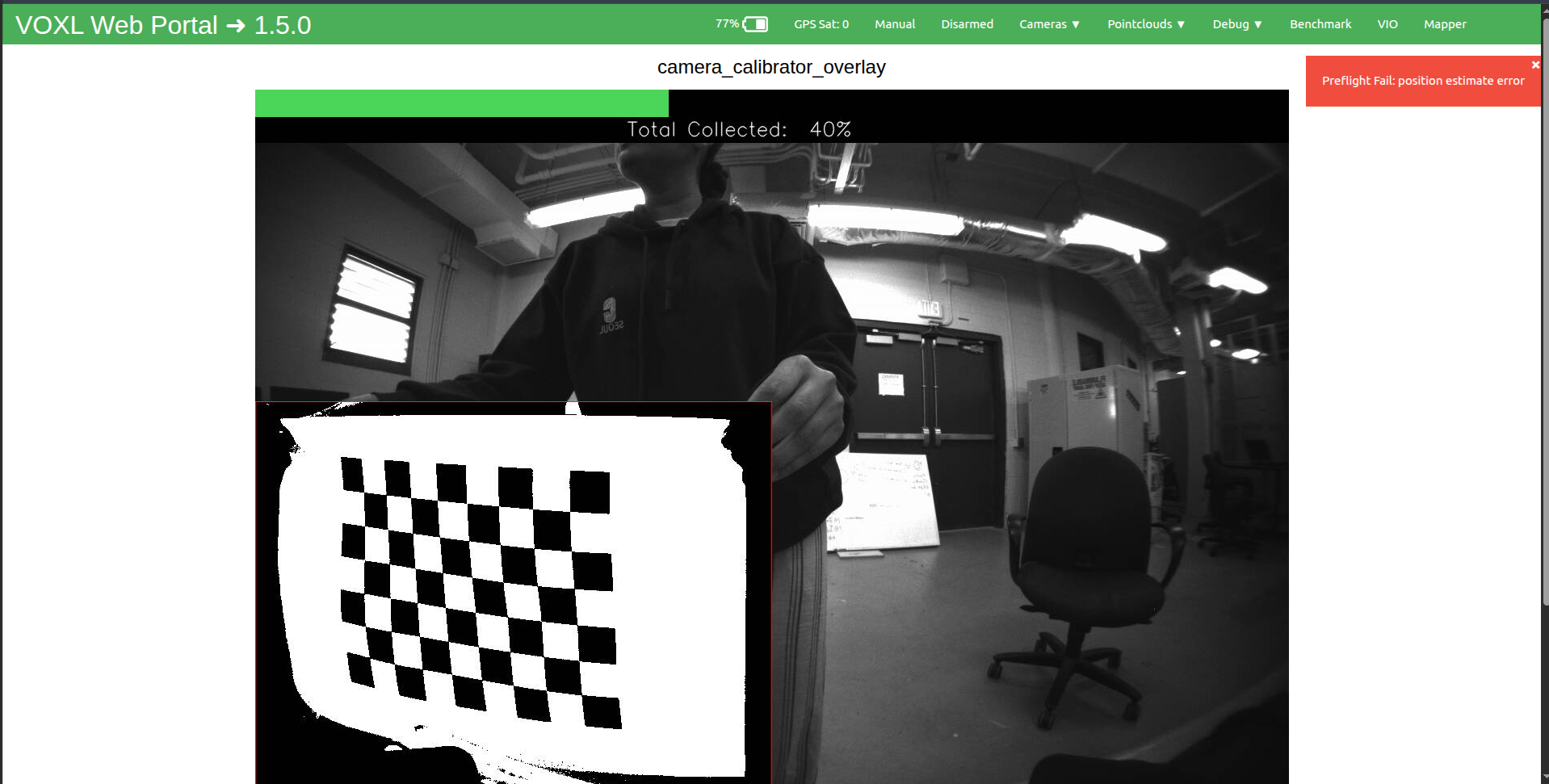
This is a new starling 2 drone. I am trying to calibrate the cameras, but it seems difficult. When chess board is placed inside rectangle, the rectangles doesn't fill most times, sometimes, i get detections, sometimes i don't. It took several minutes to get a 40% collection rate. Is the calibration supposed to be this difficult? or is there a technique to this? I have seen the video on the documentation website for this, and it was seamlessly easy. Please let me know if I am doing it wrongly?
Expecting your response soon. Thanks.
-
Hello.
This is a new starling 2 drone. I am trying to calibrate the cameras, but it seems difficult. When chess board is placed inside rectangle, the rectangles doesn't fill most times, sometimes, i get detections, sometimes i don't. It took several minutes to get a 40% collection rate. Is the calibration supposed to be this difficult? or is there a technique to this? I have seen the video on the documentation website for this, and it was seamlessly easy. Please let me know if I am doing it wrongly?
Expecting your response soon. Thanks.
Hello @taiwohazeez,
it seems your calibration pattern is significantly warped. It needs to be as straight as possible.
I personally like to perform calibration by displaying a pattern on an LCD screen (flat), which more or less guarantees it being straight. For a monocular calibration, the size of the box does not make any difference (no scale is recovered from the calibration). If you use that approach, then you actually have to move the camera as opposed to moving the pattern, unless you want to move the screen, which actually would be possible on a laptop. Watch out for reflections from screen and also sometimes setting manual exposure also helps (i won't go into detail how to do that here).
You could take your calibration sheet and glue it to a rigid flat surface, but even that can be tricky, since paper glue can cause wrinkles on paper, but those should not be as bad as the deformation seen in your screen shot.
Alex
-
Hello @taiwohazeez,
it seems your calibration pattern is significantly warped. It needs to be as straight as possible.
I personally like to perform calibration by displaying a pattern on an LCD screen (flat), which more or less guarantees it being straight. For a monocular calibration, the size of the box does not make any difference (no scale is recovered from the calibration). If you use that approach, then you actually have to move the camera as opposed to moving the pattern, unless you want to move the screen, which actually would be possible on a laptop. Watch out for reflections from screen and also sometimes setting manual exposure also helps (i won't go into detail how to do that here).
You could take your calibration sheet and glue it to a rigid flat surface, but even that can be tricky, since paper glue can cause wrinkles on paper, but those should not be as bad as the deformation seen in your screen shot.
Alex
@Alex-Kushleyev Thank you for your response. I tried it with the laptop, still couldnt calibrate it, i also tried on a flat surface, still no success.
-
@Alex-Kushleyev Thank you for your response. I tried it with the laptop, still couldnt calibrate it, i also tried on a flat surface, still no success.
@taiwohazeez , when you run the camera calibrator, are you providing the correct size of the checkerboard? it looks like you are using 8x6 in the image above (number of inner corners).
Alex
-
@taiwohazeez , when you run the camera calibrator, are you providing the correct size of the checkerboard? it looks like you are using 8x6 in the image above (number of inner corners).
Alex
@Alex-Kushleyev Yes I used the the right size. I ran this: voxl-calibrate-camera tracking_front -f -s 6x8 -l 0.030. I was able to get it to a 100 percent several times, but i keep getting caibration failed.
This is the output from the terminal:
starling2 (D0014):~$ voxl-calibrate-camera tracking_front -f -s 6x8 -l 0.030
Waiting for valid pipe...
Please open voxl-portal in a web browser to view the camera calibrator overlay stream
Running Calibration...
Matrix
[462.8203351079722, 0, 655.3416216062686;
0, 465.2531654785162, 372.0681441827904;
0, 0, 1]
Distortion
[0.1093065188826117;
-0.05638236547106363;
0.05691560193039599;
-0.01890034155803672]
distortion_model: fisheye
Re-projection error reported by calibrateCamera: 1.32316
Calibration Failed
Max reprojection error: 0.60
This is most likely due to motion blur, please try again.
Exiting Cleanly
starling2 (D0014):~$ -
@Alex-Kushleyev Yes I used the the right size. I ran this: voxl-calibrate-camera tracking_front -f -s 6x8 -l 0.030. I was able to get it to a 100 percent several times, but i keep getting caibration failed.
This is the output from the terminal:
starling2 (D0014):~$ voxl-calibrate-camera tracking_front -f -s 6x8 -l 0.030
Waiting for valid pipe...
Please open voxl-portal in a web browser to view the camera calibrator overlay stream
Running Calibration...
Matrix
[462.8203351079722, 0, 655.3416216062686;
0, 465.2531654785162, 372.0681441827904;
0, 0, 1]
Distortion
[0.1093065188826117;
-0.05638236547106363;
0.05691560193039599;
-0.01890034155803672]
distortion_model: fisheye
Re-projection error reported by calibrateCamera: 1.32316
Calibration Failed
Max reprojection error: 0.60
This is most likely due to motion blur, please try again.
Exiting Cleanly
starling2 (D0014):~$It is possible, as the output suggests that the motion blur is causing the issue.
You can override the auto exposure algorithm and reduce the exposure down to 5ms or so to help with this. There are two ways of doing this:
-
using
voxl-portal: open the regular camera view for your tracking camera, click a small check box in the bottom left corner to enable the advanced control panel. This will allow you to set the exposure and gain, you can try to set the gain to the max (should be 1600 (16x) for AR0144) and then play around with exposure to have the lowest exposure that still makes the checker board clear. After you are done changing the manual exposure, you can run the calibrator and switch thevoxl-portalto the calibrator output.- please note that until you touch the sliders for exposure and gain, they will not correspond to the current values that are being used by auto-exposure algorithm.
-
from command line you can send a command to camera server:
voxl-send-command tracking_front set_exp_gain 5.0 1600
(this would set exposure to 5.0ms and gain to 1600 ISO (16x))
Please note that the manual exposure settings / mode will persist until you reboot the camera server.
Alex
-

Reading along? Create a free ModalAI Forum account to join in.
With an account you can reply, ask your own question, get an email when a ModalAI engineer answers, and mark the reply that solved it. Your place in each thread is saved between visits.
Questions about VOXL, Flight Core, ESCs and ModalAI drones are answered here by the engineers who build them.
Register Login