
Requesting the factory original calibration files for ADK Ser#M2500000185
-
@latif You'll want to load the GPS specific px4 param file in order for "position" mode to use GPS position as opposed to VIO position.
If you run
voxl-configure-px4-params -wand navigate toEKF2_helpersyou should be able to see the relevant options.@tom Now that I seem to have a good health check and the cameras working, I'd like to do the simplest possible first flight -- I went through the video directions in the Bootcamp, but wasn't able to go beyond trying to "arm" it.
- I can't tell if it is binding or not. Tried the voxl-elrs -b, which seems to take it as the blue flashing lights become steady, but no movement of the propellers on trying to arm. I'm seeing a "model mismatch" message on the Commando8 Remote Controller. This shipped with the ADK and nothing has been done to it.
- I need some help in flying it, indoors if that's ealier without GPS, but ultimately with GPS mission-planning, but I seem to be far from it, because I haven't done even a simple off-the-shelf type of flight.
- This is my first time handling a drone of any kind, so I'm lacking some knowledge and could use some instructions to get this simple first flight job done.
-
@tom Now that I seem to have a good health check and the cameras working, I'd like to do the simplest possible first flight -- I went through the video directions in the Bootcamp, but wasn't able to go beyond trying to "arm" it.
- I can't tell if it is binding or not. Tried the voxl-elrs -b, which seems to take it as the blue flashing lights become steady, but no movement of the propellers on trying to arm. I'm seeing a "model mismatch" message on the Commando8 Remote Controller. This shipped with the ADK and nothing has been done to it.
- I need some help in flying it, indoors if that's ealier without GPS, but ultimately with GPS mission-planning, but I seem to be far from it, because I haven't done even a simple off-the-shelf type of flight.
- This is my first time handling a drone of any kind, so I'm lacking some knowledge and could use some instructions to get this simple first flight job done.
-
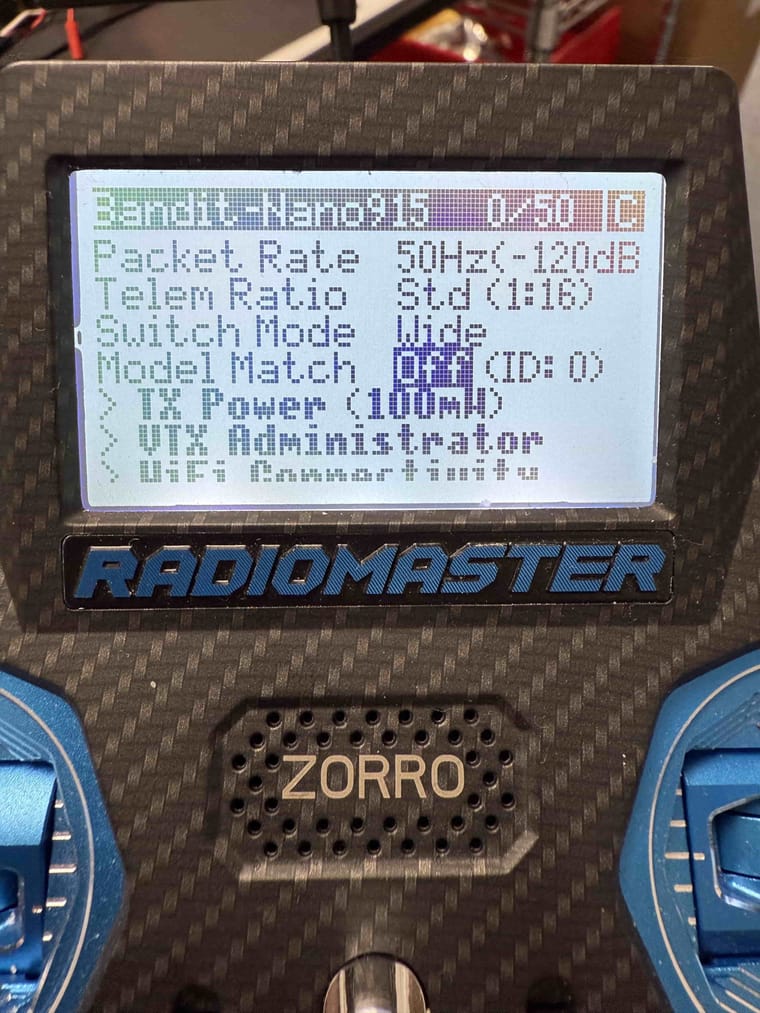
@latif You should be able to disable the model match feature on the same screen which displayed the "Model Mismatch" error. By setting the model match id to 0, it will ignore the model match id set on the receiver and connect. The ExpressLRS documentation has more detail about how to set up the RC connection here.
-
@latif You should be able to disable the model match feature on the same screen which displayed the "Model Mismatch" error. By setting the model match id to 0, it will ignore the model match id set on the receiver and connect. The ExpressLRS documentation has more detail about how to set up the RC connection here.
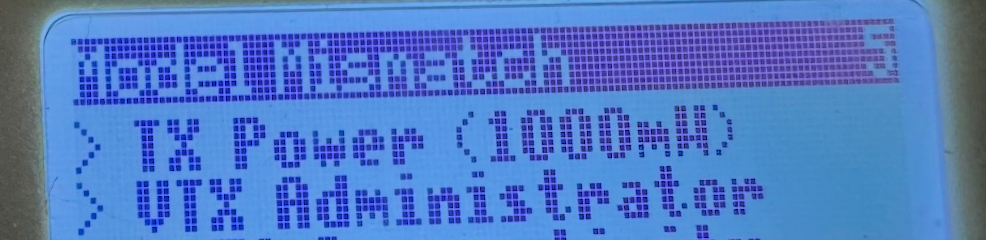
@Maxwell-Schaefer Thank you! I was able to set the model match to off using the controller screen.


Reading along? Create a free ModalAI Forum account to join in.
With an account you can reply, ask your own question, get an email when a ModalAI engineer answers, and mark the reply that solved it. Your place in each thread is saved between visits.
Questions about VOXL, Flight Core, ESCs and ModalAI drones are answered here by the engineers who build them.
Register Login