
Mavlink messages through voxl-logging
-
I'm trying to log mavlink messages though voxl-logger but all of the mavlink message pipes contain only i, timestamp.
I have been able to log imu and tracking camera data but not the mavlink messages. Any ideas?
Note: still on sdk1.3
$ voxl-version
--------------------------------------------------------------------------------
system-image: 1.7.10-M0054-14.1a-perf
kernel:       #1 SMP PREEMPT Fri Sep 27 21:59:02 UTC 2024 4.19.125
--------------------------------------------------------------------------------
hw platform:  M0054
mach.var:     1.0.1
--------------------------------------------------------------------------------
voxl-suite:   1.3.5
voxl2:/home/starling2voxl-logger -m mavlink_attitude -t 3 starting 3.0 second timer connected to ch 0 mavlink: /run/mpa/mavlink_attitude/ stopping automatically after requested timeout summary of data logged: ch 0, type: mav, samples: 88, path: /run/mpa/mavlink_attitude/ created new log here: /data/voxl-logger/log0013/ voxl2:/home/starling2$ cat /data/voxl-logger/log0013/run/mpa/mavlink_attitude/data.csv i,timestamp(ns) 0,20016407463491 1,20016507691080mavlink_message_t mavlink_ap_heartbeat mavlink_attitude mavlink_from_gcs mavlink_gps_raw_int mavlink_local_position_ned mavlink_onboard mavlink_sys_status mavlink_to_gcs$ voxl-mavlink-server -j loading our own config file ================================================================= Parameters as loaded from config file: primary_static_gcs_ip: secondary_static_gcs_ip: 192.168.41.42 onboard_port_to_autopilot: 14556 onboard_port_from_autopilot: 14557 gcs_port_to_autopilot: 14558 gcs_port_from_autopilot: 14559 en_external_uart_ap: 0 autopilot_uart_bus: 1 autopilot_uart_baudrate: 921600 autopilot_mission_delay_start: -1 udp_mtu: 0 gcs_timeout_s 4.50 en_external_ap_timesync: 1 en_external_ap_heartbeat: 1 ================================================================= existing instance of voxl-mavlink-server found, attempting to stop it starting receive thread for onboard channel from autopilot starting receive thread for gcs channel from autopilot CONNECTED to autopilot on onboard channel CONNECTED to autopilot on gcs channel Not connecting to primary gcs ip: Adding secondary manual gcs IP address to udp connection list: 192.168.41.42 Added new UDP connection to 192.168.41.42 Init complete, entering main loop to ob pipe ID: 141 compid: 1 to ob pipe ID: 32 compid: 1 to ob pipe ID: 290 compid: 1 to ob pipe ID: 291 compid: 1 to ob pipe ID: 30 compid: 1 to ob pipe ID: 331 compid: 1 to ob pipe ID: 83 compid: 1 to gcs pipe ID: 31 compid: 1 to ob pipe ID: 29 compid: 1 to ob pipe ID: 65 compid: 1 to ob pipe ID: 36 compid: 1 to ob pipe ID: 74 compid: 1 to ob pipe ID: 105 compid: 1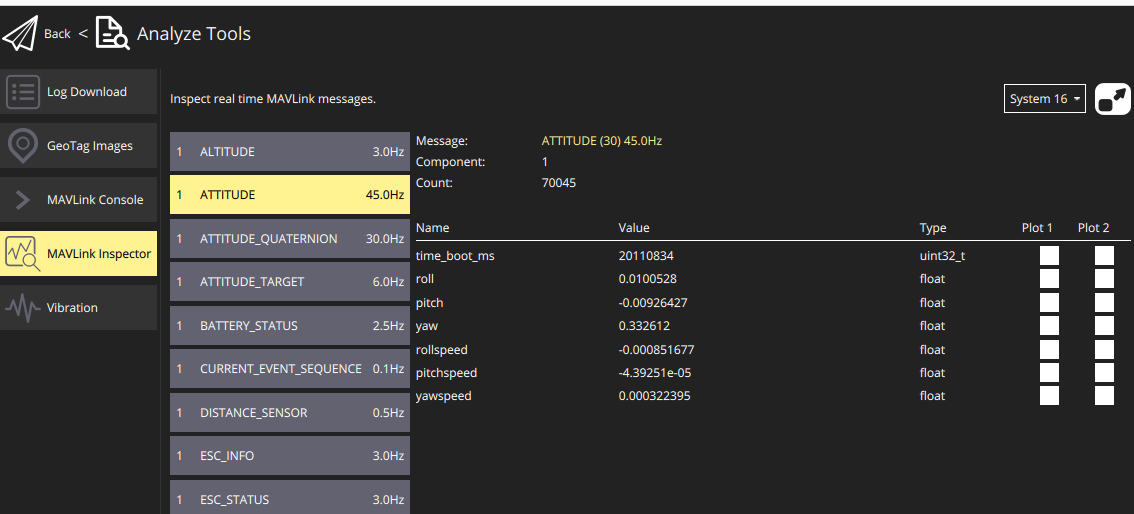
-
I'm trying to log mavlink messages though voxl-logger but all of the mavlink message pipes contain only i, timestamp.
I have been able to log imu and tracking camera data but not the mavlink messages. Any ideas?
Note: still on sdk1.3
$ voxl-version
--------------------------------------------------------------------------------
system-image: 1.7.10-M0054-14.1a-perf
kernel:       #1 SMP PREEMPT Fri Sep 27 21:59:02 UTC 2024 4.19.125
--------------------------------------------------------------------------------
hw platform:  M0054
mach.var:     1.0.1
--------------------------------------------------------------------------------
voxl-suite:   1.3.5
voxl2:/home/starling2voxl-logger -m mavlink_attitude -t 3 starting 3.0 second timer connected to ch 0 mavlink: /run/mpa/mavlink_attitude/ stopping automatically after requested timeout summary of data logged: ch 0, type: mav, samples: 88, path: /run/mpa/mavlink_attitude/ created new log here: /data/voxl-logger/log0013/ voxl2:/home/starling2$ cat /data/voxl-logger/log0013/run/mpa/mavlink_attitude/data.csv i,timestamp(ns) 0,20016407463491 1,20016507691080mavlink_message_t mavlink_ap_heartbeat mavlink_attitude mavlink_from_gcs mavlink_gps_raw_int mavlink_local_position_ned mavlink_onboard mavlink_sys_status mavlink_to_gcs$ voxl-mavlink-server -j loading our own config file ================================================================= Parameters as loaded from config file: primary_static_gcs_ip: secondary_static_gcs_ip: 192.168.41.42 onboard_port_to_autopilot: 14556 onboard_port_from_autopilot: 14557 gcs_port_to_autopilot: 14558 gcs_port_from_autopilot: 14559 en_external_uart_ap: 0 autopilot_uart_bus: 1 autopilot_uart_baudrate: 921600 autopilot_mission_delay_start: -1 udp_mtu: 0 gcs_timeout_s 4.50 en_external_ap_timesync: 1 en_external_ap_heartbeat: 1 ================================================================= existing instance of voxl-mavlink-server found, attempting to stop it starting receive thread for onboard channel from autopilot starting receive thread for gcs channel from autopilot CONNECTED to autopilot on onboard channel CONNECTED to autopilot on gcs channel Not connecting to primary gcs ip: Adding secondary manual gcs IP address to udp connection list: 192.168.41.42 Added new UDP connection to 192.168.41.42 Init complete, entering main loop to ob pipe ID: 141 compid: 1 to ob pipe ID: 32 compid: 1 to ob pipe ID: 290 compid: 1 to ob pipe ID: 291 compid: 1 to ob pipe ID: 30 compid: 1 to ob pipe ID: 331 compid: 1 to ob pipe ID: 83 compid: 1 to gcs pipe ID: 31 compid: 1 to ob pipe ID: 29 compid: 1 to ob pipe ID: 65 compid: 1 to ob pipe ID: 36 compid: 1 to ob pipe ID: 74 compid: 1 to ob pipe ID: 105 compid: 1@ndwe said in Mavlink messages through voxl-logging:
/data/voxl-logger/log0013/run/mpa/mavlink_attitude
Was there no raw data file in that directory? You can get verbose debug printouts in voxl-logger with the -z option to see what it is logging.
-
voxl-replay -p /data/voxl-logger/log0014/ -z
voxl-replay: invalid option -- 'z'Replay a log
-d, --debug enable verbose debug mode
-h, --help print this help message
-n, --number {number} number of log to open, e.g. 32
-p, --path {path} complete path of log to open, e.g. /data/mylog/
-s, --start {seconds} starts the replay (float) seconds into the log
-f, --finish {seconds} ends the replay (float) seconds into the log
-i, --include {name} name of pipe to publish, publish all if not specified
-e, --exclude {name} name of pipe to not publish, publish all if not specified
-y, --auto_kill automatically kills servers that conflict with the logWhen I use the -d flag
voxl2:/data/voxl-logger/log0013$ voxl-replay -p /data/voxl-logger/log0013/ -d
enabling debug mode
opening json info file: /data/voxl-logger/log0013/info.json
using log_format_version=1
log contains 1 channels
log started at 20016320271533ns
log publish channel 0:
type: mav
out path: /run/mpa/mavlink_attitude/
log path: /data/voxl-logger/log0013//run/mpa/mavlink_attitude/
total samples: 88
opening csv file: /data/voxl-logger/log0013//run/mpa/mavlink_attitude/data.csv
opening raw file: /data/voxl-logger/log0013//run/mpa/mavlink_attitude/data.raw
creating pipe: /run/mpa/mavlink_attitude/
finding start frame for channel 0
header for channel 0 /run/mpa/mavlink_attitude/
i,timestamp(ns)
log started at 20016320271533ns, shifting to 20016407463491ns
replay start time ns: 1498719153614entering main loop
starting to publish mavlink to: /run/mpa/mavlink_attitude/
publishing to ch0 at 1498819501us a mavlink packet with timestamp 1498819381us
publishing to ch0 at 1498819646us a mavlink packet with timestamp 1498819397us
publishing to ch0 at 1498819671us a mavlink packet with timestamp 1498819400usThanks
-
voxl-replay -p /data/voxl-logger/log0014/ -z
voxl-replay: invalid option -- 'z'Replay a log
-d, --debug enable verbose debug mode
-h, --help print this help message
-n, --number {number} number of log to open, e.g. 32
-p, --path {path} complete path of log to open, e.g. /data/mylog/
-s, --start {seconds} starts the replay (float) seconds into the log
-f, --finish {seconds} ends the replay (float) seconds into the log
-i, --include {name} name of pipe to publish, publish all if not specified
-e, --exclude {name} name of pipe to not publish, publish all if not specified
-y, --auto_kill automatically kills servers that conflict with the logWhen I use the -d flag
voxl2:/data/voxl-logger/log0013$ voxl-replay -p /data/voxl-logger/log0013/ -d
enabling debug mode
opening json info file: /data/voxl-logger/log0013/info.json
using log_format_version=1
log contains 1 channels
log started at 20016320271533ns
log publish channel 0:
type: mav
out path: /run/mpa/mavlink_attitude/
log path: /data/voxl-logger/log0013//run/mpa/mavlink_attitude/
total samples: 88
opening csv file: /data/voxl-logger/log0013//run/mpa/mavlink_attitude/data.csv
opening raw file: /data/voxl-logger/log0013//run/mpa/mavlink_attitude/data.raw
creating pipe: /run/mpa/mavlink_attitude/
finding start frame for channel 0
header for channel 0 /run/mpa/mavlink_attitude/
i,timestamp(ns)
log started at 20016320271533ns, shifting to 20016407463491ns
replay start time ns: 1498719153614entering main loop
starting to publish mavlink to: /run/mpa/mavlink_attitude/
publishing to ch0 at 1498819501us a mavlink packet with timestamp 1498819381us
publishing to ch0 at 1498819646us a mavlink packet with timestamp 1498819397us
publishing to ch0 at 1498819671us a mavlink packet with timestamp 1498819400usThanks
@ndwe -z in the voxl-logger command, not the voxl-replay command. But looks like voxl-replay sees the data and there is a raw data file for it to parse. Are you still having an issue?
-
@ndwe -z in the voxl-logger command, not the voxl-replay command. But looks like voxl-replay sees the data and there is a raw data file for it to parse. Are you still having an issue?
@Eric-Katzfey said in Mavlink messages through voxl-logging:
@ndwe -z in the voxl-logger command, not the voxl-replay command. But looks like voxl-replay sees the data and there is a raw data file for it to parse. Are you still having an issue?
@Eric-Katzfey is there any way to view the mavlink messages in plaintext (not raw)? We want to plot the data on
LOCAL_POSITION_NEDandMAVLINK_ATTITUDEhence our need for the data in CSV. -
@rnunna at this point I would recommend either creating a python or cpp script that leverages mavsdk to probe the logs and get it into the format you are desiring.
Zach


Reading along? Create a free ModalAI Forum account to join in.
With an account you can reply, ask your own question, get an email when a ModalAI engineer answers, and mark the reply that solved it. Your place in each thread is saved between visits.
Questions about VOXL, Flight Core, ESCs and ModalAI drones are answered here by the engineers who build them.
Register Login