
Status of Image Stabilization and Potentially Zoom?
-
Hi!
Was recently following along with https://docs.modalai.com/camera-video/electronic-image-stabilization/ and noticed it seemed a little out of date/potentially inaccurate.
I attempted to try this out by flashing voxl2 SDK 1.5.0 onto a starling 2 dev drone with a IMX412 M0161 (Coax).
I made sure to set
imu0_fifo_poll_rate_hz to 250
imu0_sample_rate_hz to 1000
in voxl-imu-server.confand
maxRAWSizes=20
in camxoverridesettings.txtFirst oddity I found was the resolution which is listed as 4040x3040 but as far as I can tell that resolution isn't supported by the IMX412 M0161. With the Full-Frame preview being 4056x3040.
Here is the corrected voxl-camera-server.conf I used
/**
 * voxl-camera-server Configuration File
 *
 * Each camera has configurations for up to 4 HAL3 streams:
 *    - `preview` stream for raw unprocessed images from CV cameras
 *    - `small_video` 720p (ish) h264/h265 compressed for fpv video streaming
 *    - `large_video` 4k (ish) h264/h265 for onboard video recording to disk
 *    - `snapshot` ISP-processed JPG snapshots that get saved to disk
 *
 * on QRB5165 platforms (VOXL2 and VOXL2 mini) you can only have 3 of the 4 enabled
 *
 * This file is generated from default values by voxl-configure-cameras.
 * Do not expect arbitrary resolutions to work, the ISP and video compression
 * pipelines only support very specific resolutions.
 *
 * The default video compression mode is cqp or Constant Quantization Parameter
 *
 *
 *
 */
{
	"version":	0.1,
	"cameras":	[{
			"type":	"imx412",
			"name":	"hires",
			"enabled":	true,
			"camera_id":	0,
			"fps":	30,
			"en_preview":	true,
			"en_raw_preview":	true,
			"en_misp":	true,
			"preview_width":	4056,
			"preview_height":	3040,
			"misp_width":	1280,
			"misp_height":	720,
			"misp_awb":	"auto",
			"misp_zoom":	1.5,
			"en_eis":	true,
			"eis_mode":	"horizon-level",
			"eis_view":	"pip",
			"eis_follow_rate":	0.01,
			"en_large_video":	false,
			"en_small_video":	false,
			"en_snapshot":	false,
			"ae_mode":	"lme_msv",
			"en_rotate":	false,
			"misp_venc_enable":	true,
			"misp_venc_mode":	"h264",
			"misp_venc_br_ctrl":	"cbr",
			"misp_venc_Qfixed":	30,
			"misp_venc_Qmin":	15,
			"misp_venc_Qmax":	51,
			"misp_venc_nPframes":	29,
			"misp_venc_mbps":	3,
			"ae_desired_msv":	100,
			"exposure_min_us":	25,
			"exposure_max_us":	15000,
			"gain_min":	100,
			"gain_max":	32000,
			"exposure_soft_min_us":	5000,
			"snapshot_jpeg_quality":	75,
			"small_video_width":	1024,
			"small_video_height":	768,
			"small_venc_mode":	"h264",
			"small_venc_br_ctrl":	"cqp",
			"small_venc_Qfixed":	30,
			"small_venc_Qmin":	15,
			"small_venc_Qmax":	40,
			"small_venc_nPframes":	9,
			"small_venc_mbps":	2,
			"small_venc_osd":	false,
			"large_video_width":	4056,
			"large_video_height":	3040,
			"large_venc_mode":	"h264",
			"large_venc_br_ctrl":	"cqp",
			"large_venc_Qfixed":	40,
			"large_venc_Qmin":	15,
			"large_venc_Qmax":	50,
			"large_venc_nPframes":	29,
			"large_venc_mbps":	40,
			"large_venc_osd":	false,
			"en_snapshot_width":	4056,
			"en_snapshot_height":	3040,
			"exif_focal_length":	3.0999999046325684,
			"exif_focal_length_in_35mm_format":	17,
			"exif_fnumber":	1.2400000095367432,
			"misp_venc_osd":	false,
			"misp_gamma":	1.6,
			"ae_filter_alpha":	0.600000023841858,
			"ae_ignore_fraction":	0.20000000298023224,
			"ae_slope":	0.05000000074505806,
			"ae_exposure_period":	1,
			"ae_gain_period":	1
		}],
	"fsync_en":	false,
	"fsync_gpio":	109
}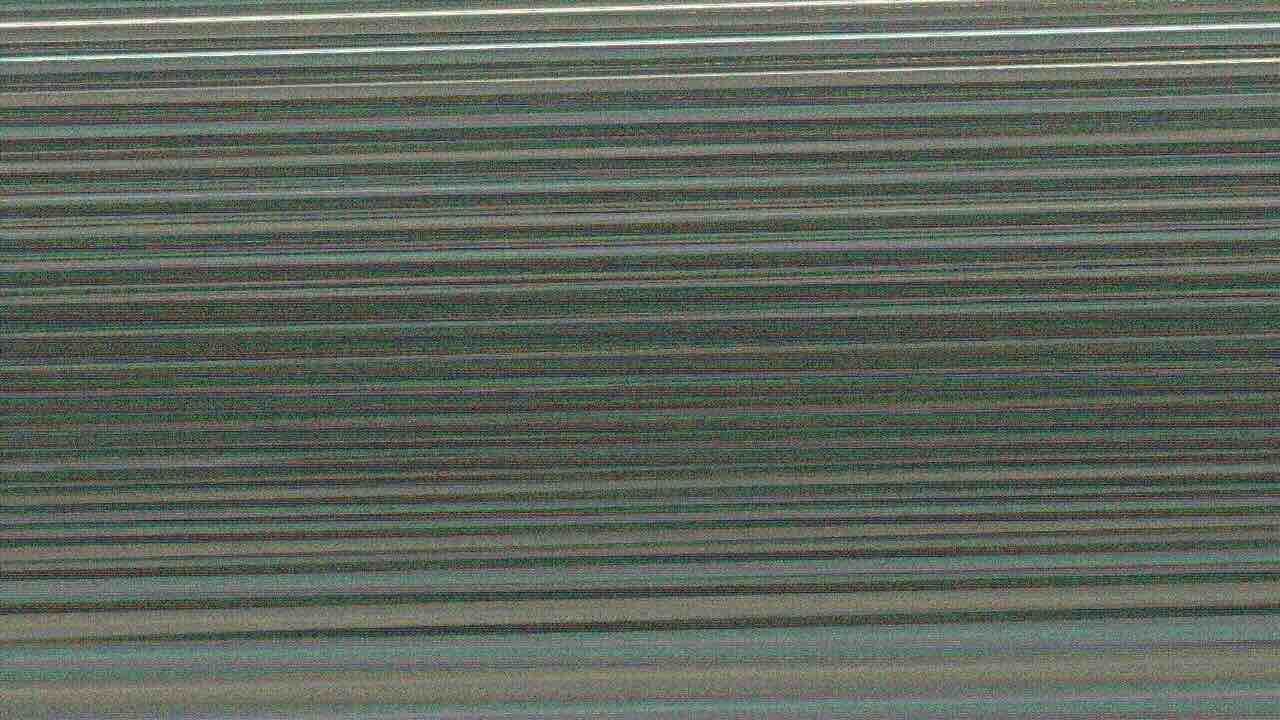
Unfortunately this is the image I got out of the portal from hires_misp_color. I must be missing a step here. Furthermore I didn't see anything in the portal about a advanced control panel for misp control commands.
I didn't do an intrinsic cal yet but I wouldn't think it would produce this without that.
Assumably, the extrinsics are also already set since this is a Starling 2 with defaults present.Any help getting this up and running would be super appreciated. A small demo or updated setup guide would be extremely helpful. If there is anything else you need from me in terms of my setup let me know!
Thanks! James
Side Question:
Am curious if the zoom level of the final image can be changed dynamically. Poking into the voxl-camera-server's code for SDK 1.5.0 i noticed there is a
set_misp_zoomCl function available. Assuming I get the camera pipe up and running correctly, am I correct in thinking this could "zoom in" or "zoom out" the image while it is running?
Thanks!
-
Hi!
Was recently following along with https://docs.modalai.com/camera-video/electronic-image-stabilization/ and noticed it seemed a little out of date/potentially inaccurate.
I attempted to try this out by flashing voxl2 SDK 1.5.0 onto a starling 2 dev drone with a IMX412 M0161 (Coax).
I made sure to set
imu0_fifo_poll_rate_hz to 250
imu0_sample_rate_hz to 1000
in voxl-imu-server.confand
maxRAWSizes=20
in camxoverridesettings.txtFirst oddity I found was the resolution which is listed as 4040x3040 but as far as I can tell that resolution isn't supported by the IMX412 M0161. With the Full-Frame preview being 4056x3040.
Here is the corrected voxl-camera-server.conf I used
/**
 * voxl-camera-server Configuration File
 *
 * Each camera has configurations for up to 4 HAL3 streams:
 *    - `preview` stream for raw unprocessed images from CV cameras
 *    - `small_video` 720p (ish) h264/h265 compressed for fpv video streaming
 *    - `large_video` 4k (ish) h264/h265 for onboard video recording to disk
 *    - `snapshot` ISP-processed JPG snapshots that get saved to disk
 *
 * on QRB5165 platforms (VOXL2 and VOXL2 mini) you can only have 3 of the 4 enabled
 *
 * This file is generated from default values by voxl-configure-cameras.
 * Do not expect arbitrary resolutions to work, the ISP and video compression
 * pipelines only support very specific resolutions.
 *
 * The default video compression mode is cqp or Constant Quantization Parameter
 *
 *
 *
 */
{
	"version":	0.1,
	"cameras":	[{
			"type":	"imx412",
			"name":	"hires",
			"enabled":	true,
			"camera_id":	0,
			"fps":	30,
			"en_preview":	true,
			"en_raw_preview":	true,
			"en_misp":	true,
			"preview_width":	4056,
			"preview_height":	3040,
			"misp_width":	1280,
			"misp_height":	720,
			"misp_awb":	"auto",
			"misp_zoom":	1.5,
			"en_eis":	true,
			"eis_mode":	"horizon-level",
			"eis_view":	"pip",
			"eis_follow_rate":	0.01,
			"en_large_video":	false,
			"en_small_video":	false,
			"en_snapshot":	false,
			"ae_mode":	"lme_msv",
			"en_rotate":	false,
			"misp_venc_enable":	true,
			"misp_venc_mode":	"h264",
			"misp_venc_br_ctrl":	"cbr",
			"misp_venc_Qfixed":	30,
			"misp_venc_Qmin":	15,
			"misp_venc_Qmax":	51,
			"misp_venc_nPframes":	29,
			"misp_venc_mbps":	3,
			"ae_desired_msv":	100,
			"exposure_min_us":	25,
			"exposure_max_us":	15000,
			"gain_min":	100,
			"gain_max":	32000,
			"exposure_soft_min_us":	5000,
			"snapshot_jpeg_quality":	75,
			"small_video_width":	1024,
			"small_video_height":	768,
			"small_venc_mode":	"h264",
			"small_venc_br_ctrl":	"cqp",
			"small_venc_Qfixed":	30,
			"small_venc_Qmin":	15,
			"small_venc_Qmax":	40,
			"small_venc_nPframes":	9,
			"small_venc_mbps":	2,
			"small_venc_osd":	false,
			"large_video_width":	4056,
			"large_video_height":	3040,
			"large_venc_mode":	"h264",
			"large_venc_br_ctrl":	"cqp",
			"large_venc_Qfixed":	40,
			"large_venc_Qmin":	15,
			"large_venc_Qmax":	50,
			"large_venc_nPframes":	29,
			"large_venc_mbps":	40,
			"large_venc_osd":	false,
			"en_snapshot_width":	4056,
			"en_snapshot_height":	3040,
			"exif_focal_length":	3.0999999046325684,
			"exif_focal_length_in_35mm_format":	17,
			"exif_fnumber":	1.2400000095367432,
			"misp_venc_osd":	false,
			"misp_gamma":	1.6,
			"ae_filter_alpha":	0.600000023841858,
			"ae_ignore_fraction":	0.20000000298023224,
			"ae_slope":	0.05000000074505806,
			"ae_exposure_period":	1,
			"ae_gain_period":	1
		}],
	"fsync_en":	false,
	"fsync_gpio":	109
}
Unfortunately this is the image I got out of the portal from hires_misp_color. I must be missing a step here. Furthermore I didn't see anything in the portal about a advanced control panel for misp control commands.
I didn't do an intrinsic cal yet but I wouldn't think it would produce this without that.
Assumably, the extrinsics are also already set since this is a Starling 2 with defaults present.Any help getting this up and running would be super appreciated. A small demo or updated setup guide would be extremely helpful. If there is anything else you need from me in terms of my setup let me know!
Thanks! James
Side Question:
Am curious if the zoom level of the final image can be changed dynamically. Poking into the voxl-camera-server's code for SDK 1.5.0 i noticed there is a
set_misp_zoomCl function available. Assuming I get the camera pipe up and running correctly, am I correct in thinking this could "zoom in" or "zoom out" the image while it is running?
Thanks!
The documentation correctly lists the input resolution as
4040x3040. Even though the camera's maximum resolution is4056x3040, we can set up the camera driver to request any smaller resolution from the camera. The reason for using width=4040is that the hardware-optimized debayering functions on the GPU require a specific row alignment (in bytes) and the width of4040results in the line stride that is compatible with the gpu functions. If width of4056is selected, the camera does send a valid RAW10 bayer image, but the gpu cannot correctly de-bayer it.You can view all the raw supported resolutions by running
voxl-camera-server -land take a look at the following (which i am pasting for the IMX412 driver that you should be using). You will see duplicate resolutions because there are different FPS supported at the same resolution (the FPS are not printed).ANDROID_SCALER_AVAILABLE_RAW_SIZES: These are likely supported by the sensor 4056 x 3040 4040 x 3040 4040 x 3040 3840 x 2160 3840 x 2160 3840 x 2160 1996 x 1520 1996 x 1520 1996 x 1520 1936 x 1080 1936 x 1080 1936 x 1080 1936 x 1080 1936 x 1080 1996 x 480 1996 x 480 1996 x 240 1996 x 240The details about all the camera modes supported by the imx412 EIS driver can be found here : https://docs.modalai.com/camera-video/low-latency-video-streaming/#imx412-operating-modes
Please follow the instructions step by step and EIS should work.
EIS zoom and drag is supported. You can test zoom easily by using
voxl-portal, click a small check box in bottom left corner to enable advanced panel. You can use mouse wheel or zoom slider to control the zoom.See demo videos here :
ROI features: https://www.youtube.com/watch?v=FXv4855WjNc
EIS: https://www.youtube.com/watch?v=fi2BO_U5f-c(and a screenshot):
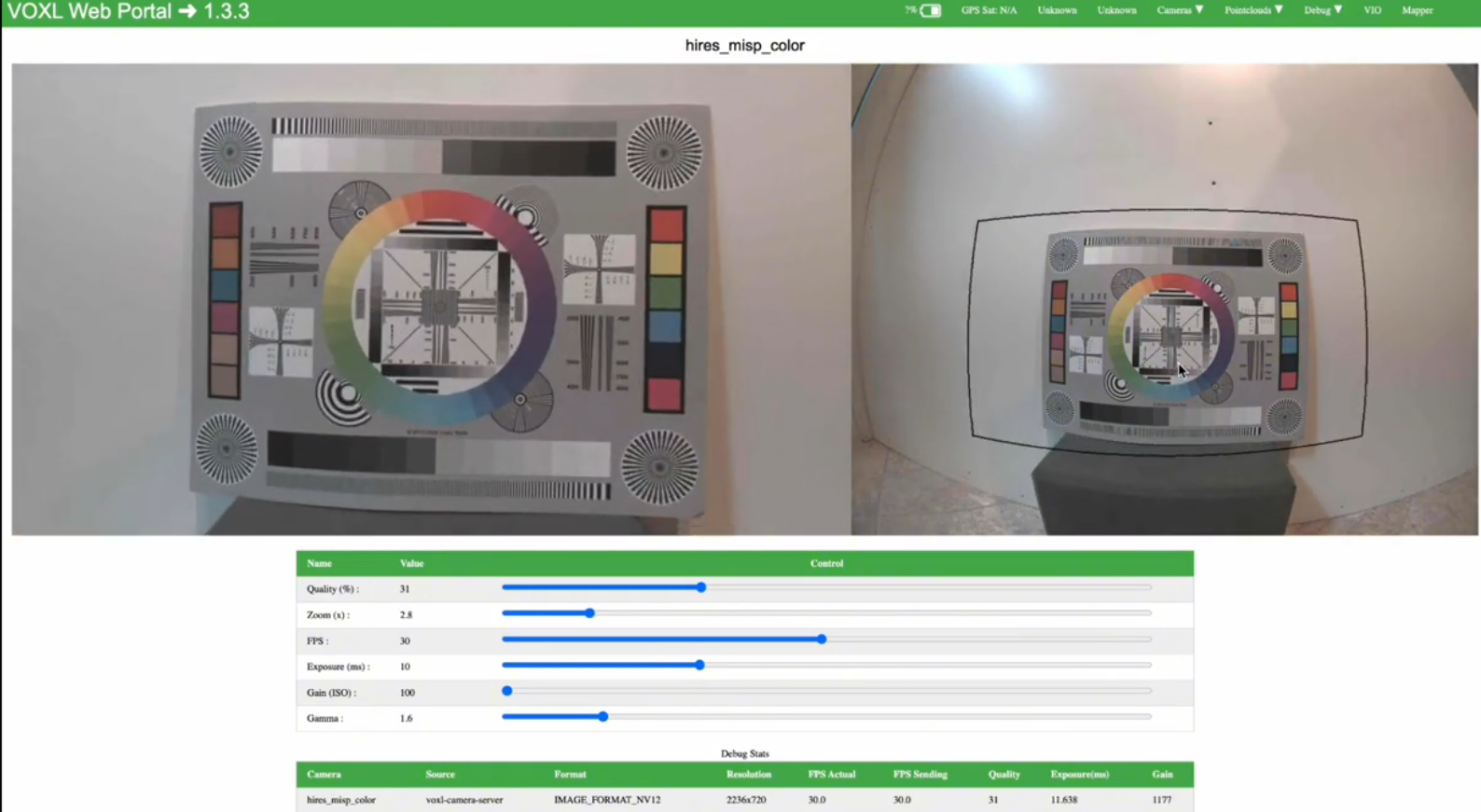
Zoom will work with the default version of
voxl-portal, but in order to use the drag feature, you need to use voxl-portal fromeis-integrationbranch : https://gitlab.com/voxl-public/voxl-sdk/services/voxl-portal/-/tree/eis-integration . Actually it looks like it has not been updated in a while, let me check if it still builds fine and i can share a deb.Under the hood, the
voxl-portalGUI sends commands tovoxl-portalback-end running on VOXL2, and that, in turn, sends commands to the camera server to change the zoom and drag. For zoom, indeed a commandset_misp_zoomis used, such as:voxl-send-command hires_misp_color set_misp_zoom <zoom> <optional: convergence_delay>zoom should be 1.0 or greater, convergence delay 0.0-1.0 -- (0.0 instant, 1.0 : infinitely long)
By the way zoom also works with MISP when EIS is disabled.
Let me check to make sure the
voxl-portalfrom the EIS branch works and I will also document the zoom / drag command syntax.Alex
-
The documentation correctly lists the input resolution as
4040x3040. Even though the camera's maximum resolution is4056x3040, we can set up the camera driver to request any smaller resolution from the camera. The reason for using width=4040is that the hardware-optimized debayering functions on the GPU require a specific row alignment (in bytes) and the width of4040results in the line stride that is compatible with the gpu functions. If width of4056is selected, the camera does send a valid RAW10 bayer image, but the gpu cannot correctly de-bayer it.You can view all the raw supported resolutions by running
voxl-camera-server -land take a look at the following (which i am pasting for the IMX412 driver that you should be using). You will see duplicate resolutions because there are different FPS supported at the same resolution (the FPS are not printed).ANDROID_SCALER_AVAILABLE_RAW_SIZES: These are likely supported by the sensor 4056 x 3040 4040 x 3040 4040 x 3040 3840 x 2160 3840 x 2160 3840 x 2160 1996 x 1520 1996 x 1520 1996 x 1520 1936 x 1080 1936 x 1080 1936 x 1080 1936 x 1080 1936 x 1080 1996 x 480 1996 x 480 1996 x 240 1996 x 240The details about all the camera modes supported by the imx412 EIS driver can be found here : https://docs.modalai.com/camera-video/low-latency-video-streaming/#imx412-operating-modes
Please follow the instructions step by step and EIS should work.
EIS zoom and drag is supported. You can test zoom easily by using
voxl-portal, click a small check box in bottom left corner to enable advanced panel. You can use mouse wheel or zoom slider to control the zoom.See demo videos here :
ROI features: https://www.youtube.com/watch?v=FXv4855WjNc
EIS: https://www.youtube.com/watch?v=fi2BO_U5f-c(and a screenshot):
Zoom will work with the default version of
voxl-portal, but in order to use the drag feature, you need to use voxl-portal fromeis-integrationbranch : https://gitlab.com/voxl-public/voxl-sdk/services/voxl-portal/-/tree/eis-integration . Actually it looks like it has not been updated in a while, let me check if it still builds fine and i can share a deb.Under the hood, the
voxl-portalGUI sends commands tovoxl-portalback-end running on VOXL2, and that, in turn, sends commands to the camera server to change the zoom and drag. For zoom, indeed a commandset_misp_zoomis used, such as:voxl-send-command hires_misp_color set_misp_zoom <zoom> <optional: convergence_delay>zoom should be 1.0 or greater, convergence delay 0.0-1.0 -- (0.0 instant, 1.0 : infinitely long)
By the way zoom also works with MISP when EIS is disabled.
Let me check to make sure the
voxl-portalfrom the EIS branch works and I will also document the zoom / drag command syntax.Alex
voxl-portal, as demonstrated in the videos linked above, has been updated in theeis-integrationbranch (merged latest from dev branch, so it can be built with the latestvoxl-cross:4:4now).https://gitlab.com/voxl-public/voxl-sdk/services/voxl-portal/-/tree/eis-integration
-
voxl-portal, as demonstrated in the videos linked above, has been updated in theeis-integrationbranch (merged latest from dev branch, so it can be built with the latestvoxl-cross:4:4now).https://gitlab.com/voxl-public/voxl-sdk/services/voxl-portal/-/tree/eis-integration
Hi Alex, Thanks for the help
I was able to get the hires_misp_color stream working and mess around with the
set_misp_zoomcommand. Very cool!I was missing the "Use latest camera drivers" step. I will say that step could probably be flushed out a bit more. I only knew what to do with the downloaded driver files due to previous experience.
Unfortunately, I was unable to get the voxl-portal from the eis-integration branch running. Ran into a
starling2 (D0014):/data$ voxl-portal
voxl-portal: symbol lookup error: voxl-portal: undefined symbol: mg_log_level
error. Almost certainly a dependency mismatch. Maybe I messed up a build step?
Everything else I'm using is Stock voxl-sdk 1.5.0 (including the voxl-camera-server!) configured for the starling 2 . What were you using for the rest of your setup?
Let me know if there is any more info you need from me.
Best
James -
Hi Alex, Thanks for the help
I was able to get the hires_misp_color stream working and mess around with the
set_misp_zoomcommand. Very cool!I was missing the "Use latest camera drivers" step. I will say that step could probably be flushed out a bit more. I only knew what to do with the downloaded driver files due to previous experience.
Unfortunately, I was unable to get the voxl-portal from the eis-integration branch running. Ran into a
starling2 (D0014):/data$ voxl-portal
voxl-portal: symbol lookup error: voxl-portal: undefined symbol: mg_log_level
error. Almost certainly a dependency mismatch. Maybe I messed up a build step?
Everything else I'm using is Stock voxl-sdk 1.5.0 (including the voxl-camera-server!) configured for the starling 2 . What were you using for the rest of your setup?
Let me know if there is any more info you need from me.
Best
JamesI believe you need to update your
voxl-mongooselibrary to latest, from here : http://voxl-packages.modalai.com/dists/qrb5165/dev/binary-arm64/ . I believevoxl-portalrecently switched to using updated version of that package and that is what is being pulled in when you buildvoxl-portalfromdevor EIS branch.Alex
-
I believe you need to update your
voxl-mongooselibrary to latest, from here : http://voxl-packages.modalai.com/dists/qrb5165/dev/binary-arm64/ . I believevoxl-portalrecently switched to using updated version of that package and that is what is being pulled in when you buildvoxl-portalfromdevor EIS branch.Alex
Thanks Alex, that did the trick I was able to get voxl-portal successfully up and running afterwards. The zoom slider works here too!
However, I still can't seem to get EIS to work. Unlike your demo, there is no side-by-side picture present when i inspect hires_misp_color in voxl-portal. I realized there was an
"eis_view"parameter so tried both"pip"and"side-by-side"as listed in the tutorial but with no luck. It's still just the single picture.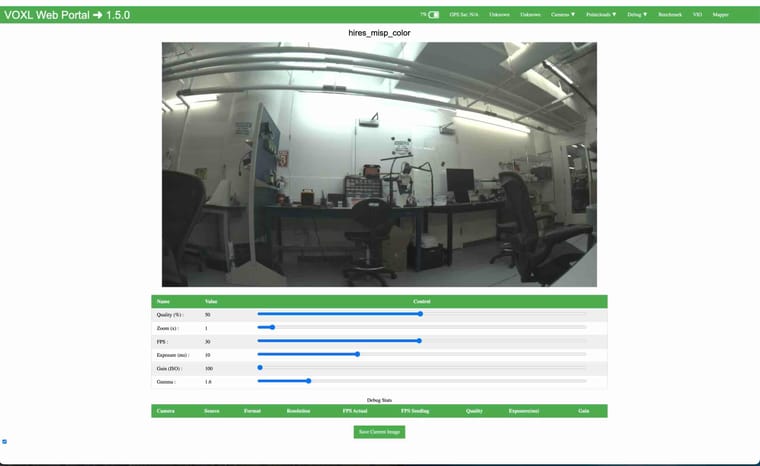
Furthermore, nothing looks like its being stabilized. I am missing an easy gotcha somewhere in my config file? Here's mine its basically just the one from the tutorial.
/**
 * voxl-camera-server Configuration File
 *
 * Each camera has configurations for up to 4 HAL3 streams:
 *    - `preview` stream for raw unprocessed images from CV cameras
 *    - `small_video` 720p (ish) h264/h265 compressed for fpv video streaming
 *    - `large_video` 4k (ish) h264/h265 for onboard video recording to disk
 *    - `snapshot` ISP-processed JPG snapshots that get saved to disk
 *
 * on QRB5165 platforms (VOXL2 and VOXL2 mini) you can only have 3 of the 4 enabled
 *
 * This file is generated from default values by voxl-configure-cameras.
 * Do not expect arbitrary resolutions to work, the ISP and video compression
 * pipelines only support very specific resolutions.
 *
 * The default video compression mode is cqp or Constant Quantization Parameter
 *
 *
 *
 */
{
	"version":	0.1,
	"cameras":	[{
			"type":	"imx412",
			"name":	"hires",
			"enabled":	true,
			"camera_id":	0,
			"fps":	30,
			"en_preview":	true,
			"en_raw_preview":	true,
			"en_misp":	true,
			"preview_width":	4040,
			"preview_height":	3040,
			"misp_width":	1280,
			"misp_height":	720,
			"misp_awb":	"auto",
			"misp_zoom":	1.5,
			"en_eis":	true,
			"eis_mode":	"horizon-level",
			"eis_view":	"side-by-side",
			"eis_follow_rate":	0.01,
			"en_large_video":	false,
			"en_small_video":	false,
			"en_snapshot":	false,
			"ae_mode":	"lme_msv",
			"en_rotate":	false,
			"misp_venc_enable":	true,
			"misp_venc_mode":	"h264",
			"misp_venc_br_ctrl":	"cbr",
			"misp_venc_Qfixed":	30,
			"misp_venc_Qmin":	15,
			"misp_venc_Qmax":	51,
			"misp_venc_nPframes":	29,
			"misp_venc_mbps":	3,
			"ae_desired_msv":	100,
			"exposure_min_us":	25,
			"exposure_max_us":	15000,
			"gain_min":	100,
			"gain_max":	32000,
			"exposure_soft_min_us":	5000,
			"snapshot_jpeg_quality":	75,
			"small_video_width":	1024,
			"small_video_height":	768,
			"small_venc_mode":	"h264",
			"small_venc_br_ctrl":	"cqp",
			"small_venc_Qfixed":	30,
			"small_venc_Qmin":	15,
			"small_venc_Qmax":	40,
			"small_venc_nPframes":	9,
			"small_venc_mbps":	2,
			"small_venc_osd":	false,
			"large_video_width":	4056,
			"large_video_height":	3040,
			"large_venc_mode":	"h264",
			"large_venc_br_ctrl":	"cqp",
			"large_venc_Qfixed":	40,
			"large_venc_Qmin":	15,
			"large_venc_Qmax":	50,
			"large_venc_nPframes":	29,
			"large_venc_mbps":	40,
			"large_venc_osd":	false,
			"en_snapshot_width":	4056,
			"en_snapshot_height":	3040,
			"exif_focal_length":	3.0999999046325684,
			"exif_focal_length_in_35mm_format":	17,
			"exif_fnumber":	1.2400000095367432,
			"misp_venc_osd":	false,
			"misp_gamma":	1.6,
			"ae_filter_alpha":	0.600000023841858,
			"ae_ignore_fraction":	0.20000000298023224,
			"ae_slope":	0.05000000074505806,
			"ae_exposure_period":	1,
			"ae_gain_period":	1
		}],
	"fsync_en":	false,
	"fsync_gpio":	109
}
If not, whats the best method to debug this? Again I'm on SDK_1.5.0 on a Starling 2 with the only upgrades being voxl-portal and voxl-mongoose (and all the changes/requirements from the tutorial (as far as I can tell)).
Thanks!
-
Thanks Alex, that did the trick I was able to get voxl-portal successfully up and running afterwards. The zoom slider works here too!
However, I still can't seem to get EIS to work. Unlike your demo, there is no side-by-side picture present when i inspect hires_misp_color in voxl-portal. I realized there was an
"eis_view"parameter so tried both"pip"and"side-by-side"as listed in the tutorial but with no luck. It's still just the single picture.Furthermore, nothing looks like its being stabilized. I am missing an easy gotcha somewhere in my config file? Here's mine its basically just the one from the tutorial.
/**
 * voxl-camera-server Configuration File
 *
 * Each camera has configurations for up to 4 HAL3 streams:
 *    - `preview` stream for raw unprocessed images from CV cameras
 *    - `small_video` 720p (ish) h264/h265 compressed for fpv video streaming
 *    - `large_video` 4k (ish) h264/h265 for onboard video recording to disk
 *    - `snapshot` ISP-processed JPG snapshots that get saved to disk
 *
 * on QRB5165 platforms (VOXL2 and VOXL2 mini) you can only have 3 of the 4 enabled
 *
 * This file is generated from default values by voxl-configure-cameras.
 * Do not expect arbitrary resolutions to work, the ISP and video compression
 * pipelines only support very specific resolutions.
 *
 * The default video compression mode is cqp or Constant Quantization Parameter
 *
 *
 *
 */
{
	"version":	0.1,
	"cameras":	[{
			"type":	"imx412",
			"name":	"hires",
			"enabled":	true,
			"camera_id":	0,
			"fps":	30,
			"en_preview":	true,
			"en_raw_preview":	true,
			"en_misp":	true,
			"preview_width":	4040,
			"preview_height":	3040,
			"misp_width":	1280,
			"misp_height":	720,
			"misp_awb":	"auto",
			"misp_zoom":	1.5,
			"en_eis":	true,
			"eis_mode":	"horizon-level",
			"eis_view":	"side-by-side",
			"eis_follow_rate":	0.01,
			"en_large_video":	false,
			"en_small_video":	false,
			"en_snapshot":	false,
			"ae_mode":	"lme_msv",
			"en_rotate":	false,
			"misp_venc_enable":	true,
			"misp_venc_mode":	"h264",
			"misp_venc_br_ctrl":	"cbr",
			"misp_venc_Qfixed":	30,
			"misp_venc_Qmin":	15,
			"misp_venc_Qmax":	51,
			"misp_venc_nPframes":	29,
			"misp_venc_mbps":	3,
			"ae_desired_msv":	100,
			"exposure_min_us":	25,
			"exposure_max_us":	15000,
			"gain_min":	100,
			"gain_max":	32000,
			"exposure_soft_min_us":	5000,
			"snapshot_jpeg_quality":	75,
			"small_video_width":	1024,
			"small_video_height":	768,
			"small_venc_mode":	"h264",
			"small_venc_br_ctrl":	"cqp",
			"small_venc_Qfixed":	30,
			"small_venc_Qmin":	15,
			"small_venc_Qmax":	40,
			"small_venc_nPframes":	9,
			"small_venc_mbps":	2,
			"small_venc_osd":	false,
			"large_video_width":	4056,
			"large_video_height":	3040,
			"large_venc_mode":	"h264",
			"large_venc_br_ctrl":	"cqp",
			"large_venc_Qfixed":	40,
			"large_venc_Qmin":	15,
			"large_venc_Qmax":	50,
			"large_venc_nPframes":	29,
			"large_venc_mbps":	40,
			"large_venc_osd":	false,
			"en_snapshot_width":	4056,
			"en_snapshot_height":	3040,
			"exif_focal_length":	3.0999999046325684,
			"exif_focal_length_in_35mm_format":	17,
			"exif_fnumber":	1.2400000095367432,
			"misp_venc_osd":	false,
			"misp_gamma":	1.6,
			"ae_filter_alpha":	0.600000023841858,
			"ae_ignore_fraction":	0.20000000298023224,
			"ae_slope":	0.05000000074505806,
			"ae_exposure_period":	1,
			"ae_gain_period":	1
		}],
	"fsync_en":	false,
	"fsync_gpio":	109
}
If not, whats the best method to debug this? Again I'm on SDK_1.5.0 on a Starling 2 with the only upgrades being voxl-portal and voxl-mongoose (and all the changes/requirements from the tutorial (as far as I can tell)).
Thanks!
@jameskuesel , it looks like EIS was merged to the main branch shortly after SDK 1.5.0 was released.
If you have not updated you camera server, please do so : https://docs.modalai.com/camera-video/electronic-image-stabilization/#latest-source-code . You may also need to update libmodal-pipe library.
Alex

Reading along? Create a free ModalAI Forum account to join in.
With an account you can reply, ask your own question, get an email when a ModalAI engineer answers, and mark the reply that solved it. Your place in each thread is saved between visits.
Questions about VOXL, Flight Core, ESCs and ModalAI drones are answered here by the engineers who build them.
Register Login