
PWM ESC calibration for VOXL ESC 4-in-1 Mini and QGroundControl
-
Hello!
I have a FCv2 running px4 1.14 and 2.0.109. The VOXL ESC 4-in-1 mini is connected via J5 on the FCv2.
The FCv2 is powered by a separate step down to 5V from the battery (not the modal power harness). I can power the ESC and the FCv2 separately.
I'm able to control the motors with my RC so I know everything is working. I'm also able to test the motors through the actuators message in QGroundControl.
The problem I have is that when I arm, the motors immediately start spinning.
I think this means I need to do PWM ESC Calibration through QGroundControl, correct? With individual ESC, I think this is the equivalent step where you power them on with the throttle all the way up, they beep, and then you slide the throttle down.
So my question is, what is the proper procedure to do this PWM ESC Calibration (no props) with QGroundControl with the FCv2 and ESC Mini?
I get two error messages from QGC.
The first error: 'calibration failed: battery unavailable'. This happens when:
- The FCv2 powered only via USB and there is no power to the ESC
The second error: 'battery must be disconnected. disconnect the battery and try again'. This happens when:
- if I have power to the FC2 from the battery, USB connected to the FCv2, and NO POWER to the ESC.
I've tried various combinations of powering the FCv2 separate from the ESC - e.g. with the modal power harness (so it is reporting battery voltage) and with my own harness that is providing just 5v (since the ESC is providing the power data to the FCv2).
I've tried various combinations of all this and I get one of the two messages above.
Is there some other way to perform the ESC calibraiton or adjust parameters so I the motors don't spin when I arm?
Thank you!
-
Hello!
I have a FCv2 running px4 1.14 and 2.0.109. The VOXL ESC 4-in-1 mini is connected via J5 on the FCv2.
The FCv2 is powered by a separate step down to 5V from the battery (not the modal power harness). I can power the ESC and the FCv2 separately.
I'm able to control the motors with my RC so I know everything is working. I'm also able to test the motors through the actuators message in QGroundControl.
The problem I have is that when I arm, the motors immediately start spinning.
I think this means I need to do PWM ESC Calibration through QGroundControl, correct? With individual ESC, I think this is the equivalent step where you power them on with the throttle all the way up, they beep, and then you slide the throttle down.
So my question is, what is the proper procedure to do this PWM ESC Calibration (no props) with QGroundControl with the FCv2 and ESC Mini?
I get two error messages from QGC.
The first error: 'calibration failed: battery unavailable'. This happens when:
- The FCv2 powered only via USB and there is no power to the ESC
The second error: 'battery must be disconnected. disconnect the battery and try again'. This happens when:
- if I have power to the FC2 from the battery, USB connected to the FCv2, and NO POWER to the ESC.
I've tried various combinations of powering the FCv2 separate from the ESC - e.g. with the modal power harness (so it is reporting battery voltage) and with my own harness that is providing just 5v (since the ESC is providing the power data to the FCv2).
I've tried various combinations of all this and I get one of the two messages above.
Is there some other way to perform the ESC calibraiton or adjust parameters so I the motors don't spin when I arm?
Thank you!
@Martin-Lukac , the ModalAI ESCs are not (typically) controlled via PWM signal, so the calibration of the PWM range is not supported for these ESCs.
Instead, a one-time calibration (for a new motor/ prop/ voltage combination) needs to be done and a new ESC config file uploaded to the ESCs, as described here :https://gitlab.com/voxl-public/voxl-sdk/utilities/voxl-esc/-/blob/master/voxl-esc-tools/calibration.md . We recommend that you perform this calibration while your ESC is connected to a Linux PC, so you can verify the results using the data plots that our tools (
voxl-esc) generate.Regarding arming / disarming.. The ModalAI ESC, while PX4 is running, is always armed and ready to spin. PX4 sends commands to the ESC and tells the ESC to not spin (stop). Whenever you are ready to fly, you send the takeoff command (or arm command) and the motors start spinning (at idle rpm if you are in manual control and your thrust is at minimum).
Please note that after calibrating the ESC configuration using the procedure above, you also need to tell PX4 the new RPM range of your motor, so that the motor control is applied correctly. Please see the following doc with more information : https://docs.modalai.com/modal-esc-px4-user-guide/#px4-114-and-newer-eg-voxl2-using-voxl-esc
You can think of
armedstated is the state then the vehicle is ready to fly. When the propellers are not spinning, the vehicle is not ready to fly (disarmed).Please let me know if you have any other questions.
Alex
-
@Martin-Lukac , the ModalAI ESCs are not (typically) controlled via PWM signal, so the calibration of the PWM range is not supported for these ESCs.
Instead, a one-time calibration (for a new motor/ prop/ voltage combination) needs to be done and a new ESC config file uploaded to the ESCs, as described here :https://gitlab.com/voxl-public/voxl-sdk/utilities/voxl-esc/-/blob/master/voxl-esc-tools/calibration.md . We recommend that you perform this calibration while your ESC is connected to a Linux PC, so you can verify the results using the data plots that our tools (
voxl-esc) generate.Regarding arming / disarming.. The ModalAI ESC, while PX4 is running, is always armed and ready to spin. PX4 sends commands to the ESC and tells the ESC to not spin (stop). Whenever you are ready to fly, you send the takeoff command (or arm command) and the motors start spinning (at idle rpm if you are in manual control and your thrust is at minimum).
Please note that after calibrating the ESC configuration using the procedure above, you also need to tell PX4 the new RPM range of your motor, so that the motor control is applied correctly. Please see the following doc with more information : https://docs.modalai.com/modal-esc-px4-user-guide/#px4-114-and-newer-eg-voxl2-using-voxl-esc
You can think of
armedstated is the state then the vehicle is ready to fly. When the propellers are not spinning, the vehicle is not ready to fly (disarmed).Please let me know if you have any other questions.
Alex
Thank you! We'll test this out and let you know if there are any issues.
Just as a FYI, I found two issues with the documentation (I'm happy to send/post these elsewhere too).
-
"Configure the Bitrate if needed (#3). For VOXL2, the default is 2000000, for FCv1/v2, use 250000." -> The motors would not spin at all UNLESS I had the bitrate set to 2000000 with my FCv2->VOXL-ESC-Mini. I spent a good couple hours trying to figure out why the motors would not spin with the actuator sliders and decided to try the higher bitrate at a whim and it worked.
-
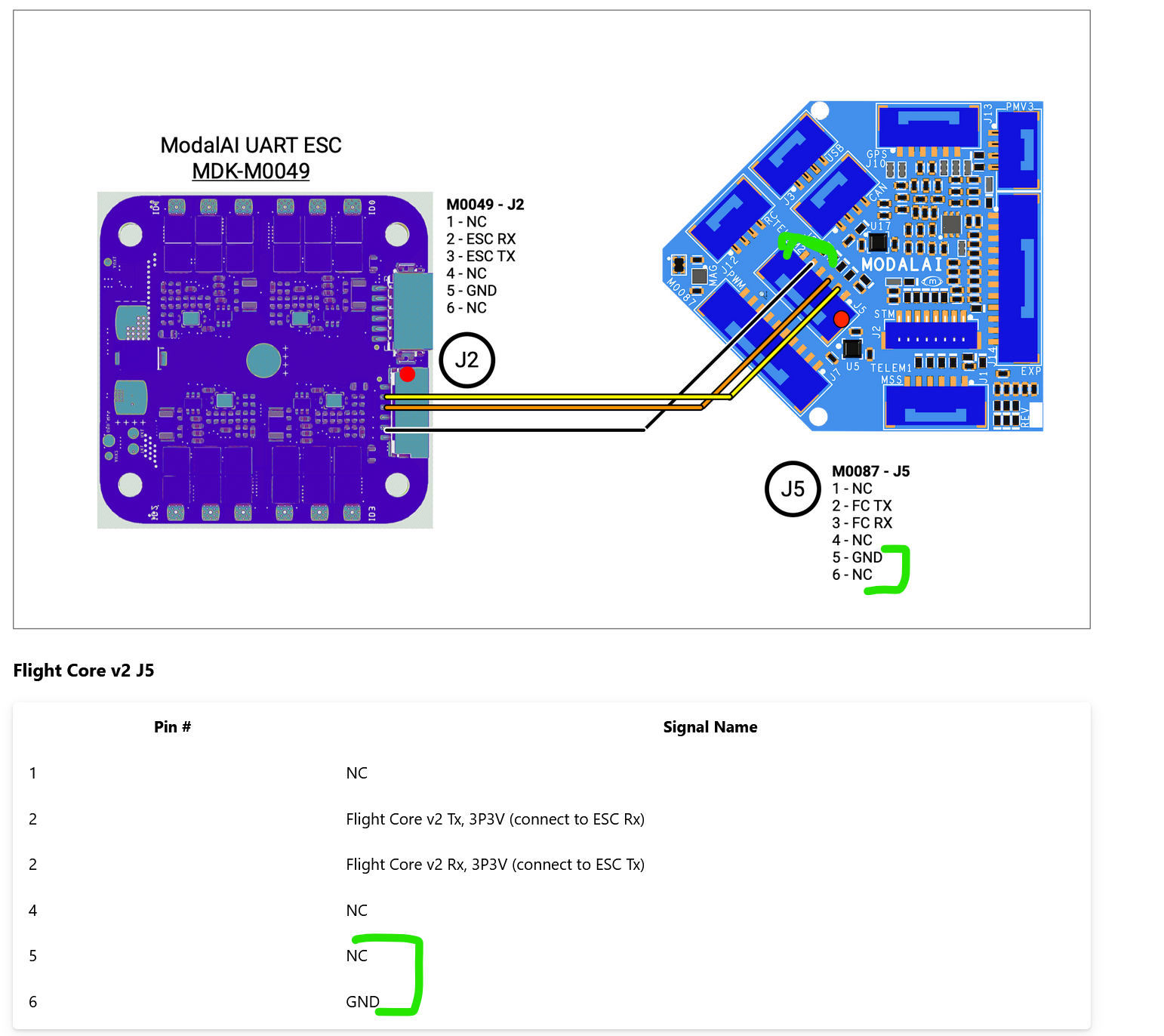
On this page, I think the diagram is wrong , it shows ground going to the second to last pin (pin 5) on the FCv2 and it should be the last pin (pin 6).
Thanks again!
Martin.
-
-
Thank you! We'll test this out and let you know if there are any issues.
Just as a FYI, I found two issues with the documentation (I'm happy to send/post these elsewhere too).
-
"Configure the Bitrate if needed (#3). For VOXL2, the default is 2000000, for FCv1/v2, use 250000." -> The motors would not spin at all UNLESS I had the bitrate set to 2000000 with my FCv2->VOXL-ESC-Mini. I spent a good couple hours trying to figure out why the motors would not spin with the actuator sliders and decided to try the higher bitrate at a whim and it worked.
-
On this page, I think the diagram is wrong , it shows ground going to the second to last pin (pin 5) on the FCv2 and it should be the last pin (pin 6).
Thanks again!
Martin.
The diagram for this variant of the ESC is correct : https://docs.modalai.com/modal-esc-datasheet/#connector-information-and-pin-outs. This applies to M0049, M0117 and M0134 ESCs.
If you are using the M0129 mini ESC, it has a different connector : https://docs.modalai.com/voxl-mini-esc-datasheet/#connector-information-and-pin-outs
Regarding the baud rate.. Your ESC probably came already set up to use 2Mbit baud rate in the ESC params. You have to make sure that the PX4 uses the baud rate that the ESC params are set to, otherwise there will be a baud rate mismatch. It looks like everything is working as expected.
Alex
-
-
The diagram for this variant of the ESC is correct : https://docs.modalai.com/modal-esc-datasheet/#connector-information-and-pin-outs. This applies to M0049, M0117 and M0134 ESCs.
If you are using the M0129 mini ESC, it has a different connector : https://docs.modalai.com/voxl-mini-esc-datasheet/#connector-information-and-pin-outs
Regarding the baud rate.. Your ESC probably came already set up to use 2Mbit baud rate in the ESC params. You have to make sure that the PX4 uses the baud rate that the ESC params are set to, otherwise there will be a baud rate mismatch. It looks like everything is working as expected.
Alex
@Alex-Kushleyev Thanks again!
For the diagram I was referring to the FCv2 side. I attached a screenshot with what I think are the discrepancies highlighted. pin6 is ground and the table shows that, but the diagram shows pin 5 as ground. Apologies if I'm misunderstanding!
M.
-
@Alex-Kushleyev Thanks again!
For the diagram I was referring to the FCv2 side. I attached a screenshot with what I think are the discrepancies highlighted. pin6 is ground and the table shows that, but the diagram shows pin 5 as ground. Apologies if I'm misunderstanding!
M.
Hi @Martin-Lukac
Good catch on the pin swap. The Table is correct, with Pin 6 = GND.The one thing I was wondering is related to this comment:
" I can power the ESC and the FCv2 separately."
That is not necessarily a good thing, and likely to lead to problems if you are powered up or down at different times. If one output (TX) is driving an unpowered input (RX), it could put the HW in a bad state. Please make sure to have them synced for ON and OFF.
Thanks.



Reading along? Create a free ModalAI Forum account to join in.
With an account you can reply, ask your own question, get an email when a ModalAI engineer answers, and mark the reply that solved it. Your place in each thread is saved between visits.
Questions about VOXL, Flight Core, ESCs and ModalAI drones are answered here by the engineers who build them.
Register Login