
VOXL2 custom Camera Config
-
Hello
I'm currently using VOXL2 and I'm using M0173. But I only want to use tracking_front and tracking_down of the image sensor here, but I don't know how to set up the image sensor.
Additionally, how can I write custom-camera-config in /data/modalai? -
Hello
I'm currently using VOXL2 and I'm using M0173. But I only want to use tracking_front and tracking_down of the image sensor here, but I don't know how to set up the image sensor.
Additionally, how can I write custom-camera-config in /data/modalai?@tkddnjs825 depending on which cameras are connected to your M0173, you can select the closest configuration using
voxl-configure-camerasand select option 26, 27, or 28. Then you can manually edit/etc/modalai/voxl-camera-server.confto disable the camera(s) that you don't have installed (you can just remove those camera config entries completely from the file to avoid confusion)https://docs.modalai.com/voxl2-coax-camera-bundles/
Please let me know if you need any further clarification.
Alex
-
@tkddnjs825 depending on which cameras are connected to your M0173, you can select the closest configuration using
voxl-configure-camerasand select option 26, 27, or 28. Then you can manually edit/etc/modalai/voxl-camera-server.confto disable the camera(s) that you don't have installed (you can just remove those camera config entries completely from the file to avoid confusion)https://docs.modalai.com/voxl2-coax-camera-bundles/
Please let me know if you need any further clarification.
Alex
@Alex-Kushleyev
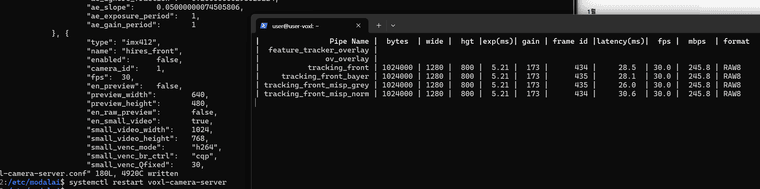
I have currently set it to C28 and have installed tracking cameras on the front and rear.However, if I disable the remaining cameras, tracking down does not run.
-
@Alex-Kushleyev
I have currently set it to C28 and have installed tracking cameras on the front and rear.However, if I disable the remaining cameras, tracking down does not run.
@tkddnjs825 ,
Can you please run “voxl-camera-server -l” and look at the very top to see which cameras have been detected (this is regardless of what you enable in camera server config). We first want to make sure all the cameras are correctly detected (should be 4 cameras). You could past the first part that lists detected cameras, their ids and slot numbers.


Reading along? Create a free ModalAI Forum account to join in.
With an account you can reply, ask your own question, get an email when a ModalAI engineer answers, and mark the reply that solved it. Your place in each thread is saved between visits.
Questions about VOXL, Flight Core, ESCs and ModalAI drones are answered here by the engineers who build them.
Register Login