
Looking for Help Understanding the GPIO mapping on the QRB5165
-
I'm using the FPV ESC and noticed the feature for switching VTX power on/off. I see in the documentation that the pin is labeled as CH0 PF0, and am struggling to figure out which pin in sys/class/gpio this refers too. Some clarity on this would be very helpful.
If you are interested in information about GPIO / PWM functionality on ESC specifically, this information should help : https://docs.modalai.com/voxl-fpv-esc-datasheet/ . The control of GPIO / PWM works by sending a special message to the ESC using UART and we have some support for this in PX4 as well as our tests scripts.
If you wanted to control GPIO that is physically connected to the VOXL2 chip, then you should look at the following documentation: https://docs.modalai.com/voxl2-linux-user-guide/#gpios and we also have a tool
voxl-gpiowhich is part of the SDK, also source here : https://gitlab.com/voxl-public/voxl-sdk/core-libs/libqrb5165-io/-/blob/master/apps/examples/voxl-gpio.cIf you need more help, please let me know which direction you want to go.
Alex
-
If you are interested in information about GPIO / PWM functionality on ESC specifically, this information should help : https://docs.modalai.com/voxl-fpv-esc-datasheet/ . The control of GPIO / PWM works by sending a special message to the ESC using UART and we have some support for this in PX4 as well as our tests scripts.
If you wanted to control GPIO that is physically connected to the VOXL2 chip, then you should look at the following documentation: https://docs.modalai.com/voxl2-linux-user-guide/#gpios and we also have a tool
voxl-gpiowhich is part of the SDK, also source here : https://gitlab.com/voxl-public/voxl-sdk/core-libs/libqrb5165-io/-/blob/master/apps/examples/voxl-gpio.cIf you need more help, please let me know which direction you want to go.
Alex
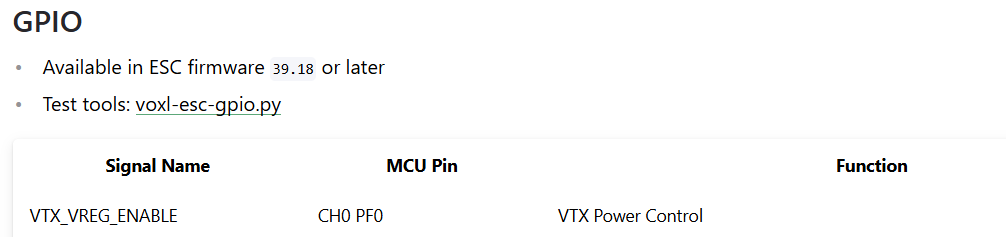
@Alex-Kushleyev I'm specifically interested in toggling the VTX on/off GPIO on the ESC as described in the attached image.
-
@Alex-Kushleyev I'm specifically interested in toggling the VTX on/off GPIO on the ESC as described in the attached image.
@Jeremy-Frederick , got it. one more question, are you looking for a way to toggle it while PX4 is running or not running?
The reason why i ask is that the command message for this action has to go through the serial port connecting to the ESC and if PX4 is running, then it opens the port and the command has to go through px4.
Here is how you can test:
- first make sure that the function works without px4:
- run this script https://gitlab.com/voxl-public/voxl-sdk/utilities/voxl-esc/-/blob/master/voxl-esc-tools/voxl-esc-gpio.py with
--val 0or--val 1options and check to see if the aux power is turning on / off. currently this script is only set up to toggle this pin on M0138 FPV ESC, but in future we will expand support to other GPIO on ESCs if needed - for example,
python3 voxl-esc-gpio.py --val 0 - you should have this script on voxl already in
/usr/share/modalai/voxl-esc-toolsor you can clone the repo to voxl2.
- run this script https://gitlab.com/voxl-public/voxl-sdk/utilities/voxl-esc/-/blob/master/voxl-esc-tools/voxl-esc-gpio.py with
I will need to double check with the team how this can be triggered via PX4.
Alex
- first make sure that the function works without px4:
-
@Jeremy-Frederick , got it. one more question, are you looking for a way to toggle it while PX4 is running or not running?
The reason why i ask is that the command message for this action has to go through the serial port connecting to the ESC and if PX4 is running, then it opens the port and the command has to go through px4.
Here is how you can test:
- first make sure that the function works without px4:
- run this script https://gitlab.com/voxl-public/voxl-sdk/utilities/voxl-esc/-/blob/master/voxl-esc-tools/voxl-esc-gpio.py with
--val 0or--val 1options and check to see if the aux power is turning on / off. currently this script is only set up to toggle this pin on M0138 FPV ESC, but in future we will expand support to other GPIO on ESCs if needed - for example,
python3 voxl-esc-gpio.py --val 0 - you should have this script on voxl already in
/usr/share/modalai/voxl-esc-toolsor you can clone the repo to voxl2.
- run this script https://gitlab.com/voxl-public/voxl-sdk/utilities/voxl-esc/-/blob/master/voxl-esc-tools/voxl-esc-gpio.py with
I will need to double check with the team how this can be triggered via PX4.
Alex
@Alex-Kushleyev Yeah, even if we can't trigger it through PX4, having to stop voxl-px4 will not work
- first make sure that the function works without px4:
-
@Alex-Kushleyev Yeah, even if we can't trigger it through PX4, having to stop voxl-px4 will not work
-
@Jeremy-Frederick To enable the feature, set the px4 paramster
GPIO_CTL_CHto a value between 1-6 and set the correspondingRC_MAP_AUX#to the button/switch you want to use.@tom Seems like neither the voxl-esc-gpio.py test script or the PX4 triggering via RC_AUX seems to be having an effect on the PF0 GPIO on the ESC. Currently, I am using SDK 1.3.5. I did notice that the voxl-esc-gpio.py has the packet = wrap_data(ESC_PACKET_TYPE_GPIO_CMD,req_data) line commented out, is there anything else that I should check? Perhaps a different ESC firmware?
-
@tom Seems like neither the voxl-esc-gpio.py test script or the PX4 triggering via RC_AUX seems to be having an effect on the PF0 GPIO on the ESC. Currently, I am using SDK 1.3.5. I did notice that the voxl-esc-gpio.py has the packet = wrap_data(ESC_PACKET_TYPE_GPIO_CMD,req_data) line commented out, is there anything else that I should check? Perhaps a different ESC firmware?
@Jeremy-Frederick The feature should be supported on that release and ESC firmware as long as you have run
voxl-configure-mpain order to load the ESC firmware contained in the release.To confirm, you have something similar setup:
GPIO_CTL_CH = 2
RC_MAP_AUX2 = 10
where 10 is the channel of the button or switch on your transmitter that you'd like to use to toggle?
There was another bug that was fixed later where if
VOXL_ESC_MODEis set to1(turtle mode) this would not work, can you check that as well -
@tom Seems like neither the voxl-esc-gpio.py test script or the PX4 triggering via RC_AUX seems to be having an effect on the PF0 GPIO on the ESC. Currently, I am using SDK 1.3.5. I did notice that the voxl-esc-gpio.py has the packet = wrap_data(ESC_PACKET_TYPE_GPIO_CMD,req_data) line commented out, is there anything else that I should check? Perhaps a different ESC firmware?
@Jeremy-Frederick , the python test script works, you may have an older version of it, we had commented out something by accident (the line you mentioned), but it is fixed now : https://gitlab.com/voxl-public/voxl-sdk/utilities/voxl-esc/-/blob/master/voxl-esc-tools/voxl-esc-gpio.py
Double check that you have ESC firmware
39.18and should be good to test with python script while px4 is not running (as a first step). then you can set up your channel mapping as Tom suggested..Hopefully that works for you!
Alex
-
@Jeremy-Frederick The feature should be supported on that release and ESC firmware as long as you have run
voxl-configure-mpain order to load the ESC firmware contained in the release.To confirm, you have something similar setup:
GPIO_CTL_CH = 2
RC_MAP_AUX2 = 10
where 10 is the channel of the button or switch on your transmitter that you'd like to use to toggle?
There was another bug that was fixed later where if
VOXL_ESC_MODEis set to1(turtle mode) this would not work, can you check that as well@tom Looks like I just needed to update the ESC firmware to the latest variant, that got the python script to work, still working on PX4 though, I'm using Joystick controls through QGC rather than an RC radio so I cannot Map an RC channel, using the actuator testing panel instead and set GPIO_CTL_CH = 3 and RC AUX 3 to one of the outputs, doesn't seem to be triggering the LED yet but I'm not sure if RC AUX 3 sends the same message as with a RC Controller, going to try going through the VOXL IO functionality instead of the ESC output next. In the end, we'll just be integrating it into our custom QGC fork, however want to test it before going through the effort.
-
@tom Looks like I just needed to update the ESC firmware to the latest variant, that got the python script to work, still working on PX4 though, I'm using Joystick controls through QGC rather than an RC radio so I cannot Map an RC channel, using the actuator testing panel instead and set GPIO_CTL_CH = 3 and RC AUX 3 to one of the outputs, doesn't seem to be triggering the LED yet but I'm not sure if RC AUX 3 sends the same message as with a RC Controller, going to try going through the VOXL IO functionality instead of the ESC output next. In the end, we'll just be integrating it into our custom QGC fork, however want to test it before going through the effort.
@Jeremy-Frederick Those aux channels are implemented differently when getting manual control messages from QGC. The only one that is mapped is aux1 that comes from the "buttons" field of the corresponding MANUAL CONTROL Mavlink message.
-
P PatkirkMartin referenced this topic on




Reading along? Create a free ModalAI Forum account to join in.
With an account you can reply, ask your own question, get an email when a ModalAI engineer answers, and mark the reply that solved it. Your place in each thread is saved between visits.
Questions about VOXL, Flight Core, ESCs and ModalAI drones are answered here by the engineers who build them.
Register Login