
VOXL2 kernel version
-
@jcai ,
If you think you might want to try building the kernel and enabling a certain module, you could try it without a risk of bricking your VOXL2. There is a way to test a kernel without overwriting your existing kernel, so if something goes wrong, you just need to power cycle voxl2 and you are good. In the test mode, the kernel is loaded in temporary memory and is then launched.
https://docs.modalai.com/voxl2-kernel-build-guide/#test
Specifically, use the following command:
adb reboot bootloader
fastboot boot your_new_kernel.img
Do not use
fastboot flashcommands until you are sure you want to overwrite the current kernel.Regarding running the build on MacOS, since OSX (assuming x86_64) is not running on the same kernel type, Docker will have to emulate the Linux kernel (not using host kernel) because that is what the kernel build docker image uses. It should still work, but building will be slower. However, if you have Parallels, you can run a Ubuntu VM, which will interact with the CPU directly, bypassing OSX, so no emulation is needed, and your build will be very fast (assuming x86_64 mac). If you have ARM64 mac, then Parallels will probably not let you run x86_64 Ubuntu VM, so your best bet is just to use native ARM64 Docker application with x86_64 translation enabled (and run our x86_64 kernel build image), which may be pretty fast.
I believe we have had users port a driver from a newer kernel by just updating the source code from a newer kernel into our 4.19.125, but there is no guarantee it will work, depending on the scope of changes.
Alex
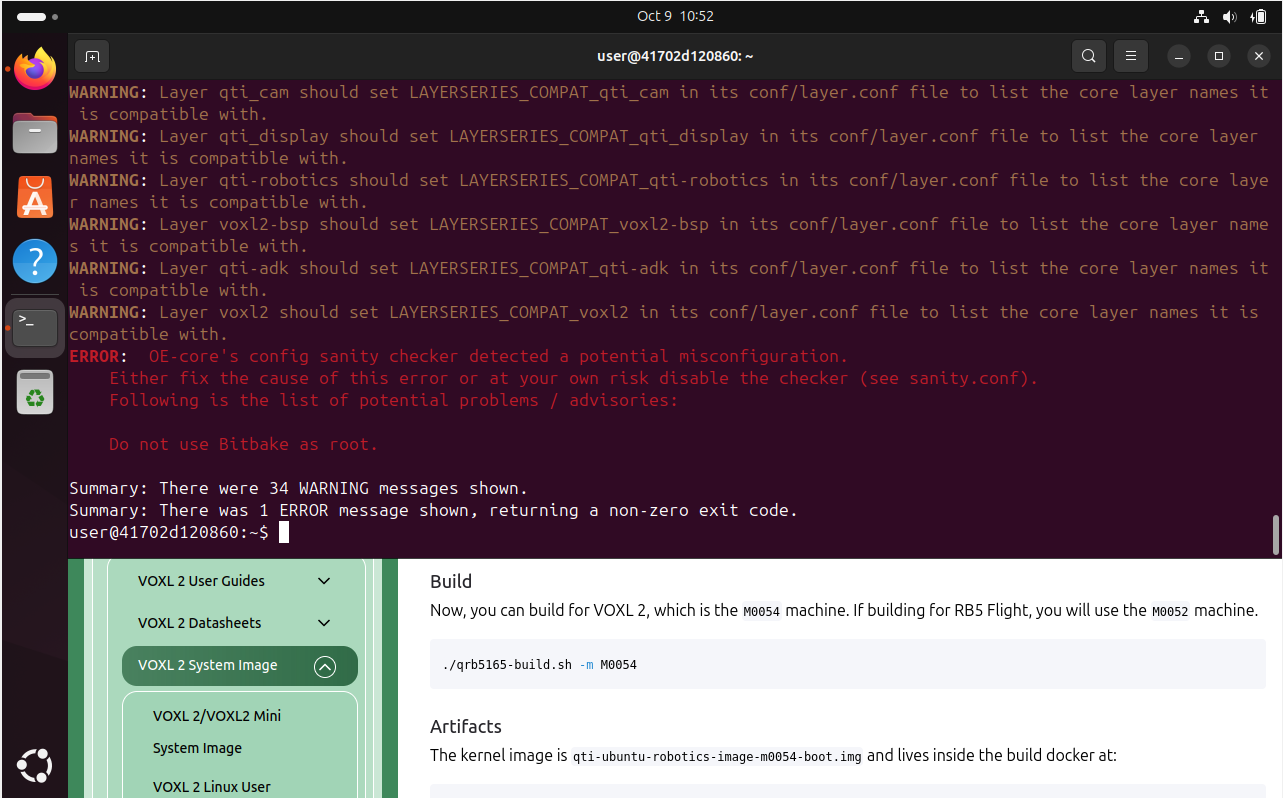
@Alex-Kushleyev I'm having some issues with building the kernel. I'm running the latest Ubuntu in VirtualBox (on Windows) for this. In the container, the sync and patch scripts run without issue but when building as root, I get the following error:
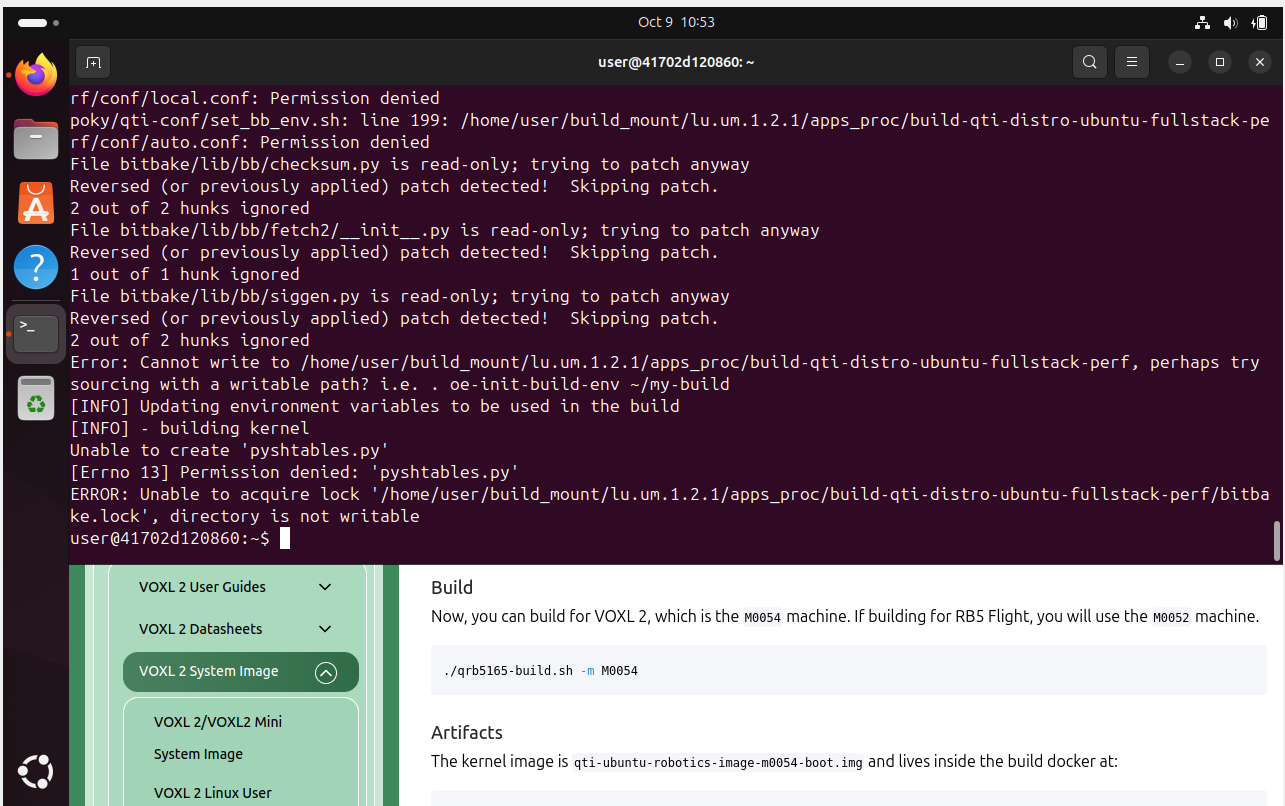
If I run build without sudo, I get access permission issues:
-
@Alex-Kushleyev I'm having some issues with building the kernel. I'm running the latest Ubuntu in VirtualBox (on Windows) for this. In the container, the sync and patch scripts run without issue but when building as root, I get the following error:
If I run build without sudo, I get access permission issues:
@jcai , i will try to do the build on native linux machine just in case. Can you confirm you did not make any changes to the kernel source or build scripts before building?
Alex
-
@jcai , i will try to do the build on native linux machine just in case. Can you confirm you did not make any changes to the kernel source or build scripts before building?
Alex
-
@Alex-Kushleyev Yeah, no changes
@jcai , I was able to successfully build the m0054 kernel by following the exact instructions from here : https://docs.modalai.com/voxl2-kernel-build-guide/
The first time, i did get an error:
Cloning into bare repository '/home/user/build_mount/lu.um.1.2.1/apps_proc/downloads/git2/github.com.dex4er.fakechroot.git'...
fatal: unable to access 'https://github.com/dex4er/fakechroot.git/': gnutls_handshake() failed: The TLS connection was non-properly terminated.
but this must have been a temporary web glitch, as it worked by just re-running the build.
When you say that you ran the build as root, how exactly did you do that? Did you run as root first then as non-root? if so, it is possible that root user created directories that are not writable by normal user, in which case you may need to clean and build from scratch.
Alex
-
@jcai , I was able to successfully build the m0054 kernel by following the exact instructions from here : https://docs.modalai.com/voxl2-kernel-build-guide/
The first time, i did get an error:
Cloning into bare repository '/home/user/build_mount/lu.um.1.2.1/apps_proc/downloads/git2/github.com.dex4er.fakechroot.git'...
fatal: unable to access 'https://github.com/dex4er/fakechroot.git/': gnutls_handshake() failed: The TLS connection was non-properly terminated.
but this must have been a temporary web glitch, as it worked by just re-running the build.
When you say that you ran the build as root, how exactly did you do that? Did you run as root first then as non-root? if so, it is possible that root user created directories that are not writable by normal user, in which case you may need to clean and build from scratch.
Alex
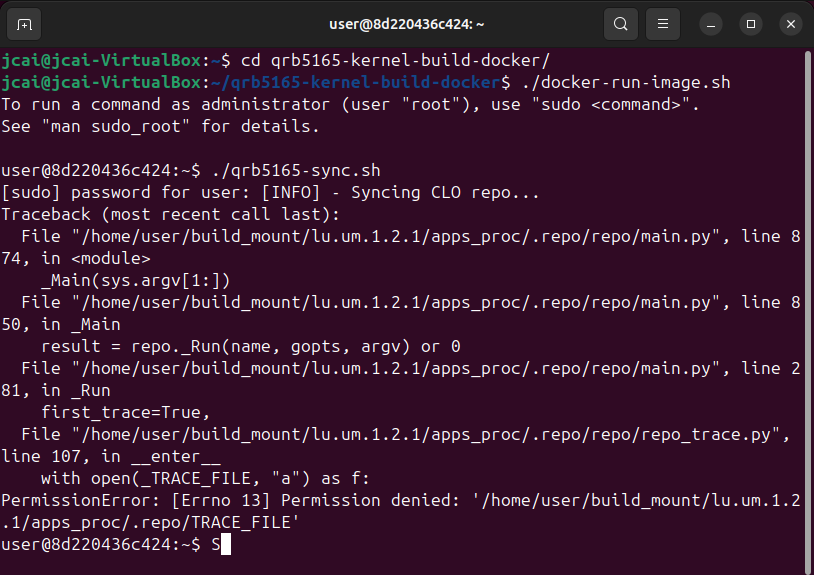
@Alex-Kushleyev I was only able to follow the guide exactly until I got into the container. From there , all the scripts inside were run with sudo. Otherwise, I would get permission issues like below.
-
@Alex-Kushleyev I was only able to follow the guide exactly until I got into the container. From there , all the scripts inside were run with sudo. Otherwise, I would get permission issues like below.
@jcai , as this is a permissions issue, can you please check the following:
inside docker
ls -lah /home/user/build_mount/lu.um.1.2.1/apps_procand outside docker
ls -lah ~/qrb5165-kernel-build-docker/workspace/lu.um.1.2.1/apps_procIn my case, all the folders that were created inside the docker container are owned by my actual username on the host machine (and permissions are
drwxr-xr-xfor the directoryapps_procand others. This means only the owner can write to it. But inside docker, the ownership is shown as useruser, so docker is writing asuserand on the host machine it is written on my actual username's behalf.user@098ef18e8424:~/build_mount/lu.um.1.2.1/apps_proc$ ls -lah total 80K drwxr-xr-x 10 user user 4.0K Oct 9 15:45 . drwxr-xr-x 3 user user 4.0K Oct 9 15:31 .. drwxr-xr-x 6 user user 4.0K Oct 9 16:31 build-qti-distro-ubuntu-fullstack-perf drwxr-xr-x 2 user user 20K Aug 23 2022 deb_premirror_packages drwxr-xr-x 5 user user 4.0K Oct 9 15:37 disregard drwxr-xr-x 13 user user 28K Oct 9 16:29 downloads drwxr-xr-x 34 user user 4.0K Oct 9 15:38 poky drwxr-xr-x 7 user user 4.0K Oct 9 15:37 .repo lrwxrwxrwx 1 user user 27 Oct 9 15:38 setup-environment -> poky/qti-conf/set_bb_env.sh drwxr-xr-x 25 user user 4.0K Oct 9 15:38 src drwxr-xr-x 177 user user 4.0K Oct 9 16:29 sstate-cachIt is possible that in your case something is not working, i am curious what the ownership shows.
Alex
-
On the host:
jcai@jcai-VirtualBox:~/qrb5165-kernel-build-docker/workspace/lu.um.1.2.1/apps_proc$ ls -lah
total 48K
drwxr-xr-x  8 root root 4.0K Oct  9 15:42 .
drwxr-xr-x  3 root root 4.0K Oct  8 13:03 ..
drwxrwxr-x  2 1001 1001  20K Aug 23  2022 deb_premirror_packages
drwxr-xr-x  5 root root 4.0K Oct  8 17:27 disregard
drwxr-xr-x  2 root root 4.0K Oct  9 09:49 downloads
drwxr-xr-x 34 root root 4.0K Oct  9 15:25 poky
drwxr-xr-x  7 root root 4.0K Oct  9 15:23 .repo
lrwxrwxrwx  1 root root   27 Oct  8 17:33 setup-environment -> poky/qti-conf/set_bb_env.sh
drwxr-xr-x 25 root root 4.0K Oct  8 17:31 src
In Docker:
user@8de0065c2813:~/build_mount/lu.um.1.2.1/apps_proc$ ls -lah
total 48K
drwxr-xr-x  8 root root 4.0K Oct  9 19:42 .
drwxr-xr-x  3 root root 4.0K Oct  8 17:03 ..
drwxrwxr-x  2 1001 1001  20K Aug 23  2022 deb_premirror_packages
drwxr-xr-x  5 root root 4.0K Oct  8 21:27 disregard
drwxr-xr-x  2 root root 4.0K Oct  9 13:49 downloads
drwxr-xr-x 34 root root 4.0K Oct  9 19:25 poky
drwxr-xr-x  7 root root 4.0K Oct  9 19:23 .repo
lrwxrwxrwx  1 root root   27 Oct  8 21:33 setup-environment -> poky/qti-conf/set_bb_env.sh
drwxr-xr-x 25 root root 4.0K Oct  8 21:31 src
Yeah, ownership looks like an issue here
-
On the host:
jcai@jcai-VirtualBox:~/qrb5165-kernel-build-docker/workspace/lu.um.1.2.1/apps_proc$ ls -lah
total 48K
drwxr-xr-x  8 root root 4.0K Oct  9 15:42 .
drwxr-xr-x  3 root root 4.0K Oct  8 13:03 ..
drwxrwxr-x  2 1001 1001  20K Aug 23  2022 deb_premirror_packages
drwxr-xr-x  5 root root 4.0K Oct  8 17:27 disregard
drwxr-xr-x  2 root root 4.0K Oct  9 09:49 downloads
drwxr-xr-x 34 root root 4.0K Oct  9 15:25 poky
drwxr-xr-x  7 root root 4.0K Oct  9 15:23 .repo
lrwxrwxrwx  1 root root   27 Oct  8 17:33 setup-environment -> poky/qti-conf/set_bb_env.sh
drwxr-xr-x 25 root root 4.0K Oct  8 17:31 src
In Docker:
user@8de0065c2813:~/build_mount/lu.um.1.2.1/apps_proc$ ls -lah
total 48K
drwxr-xr-x  8 root root 4.0K Oct  9 19:42 .
drwxr-xr-x  3 root root 4.0K Oct  8 17:03 ..
drwxrwxr-x  2 1001 1001  20K Aug 23  2022 deb_premirror_packages
drwxr-xr-x  5 root root 4.0K Oct  8 21:27 disregard
drwxr-xr-x  2 root root 4.0K Oct  9 13:49 downloads
drwxr-xr-x 34 root root 4.0K Oct  9 19:25 poky
drwxr-xr-x  7 root root 4.0K Oct  9 19:23 .repo
lrwxrwxrwx  1 root root   27 Oct  8 21:33 setup-environment -> poky/qti-conf/set_bb_env.sh
drwxr-xr-x 25 root root 4.0K Oct  8 21:31 src
Yeah, ownership looks like an issue here
@jcai , yes it looks like all the folders have root ownership, and the build script does not like being run as root, however non-root cannot write to those folders.
Please try to run the build from scratch, removing the workspace folder and running the sync, patch, build scripts as non-root. After you sync, please check the ownership of the folders, if root is the owner, the same issue will happen.
If after build and sync, the folders are owned by root, you can try to do the following from your docker container after running sync and patch (which seem to work fine, right?):
sudo chown -R user:user ~/build_mount/
This will make
userthe owner of those files and folders (recursively)Alternatively you can assign all permissions to all users for this build folder
sudo chmod -R 777 ~/build_mount/
And then run the actual build as
userAlex
-
@jcai , yes it looks like all the folders have root ownership, and the build script does not like being run as root, however non-root cannot write to those folders.
Please try to run the build from scratch, removing the workspace folder and running the sync, patch, build scripts as non-root. After you sync, please check the ownership of the folders, if root is the owner, the same issue will happen.
If after build and sync, the folders are owned by root, you can try to do the following from your docker container after running sync and patch (which seem to work fine, right?):
sudo chown -R user:user ~/build_mount/
This will make
userthe owner of those files and folders (recursively)Alternatively you can assign all permissions to all users for this build folder
sudo chmod -R 777 ~/build_mount/
And then run the actual build as
userAlex
@Alex-Kushleyev I've managed to get the build working, thanks! I think the problems started because my initial docker image was built with sudo. Removing the workspace folder and starting from scratch got everything set up as user.
I'm now attempting to test the build using:
adb reboot bootloader
fastboot boot your_new_kernel.img
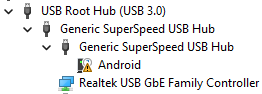
Are there specific drivers I need to download? Once I put the voxl into bootloader, VirtualBox can't detect the device anymore. The same is true on my Windows host. As a result, running
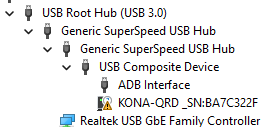
fastboot boot new_kernel.imggives me a constant<waiting for any device>message. As reference, here's my device manager during normal and bootloader modes. The "Android" device also comes and goes. It usually exists for a couple seconds before disappearing.
-
@Alex-Kushleyev I've managed to get the build working, thanks! I think the problems started because my initial docker image was built with sudo. Removing the workspace folder and starting from scratch got everything set up as user.
I'm now attempting to test the build using:
adb reboot bootloader
fastboot boot your_new_kernel.img
Are there specific drivers I need to download? Once I put the voxl into bootloader, VirtualBox can't detect the device anymore. The same is true on my Windows host. As a result, running
fastboot boot new_kernel.imggives me a constant<waiting for any device>message. As reference, here's my device manager during normal and bootloader modes. The "Android" device also comes and goes. It usually exists for a couple seconds before disappearing.
@jcai , sometimes fastboot requires running at it as root, so please try
sudo fastboot boot your_new_kernel.img -
@jcai , sometimes fastboot requires running at it as root, so please try
sudo fastboot boot your_new_kernel.img@Alex-Kushleyev I think this is just an issue with Windows drivers. I ended up switching over to OSX to use adb and fastboot, no issues there. I'm just using a USB drive to get the
.imgfile from the VM to the Mac. Boot tests look good.One more thing, I'm looking at the kernel build guide and there's a section that says I can enable in tree drivers by editing:
apps_proc/poky/meta-voxl2-bsp/recipes-kernel/linux-msm/files/m005x.cfgI don't have this file in my system. the closest I found is
../linux-msm/files/configs/m0054. In this directory, there'skona_defconfigandkona-perf_defconfig. What's the difference between these two files? Are these the correct files to be editing to enable, for example,CONFIG_MACVLAN? -
@Alex-Kushleyev I think this is just an issue with Windows drivers. I ended up switching over to OSX to use adb and fastboot, no issues there. I'm just using a USB drive to get the
.imgfile from the VM to the Mac. Boot tests look good.One more thing, I'm looking at the kernel build guide and there's a section that says I can enable in tree drivers by editing:
apps_proc/poky/meta-voxl2-bsp/recipes-kernel/linux-msm/files/m005x.cfgI don't have this file in my system. the closest I found is
../linux-msm/files/configs/m0054. In this directory, there'skona_defconfigandkona-perf_defconfig. What's the difference between these two files? Are these the correct files to be editing to enable, for example,CONFIG_MACVLAN?@jcai ,
In my kernel build, the config file exists:
workspace$ find . -name m005x.cfg ./lu.um.1.2.1/apps_proc/build-qti-distro-ubuntu-fullstack-perf/tmp-glibc/work/m0054-oe-linux/linux-msm/4.19-r0/fragments/m005x.cfg ./lu.um.1.2.1/apps_proc/poky/meta-voxl2-bsp/recipes-kernel/linux-msm/files/fragments/m005x.cfgkona-perf_defconfigis the "performance" kernel, which is what you should be using
kona_defconfigis the debug version of the kernel configurationI believe you can edit either the
m005x.cfgconfig fragment orkona-perf_defconfig, sincelinux-msm_4.19.bbappendhas the following:do_configure_prepend() { # We merge the config changes with the default config for the board # using merge-config.sh kernel tool mergeTool=${S}/scripts/kconfig/merge_config.sh confDir=${S}/arch/${ARCH}/configs defconf=${confDir}/${KERNEL_CONFIG} ${mergeTool} -m -O ${confDir} ${defconf} ${CFG_FRAGMENTS} # The output will be named .config. We rename it back to ${defconf} because # that's what the rest of do_configure expects mv ${confDir}/.config ${defconf} bbnote "Writing back the merged config: ${confDir}/.config to ${defconf}" }which is merging the config fragment with the defconfig.
I hope this helps!
Alex
-
@jcai ,
In my kernel build, the config file exists:
workspace$ find . -name m005x.cfg ./lu.um.1.2.1/apps_proc/build-qti-distro-ubuntu-fullstack-perf/tmp-glibc/work/m0054-oe-linux/linux-msm/4.19-r0/fragments/m005x.cfg ./lu.um.1.2.1/apps_proc/poky/meta-voxl2-bsp/recipes-kernel/linux-msm/files/fragments/m005x.cfgkona-perf_defconfigis the "performance" kernel, which is what you should be using
kona_defconfigis the debug version of the kernel configurationI believe you can edit either the
m005x.cfgconfig fragment orkona-perf_defconfig, sincelinux-msm_4.19.bbappendhas the following:do_configure_prepend() { # We merge the config changes with the default config for the board # using merge-config.sh kernel tool mergeTool=${S}/scripts/kconfig/merge_config.sh confDir=${S}/arch/${ARCH}/configs defconf=${confDir}/${KERNEL_CONFIG} ${mergeTool} -m -O ${confDir} ${defconf} ${CFG_FRAGMENTS} # The output will be named .config. We rename it back to ${defconf} because # that's what the rest of do_configure expects mv ${confDir}/.config ${defconf} bbnote "Writing back the merged config: ${confDir}/.config to ${defconf}" }which is merging the config fragment with the defconfig.
I hope this helps!
Alex
@Alex-Kushleyev Yup, editing
kona-perf_defconfiglooks to have worked, thanks! -
A Alex Kushleyev referenced this topic on
Reading along? Create a free ModalAI Forum account to join in.
With an account you can reply, ask your own question, get an email when a ModalAI engineer answers, and mark the reply that solved it. Your place in each thread is saved between visits.
Questions about VOXL, Flight Core, ESCs and ModalAI drones are answered here by the engineers who build them.
Register Login