
VOXL2 boot problem
-
Hello community,
I am being using VOXL2 with system image 1.2.0 since long time now. Since yesterday I am facing booting problem with my VOXL2. VOXL2 isnt booting properly and initially it was going into boot loop. I took following steps to recover VOXL2 and failed.-
I am aware of ESD problem and so have ESD matt and ground cable always connected to my hand so ESD shouldn't have been problem. I tried to put VOXL2 in fastboot mode and yes its going successfully into fastboot mode and also shows as fastboot device with command "fastboot devices" but never comes out of it. Even "lsusb" dosent show any Qualcomm device and only fastboot mode is detected correctly.
-
I tried to recover VOXL2 with QDL process as mentioned in document where QDL device and process successfully completes on VOXL2 but still it dosent boot up and adb shell never comes up for this VOXL. If I do "lsusb" while in QDL recovery then Qualcomm QDL device is been shown in the list and as a proof the process also completes successfully.
-
After QDL process, I tried to install new SDK 1.3.3 with manual fastboot mode entry by pressing fastboot switch on voxl2. Few components loads up successfully but then voxl fails to reboot and proceed with installation. Then over here I tried manual reboot by switching power off-on but still VOXL2 continues to stay disconnected.
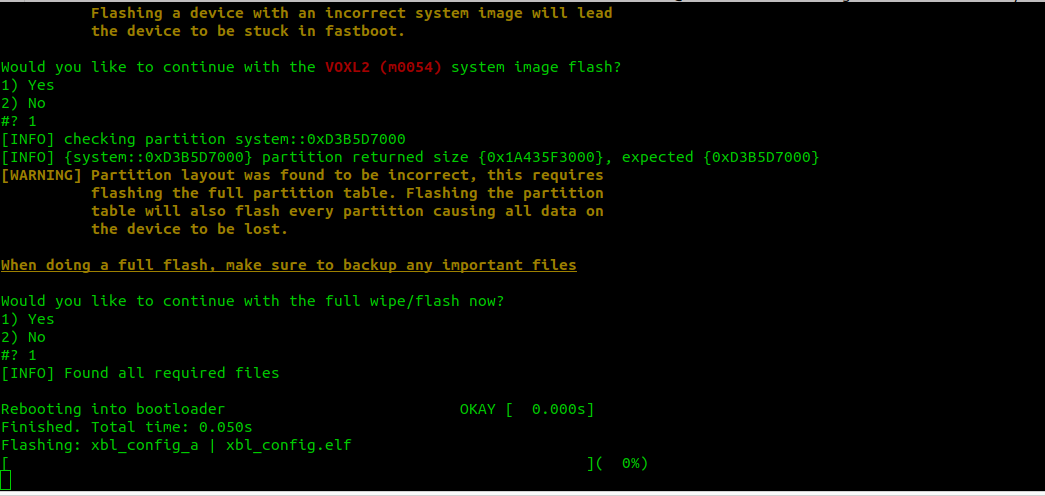
Please help @Alex-Kushleyev @Eric-Katzfey
-
-
Hello community,
I am being using VOXL2 with system image 1.2.0 since long time now. Since yesterday I am facing booting problem with my VOXL2. VOXL2 isnt booting properly and initially it was going into boot loop. I took following steps to recover VOXL2 and failed.-
I am aware of ESD problem and so have ESD matt and ground cable always connected to my hand so ESD shouldn't have been problem. I tried to put VOXL2 in fastboot mode and yes its going successfully into fastboot mode and also shows as fastboot device with command "fastboot devices" but never comes out of it. Even "lsusb" dosent show any Qualcomm device and only fastboot mode is detected correctly.
-
I tried to recover VOXL2 with QDL process as mentioned in document where QDL device and process successfully completes on VOXL2 but still it dosent boot up and adb shell never comes up for this VOXL. If I do "lsusb" while in QDL recovery then Qualcomm QDL device is been shown in the list and as a proof the process also completes successfully.
-
After QDL process, I tried to install new SDK 1.3.3 with manual fastboot mode entry by pressing fastboot switch on voxl2. Few components loads up successfully but then voxl fails to reboot and proceed with installation. Then over here I tried manual reboot by switching power off-on but still VOXL2 continues to stay disconnected.
Please help @Alex-Kushleyev @Eric-Katzfey
-
-
@Aaky When you went through the QDL process did you determine whether your VOXL2 is an M0054-1 (QRB5165) or an M0054-2 (QSM8250) and QDL flash the correct image based off of that info? (there are two different QDL images for those two flavors)
-
@tom Yes. I did flash the correct QDL image for M0054-1 and verified that process. It completed successfully as well.
-
@Aaky If you watch the dmesg output while this is going on in a separate terminal with
sudo dmesg -wHwhat do you see? Does the board enumerate at all when you get to this stage?@tom Below is the output of "sudo dmesg -wH" when voxl2 is detected.
[Sep13 05:33] usb 1-4: new high-speed USB device number 7 using xhci_hcd
[  +0.128244] usb 1-4: New USB device found, idVendor=18d1, idProduct=d00d, bcdDevice= 1.00
[  +0.000017] usb 1-4: New USB device strings: Mfr=1, Product=2, SerialNumber=3
[  +0.000005] usb 1-4: Product: Android
[  +0.000004] usb 1-4: Manufacturer: Google
[  +0.000003] usb 1-4: SerialNumber: 480f9a4a
I am seeing my voxl is going by default into fastboot mode always after bootup.
ASUS-TUF-Gaming-F15-FX507ZE-FX577ZE:~$ fastboot devices
480f9a4a	 fastboot
What we can look at next to recover this voxl2?
-
@tom Below is the output of "sudo dmesg -wH" when voxl2 is detected.
[Sep13 05:33] usb 1-4: new high-speed USB device number 7 using xhci_hcd
[  +0.128244] usb 1-4: New USB device found, idVendor=18d1, idProduct=d00d, bcdDevice= 1.00
[  +0.000017] usb 1-4: New USB device strings: Mfr=1, Product=2, SerialNumber=3
[  +0.000005] usb 1-4: Product: Android
[  +0.000004] usb 1-4: Manufacturer: Google
[  +0.000003] usb 1-4: SerialNumber: 480f9a4a
I am seeing my voxl is going by default into fastboot mode always after bootup.
ASUS-TUF-Gaming-F15-FX507ZE-FX577ZE:~$ fastboot devices
480f9a4a	 fastboot
What we can look at next to recover this voxl2?
-
@tom No this is not on virtual machine. I am on ubuntu 22.04 LTS OS. I am powering up board with this power supply from modalai itself.
-
@tom I fixed this problem. This was power supply cable problem. Now voxl is booting normally.

Reading along? Create a free ModalAI Forum account to join in.
With an account you can reply, ask your own question, get an email when a ModalAI engineer answers, and mark the reply that solved it. Your place in each thread is saved between visits.
Questions about VOXL, Flight Core, ESCs and ModalAI drones are answered here by the engineers who build them.
Register Login