
Reflashing Voxl 2 Sentinel Drone
-
Today I accidently entered rm -rf * in the home directory on the Voxl 2 Sentinel drone, removing all the directories. I tried following the steps up to https://docs.modalai.com/voxl2-unbricking/, but when I try running the command "$ sudo qdl --debug --storage ufs --include . prog_firehose_ddr.elf rawprogram_unsparse0.xml rawprogram1.xml rawprogram2.xml rawprogram3.xml rawprogram4.xml rawprogram5.xml patch0.xml patch1.xml patch2.xml patch3.xml patch4.xml patch5.xml" it just outputs "Waiting for EDL device". I was wondering how I should proceed.6
-
Today I accidently entered rm -rf * in the home directory on the Voxl 2 Sentinel drone, removing all the directories. I tried following the steps up to https://docs.modalai.com/voxl2-unbricking/, but when I try running the command "$ sudo qdl --debug --storage ufs --include . prog_firehose_ddr.elf rawprogram_unsparse0.xml rawprogram1.xml rawprogram2.xml rawprogram3.xml rawprogram4.xml rawprogram5.xml patch0.xml patch1.xml patch2.xml patch3.xml patch4.xml patch5.xml" it just outputs "Waiting for EDL device". I was wondering how I should proceed.6
@William-Huang You shouldn't have to follow the unbricking procedure as you're not really in a "bricked" state.
Just follow these steps to flash the latest SDK release: https://docs.modalai.com/flash-system-image/#flashing-a-voxl-sdk-release
-
Today I accidently entered rm -rf * in the home directory on the Voxl 2 Sentinel drone, removing all the directories. I tried following the steps up to https://docs.modalai.com/voxl2-unbricking/, but when I try running the command "$ sudo qdl --debug --storage ufs --include . prog_firehose_ddr.elf rawprogram_unsparse0.xml rawprogram1.xml rawprogram2.xml rawprogram3.xml rawprogram4.xml rawprogram5.xml patch0.xml patch1.xml patch2.xml patch3.xml patch4.xml patch5.xml" it just outputs "Waiting for EDL device". I was wondering how I should proceed.6
@William-Huang You'll likely have to force it into fastboot if you have no ADB:
https://docs.modalai.com/voxl2-voxl2-mini-system-image/#force-voxl-2-into-fastboot
-
Hi, I am currently trying the fastbook but I cannot find SW1 on the board. I see a SW3 that looks like the SW1 from the documentation. The board we are using is from this drone (https://www.modalai.com/products/voxl-2-flight-deck?variant=40503626039347). Also, when I plug in the power the light is red.
-
Hi, I am currently trying the fastbook but I cannot find SW1 on the board. I see a SW3 that looks like the SW1 from the documentation. The board we are using is from this drone (https://www.modalai.com/products/voxl-2-flight-deck?variant=40503626039347). Also, when I plug in the power the light is red.
-
Hi, I am currently trying the fastbook but I cannot find SW1 on the board. I see a SW3 that looks like the SW1 from the documentation. The board we are using is from this drone (https://www.modalai.com/products/voxl-2-flight-deck?variant=40503626039347). Also, when I plug in the power the light is red.
-
@William-Huang The light being red is not good, I would make sure the power to the board is good
@tom Hello, I am picking up this problem now and have some questions about what I should do for next steps.
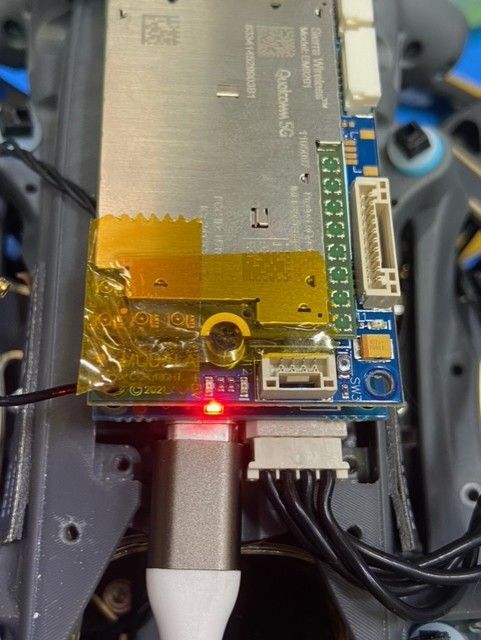
There are 2 boards in this stack and it seems slightly different than than the stock Voxl 2. On the top board there is a button labeled sw3. Pressing this button and power on does not seem to be enabling fastboot mode. the install.sh script just hangs and fastboot devices produces no results. There is a switch labled sw1 but this does not seem to do anything either and I can't seem to find what this does.
What do you mean by "light being red is not good", what does this indicate? Power to the board seems fine. I'm using the stock cable an wall power adapter and everything seems to turn on fine and is supplying the correct power.
Are there other things I can try or would this board need to be sent back for fixing
-
@tom Hello, I am picking up this problem now and have some questions about what I should do for next steps.
There are 2 boards in this stack and it seems slightly different than than the stock Voxl 2. On the top board there is a button labeled sw3. Pressing this button and power on does not seem to be enabling fastboot mode. the install.sh script just hangs and fastboot devices produces no results. There is a switch labled sw1 but this does not seem to do anything either and I can't seem to find what this does.
What do you mean by "light being red is not good", what does this indicate? Power to the board seems fine. I'm using the stock cable an wall power adapter and everything seems to turn on fine and is supplying the correct power.
Are there other things I can try or would this board need to be sent back for fixing
@mkriesel I got the green light now but there is still a problem, the 5G boaard has a button but the bottom 2 boards don't have any button, just the switch on the middle board, the one with the usb connector. I still cannot connect to it nor get fastboot working.
-
@mkriesel I got the green light now but there is still a problem, the 5G boaard has a button but the bottom 2 boards don't have any button, just the switch on the middle board, the one with the usb connector. I still cannot connect to it nor get fastboot working.
Hi @mkriesel
What did you fix/change to get that LED to go green?
Red means one of three things:- Under voltage (less than 4.4V)
- Over voltage (greater than 5.6V)
- Downstream short circuit tripping the current limits
I am curious so that other forum users also learn about this and your steps to fix it.
Thanks! -
Hi @mkriesel
What did you fix/change to get that LED to go green?
Red means one of three things:- Under voltage (less than 4.4V)
- Over voltage (greater than 5.6V)
- Downstream short circuit tripping the current limits
I am curious so that other forum users also learn about this and your steps to fix it.
Thanks!@Vinny It wasn't a power issue, I realized one of the boards in the stack wasn't connecting properly, so pretty simple to fix that.
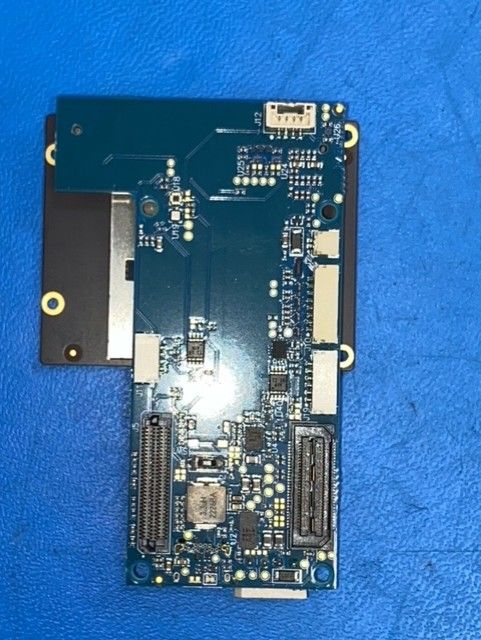
I am still having the issue of actually getting it to work though, all of my attempts to get it into fastboot mode don't do anything and there doesn't seem to be a button on the board I can push and the switch doesn't seem to be helping. There is a button on the 5G Wireless board at the top, but this also does not seem to put it into fastboot mode. I also can't connect to it any other way, like just doing adb shell and no devices show for adb devices nor fastboot devices.
-
@Vinny It wasn't a power issue, I realized one of the boards in the stack wasn't connecting properly, so pretty simple to fix that.
I am still having the issue of actually getting it to work though, all of my attempts to get it into fastboot mode don't do anything and there doesn't seem to be a button on the board I can push and the switch doesn't seem to be helping. There is a button on the 5G Wireless board at the top, but this also does not seem to put it into fastboot mode. I also can't connect to it any other way, like just doing adb shell and no devices show for adb devices nor fastboot devices.
Hi @mkriesel
Yes, The RB5 Flight Platform does unfortunately need a plug-in board, like the M0090 5G modem board you noted, to enter fastboot using the button.
That is SW3 as shown here:
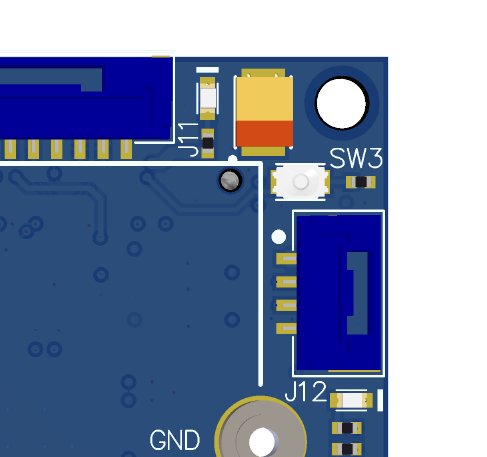
The static slide switches you see on the RB5 Flight Main Board (M0052) is for eDL/QDL Emergency Download (unbricking) procedures. Can you please ensure the static switch SW2 is on the "OFF" position, as that can prevent your board from booting normally or from entering fastboot. I think I ight see in the picture that the switch is set to "ON" which will give you these issues. Hard to tell, the image is a little blurry when I zoom in.
This picture here shows an example of the "ON" notation on those switches (and you will not have SW1 as shown here):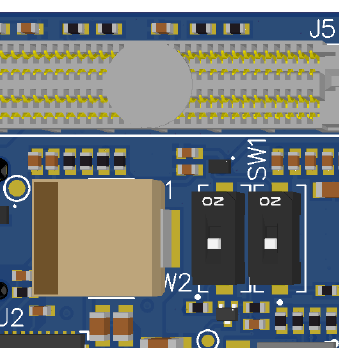
If this does not help, then we may need to pull in some software support (I am from HW team).
-
Hi @mkriesel
Yes, The RB5 Flight Platform does unfortunately need a plug-in board, like the M0090 5G modem board you noted, to enter fastboot using the button.
That is SW3 as shown here:
The static slide switches you see on the RB5 Flight Main Board (M0052) is for eDL/QDL Emergency Download (unbricking) procedures. Can you please ensure the static switch SW2 is on the "OFF" position, as that can prevent your board from booting normally or from entering fastboot. I think I ight see in the picture that the switch is set to "ON" which will give you these issues. Hard to tell, the image is a little blurry when I zoom in.
This picture here shows an example of the "ON" notation on those switches (and you will not have SW1 as shown here):If this does not help, then we may need to pull in some software support (I am from HW team).



Reading along? Create a free ModalAI Forum account to join in.
With an account you can reply, ask your own question, get an email when a ModalAI engineer answers, and mark the reply that solved it. Your place in each thread is saved between visits.
Questions about VOXL, Flight Core, ESCs and ModalAI drones are answered here by the engineers who build them.
Register Login