
"Serial Port Closed!" and other HITL Errors


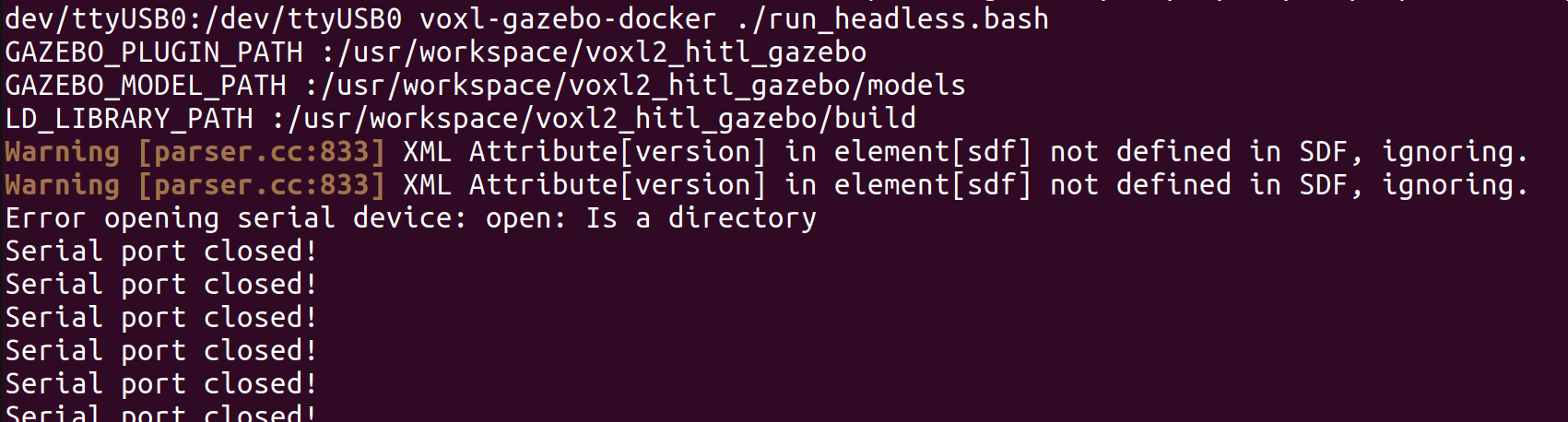
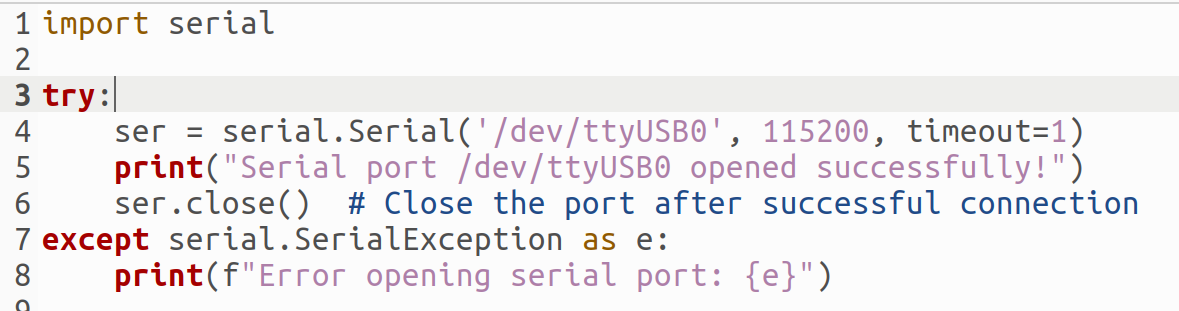
-
@labkit For GUI mode you can do something similar. Start with
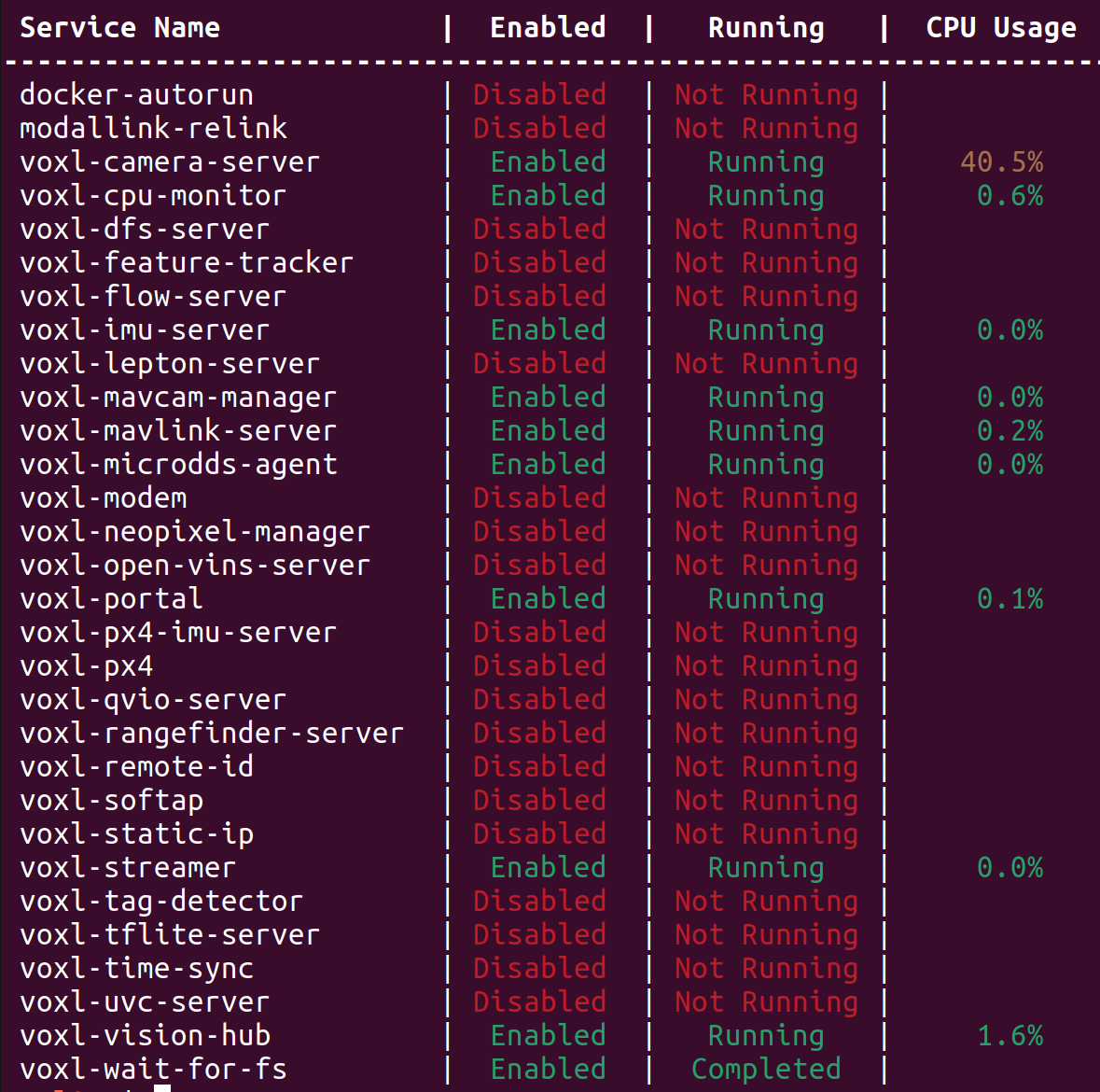
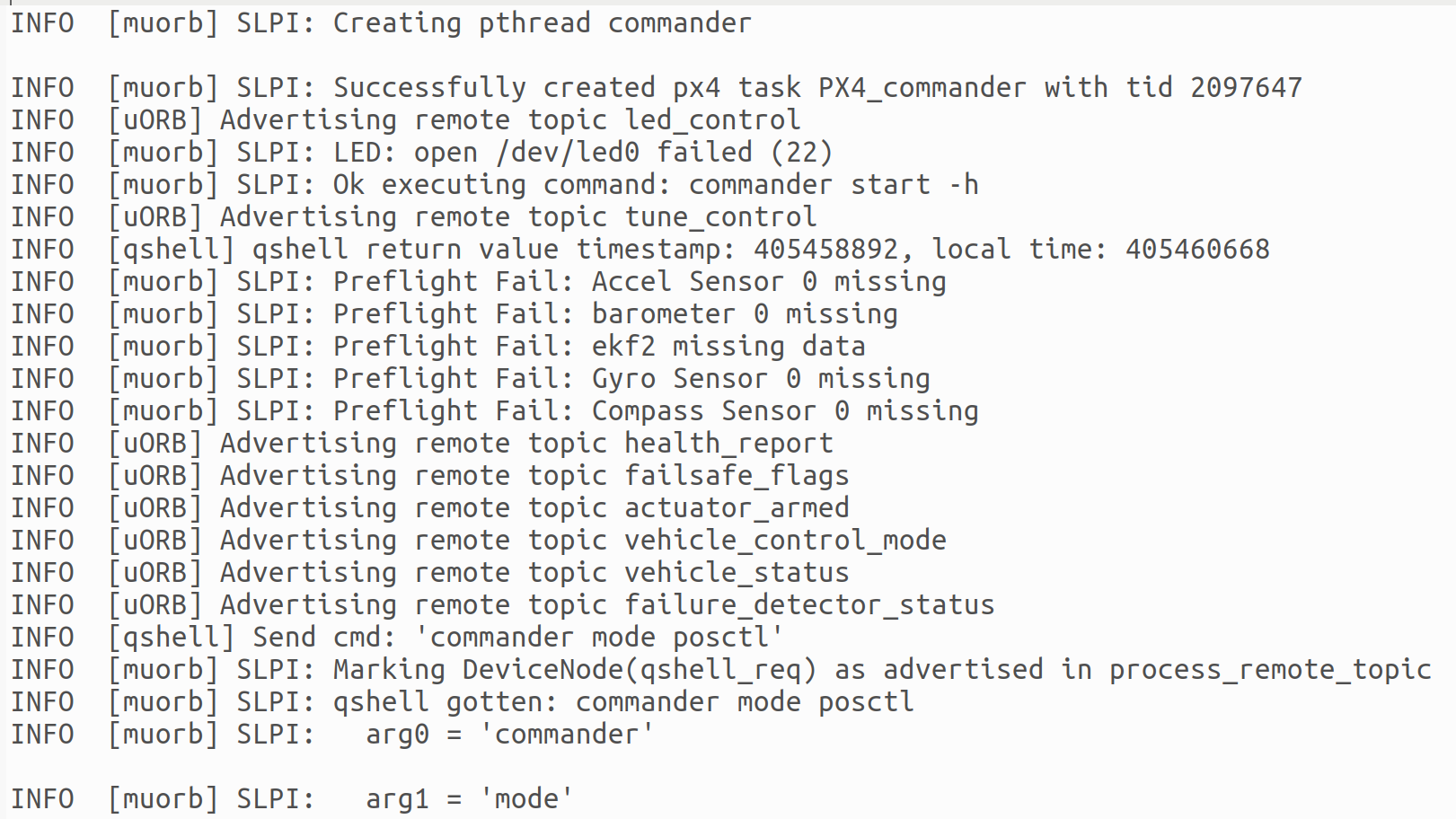
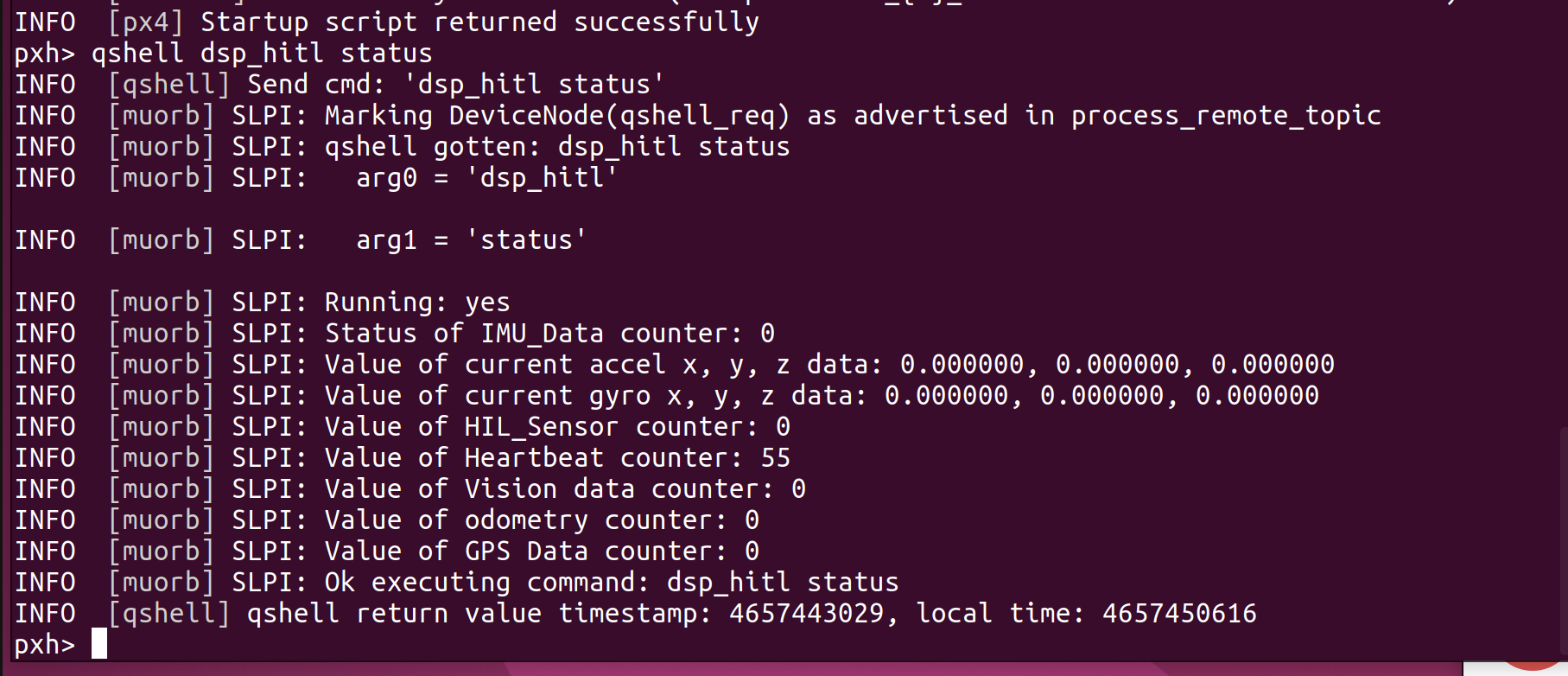
xhost +and then launch the docker withdocker run --rm -it --net=host --privileged -e DISPLAY=$DISPLAY -v /dev/input:/dev/input:rw -v /tmp/.X11-unix:/tmp/.X11-unix:ro voxl-gazebo-docker. Check for /dev/ttyUSB0. Then run gazebo with./run_gazebo.bash. Then, on VOXL 2, checkqshell dsp_hitl status. You are starting px4 with thevoxl-px4-hitlcommand, correct?@Eric-Katzfey Yes, I start px4 with voxl-px4-hitl. Here's the results of the qshell dsp_hitl status command called on the PX4 command prompt after SSHing to the Starling. I assume all the values are set to 0 because the "Serial port closed!" error is preventing Gazebo from sending it data.
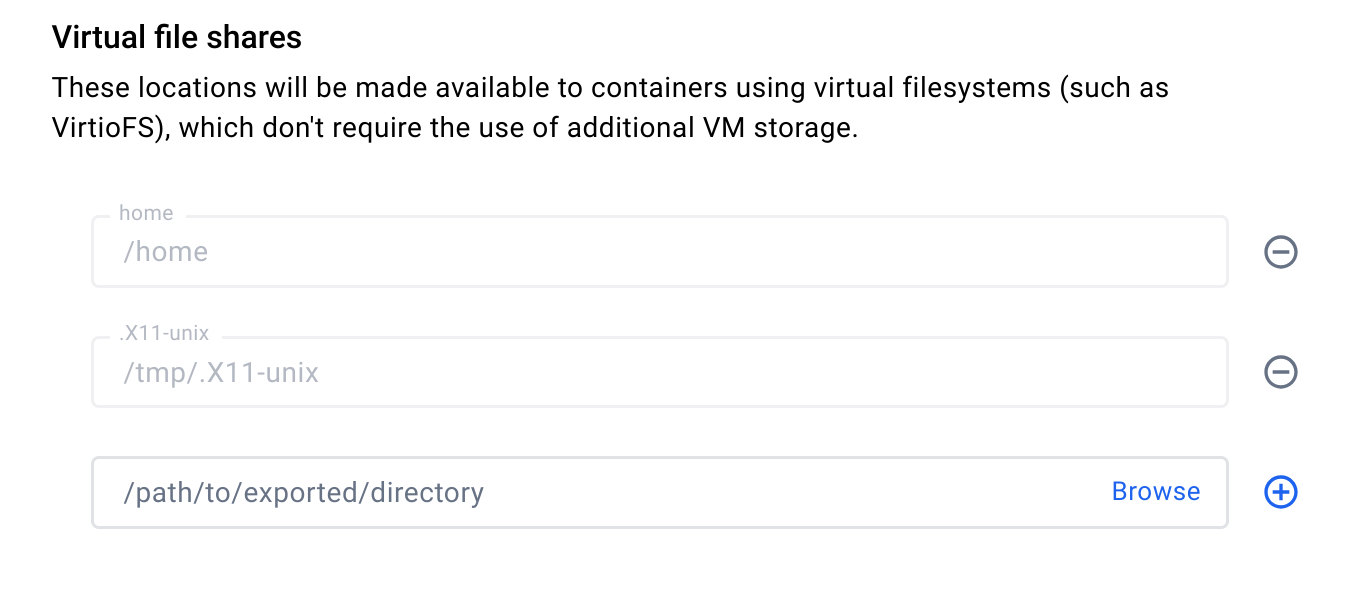
On the laptop, I used Docker's virtual file sharing to share /tmp/.X11-unix with docker, so the original GUI mode error seems to be resolved. (The one in which it couldn't acess that directory.)
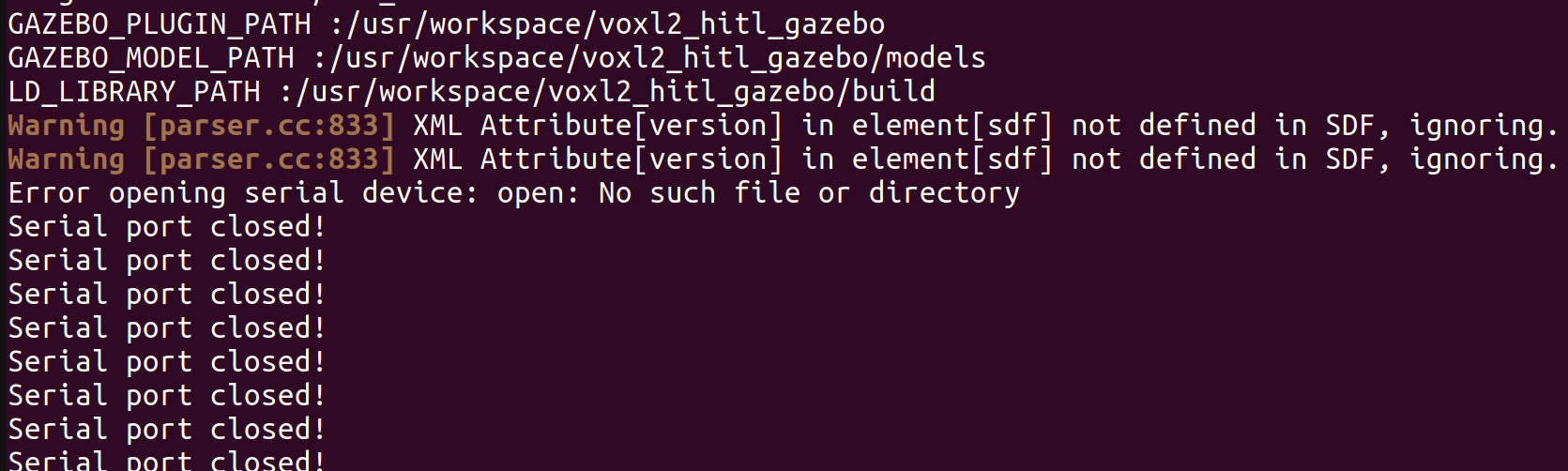
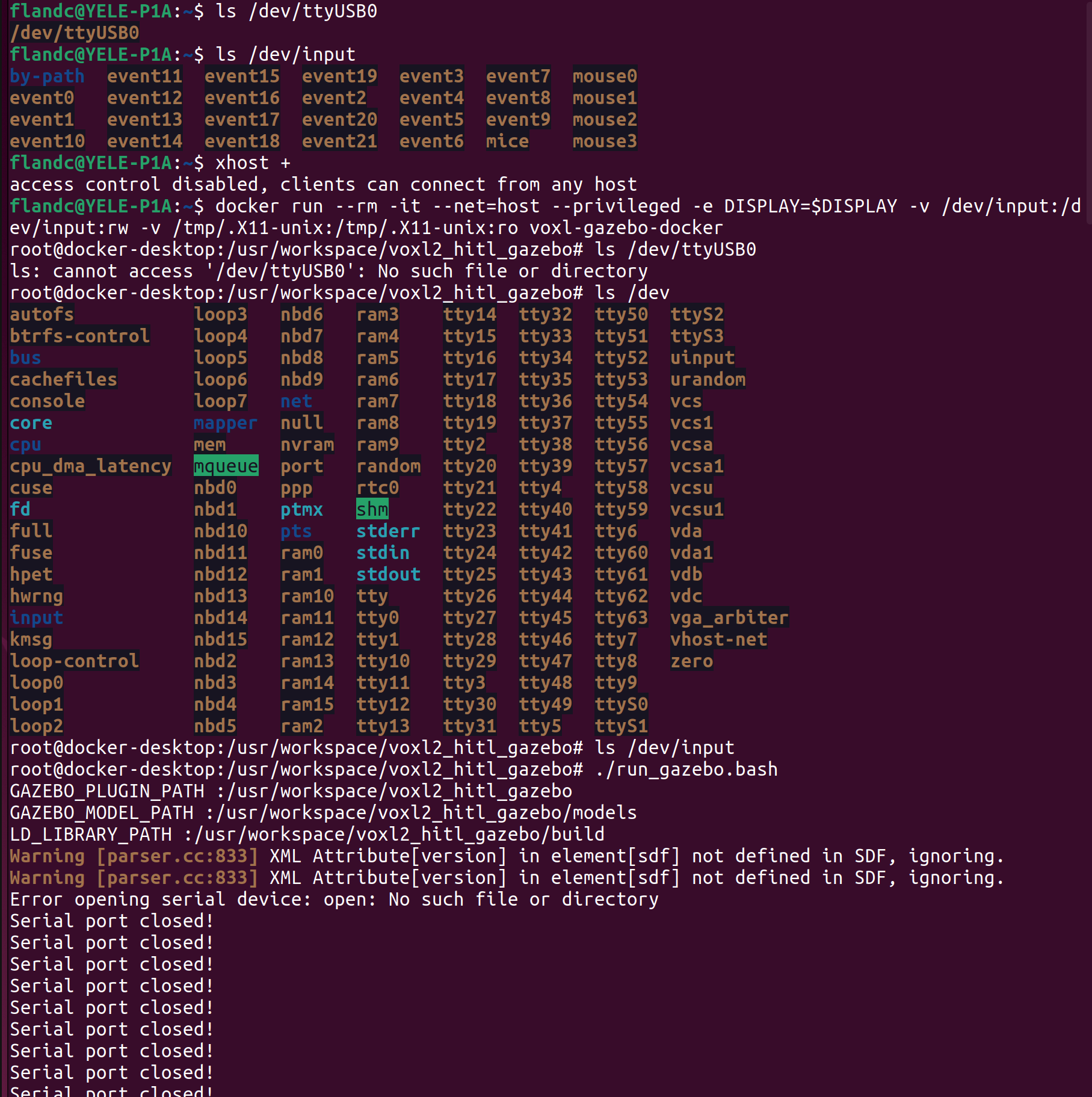
By using your instructions, I can get to the docker command prompt in both GUI and headless modes. However, /dev/ttyUSB0 is not present here, although it can still be found from the Linux command line. Running Gazebo from the Docker command line still results in the serial port closed error.Here's the attempt to run in GUI mode. Headless mode has the same issue.
-
@Eric-Katzfey Yes, I start px4 with voxl-px4-hitl. Here's the results of the qshell dsp_hitl status command called on the PX4 command prompt after SSHing to the Starling. I assume all the values are set to 0 because the "Serial port closed!" error is preventing Gazebo from sending it data.
On the laptop, I used Docker's virtual file sharing to share /tmp/.X11-unix with docker, so the original GUI mode error seems to be resolved. (The one in which it couldn't acess that directory.)
By using your instructions, I can get to the docker command prompt in both GUI and headless modes. However, /dev/ttyUSB0 is not present here, although it can still be found from the Linux command line. Running Gazebo from the Docker command line still results in the serial port closed error.Here's the attempt to run in GUI mode. Headless mode has the same issue.
@labkit Okay, interesting. Here's what I get on my machine:
modalai@modalai-XPS-15-9570:~$ ls /dev/ttyUSB0 /dev/ttyUSB0 modalai@modalai-XPS-15-9570:~$ docker run --rm -it --net=host --privileged -v /dev/input:/dev/input:rw voxl-gazebo-docker root@modalai-XPS-15-9570:/usr/workspace/voxl2_hitl_gazebo# ls /dev/ttyUSB0 /dev/ttyUSB0 -
@Eric-Katzfey Yes, I start px4 with voxl-px4-hitl. Here's the results of the qshell dsp_hitl status command called on the PX4 command prompt after SSHing to the Starling. I assume all the values are set to 0 because the "Serial port closed!" error is preventing Gazebo from sending it data.
On the laptop, I used Docker's virtual file sharing to share /tmp/.X11-unix with docker, so the original GUI mode error seems to be resolved. (The one in which it couldn't acess that directory.)
By using your instructions, I can get to the docker command prompt in both GUI and headless modes. However, /dev/ttyUSB0 is not present here, although it can still be found from the Linux command line. Running Gazebo from the Docker command line still results in the serial port closed error.Here's the attempt to run in GUI mode. Headless mode has the same issue.
@labkit Maybe a groups / permission issue? Here's some more information from my setup:
root@modalai-XPS-15-9570:/usr/workspace/voxl2_hitl_gazebo# ls -l /dev/ttyUSB0
crw-rw---- 1 root dialout 188, 0 May 31 16:01 /dev/ttyUSB0
root@modalai-XPS-15-9570:/usr/workspace/voxl2_hitl_gazebo# groups
root
root@modalai-XPS-15-9570:/usr/workspace/voxl2_hitl_gazebo# exit
exit
modalai@modalai-XPS-15-9570:~$ ls -l /dev/ttyUSB0
crw-rw---- 1 root dialout 188, 0 May 31 09:00 /dev/ttyUSB0
modalai@modalai-XPS-15-9570:~$ groups
modalai adm dialout cdrom sudo dip plugdev lpadmin lxd sambashare docker
modalai@modalai-XPS-15-9570:~$
Perhaps you need to be in dialout group?
-
@labkit Maybe a groups / permission issue? Here's some more information from my setup:
root@modalai-XPS-15-9570:/usr/workspace/voxl2_hitl_gazebo# ls -l /dev/ttyUSB0
crw-rw---- 1 root dialout 188, 0 May 31 16:01 /dev/ttyUSB0
root@modalai-XPS-15-9570:/usr/workspace/voxl2_hitl_gazebo# groups
root
root@modalai-XPS-15-9570:/usr/workspace/voxl2_hitl_gazebo# exit
exit
modalai@modalai-XPS-15-9570:~$ ls -l /dev/ttyUSB0
crw-rw---- 1 root dialout 188, 0 May 31 09:00 /dev/ttyUSB0
modalai@modalai-XPS-15-9570:~$ groups
modalai adm dialout cdrom sudo dip plugdev lpadmin lxd sambashare docker
modalai@modalai-XPS-15-9570:~$
Perhaps you need to be in dialout group?
@Eric-Katzfey Here are my results with the same commands.
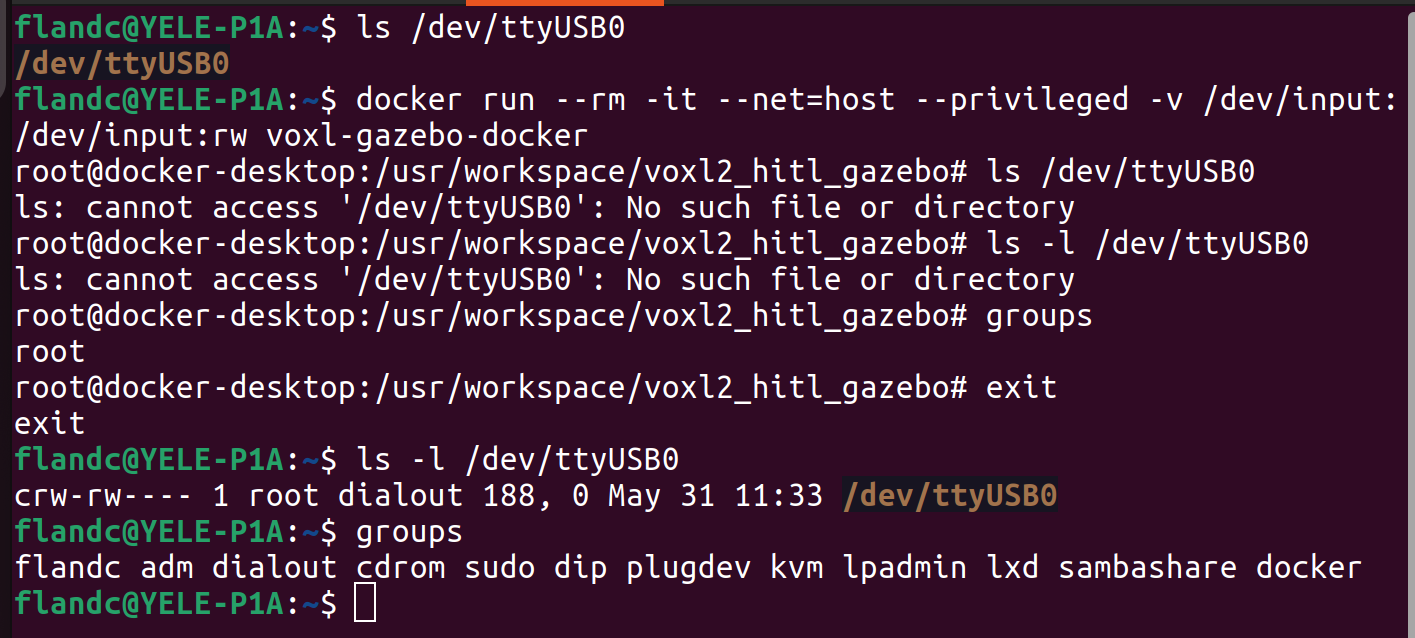
I ran docker in the dialout group but it didn't seem to make a difference. I was already in root.
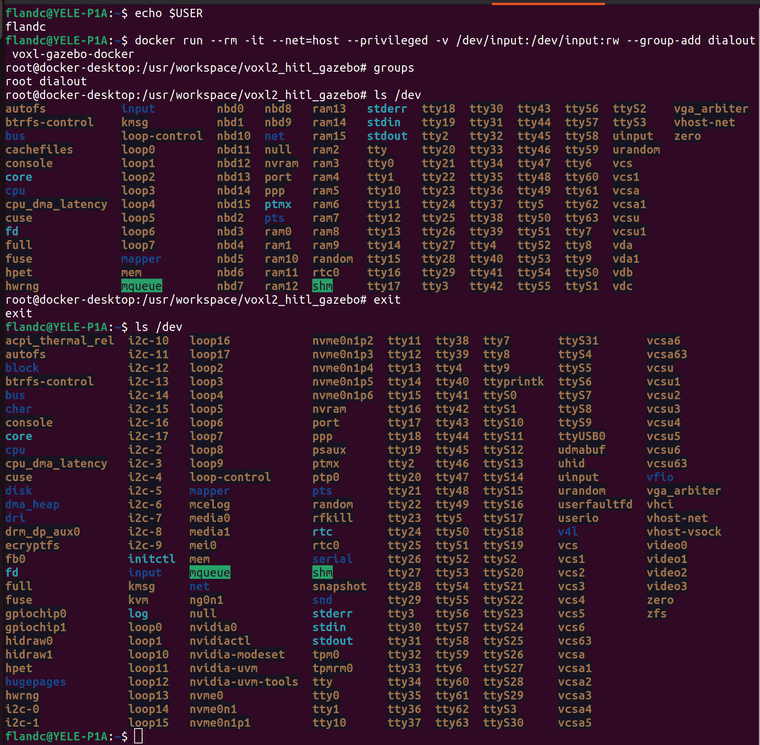
As you can see, much of the contents of /dev is missing in docker compared to what's available from the linux command line. It's not only ttyUSB0. -
@Eric-Katzfey Here are my results with the same commands.
I ran docker in the dialout group but it didn't seem to make a difference. I was already in root.
As you can see, much of the contents of /dev is missing in docker compared to what's available from the linux command line. It's not only ttyUSB0.I got Docker to avoid the error by doing the steps in the tutorial in a different order with setup on the drone coming first. This must have been why I didn't receive the "serial port closed" error when I first tried to set up the simulation two days ago. However, I don't think the simulation is in shape to run yet, all I've managed is to get back to where I was originally....
-
I got Docker to avoid the error by doing the steps in the tutorial in a different order with setup on the drone coming first. This must have been why I didn't receive the "serial port closed" error when I first tried to set up the simulation two days ago. However, I don't think the simulation is in shape to run yet, all I've managed is to get back to where I was originally....
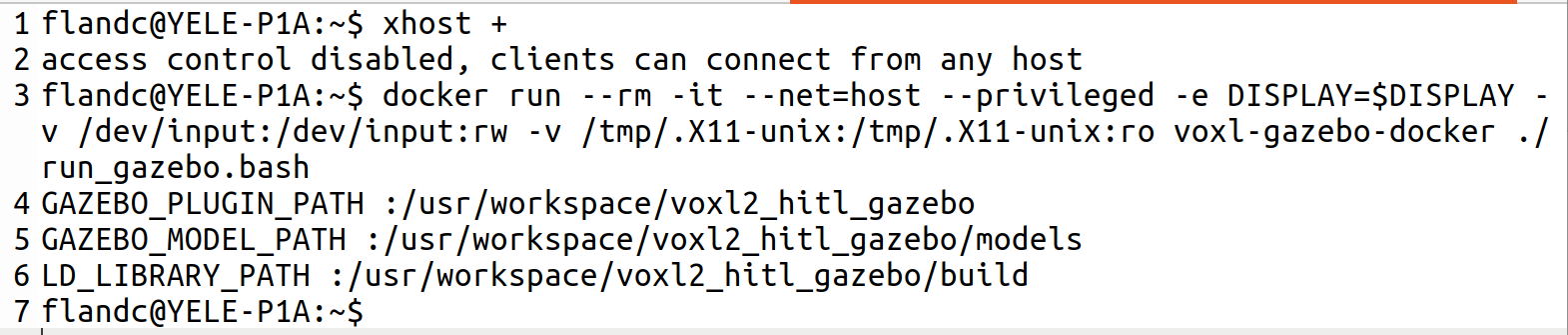
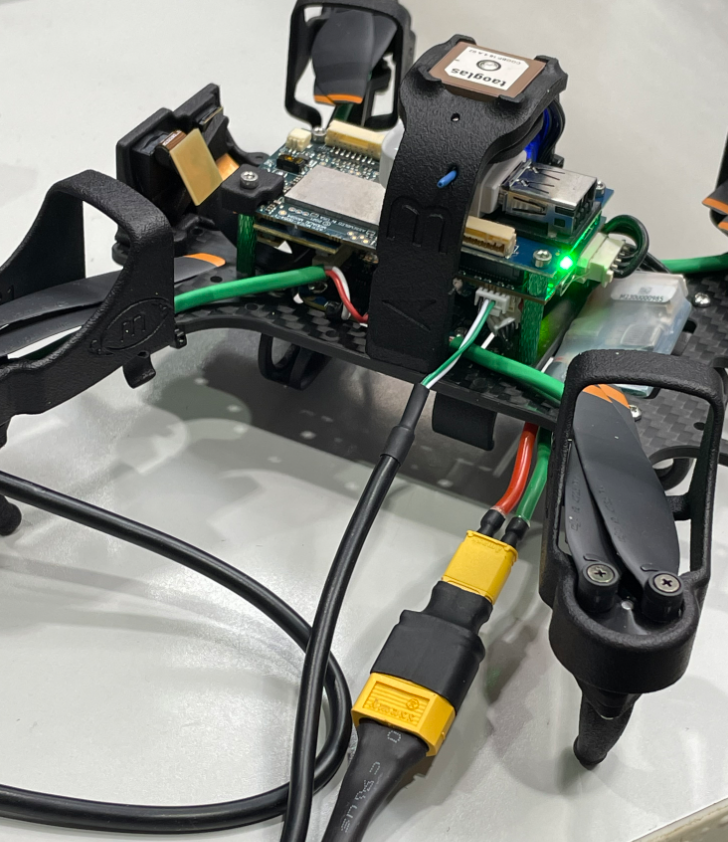
@Eric-Katzfey I have figured out why I thought that the drone wasn't giving me a "Serial port closed!" error a couple of days ago but has been doing so yesterday and today. When the gazebo docker container has not been created, the first attempt to create it will result in a "Serial port closed!" error. However, when the container is already running, future attempts to create it will not display the error, they will simply show the following message rather than creating a new container. At first I thought that this message meant that the connection to the drone had successfully avoided the "serial port closed" message.
The bad news is that this means that there may never have been a successful connection between the laptop and drone at all. A hardware misconfiguration can't be ruled out in this case. As I said, I had to remove a connection to the ESC 4 in 1 in order to connect the cable to the JST port on the VOXL2. If the connection's in the right place, it might be a permissions issue like you mentioned, although docker was run as privileged and I'm already in dialout.
-
@Eric-Katzfey I have figured out why I thought that the drone wasn't giving me a "Serial port closed!" error a couple of days ago but has been doing so yesterday and today. When the gazebo docker container has not been created, the first attempt to create it will result in a "Serial port closed!" error. However, when the container is already running, future attempts to create it will not display the error, they will simply show the following message rather than creating a new container. At first I thought that this message meant that the connection to the drone had successfully avoided the "serial port closed" message.
The bad news is that this means that there may never have been a successful connection between the laptop and drone at all. A hardware misconfiguration can't be ruled out in this case. As I said, I had to remove a connection to the ESC 4 in 1 in order to connect the cable to the JST port on the VOXL2. If the connection's in the right place, it might be a permissions issue like you mentioned, although docker was run as privileged and I'm already in dialout.
Hi @labkit
MCBL-00091-1 is by default meant for ESC tools...i.e.: it will plug into the ESC side of that cable you removed, not the VOXL 2 side:
https://docs.modalai.com/cable-datasheets/#mcbl-00091
To use it for HWIL, pins 2&3 need to be swapped as noted: https://docs.modalai.com/cable-userguides/#m0163-4-pin-jst-to-4-pin-jst-cross-over-example
You do not need to have the M0163 if you are comfortable re-pinning JSTs:
https://docs.modalai.com/cable-userguides/#flightcore-v2-conversion-cables-info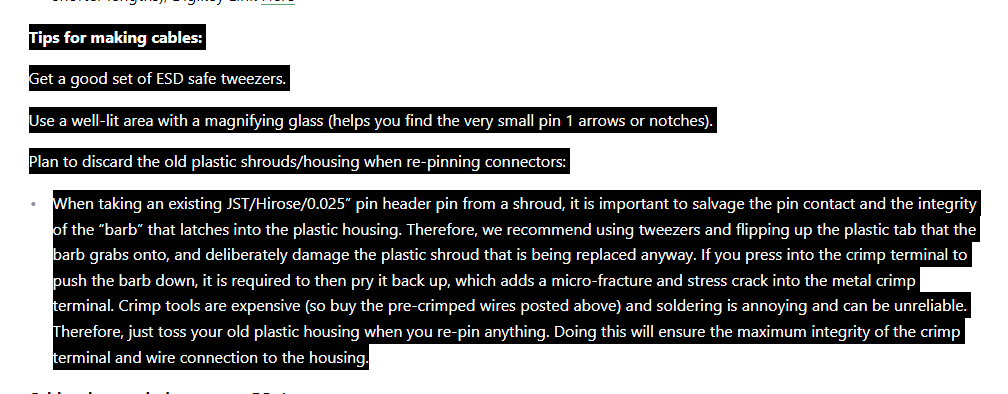
Hope this helps.
If you have already determined that and made the swap, then please ignore my message.
Thanks! -
Hi @labkit
MCBL-00091-1 is by default meant for ESC tools...i.e.: it will plug into the ESC side of that cable you removed, not the VOXL 2 side:
https://docs.modalai.com/cable-datasheets/#mcbl-00091
To use it for HWIL, pins 2&3 need to be swapped as noted: https://docs.modalai.com/cable-userguides/#m0163-4-pin-jst-to-4-pin-jst-cross-over-example
You do not need to have the M0163 if you are comfortable re-pinning JSTs:
https://docs.modalai.com/cable-userguides/#flightcore-v2-conversion-cables-info
Hope this helps.
If you have already determined that and made the swap, then please ignore my message.
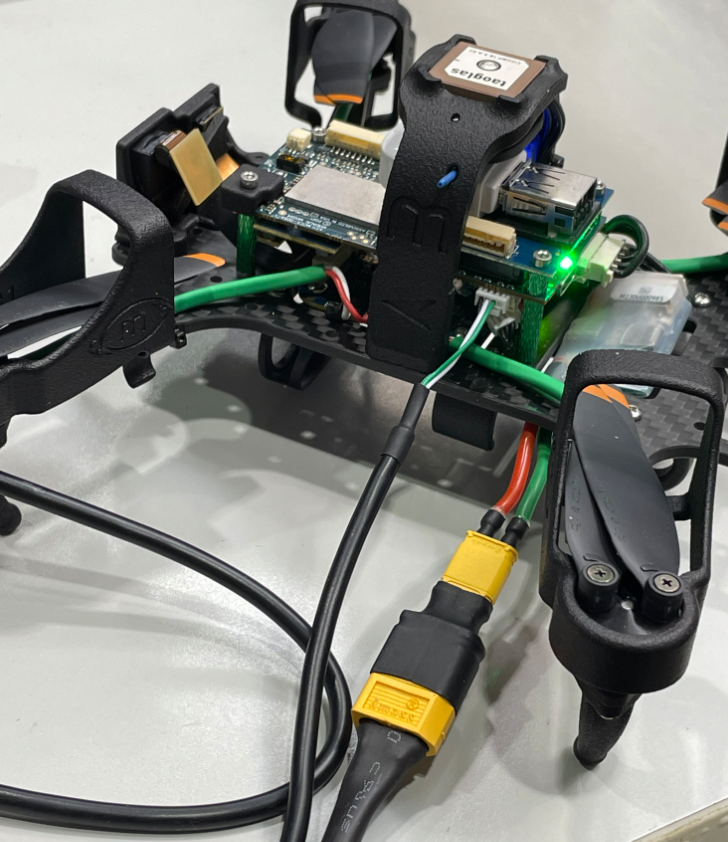
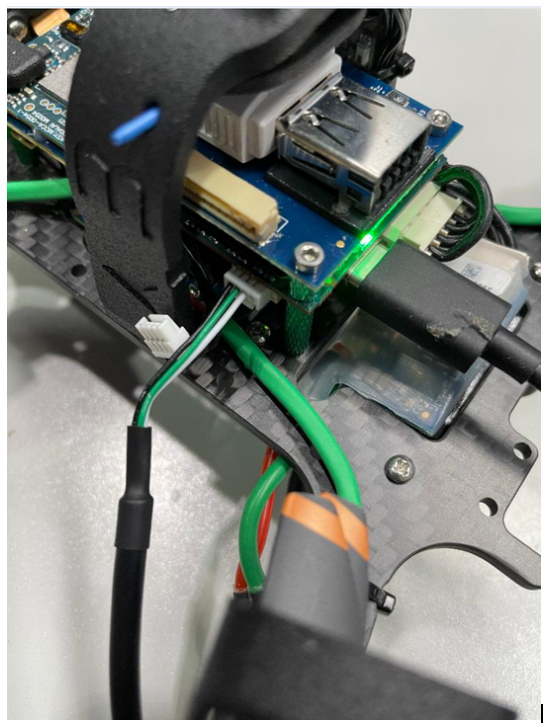
Thanks!@Vinny I swapped pins 2&3 so that the former pin 2 is now pin 3 and vice versa. The swap occurred with no damage to the pins as far as I am aware, but the "Serial port closed" issue is still present. This image shows the correct rewiring, right? The RX and TX wires (white and green) are switched and the USB to JST is in J18 on the VOXL 2. The ESC is unplugged from VOXL 2.
-
@Vinny I swapped pins 2&3 so that the former pin 2 is now pin 3 and vice versa. The swap occurred with no damage to the pins as far as I am aware, but the "Serial port closed" issue is still present. This image shows the correct rewiring, right? The RX and TX wires (white and green) are switched and the USB to JST is in J18 on the VOXL 2. The ESC is unplugged from VOXL 2.
-
Hi @labkit
Looks good! At least now the efforts with Eric and team are not in vain since that is the correct MCBL-00091 config for HWIL.
You are in good hands with them now@Eric-Katzfey I rewired the cable but the issue hasn't changed at all. It's still reporting "Serial port not found!" and the /dev/ttyUSB0 that you mentioned still isn't available from the Gazebo Docker command line.
-
@Eric-Katzfey I rewired the cable but the issue hasn't changed at all. It's still reporting "Serial port not found!" and the /dev/ttyUSB0 that you mentioned still isn't available from the Gazebo Docker command line.
@labkit Is there another Linux computer that you can try? Many people use HITL and no one has reported any issues like this so I am suspecting that there is something about the environment on your machine that is causing the problem.
-
I got Docker to avoid the error by doing the steps in the tutorial in a different order with setup on the drone coming first. This must have been why I didn't receive the "serial port closed" error when I first tried to set up the simulation two days ago. However, I don't think the simulation is in shape to run yet, all I've managed is to get back to where I was originally....
Also, ignore my earlier post that said I had fixed things by performing the tutorial steps in a different order. I was mistaken in thinking I had resolved the original issue. The next message explained why I made that mistake.
-
@labkit Is there another Linux computer that you can try? Many people use HITL and no one has reported any issues like this so I am suspecting that there is something about the environment on your machine that is causing the problem.
@Eric-Katzfey I will look into trying this.
-
A Alexander Saunders referenced this topic on
-
@Eric-Katzfey I will look into trying this.
@Eric-Katzfey Issue is mostly resolved. There were two main errors to fix. The first was that the cable that I was using needed to have its RX and TX wires swapped as Vinny pointed out. The second was that Docker Desktop needed to be uninstalled and replaced with only the core Docker CE Engine. After doing this, the HITL seems to be up and running on the alternate Linux computer I tested with. On the original computer, the "Serial port closed error" is no longer present although there does seem to be a graphics issue when attempting to run the Gazebo image with graphics.
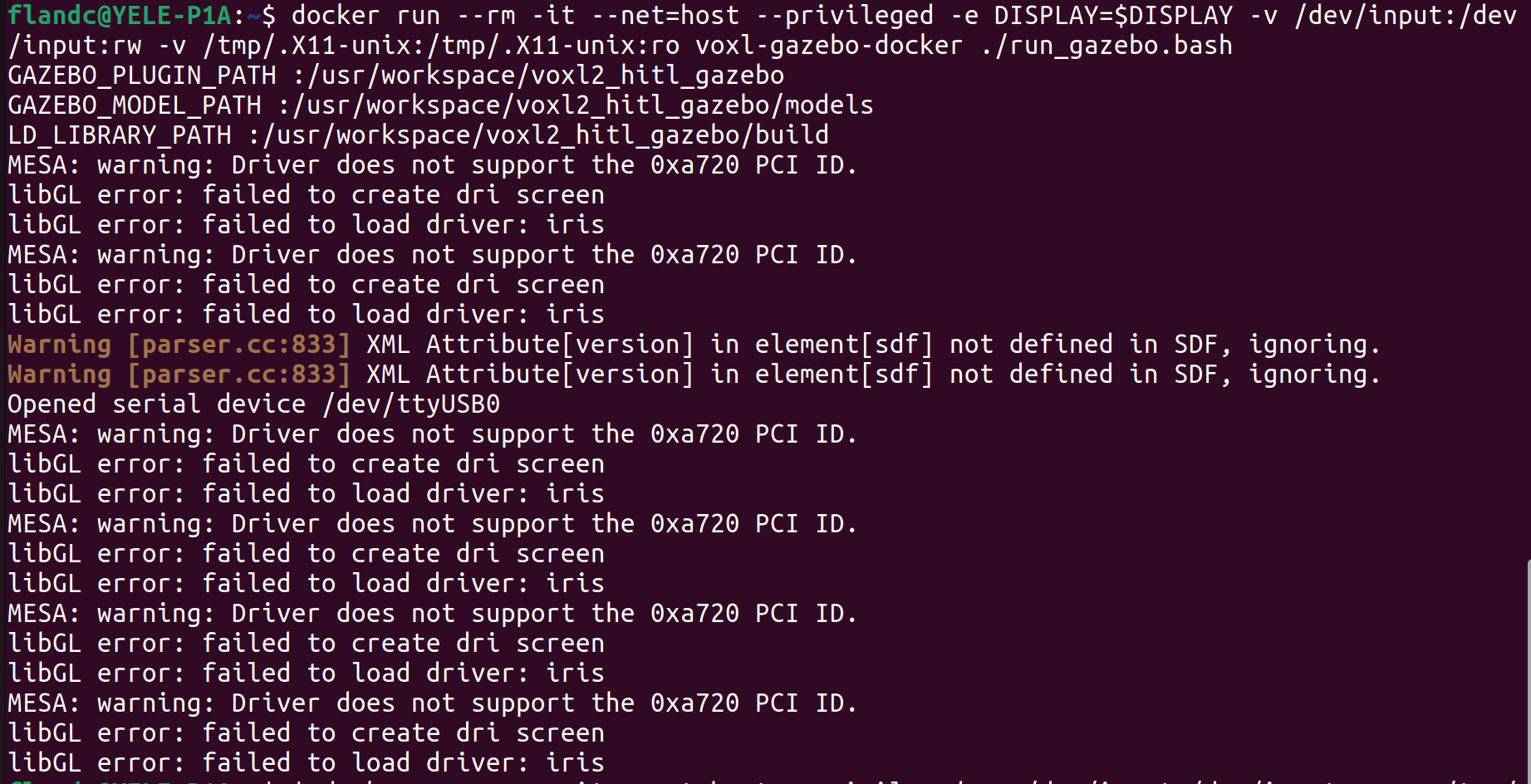
Once this is fixed I think it should be all ready to perform simulations.
-
R RyanH referenced this topic on


Reading along? Create a free ModalAI Forum account to join in.
With an account you can reply, ask your own question, get an email when a ModalAI engineer answers, and mark the reply that solved it. Your place in each thread is saved between visits.
Questions about VOXL, Flight Core, ESCs and ModalAI drones are answered here by the engineers who build them.
Register Login