
ODOMETRY MESSAGE
-
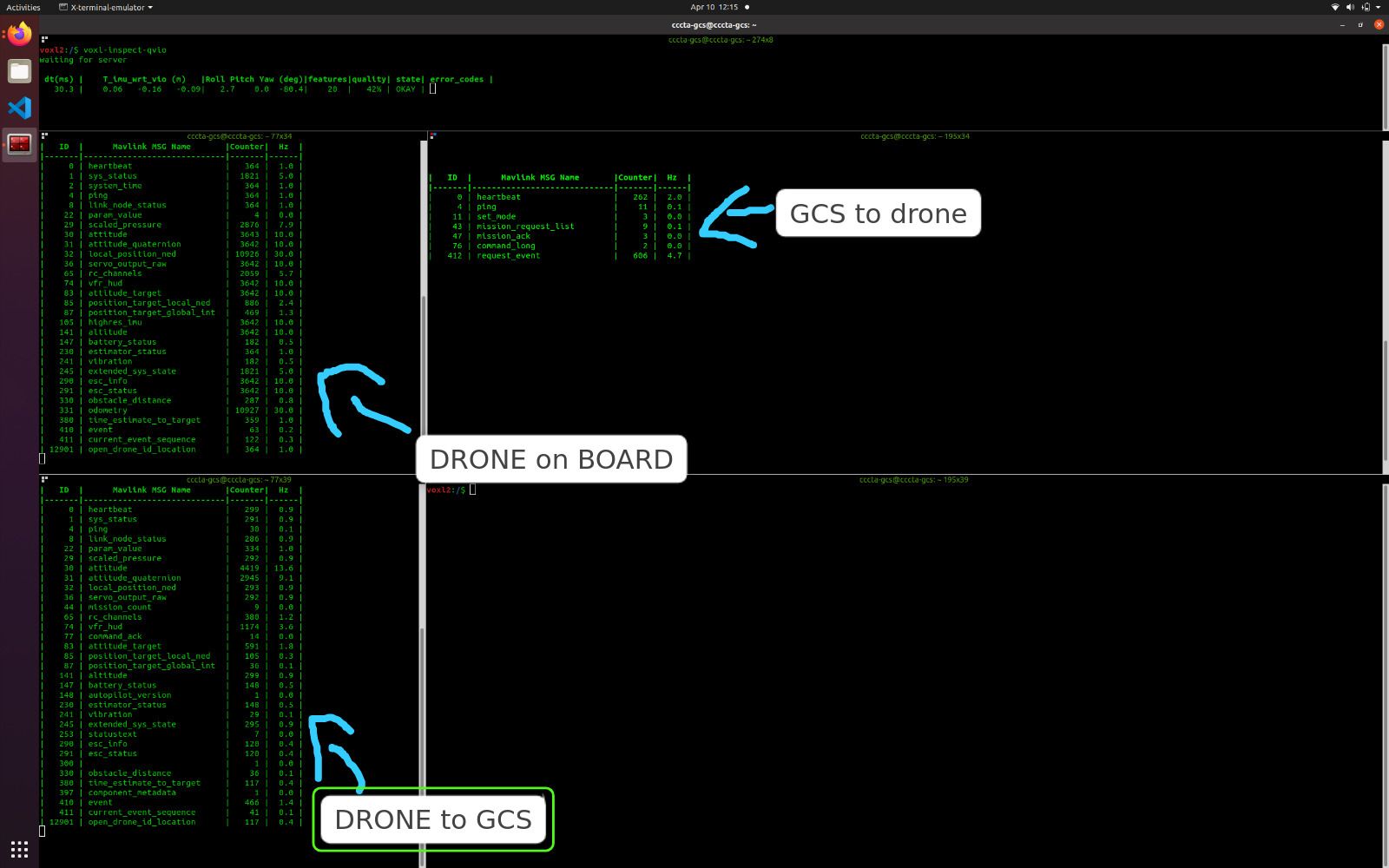
I'm missing the odometry message (ID 331) in QGC after updating the system to version 1.1.3.
I loaded the parameters (Indoor VIO Missing GPS) :
However, when I use the voxl-inspect-qvio service (and take measurements with markings on the ground, the coordinates are correct/within tolerance).
When I call the service:
voxl-inspect-mavlink mavlink_onboardThe odometry message is there, but when I call
voxl-inspect-mavlink mavlink_to_gcs
Which of course reflects what is appearing in QGC (there is no odometry message, only local_position_ned).
So we're not supposed to have the odometry message in these new versions? Mainly because the PX4 v1.14 firmware no longer supports the EKF2_AID_MASK parameters, among others.
I really want to answer this question, especially to find out if I can fly autonomously.
-
I'm missing the odometry message (ID 331) in QGC after updating the system to version 1.1.3.
I loaded the parameters (Indoor VIO Missing GPS) :
However, when I use the voxl-inspect-qvio service (and take measurements with markings on the ground, the coordinates are correct/within tolerance).
When I call the service:
voxl-inspect-mavlink mavlink_onboardThe odometry message is there, but when I call
voxl-inspect-mavlink mavlink_to_gcs
Which of course reflects what is appearing in QGC (there is no odometry message, only local_position_ned).
So we're not supposed to have the odometry message in these new versions? Mainly because the PX4 v1.14 firmware no longer supports the EKF2_AID_MASK parameters, among others.
I really want to answer this question, especially to find out if I can fly autonomously.
@leonardo-Andrade-0 The startup script
/usr/bin/voxl-px4-startcontrols the startup of the mavlink instances. The mavlink instance that sends messages to QGC enablesnormalmode which does not include the odometry message. But you can see in that script how you can add extra streams. So, you can add odometry with something like this:mavlink start -x -u 14558 -o 14559 -r 100000 -n lo mavlink stream -u 14558 -s ODOMETRY -r 30 -
 E Eric Katzfey referenced this topic on
-
@leonardo-Andrade-0 The startup script
/usr/bin/voxl-px4-startcontrols the startup of the mavlink instances. The mavlink instance that sends messages to QGC enablesnormalmode which does not include the odometry message. But you can see in that script how you can add extra streams. So, you can add odometry with something like this:mavlink start -x -u 14558 -o 14559 -r 100000 -n lo mavlink stream -u 14558 -s ODOMETRY -r 30@Eric-Katzfey thanks mate for your answer!
-
E Eric Katzfey referenced this topic on

Reading along? Create a free ModalAI Forum account to join in.
With an account you can reply, ask your own question, get an email when a ModalAI engineer answers, and mark the reply that solved it. Your place in each thread is saved between visits.
Questions about VOXL, Flight Core, ESCs and ModalAI drones are answered here by the engineers who build them.
Register Login