
Starling fan attachment and optimization
-
@Alex-Kushleyev I tried this recommendation by removing the fan and holding it up and running my code it didn't make any difference as soon as the temperatures go above 75 the accelerometer bias flag is active. Also I don't think fan placement is an issue because the fan is placed right above the heat sink of the cpus and not anywhere near the imus, there is sufficient space between the wifi dongle and the board to move around a little.
@Alex-Kushleyev said in Starling fan attachment and optimization:
Then you can remove the wedged fan (and hold it close to the board) and test again and see if the unusual accel bias is gone (when warmed up).
The bias issues only come when I run the object detection and my own sensor fusion module, without that code running and the fan installed the drone is able to fly in position mode. This is more of a cpu heating and load distribution issue, somehow I think cpu0-3 are pinned for some MPA services and pipes and the rest of the 4 cpus are not being utilized equally, I am looking into multi threading for load distribution in my code, let me know if there are any more recommendations
Back to the accelerometer, you can use the following command to print out the raw accel data:
px4-listener sensor_accel

TOPIC: sensor_accel
 sensor_accel
    timestamp: 306076285 (0.437680 seconds ago)
    timestamp_sample: 306076069 (216 us before timestamp)
    device_id: 2490378 (Type: 0x26, SPI:1 (0x00))
    x: -0.27078
    y: 7.87261
    z: 5.88561
    temperature: 24.30556
    error_count: 1
    clip_counter: [0, 0, 0]
    samples: 10
So you should make sure the board is level and check this message periodically as you are running processing as the board heats up. (in my case the board is not flat, so you are not seeing (0,0,9.8). I am curious what the accel reading is at the start and then when you get the accel bias warning.
Worth taking a look at px4 imu calibration. I have not done this myself, but it looks like this is the right resource : https://docs.px4.io/main/en/advanced_config/sensor_thermal_calibration.html
Regarding CPU frequencies, when cpu governor is in auto mode, it will try to scale down cpu frequencies to save power. but if you want maximum performance, you can set to to performance mode:
voxl-set-cpu-mode perfNote that this does not persist after reboot, if you want permanent change, you can change
more /etc/modalai/voxl-cpu-monitor.confand set normal cpu mode toperf -
Back to the accelerometer, you can use the following command to print out the raw accel data:
px4-listener sensor_accel

TOPIC: sensor_accel
 sensor_accel
    timestamp: 306076285 (0.437680 seconds ago)
    timestamp_sample: 306076069 (216 us before timestamp)
    device_id: 2490378 (Type: 0x26, SPI:1 (0x00))
    x: -0.27078
    y: 7.87261
    z: 5.88561
    temperature: 24.30556
    error_count: 1
    clip_counter: [0, 0, 0]
    samples: 10
So you should make sure the board is level and check this message periodically as you are running processing as the board heats up. (in my case the board is not flat, so you are not seeing (0,0,9.8). I am curious what the accel reading is at the start and then when you get the accel bias warning.
Worth taking a look at px4 imu calibration. I have not done this myself, but it looks like this is the right resource : https://docs.px4.io/main/en/advanced_config/sensor_thermal_calibration.html
Regarding CPU frequencies, when cpu governor is in auto mode, it will try to scale down cpu frequencies to save power. but if you want maximum performance, you can set to to performance mode:
voxl-set-cpu-mode perfNote that this does not persist after reboot, if you want permanent change, you can change
more /etc/modalai/voxl-cpu-monitor.confand set normal cpu mode toperf@Alex-Kushleyev said in Starling fan attachment and optimization:
Regarding CPU frequencies, when cpu governor is in auto mode, it will try to scale down cpu frequencies to save power. but if you want maximum performance, you can set to to performance mode:
voxl-set-cpu-mode perf
Note that this does not persist after reboot, if you want permanent change, you can change more /etc/modalai/voxl-cpu-monitor.conf and set normal cpu mode to perf
This is definitely useful, but is it right that cpu0-3 are pinned for MPA services, if that is the case I can explicitly assign cpu's for my ros nodes to run cpu 4-7?
-
@Alex-Kushleyev said in Starling fan attachment and optimization:
Regarding CPU frequencies, when cpu governor is in auto mode, it will try to scale down cpu frequencies to save power. but if you want maximum performance, you can set to to performance mode:
voxl-set-cpu-mode perf
Note that this does not persist after reboot, if you want permanent change, you can change more /etc/modalai/voxl-cpu-monitor.conf and set normal cpu mode to perf
This is definitely useful, but is it right that cpu0-3 are pinned for MPA services, if that is the case I can explicitly assign cpu's for my ros nodes to run cpu 4-7?
@Darshit-Desai I do not think that cpu0-3 are pinned for MPA services. The cpu governor typically assigns task to slower cores when possible (0-3 are slowest, 4-6 are medium, and core 7 is the fastest one) in auto / powersave mode. In performance mode, the distribution of load will probably look different.
max frequencies for the cores:
0-3: 1800Mhz
4-6: 2420Mhz
7: 2840Mhz -
@Darshit-Desai I do not think that cpu0-3 are pinned for MPA services. The cpu governor typically assigns task to slower cores when possible (0-3 are slowest, 4-6 are medium, and core 7 is the fastest one) in auto / powersave mode. In performance mode, the distribution of load will probably look different.
max frequencies for the cores:
0-3: 1800Mhz
4-6: 2420Mhz
7: 2840MhzHi @Alex-Kushleyev, I wanted to ask one more question regarding cpu utilization while running the tflite server. It shows that it uses cores 4, 5 and 6 for processing and connects itself to the camera server. What is the tflite server using cpu for? Publishing images to libmodal-pipe? like bbox drawn on images? What if I want to disable that and zero out any utilization of cpus by the tflite server?
By that I mean this line here: https://gitlab.com/voxl-public/voxl-sdk/services/voxl-tflite-server/-/blob/master/src/main.cpp?ref_type=heads#L247
What else is the tflite server using on cpus which can be removed? As in my system I am only concerned with the bbox detection message.
@thomas
-
Hi @Alex-Kushleyev, I wanted to ask one more question regarding cpu utilization while running the tflite server. It shows that it uses cores 4, 5 and 6 for processing and connects itself to the camera server. What is the tflite server using cpu for? Publishing images to libmodal-pipe? like bbox drawn on images? What if I want to disable that and zero out any utilization of cpus by the tflite server?
By that I mean this line here: https://gitlab.com/voxl-public/voxl-sdk/services/voxl-tflite-server/-/blob/master/src/main.cpp?ref_type=heads#L247
What else is the tflite server using on cpus which can be removed? As in my system I am only concerned with the bbox detection message.
@thomas
Yeah, tflite-server uses the CPU to load in images, draw frames, and other things like the link you posted. If you want some part of tflite-server to run more efficiently, you should fork the repository and make changes. We have an in-depth README in the repository showing how to build and create a custom fork of tflite-server.
Let me know if you have any questions!
Thomas
-
Yeah, tflite-server uses the CPU to load in images, draw frames, and other things like the link you posted. If you want some part of tflite-server to run more efficiently, you should fork the repository and make changes. We have an in-depth README in the repository showing how to build and create a custom fork of tflite-server.
Let me know if you have any questions!
Thomas
@thomas Thank you, actually the purpose of the question was to identify all components which use CPU in the tflite server. So if it's just image publishing and drawing of bboxes or seg maps on images then I can just comment out the relevant function calls to publishing the image with bbox and the part where it actual makes an image with bbox and writes parameters on the image like fps and other details.
Is there any other part which is being done on the CPU other then the ones highlighted?
-
@thomas Thank you, actually the purpose of the question was to identify all components which use CPU in the tflite server. So if it's just image publishing and drawing of bboxes or seg maps on images then I can just comment out the relevant function calls to publishing the image with bbox and the part where it actual makes an image with bbox and writes parameters on the image like fps and other details.
Is there any other part which is being done on the CPU other then the ones highlighted?
I mean, there's really only one line of tfliter-server that isn't on the CPU and it's this one which actually does the inference (assuming GPU or NPU delegate was selected). Everything else uses the CPU.
Thomas
-
I mean, there's really only one line of tfliter-server that isn't on the CPU and it's this one which actually does the inference (assuming GPU or NPU delegate was selected). Everything else uses the CPU.
Thomas
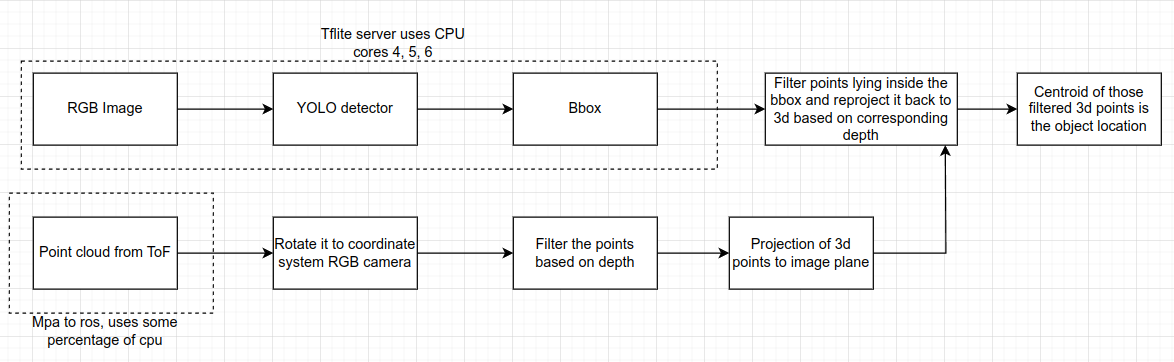
@thomas @Alex-Kushleyev I have bottle necks in my sensor fusion pipeline because of which the temperature of the cpus go very high even with the fan cooling and the propeller throwing airflow in flight. I am doing a rigid body transformation of the incoming points from tof frame to rgb camera frame and that transformation of 38528x3 vector takes a lot of cpu capacity and overheats the cpu. Now I have tried every trick in my toolbox ranging from multi threading to removing unnecessary pipes from voxl_mpa_to_ros but none of them work. I see one of the options is, I somehow filter out the points which are irrelevant to me (i.e. I am only looking for a certain depth range between 10 cms to 1.5 mtrs) before it is published on mpa to ros and then do a rigid body transformation. Another option is to use the raw data by somehow tapping into one of the camera server pipes and filter out the points. Any thoughts on how to optimize the below pipeline for performance would be helpful
-
@thomas @Alex-Kushleyev I have bottle necks in my sensor fusion pipeline because of which the temperature of the cpus go very high even with the fan cooling and the propeller throwing airflow in flight. I am doing a rigid body transformation of the incoming points from tof frame to rgb camera frame and that transformation of 38528x3 vector takes a lot of cpu capacity and overheats the cpu. Now I have tried every trick in my toolbox ranging from multi threading to removing unnecessary pipes from voxl_mpa_to_ros but none of them work. I see one of the options is, I somehow filter out the points which are irrelevant to me (i.e. I am only looking for a certain depth range between 10 cms to 1.5 mtrs) before it is published on mpa to ros and then do a rigid body transformation. Another option is to use the raw data by somehow tapping into one of the camera server pipes and filter out the points. Any thoughts on how to optimize the below pipeline for performance would be helpful
@Darshit-Desai , can you specify how you are doing the 3D vector transformation? Are you using any math library to help with that? Voxl2 has a powerful NEON instruction set, but the code has to be written correctly to utilize it. Eigen library provides a lot of optimized vector functions.
-
@Darshit-Desai , can you specify how you are doing the 3D vector transformation? Are you using any math library to help with that? Voxl2 has a powerful NEON instruction set, but the code has to be written correctly to utilize it. Eigen library provides a lot of optimized vector functions.
@Alex-Kushleyev Yes I use Eigen3 for doing the rigid body transformation,
Method0: Use the tf2 sensor msgs::do transform cloud function directly on the large 38528x3 pointcloud, which didn't work so I used Eigen 3 from the next method onwards
Method1:
I have tried statically assigning eigen matrixxd variables, I also tried bifurcating the large 38528x3 pointcloud matrix which i get into 5 parts and parallelizing the mutliplication by doing the multiplication of 5 different parts of matrices on different pinned cpus and then combining them. None of the methods worked because all of them end up heating up the cpu when ran in combination of the voxl-tflite-server.Method2:
Other method I tried was filtering the points by depth which reduced the number of points to 15000 points for rigid body transformation and then doing the same parallelized multiplication of rotation matrix and pointcloud but that also ends up heating the cpu too much when run in combination of voxl-tflite-server.All of the code was written in eigen3. This is the code that I used for method 2 https://github.com/darshit-desai/Project_LegionAir/blob/master/your_pointcloud_package/src/pc_transform.cpp
Note all of this methods above run fine on my desktop cpu which is understandable because my desktop cpu has literally a million times more compute power and better cooling then what's onboard the voxl
Edit: Also in case of voxl I use the CPUs in perf mode
-
@Alex-Kushleyev Yes I use Eigen3 for doing the rigid body transformation,
Method0: Use the tf2 sensor msgs::do transform cloud function directly on the large 38528x3 pointcloud, which didn't work so I used Eigen 3 from the next method onwards
Method1:
I have tried statically assigning eigen matrixxd variables, I also tried bifurcating the large 38528x3 pointcloud matrix which i get into 5 parts and parallelizing the mutliplication by doing the multiplication of 5 different parts of matrices on different pinned cpus and then combining them. None of the methods worked because all of them end up heating up the cpu when ran in combination of the voxl-tflite-server.Method2:
Other method I tried was filtering the points by depth which reduced the number of points to 15000 points for rigid body transformation and then doing the same parallelized multiplication of rotation matrix and pointcloud but that also ends up heating the cpu too much when run in combination of voxl-tflite-server.All of the code was written in eigen3. This is the code that I used for method 2 https://github.com/darshit-desai/Project_LegionAir/blob/master/your_pointcloud_package/src/pc_transform.cpp
Note all of this methods above run fine on my desktop cpu which is understandable because my desktop cpu has literally a million times more compute power and better cooling then what's onboard the voxl
Edit: Also in case of voxl I use the CPUs in perf mode
@Darshit-Desai , i suspect you are running into an issue discussed in this topic : https://stackoverflow.com/questions/61140594/why-eigen-use-column-major-by-default-instead-of-row-major
I did not confirm this is the issue in your case but you should check. Basically because you have a super long array of vectors, if your memory storage order is not correct, you can be missing cpu cache for every single float that you (eigen3) are loading to get the x, y, z of each vector during the matrix multiplication.
This is also true when you are populating the array of vectors into eigen data structure (writes will take a long time if memory locations are jumping around)
For best results, x, y and z components of each vector have to be stored in consecutive memory locations and vector N+1 should be right after vector N (in memory)
-
@Darshit-Desai , i suspect you are running into an issue discussed in this topic : https://stackoverflow.com/questions/61140594/why-eigen-use-column-major-by-default-instead-of-row-major
I did not confirm this is the issue in your case but you should check. Basically because you have a super long array of vectors, if your memory storage order is not correct, you can be missing cpu cache for every single float that you (eigen3) are loading to get the x, y, z of each vector during the matrix multiplication.
This is also true when you are populating the array of vectors into eigen data structure (writes will take a long time if memory locations are jumping around)
For best results, x, y and z components of each vector have to be stored in consecutive memory locations and vector N+1 should be right after vector N (in memory)
@Alex-Kushleyev said in Starling fan attachment and optimization:
As far as I understand from the article here and some of my own search online, https://libeigen.gitlab.io/docs/group__TopicStorageOrders.html
It seems that eigen default uses column major order if the options aren't specified. For the point cloud data we have column major would be better right?
@Alex-Kushleyev said in Starling fan attachment and optimization:
For best results, x, y and z components of each vector have to be stored in consecutive memory locations and vector N+1 should be right after vector N (in memory)
I am also not sure about the memory locations here so if the matrix is column major and the incoming pointcloud is of shape 3, 38528 a column major matrix should be optimal for consecutive memory allocations
-
@Alex-Kushleyev said in Starling fan attachment and optimization:
As far as I understand from the article here and some of my own search online, https://libeigen.gitlab.io/docs/group__TopicStorageOrders.html
It seems that eigen default uses column major order if the options aren't specified. For the point cloud data we have column major would be better right?
@Alex-Kushleyev said in Starling fan attachment and optimization:
For best results, x, y and z components of each vector have to be stored in consecutive memory locations and vector N+1 should be right after vector N (in memory)
I am also not sure about the memory locations here so if the matrix is column major and the incoming pointcloud is of shape 3, 38528 a column major matrix should be optimal for consecutive memory allocations
@Darshit-Desai , i would say the best way to confirm storage order would be to print out the memory location of the vector’s 0th, 1st and 2nd element after you put it into eigen structure. You should be able to get the pointer using & operator and print out the pointer using printf(“%p”, ptr). If the 3 pointer values are separated by 4 or 8 (single or double precision), then storage order is optimal


Reading along? Create a free ModalAI Forum account to join in.
With an account you can reply, ask your own question, get an email when a ModalAI engineer answers, and mark the reply that solved it. Your place in each thread is saved between visits.
Questions about VOXL, Flight Core, ESCs and ModalAI drones are answered here by the engineers who build them.
Register Login