
New VOXL 2 IOs Solid Orange LED
-
Primary Issue: Motors will not spin after arming.
Hardware: VOXL 2
Configuration: Custom
SDK: v1.1.2Hello,
I received five M0065 VOXL 2 IO boards this week. I have a custom multirotor with VOXL 2 running SDK v1.1.2 (I'm assuming these new M0065 boards come with the latest firmware and bootloader). After connecting the M0065 boards to the VOXL 2 and powering on, all five M0065 boards first show the boot up pattern shown here for about 1 second, then the orange LED shines solid. The green LED is solid as well. I'm not sure if the legacy M0065 firmware and current M0065 firmware have the same modes and LED patterns listed here.
I have the system wired as such, with the VOXL 2 J18 connected to the VOXL 2 IO J4 connector. I have PWM output (M0022) connected to J1. I have ESCs connected with signal and ground wires only. I have RC input connected to J3. Regardless if J1 or J3 or both are connected, the orange LED shines solid.
With J1/J3 both connected, in QGroundControl I see radio channels and am able to arm/disarm, change flight mode, enable/disable kill switch etc from my RC transmitter.
When I arm, and increase the throttle, the motors are not spinning.
I notice a three other things that may indicate problems. First, when I calibrated the ESCs (following the instructions here) the final chime was not made (the last two long dings in the sequence).
Second, in the top left corner of QGroundControl's display next to the flight mode, "Ready" and "Not Ready" switch every 1 second or so with no warning message appearing in QGroundControl. I decided to run voxl-px4 not as a service but in the shell so I could see the info. (Third) After inital configuration this appears repeatedly:
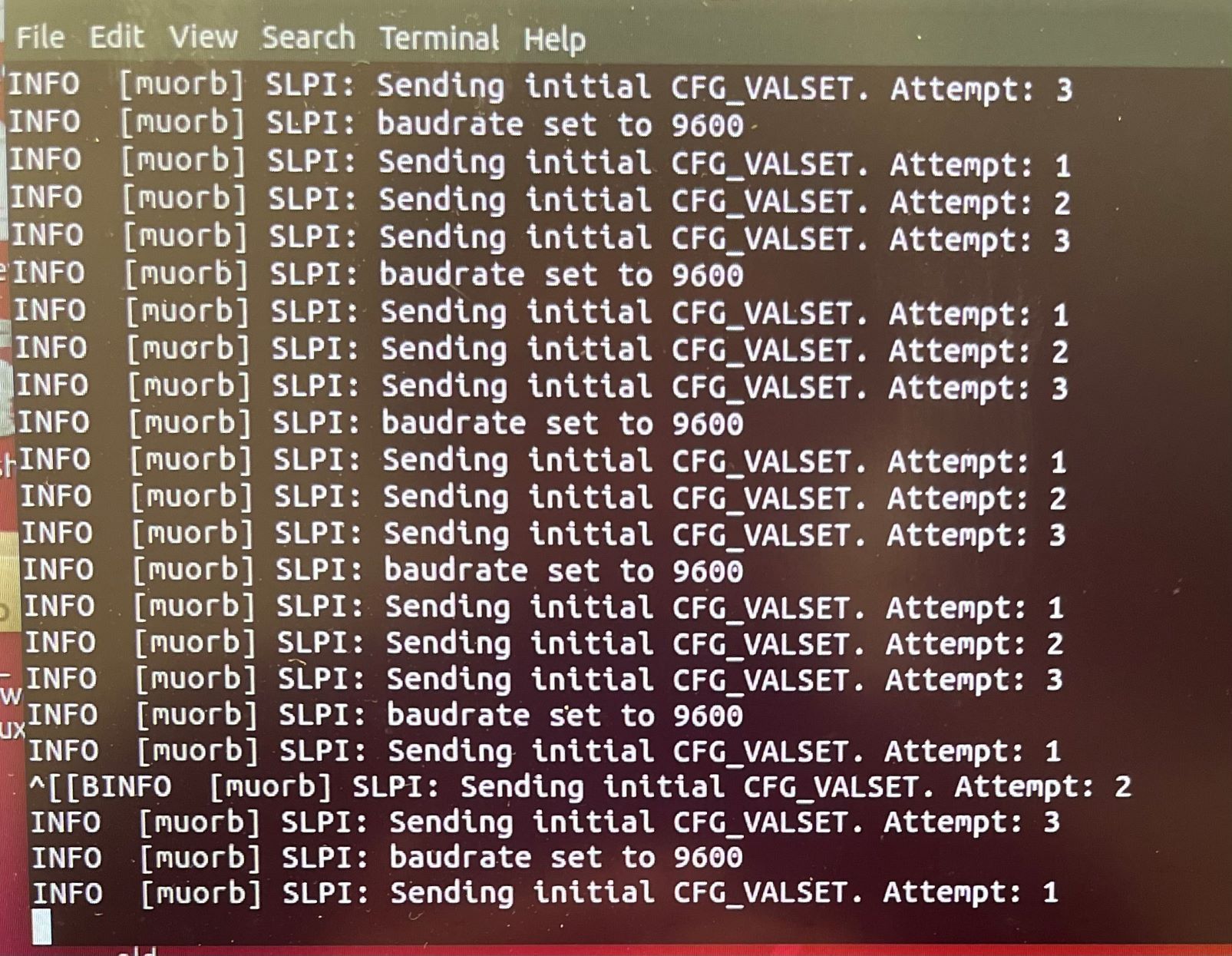
We have older M0065 boards (with the older firmware/bootloader) and other VOXL 2s with SDK 0.9.5 that do not experience the issues above. However, we would like to use the latest SDK on our VOXL 2s on our custom drones.
Any advice would be appreciated. Also, if necessary, we can send these "newer" M0065 boards back alongside our older ones which would need the updated firmware and bootloader.
Thanks!
Julius
-
Primary Issue: Motors will not spin after arming.
Hardware: VOXL 2
Configuration: Custom
SDK: v1.1.2Hello,
I received five M0065 VOXL 2 IO boards this week. I have a custom multirotor with VOXL 2 running SDK v1.1.2 (I'm assuming these new M0065 boards come with the latest firmware and bootloader). After connecting the M0065 boards to the VOXL 2 and powering on, all five M0065 boards first show the boot up pattern shown here for about 1 second, then the orange LED shines solid. The green LED is solid as well. I'm not sure if the legacy M0065 firmware and current M0065 firmware have the same modes and LED patterns listed here.
I have the system wired as such, with the VOXL 2 J18 connected to the VOXL 2 IO J4 connector. I have PWM output (M0022) connected to J1. I have ESCs connected with signal and ground wires only. I have RC input connected to J3. Regardless if J1 or J3 or both are connected, the orange LED shines solid.
With J1/J3 both connected, in QGroundControl I see radio channels and am able to arm/disarm, change flight mode, enable/disable kill switch etc from my RC transmitter.
When I arm, and increase the throttle, the motors are not spinning.
I notice a three other things that may indicate problems. First, when I calibrated the ESCs (following the instructions here) the final chime was not made (the last two long dings in the sequence).
Second, in the top left corner of QGroundControl's display next to the flight mode, "Ready" and "Not Ready" switch every 1 second or so with no warning message appearing in QGroundControl. I decided to run voxl-px4 not as a service but in the shell so I could see the info. (Third) After inital configuration this appears repeatedly:
We have older M0065 boards (with the older firmware/bootloader) and other VOXL 2s with SDK 0.9.5 that do not experience the issues above. However, we would like to use the latest SDK on our VOXL 2s on our custom drones.
Any advice would be appreciated. Also, if necessary, we can send these "newer" M0065 boards back alongside our older ones which would need the updated firmware and bootloader.
Thanks!
Julius
@majjam The messages in your screenshot are coming from the GPS driver. What GPS unit do you have attached and how is it wired in?
-
@majjam The messages in your screenshot are coming from the GPS driver. What GPS unit do you have attached and how is it wired in?
@Eric-Katzfey Thanks for your reply. In the screenshot of the original post, no GPS unit was attached. After reading your reply, I attached an M8N GPS Unit to J19 and got this response from the px4 shell when the variable "GPS" is set to "AUTODETECT" in voxl_px4.conf (I'm indoors so no satellites are detected; cannot go outside w/ this UAS):

When I set "GPS" to "NONE" in voxl_px4.conf I get this output from the px4 shell:
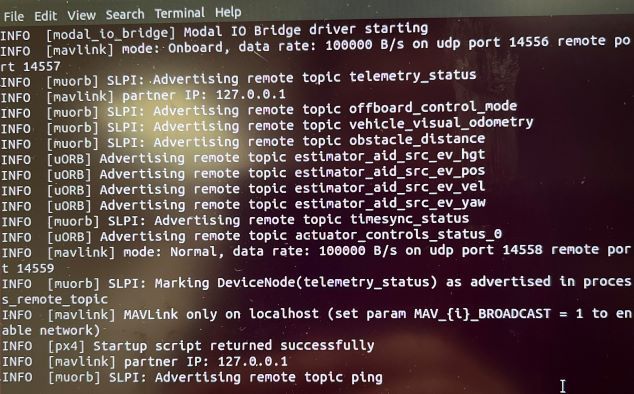
I imagine setting GPS to NONE with or without the M8N attached yields this result.
In either case, the VOXL 2 IO still shines a solid orange LED. When I arm and increase throttle, no motors spin.
-
@Eric-Katzfey Thanks for your reply. In the screenshot of the original post, no GPS unit was attached. After reading your reply, I attached an M8N GPS Unit to J19 and got this response from the px4 shell when the variable "GPS" is set to "AUTODETECT" in voxl_px4.conf (I'm indoors so no satellites are detected; cannot go outside w/ this UAS):
When I set "GPS" to "NONE" in voxl_px4.conf I get this output from the px4 shell:
I imagine setting GPS to NONE with or without the M8N attached yields this result.
In either case, the VOXL 2 IO still shines a solid orange LED. When I arm and increase throttle, no motors spin.
@majjam ,
We will help you debug the M0065 operation.
Do you have any indication that M0065 board is sending any signal to the ESCs? You mentioned that the ESC calibration did not complete as expected, but were you able to initiate the calibration? If the calibration at least started (motors made sounds to indicate start of calibration), then this would at least confirm proper communication between VOXL2 and M0065 board.
Also, have you tried using the actuator test to spin the motors?
Alex
-
@majjam ,
We will help you debug the M0065 operation.
Do you have any indication that M0065 board is sending any signal to the ESCs? You mentioned that the ESC calibration did not complete as expected, but were you able to initiate the calibration? If the calibration at least started (motors made sounds to indicate start of calibration), then this would at least confirm proper communication between VOXL2 and M0065 board.
Also, have you tried using the actuator test to spin the motors?
Alex
@majjam ,
The behavior of the LEDs on M0065 board is as follows:
Bootloader
- when power is first applied to M0065, it enters bootloader mode for 1 second, during which BLUE led will blink fast
- if there is valid firmware on M0065, bootloader will exit after 1 second and start executing the firmware.
- if there is no valid firmware, the board will stay in bootloader mode, continuously blinking fast
Firmware
- Once the firmware starts, the BLUE and ORANGE leds will turn off and remain off
- BLUE led will blink while there is active communication from the host (flight controller). the LED will toggle every 10 commands that are received, which may actually appear as always ON if the flight controller is running at 500+Hz.
- ORANGE led will turn on once PX4 starts, this has a special meaning that it received a configuration packet from the modalio px4 driver. After that, if an sbus receiver is plugged into M0065, and the sbus receiver is sending data, the orange LED will blink to notify the user that SBUS data is coming in and it is being forwarded to the flight controller.
Based on this information, please double check your connection, px4 params and try the actuator test to make sure you can spin the motors and M0065 board is responding appropriately.
Alex
-
@majjam ,
We will help you debug the M0065 operation.
Do you have any indication that M0065 board is sending any signal to the ESCs? You mentioned that the ESC calibration did not complete as expected, but were you able to initiate the calibration? If the calibration at least started (motors made sounds to indicate start of calibration), then this would at least confirm proper communication between VOXL2 and M0065 board.
Also, have you tried using the actuator test to spin the motors?
Alex
Alex,
I've had some more luck this week. I am able to get motors spinning with the newer M0065 board. The SDK 1.1.2/voxl-suite/voxl-px4 package did not have the parameter VOXL2_IO_PWM, so I could not set it via QGroundControl and px4-param set would fail too (although I could set VOXL2_IO_FUNC1/2/3/4). After reinstalling the SDK a few times, the missing parameter finally appeared. Also, I assumed that in the voxl-px4.conf file that setting ESC=VOXL2_IO_PWM_ESC would set everything up, but VOXL_ESC_FUNC1/2/3/4 parameters were still left as 101/2/3/4 and causing issues as well.
Based on your last reply, a solid orange LED seems to not be a problem, since I'm using an SBUS receiver, and it is probably sending data at a high rate to the flight controller.
The ESC calibration process fully completes, actuator test is functional, and the motors spin-up after arming now. I believe the solid orange LED was a non-issue, but the missing parameter and VOXL_ESC_FUNC unconfigured parameters were. Thanks for the help.
One thing that is worrisome is that the chip on the bottom of the board is searing hot and must be cooled.
v/r,
Julius Marshall
-
Alex,
I've had some more luck this week. I am able to get motors spinning with the newer M0065 board. The SDK 1.1.2/voxl-suite/voxl-px4 package did not have the parameter VOXL2_IO_PWM, so I could not set it via QGroundControl and px4-param set would fail too (although I could set VOXL2_IO_FUNC1/2/3/4). After reinstalling the SDK a few times, the missing parameter finally appeared. Also, I assumed that in the voxl-px4.conf file that setting ESC=VOXL2_IO_PWM_ESC would set everything up, but VOXL_ESC_FUNC1/2/3/4 parameters were still left as 101/2/3/4 and causing issues as well.
Based on your last reply, a solid orange LED seems to not be a problem, since I'm using an SBUS receiver, and it is probably sending data at a high rate to the flight controller.
The ESC calibration process fully completes, actuator test is functional, and the motors spin-up after arming now. I believe the solid orange LED was a non-issue, but the missing parameter and VOXL_ESC_FUNC unconfigured parameters were. Thanks for the help.
One thing that is worrisome is that the chip on the bottom of the board is searing hot and must be cooled.
v/r,
Julius Marshall
@majjam ,
Can you please clarify which "chip on the bottom of the board is searing hot and must be cooled" -- is that the STM32 MCU on VOXL2 IO board?
Is your SBUS receiver plugged into VOXL2 IO board?
I would recommend trying to unplug the motors and receiver from VOXL2 IO board and see if it stops overheating
-
Alex,
I've had some more luck this week. I am able to get motors spinning with the newer M0065 board. The SDK 1.1.2/voxl-suite/voxl-px4 package did not have the parameter VOXL2_IO_PWM, so I could not set it via QGroundControl and px4-param set would fail too (although I could set VOXL2_IO_FUNC1/2/3/4). After reinstalling the SDK a few times, the missing parameter finally appeared. Also, I assumed that in the voxl-px4.conf file that setting ESC=VOXL2_IO_PWM_ESC would set everything up, but VOXL_ESC_FUNC1/2/3/4 parameters were still left as 101/2/3/4 and causing issues as well.
Based on your last reply, a solid orange LED seems to not be a problem, since I'm using an SBUS receiver, and it is probably sending data at a high rate to the flight controller.
The ESC calibration process fully completes, actuator test is functional, and the motors spin-up after arming now. I believe the solid orange LED was a non-issue, but the missing parameter and VOXL_ESC_FUNC unconfigured parameters were. Thanks for the help.
One thing that is worrisome is that the chip on the bottom of the board is searing hot and must be cooled.
v/r,
Julius Marshall
Hi @majjam
I'm glad Alex is helping you.
Nothing should ever be "searing hot" in our platforms.
If it is, it may be that you have a 5V supply connected to the 3.3V supply of the MCU by an errant connection using one of the connectors, and over time the MCU will fail (likely very promptly).Please double check your wiring and connections to all peripherals and connectors using this page as a guide: https://docs.modalai.com/voxl2-io-datasheet/#connector-callouts
Be sure you do not connect any 5V supply to the 3.3V pins.Thanks!



Reading along? Create a free ModalAI Forum account to join in.
With an account you can reply, ask your own question, get an email when a ModalAI engineer answers, and mark the reply that solved it. Your place in each thread is saved between visits.
Questions about VOXL, Flight Core, ESCs and ModalAI drones are answered here by the engineers who build them.
Register Login