
M0040 Time of Flight sensor FPS
-
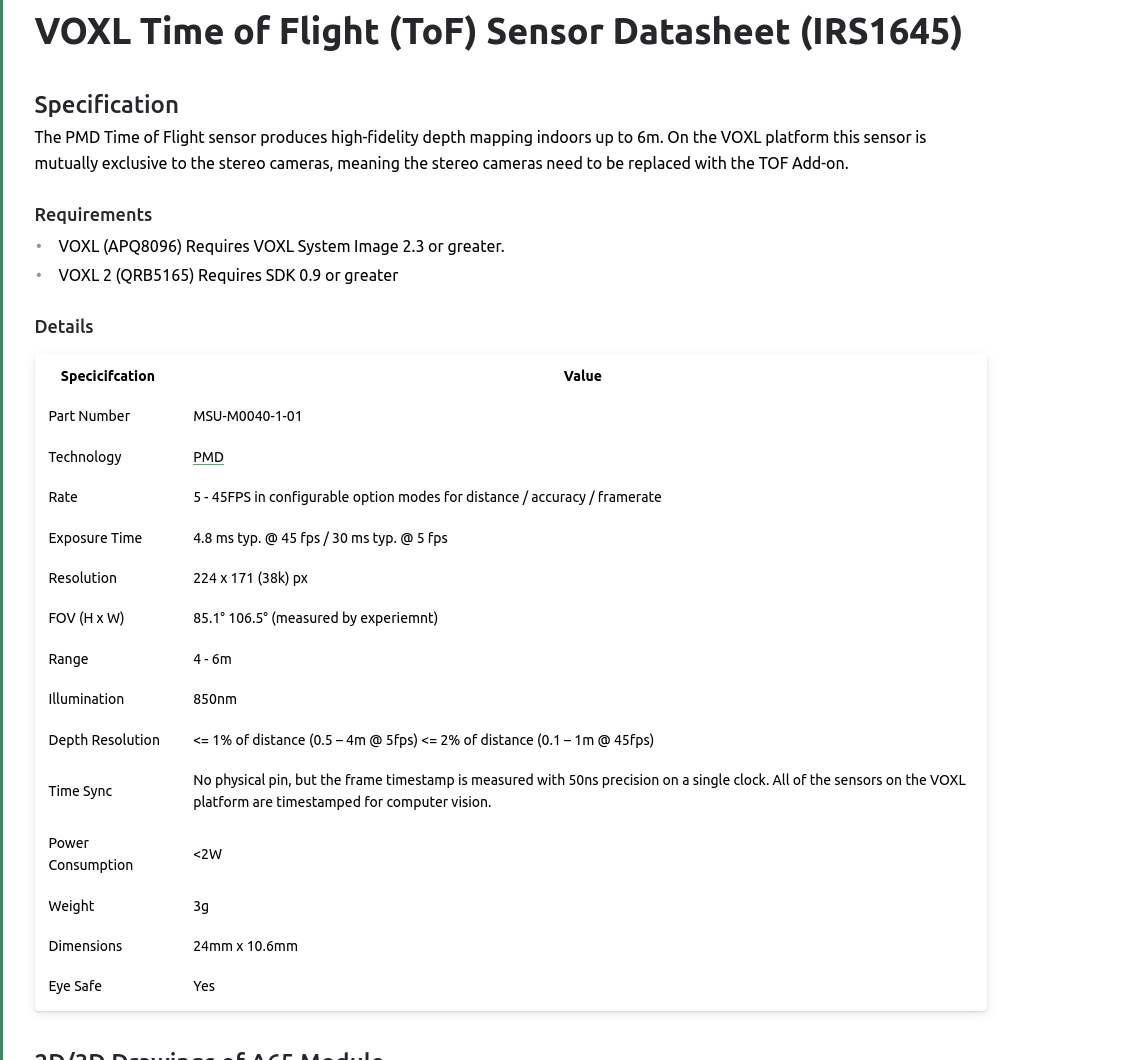
@Alex-Kushleyev Thanks it worked it shows point cloud at 30 FPS when I set it to 30 in .conf file
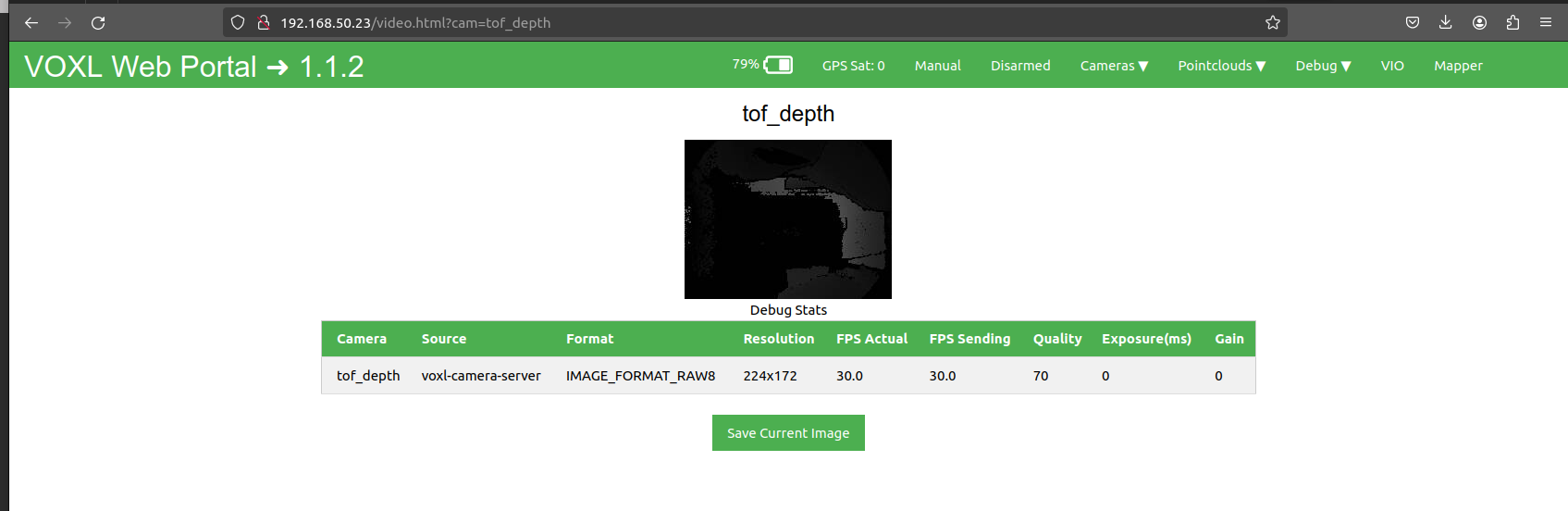
I will try it out with other services like mpatoros2, tfliteserver in tandem see if there is a drop in frame rate or performance
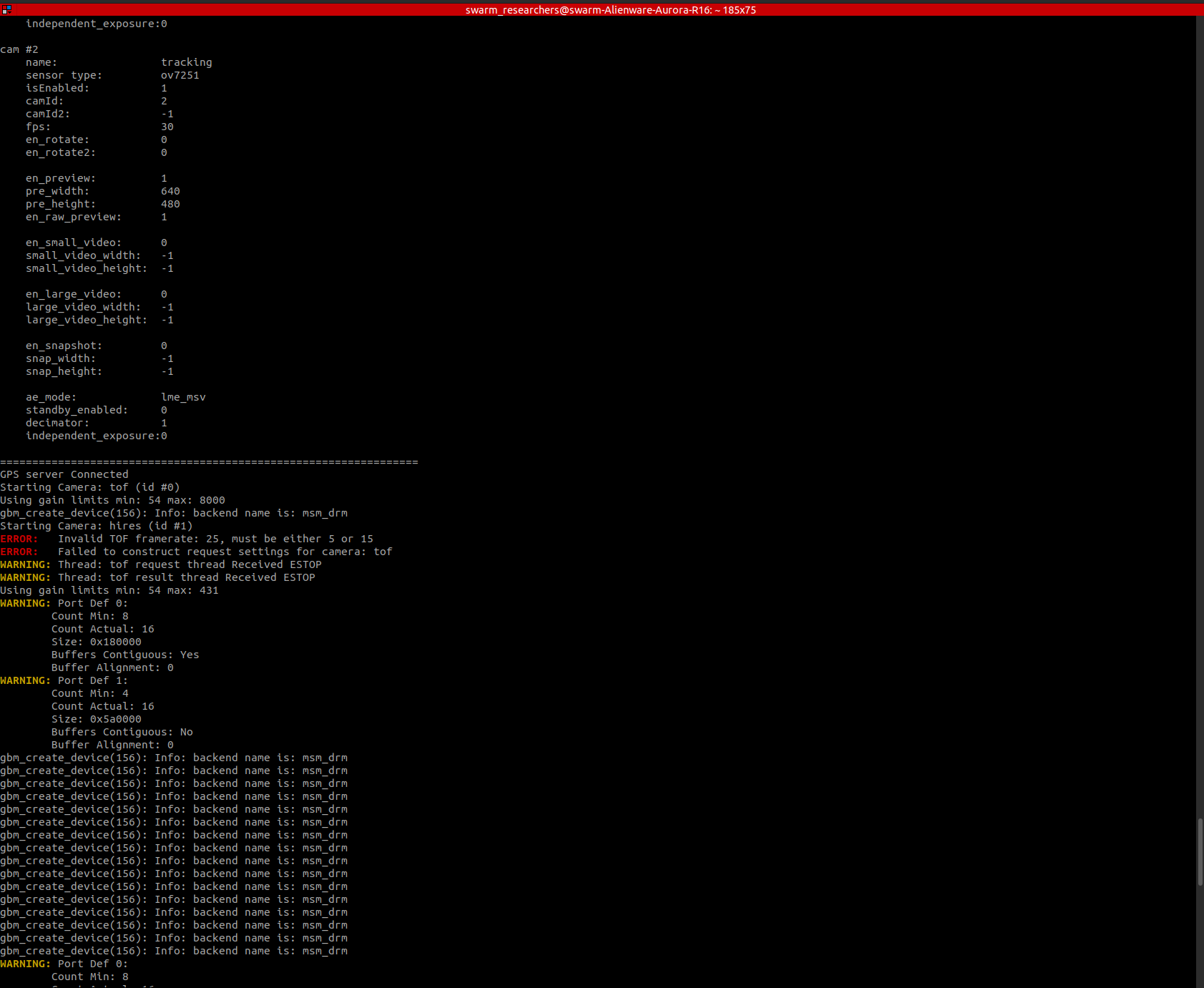
@Alex-Kushleyev right now the FPS values need to be a multiple of 15 for some reason because I tried 35, and 20 FPS and the camera server refuses to start
-
@Alex-Kushleyev right now the FPS values need to be a multiple of 15 for some reason because I tried 35, and 20 FPS and the camera server refuses to start
@Darshit-Desai , i will double check the available FPS. Not all arbitrary FPS are possible.
-
@Darshit-Desai , i will double check the available FPS. Not all arbitrary FPS are possible.
If you run “voxl-camera-server -d 0”, you will see a lot of debug messages including all possible tof modes. If you see something you want to try, you can modify the code. Mode9 is long range and mode5 is short range.
-
If you run “voxl-camera-server -d 0”, you will see a lot of debug messages including all possible tof modes. If you see something you want to try, you can modify the code. Mode9 is long range and mode5 is short range.
@Alex-Kushleyev I dont see mode descriptions when I try this
voxl2:/etc/modalai$ voxl-camera-server -d 0 detected system image 1.7.1 using new imx214 defaults ================================================================= configuration for 3 cameras: cam #0 name: tof sensor type: pmd-tof isEnabled: 1 camId: 0 camId2: -1 fps: 20 en_rotate: 0 en_rotate2: 0 en_preview: 1 pre_width: 224 pre_height: 1557 en_raw_preview: 1 en_small_video: 0 small_video_width: -1 small_video_height: -1 en_large_video: 0 large_video_width: -1 large_video_height: -1 en_snapshot: 0 snap_width: -1 snap_height: -1 ae_mode: off standby_enabled: 0 decimator: 5 independent_exposure:0 cam #1 name: hires sensor type: imx214 isEnabled: 1 camId: 1 camId2: -1 fps: 30 en_rotate: 0 en_rotate2: 0 en_preview: 0 pre_width: 640 pre_height: 480 en_raw_preview: 0 en_small_video: 1 small_video_width: 1024 small_video_height: 768 en_large_video: 1 large_video_width: 4208 large_video_height: 3120 en_snapshot: 1 snap_width: 4208 snap_height: 3120 ae_mode: isp standby_enabled: 0 decimator: 1 independent_exposure:0 cam #2 name: tracking sensor type: ov7251 isEnabled: 1 camId: 2 camId2: -1 fps: 30 en_rotate: 0 en_rotate2: 0 en_preview: 1 pre_width: 640 pre_height: 480 en_raw_preview: 1 en_small_video: 0 small_video_width: -1 small_video_height: -1 en_large_video: 0 large_video_width: -1 large_video_height: -1 en_snapshot: 0 snap_width: -1 snap_height: -1 ae_mode: lme_msv standby_enabled: 0 decimator: 1 independent_exposure:0 ================================================================= DEBUG: Attempting to open the hal module DEBUG: SUCCESS: Camera module opened on attempt 0 DEBUG: ----------- Number of cameras: 3 DEBUG: Cam idx: 0, Cam slot: 0, Slave Address: 0x007A, Sensor Id: 0x003D DEBUG: Cam idx: 1, Cam slot: 2, Slave Address: 0x0020, Sensor Id: 0x0214 DEBUG: Cam idx: 2, Cam slot: 3, Slave Address: 0x00E2, Sensor Id: 0x7750 GPS server Connected DEBUG: Connected to cpu-monitor DEBUG: ------ voxl-camera-server: Starting 3 cameras Starting Camera: tof (id #0) DEBUG: Checking Gain limits for Camera: tof Using gain limits min: 54 max: 8000 DEBUG: cam ID 0 checking for fmt: 38 w: 224 h: 1557 o: 0 DEBUG: i: 0 fmt: 34 w: 176 h: 144 o:0 DEBUG: i: 4 fmt: 34 w: 176 h: 144 o:1 DEBUG: i: 8 fmt: 35 w: 176 h: 144 o:0 DEBUG: i: 12 fmt: 35 w: 176 h: 144 o:1 DEBUG: i: 16 fmt: 33 w: 176 h: 144 o:0 DEBUG: i: 20 fmt: 37 w: 224 h:1557 o:0 DEBUG: i: 24 fmt: 38 w: 224 h:1557 o:0 DEBUG: i: 28 fmt: 32 w: 224 h:1557 o:0 DEBUG: i: 32 fmt: 36 w: 224 h:1557 o:0 VERBOSE: Successfully found configuration match for camera 0: 224x1557 VERBOSE: Adding preview stream for camera: 0 DEBUG: Converted gralloc flags 0x20900 to GBM flags 0x1400000 VERBOSE: Dumping GBM flags DEBUG: Found flag GBM_BO_USAGE_CAMERA_WRITE_QTI DEBUG: Found flag GBM_BO_USAGE_HW_COMPOSER_QTI VERBOSE: Opened GBM fd gbm_create_device(156): Info: backend name is: msm_drm VERBOSE: Created GBM device DEBUG: Allocated BO with width=224 height=1557 stride=336 aligned_w=336 aligned_h=1557 size=524288 flags=0x20900 format=GBM_FORMAT_RAW12 DEBUG: Converted gralloc flags 0x20900 to GBM flags 0x1400000 VERBOSE: Dumping GBM flags DEBUG: Found flag GBM_BO_USAGE_CAMERA_WRITE_QTI DEBUG: Found flag GBM_BO_USAGE_HW_COMPOSER_QTI DEBUG: Allocated BO with width=224 height=1557 stride=336 aligned_w=336 aligned_h=1557 size=524288 flags=0x20900 format=GBM_FORMAT_RAW12 DEBUG: Converted gralloc flags 0x20900 to GBM flags 0x1400000 VERBOSE: Dumping GBM flags DEBUG: Found flag GBM_BO_USAGE_CAMERA_WRITE_QTI DEBUG: Found flag GBM_BO_USAGE_HW_COMPOSER_QTI DEBUG: Allocated BO with width=224 height=1557 stride=336 aligned_w=336 aligned_h=1557 size=524288 flags=0x20900 format=GBM_FORMAT_RAW12 DEBUG: Converted gralloc flags 0x20900 to GBM flags 0x1400000 VERBOSE: Dumping GBM flags DEBUG: Found flag GBM_BO_USAGE_CAMERA_WRITE_QTI DEBUG: Found flag GBM_BO_USAGE_HW_COMPOSER_QTI DEBUG: Allocated BO with width=224 height=1557 stride=336 aligned_w=336 aligned_h=1557 size=524288 flags=0x20900 format=GBM_FORMAT_RAW12 DEBUG: Converted gralloc flags 0x20900 to GBM flags 0x1400000 VERBOSE: Dumping GBM flags DEBUG: Found flag GBM_BO_USAGE_CAMERA_WRITE_QTI DEBUG: Found flag GBM_BO_USAGE_HW_COMPOSER_QTI DEBUG: Allocated BO with width=224 height=1557 stride=336 aligned_w=336 aligned_h=1557 size=524288 flags=0x20900 format=GBM_FORMAT_RAW12 DEBUG: Converted gralloc flags 0x20900 to GBM flags 0x1400000 VERBOSE: Dumping GBM flags DEBUG: Found flag GBM_BO_USAGE_CAMERA_WRITE_QTI DEBUG: Found flag GBM_BO_USAGE_HW_COMPOSER_QTI DEBUG: Allocated BO with width=224 height=1557 stride=336 aligned_w=336 aligned_h=1557 size=524288 flags=0x20900 format=GBM_FORMAT_RAW12 DEBUG: Converted gralloc flags 0x20900 to GBM flags 0x1400000 VERBOSE: Dumping GBM flags DEBUG: Found flag GBM_BO_USAGE_CAMERA_WRITE_QTI DEBUG: Found flag GBM_BO_USAGE_HW_COMPOSER_QTI DEBUG: Allocated BO with width=224 height=1557 stride=336 aligned_w=336 aligned_h=1557 size=524288 flags=0x20900 format=GBM_FORMAT_RAW12 DEBUG: Converted gralloc flags 0x20900 to GBM flags 0x1400000 VERBOSE: Dumping GBM flags DEBUG: Found flag GBM_BO_USAGE_CAMERA_WRITE_QTI DEBUG: Found flag GBM_BO_USAGE_HW_COMPOSER_QTI DEBUG: Allocated BO with width=224 height=1557 stride=336 aligned_w=336 aligned_h=1557 size=524288 flags=0x20900 format=GBM_FORMAT_RAW12 DEBUG: Converted gralloc flags 0x20900 to GBM flags 0x1400000 VERBOSE: Dumping GBM flags DEBUG: Found flag GBM_BO_USAGE_CAMERA_WRITE_QTI DEBUG: Found flag GBM_BO_USAGE_HW_COMPOSER_QTI DEBUG: Allocated BO with width=224 height=1557 stride=336 aligned_w=336 aligned_h=1557 size=524288 flags=0x20900 format=GBM_FORMAT_RAW12 DEBUG: Converted gralloc flags 0x20900 to GBM flags 0x1400000 VERBOSE: Dumping GBM flags DEBUG: Found flag GBM_BO_USAGE_CAMERA_WRITE_QTI DEBUG: Found flag GBM_BO_USAGE_HW_COMPOSER_QTI DEBUG: Allocated BO with width=224 height=1557 stride=336 aligned_w=336 aligned_h=1557 size=524288 flags=0x20900 format=GBM_FORMAT_RAW12 DEBUG: Converted gralloc flags 0x20900 to GBM flags 0x1400000 VERBOSE: Dumping GBM flags DEBUG: Found flag GBM_BO_USAGE_CAMERA_WRITE_QTI DEBUG: Found flag GBM_BO_USAGE_HW_COMPOSER_QTI DEBUG: Allocated BO with width=224 height=1557 stride=336 aligned_w=336 aligned_h=1557 size=524288 flags=0x20900 format=GBM_FORMAT_RAW12 DEBUG: Converted gralloc flags 0x20900 to GBM flags 0x1400000 VERBOSE: Dumping GBM flags DEBUG: Found flag GBM_BO_USAGE_CAMERA_WRITE_QTI DEBUG: Found flag GBM_BO_USAGE_HW_COMPOSER_QTI DEBUG: Allocated BO with width=224 height=1557 stride=336 aligned_w=336 aligned_h=1557 size=524288 flags=0x20900 format=GBM_FORMAT_RAW12 DEBUG: Converted gralloc flags 0x20900 to GBM flags 0x1400000 VERBOSE: Dumping GBM flags DEBUG: Found flag GBM_BO_USAGE_CAMERA_WRITE_QTI DEBUG: Found flag GBM_BO_USAGE_HW_COMPOSER_QTI DEBUG: Allocated BO with width=224 height=1557 stride=336 aligned_w=336 aligned_h=1557 size=524288 flags=0x20900 format=GBM_FORMAT_RAW12 DEBUG: Converted gralloc flags 0x20900 to GBM flags 0x1400000 VERBOSE: Dumping GBM flags DEBUG: Found flag GBM_BO_USAGE_CAMERA_WRITE_QTI DEBUG: Found flag GBM_BO_USAGE_HW_COMPOSER_QTI DEBUG: Allocated BO with width=224 height=1557 stride=336 aligned_w=336 aligned_h=1557 size=524288 flags=0x20900 format=GBM_FORMAT_RAW12 DEBUG: Converted gralloc flags 0x20900 to GBM flags 0x1400000 VERBOSE: Dumping GBM flags DEBUG: Found flag GBM_BO_USAGE_CAMERA_WRITE_QTI DEBUG: Found flag GBM_BO_USAGE_HW_COMPOSER_QTI DEBUG: Allocated BO with width=224 height=1557 stride=336 aligned_w=336 aligned_h=1557 size=524288 flags=0x20900 format=GBM_FORMAT_RAW12 DEBUG: Converted gralloc flags 0x20900 to GBM flags 0x1400000 VERBOSE: Dumping GBM flags DEBUG: Found flag GBM_BO_USAGE_CAMERA_WRITE_QTI DEBUG: Found flag GBM_BO_USAGE_HW_COMPOSER_QTI DEBUG: Allocated BO with width=224 height=1557 stride=336 aligned_w=336 aligned_h=1557 size=524288 flags=0x20900 format=GBM_FORMAT_RAW12 DEBUG: Successfully set up pipeline for stream: PREVIEW VERBOSE: Entered thread: cam0-request(tid: 3925) DEBUG: Started Camera: tof Starting Camera: hires (id #1) ERROR: Invalid TOF framerate: 20, must be either 5 or 15 ERROR: Failed to construct request settings for camera: tof WARNING: Thread: tof request thread Received ESTOP VERBOSE: Leaving tof request thr ```ead -
@Alex-Kushleyev I dont see mode descriptions when I try this
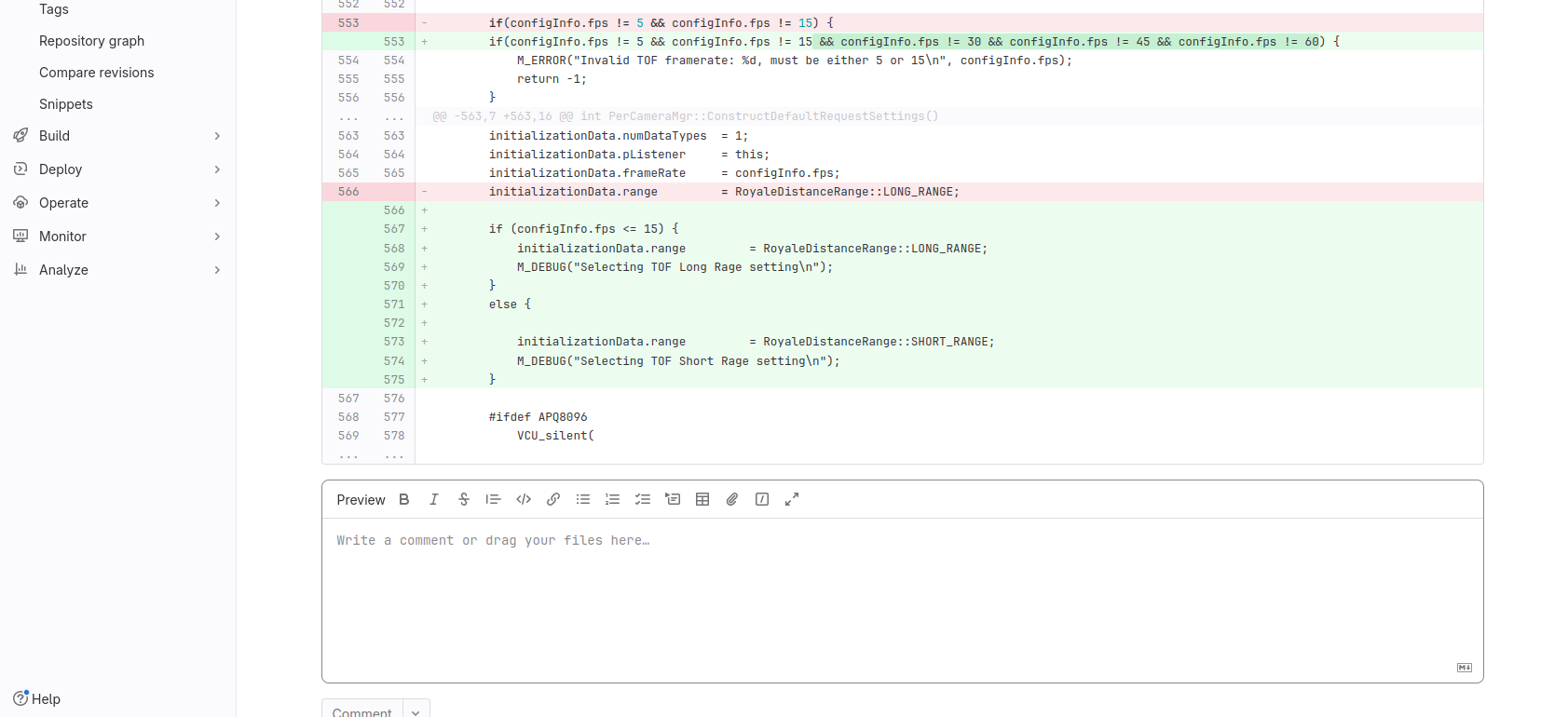
voxl2:/etc/modalai$ voxl-camera-server -d 0 detected system image 1.7.1 using new imx214 defaults ================================================================= configuration for 3 cameras: cam #0 name: tof sensor type: pmd-tof isEnabled: 1 camId: 0 camId2: -1 fps: 20 en_rotate: 0 en_rotate2: 0 en_preview: 1 pre_width: 224 pre_height: 1557 en_raw_preview: 1 en_small_video: 0 small_video_width: -1 small_video_height: -1 en_large_video: 0 large_video_width: -1 large_video_height: -1 en_snapshot: 0 snap_width: -1 snap_height: -1 ae_mode: off standby_enabled: 0 decimator: 5 independent_exposure:0 cam #1 name: hires sensor type: imx214 isEnabled: 1 camId: 1 camId2: -1 fps: 30 en_rotate: 0 en_rotate2: 0 en_preview: 0 pre_width: 640 pre_height: 480 en_raw_preview: 0 en_small_video: 1 small_video_width: 1024 small_video_height: 768 en_large_video: 1 large_video_width: 4208 large_video_height: 3120 en_snapshot: 1 snap_width: 4208 snap_height: 3120 ae_mode: isp standby_enabled: 0 decimator: 1 independent_exposure:0 cam #2 name: tracking sensor type: ov7251 isEnabled: 1 camId: 2 camId2: -1 fps: 30 en_rotate: 0 en_rotate2: 0 en_preview: 1 pre_width: 640 pre_height: 480 en_raw_preview: 1 en_small_video: 0 small_video_width: -1 small_video_height: -1 en_large_video: 0 large_video_width: -1 large_video_height: -1 en_snapshot: 0 snap_width: -1 snap_height: -1 ae_mode: lme_msv standby_enabled: 0 decimator: 1 independent_exposure:0 ================================================================= DEBUG: Attempting to open the hal module DEBUG: SUCCESS: Camera module opened on attempt 0 DEBUG: ----------- Number of cameras: 3 DEBUG: Cam idx: 0, Cam slot: 0, Slave Address: 0x007A, Sensor Id: 0x003D DEBUG: Cam idx: 1, Cam slot: 2, Slave Address: 0x0020, Sensor Id: 0x0214 DEBUG: Cam idx: 2, Cam slot: 3, Slave Address: 0x00E2, Sensor Id: 0x7750 GPS server Connected DEBUG: Connected to cpu-monitor DEBUG: ------ voxl-camera-server: Starting 3 cameras Starting Camera: tof (id #0) DEBUG: Checking Gain limits for Camera: tof Using gain limits min: 54 max: 8000 DEBUG: cam ID 0 checking for fmt: 38 w: 224 h: 1557 o: 0 DEBUG: i: 0 fmt: 34 w: 176 h: 144 o:0 DEBUG: i: 4 fmt: 34 w: 176 h: 144 o:1 DEBUG: i: 8 fmt: 35 w: 176 h: 144 o:0 DEBUG: i: 12 fmt: 35 w: 176 h: 144 o:1 DEBUG: i: 16 fmt: 33 w: 176 h: 144 o:0 DEBUG: i: 20 fmt: 37 w: 224 h:1557 o:0 DEBUG: i: 24 fmt: 38 w: 224 h:1557 o:0 DEBUG: i: 28 fmt: 32 w: 224 h:1557 o:0 DEBUG: i: 32 fmt: 36 w: 224 h:1557 o:0 VERBOSE: Successfully found configuration match for camera 0: 224x1557 VERBOSE: Adding preview stream for camera: 0 DEBUG: Converted gralloc flags 0x20900 to GBM flags 0x1400000 VERBOSE: Dumping GBM flags DEBUG: Found flag GBM_BO_USAGE_CAMERA_WRITE_QTI DEBUG: Found flag GBM_BO_USAGE_HW_COMPOSER_QTI VERBOSE: Opened GBM fd gbm_create_device(156): Info: backend name is: msm_drm VERBOSE: Created GBM device DEBUG: Allocated BO with width=224 height=1557 stride=336 aligned_w=336 aligned_h=1557 size=524288 flags=0x20900 format=GBM_FORMAT_RAW12 DEBUG: Converted gralloc flags 0x20900 to GBM flags 0x1400000 VERBOSE: Dumping GBM flags DEBUG: Found flag GBM_BO_USAGE_CAMERA_WRITE_QTI DEBUG: Found flag GBM_BO_USAGE_HW_COMPOSER_QTI DEBUG: Allocated BO with width=224 height=1557 stride=336 aligned_w=336 aligned_h=1557 size=524288 flags=0x20900 format=GBM_FORMAT_RAW12 DEBUG: Converted gralloc flags 0x20900 to GBM flags 0x1400000 VERBOSE: Dumping GBM flags DEBUG: Found flag GBM_BO_USAGE_CAMERA_WRITE_QTI DEBUG: Found flag GBM_BO_USAGE_HW_COMPOSER_QTI DEBUG: Allocated BO with width=224 height=1557 stride=336 aligned_w=336 aligned_h=1557 size=524288 flags=0x20900 format=GBM_FORMAT_RAW12 DEBUG: Converted gralloc flags 0x20900 to GBM flags 0x1400000 VERBOSE: Dumping GBM flags DEBUG: Found flag GBM_BO_USAGE_CAMERA_WRITE_QTI DEBUG: Found flag GBM_BO_USAGE_HW_COMPOSER_QTI DEBUG: Allocated BO with width=224 height=1557 stride=336 aligned_w=336 aligned_h=1557 size=524288 flags=0x20900 format=GBM_FORMAT_RAW12 DEBUG: Converted gralloc flags 0x20900 to GBM flags 0x1400000 VERBOSE: Dumping GBM flags DEBUG: Found flag GBM_BO_USAGE_CAMERA_WRITE_QTI DEBUG: Found flag GBM_BO_USAGE_HW_COMPOSER_QTI DEBUG: Allocated BO with width=224 height=1557 stride=336 aligned_w=336 aligned_h=1557 size=524288 flags=0x20900 format=GBM_FORMAT_RAW12 DEBUG: Converted gralloc flags 0x20900 to GBM flags 0x1400000 VERBOSE: Dumping GBM flags DEBUG: Found flag GBM_BO_USAGE_CAMERA_WRITE_QTI DEBUG: Found flag GBM_BO_USAGE_HW_COMPOSER_QTI DEBUG: Allocated BO with width=224 height=1557 stride=336 aligned_w=336 aligned_h=1557 size=524288 flags=0x20900 format=GBM_FORMAT_RAW12 DEBUG: Converted gralloc flags 0x20900 to GBM flags 0x1400000 VERBOSE: Dumping GBM flags DEBUG: Found flag GBM_BO_USAGE_CAMERA_WRITE_QTI DEBUG: Found flag GBM_BO_USAGE_HW_COMPOSER_QTI DEBUG: Allocated BO with width=224 height=1557 stride=336 aligned_w=336 aligned_h=1557 size=524288 flags=0x20900 format=GBM_FORMAT_RAW12 DEBUG: Converted gralloc flags 0x20900 to GBM flags 0x1400000 VERBOSE: Dumping GBM flags DEBUG: Found flag GBM_BO_USAGE_CAMERA_WRITE_QTI DEBUG: Found flag GBM_BO_USAGE_HW_COMPOSER_QTI DEBUG: Allocated BO with width=224 height=1557 stride=336 aligned_w=336 aligned_h=1557 size=524288 flags=0x20900 format=GBM_FORMAT_RAW12 DEBUG: Converted gralloc flags 0x20900 to GBM flags 0x1400000 VERBOSE: Dumping GBM flags DEBUG: Found flag GBM_BO_USAGE_CAMERA_WRITE_QTI DEBUG: Found flag GBM_BO_USAGE_HW_COMPOSER_QTI DEBUG: Allocated BO with width=224 height=1557 stride=336 aligned_w=336 aligned_h=1557 size=524288 flags=0x20900 format=GBM_FORMAT_RAW12 DEBUG: Converted gralloc flags 0x20900 to GBM flags 0x1400000 VERBOSE: Dumping GBM flags DEBUG: Found flag GBM_BO_USAGE_CAMERA_WRITE_QTI DEBUG: Found flag GBM_BO_USAGE_HW_COMPOSER_QTI DEBUG: Allocated BO with width=224 height=1557 stride=336 aligned_w=336 aligned_h=1557 size=524288 flags=0x20900 format=GBM_FORMAT_RAW12 DEBUG: Converted gralloc flags 0x20900 to GBM flags 0x1400000 VERBOSE: Dumping GBM flags DEBUG: Found flag GBM_BO_USAGE_CAMERA_WRITE_QTI DEBUG: Found flag GBM_BO_USAGE_HW_COMPOSER_QTI DEBUG: Allocated BO with width=224 height=1557 stride=336 aligned_w=336 aligned_h=1557 size=524288 flags=0x20900 format=GBM_FORMAT_RAW12 DEBUG: Converted gralloc flags 0x20900 to GBM flags 0x1400000 VERBOSE: Dumping GBM flags DEBUG: Found flag GBM_BO_USAGE_CAMERA_WRITE_QTI DEBUG: Found flag GBM_BO_USAGE_HW_COMPOSER_QTI DEBUG: Allocated BO with width=224 height=1557 stride=336 aligned_w=336 aligned_h=1557 size=524288 flags=0x20900 format=GBM_FORMAT_RAW12 DEBUG: Converted gralloc flags 0x20900 to GBM flags 0x1400000 VERBOSE: Dumping GBM flags DEBUG: Found flag GBM_BO_USAGE_CAMERA_WRITE_QTI DEBUG: Found flag GBM_BO_USAGE_HW_COMPOSER_QTI DEBUG: Allocated BO with width=224 height=1557 stride=336 aligned_w=336 aligned_h=1557 size=524288 flags=0x20900 format=GBM_FORMAT_RAW12 DEBUG: Converted gralloc flags 0x20900 to GBM flags 0x1400000 VERBOSE: Dumping GBM flags DEBUG: Found flag GBM_BO_USAGE_CAMERA_WRITE_QTI DEBUG: Found flag GBM_BO_USAGE_HW_COMPOSER_QTI DEBUG: Allocated BO with width=224 height=1557 stride=336 aligned_w=336 aligned_h=1557 size=524288 flags=0x20900 format=GBM_FORMAT_RAW12 DEBUG: Converted gralloc flags 0x20900 to GBM flags 0x1400000 VERBOSE: Dumping GBM flags DEBUG: Found flag GBM_BO_USAGE_CAMERA_WRITE_QTI DEBUG: Found flag GBM_BO_USAGE_HW_COMPOSER_QTI DEBUG: Allocated BO with width=224 height=1557 stride=336 aligned_w=336 aligned_h=1557 size=524288 flags=0x20900 format=GBM_FORMAT_RAW12 DEBUG: Converted gralloc flags 0x20900 to GBM flags 0x1400000 VERBOSE: Dumping GBM flags DEBUG: Found flag GBM_BO_USAGE_CAMERA_WRITE_QTI DEBUG: Found flag GBM_BO_USAGE_HW_COMPOSER_QTI DEBUG: Allocated BO with width=224 height=1557 stride=336 aligned_w=336 aligned_h=1557 size=524288 flags=0x20900 format=GBM_FORMAT_RAW12 DEBUG: Successfully set up pipeline for stream: PREVIEW VERBOSE: Entered thread: cam0-request(tid: 3925) DEBUG: Started Camera: tof Starting Camera: hires (id #1) ERROR: Invalid TOF framerate: 20, must be either 5 or 15 ERROR: Failed to construct request settings for camera: tof WARNING: Thread: tof request thread Received ESTOP VERBOSE: Leaving tof request thr ```ead@Alex-Kushleyev I found where the code changes were done and technically all arbitrary frame rates should work if we remove the == comparison with a range based comparison, but before changing that is there a reason why it is kept discrete? Can this discrete values be made into multiples of 5?
if(configInfo.fps != 5 && configInfo.fps != 15 && configInfo.fps != 30 && configInfo.fps != 45 && configInfo.fps != 60) {
            M_ERROR("Invalid TOF framerate: %d, must be either 5 or 15\n", configInfo.fps);
            return -1;
        }
Because the settings selection for long_range or short_range is just a simple if else condition
-
@Alex-Kushleyev I found where the code changes were done and technically all arbitrary frame rates should work if we remove the == comparison with a range based comparison, but before changing that is there a reason why it is kept discrete? Can this discrete values be made into multiples of 5?
if(configInfo.fps != 5 && configInfo.fps != 15 && configInfo.fps != 30 && configInfo.fps != 45 && configInfo.fps != 60) {
            M_ERROR("Invalid TOF framerate: %d, must be either 5 or 15\n", configInfo.fps);
            return -1;
        }
Because the settings selection for long_range or short_range is just a simple if else condition
First set the framerate to one that is currently supported, then run voxl-camera-server -d 0. Then you will see the possible tof modes.
The tof sensor does not support arbitrary fps
-
First set the framerate to one that is currently supported, then run voxl-camera-server -d 0. Then you will see the possible tof modes.
The tof sensor does not support arbitrary fps
@Alex-Kushleyev I got it about the debug command.
On the topic of arbitrary fps, the sensor supports only 5, 15, 30, 45 and 60 according to the above code snippet. Nothing in the middle not even fps with multiples of 10 or 5. (Like 20, 25, 40, 50, 55)
-
@Alex-Kushleyev I got it about the debug command.
On the topic of arbitrary fps, the sensor supports only 5, 15, 30, 45 and 60 according to the above code snippet. Nothing in the middle not even fps with multiples of 10 or 5. (Like 20, 25, 40, 50, 55)
@Darshit-Desai , this check i added quickly just to allow additional rates other than 5 and 15 originally supported.
Based on the output of the supported use cases (from
voxl-camera-server -d 0 | grep usecase), here are all the supported modes:Long Range: 5, 10, 15, 20, 30
Short Range: 15, 30, 45, 60Based on this information, you can experiment with the short / long range and desired FPS by modifying the camera server code directly (including logic for checking fps and setting long/short range). In future we will most likely add a param for selecting the range mode.
Just to clarify, the use case information that lists range mode and fps is printed from the low level TOF driver, but the fps checks that you are referring to are in camera server high level code.
-
@Darshit-Desai , this check i added quickly just to allow additional rates other than 5 and 15 originally supported.
Based on the output of the supported use cases (from
voxl-camera-server -d 0 | grep usecase), here are all the supported modes:Long Range: 5, 10, 15, 20, 30
Short Range: 15, 30, 45, 60Based on this information, you can experiment with the short / long range and desired FPS by modifying the camera server code directly (including logic for checking fps and setting long/short range). In future we will most likely add a param for selecting the range mode.
Just to clarify, the use case information that lists range mode and fps is printed from the low level TOF driver, but the fps checks that you are referring to are in camera server high level code.
@Alex-Kushleyev So I got it how to check the long range and short range modes, the last commit on the code shows that you only changed the
ifcondition and theLONG_RANGE&SHORT_RANGEsettings. For multiple FPS rates can I just edit the code to add something like this,setExposure = 2259763; setGain = 200; if(configInfo.fps != 5 && configInfo.fps != 15) { if(configInfo.fps != 5 && configInfo.fps != 15 && configInfo.fps != 30 && configInfo.fps != 45 && configInfo.fps != 60 && configInfo.fps != 10 && configInfo.fps != 20) { M_ERROR("Invalid TOF framerate: %d, must be either 5, 10, 15, 20, 30, 45, 60 \n", configInfo.fps); return -1; } initializationData.numDataTypes = 1; initializationData.pListener = this; initializationData.frameRate = configInfo.fps; initializationData.range = RoyaleDistanceRange::LONG_RANGE; //Change the below condition according to testing if (configInfo.fps <= 15) { initializationData.range = RoyaleDistanceRange::LONG_RANGE; M_DEBUG("Selecting TOF Long Rage setting\n"); } else { initializationData.range = RoyaleDistanceRange::SHORT_RANGE; M_DEBUG("Selecting TOF Short Rage setting\n"); } #ifdef APQ8096 VCU_silent( -
@Alex-Kushleyev So I got it how to check the long range and short range modes, the last commit on the code shows that you only changed the
ifcondition and theLONG_RANGE&SHORT_RANGEsettings. For multiple FPS rates can I just edit the code to add something like this,setExposure = 2259763; setGain = 200; if(configInfo.fps != 5 && configInfo.fps != 15) { if(configInfo.fps != 5 && configInfo.fps != 15 && configInfo.fps != 30 && configInfo.fps != 45 && configInfo.fps != 60 && configInfo.fps != 10 && configInfo.fps != 20) { M_ERROR("Invalid TOF framerate: %d, must be either 5, 10, 15, 20, 30, 45, 60 \n", configInfo.fps); return -1; } initializationData.numDataTypes = 1; initializationData.pListener = this; initializationData.frameRate = configInfo.fps; initializationData.range = RoyaleDistanceRange::LONG_RANGE; //Change the below condition according to testing if (configInfo.fps <= 15) { initializationData.range = RoyaleDistanceRange::LONG_RANGE; M_DEBUG("Selecting TOF Long Rage setting\n"); } else { initializationData.range = RoyaleDistanceRange::SHORT_RANGE; M_DEBUG("Selecting TOF Short Rage setting\n"); } #ifdef APQ8096 VCU_silent(@Darshit-Desai , yes, feel free to modify the code as you need for right now for your own testing. Once i have a chance, i will make the mode selection (long / short) and FPS more flexible.
I hope this unblocked your work and you can move forward.
Alex


Reading along? Create a free ModalAI Forum account to join in.
With an account you can reply, ask your own question, get an email when a ModalAI engineer answers, and mark the reply that solved it. Your place in each thread is saved between visits.
Questions about VOXL, Flight Core, ESCs and ModalAI drones are answered here by the engineers who build them.
Register Login