
voxlmpa2ros not working starling with sdk version 1.1.2
-
Voxl mpa to ros fails to launch on the starling drone with ros melodic.
voxl2:~$ source ros_env.sh
ROS_DISTRO was set to 'foxy' before. Please make sure that the environment does not mix paths from different distributions.
VOXL IP is:  192.168.50.23
ROS_IP is:  192.168.50.23
ROS_HOSTNAME is:  192.168.50.23
ROS_MASTER_URI is:  http://localhost:11311
voxl2:~$ roslaunch voxl_mpa_to_ros voxl_mpa_to_ros.launch
... logging to /home/root/.ros/log/84adc3a4-bfe2-11ee-a05b-00c0cab3a2b6/roslaunch-m0054-3291.log
Checking log directory for disk usage. This may take a while.
Press Ctrl-C to interrupt
Done checking log file disk usage. Usage is <1GB.

started roslaunch server http://192.168.50.23:44943/

SUMMARY
========

PARAMETERS
 * /rosdistro: melodic
 * /rosversion: 1.14.13

NODES
  /
    voxl_mpa_to_ros_node (voxl_mpa_to_ros/voxl_mpa_to_ros_node)

auto-starting new master
process[master]: started with pid [3305]
ROS_MASTER_URI=http://localhost:11311

setting /run_id to 84adc3a4-bfe2-11ee-a05b-00c0cab3a2b6
process[rosout-1]: started with pid [3316]
started core service [/rosout]
/opt/ros/melodic/lib/voxl_mpa_to_ros/voxl_mpa_to_ros_node: error while loading shared libraries: libimage_transport.so: cannot open shared object file: No such file or directory
failed to start local process: /opt/ros/melodic/lib/voxl_mpa_to_ros/voxl_mpa_to_ros_node __name:=voxl_mpa_to_ros_node __log:=/home/root/.ros/log/84adc3a4-bfe2-11ee-a05b-00c0cab3a2b6/voxl_mpa_to_ros_node-2.log
local launch of voxl_mpa_to_ros/voxl_mpa_to_ros_node failed
[voxl_mpa_to_ros_node-2] process has died [pid -1, exit code 127, cmd /opt/ros/melodic/lib/voxl_mpa_to_ros/voxl_mpa_to_ros_node __name:=voxl_mpa_to_ros_node __log:=/home/root/.ros/log/84adc3a4-bfe2-11ee-a05b-00c0cab3a2b6/voxl_mpa_to_ros_node-2.log].
log file: /home/root/.ros/log/84adc3a4-bfe2-11ee-a05b-00c0cab3a2b6/voxl_mpa_to_ros_node-2*.log
voxl2 details:
voxl2:~$ voxl-version -------------------------------------------------------------------------------- system-image: 1.7.1-M0054-14.1a-perf-nightly-20231025 kernel: #1 SMP PREEMPT Thu Oct 26 03:25:38 UTC 2023 4.19.125 -------------------------------------------------------------------------------- hw version: M0054 -------------------------------------------------------------------------------- voxl-suite: 1.1.2 -------------------------------------------------------------------------------- Packages: Repo: http://voxl-packages.modalai.com/ ./dists/qrb5165/sdk-1.1/binary-arm64/ Last Updated: 2024-01-29 20:29:28 List: libmodal-cv 0.4.0 libmodal-exposure 0.1.0 libmodal-journal 0.2.2 libmodal-json 0.4.3 libmodal-pipe 2.9.2 libqrb5165-io 0.4.2 libvoxl-cci-direct 0.2.1 libvoxl-cutils 0.1.1 mv-voxl 0.1-r0 qrb5165-bind 0.1-r0 qrb5165-dfs-server 0.2.0 qrb5165-imu-server 1.0.1 qrb5165-rangefinder-server 0.1.1 qrb5165-slpi-test-sig 01-r0 qrb5165-system-tweaks 0.2.3 qrb5165-tflite 2.8.0-2 voxl-bind-spektrum 0.1.0 voxl-camera-calibration 0.5.3 voxl-camera-server 1.8.9 voxl-configurator 0.4.8 voxl-cpu-monitor 0.4.7 voxl-docker-support 1.3.0 voxl-elrs 0.1.3 voxl-esc 1.3.7 voxl-feature-tracker 0.3.2 voxl-flow-server 0.3.3 voxl-gphoto2-server 0.0.10 voxl-jpeg-turbo 2.1.3-5 voxl-lepton-server 1.2.0 voxl-libgphoto2 0.0.4 voxl-libuvc 1.0.7 voxl-logger 0.3.5 voxl-mavcam-manager 0.5.3 voxl-mavlink 0.1.1 voxl-mavlink-server 1.3.2 voxl-modem 1.0.8 voxl-mongoose 7.7.0-1 voxl-mpa-to-ros 0.3.7 voxl-mpa-tools 1.1.3 voxl-neopixel-manager 0.0.3 voxl-opencv 4.5.5-2 voxl-portal 0.6.3 voxl-px4 1.14.0-2.0.63 voxl-px4-imu-server 0.1.2 voxl-px4-params 0.3.3 voxl-qvio-server 1.0.0 voxl-remote-id 0.0.9 voxl-streamer 0.7.4 voxl-suite 1.1.2 voxl-tag-detector 0.0.4 voxl-tflite-server 0.3.2 voxl-utils 1.3.3 voxl-uvc-server 0.1.6 voxl-vision-hub 1.7.3 voxl2-system-image 1.7.1-r0 voxl2-wlan 1.0-r0 ---------------------------------------------------- -
Voxl mpa to ros fails to launch on the starling drone with ros melodic.
voxl2:~$ source ros_env.sh
ROS_DISTRO was set to 'foxy' before. Please make sure that the environment does not mix paths from different distributions.
VOXL IP is:  192.168.50.23
ROS_IP is:  192.168.50.23
ROS_HOSTNAME is:  192.168.50.23
ROS_MASTER_URI is:  http://localhost:11311
voxl2:~$ roslaunch voxl_mpa_to_ros voxl_mpa_to_ros.launch
... logging to /home/root/.ros/log/84adc3a4-bfe2-11ee-a05b-00c0cab3a2b6/roslaunch-m0054-3291.log
Checking log directory for disk usage. This may take a while.
Press Ctrl-C to interrupt
Done checking log file disk usage. Usage is <1GB.

started roslaunch server http://192.168.50.23:44943/

SUMMARY
========

PARAMETERS
 * /rosdistro: melodic
 * /rosversion: 1.14.13

NODES
  /
    voxl_mpa_to_ros_node (voxl_mpa_to_ros/voxl_mpa_to_ros_node)

auto-starting new master
process[master]: started with pid [3305]
ROS_MASTER_URI=http://localhost:11311

setting /run_id to 84adc3a4-bfe2-11ee-a05b-00c0cab3a2b6
process[rosout-1]: started with pid [3316]
started core service [/rosout]
/opt/ros/melodic/lib/voxl_mpa_to_ros/voxl_mpa_to_ros_node: error while loading shared libraries: libimage_transport.so: cannot open shared object file: No such file or directory
failed to start local process: /opt/ros/melodic/lib/voxl_mpa_to_ros/voxl_mpa_to_ros_node __name:=voxl_mpa_to_ros_node __log:=/home/root/.ros/log/84adc3a4-bfe2-11ee-a05b-00c0cab3a2b6/voxl_mpa_to_ros_node-2.log
local launch of voxl_mpa_to_ros/voxl_mpa_to_ros_node failed
[voxl_mpa_to_ros_node-2] process has died [pid -1, exit code 127, cmd /opt/ros/melodic/lib/voxl_mpa_to_ros/voxl_mpa_to_ros_node __name:=voxl_mpa_to_ros_node __log:=/home/root/.ros/log/84adc3a4-bfe2-11ee-a05b-00c0cab3a2b6/voxl_mpa_to_ros_node-2.log].
log file: /home/root/.ros/log/84adc3a4-bfe2-11ee-a05b-00c0cab3a2b6/voxl_mpa_to_ros_node-2*.log
voxl2 details:
voxl2:~$ voxl-version -------------------------------------------------------------------------------- system-image: 1.7.1-M0054-14.1a-perf-nightly-20231025 kernel: #1 SMP PREEMPT Thu Oct 26 03:25:38 UTC 2023 4.19.125 -------------------------------------------------------------------------------- hw version: M0054 -------------------------------------------------------------------------------- voxl-suite: 1.1.2 -------------------------------------------------------------------------------- Packages: Repo: http://voxl-packages.modalai.com/ ./dists/qrb5165/sdk-1.1/binary-arm64/ Last Updated: 2024-01-29 20:29:28 List: libmodal-cv 0.4.0 libmodal-exposure 0.1.0 libmodal-journal 0.2.2 libmodal-json 0.4.3 libmodal-pipe 2.9.2 libqrb5165-io 0.4.2 libvoxl-cci-direct 0.2.1 libvoxl-cutils 0.1.1 mv-voxl 0.1-r0 qrb5165-bind 0.1-r0 qrb5165-dfs-server 0.2.0 qrb5165-imu-server 1.0.1 qrb5165-rangefinder-server 0.1.1 qrb5165-slpi-test-sig 01-r0 qrb5165-system-tweaks 0.2.3 qrb5165-tflite 2.8.0-2 voxl-bind-spektrum 0.1.0 voxl-camera-calibration 0.5.3 voxl-camera-server 1.8.9 voxl-configurator 0.4.8 voxl-cpu-monitor 0.4.7 voxl-docker-support 1.3.0 voxl-elrs 0.1.3 voxl-esc 1.3.7 voxl-feature-tracker 0.3.2 voxl-flow-server 0.3.3 voxl-gphoto2-server 0.0.10 voxl-jpeg-turbo 2.1.3-5 voxl-lepton-server 1.2.0 voxl-libgphoto2 0.0.4 voxl-libuvc 1.0.7 voxl-logger 0.3.5 voxl-mavcam-manager 0.5.3 voxl-mavlink 0.1.1 voxl-mavlink-server 1.3.2 voxl-modem 1.0.8 voxl-mongoose 7.7.0-1 voxl-mpa-to-ros 0.3.7 voxl-mpa-tools 1.1.3 voxl-neopixel-manager 0.0.3 voxl-opencv 4.5.5-2 voxl-portal 0.6.3 voxl-px4 1.14.0-2.0.63 voxl-px4-imu-server 0.1.2 voxl-px4-params 0.3.3 voxl-qvio-server 1.0.0 voxl-remote-id 0.0.9 voxl-streamer 0.7.4 voxl-suite 1.1.2 voxl-tag-detector 0.0.4 voxl-tflite-server 0.3.2 voxl-utils 1.3.3 voxl-uvc-server 0.1.6 voxl-vision-hub 1.7.3 voxl2-system-image 1.7.1-r0 voxl2-wlan 1.0-r0 ----------------------------------------------------I tried using downgraded versions of sdk from 1.1.2 to 1.0.0 and all of them have this same error
-
@Darshit-Desai - ros melodic is ros1, not ros2. If you are using ros melodic - you will need to install the lib image transport package. You can do that via the following:
sudo apt-get install ros-melodic-image-transport-plugins -
@Darshit-Desai - ros melodic is ros1, not ros2. If you are using ros melodic - you will need to install the lib image transport package. You can do that via the following:
sudo apt-get install ros-melodic-image-transport-plugins@Zachary-Lowell-0 Thank you I will try that out, I also tried to install ros2 but while building voxl-mpa-to-ros-2 in the emulator it shows this error. I have made a separate issue here,
https://forum.modalai.com/topic/3073/voxl2-mpatoros2-build?_=1706718841766
-
@Darshit-Desai - ros melodic is ros1, not ros2. If you are using ros melodic - you will need to install the lib image transport package. You can do that via the following:
sudo apt-get install ros-melodic-image-transport-plugins@Zachary-Lowell-0 said in voxlmpa2ros not working starling with sdk version 1.1.2:
sudo apt-get install ros-melodic-image-transport-plugins
Also I get this error when I try to install image transport
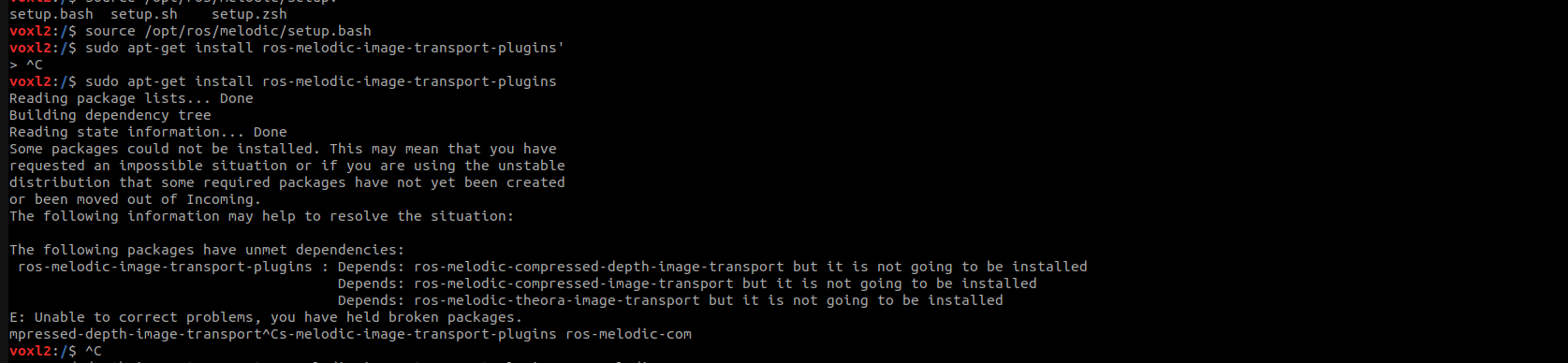
This error comes up in all versions of sdk starting from sdk v1.0.0 to 1.1.2
-
@Zachary-Lowell-0 said in voxlmpa2ros not working starling with sdk version 1.1.2:
sudo apt-get install ros-melodic-image-transport-plugins
Also I get this error when I try to install image transport
This error comes up in all versions of sdk starting from sdk v1.0.0 to 1.1.2
@Zachary-Lowell-0 anything more which I can do here?
-
It most likely requires more than just the plugins then - please run
sudo apt-get install ros-melodic-image-transport*and then rerun.
-
It most likely requires more than just the plugins then - please run
sudo apt-get install ros-melodic-image-transport*and then rerun.
@Zachary-Lowell-0 Ok got it this worked. Thanks


Reading along? Create a free ModalAI Forum account to join in.
With an account you can reply, ask your own question, get an email when a ModalAI engineer answers, and mark the reply that solved it. Your place in each thread is saved between visits.
Questions about VOXL, Flight Core, ESCs and ModalAI drones are answered here by the engineers who build them.
Register Login