Skip to content
  • Categories
  • Recent
  • Tags
  • Popular
  • Users
  • Groups
Collapse
Brand Logo

ModalAI Forum

  1. ModalAI Support Forum
  2. VOXL Dev Drones
  3. Sentinel
  4. Sentinel Drone (VOXL2) initialize error

Sentinel Drone (VOXL2) initialize error

Scheduled Pinned Locked Moved Sentinel
8 Posts 2 Posters 960 Views 1 Watching
  • Oldest to Newest
  • Newest to Oldest
  • Most Votes
Reply
  • Reply as topic
Log in to reply
This topic has been deleted. Only users with topic management privileges can see it.
  • I Offline
    I Offline
    inha_baek
    wrote on last edited by
    #1

    Hello.

    We recently conducted tests on your SENTINEL drones and encountered some issues with one of the units. The issues are as follows.

    • When the main power source (Platform Battery) connected with the drone, only the VOXL2 modules light turned on, but other devicess led lights remained inactive.
    • We tried to connect the VOXL2s system with a USB C-type connector, theres no linking from the VOXL2 module.
    • We followed your provided instructions, attempting to connect it to an UBUNTU PC and using the terminal command "adb devices", but no detection for VOXL2 was registered.

    We kindly request your prompt assistance in resolving this issue. Your immediate attention to this matter would be greatly appreciated.

    Thanks.

    tomT 1 Reply Last reply
    0
    • I inha_baek

      Hello.

      We recently conducted tests on your SENTINEL drones and encountered some issues with one of the units. The issues are as follows.

      • When the main power source (Platform Battery) connected with the drone, only the VOXL2 modules light turned on, but other devicess led lights remained inactive.
      • We tried to connect the VOXL2s system with a USB C-type connector, theres no linking from the VOXL2 module.
      • We followed your provided instructions, attempting to connect it to an UBUNTU PC and using the terminal command "adb devices", but no detection for VOXL2 was registered.

      We kindly request your prompt assistance in resolving this issue. Your immediate attention to this matter would be greatly appreciated.

      Thanks.

      tomT Online
      tomT Online
      tom
      admin
      wrote on last edited by
      #2

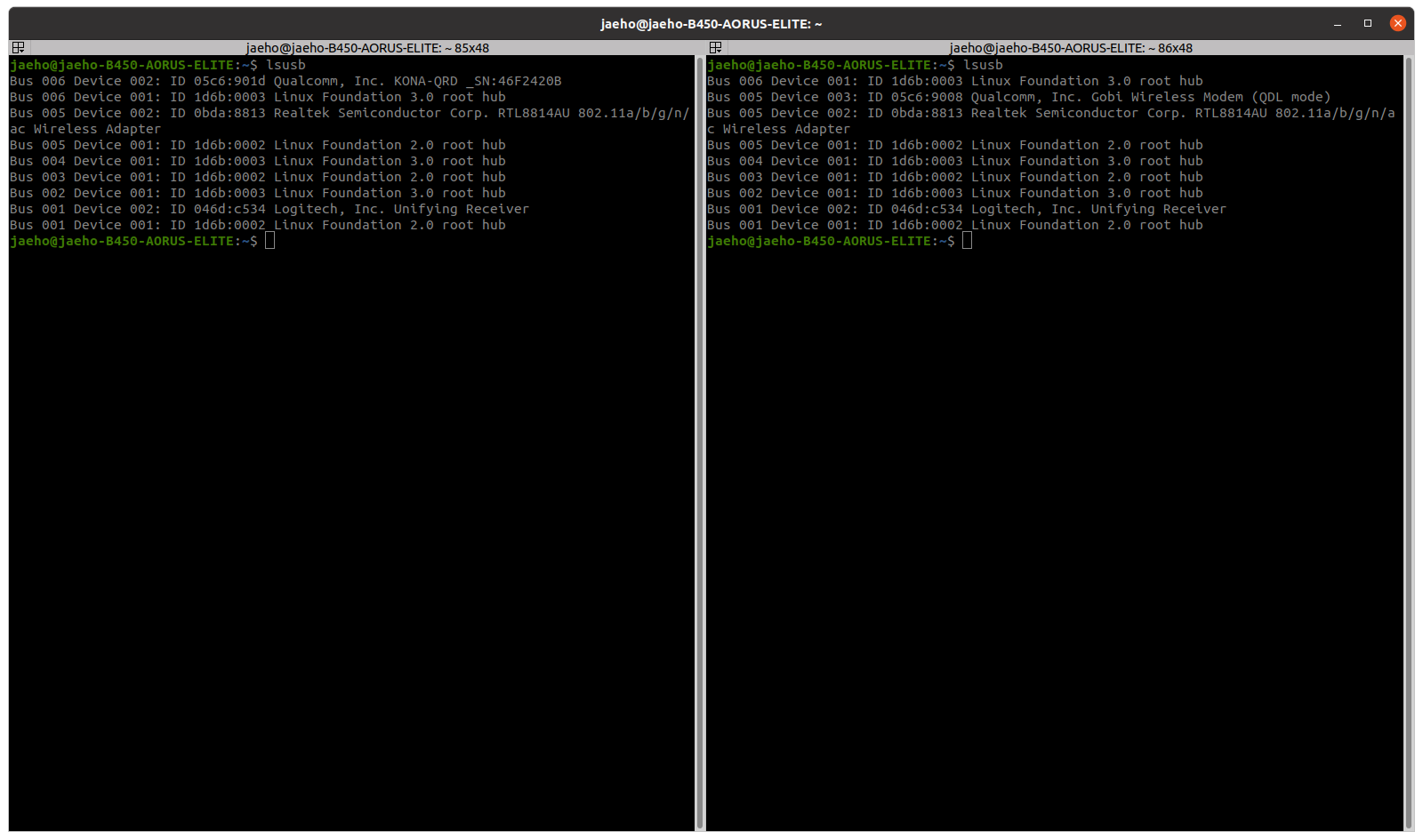
      @inha_baek What do you see with lsusb on your Ubuntu machine with the USB connected + sentinel powered?

      I 1 Reply Last reply
      0
      • tomT tom

        @inha_baek What do you see with lsusb on your Ubuntu machine with the USB connected + sentinel powered?

        I Offline
        I Offline
        inha_baek
        wrote on last edited by
        #3

        @tom

        Screenshot from 2023-10-12 13-15-09.png

        Here is Ubuntu machine`s screenshot. Left one is normal (one of the units that successfully finished initial setting), and a right one is abnormal.

        tomT 1 Reply Last reply
        0
        • I inha_baek

          @tom

          Screenshot from 2023-10-12 13-15-09.png

          Here is Ubuntu machine`s screenshot. Left one is normal (one of the units that successfully finished initial setting), and a right one is abnormal.

          tomT Online
          tomT Online
          tom
          admin
          wrote on last edited by
          #4

          @inha_baek It appears as thought the voxl2 has entered in to "QDL mode" which means that you will have to follow the unbricking process in order to bring it back to a working state:
          https://docs.modalai.com/voxl2-unbricking/#unbricking-your-voxl-2

          I 1 Reply Last reply
          0
          • tomT tom

            @inha_baek It appears as thought the voxl2 has entered in to "QDL mode" which means that you will have to follow the unbricking process in order to bring it back to a working state:
            https://docs.modalai.com/voxl2-unbricking/#unbricking-your-voxl-2

            I Offline
            I Offline
            inha_baek
            wrote on last edited by
            #5

            @tom

            Thanks for reply.

            With your recommendation, we followed that guide (https://docs.modalai.com/voxl2-unbricking/#unbricking-your-voxl-2).
            But in Initiate Flash step, we saw this lines in host pc`s terminal.
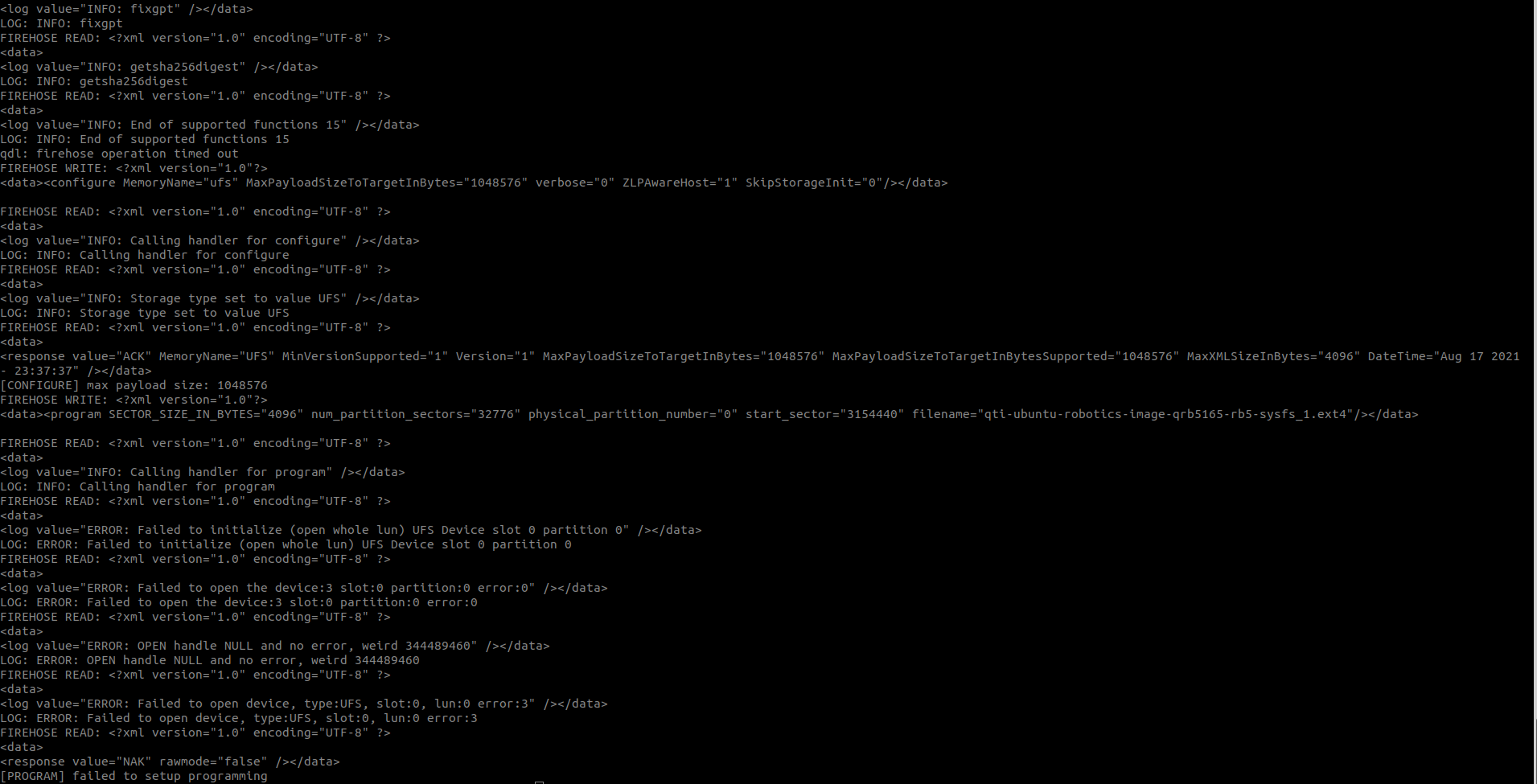
            Screenshot from 2023-10-17 15-15-23.png

            Please check this.

            tomT 1 Reply Last reply
            0
            • I inha_baek

              @tom

              Thanks for reply.

              With your recommendation, we followed that guide (https://docs.modalai.com/voxl2-unbricking/#unbricking-your-voxl-2).
              But in Initiate Flash step, we saw this lines in host pc`s terminal.

              Screenshot from 2023-10-17 15-15-23.png

              Please check this.

              tomT Online
              tomT Online
              tom
              admin
              wrote on last edited by
              #6

              @inha_baek Do you have the SW2 switch flipped and did you use sudo?

              Sometime it takes a power cycle and retry to get it going.

              I 1 Reply Last reply
              0
              • tomT tom

                @inha_baek Do you have the SW2 switch flipped and did you use sudo?

                Sometime it takes a power cycle and retry to get it going.

                I Offline
                I Offline
                inha_baek
                wrote on last edited by
                #7

                @tom
                Of course we did with SW switch flipped and 'sudo'.
                Also we retried a lot of times.

                And we got same result in every tries.

                tomT 1 Reply Last reply
                0
                • I inha_baek

                  @tom
                  Of course we did with SW switch flipped and 'sudo'.
                  Also we retried a lot of times.

                  And we got same result in every tries.

                  tomT Online
                  tomT Online
                  tom
                  admin
                  wrote on last edited by
                  #8

                  @inha_baek If QDL still isn't working I would look into an RMA: https://www.modalai.com/pages/rma

                  1 Reply Last reply
                  0

                  Hello! It looks like you're interested in this conversation, but you don't have an account yet.

                  Getting fed up of having to scroll through the same posts each visit? When you register for an account, you'll always come back to exactly where you were before, and choose to be notified of new replies (either via email, or push notification). You'll also be able to save bookmarks and upvote posts to show your appreciation to other community members.

                  With your input, this post could be even better 💗

                  Register Login
                  Reply
                  • Reply as topic
                  Log in to reply
                  • Oldest to Newest
                  • Newest to Oldest
                  • Most Votes


                  ModalAI
                  Categories Recent Tags ModalAI.com Docs
                  © 2026 ModalAI® · Accelerating autonomy for smaller, smarter, safer drones · Powered by NodeBB
                  • Login

                  • Don't have an account? Register

                  • Login or register to search.
                  • First post
                    Last post
                  0
                  • Categories
                  • Recent
                  • Tags
                  • Popular
                  • Users
                  • Groups