
adb is not working after tflite deployment.
-
@tom Indeed, I have previously utilized the same computer without any issues, and the connection was established successfully. It is perplexing since I have not implemented any firewall restrictions on the PC. I am uncertain about the underlying cause of this connectivity problem.
-
@tom Yes, the QGC has auto-connect over UDP enabled.
we see the status of voxl-px4 as well,
rb5:~$ systemctl status voxl-px4
● voxl-px4.service - px4
   Loaded: loaded (/etc/systemd/system/voxl-px4.service; enabled; vendor preset: enabled)
   Active: active (running) since Tue 2022-09-06 03:18:14 UTC; 11min ago
 Main PID: 2892 (voxl-px4)
    Tasks: 26 (limit: 4915)
   CGroup: /system.slice/voxl-px4.service
           ├─2892 /bin/bash /usr/bin/voxl-px4 -d
           └─2904 px4 -d -s /etc/modalai/voxl-px4.config

Sep 06 03:26:44 m0052 bash[2892]: INFO  [PreFlightCheck] Failed EKF sensor bias preflight check
Sep 06 03:26:44 m0052 bash[2892]: ERROR [muorb] SLPI: MAG #0 failed:  TIMEOUT!
Sep 06 03:26:44 m0052 bash[2892]: INFO  [PreFlightCheck] Failed EKF sensor bias preflight check
Sep 06 03:26:44 m0052 bash[2892]: ERROR [muorb] SLPI: MAG #0 failed:  TIMEOUT!
Sep 06 03:26:44 m0052 bash[2892]: INFO  [PreFlightCheck] Failed EKF sensor bias preflight check
Sep 06 03:26:44 m0052 bash[2892]: INFO  [PreFlightCheck] Failed EKF sensor bias preflight check
Sep 06 03:26:44 m0052 bash[2892]: ERROR [muorb] SLPI: MAG #0 failed:  TIMEOUT!
Sep 06 03:26:44 m0052 bash[2892]: INFO  [PreFlightCheck] Failed EKF sensor bias preflight check
Sep 06 03:26:44 m0052 bash[2892]: ERROR [muorb] SLPI: MAG #0 failed:  TIMEOUT!
Sep 06 03:26:44 m0052 bash[2892]: ERROR [muorb] SLPI: MAG #0 failed:  TIMEOUT!
==================
the output of debugging the communication link as per https://docs.modalai.com/voxl-vision-px4-telemetry/rb5:/$ voxl-vision-px4 --debug_udp_recv Enabling UDP recv debugging loading our own config file ================================================================= Parameters as loaded from config file: config_file_version: 1 MAVLINK IO qgc_ip: NULL en_secondary_qgc: 0 secondary_qgc_ip: NULL qgc_udp_port_number: 14550 udp_mtu: 512 en_localhost_mavlink_udp 1 localhost_udp_port_number: 14551 VIO en_vio: 1 vio_pipe: qvio en_send_vio_to_qgc: 0 en_reset_vio_if_initialized_inverted: 1 vio_warmup_s: 3.000000 send_odom_while_failed: 0 MISC FEATURES horizon_cal_tolerance: 0.500000 OFFBOARD MODE offboard_mode: off follow_tag_id: 0 figure_eight_move_home: 1 robot_radius: 0.300000 collision_sampling_dt: 0.100000 max_lookahead_distance: 1.000000 FIXED FRAME RELOCALIZATION en_tag_fixed_frame: 0 fixed_frame_filter_len: 5 en_transform_mavlink_pos_setpoints_from_fixed_frame:0 COLLISION PREVENTION (VOA) en_voa: 1 en_send_voa_to_qgc: 0 voa_upper_bound_m: -0.150000 voa_lower_bound_m: 0.150000 voa_memory_s: 1.000000 voa_input #0 enabled: 1 type: point_cloud input_pipe: dfs_point_cloud frame: stereo_l voa_input #1 enabled: 1 type: point_cloud input_pipe: stereo_front_pc frame: stereo_front_l voa_input #2 enabled: 1 type: point_cloud input_pipe: stereo_rear_pc frame: stereo_rear_l voa_input #3 enabled: 1 type: tof input_pipe: tof frame: tof voa_input #4 enabled: 1 type: rangefinder input_pipe: rangefinders frame: body ================================================================= loading extrinsics config file loading horizon cal file existing instance of voxl-vision-px4 found, attempting to stop it starting geometry module starting px4 monitor starting px4 mavlink Waiting to connect to voxl-mavlink-server Connected to voxl-mavlink-server starting udp mavlink Adding manual QGC IP address to udp connection list: NULL WARNING: invalid qgc_ip, this is fine if you don't want to use it starting fixed pose input starting vio manager Connected to VIO pipe: qvio updating to use imu: imu_px4 done updating transforms to use imu: imu_px4 starting tag manager starting voa manager Connected to voxl-tag-detector Connected to pipe: stereo_front_pc Connected to pipe: stereo_rear_pc starting horizon cal module Init complete WARNING: connected to voxl-mavlink-server but no messages from PX4 UDP recv msg ID: 0 sysid:255 from port: 14550 IP: 172.16.0.203 Added new UDP connection to 172.16.0.203 UDP recv msg ID: 0 sysid:255 from port: 14550 IP: 172.16.0.203 UDP recv msg ID: 0 sysid:255 from port: 14550 IP: 172.16.0.203 UDP recv msg ID: 0 sysid:255 from port: 14550 IP: 172.16.0.203 UDP recv msg ID: 0 sysid:255 from port: 14550 IP: 172.16.0.203 UDP recv msg ID: 0 sysid:255 from port: 14550 IP: 172.16.0.203 UDP recv msg ID: 0 sysid:255 from port: 14550 IP: 172.16.0.203 UDP recv msg ID: 0 sysid:255 from port: 14550 IP: 172.16.0.203 UDP recv msg ID: 0 sysid:255 from port: 14550 IP: 172.16.0.203 UDP recv msg ID: 0 sysid:255 from port: 14550 IP: 172.16.0.203Is there any specific configuration or installation that we need to do for px4 or QGC after installing the VOXL SDK image on a rb5 drone?
-
@tom Yes, the QGC has auto-connect over UDP enabled.
we see the status of voxl-px4 as well,
rb5:~$ systemctl status voxl-px4
● voxl-px4.service - px4
   Loaded: loaded (/etc/systemd/system/voxl-px4.service; enabled; vendor preset: enabled)
   Active: active (running) since Tue 2022-09-06 03:18:14 UTC; 11min ago
 Main PID: 2892 (voxl-px4)
    Tasks: 26 (limit: 4915)
   CGroup: /system.slice/voxl-px4.service
           ├─2892 /bin/bash /usr/bin/voxl-px4 -d
           └─2904 px4 -d -s /etc/modalai/voxl-px4.config

Sep 06 03:26:44 m0052 bash[2892]: INFO  [PreFlightCheck] Failed EKF sensor bias preflight check
Sep 06 03:26:44 m0052 bash[2892]: ERROR [muorb] SLPI: MAG #0 failed:  TIMEOUT!
Sep 06 03:26:44 m0052 bash[2892]: INFO  [PreFlightCheck] Failed EKF sensor bias preflight check
Sep 06 03:26:44 m0052 bash[2892]: ERROR [muorb] SLPI: MAG #0 failed:  TIMEOUT!
Sep 06 03:26:44 m0052 bash[2892]: INFO  [PreFlightCheck] Failed EKF sensor bias preflight check
Sep 06 03:26:44 m0052 bash[2892]: INFO  [PreFlightCheck] Failed EKF sensor bias preflight check
Sep 06 03:26:44 m0052 bash[2892]: ERROR [muorb] SLPI: MAG #0 failed:  TIMEOUT!
Sep 06 03:26:44 m0052 bash[2892]: INFO  [PreFlightCheck] Failed EKF sensor bias preflight check
Sep 06 03:26:44 m0052 bash[2892]: ERROR [muorb] SLPI: MAG #0 failed:  TIMEOUT!
Sep 06 03:26:44 m0052 bash[2892]: ERROR [muorb] SLPI: MAG #0 failed:  TIMEOUT!
==================
the output of debugging the communication link as per https://docs.modalai.com/voxl-vision-px4-telemetry/rb5:/$ voxl-vision-px4 --debug_udp_recv Enabling UDP recv debugging loading our own config file ================================================================= Parameters as loaded from config file: config_file_version: 1 MAVLINK IO qgc_ip: NULL en_secondary_qgc: 0 secondary_qgc_ip: NULL qgc_udp_port_number: 14550 udp_mtu: 512 en_localhost_mavlink_udp 1 localhost_udp_port_number: 14551 VIO en_vio: 1 vio_pipe: qvio en_send_vio_to_qgc: 0 en_reset_vio_if_initialized_inverted: 1 vio_warmup_s: 3.000000 send_odom_while_failed: 0 MISC FEATURES horizon_cal_tolerance: 0.500000 OFFBOARD MODE offboard_mode: off follow_tag_id: 0 figure_eight_move_home: 1 robot_radius: 0.300000 collision_sampling_dt: 0.100000 max_lookahead_distance: 1.000000 FIXED FRAME RELOCALIZATION en_tag_fixed_frame: 0 fixed_frame_filter_len: 5 en_transform_mavlink_pos_setpoints_from_fixed_frame:0 COLLISION PREVENTION (VOA) en_voa: 1 en_send_voa_to_qgc: 0 voa_upper_bound_m: -0.150000 voa_lower_bound_m: 0.150000 voa_memory_s: 1.000000 voa_input #0 enabled: 1 type: point_cloud input_pipe: dfs_point_cloud frame: stereo_l voa_input #1 enabled: 1 type: point_cloud input_pipe: stereo_front_pc frame: stereo_front_l voa_input #2 enabled: 1 type: point_cloud input_pipe: stereo_rear_pc frame: stereo_rear_l voa_input #3 enabled: 1 type: tof input_pipe: tof frame: tof voa_input #4 enabled: 1 type: rangefinder input_pipe: rangefinders frame: body ================================================================= loading extrinsics config file loading horizon cal file existing instance of voxl-vision-px4 found, attempting to stop it starting geometry module starting px4 monitor starting px4 mavlink Waiting to connect to voxl-mavlink-server Connected to voxl-mavlink-server starting udp mavlink Adding manual QGC IP address to udp connection list: NULL WARNING: invalid qgc_ip, this is fine if you don't want to use it starting fixed pose input starting vio manager Connected to VIO pipe: qvio updating to use imu: imu_px4 done updating transforms to use imu: imu_px4 starting tag manager starting voa manager Connected to voxl-tag-detector Connected to pipe: stereo_front_pc Connected to pipe: stereo_rear_pc starting horizon cal module Init complete WARNING: connected to voxl-mavlink-server but no messages from PX4 UDP recv msg ID: 0 sysid:255 from port: 14550 IP: 172.16.0.203 Added new UDP connection to 172.16.0.203 UDP recv msg ID: 0 sysid:255 from port: 14550 IP: 172.16.0.203 UDP recv msg ID: 0 sysid:255 from port: 14550 IP: 172.16.0.203 UDP recv msg ID: 0 sysid:255 from port: 14550 IP: 172.16.0.203 UDP recv msg ID: 0 sysid:255 from port: 14550 IP: 172.16.0.203 UDP recv msg ID: 0 sysid:255 from port: 14550 IP: 172.16.0.203 UDP recv msg ID: 0 sysid:255 from port: 14550 IP: 172.16.0.203 UDP recv msg ID: 0 sysid:255 from port: 14550 IP: 172.16.0.203 UDP recv msg ID: 0 sysid:255 from port: 14550 IP: 172.16.0.203 UDP recv msg ID: 0 sysid:255 from port: 14550 IP: 172.16.0.203Is there any specific configuration or installation that we need to do for px4 or QGC after installing the VOXL SDK image on a rb5 drone?
-
@bgaudel What does your voxl-vision-px4 config file look like?
cat /etc/modalai/voxl-vision-px4.conf?I'm seeing
qgc_ip: NULL, which may be the issue@tom we tried different settings. The following is the IP setup that we have on the LAN network using a router. "qgc_ip": "172.16.0.203", is my computer IP, and the drone IP is 172.16.0.75". Also, the ping test works back and forth.
rb5:/$ cat /etc/modalai/voxl-vision-px4.conf /** * VOXL Vision PX4 Configuration File * * version: don't touch this, used to keep track of changing config file formats * * ############################################################################## * ## Networking * ############################################################################## * * qgc_ip: * Manually inform voxl-vision-px4 of the IP address of your QGC Ground * Controller by providing the IP address of your ground station computer * in the “qgc_ip” field of the config file. This field is also configured * as one of the first questions in the configuration wizard. * If you wish to rely on QGC to initiate the connection to VOXL you can * leave this field as-is, blank, or “NULL”. Mavlink data is sent to this * IP on port 14550 by default, but this can be changed with the * qgc_udp_port_number config value. * * en_secondary_qgc: * Enable manually setting a second QGC ground station IP address. * * secondary_qgc_ip: * IP address for optional second QGC connection. Note that many more mavlink * connections can be made as long as they are initialized by the other device. * * qgc_udp_port_number: * Port to use for manual and automatic QGC connections, default 14550 * * udp_mtu: * Max size of UDP packet to send to QGC. Multiple mavlink messages will be * combined into one UDP packet to reduce network traffic. Set this to 0 to * send one UDP packet for every mavlink message. Default is 512 which * allows several mavlink messages per UDP packet. * * en_localhost_mavlink_udp: * If you are running MAVROS/MAVSDK onboard VOXL and wish to open access to * PX4 through a localhost UDP port simply ensure the follow feature is * enabled. This is set to true by default. This will allow one local process * to communicate with PX4 via port 14551 by default, NOT 14550 which is * reserved for connections outside the board. These separation prevents * conflicts between the two sockets. Both MAVROS and MAVSDK can be * configured to use this port. * * localhost_udp_port_number: * Port number for localhost UDP socket, default 14551 * * ############################################################################## * ## VIO * ############################################################################## * * en_vio: * Enable processing of VIO data from MPA to be sent to PX4 as mavlink * odometry messages. Enabled by default. * * vio_pipe: * Which pipe to subscribe to VIO data. Must be a standard libmodal-pipe * vio_data_t type. Default is qvio * * en_send_vio_to_qgc: * Enable sending of VIO odometry messages to QGC for debug. * Note PX4 also sends odometry messages to QGC, so look for * the messages in mavlink-inspector marked as from component 197 * * en_reset_vio_if_initialized_inverted: * For VIO algorithms like qVIO that can initialize in any orientation * and output their estimate of the gravity vector, we suggest leaving * this enabled to allow vvpx4 to automatically send the reset signal * back to the VIO pipe if VIO was initialized upside-down or sufficiently * off-level. Helpful if the user powers on a drone while carrying it to * the flight area and VIO starts too early. * * vio_warmup_s: * Wait this for this amount of time of having good VIO data before * actually starting to send to PX4. This helps stop EKF2 getting * confused if VIO flickers in and out while struggling to init. * Set to 0 to disable the feature. * * send_odom_while_failed: * Off by default. Reserved for the future when PX4 supports quality field * * ############################################################################## * ## APQ8096-only Features * ############################################################################## * * en_set_clock_from_gps: * Enable setting the VOXL system time to GPS time if no NTP server can be * reached via network to set the time. * * en_force_onboard_mav1_mode: * Force PX4 to use onboard mode for mavlink 1 channel which is the channel * apq8096 (VOXL1) uses to communicate UART Mavlink with PX4. Not applicable * to qrb5165-based platforms. Sets the MAV1_MODE PX4 param. * * en_reset_px4_on_error: * Trigger a reboot of PX4 one some of PX4's unrecoverable errors, * Not applicable to qrb5165 * Yaw estimate error & High Accelerometer Bias and both detected * * ############################################################################## * ## Misc Features * ############################################################################## * * horizon_cal_tolerance: * Allowable standard deviation in roll/pitch values to consider the drone * stable enough in flight to do a PX4 horizon calibration. Default is 0.45, * you can increase this slightly if flying in a small indoor area or with * a drone that does not hold still very well. * See https://docs.modalai.com/calibrate-px4-horizon/ * * ############################################################################## * ## offboard mode config * ############################################################################## * * offboard_mode: The following are valid strings * off: VVPX4 will not send any offboard commands to PX4 * figure_eight: Default value, VVPX4 commands PX4 to fly a figure 8 path * follow_tag: Drone will follow an apriltag around. Very dangerous, not * recommended for customer use, for ModalAI R&D only. * trajectory: VVPX4 receives polynomial trajectories by pipe and commands * PX4 to follow the trajectory path. Still in development. * * follow_tag_id: * Apriltag ID to follow in follow_tag mode * * figure_eight_move_home: * Enable by default, resets the center of the figure 8 path to wherever * the drone is when flipped into offboard mode. When disabled, the drone * will quickly fly back to the XYZ point 0,0,-1.5 in VIO frame before * starting the figure 8. Disabling this feature can be dangerous if VIO * has drifted significantly. * * robot_radius: * Robot radius to use when checking collisions within the trajectory monitor. * The trajectory monitor is only active when in trajectory mode * * collision_sampling_dt: * The time step to sample along the polynomials by when checking for collisions * in the collision monitor. * * max_lookahead_distance: * Maximum distance to look along the trajectory. Sensor data further out can be * unrealiable so keeping this value small reduces false positives * * ############################################################################## * ## Fixed Frame Tag Relocalization * ############################################################################## * * en_tag_fixed_frame: * Enable fixed frame relocalization via voa_inputs. * See: https://docs.modalai.com/voxl-vision-px4-apriltag-relocalization/ * * fixed_frame_filter_len: * Length of the moving average filter to use for smooth relocalization * when a tag is detected. Default is 5, a longer filter will result in * smoother behavior when a new tag comes into view. Set to 1 to do no * filtering at all and assume every tag detection is accurate. * * en_transform_mavlink_pos_setpoints_from_fixed_frame: * When enabled, mavlink position_target_local_ned_t commands received on * via UDP will be assumed to be in fixed frame and are then transformed * to local frame before being sent to PX4. This allows offboard mode * position commands from MAVROS/MAVSDK to be in fixed frame relative to * voa_inputs even though PX4/EKF2 operates in local frame relative to where * VIO initialized. * * ############################################################################## * ## Collision Prevention (VOA) * ## Settings for configuring data sent to PX4 for Collision Prevention * ############################################################################## * * en_voa: * Enable processing of DFS and TOF data to be sent to PX4 as mavlink * obstacle_distance messages for collision prevention in position mode. * * en_send_voa_to_qgc: * Enable sending of VOA obstacle_distance messages to QGC for debug. * * voa_lower_bound_m & voa_upper_bound_m: * VOA ignores obstacles above and below the upper and lower bounds. * Remember, Z points downwards in body and NED frames, so the lower bound * is a positive number, and the upper bound is a negative number. * Defaults are lower: 0.15 upper: -0.15 Units are in meters. * * voa_memory_s: * number of seconds to keep track of sensor readings for VOA * default: 1.0 * * voa_inputs: * Array of pipes to subscribe to for use with VOA, up to 10 supported * Each entry has 4 fields: * * enabled: true or false, it's safe to leave this enabled when the pipe is missing * type: can be point_cloud, tof, or rangefinder * input_pipe: pipe name, e.g. stereo_front_pc, rangefinders, tof, etc * frame: frame of reference, should be listed in /etc/modalai/extrinsics/conf * */ { "config_file_version": 1, "qgc_ip": "172.16.0.203", "en_secondary_qgc": false, "secondary_qgc_ip": "192.168.1.214", "qgc_udp_port_number": 14550, "udp_mtu": 512, "en_localhost_mavlink_udp": true, "localhost_udp_port_number": 14551, "vio_pipe": "qvio", "en_vio": true, "en_send_vio_to_qgc": false, "en_reset_vio_if_initialized_inverted": true, "vio_warmup_s": 3, "send_odom_while_failed": false, "horizon_cal_tolerance": 0.5, "offboard_mode": "off", "follow_tag_id": 0, "figure_eight_move_home": true, "robot_radius": 0.300000011920929, "collision_sampling_dt": 0.1, "max_lookahead_distance": 1, "en_tag_fixed_frame": false, "fixed_frame_filter_len": 5, "en_transform_mavlink_pos_setpoints_from_fixed_frame": false, "en_voa": true, "en_send_voa_to_qgc": false, "voa_upper_bound_m": -0.15000000596046448, "voa_lower_bound_m": 0.15000000596046448, "voa_memory_s": 1, "voa_inputs": [{ "enabled": true, "type": "point_cloud", "input_pipe": "dfs_point_cloud", "frame": "stereo_l" }, { "enabled": true, "type": "point_cloud", "input_pipe": "stereo_front_pc", "frame": "stereo_front_l" }, { "enabled": true, "type": "point_cloud", "input_pipe": "stereo_rear_pc", "frame": "stereo_rear_l" }, { "enabled": true, "type": "tof", "input_pipe": "tof", "frame": "tof" }, { "enabled": true, "type": "rangefinder", "input_pipe": "rangefinders", "frame": "body" }] } -
@tom we tried different settings. The following is the IP setup that we have on the LAN network using a router. "qgc_ip": "172.16.0.203", is my computer IP, and the drone IP is 172.16.0.75". Also, the ping test works back and forth.
rb5:/$ cat /etc/modalai/voxl-vision-px4.conf /** * VOXL Vision PX4 Configuration File * * version: don't touch this, used to keep track of changing config file formats * * ############################################################################## * ## Networking * ############################################################################## * * qgc_ip: * Manually inform voxl-vision-px4 of the IP address of your QGC Ground * Controller by providing the IP address of your ground station computer * in the “qgc_ip” field of the config file. This field is also configured * as one of the first questions in the configuration wizard. * If you wish to rely on QGC to initiate the connection to VOXL you can * leave this field as-is, blank, or “NULL”. Mavlink data is sent to this * IP on port 14550 by default, but this can be changed with the * qgc_udp_port_number config value. * * en_secondary_qgc: * Enable manually setting a second QGC ground station IP address. * * secondary_qgc_ip: * IP address for optional second QGC connection. Note that many more mavlink * connections can be made as long as they are initialized by the other device. * * qgc_udp_port_number: * Port to use for manual and automatic QGC connections, default 14550 * * udp_mtu: * Max size of UDP packet to send to QGC. Multiple mavlink messages will be * combined into one UDP packet to reduce network traffic. Set this to 0 to * send one UDP packet for every mavlink message. Default is 512 which * allows several mavlink messages per UDP packet. * * en_localhost_mavlink_udp: * If you are running MAVROS/MAVSDK onboard VOXL and wish to open access to * PX4 through a localhost UDP port simply ensure the follow feature is * enabled. This is set to true by default. This will allow one local process * to communicate with PX4 via port 14551 by default, NOT 14550 which is * reserved for connections outside the board. These separation prevents * conflicts between the two sockets. Both MAVROS and MAVSDK can be * configured to use this port. * * localhost_udp_port_number: * Port number for localhost UDP socket, default 14551 * * ############################################################################## * ## VIO * ############################################################################## * * en_vio: * Enable processing of VIO data from MPA to be sent to PX4 as mavlink * odometry messages. Enabled by default. * * vio_pipe: * Which pipe to subscribe to VIO data. Must be a standard libmodal-pipe * vio_data_t type. Default is qvio * * en_send_vio_to_qgc: * Enable sending of VIO odometry messages to QGC for debug. * Note PX4 also sends odometry messages to QGC, so look for * the messages in mavlink-inspector marked as from component 197 * * en_reset_vio_if_initialized_inverted: * For VIO algorithms like qVIO that can initialize in any orientation * and output their estimate of the gravity vector, we suggest leaving * this enabled to allow vvpx4 to automatically send the reset signal * back to the VIO pipe if VIO was initialized upside-down or sufficiently * off-level. Helpful if the user powers on a drone while carrying it to * the flight area and VIO starts too early. * * vio_warmup_s: * Wait this for this amount of time of having good VIO data before * actually starting to send to PX4. This helps stop EKF2 getting * confused if VIO flickers in and out while struggling to init. * Set to 0 to disable the feature. * * send_odom_while_failed: * Off by default. Reserved for the future when PX4 supports quality field * * ############################################################################## * ## APQ8096-only Features * ############################################################################## * * en_set_clock_from_gps: * Enable setting the VOXL system time to GPS time if no NTP server can be * reached via network to set the time. * * en_force_onboard_mav1_mode: * Force PX4 to use onboard mode for mavlink 1 channel which is the channel * apq8096 (VOXL1) uses to communicate UART Mavlink with PX4. Not applicable * to qrb5165-based platforms. Sets the MAV1_MODE PX4 param. * * en_reset_px4_on_error: * Trigger a reboot of PX4 one some of PX4's unrecoverable errors, * Not applicable to qrb5165 * Yaw estimate error & High Accelerometer Bias and both detected * * ############################################################################## * ## Misc Features * ############################################################################## * * horizon_cal_tolerance: * Allowable standard deviation in roll/pitch values to consider the drone * stable enough in flight to do a PX4 horizon calibration. Default is 0.45, * you can increase this slightly if flying in a small indoor area or with * a drone that does not hold still very well. * See https://docs.modalai.com/calibrate-px4-horizon/ * * ############################################################################## * ## offboard mode config * ############################################################################## * * offboard_mode: The following are valid strings * off: VVPX4 will not send any offboard commands to PX4 * figure_eight: Default value, VVPX4 commands PX4 to fly a figure 8 path * follow_tag: Drone will follow an apriltag around. Very dangerous, not * recommended for customer use, for ModalAI R&D only. * trajectory: VVPX4 receives polynomial trajectories by pipe and commands * PX4 to follow the trajectory path. Still in development. * * follow_tag_id: * Apriltag ID to follow in follow_tag mode * * figure_eight_move_home: * Enable by default, resets the center of the figure 8 path to wherever * the drone is when flipped into offboard mode. When disabled, the drone * will quickly fly back to the XYZ point 0,0,-1.5 in VIO frame before * starting the figure 8. Disabling this feature can be dangerous if VIO * has drifted significantly. * * robot_radius: * Robot radius to use when checking collisions within the trajectory monitor. * The trajectory monitor is only active when in trajectory mode * * collision_sampling_dt: * The time step to sample along the polynomials by when checking for collisions * in the collision monitor. * * max_lookahead_distance: * Maximum distance to look along the trajectory. Sensor data further out can be * unrealiable so keeping this value small reduces false positives * * ############################################################################## * ## Fixed Frame Tag Relocalization * ############################################################################## * * en_tag_fixed_frame: * Enable fixed frame relocalization via voa_inputs. * See: https://docs.modalai.com/voxl-vision-px4-apriltag-relocalization/ * * fixed_frame_filter_len: * Length of the moving average filter to use for smooth relocalization * when a tag is detected. Default is 5, a longer filter will result in * smoother behavior when a new tag comes into view. Set to 1 to do no * filtering at all and assume every tag detection is accurate. * * en_transform_mavlink_pos_setpoints_from_fixed_frame: * When enabled, mavlink position_target_local_ned_t commands received on * via UDP will be assumed to be in fixed frame and are then transformed * to local frame before being sent to PX4. This allows offboard mode * position commands from MAVROS/MAVSDK to be in fixed frame relative to * voa_inputs even though PX4/EKF2 operates in local frame relative to where * VIO initialized. * * ############################################################################## * ## Collision Prevention (VOA) * ## Settings for configuring data sent to PX4 for Collision Prevention * ############################################################################## * * en_voa: * Enable processing of DFS and TOF data to be sent to PX4 as mavlink * obstacle_distance messages for collision prevention in position mode. * * en_send_voa_to_qgc: * Enable sending of VOA obstacle_distance messages to QGC for debug. * * voa_lower_bound_m & voa_upper_bound_m: * VOA ignores obstacles above and below the upper and lower bounds. * Remember, Z points downwards in body and NED frames, so the lower bound * is a positive number, and the upper bound is a negative number. * Defaults are lower: 0.15 upper: -0.15 Units are in meters. * * voa_memory_s: * number of seconds to keep track of sensor readings for VOA * default: 1.0 * * voa_inputs: * Array of pipes to subscribe to for use with VOA, up to 10 supported * Each entry has 4 fields: * * enabled: true or false, it's safe to leave this enabled when the pipe is missing * type: can be point_cloud, tof, or rangefinder * input_pipe: pipe name, e.g. stereo_front_pc, rangefinders, tof, etc * frame: frame of reference, should be listed in /etc/modalai/extrinsics/conf * */ { "config_file_version": 1, "qgc_ip": "172.16.0.203", "en_secondary_qgc": false, "secondary_qgc_ip": "192.168.1.214", "qgc_udp_port_number": 14550, "udp_mtu": 512, "en_localhost_mavlink_udp": true, "localhost_udp_port_number": 14551, "vio_pipe": "qvio", "en_vio": true, "en_send_vio_to_qgc": false, "en_reset_vio_if_initialized_inverted": true, "vio_warmup_s": 3, "send_odom_while_failed": false, "horizon_cal_tolerance": 0.5, "offboard_mode": "off", "follow_tag_id": 0, "figure_eight_move_home": true, "robot_radius": 0.300000011920929, "collision_sampling_dt": 0.1, "max_lookahead_distance": 1, "en_tag_fixed_frame": false, "fixed_frame_filter_len": 5, "en_transform_mavlink_pos_setpoints_from_fixed_frame": false, "en_voa": true, "en_send_voa_to_qgc": false, "voa_upper_bound_m": -0.15000000596046448, "voa_lower_bound_m": 0.15000000596046448, "voa_memory_s": 1, "voa_inputs": [{ "enabled": true, "type": "point_cloud", "input_pipe": "dfs_point_cloud", "frame": "stereo_l" }, { "enabled": true, "type": "point_cloud", "input_pipe": "stereo_front_pc", "frame": "stereo_front_l" }, { "enabled": true, "type": "point_cloud", "input_pipe": "stereo_rear_pc", "frame": "stereo_rear_l" }, { "enabled": true, "type": "tof", "input_pipe": "tof", "frame": "tof" }, { "enabled": true, "type": "rangefinder", "input_pipe": "rangefinders", "frame": "body" }] } -
@bgaudel After modifying the conf file, are you restarting voxl-vision-px4 with
systemctl restart voxl-vision-px4?@tom yes we did
systemctl restart voxl-vision-px4after modifying the config file.The setting of our QGC is:
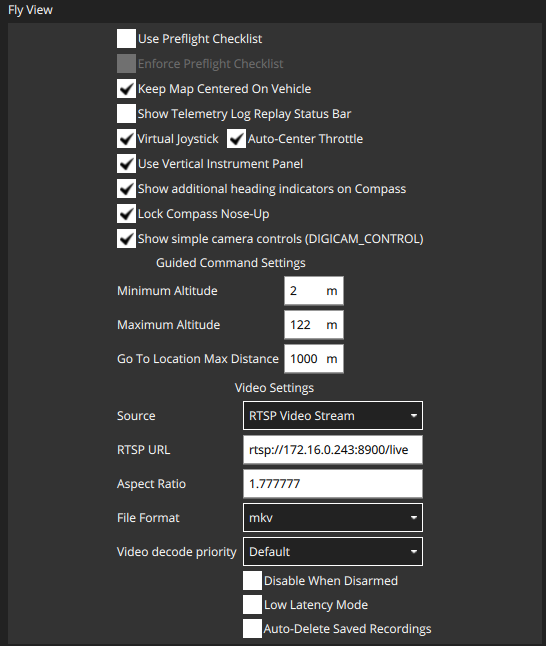
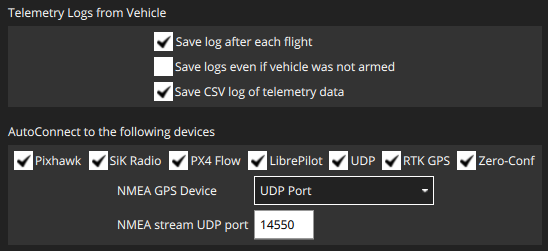
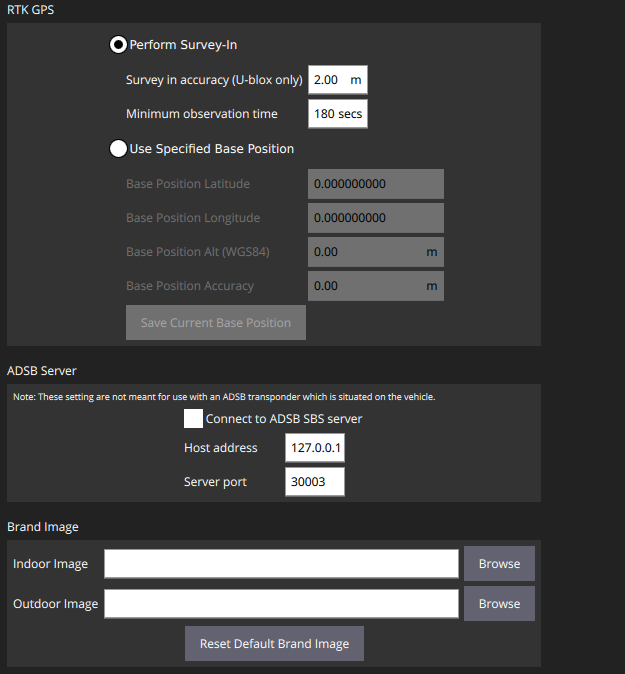 .
.Still not able to connect with QGC. We also tried the same thing on the two different PC. Are there any settings or configurations that we especially need to take care of?
-
@tom yes we did
systemctl restart voxl-vision-px4after modifying the config file.The setting of our QGC is:
.Still not able to connect with QGC. We also tried the same thing on the two different PC. Are there any settings or configurations that we especially need to take care of?
-
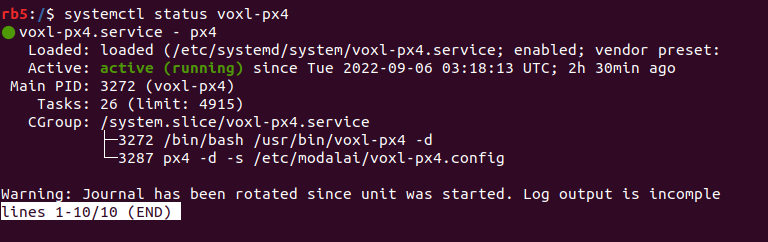
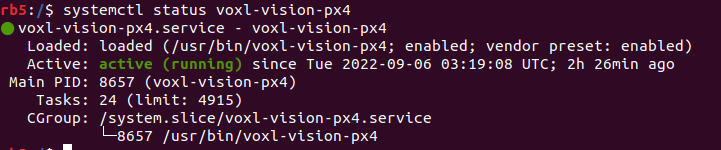
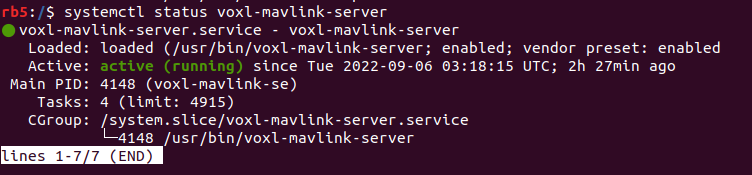
@bgaudel It seems as though you have all the configs setup correctly, can you post the status of the following services:
systemctl status voxl-px4 systemctl status voxl-vision-px4 systemctl status voxl-mavlink-server -
-
@bijay-gaudel How about:
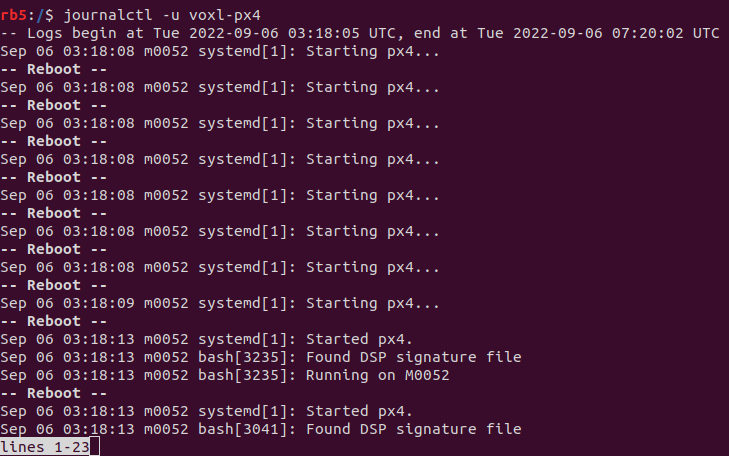
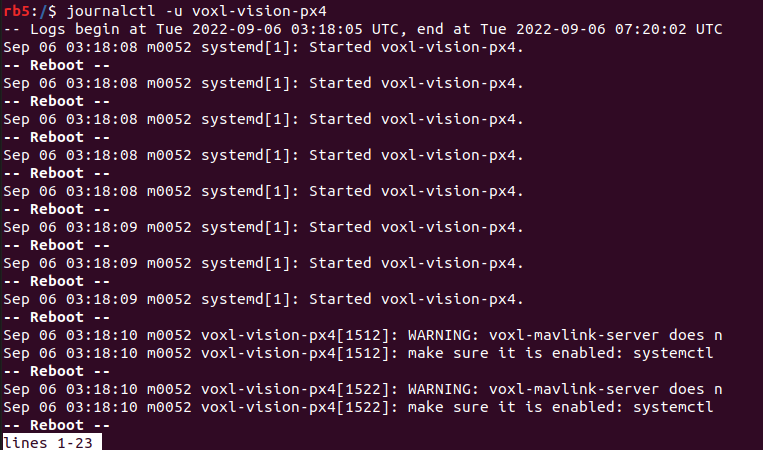
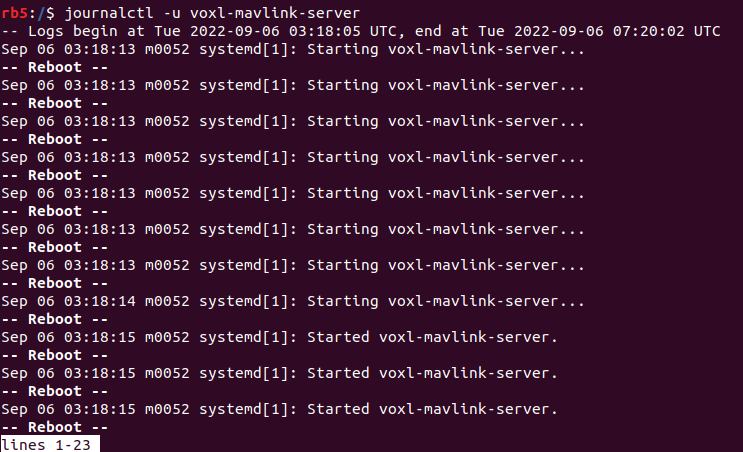
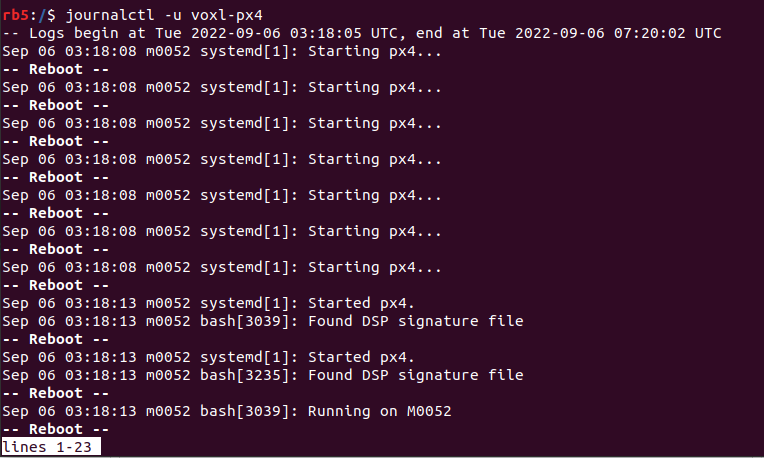
journalctl -u voxl-px4 journalctl -u voxl-vision-px4 journalctl -u voxl-mavlink-server -
@bijay-gaudel Let's reset all of the services to their default / working state for RB5, can you run the following:
# configure services to defaults
voxl-configure-mpa -f rb5-flight

# modify /etc/modalai/voxl-vision-px4 with your correct qgc_ip
vi  /etc/modalai/voxl-vision-px4

# reboot rb5
adb reboot
The services seem to be having issue in this current state based off of the WARNING
-
@bijay-gaudel Let's reset all of the services to their default / working state for RB5, can you run the following:
# configure services to defaults
voxl-configure-mpa -f rb5-flight

# modify /etc/modalai/voxl-vision-px4 with your correct qgc_ip
vi  /etc/modalai/voxl-vision-px4

# reboot rb5
adb reboot
The services seem to be having issue in this current state based off of the WARNING
This post is deleted! -
@bijay-gaudel Let's reset all of the services to their default / working state for RB5, can you run the following:
# configure services to defaults
voxl-configure-mpa -f rb5-flight

# modify /etc/modalai/voxl-vision-px4 with your correct qgc_ip
vi  /etc/modalai/voxl-vision-px4

# reboot rb5
adb reboot
The services seem to be having issue in this current state based off of the WARNING
@tom /etc/modalai/voxl-vision-px4 file seems empty.
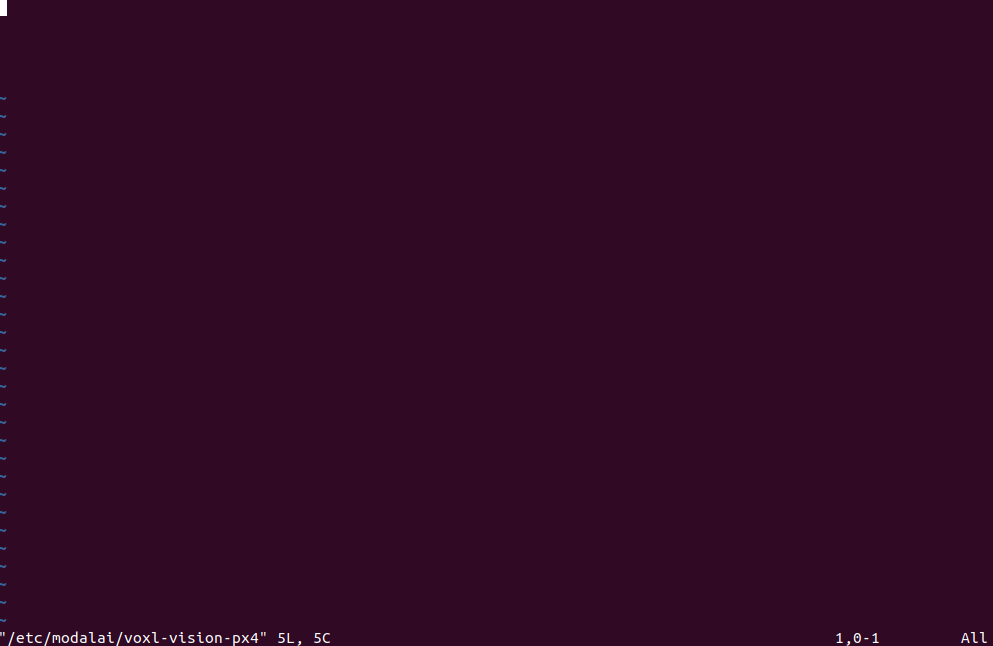
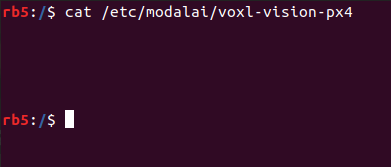
but
/etc/modalai/voxl-vision-px4.confighave data as:rb5:/$ cat /etc/modalai/voxl-vision-px4.conf /** * VOXL Vision PX4 Configuration File * * version: don't touch this, used to keep track of changing config file formats * * ############################################################################## * ## Networking * ############################################################################## * * qgc_ip: * Manually inform voxl-vision-px4 of the IP address of your QGC Ground * Controller by providing the IP address of your ground station computer * in the “qgc_ip” field of the config file. This field is also configured * as one of the first questions in the configuration wizard. * If you wish to rely on QGC to initiate the connection to VOXL you can * leave this field as-is, blank, or “NULL”. Mavlink data is sent to this * IP on port 14550 by default, but this can be changed with the * qgc_udp_port_number config value. * * en_secondary_qgc: * Enable manually setting a second QGC ground station IP address. * * secondary_qgc_ip: * IP address for optional second QGC connection. Note that many more mavlink * connections can be made as long as they are initialized by the other device. * * qgc_udp_port_number: * Port to use for manual and automatic QGC connections, default 14550 * * udp_mtu: * Max size of UDP packet to send to QGC. Multiple mavlink messages will be * combined into one UDP packet to reduce network traffic. Set this to 0 to * send one UDP packet for every mavlink message. Default is 512 which * allows several mavlink messages per UDP packet. * * en_localhost_mavlink_udp: * If you are running MAVROS/MAVSDK onboard VOXL and wish to open access to * PX4 through a localhost UDP port simply ensure the follow feature is * enabled. This is set to true by default. This will allow one local process * to communicate with PX4 via port 14551 by default, NOT 14550 which is * reserved for connections outside the board. These separation prevents * conflicts between the two sockets. Both MAVROS and MAVSDK can be * configured to use this port. * * localhost_udp_port_number: * Port number for localhost UDP socket, default 14551 * * ############################################################################## * ## VIO * ############################################################################## * * en_vio: * Enable processing of VIO data from MPA to be sent to PX4 as mavlink * odometry messages. Enabled by default. * * vio_pipe: * Which pipe to subscribe to VIO data. Must be a standard libmodal-pipe * vio_data_t type. Default is qvio * * en_send_vio_to_qgc: * Enable sending of VIO odometry messages to QGC for debug. * Note PX4 also sends odometry messages to QGC, so look for * the messages in mavlink-inspector marked as from component 197 * * en_reset_vio_if_initialized_inverted: * For VIO algorithms like qVIO that can initialize in any orientation * and output their estimate of the gravity vector, we suggest leaving * this enabled to allow vvpx4 to automatically send the reset signal * back to the VIO pipe if VIO was initialized upside-down or sufficiently * off-level. Helpful if the user powers on a drone while carrying it to * the flight area and VIO starts too early. * * vio_warmup_s: * Wait this for this amount of time of having good VIO data before * actually starting to send to PX4. This helps stop EKF2 getting * confused if VIO flickers in and out while struggling to init. * Set to 0 to disable the feature. * * send_odom_while_failed: * Off by default. Reserved for the future when PX4 supports quality field * * ############################################################################## * ## APQ8096-only Features * ############################################################################## * * en_set_clock_from_gps: * Enable setting the VOXL system time to GPS time if no NTP server can be * reached via network to set the time. * * en_force_onboard_mav1_mode: * Force PX4 to use onboard mode for mavlink 1 channel which is the channel * apq8096 (VOXL1) uses to communicate UART Mavlink with PX4. Not applicable * to qrb5165-based platforms. Sets the MAV1_MODE PX4 param. * * en_reset_px4_on_error: * Trigger a reboot of PX4 one some of PX4's unrecoverable errors, * Not applicable to qrb5165 * Yaw estimate error & High Accelerometer Bias and both detected * * ############################################################################## * ## Misc Features * ############################################################################## * * horizon_cal_tolerance: * Allowable standard deviation in roll/pitch values to consider the drone * stable enough in flight to do a PX4 horizon calibration. Default is 0.45, * you can increase this slightly if flying in a small indoor area or with * a drone that does not hold still very well. * See https://docs.modalai.com/calibrate-px4-horizon/ * * ############################################################################## * ## offboard mode config * ############################################################################## * * offboard_mode: The following are valid strings * off: VVPX4 will not send any offboard commands to PX4 * figure_eight: Default value, VVPX4 commands PX4 to fly a figure 8 path * follow_tag: Drone will follow an apriltag around. Very dangerous, not * recommended for customer use, for ModalAI R&D only. * trajectory: VVPX4 receives polynomial trajectories by pipe and commands * PX4 to follow the trajectory path. Still in development. * * follow_tag_id: * Apriltag ID to follow in follow_tag mode * * figure_eight_move_home: * Enable by default, resets the center of the figure 8 path to wherever * the drone is when flipped into offboard mode. When disabled, the drone * will quickly fly back to the XYZ point 0,0,-1.5 in VIO frame before * starting the figure 8. Disabling this feature can be dangerous if VIO * has drifted significantly. * * robot_radius: * Robot radius to use when checking collisions within the trajectory monitor. * The trajectory monitor is only active when in trajectory mode * * collision_sampling_dt: * The time step to sample along the polynomials by when checking for collisions * in the collision monitor. * * max_lookahead_distance: * Maximum distance to look along the trajectory. Sensor data further out can be * unrealiable so keeping this value small reduces false positives * * ############################################################################## * ## Fixed Frame Tag Relocalization * ############################################################################## * * en_tag_fixed_frame: * Enable fixed frame relocalization via voa_inputs. * See: https://docs.modalai.com/voxl-vision-px4-apriltag-relocalization/ * * fixed_frame_filter_len: * Length of the moving average filter to use for smooth relocalization * when a tag is detected. Default is 5, a longer filter will result in * smoother behavior when a new tag comes into view. Set to 1 to do no * filtering at all and assume every tag detection is accurate. * * en_transform_mavlink_pos_setpoints_from_fixed_frame: * When enabled, mavlink position_target_local_ned_t commands received on * via UDP will be assumed to be in fixed frame and are then transformed * to local frame before being sent to PX4. This allows offboard mode * position commands from MAVROS/MAVSDK to be in fixed frame relative to * voa_inputs even though PX4/EKF2 operates in local frame relative to where * VIO initialized. * * ############################################################################## * ## Collision Prevention (VOA) * ## Settings for configuring data sent to PX4 for Collision Prevention * ############################################################################## * * en_voa: * Enable processing of DFS and TOF data to be sent to PX4 as mavlink * obstacle_distance messages for collision prevention in position mode. * * en_send_voa_to_qgc: * Enable sending of VOA obstacle_distance messages to QGC for debug. * * voa_lower_bound_m & voa_upper_bound_m: * VOA ignores obstacles above and below the upper and lower bounds. * Remember, Z points downwards in body and NED frames, so the lower bound * is a positive number, and the upper bound is a negative number. * Defaults are lower: 0.15 upper: -0.15 Units are in meters. * * voa_memory_s: * number of seconds to keep track of sensor readings for VOA * default: 1.0 * * voa_inputs: * Array of pipes to subscribe to for use with VOA, up to 10 supported * Each entry has 4 fields: * * enabled: true or false, it's safe to leave this enabled when the pipe is missing * type: can be point_cloud, tof, or rangefinder * input_pipe: pipe name, e.g. stereo_front_pc, rangefinders, tof, etc * frame: frame of reference, should be listed in /etc/modalai/extrinsics/conf * */ { "config_file_version": 1, "qgc_ip": "172.16.0.204", "en_secondary_qgc": false, "secondary_qgc_ip": "192.168.1.214", "qgc_udp_port_number": 14550, "udp_mtu": 512, "en_localhost_mavlink_udp": true, "localhost_udp_port_number": 14551, "vio_pipe": "qvio", "en_vio": true, "en_send_vio_to_qgc": false, "en_reset_vio_if_initialized_inverted": true, "vio_warmup_s": 3, "send_odom_while_failed": false, "horizon_cal_tolerance": 0.5, "offboard_mode": "off", "follow_tag_id": 0, "figure_eight_move_home": true, "robot_radius": 0.300000011920929, "collision_sampling_dt": 0.1, "max_lookahead_distance": 1, "en_tag_fixed_frame": false, "fixed_frame_filter_len": 5, /** * VOXL Vision PX4 Configuration File * * version: don't touch this, used to keep track of changing config file formats * * ############################################################################## * ## Networking * ############################################################################## * * qgc_ip: * Manually inform voxl-vision-px4 of the IP address of your QGC Ground * Controller by providing the IP address of your ground station computer * in the �~@~\qgc_ip�~@~] field of the config file. This field is also configured * as one of the first questions in the configuration wizard. * If you wish to rely on QGC to initiate the connection to VOXL you can * leave this field as-is, blank, or �~@~\NULL�~@~]. Mavlink data is sent to this * IP on port 14550 by default, but this can be changed with the * qgc_udp_port_number config value. * * en_secondary_qgc: * Enable manually setting a second QGC ground station IP address. * * secondary_qgc_ip: * IP address for optional second QGC connection. Note that many more mavlink * connections can be made as long as they are initialized by the other device. * * qgc_udp_port_number: * Port to use for manual and automatic QGC connections, default 14550 * * udp_mtu: * Max size of UDP packet to send to QGC. Multiple mavlink messages will be * combined into one UDP packet to reduce network traffic. Set this to 0 to * send one UDP packet for every mavlink message. Default is 512 which * allows several mavlink messages per UDP packet. * * en_localhost_mavlink_udp: * If you are running MAVROS/MAVSDK onboard VOXL and wish to open access to * PX4 through a localhost UDP port simply ensure the follow feature is * enabled. This is set to true by default. This will allow one local process * to communicate with PX4 via port 14551 by default, NOT 14550 which is * reserved for connections outside the board. These separation prevents * conflicts between the two sockets. Both MAVROS and MAVSDK can be * configured to use this port. * * localhost_udp_port_number: * Port number for localhost UDP socket, default 14551 * * ############################################################################## * ## VIO * ############################################################################## * * en_vio: * Enable processing of VIO data from MPA to be sent to PX4 as mavlink * odometry messages. Enabled by default. * * vio_pipe: * Which pipe to subscribe to VIO data. Must be a standard libmodal-pipe * vio_data_t type. Default is qvio * * en_send_vio_to_qgc: * Enable sending of VIO odometry messages to QGC for debug. * Note PX4 also sends odometry messages to QGC, so look for * the messages in mavlink-inspector marked as from component 197 * * en_reset_vio_if_initialized_inverted: * For VIO algorithms like qVIO that can initialize in any orientation * and output their estimate of the gravity vector, we suggest leaving * this enabled to allow vvpx4 to automatically send the reset signal * back to the VIO pipe if VIO was initialized upside-down or sufficiently * off-level. Helpful if the user powers on a drone while carrying it to * the flight area and VIO starts too early. * * vio_warmup_s: * Wait this for this amount of time of having good VIO data before * actually starting to send to PX4. This helps stop EKF2 getting * confused if VIO flickers in and out while struggling to init. * Set to 0 to disable the feature. * * send_odom_while_failed: * Off by default. Reserved for the future when PX4 supports quality field * * ############################################################################## * ## APQ8096-only Features * ############################################################################## * * en_set_clock_from_gps: * Enable setting the VOXL system time to GPS time if no NTP server can be * reached via network to set the time. * * en_force_onboard_mav1_mode: * Force PX4 to use onboard mode for mavlink 1 channel which is the channel * apq8096 (VOXL1) uses to communicate UART Mavlink with PX4. Not applicable * to qrb5165-based platforms. Sets the MAV1_MODE PX4 param. * * en_reset_px4_on_error: * Trigger a reboot of PX4 one some of PX4's unrecoverable errors, * Not applicable to qrb5165 * Yaw estimate error & High Accelerometer Bias and both detected * * ############################################################################## * ## Misc Features * ############################################################################## * * horizon_cal_tolerance: * Allowable standard deviation in roll/pitch values to consider the drone * stable enough in flight to do a PX4 horizon calibration. Default is 0.45, * you can increase this slightly if flying in a small indoor area or with * a drone that does not hold still very well. * See https://docs.modalai.com/calibrate-px4-horizon/ * * ############################################################################## * ## offboard mode config * ############################################################################## * * offboard_mode: The following are valid strings * off: VVPX4 will not send any offboard commands to PX4 * figure_eight: Default value, VVPX4 commands PX4 to fly a figure 8 path * follow_tag: Drone will follow an apriltag around. Very dangerous, not * recommended for customer use, for ModalAI R&D only. * trajectory: VVPX4 receives polynomial trajectories by pipe and commands * PX4 to follow the trajectory path. Still in development. * * follow_tag_id: * Apriltag ID to follow in follow_tag mode * * figure_eight_move_home: * Enable by default, resets the center of the figure 8 path to wherever * the drone is when flipped into offboard mode. When disabled, the drone * will quickly fly back to the XYZ point 0,0,-1.5 in VIO frame before * starting the figure 8. Disabling this feature can be dangerous if VIO * has drifted significantly. * * robot_radius: * Robot radius to use when checking collisions within the trajectory monitor. * The trajectory monitor is only active when in trajectory mode * * collision_sampling_dt: * The time step to sample along the polynomials by when checking for collisions * in the collision monitor. * * max_lookahead_distance: * Maximum distance to look along the trajectory. Sensor data further out can be * unrealiable so keeping this value small reduces false positives * * ############################################################################## * ## Fixed Frame Tag Relocalization * ############################################################################## * * en_tag_fixed_frame: * Enable fixed frame relocalization via voa_inputs. * See: https://docs.modalai.com/voxl-vision-px4-apriltag-relocalization/ * * fixed_frame_filter_len: * Length of the moving average filter to use for smooth relocalization * when a tag is detected. Default is 5, a longer filter will result in * smoother behavior when a new tag comes into view. Set to 1 to do no * filtering at all and assume every tag detection is accurate. * * en_transform_mavlink_pos_setpoints_from_fixed_frame: * When enabled, mavlink position_target_local_ned_t commands received on * via UDP will be assumed to be in fixed frame and are then transformed * to local frame before being sent to PX4. This allows offboard mode * position commands from MAVROS/MAVSDK to be in fixed frame relative to * voa_inputs even though PX4/EKF2 operates in local frame relative to where * VIO initialized. * * ############################################################################## * ## Collision Prevention (VOA) * ## Settings for configuring data sent to PX4 for Collision Prevention * ############################################################################## * * en_voa: * Enable processing of DFS and TOF data to be sent to PX4 as mavlink * obstacle_distance messages for collision prevention in position mode. * * en_send_voa_to_qgc: * Enable sending of VOA obstacle_distance messages to QGC for debug. * * voa_lower_bound_m & voa_upper_bound_m: * VOA ignores obstacles above and below the upper and lower bounds. * Remember, Z points downwards in body and NED frames, so the lower bound * is a positive number, and the upper bound is a negative number. * Defaults are lower: 0.15 upper: -0.15 Units are in meters. * * voa_memory_s: * number of seconds to keep track of sensor readings for VOA * default: 1.0 * * voa_inputs: * Array of pipes to subscribe to for use with VOA, up to 10 supported * Each entry has 4 fields: * * enabled: true or false, it's safe to leave this enabled when the pipe is missing * type: can be point_cloud, tof, or rangefinder * input_pipe: pipe name, e.g. stereo_front_pc, rangefinders, tof, etc * frame: frame of reference, should be listed in /etc/modalai/extrinsics/conf * */ { "config_file_version": 1, "qgc_ip": "172.16.0.204", * * voa_inputs: * Array of pipes to subscribe to for use with VOA, up to 10 supported * Each entry has 4 fields: * * enabled: true or false, it's safe to leave this enabled when the pipe is missing * type: can be point_cloud, tof, or rangefinder * input_pipe: pipe name, e.g. stereo_front_pc, rangefinders, tof, etc * frame: frame of reference, should be listed in /etc/modalai/extrinsics/conf * */ { "config_file_version": 1, "qgc_ip": "172.16.0.204", "en_secondary_qgc": false, "secondary_qgc_ip": "192.168.1.214", "qgc_udp_port_number": 14550, "udp_mtu": 512, "en_localhost_mavlink_udp": true, "localhost_udp_port_number": 14551, "vio_pipe": "qvio", "en_vio": true, "en_send_vio_to_qgc": false, "en_reset_vio_if_initialized_inverted": true, "vio_warmup_s": 3, "send_odom_while_failed": false, "horizon_cal_tolerance": 0.5, "offboard_mode": "off", "follow_tag_id": 0, "figure_eight_move_home": true, "robot_radius": 0.300000011920929, "collision_sampling_dt": 0.1, "max_lookahead_distance": 1, "en_tag_fixed_frame": false, "fixed_frame_filter_len": 5,The
qgc_ipin this file is correct IP address of my PC. -
@tom /etc/modalai/voxl-vision-px4 file seems empty.
but
/etc/modalai/voxl-vision-px4.confighave data as:rb5:/$ cat /etc/modalai/voxl-vision-px4.conf /** * VOXL Vision PX4 Configuration File * * version: don't touch this, used to keep track of changing config file formats * * ############################################################################## * ## Networking * ############################################################################## * * qgc_ip: * Manually inform voxl-vision-px4 of the IP address of your QGC Ground * Controller by providing the IP address of your ground station computer * in the “qgc_ip” field of the config file. This field is also configured * as one of the first questions in the configuration wizard. * If you wish to rely on QGC to initiate the connection to VOXL you can * leave this field as-is, blank, or “NULL”. Mavlink data is sent to this * IP on port 14550 by default, but this can be changed with the * qgc_udp_port_number config value. * * en_secondary_qgc: * Enable manually setting a second QGC ground station IP address. * * secondary_qgc_ip: * IP address for optional second QGC connection. Note that many more mavlink * connections can be made as long as they are initialized by the other device. * * qgc_udp_port_number: * Port to use for manual and automatic QGC connections, default 14550 * * udp_mtu: * Max size of UDP packet to send to QGC. Multiple mavlink messages will be * combined into one UDP packet to reduce network traffic. Set this to 0 to * send one UDP packet for every mavlink message. Default is 512 which * allows several mavlink messages per UDP packet. * * en_localhost_mavlink_udp: * If you are running MAVROS/MAVSDK onboard VOXL and wish to open access to * PX4 through a localhost UDP port simply ensure the follow feature is * enabled. This is set to true by default. This will allow one local process * to communicate with PX4 via port 14551 by default, NOT 14550 which is * reserved for connections outside the board. These separation prevents * conflicts between the two sockets. Both MAVROS and MAVSDK can be * configured to use this port. * * localhost_udp_port_number: * Port number for localhost UDP socket, default 14551 * * ############################################################################## * ## VIO * ############################################################################## * * en_vio: * Enable processing of VIO data from MPA to be sent to PX4 as mavlink * odometry messages. Enabled by default. * * vio_pipe: * Which pipe to subscribe to VIO data. Must be a standard libmodal-pipe * vio_data_t type. Default is qvio * * en_send_vio_to_qgc: * Enable sending of VIO odometry messages to QGC for debug. * Note PX4 also sends odometry messages to QGC, so look for * the messages in mavlink-inspector marked as from component 197 * * en_reset_vio_if_initialized_inverted: * For VIO algorithms like qVIO that can initialize in any orientation * and output their estimate of the gravity vector, we suggest leaving * this enabled to allow vvpx4 to automatically send the reset signal * back to the VIO pipe if VIO was initialized upside-down or sufficiently * off-level. Helpful if the user powers on a drone while carrying it to * the flight area and VIO starts too early. * * vio_warmup_s: * Wait this for this amount of time of having good VIO data before * actually starting to send to PX4. This helps stop EKF2 getting * confused if VIO flickers in and out while struggling to init. * Set to 0 to disable the feature. * * send_odom_while_failed: * Off by default. Reserved for the future when PX4 supports quality field * * ############################################################################## * ## APQ8096-only Features * ############################################################################## * * en_set_clock_from_gps: * Enable setting the VOXL system time to GPS time if no NTP server can be * reached via network to set the time. * * en_force_onboard_mav1_mode: * Force PX4 to use onboard mode for mavlink 1 channel which is the channel * apq8096 (VOXL1) uses to communicate UART Mavlink with PX4. Not applicable * to qrb5165-based platforms. Sets the MAV1_MODE PX4 param. * * en_reset_px4_on_error: * Trigger a reboot of PX4 one some of PX4's unrecoverable errors, * Not applicable to qrb5165 * Yaw estimate error & High Accelerometer Bias and both detected * * ############################################################################## * ## Misc Features * ############################################################################## * * horizon_cal_tolerance: * Allowable standard deviation in roll/pitch values to consider the drone * stable enough in flight to do a PX4 horizon calibration. Default is 0.45, * you can increase this slightly if flying in a small indoor area or with * a drone that does not hold still very well. * See https://docs.modalai.com/calibrate-px4-horizon/ * * ############################################################################## * ## offboard mode config * ############################################################################## * * offboard_mode: The following are valid strings * off: VVPX4 will not send any offboard commands to PX4 * figure_eight: Default value, VVPX4 commands PX4 to fly a figure 8 path * follow_tag: Drone will follow an apriltag around. Very dangerous, not * recommended for customer use, for ModalAI R&D only. * trajectory: VVPX4 receives polynomial trajectories by pipe and commands * PX4 to follow the trajectory path. Still in development. * * follow_tag_id: * Apriltag ID to follow in follow_tag mode * * figure_eight_move_home: * Enable by default, resets the center of the figure 8 path to wherever * the drone is when flipped into offboard mode. When disabled, the drone * will quickly fly back to the XYZ point 0,0,-1.5 in VIO frame before * starting the figure 8. Disabling this feature can be dangerous if VIO * has drifted significantly. * * robot_radius: * Robot radius to use when checking collisions within the trajectory monitor. * The trajectory monitor is only active when in trajectory mode * * collision_sampling_dt: * The time step to sample along the polynomials by when checking for collisions * in the collision monitor. * * max_lookahead_distance: * Maximum distance to look along the trajectory. Sensor data further out can be * unrealiable so keeping this value small reduces false positives * * ############################################################################## * ## Fixed Frame Tag Relocalization * ############################################################################## * * en_tag_fixed_frame: * Enable fixed frame relocalization via voa_inputs. * See: https://docs.modalai.com/voxl-vision-px4-apriltag-relocalization/ * * fixed_frame_filter_len: * Length of the moving average filter to use for smooth relocalization * when a tag is detected. Default is 5, a longer filter will result in * smoother behavior when a new tag comes into view. Set to 1 to do no * filtering at all and assume every tag detection is accurate. * * en_transform_mavlink_pos_setpoints_from_fixed_frame: * When enabled, mavlink position_target_local_ned_t commands received on * via UDP will be assumed to be in fixed frame and are then transformed * to local frame before being sent to PX4. This allows offboard mode * position commands from MAVROS/MAVSDK to be in fixed frame relative to * voa_inputs even though PX4/EKF2 operates in local frame relative to where * VIO initialized. * * ############################################################################## * ## Collision Prevention (VOA) * ## Settings for configuring data sent to PX4 for Collision Prevention * ############################################################################## * * en_voa: * Enable processing of DFS and TOF data to be sent to PX4 as mavlink * obstacle_distance messages for collision prevention in position mode. * * en_send_voa_to_qgc: * Enable sending of VOA obstacle_distance messages to QGC for debug. * * voa_lower_bound_m & voa_upper_bound_m: * VOA ignores obstacles above and below the upper and lower bounds. * Remember, Z points downwards in body and NED frames, so the lower bound * is a positive number, and the upper bound is a negative number. * Defaults are lower: 0.15 upper: -0.15 Units are in meters. * * voa_memory_s: * number of seconds to keep track of sensor readings for VOA * default: 1.0 * * voa_inputs: * Array of pipes to subscribe to for use with VOA, up to 10 supported * Each entry has 4 fields: * * enabled: true or false, it's safe to leave this enabled when the pipe is missing * type: can be point_cloud, tof, or rangefinder * input_pipe: pipe name, e.g. stereo_front_pc, rangefinders, tof, etc * frame: frame of reference, should be listed in /etc/modalai/extrinsics/conf * */ { "config_file_version": 1, "qgc_ip": "172.16.0.204", "en_secondary_qgc": false, "secondary_qgc_ip": "192.168.1.214", "qgc_udp_port_number": 14550, "udp_mtu": 512, "en_localhost_mavlink_udp": true, "localhost_udp_port_number": 14551, "vio_pipe": "qvio", "en_vio": true, "en_send_vio_to_qgc": false, "en_reset_vio_if_initialized_inverted": true, "vio_warmup_s": 3, "send_odom_while_failed": false, "horizon_cal_tolerance": 0.5, "offboard_mode": "off", "follow_tag_id": 0, "figure_eight_move_home": true, "robot_radius": 0.300000011920929, "collision_sampling_dt": 0.1, "max_lookahead_distance": 1, "en_tag_fixed_frame": false, "fixed_frame_filter_len": 5, /** * VOXL Vision PX4 Configuration File * * version: don't touch this, used to keep track of changing config file formats * * ############################################################################## * ## Networking * ############################################################################## * * qgc_ip: * Manually inform voxl-vision-px4 of the IP address of your QGC Ground * Controller by providing the IP address of your ground station computer * in the �~@~\qgc_ip�~@~] field of the config file. This field is also configured * as one of the first questions in the configuration wizard. * If you wish to rely on QGC to initiate the connection to VOXL you can * leave this field as-is, blank, or �~@~\NULL�~@~]. Mavlink data is sent to this * IP on port 14550 by default, but this can be changed with the * qgc_udp_port_number config value. * * en_secondary_qgc: * Enable manually setting a second QGC ground station IP address. * * secondary_qgc_ip: * IP address for optional second QGC connection. Note that many more mavlink * connections can be made as long as they are initialized by the other device. * * qgc_udp_port_number: * Port to use for manual and automatic QGC connections, default 14550 * * udp_mtu: * Max size of UDP packet to send to QGC. Multiple mavlink messages will be * combined into one UDP packet to reduce network traffic. Set this to 0 to * send one UDP packet for every mavlink message. Default is 512 which * allows several mavlink messages per UDP packet. * * en_localhost_mavlink_udp: * If you are running MAVROS/MAVSDK onboard VOXL and wish to open access to * PX4 through a localhost UDP port simply ensure the follow feature is * enabled. This is set to true by default. This will allow one local process * to communicate with PX4 via port 14551 by default, NOT 14550 which is * reserved for connections outside the board. These separation prevents * conflicts between the two sockets. Both MAVROS and MAVSDK can be * configured to use this port. * * localhost_udp_port_number: * Port number for localhost UDP socket, default 14551 * * ############################################################################## * ## VIO * ############################################################################## * * en_vio: * Enable processing of VIO data from MPA to be sent to PX4 as mavlink * odometry messages. Enabled by default. * * vio_pipe: * Which pipe to subscribe to VIO data. Must be a standard libmodal-pipe * vio_data_t type. Default is qvio * * en_send_vio_to_qgc: * Enable sending of VIO odometry messages to QGC for debug. * Note PX4 also sends odometry messages to QGC, so look for * the messages in mavlink-inspector marked as from component 197 * * en_reset_vio_if_initialized_inverted: * For VIO algorithms like qVIO that can initialize in any orientation * and output their estimate of the gravity vector, we suggest leaving * this enabled to allow vvpx4 to automatically send the reset signal * back to the VIO pipe if VIO was initialized upside-down or sufficiently * off-level. Helpful if the user powers on a drone while carrying it to * the flight area and VIO starts too early. * * vio_warmup_s: * Wait this for this amount of time of having good VIO data before * actually starting to send to PX4. This helps stop EKF2 getting * confused if VIO flickers in and out while struggling to init. * Set to 0 to disable the feature. * * send_odom_while_failed: * Off by default. Reserved for the future when PX4 supports quality field * * ############################################################################## * ## APQ8096-only Features * ############################################################################## * * en_set_clock_from_gps: * Enable setting the VOXL system time to GPS time if no NTP server can be * reached via network to set the time. * * en_force_onboard_mav1_mode: * Force PX4 to use onboard mode for mavlink 1 channel which is the channel * apq8096 (VOXL1) uses to communicate UART Mavlink with PX4. Not applicable * to qrb5165-based platforms. Sets the MAV1_MODE PX4 param. * * en_reset_px4_on_error: * Trigger a reboot of PX4 one some of PX4's unrecoverable errors, * Not applicable to qrb5165 * Yaw estimate error & High Accelerometer Bias and both detected * * ############################################################################## * ## Misc Features * ############################################################################## * * horizon_cal_tolerance: * Allowable standard deviation in roll/pitch values to consider the drone * stable enough in flight to do a PX4 horizon calibration. Default is 0.45, * you can increase this slightly if flying in a small indoor area or with * a drone that does not hold still very well. * See https://docs.modalai.com/calibrate-px4-horizon/ * * ############################################################################## * ## offboard mode config * ############################################################################## * * offboard_mode: The following are valid strings * off: VVPX4 will not send any offboard commands to PX4 * figure_eight: Default value, VVPX4 commands PX4 to fly a figure 8 path * follow_tag: Drone will follow an apriltag around. Very dangerous, not * recommended for customer use, for ModalAI R&D only. * trajectory: VVPX4 receives polynomial trajectories by pipe and commands * PX4 to follow the trajectory path. Still in development. * * follow_tag_id: * Apriltag ID to follow in follow_tag mode * * figure_eight_move_home: * Enable by default, resets the center of the figure 8 path to wherever * the drone is when flipped into offboard mode. When disabled, the drone * will quickly fly back to the XYZ point 0,0,-1.5 in VIO frame before * starting the figure 8. Disabling this feature can be dangerous if VIO * has drifted significantly. * * robot_radius: * Robot radius to use when checking collisions within the trajectory monitor. * The trajectory monitor is only active when in trajectory mode * * collision_sampling_dt: * The time step to sample along the polynomials by when checking for collisions * in the collision monitor. * * max_lookahead_distance: * Maximum distance to look along the trajectory. Sensor data further out can be * unrealiable so keeping this value small reduces false positives * * ############################################################################## * ## Fixed Frame Tag Relocalization * ############################################################################## * * en_tag_fixed_frame: * Enable fixed frame relocalization via voa_inputs. * See: https://docs.modalai.com/voxl-vision-px4-apriltag-relocalization/ * * fixed_frame_filter_len: * Length of the moving average filter to use for smooth relocalization * when a tag is detected. Default is 5, a longer filter will result in * smoother behavior when a new tag comes into view. Set to 1 to do no * filtering at all and assume every tag detection is accurate. * * en_transform_mavlink_pos_setpoints_from_fixed_frame: * When enabled, mavlink position_target_local_ned_t commands received on * via UDP will be assumed to be in fixed frame and are then transformed * to local frame before being sent to PX4. This allows offboard mode * position commands from MAVROS/MAVSDK to be in fixed frame relative to * voa_inputs even though PX4/EKF2 operates in local frame relative to where * VIO initialized. * * ############################################################################## * ## Collision Prevention (VOA) * ## Settings for configuring data sent to PX4 for Collision Prevention * ############################################################################## * * en_voa: * Enable processing of DFS and TOF data to be sent to PX4 as mavlink * obstacle_distance messages for collision prevention in position mode. * * en_send_voa_to_qgc: * Enable sending of VOA obstacle_distance messages to QGC for debug. * * voa_lower_bound_m & voa_upper_bound_m: * VOA ignores obstacles above and below the upper and lower bounds. * Remember, Z points downwards in body and NED frames, so the lower bound * is a positive number, and the upper bound is a negative number. * Defaults are lower: 0.15 upper: -0.15 Units are in meters. * * voa_memory_s: * number of seconds to keep track of sensor readings for VOA * default: 1.0 * * voa_inputs: * Array of pipes to subscribe to for use with VOA, up to 10 supported * Each entry has 4 fields: * * enabled: true or false, it's safe to leave this enabled when the pipe is missing * type: can be point_cloud, tof, or rangefinder * input_pipe: pipe name, e.g. stereo_front_pc, rangefinders, tof, etc * frame: frame of reference, should be listed in /etc/modalai/extrinsics/conf * */ { "config_file_version": 1, "qgc_ip": "172.16.0.204", * * voa_inputs: * Array of pipes to subscribe to for use with VOA, up to 10 supported * Each entry has 4 fields: * * enabled: true or false, it's safe to leave this enabled when the pipe is missing * type: can be point_cloud, tof, or rangefinder * input_pipe: pipe name, e.g. stereo_front_pc, rangefinders, tof, etc * frame: frame of reference, should be listed in /etc/modalai/extrinsics/conf * */ { "config_file_version": 1, "qgc_ip": "172.16.0.204", "en_secondary_qgc": false, "secondary_qgc_ip": "192.168.1.214", "qgc_udp_port_number": 14550, "udp_mtu": 512, "en_localhost_mavlink_udp": true, "localhost_udp_port_number": 14551, "vio_pipe": "qvio", "en_vio": true, "en_send_vio_to_qgc": false, "en_reset_vio_if_initialized_inverted": true, "vio_warmup_s": 3, "send_odom_while_failed": false, "horizon_cal_tolerance": 0.5, "offboard_mode": "off", "follow_tag_id": 0, "figure_eight_move_home": true, "robot_radius": 0.300000011920929, "collision_sampling_dt": 0.1, "max_lookahead_distance": 1, "en_tag_fixed_frame": false, "fixed_frame_filter_len": 5,The
qgc_ipin this file is correct IP address of my PC. -
@tom yes, still not able to connect with
QGCThe output of
voxl-px4command is:
Does this look okay? What other settings and files should I pay attention for?@bgaudel
voxl-px4is already running in the background, there's no need to try to start any of the processes manually from the command line.Now that you've gone through
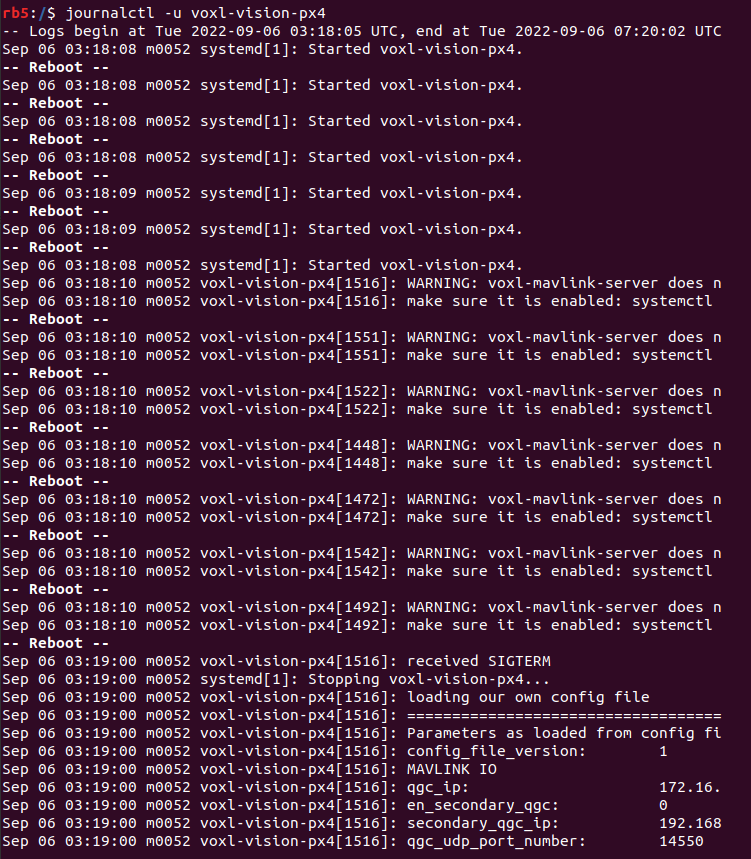
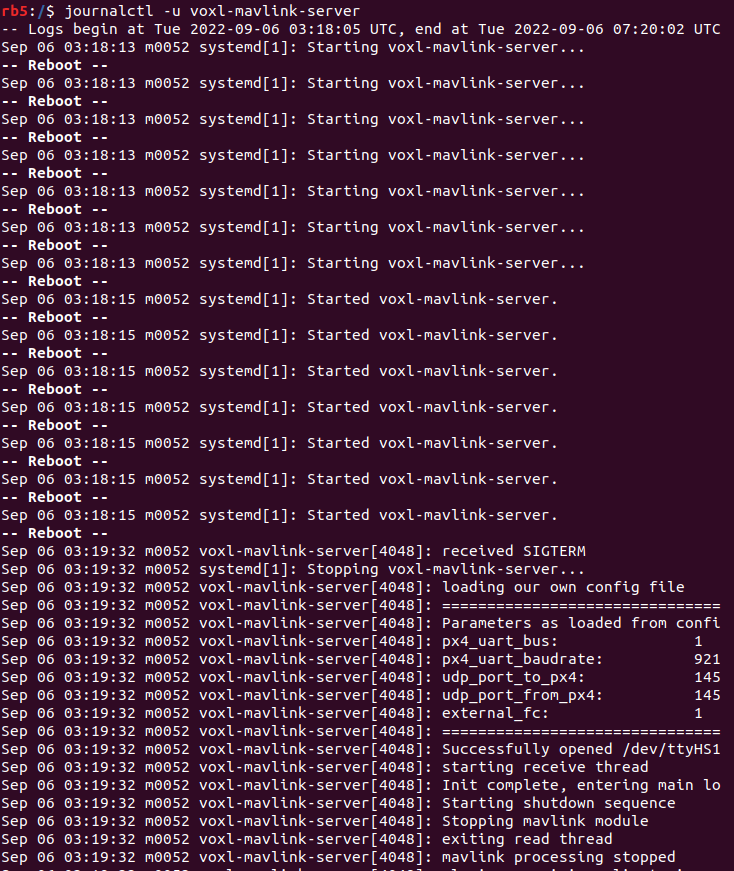
voxl-configure-mpa, can you try these commands again so we can get some info:journalctl -u voxl-px4 journalctl -u voxl-vision-px4 journalctl -u voxl-mavlink-server -
@bgaudel
voxl-px4is already running in the background, there's no need to try to start any of the processes manually from the command line.Now that you've gone through
voxl-configure-mpa, can you try these commands again so we can get some info:journalctl -u voxl-px4 journalctl -u voxl-vision-px4 journalctl -u voxl-mavlink-server



Reading along? Create a free ModalAI Forum account to join in.
With an account you can reply, ask your own question, get an email when a ModalAI engineer answers, and mark the reply that solved it. Your place in each thread is saved between visits.
Questions about VOXL, Flight Core, ESCs and ModalAI drones are answered here by the engineers who build them.
Register Login