Skip to content
  • Categories
  • Recent
  • Tags
  • Popular
  • Users
  • Groups
Collapse
Brand Logo

ModalAI Forum

  1. ModalAI Support Forum
  2. VOXL Dev Drones
  3. VOXL m500 Reference Drone
  4. Docker MAVSDK cannot find camera

Docker MAVSDK cannot find camera

Scheduled Pinned Locked Moved VOXL m500 Reference Drone
14 Posts 2 Posters 2.2k Views 2 Watching
  • Oldest to Newest
  • Newest to Oldest
  • Most Votes
Reply
  • Reply as topic
Log in to reply
This topic has been deleted. Only users with topic management privileges can see it.
  • Steve SagerS Offline
    Steve SagerS Offline
    Steve Sager
    wrote on last edited by
    #1

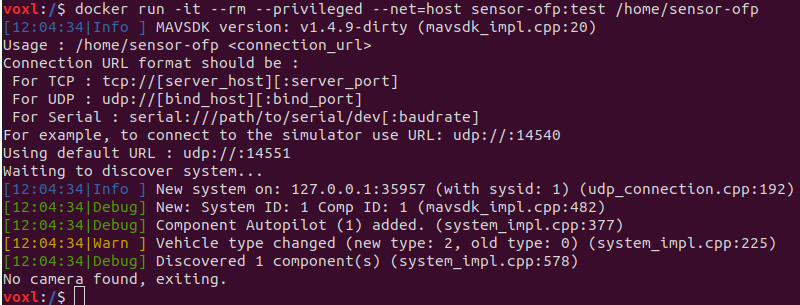
    We are trying to use a docker container to run a recording code that will save the Hires camera data. When we start up our code the aircraft won't see the camera on the M500. Any suggestions on how to help MAVSDK see the camera?
    Screenshot from 2022-12-13 16-28-42.png

    1 Reply Last reply
    0
    • tomT Offline
      tomT Offline
      tom
      admin
      wrote on last edited by
      #2

      @Steve-Sager Are you running voxl-streamer?

      Steve SagerS 1 Reply Last reply
      1
      • tomT tom

        @Steve-Sager Are you running voxl-streamer?

        Steve SagerS Offline
        Steve SagerS Offline
        Steve Sager
        wrote on last edited by
        #3

        @tom I am not able to turn on the voxl-streamer. I have it enabled, but the process will not run, any suggestions on how to unlock it?

        1 Reply Last reply
        0
        • tomT Offline
          tomT Offline
          tom
          admin
          wrote on last edited by
          #4

          @Steve-Sager What is the output of voxl-inspect-services?

          Steve SagerS 1 Reply Last reply
          1
          • tomT tom

            @Steve-Sager What is the output of voxl-inspect-services?

            Steve SagerS Offline
            Steve SagerS Offline
            Steve Sager
            wrote on last edited by
            #5

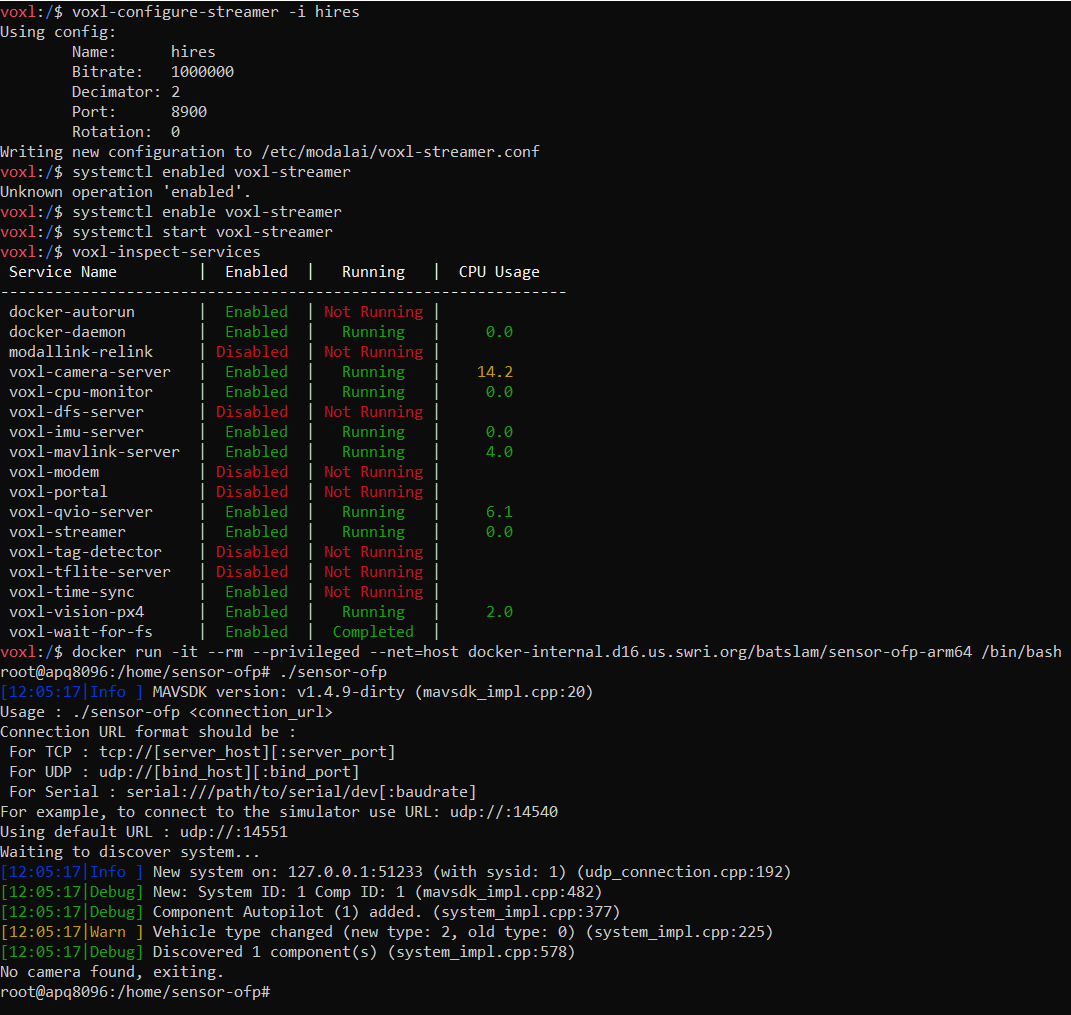
            @tom Actually, I was able to fix the problem with the voxl-streamer not running by using voxl-configure-streamer -i hires.
            We are still not able to see the camera with our docker mavlink image though.
            The following screen shot is what is happening...
            MicrosoftTeams-image (1).png

            1 Reply Last reply
            0
            • tomT Offline
              tomT Offline
              tom
              admin
              wrote on last edited by
              #6

              @Steve-Sager Based on the output from voxl-configure-streamer, it looks as though the video is on port 8900 while your app seems to be looking at port 14551

              Steve SagerS 1 Reply Last reply
              0
              • tomT tom

                @Steve-Sager Based on the output from voxl-configure-streamer, it looks as though the video is on port 8900 while your app seems to be looking at port 14551

                Steve SagerS Offline
                Steve SagerS Offline
                Steve Sager
                wrote on last edited by
                #7

                @tom the 14551 port is looking for our aircraft to run the docker, should we change that to the video port 8900?

                1 Reply Last reply
                0
                • tomT Offline
                  tomT Offline
                  tom
                  admin
                  wrote on last edited by
                  #8

                  @Steve-Sager I don't know anything about this app that you are running. Is the application itself trying to take in the video? If so, what port is it expecting the video to be on?

                  Steve SagerS 1 Reply Last reply
                  1
                  • tomT tom

                    @Steve-Sager I don't know anything about this app that you are running. Is the application itself trying to take in the video? If so, what port is it expecting the video to be on?

                    Steve SagerS Offline
                    Steve SagerS Offline
                    Steve Sager
                    wrote on last edited by
                    #9

                    @tom okay so following the steps here https://docs.modalai.com/voxl-vision-px4-telemetry/ I should be able to connect to the aircraft over mavlink using a docker image that is requesting information from the mavlink server. We want to pull IMU telemetry data and hires image data to train an AI with, we are then going to use said AI to re-fly the obstacle course based on our first human pilot flight. Should we be using the port 14550 or 14551 for this?

                    1 Reply Last reply
                    0
                    • tomT Offline
                      tomT Offline
                      tom
                      admin
                      wrote on last edited by
                      #10

                      @Steve-Sager If you're just looking to train the model you can use voxl-logger to save the hires images and then pull them off later (this would be done outside the docker)

                      Steve SagerS 1 Reply Last reply
                      1
                      • tomT tom

                        @Steve-Sager If you're just looking to train the model you can use voxl-logger to save the hires images and then pull them off later (this would be done outside the docker)

                        Steve SagerS Offline
                        Steve SagerS Offline
                        Steve Sager
                        wrote on last edited by
                        #11

                        @tom How exactly would I go about doing that with voxl-logger, step-by-step?

                        1 Reply Last reply
                        0
                        • tomT Offline
                          tomT Offline
                          tom
                          admin
                          wrote on last edited by
                          #12

                          @Steve-Sager voxl-logger requires that you have camera server running so that it can pull frames from /run/mpa/hires, then you'll follow the docs here: https://docs.modalai.com/voxl-logger/

                          to use voxl-logger --cam hires to save frames to the /data/voxl-logger.

                          You can then pull your frames off of VOXL from that directory for training purposes.

                          Steve SagerS 1 Reply Last reply
                          1
                          • tomT tom

                            @Steve-Sager voxl-logger requires that you have camera server running so that it can pull frames from /run/mpa/hires, then you'll follow the docs here: https://docs.modalai.com/voxl-logger/

                            to use voxl-logger --cam hires to save frames to the /data/voxl-logger.

                            You can then pull your frames off of VOXL from that directory for training purposes.

                            Steve SagerS Offline
                            Steve SagerS Offline
                            Steve Sager
                            wrote on last edited by
                            #13

                            @tom thank you for responding to my question regarding how to setup voxl-logger, we followed your instructions and recorded some data.

                            I noticed that the capture rate of the sensors is extremely high (around 1000+ hertz) and the video capture rate is about 30 hertz. Is there any way that we can get these data collection rates to be more synchronized? Is there a way to limit the imu frequency to ~30 hertz?

                            right now we are using a command that looks something like....

                            voxl-logger --cam hires -i imu1

                            1 Reply Last reply
                            0
                            • tomT Offline
                              tomT Offline
                              tom
                              admin
                              wrote on last edited by
                              #14

                              https://docs.modalai.com/voxl-logger/

                              I would try out the "-k" option

                              1 Reply Last reply
                              1

                              Hello! It looks like you're interested in this conversation, but you don't have an account yet.

                              Getting fed up of having to scroll through the same posts each visit? When you register for an account, you'll always come back to exactly where you were before, and choose to be notified of new replies (either via email, or push notification). You'll also be able to save bookmarks and upvote posts to show your appreciation to other community members.

                              With your input, this post could be even better 💗

                              Register Login
                              Reply
                              • Reply as topic
                              Log in to reply
                              • Oldest to Newest
                              • Newest to Oldest
                              • Most Votes


                              ModalAI
                              Categories Recent Tags ModalAI.com Docs
                              © 2026 ModalAI® · Accelerating autonomy for smaller, smarter, safer drones · Powered by NodeBB
                              • Login

                              • Don't have an account? Register

                              • Login or register to search.
                              • First post
                                Last post
                              0
                              • Categories
                              • Recent
                              • Tags
                              • Popular
                              • Users
                              • Groups
