
Dual IMX412 connected to VOXL 2
-
HI @Hector-Nevarez @Chad-Sweet sorry for the late response as we were tied up in some other priority work.
As instructed in the earlier post we did update the system image and also installed the voxl-sdk, also right now on our setup we are connecting only two Hires camera (IMX412) via the M0084-1 on the camera group 1 connector (J7), and no other camera sensors are there right now on the board.
Once connections are done we executed the voxl-configure-cameras where in we are able to see the following list:
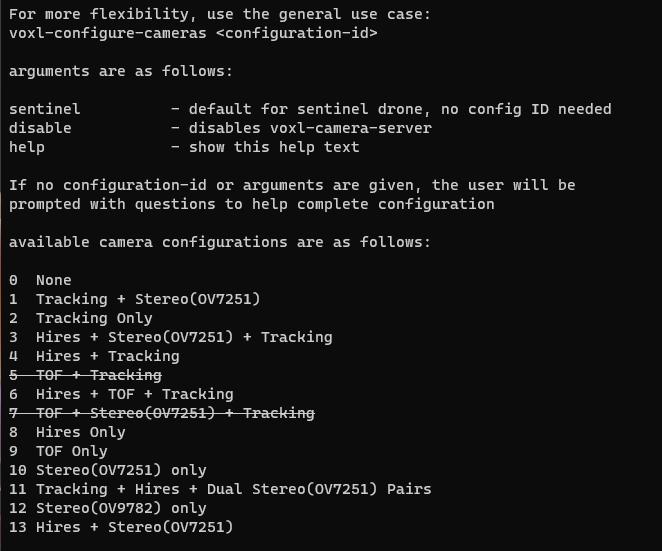
We tired with the camera config ID 3, 4, 6, 8 & 13 followed by voxl-camera-server, only with camera config ID 8 we are able to get video but only of one hires camera, and for rest config ID's the pipeline fails with different errors each time.
Can you please guide us how to get two simultaneous stream from the both the hires cameras via the voxl-portal and what camera config ID should be selected.
-
Hi,
Mentioned here:
Your camera server configuration file
/etc/modalai/voxl-camera-server.conffor only two imx412 sensors connected would look as such:You'll need to customize your camera server config file manually because this is not a standard supported arrangement.
If these are the only 2 cameras plugged in then they will be ID 0 and 1
-
@Alex-Gardner Thank you for the clarification, pls refer following screenshot of the updated voxl-camera-serve.conf file from the VOXL2 module.
{
        "version":      0.1,
        "cameras":      [{
                        "name": "hires1",
                        "enabled":      true,
                        "frame_rate":   30,
                        "type": "imx214",
                        "camera_id":    0,
                        "preview_width":        640,
                        "preview_height":       480,
                        "snapshot_width":       640,
                        "snapshot_height":      480
                }, {
                        "name": "hires2",
                        "enabled":      true,
                        "frame_rate":   30,
                        "type": "imx214",
                        "camera_id":    1,
                        "preview_width":        640,
                        "preview_height":       480,
                        "snapshot_width":       640,
                        "snapshot_height":      480
                }]
}
Once the above file as updated we carried out the suggested steps by providing the command
voxl-configure-cameras, as stated in my earlier post there are variety of options which pop-up once the command is executed, can you please let us know which is the appropriate configuration id to be selected from the following drop down:available camera configurations are as follows: 0 None 1 Tracking + Stereo(OV7251) 2 Tracking Only 3 Hires + Stereo(OV7251) + Tracking 4 Hires + Tracking 5 TOF + Tracking 6 Hires + TOF + Tracking 7 TOF + Stereo(OV7251) + Tracking 8 Hires Only 9 TOF Only 10 Stereo(OV7251) only 11 Tracking + Hires + Dual Stereo(OV7251) Pairs 12 Stereo(OV9782) only 13 Hires + Stereo(OV7251)We have already tried out the following all camera configurations option so far and only in camera configuration id 8 we are able to get video but the video is only from 1 IMX412 sensor.
-
To add to the above point the voxl-camera-server.conf file goes back to the default setting once the module is power cycled, refer following snapshot of the same file post power cycling.
voxl2:/etc/modalai$ cat voxl-camera-server.conf { "version": 0.1, "cameras": [{ "name": "tracking", "enabled": true, "frame_rate": 30, "type": "ov7251", "camera_id": 2, "ae_desired_msv": 60, "ae_filter_alpha": 0.600000023841858, "ae_ignore_fraction": 0.20000000298023224, "ae_slope": 0.05000000074505806, "ae_exposure_period": 1, "ae_gain_period": 1 }, { "name": "hires", "enabled": true, "frame_rate": 30, "type": "imx214", "camera_id": 3, "preview_width": 640, "preview_height": 480, "snapshot_width": 3840, "snapshot_height": 2160 }, { "name": "stereo_front", "enabled": true, "frame_rate": 30, "type": "ov7251", "camera_id": 0, "camera_id_second": 1, "independent_exposure": false, "ae_desired_msv": 60, "ae_filter_alpha": 0.600000023841858, "ae_ignore_fraction": 0.20000000298023224, "ae_slope": 0.05000000074505806, "ae_exposure_period": 1, "ae_gain_period": 1 }, { "name": "stereo_rear", "enabled": true, "frame_rate": 30, "type": "ov7251", "camera_id": 5, "camera_id_second": 4, "independent_exposure": false, "ae_desired_msv": 60, "ae_filter_alpha": 0.600000023841858, "ae_ignore_fraction": 0.20000000298023224, "ae_slope": 0.05000000074505806, "ae_exposure_period": 1, "ae_gain_period": 1 }] -
Hi @Alex-Gardner I guess the voxl-configure-camera was overwriting the voxl-camera-server file, bypassing that allowed us to get streams from both the IMX412 camera via the voxl-portal command.
Refer Following image:
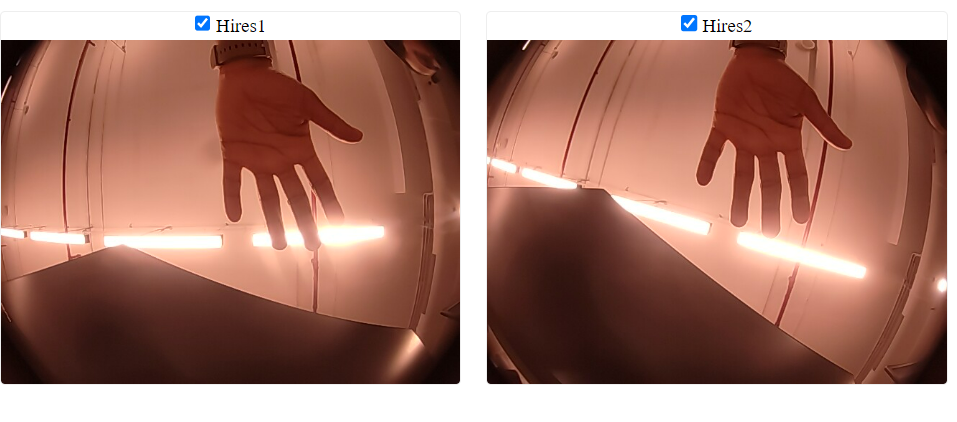 
The required part of getting two parallel streams from 2 IMX412 camera onthe VOXL2 board seem to be achieved. I case of any further doubts on this activity will open a new thread. Thanks for your support.
-
@Hector-Nevarez @Chad-Sweet @Alex-Gardner by editing the voxl-camera-server.conf file we were able to get a video stream from 640X480 @ 30fps up to (1920X1080) FHD @ 30 fps resolution for both the IMX412 camera, as seen from the datasheet the IMX412 sensor is a 12.3 Megapixel sensor and we would like to acquire highest possible resolution video stream from the sensor at 30fps as well as 60fps. Can you please let us know how this can be achieved.
P.S. In the above mentioned conf file if we provide any resolution over and above 1920X1080 the video pile line crashes.
-
@vipul-kadam ,
OK starting off with FPS, I perhaps stumbled into a fix that was preventing higher FPS from being used in the camera pipeline... I've tested this on a single imx412 only (what I have with me at the moment to try) but I'm able to get 1920x1080 at 60FPS after this mod:
Can you add a new line with this:
defaultMaxFPS=120
at the end of this file?
/vendor/etc/camera/camxoverridesettings.txtI believe this will allow higher FPS.
-
Hi @modaltb by doing so the voxl-camera-serve and the voxl-portal pumps data over ethernet but on the web portal we are not able to see any vide0 from the IMX412 camera, pls note we are using the same voxl-camera-server.conf file which @Alex-Gardner have suggested to use.
-
OK thanks for the info, we've not tested portal much with this new tweak above so it will take a little time to propagate the updates to support these, we'll update as it becomes available.
-
@modaltb meanwhile the update becomes available, is there any other method to get a video streamed at FHD@60fps from the voxl2 module over the ethernet interface?
-
Have you tried voxl-streamer instead of trying to visualize using voxl-portal? I've not tried this myself but I would next try voxl-streamer.

Reading along? Create a free ModalAI Forum account to join in.
With an account you can reply, ask your own question, get an email when a ModalAI engineer answers, and mark the reply that solved it. Your place in each thread is saved between visits.
Questions about VOXL, Flight Core, ESCs and ModalAI drones are answered here by the engineers who build them.
Register Login