Skip to content
  • Categories
  • Recent
  • Tags
  • Popular
  • Users
  • Groups
Collapse
Brand Logo

ModalAI Forum

  1. ModalAI Support Forum
  2. VOXL Compute & Autopilot
  3. VOXL 2
  4. Dual IMX412 connected to VOXL 2

Dual IMX412 connected to VOXL 2

Scheduled Pinned Locked Moved VOXL 2
21 Posts 6 Posters 5.2k Views 3 Watching
  • Oldest to Newest
  • Newest to Oldest
  • Most Votes
Reply
  • Reply as topic
Log in to reply
This topic has been deleted. Only users with topic management privileges can see it.
  • ? A Former User

    Hello @vipul-kadam ,
    We've now released a Beta System Image which should support the 2 IMX412 camers on the M0084-1 on camera group 1 (J7). Once you download the system image, you'll have to reinstall the voxl-sdk again as the download will only install the system image.

    Your camera server configuration file (/etc/modalai/voxl-camera-server.conf) for only two imx412 sensors connected would look as such:

    {
            "version":      0.1,
            "cameras":      [{
                            "name": "hires1",
                            "enabled":      true,
                            "frame_rate":   30,
                            "type": "imx214",
                            "camera_id":    0,
                            "preview_width":        640,
                            "preview_height":       480,
                            "snapshot_width":       640,
                            "snapshot_height":      480
                    }, {
                            "name": "hires2",
                            "enabled":      true,
                            "frame_rate":   30,
                            "type": "imx214",
                            "camera_id":    1,
                            "preview_width":        640,
                            "preview_height":       480,
                            "snapshot_width":       640,
                            "snapshot_height":      480
                    }]
    }
    

    Note that even though you are using IMX412, the camera type will still be IMX214 in the configuration file. Please let me know if this works for you.

    ? Offline
    ? Offline
    A Former User
    wrote on last edited by A Former User
    #8

    Adding more context for my last message:

    The voxl-sdk that you should install should be the latest from our 0.9 platform release. You'll have to download our latest platform release (VOXL2 Platform 0.9) from our downloads page. From there you can find the platform release under:
    Protected Downloads -> VOXL 2 Platform Releases -> VOXL2 Platform 0.9

    From there download the pacakge, untar the package, and navigate to the voxl-suite directory within the package (voxl2_platform_0.9/voxl-suite/). From there run the offline-install.sh script and this will install the voxl-sdk ontop of the beta system image that you previously flashed on target.

    1 Reply Last reply
    0
    • V Offline
      V Offline
      vipul.kadam
      Contributor
      wrote on last edited by
      #9

      Hello @Hector-Nevarez @Chad-Sweet

      As per the above two threads pls find the following status of the voxl version and the information in the voxl-camera-server.conf file, pls check as the information in the camera server configuration file that you shared and the one in the current updated system is not matching. Since the files are not matching, we haven’t connected the two IMX412 camera on the camera group 1 connector (J7) yet. Pls note the systems image is updated and even installed the voxl-sdk on top of the new system image.

      Pls let me know if its ok to go ahead and connect the 2 nos of IMX 412 to cameras of anything else needs to be done.

      voxl2:/$ voxl-version
      --------------------------------------------------------------------------------
      system-image: 1.5.2-M0054-14.1a-perf-nightly-20221219
      kernel:       #1 SMP PREEMPT Mon Dec 19 02:17:54 UTC 2022 4.19.125
      --------------------------------------------------------------------------------
      hw version:   M0054
      --------------------------------------------------------------------------------
      voxl-suite:   0.9.4
      --------------------------------------------------------------------------------
      Packages:
      Repo:  http://voxl-packages.modalai.com/ ./dists/qrb5165/sdk-0.9/binary-arm64/
      Last Updated: 2022-09-06 03:20:58
      
      voxl2:/$ cat etc/modalai/voxl-camera-server.conf
      {
              "version":      0.1,
              "cameras":      [{
                              "name": "tracking",
                              "enabled":      true,
                              "frame_rate":   30,
                              "type": "ov7251",
                              "camera_id":    2,
                              "ae_desired_msv":       60,
                              "ae_filter_alpha":      0.600000023841858,
                              "ae_ignore_fraction":   0.20000000298023224,
                              "ae_slope":     0.05000000074505806,
                              "ae_exposure_period":   1,
                              "ae_gain_period":       1
                      }, {
                              "name": "hires",
                              "enabled":      true,
                              "frame_rate":   30,
                              "type": "imx214",
                              "camera_id":    3,
                              "preview_width":        640,
                              "preview_height":       480,
                              "snapshot_width":       3840,
                              "snapshot_height":      2160
                      }, {
                              "name": "stereo",
                              "enabled":      true,
                              "frame_rate":   30,
                              "type": "ov7251",
                              "camera_id":    0,
                              "camera_id_second":     1,
                              "independent_exposure": false,
                              "ae_desired_msv":       60,
                              "ae_filter_alpha":      0.600000023841858,
                              "ae_ignore_fraction":   0.20000000298023224,
                              "ae_slope":     0.05000000074505806,
                              "ae_exposure_period":   1,
                              "ae_gain_period":       1
                      }]
      
      
      1 Reply Last reply
      0
      • Chad SweetC Offline
        Chad SweetC Offline
        Chad Sweet
        ModalAI Team
        wrote on last edited by
        #10

        Yes, please connect per Hector's instructions

        1 Reply Last reply
        0
        • V Offline
          V Offline
          vipul.kadam
          Contributor
          wrote on last edited by
          #11

          HI @Hector-Nevarez @Chad-Sweet sorry for the late response as we were tied up in some other priority work.

          As instructed in the earlier post we did update the system image and also installed the voxl-sdk, also right now on our setup we are connecting only two Hires camera (IMX412) via the M0084-1 on the camera group 1 connector (J7), and no other camera sensors are there right now on the board.

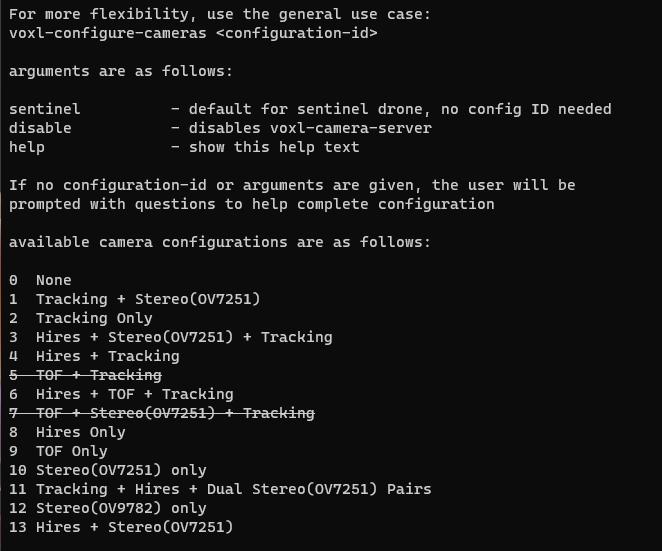
          Once connections are done we executed the voxl-configure-cameras where in we are able to see the following list:
          Screenshot_20230120_120953.png

          We tired with the camera config ID 3, 4, 6, 8 & 13 followed by voxl-camera-server, only with camera config ID 8 we are able to get video but only of one hires camera, and for rest config ID's the pipeline fails with different errors each time.

          Can you please guide us how to get two simultaneous stream from the both the hires cameras via the voxl-portal and what camera config ID should be selected.

          1 Reply Last reply
          0
          • ? Offline
            ? Offline
            A Former User
            wrote on last edited by
            #12

            Hi,

            Mentioned here:

            Your camera server configuration file /etc/modalai/voxl-camera-server.conf for only two imx412 sensors connected would look as such:

            You'll need to customize your camera server config file manually because this is not a standard supported arrangement.

            If these are the only 2 cameras plugged in then they will be ID 0 and 1

            1 Reply Last reply
            0
            • V Offline
              V Offline
              vipul.kadam
              Contributor
              wrote on last edited by
              #13

              @Alex-Gardner Thank you for the clarification, pls refer following screenshot of the updated voxl-camera-serve.conf file from the VOXL2 module.

              {
                      "version":      0.1,
                      "cameras":      [{
                                      "name": "hires1",
                                      "enabled":      true,
                                      "frame_rate":   30,
                                      "type": "imx214",
                                      "camera_id":    0,
                                      "preview_width":        640,
                                      "preview_height":       480,
                                      "snapshot_width":       640,
                                      "snapshot_height":      480
                              }, {
                                      "name": "hires2",
                                      "enabled":      true,
                                      "frame_rate":   30,
                                      "type": "imx214",
                                      "camera_id":    1,
                                      "preview_width":        640,
                                      "preview_height":       480,
                                      "snapshot_width":       640,
                                      "snapshot_height":      480
                              }]
              }
              

              Once the above file as updated we carried out the suggested steps by providing the command
              voxl-configure-cameras, as stated in my earlier post there are variety of options which pop-up once the command is executed, can you please let us know which is the appropriate configuration id to be selected from the following drop down:

              available camera configurations are as follows:
              
              0  None
              1  Tracking + Stereo(OV7251)
              2  Tracking Only
              3  Hires + Stereo(OV7251) + Tracking
              4  Hires + Tracking
              5  TOF + Tracking
              6  Hires + TOF + Tracking
              7  TOF + Stereo(OV7251) + Tracking
              8  Hires Only
              9  TOF Only
              10 Stereo(OV7251) only
              11 Tracking + Hires + Dual Stereo(OV7251) Pairs
              12 Stereo(OV9782) only
              13 Hires + Stereo(OV7251)
              

              We have already tried out the following all camera configurations option so far and only in camera configuration id 8 we are able to get video but the video is only from 1 IMX412 sensor.

              1 Reply Last reply
              0
              • V Offline
                V Offline
                vipul.kadam
                Contributor
                wrote on last edited by
                #14

                To add to the above point the voxl-camera-server.conf file goes back to the default setting once the module is power cycled, refer following snapshot of the same file post power cycling.

                voxl2:/etc/modalai$ cat voxl-camera-server.conf
                {
                        "version":      0.1,
                        "cameras":      [{
                                        "name": "tracking",
                                        "enabled":      true,
                                        "frame_rate":   30,
                                        "type": "ov7251",
                                        "camera_id":    2,
                                        "ae_desired_msv":       60,
                                        "ae_filter_alpha":      0.600000023841858,
                                        "ae_ignore_fraction":   0.20000000298023224,
                                        "ae_slope":     0.05000000074505806,
                                        "ae_exposure_period":   1,
                                        "ae_gain_period":       1
                                }, {
                                        "name": "hires",
                                        "enabled":      true,
                                        "frame_rate":   30,
                                        "type": "imx214",
                                        "camera_id":    3,
                                        "preview_width":        640,
                                        "preview_height":       480,
                                        "snapshot_width":       3840,
                                        "snapshot_height":      2160
                                }, {
                                        "name": "stereo_front",
                                        "enabled":      true,
                                        "frame_rate":   30,
                                        "type": "ov7251",
                                        "camera_id":    0,
                                        "camera_id_second":     1,
                                        "independent_exposure": false,
                                        "ae_desired_msv":       60,
                                        "ae_filter_alpha":      0.600000023841858,
                                        "ae_ignore_fraction":   0.20000000298023224,
                                        "ae_slope":     0.05000000074505806,
                                        "ae_exposure_period":   1,
                                        "ae_gain_period":       1
                                }, {
                                        "name": "stereo_rear",
                                        "enabled":      true,
                                        "frame_rate":   30,
                                        "type": "ov7251",
                                        "camera_id":    5,
                                        "camera_id_second":     4,
                                        "independent_exposure": false,
                                        "ae_desired_msv":       60,
                                        "ae_filter_alpha":      0.600000023841858,
                                        "ae_ignore_fraction":   0.20000000298023224,
                                        "ae_slope":     0.05000000074505806,
                                        "ae_exposure_period":   1,
                                        "ae_gain_period":       1
                                }]
                
                1 Reply Last reply
                0
                • V Offline
                  V Offline
                  vipul.kadam
                  Contributor
                  wrote on last edited by
                  #15

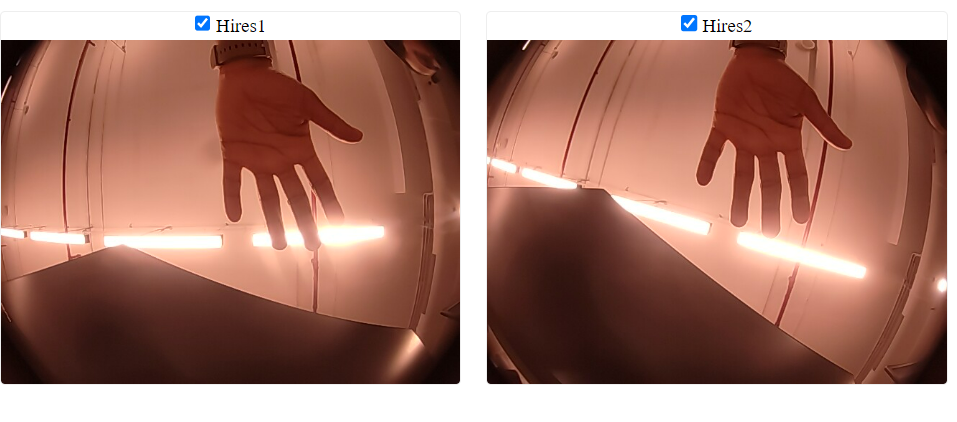
                  Hi @Alex-Gardner I guess the voxl-configure-camera was overwriting the voxl-camera-server file, bypassing that allowed us to get streams from both the IMX412 camera via the voxl-portal command.

                  Refer Following image:
                  0a9b0915-8b9e-4c82-bc13-377c048102a9-image.png ![alt text](image url)

                  The required part of getting two parallel streams from 2 IMX412 camera onthe VOXL2 board seem to be achieved. I case of any further doubts on this activity will open a new thread. Thanks for your support.

                  1 Reply Last reply
                  0
                  • V Offline
                    V Offline
                    vipul.kadam
                    Contributor
                    wrote on last edited by
                    #16

                    @Hector-Nevarez @Chad-Sweet @Alex-Gardner by editing the voxl-camera-server.conf file we were able to get a video stream from 640X480 @ 30fps up to (1920X1080) FHD @ 30 fps resolution for both the IMX412 camera, as seen from the datasheet the IMX412 sensor is a 12.3 Megapixel sensor and we would like to acquire highest possible resolution video stream from the sensor at 30fps as well as 60fps. Can you please let us know how this can be achieved.

                    P.S. In the above mentioned conf file if we provide any resolution over and above 1920X1080 the video pile line crashes.

                    1 Reply Last reply
                    0
                    • modaltbM Offline
                      modaltbM Offline
                      modaltb
                      ModalAI Team
                      wrote on last edited by
                      #17

                      @vipul-kadam ,

                      OK starting off with FPS, I perhaps stumbled into a fix that was preventing higher FPS from being used in the camera pipeline... I've tested this on a single imx412 only (what I have with me at the moment to try) but I'm able to get 1920x1080 at 60FPS after this mod:

                      Can you add a new line with this:
                      defaultMaxFPS=120
                      at the end of this file?
                      /vendor/etc/camera/camxoverridesettings.txt

                      I believe this will allow higher FPS.

                      1 Reply Last reply
                      0
                      • V Offline
                        V Offline
                        vipul.kadam
                        Contributor
                        wrote on last edited by
                        #18

                        Hi @modaltb by doing so the voxl-camera-serve and the voxl-portal pumps data over ethernet but on the web portal we are not able to see any vide0 from the IMX412 camera, pls note we are using the same voxl-camera-server.conf file which @Alex-Gardner have suggested to use.

                        1 Reply Last reply
                        0
                        • modaltbM Offline
                          modaltbM Offline
                          modaltb
                          ModalAI Team
                          wrote on last edited by
                          #19

                          OK thanks for the info, we've not tested portal much with this new tweak above so it will take a little time to propagate the updates to support these, we'll update as it becomes available.

                          1 Reply Last reply
                          0
                          • V Offline
                            V Offline
                            vipul.kadam
                            Contributor
                            wrote on last edited by
                            #20

                            @modaltb meanwhile the update becomes available, is there any other method to get a video streamed at FHD@60fps from the voxl2 module over the ethernet interface?

                            1 Reply Last reply
                            0
                            • modaltbM Offline
                              modaltbM Offline
                              modaltb
                              ModalAI Team
                              wrote on last edited by
                              #21

                              Have you tried voxl-streamer instead of trying to visualize using voxl-portal? I've not tried this myself but I would next try voxl-streamer.


                              1 Reply Last reply
                              0

                              Hello! It looks like you're interested in this conversation, but you don't have an account yet.

                              Getting fed up of having to scroll through the same posts each visit? When you register for an account, you'll always come back to exactly where you were before, and choose to be notified of new replies (either via email, or push notification). You'll also be able to save bookmarks and upvote posts to show your appreciation to other community members.

                              With your input, this post could be even better 💗

                              Register Login
                              Reply
                              • Reply as topic
                              Log in to reply
                              • Oldest to Newest
                              • Newest to Oldest
                              • Most Votes


                              ModalAI
                              Categories Recent Tags ModalAI.com Docs
                              © 2026 ModalAI® · Accelerating autonomy for smaller, smarter, safer drones · Powered by NodeBB
                              • Login

                              • Don't have an account? Register

                              • Login or register to search.
                              • First post
                                Last post
                              0
                              • Categories
                              • Recent
                              • Tags
                              • Popular
                              • Users
                              • Groups