
Cannot run voxl-mapper: ERROR fetching tf from tf ringbuffer there wasn't sufficient data in the buffer
-
I have been getting the following error when starting voxl-mapper in the terminal, even though as per the instructions, all the services (voxl-vision-px4, voxl-qvio-server, voxl-camera-server) are running.
I wonder what might have been the problem in this case.root@apq8096:~# voxl-mapper Loading our own config file Loading extrinsics config file Trying to init tsdf server created tsdf server waiting for server at /run/mpa/vvpx4_body_wrt_fixed/ waiting for server at /run/mpa/tof Initializing ESDF structs Connected to VIO server Connected to depth pipe ERROR fetching tf from tf ringbuffer there wasn't sufficient data in the buffer ERROR fetching tf from tf ringbuffer there wasn't sufficient data in the buffer ERROR fetching tf from tf ringbuffer there wasn't sufficient data in the bufferroot@apq8096:~# voxl-inspect-services Service Name | Enabled | Running | CPU Usage --------------------------------------------------------------- docker-autorun | Disabled | Not Running | docker-daemon | Disabled | Not Running | modallink-relink | Disabled | Not Running | voxl-camera-server | Enabled | Running | 33.2 voxl-cpu-monitor | Enabled | Running | 0.0 voxl-dfs-server | Enabled | Running | 2.5 voxl-imu-server | Enabled | Running | 0.0 voxl-mavlink-server | Enabled | Running | 0.0 voxl-modem | Disabled | Not Running | voxl-portal | Enabled | Running | 2.5 voxl-qvio-server | Enabled | Running | 10.2 voxl-streamer | Disabled | Not Running | voxl-tag-detector | Disabled | Not Running | voxl-tflite-server | Disabled | Not Running | voxl-time-sync | Disabled | Not Running | voxl-vision-px4 | Enabled | Running | 2.5 voxl-wait-for-fs | Enabled | Completed |/etc/modalai/voxl-mapper.conf
{ "tof_pipe": "/run/mpa/tof", "tof_enable": true, "tof_rate": 10, "depth_pipe_0": "/run/mpa/dfs_point_cloud", "depth_pipe_0_enable": false, "extrinsics0_name": "stereo_l", "depth0_rate": 10, "depth_pipe_1": "/run/mpa/stereo_front_pc", "depth_pipe_1_enable": false, "extrinsics1_name": "stereo_front_l", "depth1_rate": 10, "depth_pipe_2": "/run/mpa/stereo_rear_pc", "depth_pipe_2_enable": false, "extrinsics2_name": "stereo_rear_l", "depth2_rate": 10, "depth_pipe_3": "/run/mpa/dfs_point_cloud", "depth_pipe_3_enable": false, "extrinsics3_name": "stereo_l", "depth3_rate": 10, "robot_radius": 0.3, "voxel_size": 0.20000000298023224, "voxels_per_side": 16, "esdf_save_path": "/data/voxl_mapper/esdf_map", "tsdf_save_path": "/data/voxl_mapper/tsdf_map", "mesh_save_path": "/data/voxl_mapper/mesh.ply", "esdf_max_distance": 4, "esdf_min_distance": 0.10000000149011612, "esdf_default_distance": 2, "esdf_inner_sphere_radius": 0.20000000298023224, "esdf_outer_sphere_radius": 0.600000023841858, "rrt_min_distance": 0.2, "rrt_max_runtime_nanoseconds": 1000000000, "rrt_use_first_solution": false, "rrt_treat_unknown_as_occupied": true, "rrt_send_tree": false, "loco_num_segments": 10, "loco_derivative_to_optimize": 3, "loco_poly_degree": 10, "loco_smoothness_cost_weight": 2.5, "loco_collision_cost_weight": 14, "loco_waypoint_cost_weight": 0, "loco_min_collision_sampling_dist": 0.05, "loco_add_waypoints": true, "loco_scale_time": true, "loco_split_at_collisions": true, "loco_resample_trajectory": true, "loco_verbose": false } -
Hi @ahmed-mustahid : I am no expert, but I too get that warning sometimes but the voxl-mapper still works and generates a valid scene. I thought it is just when the camera is blocked or it doesn't have enough features or something like that it displays that warning. I am also curious to learn from the voxl team what this warning means.
-
Hi,
Typically that error presents itself when we do not have a pose from the qvio server. If you block the tracking camera or qvio server loses tracking that error will occur. -
Hi,
Typically that error presents itself when we do not have a pose from the qvio server. If you block the tracking camera or qvio server loses tracking that error will occur.@Matthew-Booker Hi Matthew, can you clarify on this? I'm also having this problem, even with the tracking camera not blocked (and all of ahmeds aforementioned pre-reqs).
Will the error result in no map at all being generated? (Thats where I'm at
 ) or will it generate regardless?
How can I monitor whether the qvio server loses tracking or does not have a pose?
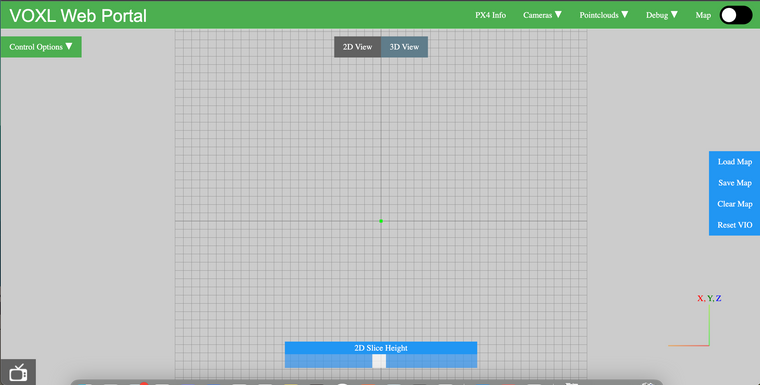
Is all I'm getting from the mapper.
Best,
Jamie -
Hey @jamiek,
If this error occurs, it will result in no map generation at the time of error. This is because we need to grab a pose from our ringbuffer (at the timestamp of our pointcloud) in order to insert each pointcloud correctly into the map.
This is caused by either voxl-qvio-server or voxl-vision-px4 not properly publishing a pose estimate.
You can monitor the output of voxl-qvio-server using
voxl-inspect-qvioon voxl or viewing the qvio overlay in voxl-portal. If everything looks good there and qvio is properly publishing pose info, the next place to check is voxl-vision-px4.This error means that we are not receiving a fixed pose data out of voxl-vision-px4, so once you have verified qvio is not reporting any error codes, monitor the output of
voxl-inspect-pose -fon voxl and make sure that you are receiving pose data.

Reading along? Create a free ModalAI Forum account to join in.
With an account you can reply, ask your own question, get an email when a ModalAI engineer answers, and mark the reply that solved it. Your place in each thread is saved between visits.
Questions about VOXL, Flight Core, ESCs and ModalAI drones are answered here by the engineers who build them.
Register Login