
modifying voxl-mapper
-
Hi Howard,
The error occurs further up in the text. Without it I'm not sure what the issue is. Please could you post a more complete image of the error?
-
Hi Howard,
The error occurs further up in the text. Without it I'm not sure what the issue is. Please could you post a more complete image of the error?
-
Hi Howard,
The error occurs further up in the text. Without it I'm not sure what the issue is. Please could you post a more complete image of the error?
@Matthew-Booker
Sorry for being late, we were trying to build the package again on voxl cross,
We got the following error,
https://docs.google.com/document/d/1C1fZl-i5CzY3OUXER0KUOl3I6TGEhlw1XSsiebbMCr4/edit?usp=drivesdk
After analysis we felt that ceres server package was missing hence we installed it using the instructions provided on the ceres server page. https://ceres-solver.org/installation.html
We even customised the build by using tye commandcmake -DCMAKE_CXX_FLAGS="-march=native" /home/root/ceres-solverAfter running make install as seen in above link
We noticed that the libceres.a file was in /usr/local/bin and not in /usr/lib64
Hence we copied libceres.a file to usr/lib64 but we ended up getting the following error, '/usr/lib64/libceres.a: error adding symbols: file in wrong format'
The scenario can be seen in the below document.https://docs.google.com/document/d/1Q_5aam02v79-E3MosS6sw1BJ_0q3x1HUCCt_twu33Ao/edit?usp=drivesdk
Please help us in solving the error
Thanks! -
Hi Howard,
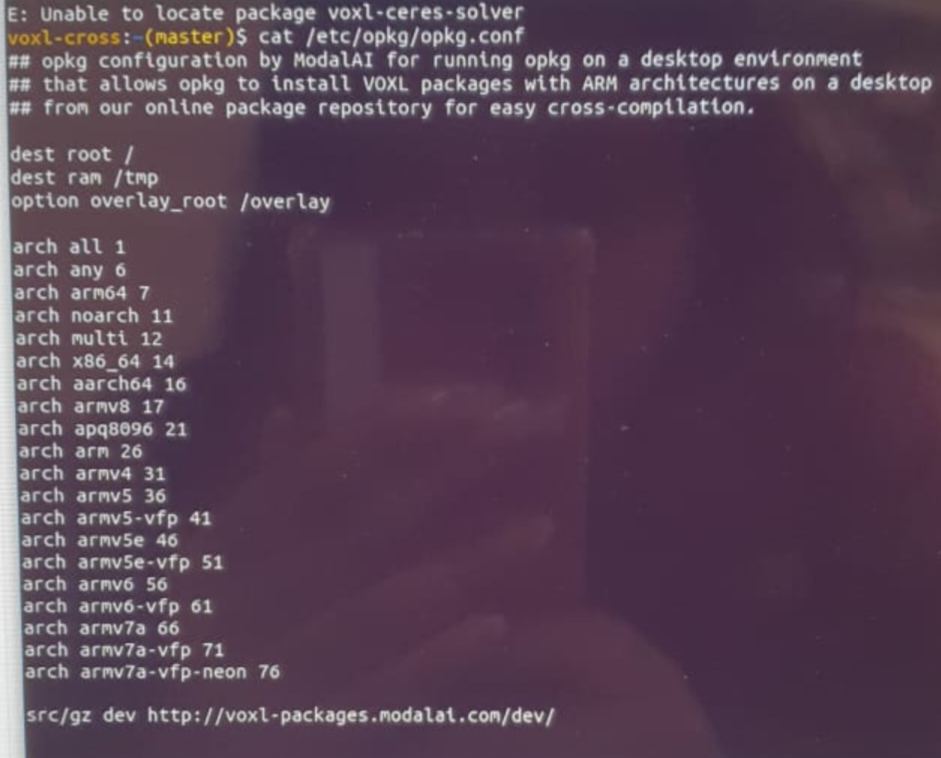
So the issue here is you've built ceres-solver for the native architecture which would mean that if you are running voxl-cross on your own desktop it built ceres-solver for your desktops architecture. In any case we have our own ceres-solver which you can install. Could you post the results of running
cat /etc/opkg/opkg.confon your VOXL?Also just a heads up that I should have mentioned earlier. In about a week or two there will be a major update to voxl-mapper which should bring a lot of improvements but will change a lot of things.
-
Hi Howard,
So the issue here is you've built ceres-solver for the native architecture which would mean that if you are running voxl-cross on your own desktop it built ceres-solver for your desktops architecture. In any case we have our own ceres-solver which you can install. Could you post the results of running
cat /etc/opkg/opkg.confon your VOXL?Also just a heads up that I should have mentioned earlier. In about a week or two there will be a major update to voxl-mapper which should bring a lot of improvements but will change a lot of things.
-
This post is deleted!
-
Can I double check. Did you run
./install_build_deps.shbefore trying to build?If building for a VOXL 2 the full command would be
./install_build_deps.sh qrb5165 stable -
If we are building it for voxlcam, what should be used?
If we use ./install_build_deps.sh apq8096 stable, we get the error,
'-- Configuring done
-- Generating done
-- Build files have been written to: /home/root/voxlcam_mapper/voxl-mapper/build64
Consolidate compiler generated dependencies of target mav_trajectory_generation
[ 25%] Built target mav_trajectory_generation
Consolidate compiler generated dependencies of target mav_planning_common
[ 36%] Built target mav_planning_common
Consolidate compiler generated dependencies of target voxblox_planning_common
Consolidate compiler generated dependencies of target mav_path_smoothing
[ 44%] Built target voxblox_planning_common
[ 58%] Built target mav_path_smoothing
Consolidate compiler generated dependencies of target voxblox_loco_planner
[ 69%] Built target voxblox_loco_planner
Consolidate compiler generated dependencies of target mav_local_planner
[ 77%] Built target mav_local_planner
Consolidate compiler generated dependencies of target voxl-mapper
[ 80%] Building CXX object server/voxl-mapper/CMakeFiles/voxl-mapper.dir/voxl_mapper.cc.o
/home/root/voxlcam_mapper/voxl-mapper/server/voxl-mapper/voxl_mapper.cc: In member function 'virtual bool voxblox::TsdfServer::loadMap(std::string, std::string)':
/home/root/voxlcam_mapper/voxl-mapper/server/voxl-mapper/voxl_mapper.cc:1164:54: error: 'class voxblox::Layervoxblox::TsdfVoxel' has no member named 'loadBlocksFromFile'
bool tsdf_loaded = tsdf_map_->getTsdfLayerPtr()->loadBlocksFromFile(
^
/home/root/voxlcam_mapper/voxl-mapper/server/voxl-mapper/voxl_mapper.cc:1172:54: error: 'class voxblox::Layervoxblox::EsdfVoxel' has no member named 'loadBlocksFromFile'
bool esdf_loaded = esdf_map_->getEsdfLayerPtr()->loadBlocksFromFile(
^
server/voxl-mapper/CMakeFiles/voxl-mapper.dir/build.make:159: recipe for target 'server/voxl-mapper/CMakeFiles/voxl-mapper.dir/voxl_mapper.cc.o' failed
make[2]: *** [server/voxl-mapper/CMakeFiles/voxl-mapper.dir/voxl_mapper.cc.o] Error 1
CMakeFiles/Makefile2:398: recipe for target 'server/voxl-mapper/CMakeFiles/voxl-mapper.dir/all' failed
make[1]: *** [server/voxl-mapper/CMakeFiles/voxl-mapper.dir/all] Error 2
Makefile:135: recipe for target 'all' failed
make: *** [all] Error 2
' -
@Nishkala you can instead use
./install_build_deps.sh apq8096 sdk-0.8 -
@Nishkala you can instead use
./install_build_deps.sh apq8096 sdk-0.8 -
[[topic:post-is-deleted]]This post is deleted!
-
@Nishkala you can instead use
./install_build_deps.sh apq8096 sdk-0.8@Matthew-Booker Thanks a lot!
What works for me is:
voxl-cross:~/voxl-mapper(master)(0.0.7)$ ./install_build_deps.sh apq8096 sdk-0.8
voxl-cross:~/voxl-mapper(master)(0.0.7)$ ./build.sh apq8096
voxl-cross:~/voxl-mapper(master)(0.0.7)$ ./make_package.sh ipk
scp voxl-mapper_0.0.7.ipk root@10.0.1.10:On voxl 1 board, I added arm64 7 to /etc/opkg/arch.conf
voxl:~$ voxl-configure-opkg dev
opkg install --force-reinstall --force-downgrade --force-depends --force-overwrite voxl-mapper_0.0.7.ipkThen everything seems to work so far!
-
@Nishkala you can instead use
./install_build_deps.sh apq8096 sdk-0.8@Matthew-Booker However, when I try to save the mesh from the portal, in my compiled version, I get this symbol not found error. Any ideas why it can not find this function and how to fix it? Many thanks in advance.
skipped 2 point clouds
WARNING bytes left in tof point cloud pipe
skipped 3 point clouds
skipped 1 point clouds
voxl-mapper: symbol lookup error: voxl-mapper: undefined symbol: _ZNK7voxblox5LayerINS_9TsdfVoxelEE10saveToFileESsb
Fault address: 0x7f60053888
Access to this address is not allowed.
Segmentation fault -
@Arjun-Jain Looks like a mismatch in the voxl-voxblox version. Since you've already configured opkg you should just be able to run
opkg install voxl-voxbloxand it should work. -
@Matthew-Booker Thanks a lot!
What works for me is:
voxl-cross:~/voxl-mapper(master)(0.0.7)$ ./install_build_deps.sh apq8096 sdk-0.8
voxl-cross:~/voxl-mapper(master)(0.0.7)$ ./build.sh apq8096
voxl-cross:~/voxl-mapper(master)(0.0.7)$ ./make_package.sh ipk
scp voxl-mapper_0.0.7.ipk root@10.0.1.10:On voxl 1 board, I added arm64 7 to /etc/opkg/arch.conf
voxl:~$ voxl-configure-opkg dev
opkg install --force-reinstall --force-downgrade --force-depends --force-overwrite voxl-mapper_0.0.7.ipkThen everything seems to work so far!
@Matthew-Booker How to do the same on voxl2
I tried the below commands
voxl-cross:~/voxl-mapper(master)(0.0.7)$ ./install_build_deps.sh apq8096 sdk-0.8
voxl-cross:~/voxl-mapper(master)(0.0.7)$ ./build.sh apq8096
voxl-cross:~/voxl-mapper(master)(0.0.7)$ ./make_package.sh
voxl-cross:~/voxl-mapper(master)(0.0.7)$ ./deploy_to_voxl.shOn the voxl2 board
voxl2:/$ voxl-configure-pkg-manager
Chose sdk 0.8
voxl2:/$ apt update
voxl2:/$ voxl-mapperI got the below error
'
Loading our own config file
Loading extrinsics config file
Trying to init tsdf server
terminate called after throwing an instance of 'std::bad_alloc'
what(): std::bad_alloc
Aborted
' -
@Matthew-Booker How to do the same on voxl2
I tried the below commands
voxl-cross:~/voxl-mapper(master)(0.0.7)$ ./install_build_deps.sh apq8096 sdk-0.8
voxl-cross:~/voxl-mapper(master)(0.0.7)$ ./build.sh apq8096
voxl-cross:~/voxl-mapper(master)(0.0.7)$ ./make_package.sh
voxl-cross:~/voxl-mapper(master)(0.0.7)$ ./deploy_to_voxl.shOn the voxl2 board
voxl2:/$ voxl-configure-pkg-manager
Chose sdk 0.8
voxl2:/$ apt update
voxl2:/$ voxl-mapperI got the below error
'
Loading our own config file
Loading extrinsics config file
Trying to init tsdf server
terminate called after throwing an instance of 'std::bad_alloc'
what(): std::bad_alloc
Aborted
'@Nishkala When you build for voxl2 you need to use qrb5165 not apq8096 so the full command would be:
./install_build_deps.sh qrb5165 sdk-0.8
./build.sh qrb5165
./make_package.sh -
@Matthew-Booker Thanks a lot!
What works for me is:
voxl-cross:~/voxl-mapper(master)(0.0.7)$ ./install_build_deps.sh apq8096 sdk-0.8
voxl-cross:~/voxl-mapper(master)(0.0.7)$ ./build.sh apq8096
voxl-cross:~/voxl-mapper(master)(0.0.7)$ ./make_package.sh ipk
scp voxl-mapper_0.0.7.ipk root@10.0.1.10:On voxl 1 board, I added arm64 7 to /etc/opkg/arch.conf
voxl:~$ voxl-configure-opkg dev
opkg install --force-reinstall --force-downgrade --force-depends --force-overwrite voxl-mapper_0.0.7.ipkThen everything seems to work so far!
@Matthew-Booker
I ran the below commands on voxl cross:
./install_build_deps.sh qrb5165 sdk-0.8
./build.sh qrb5165
./make_package.sh
./deploy_to_voxl.shI ran voxl-mapper after this on the board and got the error 'voxl-mapper: symbol lookup error: voxl-mapper: undefined symbol: _ZNK7voxblox5LayerINS_9EsdfVoxelEE10saveToFileENSt7__cxx1112basic_stringIcSt11char_traitsIcESaIcEEEb
'I wanted to add arm64 to /etc/opkg/arch.conf but voxl2 uses apt. How to solve the above issue?
-
That error occurs when theres a voxl-voxblox version mismatch. The version of voxl-voxblox on your voxl2 is older. On your voxl2 if you run the following it should update
apt install voxl-voxblox -
That error occurs when theres a voxl-voxblox version mismatch. The version of voxl-voxblox on your voxl2 is older. On your voxl2 if you run the following it should update
apt install voxl-voxbloxThis post is deleted!

Reading along? Create a free ModalAI Forum account to join in.
With an account you can reply, ask your own question, get an email when a ModalAI engineer answers, and mark the reply that solved it. Your place in each thread is saved between visits.
Questions about VOXL, Flight Core, ESCs and ModalAI drones are answered here by the engineers who build them.
Register Login