
M500 Camera Feed Upside Down
-
I have an out-of-the-box VOXL M500 that streams the video upside down when running
voxl-rtsp -c 0. I tried configuring withvoxl-configure-vision-px4but the issue persisted. I haven't calibrated the camera yet, and the image version is at 2.5.2.Am I missing any steps?
Thanks
-
No, it is mounted upside down. we can flip in software though. Will get back to you quickly on how to do it
-
How are you viewing the video? In some viewers, such as VLC, there is a way to rotate the image.
-
The simplest method is to flip in your viewer.
If that's not possible, you can use a flipped driver for the IMX214 sensor found here. Be careful when doing this. Below are the commands (I don't have a board in front of me, but this should be close)
adb push libmmcamera_imx214_rot180.so /usr/lib/
adb shell mv /usr/lib/libmmcamera_imx214.so /usr/lib/libmmcamera_imx214_orig.so # this name might be wrong, but something similar
adb shell ln -s /usr/lib/libmmcamera_imx214_rot180.so /usr/lib/libmmcamera_imx214.so
<power cycle the board>
If the camera doesn't come up, then revert the above changes and let us know. Basically you're changing the default driver to one that has the image flipped.
We will fix this by default in an upcoming system image, likely 3.2
-
The simplest method is to flip in your viewer.
If that's not possible, you can use a flipped driver for the IMX214 sensor found here. Be careful when doing this. Below are the commands (I don't have a board in front of me, but this should be close)
adb push libmmcamera_imx214_rot180.so /usr/lib/
adb shell mv /usr/lib/libmmcamera_imx214.so /usr/lib/libmmcamera_imx214_orig.so # this name might be wrong, but something similar
adb shell ln -s /usr/lib/libmmcamera_imx214_rot180.so /usr/lib/libmmcamera_imx214.so
<power cycle the board>
If the camera doesn't come up, then revert the above changes and let us know. Basically you're changing the default driver to one that has the image flipped.
We will fix this by default in an upcoming system image, likely 3.2
@Chad-Sweet Thanks for the reply Chad!
I will try your instructionsAlso, I've been going through the documentation and I found the voxl-streamer utility, and it looks like it allows orientation. Would that work as well? I'm a little hesitant to try it since I'm on an older version than 3.0.0 and I would want to update only when necessary.
Thanks again
-
How are you viewing the video? In some viewers, such as VLC, there is a way to rotate the image.
@Eric-Katzfey I'm viewing in QGroundControl, so as far as I know, there's no way to flip the video feed, unless you turn the tablet upside down
-
That's correct, QGroundControl has no way to change the video orientation. And yes, voxl-streamer does have an option to rotate the video 90, 180, or 270.
-
The simplest method is to flip in your viewer.
If that's not possible, you can use a flipped driver for the IMX214 sensor found here. Be careful when doing this. Below are the commands (I don't have a board in front of me, but this should be close)
adb push libmmcamera_imx214_rot180.so /usr/lib/
adb shell mv /usr/lib/libmmcamera_imx214.so /usr/lib/libmmcamera_imx214_orig.so # this name might be wrong, but something similar
adb shell ln -s /usr/lib/libmmcamera_imx214_rot180.so /usr/lib/libmmcamera_imx214.so
<power cycle the board>
If the camera doesn't come up, then revert the above changes and let us know. Basically you're changing the default driver to one that has the image flipped.
We will fix this by default in an upcoming system image, likely 3.2
@Chad-Sweet I tried replacing the driver but it gave me the following error when trying to stream camera 0
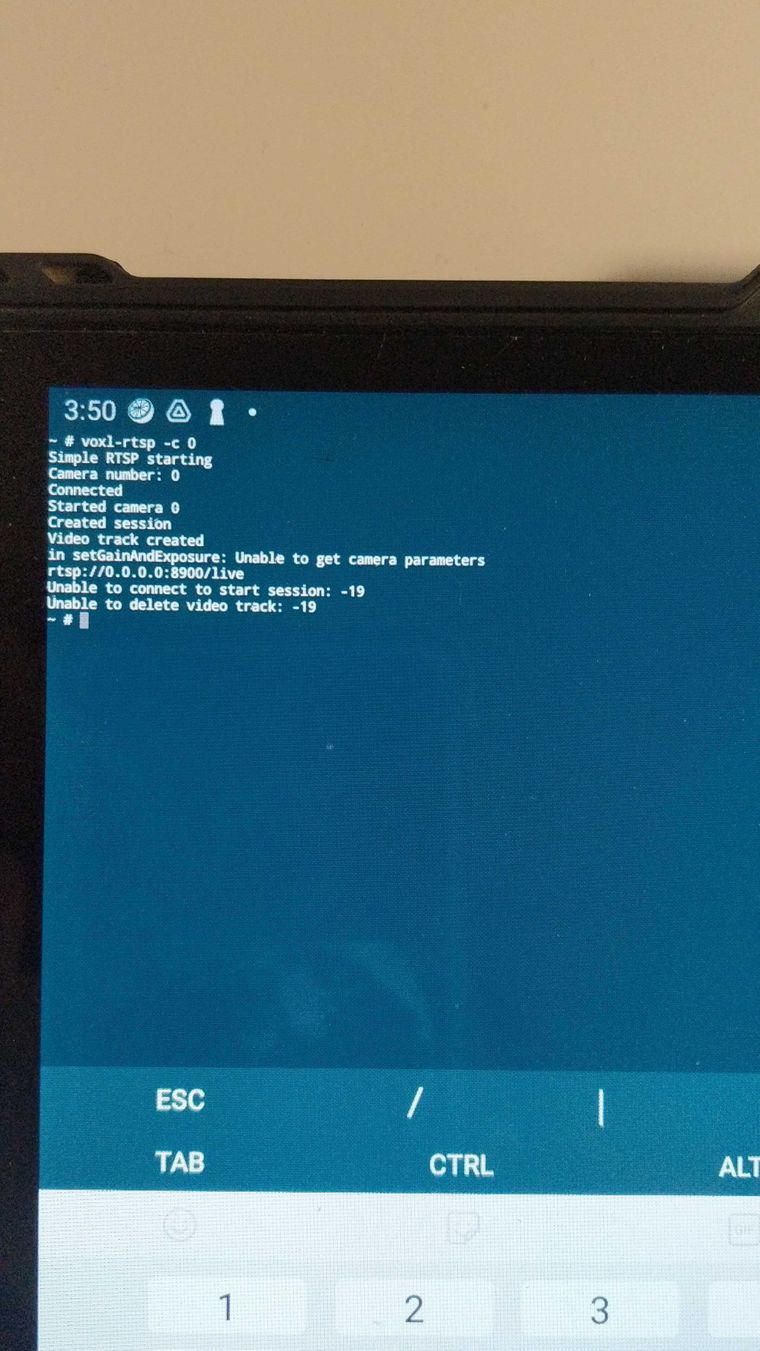
Cameras at ID 1 and 2 worked though (stereo and tracking)
I also configured the cameras as option 3 (Hires + Stereo + Tracking) and it issued the following result:
attempting to use camera configuration 3
adding override_cam_id value=1 to /etc/snav/camera.downward.xml
adding override_cam_id value=2 to /etc/snav/camera.stereo.xml
I also tried reverting the driver change and reset the configurations to factory settings but the issue persisted.
One last thing to note is that whatever camera configuration I ended up setting it to, streaming camera at ID 0 does not work anymore.
Any ideas on how to fix this?
Thanks
-
@Chad-Sweet I tried replacing the driver but it gave me the following error when trying to stream camera 0
Cameras at ID 1 and 2 worked though (stereo and tracking)
I also configured the cameras as option 3 (Hires + Stereo + Tracking) and it issued the following result:
attempting to use camera configuration 3
adding override_cam_id value=1 to /etc/snav/camera.downward.xml
adding override_cam_id value=2 to /etc/snav/camera.stereo.xml
I also tried reverting the driver change and reset the configurations to factory settings but the issue persisted.
One last thing to note is that whatever camera configuration I ended up setting it to, streaming camera at ID 0 does not work anymore.
Any ideas on how to fix this?
Thanks
Edit: reverting to original driver returns the functionality to default (upside down feed)



Reading along? Create a free ModalAI Forum account to join in.
With an account you can reply, ask your own question, get an email when a ModalAI engineer answers, and mark the reply that solved it. Your place in each thread is saved between visits.
Questions about VOXL, Flight Core, ESCs and ModalAI drones are answered here by the engineers who build them.
Register Login