Skip to content
  • Categories
  • Recent
  • Tags
  • Popular
  • Users
  • Groups
Collapse
Brand Logo

ModalAI Forum

  1. ModalAI Support Forum
  2. VOXL Dev Drones
  3. VOXL m500 Reference Drone
  4. About camera configuration for M500 frame.

About camera configuration for M500 frame.

Scheduled Pinned Locked Moved VOXL m500 Reference Drone
3 Posts 2 Posters 888 Views 2 Watching
  • Oldest to Newest
  • Newest to Oldest
  • Most Votes
Reply
  • Reply as topic
Log in to reply
This topic has been deleted. Only users with topic management privileges can see it.
  • Kaiba-KunK Offline
    Kaiba-KunK Offline
    Kaiba-Kun
    Contributor
    wrote on last edited by
    #1

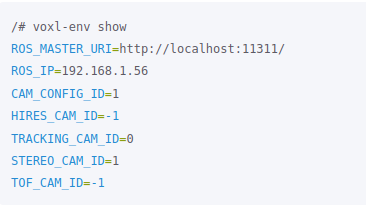
    Hello, i want to ask about camera configuration. After reset m500 by voxl-configure-modalai-vl and setup again follow the guide. I also re-config voxl-vision-px4 to the factory set-up because it's look like when reset modalai-vl the NED position also lost. When i tried with position mode it seem the UAV flies is not good as well as the first time flight.

    • for voxl-configure-cameras i choose the option 3.
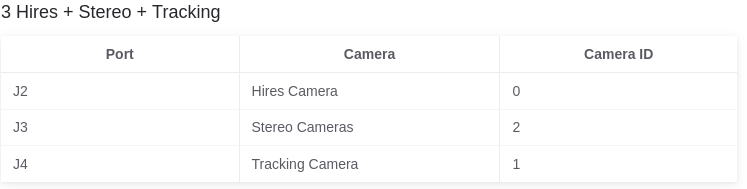
      c6237751-57a1-4d03-9c33-f76409bbb05c-image.png
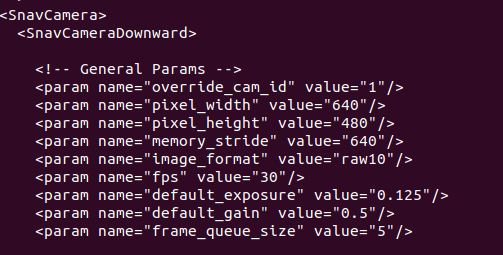
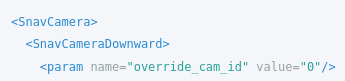
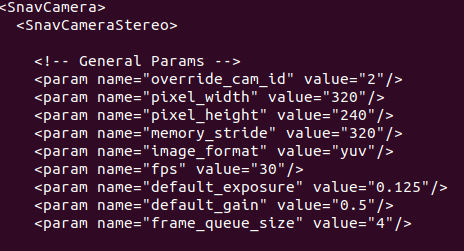
    • Here is some information. i think the config is not same as the manual document.
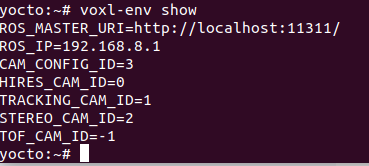
      026e376e-a37d-4bc3-875a-0f89bb7e55b5-image.png
      9fb042a5-2d32-4977-8826-2783d678ea41-image.png
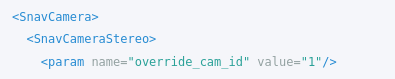
    • cat /etc/snav/camera.downward.xml
      1e777ba3-0f60-4123-88a1-29548a24957a-image.png
      e9378da2-2676-4541-9203-6c32452cecab-image.png
    • cat /etc/snav/camera.stereo.xml
      cf54d95d-6b48-42c0-b7ee-705b4033e266-image.png
      923e47e6-edd9-43b6-8748-9fc7149facb0-image.png
      -> Did i was wrong? M500 driff so much when tried to flies in position mode.
    1 Reply Last reply
    0
    • Kaiba-KunK Offline
      Kaiba-KunK Offline
      Kaiba-Kun
      Contributor
      wrote on last edited by
      #2

      do you have any idea? @modaltb.

      1 Reply Last reply
      0
      • modaltbM Offline
        modaltbM Offline
        modaltb
        ModalAI Team
        wrote on last edited by
        #3

        Hi @Kaiba-Kun ,

        Hmm, we normally use voxl-configure-vision-px4 when setting up the vehicle.

        For the m500, we have a -f option which will set it to factory state with respect to voxl-vision-px4, so voxl-configure-vision-px4 -f

        The camera configs in the ENV variables should be fine after this.

        I'd try that option above, if you've configured your GCS IP address in the config file needs to be updated, eg.

        vi /etc/modalai/voxl-vision-px4.conf and setup your GCS IP after running with the -f flag.

        After that, I'd then reboot the system, and then do a 'hand flight' validation, where you can pick the vehicle up and move around, validating local position NED in QGC.

        Here's a video where I do this: https://youtu.be/gTuSaHLCz8w?t=571

        1 Reply Last reply
        0

        Hello! It looks like you're interested in this conversation, but you don't have an account yet.

        Getting fed up of having to scroll through the same posts each visit? When you register for an account, you'll always come back to exactly where you were before, and choose to be notified of new replies (either via email, or push notification). You'll also be able to save bookmarks and upvote posts to show your appreciation to other community members.

        With your input, this post could be even better 💗

        Register Login
        Reply
        • Reply as topic
        Log in to reply
        • Oldest to Newest
        • Newest to Oldest
        • Most Votes


        ModalAI
        Categories Recent Tags ModalAI.com Docs
        © 2026 ModalAI® · Accelerating autonomy for smaller, smarter, safer drones · Powered by NodeBB
        • Login

        • Don't have an account? Register

        • Login or register to search.
        • First post
          Last post
        0
        • Categories
        • Recent
        • Tags
        • Popular
        • Users
        • Groups