
RB5 motor does not spin even after successful arm
-
May not be related. Does each unit of RB5 store a copy of its unique factory calibration data (such as compass, etc.) on its file system so that we can always restore such factory parameters? If so, where is path of such data?
-
QGC does have warning messages:
MAG #0 failed: TIMEOUT!
-
After rebooting RB5, MAG #0 error msg is gone.
Still no motor spin after a successful ARM.
Another question is on vehicle setup, which sub-type should be selected for RB5? Generic Quadcopter?
-
On MAVLink Console, type
modalai_escno response from vehicle's system shell.
Is this normal? -
Hi @sesajap ,
The MAVLink shell through QGC isn't functional at this time on rb5 flight, so yes at this point it's expected.
Are the blue LEDs on the ESC flashing? When they are talking with the flight controller they are flashing.
Here's information on how to load parameters:
https://docs.qgroundcontrol.com/master/en/SetupView/Parameters.html
I'd recommend using the params from our production team:
Note: the UART esc is enabled via this params:
https://gitlab.com/voxl-public/flight-core-px4/px4-parameters/-/blob/master/platforms/v1.12/RB5_Flight/RB5_Flight_V1_param_rev_A.params#L64So you could quickly check right now if those ESC params are correct, if not that might be it.
How are you powering the vehicle?
-
Hi @modaltb
The vehicle was powered via benchtop/AC adapter. We have tried 4S battery as well now. Still no-motor-spin when ARM even when vehicle is battery powered. Under either powering method, the blue LEDs on the ESC always flashing.There is a failure when loading https://gitlab.com/voxl-public/flight-core-px4/px4-parameters/-/blob/master/platforms/v1.12/RB5_Flight/RB5_Flight_V1_param_rev_A.params
The error message is
Parameters are missing from firmware. You may be running a version of firmware which is not fully supported or your firmware has a bug in it. Missing params: 1:DSHOT_TEL_CFGLooks like DSHOT_TEL_CFG does not exist on the vehicle. How do we create this missing parameter? Does this parameter have anything to do with motor spin?
RB5 firmware info:
rb5-flight-versions
SDK version:
rb5-flight-sdk: [trusted=yes]PX4 versions:
modalai-slpi: 1.0-6
px4-rb5-fligh: 1.4-6
px4-support: 1.0-4
libfc-sensor: 1.0-2System Image:
1.0.5-M0052-9.1-perf -
Hi @modaltb
When vehicle is armed, there is another message showing on the QGC. The message isFailsafe mode activated
Then there is no motor spin.
When going to QGC->Vehicle Setup->Safety, another message shows "Missing params: 1:SDLOG_MODE"
-
Hi @modaltb
################################################################################
Motors/ESCs
################################################################################
disable dshot, use uart instead
1 1 DSHOT_CONFIG 0 6
1 1 DSHOT_TEL_CFG 0 6=============
Looks like DSHOT_TEL_CFG is related to Motors. So missing that from PX4 probably relate to the no-motor-spin issue here.
How do we add this PX4 param? How could this parameter be missing?
-
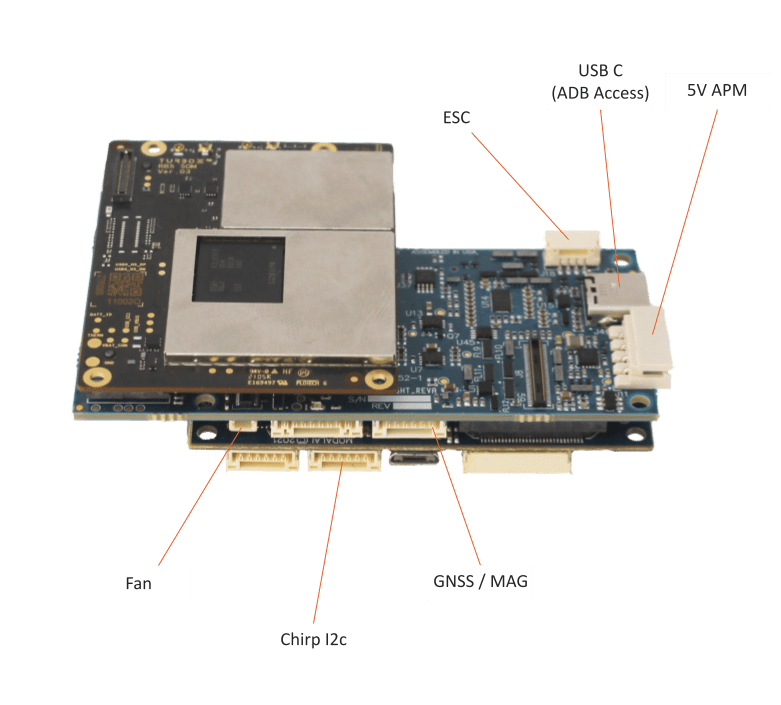
Can you double check that the cable going from the esc to the RB5 is still plugged in? If this cable is unplugged the motors won't spin but QGC will say it's armed.
Another note is that the RB5 only gets the helper files from the px4 parameters.
In RB5, the helper files, load the indoor or outdoor depending where you are flying and the Spektrum dx6e if that is the transmitter you're using.
If the platform files were loaded you may have to flash the system image to restart the drone. -
thank you for your notes.
Double check the cable from RB5 to ESC per https://docs.modalai.com/images/rb5/rb5-labeled-3.png . The cable is plugged on both ends.
Yes, dx6e is the transmitter. Did load indoor helper (https://gitlab.com/voxl-public/flight-core-px4/px4-parameters/-/blob/master/helpers/rb5/ekf2_indoor_vio.params) and dx6e helper (https://gitlab.com/voxl-public/flight-core-px4/px4-parameters/-/blob/master/helpers/rb5/spektrum_dx6e_config.params).
Also did load single platform file (https://gitlab.com/voxl-public/flight-core-px4/px4-parameters/-/blob/master/platforms/v1.12/RB5_Flight/RB5_Flight_V1_param_rev_A.params).
After load above three files, we power cycle RB5 and still no motor spin on ARM.
Question is why we need to flash system image after loading platform file? Is this a routine thing we need to do with any platform file loading? Or we flash system image for troubleshooting purpose?
Any method (such as wavros?) to create the missing DSHOT_TEL_CFG ? Why would reflash system image create such missing parameter?
-
thank you for your notes.
Double check the cable from RB5 to ESC per https://docs.modalai.com/images/rb5/rb5-labeled-3.png . The cable is plugged on both ends.
Yes, dx6e is the transmitter. Did load indoor helper (https://gitlab.com/voxl-public/flight-core-px4/px4-parameters/-/blob/master/helpers/rb5/ekf2_indoor_vio.params) and dx6e helper (https://gitlab.com/voxl-public/flight-core-px4/px4-parameters/-/blob/master/helpers/rb5/spektrum_dx6e_config.params).
Also did load single platform file (https://gitlab.com/voxl-public/flight-core-px4/px4-parameters/-/blob/master/platforms/v1.12/RB5_Flight/RB5_Flight_V1_param_rev_A.params).
After load above three files, we power cycle RB5 and still no motor spin on ARM.
Question is why we need to flash system image after loading platform file? Is this a routine thing we need to do with any platform file loading? Or we flash system image for troubleshooting purpose?
Any method (such as wavros?) to create the missing DSHOT_TEL_CFG ? Why would reflash system image create such missing parameter?
@sesajap perfect. Was anything changed from when the drone armed and the motors spun to the next day?
The RB5 platform px4 params are there mostly for reference in case other params were changed. Since they are just a reference they contain some params that will cause some interference with the flight/arming.
Since they were loaded, the only way to wipe those params would be to factory flash it and only load the helper files regarding the RB5.
Flashing the system image when loading the platform file is not a routine procedure. However, it is necessary in this case for trouble shooting.
-
Thank you for your patient!
Recall the changes between spin and no-more-spin is active VIO and VOA services while indoor. Then disable both VIO and VOA service, but motor no longer spin after reboot.
Finally found a solution without flashing the system image:
Step 1: load https://gitlab.com/voxl-public/flight-core-px4/px4-parameters/-/blob/master/helpers/rb5/ekf2_outdoor_gps_mag.params
Step 2: set vehicle param COM_ARM_WO_GPS to 1
Step 3: power cycle RB5Now arm RB5 after it comes back online, motor spins. -:)
Hope this helps anyone else running into same issue.


Reading along? Create a free ModalAI Forum account to join in.
With an account you can reply, ask your own question, get an email when a ModalAI engineer answers, and mark the reply that solved it. Your place in each thread is saved between visits.
Questions about VOXL, Flight Core, ESCs and ModalAI drones are answered here by the engineers who build them.
Register Login