Skip to content
  • Categories
  • Recent
  • Tags
  • Popular
  • Users
  • Groups
Collapse
Brand Logo

ModalAI Forum

  1. ModalAI Support Forum
  2. VOXL Compute & Autopilot
  3. VOXL 2
  4. Broken Parts

Broken Parts

Scheduled Pinned Locked Moved VOXL 2
52 Posts 4 Posters 19.6k Views 1 Watching
  • Oldest to Newest
  • Newest to Oldest
  • Most Votes
Reply
  • Reply as topic
Log in to reply
This topic has been deleted. Only users with topic management privileges can see it.
  • tomT tom

    @Bright-Nnadi I will try your other email

    Bright NnadiB Offline
    Bright NnadiB Offline
    Bright Nnadi
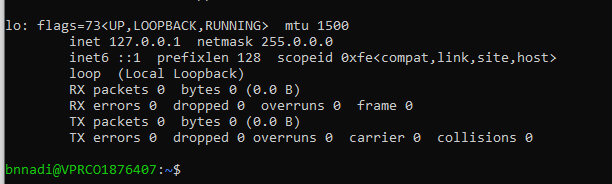
    Contributor
    wrote on last edited by
    #14

    @tom Okay thanks

    1 Reply Last reply
    0
    • Bright NnadiB Offline
      Bright NnadiB Offline
      Bright Nnadi
      Contributor
      wrote on last edited by
      #15

      Hey Tom,

      Please i have been looking at y'alls documentation for a while now. I still haven't found the pinout of the VOXL 2 flight deck yet. Please can you send me a image with labelled pinouts of the VOXL Flight Deck.

      1 Reply Last reply
      0
      • ? Offline
        ? Offline
        A Former User
        wrote on last edited by
        #16

        Hi,

        The connectors and pinouts for them can be found here

        Bright NnadiB 1 Reply Last reply
        0
        • ? A Former User

          Hi,

          The connectors and pinouts for them can be found here

          Bright NnadiB Offline
          Bright NnadiB Offline
          Bright Nnadi
          Contributor
          wrote on last edited by
          #17

          @Alex-Gardner Thanks Alex, so my VOXL 2 is already assembled so its hard for me to find where each pinout are located. The labels aren't showing because the 3D model is covering it. Is it possible to set up a meeting with you sometime or you can send a video where you are plugging in stuffs to the assembled VOXL 2. (I could also take out the 3D model but I prefer not too since its fragile)

          1 Reply Last reply
          0
          • tomT Offline
            tomT Offline
            tom
            admin
            wrote on last edited by
            #18

            @Bright-Nnadi the photos you sent me were of a VOXL CAM not a VOXL2, is that what you are referencing? Or is this different hardware that you’re talking about now

            Bright NnadiB 3 Replies Last reply
            0
            • tomT tom

              @Bright-Nnadi the photos you sent me were of a VOXL CAM not a VOXL2, is that what you are referencing? Or is this different hardware that you’re talking about now

              Bright NnadiB Offline
              Bright NnadiB Offline
              Bright Nnadi
              Contributor
              wrote on last edited by
              #19

              @tom yes the VOXL CAM

              1 Reply Last reply
              0
              • tomT tom

                @Bright-Nnadi the photos you sent me were of a VOXL CAM not a VOXL2, is that what you are referencing? Or is this different hardware that you’re talking about now

                Bright NnadiB Offline
                Bright NnadiB Offline
                Bright Nnadi
                Contributor
                wrote on last edited by
                #20

                @tom My bad I have been mixing up the VOXL CAM with the VOXL 2 all this time.

                1 Reply Last reply
                0
                • tomT tom

                  @Bright-Nnadi the photos you sent me were of a VOXL CAM not a VOXL2, is that what you are referencing? Or is this different hardware that you’re talking about now

                  Bright NnadiB Offline
                  Bright NnadiB Offline
                  Bright Nnadi
                  Contributor
                  wrote on last edited by
                  #21

                  @tom Do y'all have sell the VOXL ESC USB interface

                  1 Reply Last reply
                  0
                  • tomT Offline
                    tomT Offline
                    tom
                    admin
                    wrote on last edited by
                    #22

                    @Bright-Nnadi Is this what you're referencing? https://www.modalai.com/products/voxl-esc

                    Bright NnadiB 2 Replies Last reply
                    0
                    • tomT tom

                      @Bright-Nnadi Is this what you're referencing? https://www.modalai.com/products/voxl-esc

                      Bright NnadiB Offline
                      Bright NnadiB Offline
                      Bright Nnadi
                      Contributor
                      wrote on last edited by
                      #23

                      @tom I am talking about this https://docs.modalai.com/modal-esc-v2-manual/

                      1 Reply Last reply
                      0
                      • tomT Offline
                        tomT Offline
                        tom
                        admin
                        wrote on last edited by
                        #24

                        @Bright-Nnadi Yes, that is the same as what I linked above.

                        1 Reply Last reply
                        0
                        • tomT tom

                          @Bright-Nnadi Is this what you're referencing? https://www.modalai.com/products/voxl-esc

                          Bright NnadiB Offline
                          Bright NnadiB Offline
                          Bright Nnadi
                          Contributor
                          wrote on last edited by
                          #25

                          @tom Okay thanks Tom

                          1 Reply Last reply
                          0
                          • Bright NnadiB Offline
                            Bright NnadiB Offline
                            Bright Nnadi
                            Contributor
                            wrote on last edited by
                            #26

                            Hey Tom , So i am trying to set up the VOXL CAM now. I have turned it on using the power module and the USB and the LED is solid green but I am not seeing the VOXL wifi.

                            1 Reply Last reply
                            0
                            • tomT Offline
                              tomT Offline
                              tom
                              admin
                              wrote on last edited by
                              #27

                              @Bright-Nnadi When you say you aren't seeing the VOXL WiFi, are you saying you want VOXL to be in SoftAP and are trying to connect to it with a computer? Or are you trying to put it in station mode and have it connect to an external network?

                              Bright NnadiB 1 Reply Last reply
                              0
                              • tomT tom

                                @Bright-Nnadi When you say you aren't seeing the VOXL WiFi, are you saying you want VOXL to be in SoftAP and are trying to connect to it with a computer? Or are you trying to put it in station mode and have it connect to an external network?

                                Bright NnadiB Offline
                                Bright NnadiB Offline
                                Bright Nnadi
                                Contributor
                                wrote on last edited by
                                #28

                                @tom I am following the VOXL CAM Start guide and it says to connect to the VOXL wifi after powering it on. I am trying to connect it to my computer

                                1 Reply Last reply
                                0
                                • tomT Offline
                                  tomT Offline
                                  tom
                                  admin
                                  wrote on last edited by
                                  #29

                                  @Bright-Nnadi Are you using ADB in order to access the VOXL's shell? If so, what is the output of ifconfig ?

                                  Bright NnadiB 1 Reply Last reply
                                  0
                                  • tomT tom

                                    @Bright-Nnadi Are you using ADB in order to access the VOXL's shell? If so, what is the output of ifconfig ?

                                    Bright NnadiB Offline
                                    Bright NnadiB Offline
                                    Bright Nnadi
                                    Contributor
                                    wrote on last edited by
                                    #30

                                    @tom 0e324744-66bb-42f8-b599-e4df4cb37dec-image.png output

                                    1 Reply Last reply
                                    0
                                    • Bright NnadiB Offline
                                      Bright NnadiB Offline
                                      Bright Nnadi
                                      Contributor
                                      wrote on last edited by
                                      #31

                                      Tom right now I'm using the ADB and I want to enable the station mode. what SSID and password Im using for the command line adb shell voxl-wifi station <SSID> <Passowrd>

                                      1 Reply Last reply
                                      0
                                      • tomT Offline
                                        tomT Offline
                                        tom
                                        admin
                                        wrote on last edited by
                                        #32

                                        @Bright-Nnadi Apologies I mean running ifconfig in adb shell

                                        You will do the following:

                                        adb shell
                                        
                                        voxl-wifi station SSID PASS


                                        where SSID is the name of the WiFi network you want to connect to and PASS is the password of that network.

                                        You'll want to connect to whatever network your ground station is also connected to.

                                        Bright NnadiB 1 Reply Last reply
                                        0
                                        • tomT tom

                                          @Bright-Nnadi Apologies I mean running ifconfig in adb shell

                                          You will do the following:

                                          adb shell
                                          
                                          voxl-wifi station SSID PASS


                                          where SSID is the name of the WiFi network you want to connect to and PASS is the password of that network.

                                          You'll want to connect to whatever network your ground station is also connected to.

                                          Bright NnadiB Offline
                                          Bright NnadiB Offline
                                          Bright Nnadi
                                          Contributor
                                          wrote on last edited by
                                          #33

                                          @tom For some reason i am not able to get into the adb shell. And I am also using my organization's network which is private.

                                          1 Reply Last reply
                                          0

                                          Hello! It looks like you're interested in this conversation, but you don't have an account yet.

                                          Getting fed up of having to scroll through the same posts each visit? When you register for an account, you'll always come back to exactly where you were before, and choose to be notified of new replies (either via email, or push notification). You'll also be able to save bookmarks and upvote posts to show your appreciation to other community members.

                                          With your input, this post could be even better 💗

                                          Register Login
                                          Reply
                                          • Reply as topic
                                          Log in to reply
                                          • Oldest to Newest
                                          • Newest to Oldest
                                          • Most Votes


                                          ModalAI
                                          Categories Recent Tags ModalAI.com Docs
                                          © 2026 ModalAI® · Accelerating autonomy for smaller, smarter, safer drones · Powered by NodeBB
                                          • Login

                                          • Login or register to search.
                                          • First post
                                            Last post
                                          0
                                          • Categories
                                          • Recent
                                          • Tags
                                          • Popular
                                          • Users
                                          • Groups