
Voxl-hexagon build.sh
-
Hi,
I am at step 4 of "Build instructions" (https://gitlab.com/voxl-public/core-libs/libvoxl_io), where I need to use "./build.sh" in voxl-hexagon, but the following error is raised:
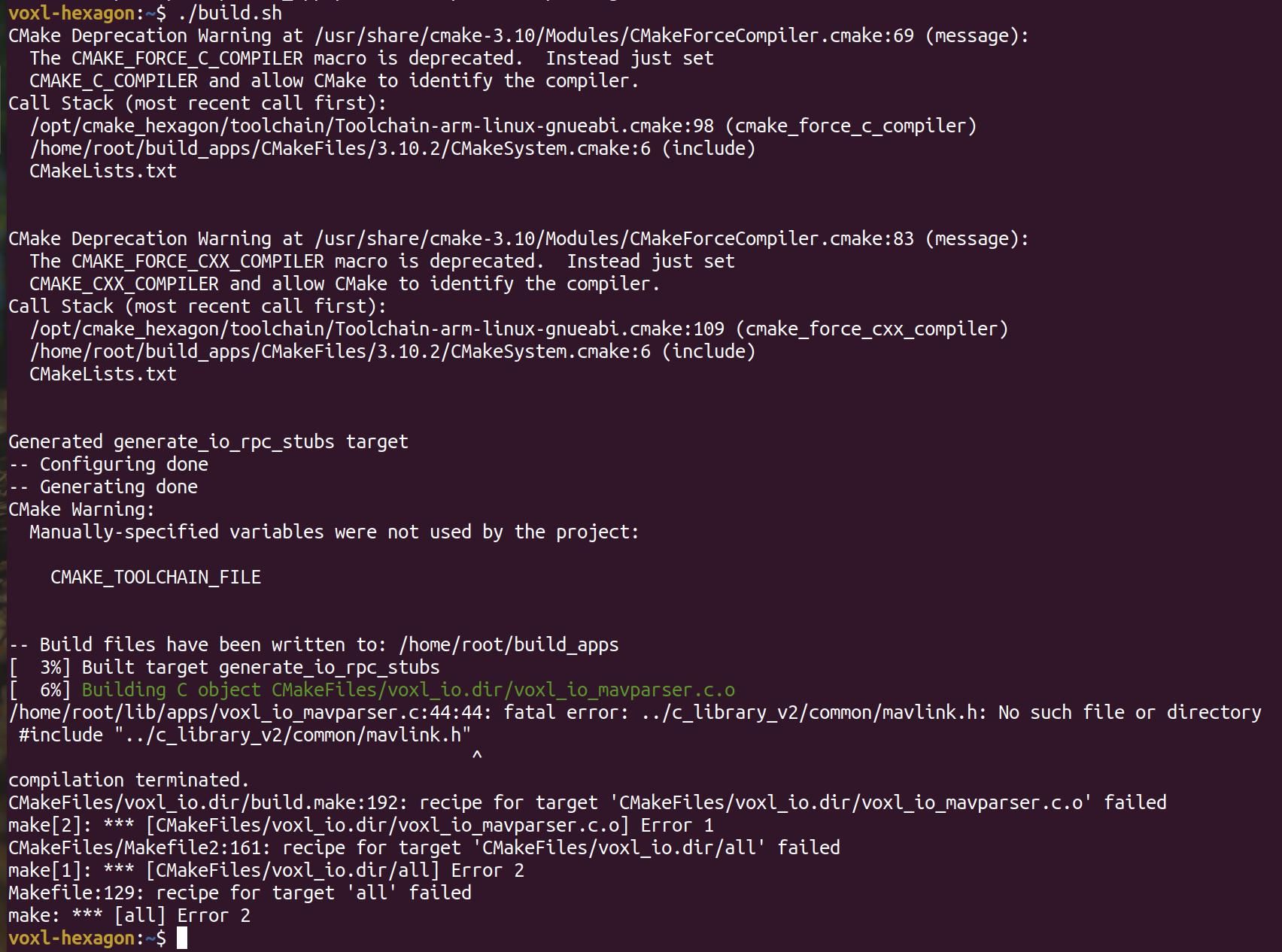
In step 3 of "Build instructions", it says to use "-p" after "voxl-docker -i voxl-hexagon", when opening voxl-hexagon. But when I type "voxl-docker -h" it isn't an option, so I opened voxl-hexagon without the "-p". Step 3 says to update the latest version, but I followed the steps from the Modalai docs and also downloaded it from the git-repository, but still no "-p".
Does it have to do with the "-p" or lies the problem elsewhere?
Thanks in advance
-
Hi,
I am at step 4 of "Build instructions" (https://gitlab.com/voxl-public/core-libs/libvoxl_io), where I need to use "./build.sh" in voxl-hexagon, but the following error is raised:
In step 3 of "Build instructions", it says to use "-p" after "voxl-docker -i voxl-hexagon", when opening voxl-hexagon. But when I type "voxl-docker -h" it isn't an option, so I opened voxl-hexagon without the "-p". Step 3 says to update the latest version, but I followed the steps from the Modalai docs and also downloaded it from the git-repository, but still no "-p".
Does it have to do with the "-p" or lies the problem elsewhere?
Thanks in advance
@SHofmeester I'll try this on my machine but the error it is showing is related to a missing file. That file should be there if the submodules were updated properly. Step 2 does this:
git submodule update --init --recursive. What happened when you ran that step? What do you get if you run this command in the libvoxl_io top level directory?libvoxl_io$ find . -name mavlink.h ./lib/c_library_v2/standard/mavlink.h ./lib/c_library_v2/ASLUAV/mavlink.h ./lib/c_library_v2/matrixpilot/mavlink.h ./lib/c_library_v2/icarous/mavlink.h ./lib/c_library_v2/autoquad/mavlink.h ./lib/c_library_v2/ardupilotmega/mavlink.h ./lib/c_library_v2/slugs/mavlink.h ./lib/c_library_v2/test/mavlink.h ./lib/c_library_v2/minimal/mavlink.h ./lib/c_library_v2/uAvionix/mavlink.h ./lib/c_library_v2/common/mavlink.h -
Hi,
I am at step 4 of "Build instructions" (https://gitlab.com/voxl-public/core-libs/libvoxl_io), where I need to use "./build.sh" in voxl-hexagon, but the following error is raised:
In step 3 of "Build instructions", it says to use "-p" after "voxl-docker -i voxl-hexagon", when opening voxl-hexagon. But when I type "voxl-docker -h" it isn't an option, so I opened voxl-hexagon without the "-p". Step 3 says to update the latest version, but I followed the steps from the Modalai docs and also downloaded it from the git-repository, but still no "-p".
Does it have to do with the "-p" or lies the problem elsewhere?
Thanks in advance
@SHofmeester I just tried the build with V1.1 of voxl-hexagon and it all worked for me. But you are correct, the
-poption is not needed. We'll update the documentation. And after I downloaded V1.1 of voxl-hexagon from downloads.modalai.com I loaded it withdocker load < ~/Downloads/voxl-hexagon_v1.1.tgzand then ran it withvoxl-docker -i voxl-hexagon:V1.1. -
@Eric-Katzfey Thank you for your reply.
I managed to get the same "find" results as you, by properly cloning the repository and using "git submodule update --init --recursive".
When I try to run build.sh in ~/git/libapq8096-io, the following error appears:
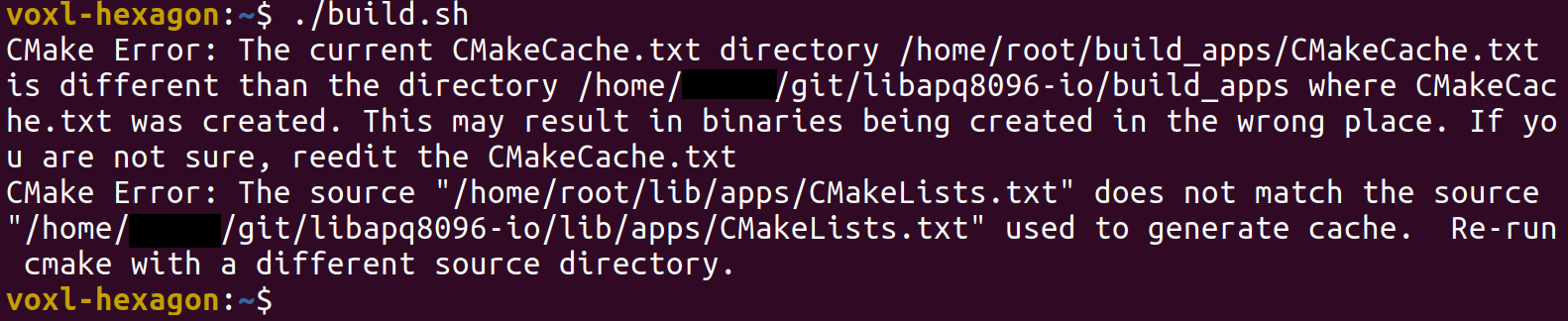
-
@Eric-Katzfey Thank you for your reply.
I managed to get the same "find" results as you, by properly cloning the repository and using "git submodule update --init --recursive".
When I try to run build.sh in ~/git/libapq8096-io, the following error appears:
@SHofmeester Something got corrupted. That can happen when you build, then make some changes to the structure of the build environment, then try to build again. Just delete everything, and start from scratch. Looks like we also just moved and changed the name of the repository which probably contributed to the error you saw. Here is the full output from what I just described:
modalai@modalai-XPS-15-9570:~/development/modalai$ git clone git@gitlab.com:voxl-public/voxl-sdk/core-libs/libapq8096-io.git Cloning into 'libapq8096-io'... remote: Enumerating objects: 893, done. remote: Counting objects: 100% (152/152), done. remote: Compressing objects: 100% (76/76), done. remote: Total 893 (delta 95), reused 125 (delta 74), pack-reused 741 Receiving objects: 100% (893/893), 294.66 KiB | 1.94 MiB/s, done. Resolving deltas: 100% (499/499), done. modalai@modalai-XPS-15-9570:~/development/modalai$ cd libapq8096-io/ modalai@modalai-XPS-15-9570:~/development/modalai/libapq8096-io$ ls build.sh clean.sh ipk LICENSE README.md CHANGELOG install_on_voxl.sh lib make_package.sh modalai@modalai-XPS-15-9570:~/development/modalai/libapq8096-io$ git submodule update --init --recursive Submodule 'lib/c_library_v2' (https://github.com/mavlink/c_library_v2.git) registered for path 'lib/c_library_v2' Cloning into '/home/modalai/development/modalai/libapq8096-io/lib/c_library_v2'... Submodule path 'lib/c_library_v2': checked out '99a977433a13705cd0624f8ff3b5f5210d526ba9' modalai@modalai-XPS-15-9570:~/development/modalai/libapq8096-io$ voxl-docker -i voxl-hexagon:V1.1 launching image: voxl-hexagon:V1.1 with the following command: docker run --rm -it --net=host --privileged -w /home/modalai --volume=/dev/bus/usb:/dev/bus/usb -e LOCAL_USER_ID=0 -e LOCAL_USER_NAME=root -e LOCAL_GID=0 -v /home/modalai/development/modalai/libapq8096-io:/home/root:rw -w /home/root voxl-hexagon:V1.1 /bin/bash -l voxl-hexagon:~$ ./build.sh CMake Deprecation Warning at /usr/share/cmake-3.10/Modules/CMakeForceCompiler.cmake:69 (message): The CMAKE_FORCE_C_COMPILER macro is deprecated. Instead just set CMAKE_C_COMPILER and allow CMake to identify the compiler. Call Stack (most recent call first): /opt/cmake_hexagon/toolchain/Toolchain-arm-linux-gnueabi.cmake:98 (cmake_force_c_compiler) /usr/share/cmake-3.10/Modules/CMakeDetermineSystem.cmake:94 (include) CMakeLists.txt CMake Deprecation Warning at /usr/share/cmake-3.10/Modules/CMakeForceCompiler.cmake:83 (message): The CMAKE_FORCE_CXX_COMPILER macro is deprecated. Instead just set CMAKE_CXX_COMPILER and allow CMake to identify the compiler. Call Stack (most recent call first): /opt/cmake_hexagon/toolchain/Toolchain-arm-linux-gnueabi.cmake:109 (cmake_force_cxx_compiler) /usr/share/cmake-3.10/Modules/CMakeDetermineSystem.cmake:94 (include) CMakeLists.txt CMake Deprecation Warning at /usr/share/cmake-3.10/Modules/CMakeForceCompiler.cmake:69 (message): The CMAKE_FORCE_C_COMPILER macro is deprecated. Instead just set CMAKE_C_COMPILER and allow CMake to identify the compiler. Call Stack (most recent call first): /opt/cmake_hexagon/toolchain/Toolchain-arm-linux-gnueabi.cmake:98 (cmake_force_c_compiler) /home/root/build_apps/CMakeFiles/3.10.2/CMakeSystem.cmake:6 (include) CMakeLists.txt CMake Deprecation Warning at /usr/share/cmake-3.10/Modules/CMakeForceCompiler.cmake:83 (message): The CMAKE_FORCE_CXX_COMPILER macro is deprecated. Instead just set CMAKE_CXX_COMPILER and allow CMake to identify the compiler. Call Stack (most recent call first): /opt/cmake_hexagon/toolchain/Toolchain-arm-linux-gnueabi.cmake:109 (cmake_force_cxx_compiler) /home/root/build_apps/CMakeFiles/3.10.2/CMakeSystem.cmake:6 (include) CMakeLists.txt Generated generate_io_rpc_stubs target -- Configuring done -- Generating done -- Build files have been written to: /home/root/build_apps Scanning dependencies of target generate_io_rpc_stubs [ 3%] Generating io_rpc.h, io_rpc_skel.c, io_rpc_stub.c [ 3%] Built target generate_io_rpc_stubs Scanning dependencies of target voxl_io [ 6%] Building C object CMakeFiles/voxl_io.dir/voxl_io_uart.c.o [ 9%] Building C object CMakeFiles/voxl_io.dir/voxl_io_misc.c.o [ 12%] Building C object CMakeFiles/voxl_io.dir/voxl_io_spi.c.o [ 15%] Building C object CMakeFiles/voxl_io.dir/voxl_io_gpio.c.o [ 18%] Building C object CMakeFiles/voxl_io.dir/voxl_io_i2c.c.o [ 21%] Building C object CMakeFiles/voxl_io.dir/voxl_io_mavparser.c.o [ 24%] Building C object CMakeFiles/voxl_io.dir/io_rpc_stub.c.o [ 27%] Building C object CMakeFiles/voxl_io.dir/opt/Qualcomm/Hexagon_SDK/3.1/libs/common/rpcmem/src/rpcmem.c.o [ 30%] Linking C shared library libvoxl_io.so [ 36%] Built target voxl_io Scanning dependencies of target voxl-test-mavparser [ 39%] Building C object CMakeFiles/voxl-test-mavparser.dir/voxl-test-mavparser.c.o [ 42%] Linking C executable voxl-test-mavparser [ 45%] Built target voxl-test-mavparser Scanning dependencies of target voxl-i2c [ 48%] Building C object CMakeFiles/voxl-i2c.dir/voxl-i2c.c.o [ 51%] Linking C executable voxl-i2c [ 54%] Built target voxl-i2c Scanning dependencies of target voxl-spi [ 57%] Building C object CMakeFiles/voxl-spi.dir/voxl-spi.c.o [ 60%] Linking C executable voxl-spi [ 63%] Built target voxl-spi Scanning dependencies of target voxl-gpio-loopback [ 66%] Building C object CMakeFiles/voxl-gpio-loopback.dir/voxl-gpio-loopback.c.o [ 69%] Linking C executable voxl-gpio-loopback [ 72%] Built target voxl-gpio-loopback Scanning dependencies of target voxl-gpio [ 75%] Building C object CMakeFiles/voxl-gpio.dir/voxl-gpio.c.o [ 78%] Linking C executable voxl-gpio [ 81%] Built target voxl-gpio Scanning dependencies of target voxl-uart-loopback [ 84%] Building C object CMakeFiles/voxl-uart-loopback.dir/voxl-uart-loopback.c.o [ 87%] Linking C executable voxl-uart-loopback [ 90%] Built target voxl-uart-loopback Scanning dependencies of target voxl-test-time [ 93%] Building C object CMakeFiles/voxl-test-time.dir/voxl-test-time.c.o [ 96%] Linking C executable voxl-test-time [100%] Built target voxl-test-time /home/root -- The C compiler identification is Clang 3.9.0 -- The CXX compiler identification is Clang 3.9.0 -- Check for working C compiler: /opt/Qualcomm/Hexagon_SDK/3.1/tools/HEXAGON_Tools/8.0.08/Tools/bin/hexagon-clang -- Check for working C compiler: /opt/Qualcomm/Hexagon_SDK/3.1/tools/HEXAGON_Tools/8.0.08/Tools/bin/hexagon-clang -- works -- Detecting C compiler ABI info -- Detecting C compiler ABI info - done -- Detecting C compile features -- Detecting C compile features - done -- Check for working CXX compiler: /opt/Qualcomm/Hexagon_SDK/3.1/tools/HEXAGON_Tools/8.0.08/Tools/bin/hexagon-clang++ -- Check for working CXX compiler: /opt/Qualcomm/Hexagon_SDK/3.1/tools/HEXAGON_Tools/8.0.08/Tools/bin/hexagon-clang++ -- works -- Detecting CXX compiler ABI info -- Detecting CXX compiler ABI info - done -- Detecting CXX compile features -- Detecting CXX compile features - done -- CMAKE_C_FLAGS: -O0 -g -std=gnu99 -fno-strict-aliasing -fdata-sections -fno-zero-initialized-in-bss -Wall -Wextra -Werror -Wno-unused-parameter -Wno-unused-function -Wno-unused-variable -Wno-gnu-array-member-paren-init -Wno-cast-align -Wno-missing-braces -Wno-strict-aliasing -D__CUSTOM_FILE_IO__ -mv60 -G0 -DDSP_TYPE_SLPI -- CMAKE_CXX_FLAGS: -DCONFIG_WCHAR_BUILTIN -D__CUSTOM_FILE_IO__ -mv60 -G0 -DDSP_TYPE_SLPI Generated generate_io_rpc_stubs target QURT_LIB_INCS = QURT_LIB_LINK_LIBS = -- Configuring done -- Generating done -- Build files have been written to: /home/root/build_sdsp Scanning dependencies of target generate_io_rpc_stubs [ 9%] Generating io_rpc.h, io_rpc_skel.c, io_rpc_stub.c [ 9%] Built target generate_io_rpc_stubs Scanning dependencies of target io_rpc [ 18%] Building C object CMakeFiles/io_rpc.dir/io_rpc_misc.c.o [ 27%] Building C object CMakeFiles/io_rpc.dir/io_rpc_spi.c.o [ 36%] Building C object CMakeFiles/io_rpc.dir/io_rpc_uart.c.o [ 45%] Building C object CMakeFiles/io_rpc.dir/io_rpc_gpio.c.o [ 54%] Building C object CMakeFiles/io_rpc.dir/io_rpc_i2c.c.o [ 63%] Building C object CMakeFiles/io_rpc.dir/io_rpc_mavparser.c.o [ 72%] Linking C shared library libio_rpc.so [ 72%] Built target io_rpc Scanning dependencies of target io_rpc_skel [ 81%] Building C object CMakeFiles/io_rpc_skel.dir/io_rpc_skel.c.o [ 90%] Linking C shared module libio_rpc_skel.so [100%] Built target io_rpc_skel /home/root DONE voxl-hexagon:~$ -
@Eric-Katzfey Thank you for your help. I followed your steps and it worked immediately. I am now also able to generate the ipk-package and push it to the VOXL. When I use adb shell, the file appears in home/root/ipk.
I tried a few things, but I still have some questions:
How can I run the i2c related files from "libapq8096-io/lib/python" on the VOXL, for example voxl_i2c_scan.py?
Can I also make my own python scripts and run them?


Reading along? Create a free ModalAI Forum account to join in.
With an account you can reply, ask your own question, get an email when a ModalAI engineer answers, and mark the reply that solved it. Your place in each thread is saved between visits.
Questions about VOXL, Flight Core, ESCs and ModalAI drones are answered here by the engineers who build them.
Register Login