
Questions on Starling 2 Max
-
Hardware:
- Device: Starling 2 Max (MRB-D0012)
- Hardware platform: M0054
- Machine variant: 1.2.1
- SKU: MRB-D0012-4-V3-C28-T8-M36-X0
Software:
- System image: 1.8.06-M0054-14.1a-perf
- Kernel: #1 SMP PREEMPT Wed Oct 22 04:29:38 UTC 2025 4.19.125
- VOXL Suite: 1.6.4~alpha2
I am new to drones, the ModalAI interface, and PX4. I encountered several issues while working through the VOXL Developer Bootcamp and would appreciate guidance on the following questions.
Questions:
-
In the ModalAI VOXL Portal, I repeatedly receive one of the following errors: "Preflight Fail: High Accelerometer Bias" or "Preflight Fail: Yaw Estimate Error". To address these errors, I have restarted the drone while it was stationary and level on a table, and also recalibrated the gyroscope, accelerometer, level horizon, and magnetometer. However, the errors continue to appear. What additional troubleshooting steps should I follow to resolve these preflight failures?
-
While the drone is powered on and idle on a table, the reported CPU temperature rises to approximately 104°C. Pointing a desk fan at the drone reduces the temperature to approximately 80°C. Is this temperature expected during normal development? If not, what are the recommended practices for keeping the system cool while writing, compiling, or testing code? The log is shown below:
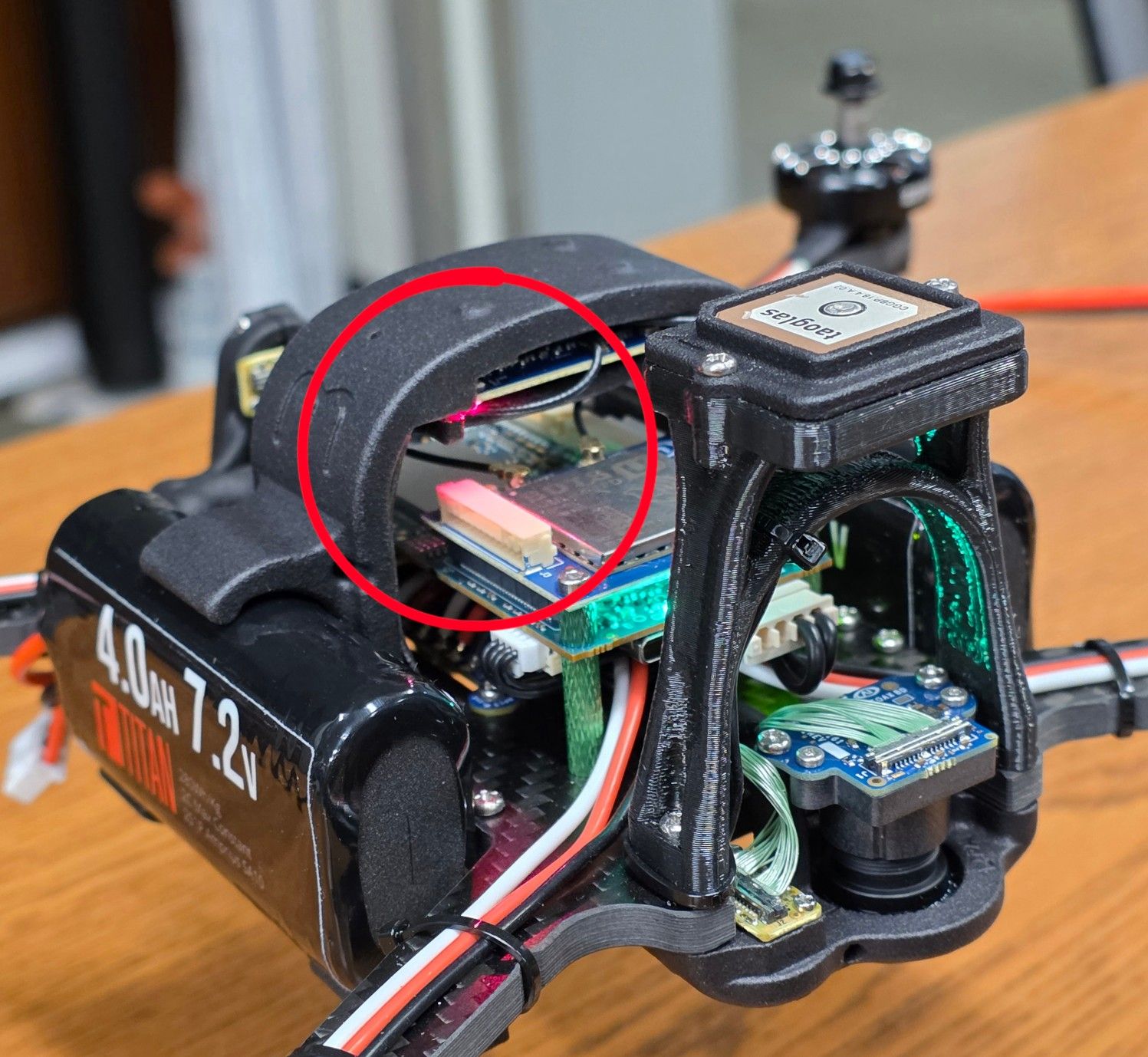
Name MHz Temp Util Jul 20 2026 20:46:05 cpu0 979 104.7 99.0 Uptime: 0:15:36 cpu1 979 103.5 90.0 cpu2 979 102.4 91.4 Mem Use (MB) cpu3 979 104.3 89.5 6244.8/7671 cpu4 710 103.9 100.0 Mem Allocation cpu5 710 104.7 99.0 6.4 MB/s cpu6 710 103.5 100.0 cpu7 844 104.7 100.0 Governor: Cool Total 104.0 96.1 Pitmode: Active 10s avg 91.4 Auto Pitmode: ON ------------------------- CPU OVERLOAD WARN GPU 305 98.1 15.0 CPU OVERHEAT CRIT GPU 10s avg 18.6 MEM LEAK WARNING PID Top CPU Consumers CPU% Core Pri 1429 voxl-camera-server 184.3 4 80 2867 voxl-qvio-server 96.2 6 80 1931 px4 89.7 3 0 2219 voxl-mavlink-server 12.3 3 0 1266 voxl-cpu-monitor 5.3 3 0 1425 voxl-vision-hub 5.0 3 0 1714 voxl-imu-server 5.0 3 80 2889 voxl-portal 4.3 6 0 527 systemd-journald 3.4 7 0 1364 voxl-rangefinder-server 1.9 2 0 ----------------------------------------------- PID Top Memory Consumers Mem (MB) uptime 1931 px4 167.8 15:29 1429 voxl-camera-server 137.2 15:31 2867 voxl-qvio-server 12.9 14:22 2889 voxl-portal 10.4 14:04 2219 voxl-mavlink-server 7.6 15:27 2274 voxl-streamer 6.6 15:26 1364 voxl-rangefinder-server 5.9 15:31 1714 voxl-imu-server 5.7 15:30 1277 sensors.qti 5.3 15:31 1425 voxl-vision-hub 4.6 15:31 ----------------------------------------------- - A red light on the top portion of the drone flashes continuously. I initially thought this indicated that the drone was not connected to the controller. However, the light continues flashing even after the Commando 8 controller is connected and the drone can be controlled successfully. What does this flashing red light indicate, and what steps should I take to diagnose or resolve it? A picture is attached below:
-
Can you provide a px4 log to help diagnose the "High Accelerometer Bias" and "Yaw Estimate Error" issues? Normally a log file is only generated after the drone is armed but you can force a log to start by issuing the command
px4-logger onat the command prompt on voxl2. Then after a few seconds issuepx4-logger offto close the log file. The high temperatures may be causing the high accelerometer bias error. It's definitely best to have a fan blowing on the VOXL2 board if it will just be sitting on the desktop during development. For the yaw error perhaps you can take the drone outside and let it acquire a GPS lock and see if that resolves the error. -
Currently, when the drone is sitting flat on the table, my VOXL Portal says "Preflight Fail: High Accelerometer Bias". Below is the temperature of when the log was ran.
Name MHz Temp Util Jul 22 2026 20:42:30 cpu0 979 49.6 32.6 Uptime: 0:08:27 cpu1 979 48.8 22.0 cpu2 979 48.8 23.4 Mem Use (MB) cpu3 979 49.2 22.1 4089.6/7671 cpu4 710 50.4 44.4 Mem Allocation cpu5 710 50.4 40.2 -0.1 MB/s cpu6 710 50.0 38.8 cpu7 844 49.6 5.9 Governor: Cool Total 49.6 28.6 Pitmode: Active 10s avg 29.8 Auto Pitmode: ON ------------------------- GPU 587 48.4 13.7 GPU 10s avg 13.3 PID Top CPU Consumers CPU% Core Pri 1417 voxl-open-vins-server 78.7 6 50 1416 voxl-camera-server 71.9 5 80 1930 px4 31.0 0 0 2233 voxl-mavlink-server 3.6 3 0 1419 voxl-vision-hub 1.7 1 0 1714 voxl-imu-server 1.3 1 80 1290 voxl-cpu-monitor 1.1 0 0 1399 voxl-rangefinder-server 0.6 0 0 1421 voxl-mavcam-manager 0.1 1 0 1497 adbd 0.1 2 0 ----------------------------------------------- PID Top Memory Consumers Mem (MB) uptime 1416 voxl-camera-server 207.9 8:22 1930 px4 159.2 8:19 1417 voxl-open-vins-server 67.4 8:22 17566 tailscaled 20.7 0:25 1269 python3.6 16.6 8:22 541 systemd-journald 14.7 8:24 2317 voxl-streamer 10.9 8:17 1574 qwesd 9.3 8:21 1 systemd 9.0 8:27 1419 voxl-vision-hub 8.3 8:22 ----------------------------------------------- The forum says I don't have enough privileges to upload the ulg log, so I uploaded it to the px4 log interpreter, and the logs can be found here: https://logs.px4.io/plot_app?log=b6a8145b-b1f4-442b-93bc-ff448e57ab69 . If the actual ulg log would be more helpful, I can either email it to you or upload it to a google drive. Is the red flashing light from the preflight error or is there another cause? I also get "Preflight Fail: Yaw estimate error" at random times. Thank you so much for your help!
-
I am able to download the log from the site along with all of the parameter settings. The accelerometer bias is clear in the log. Can you try to recalibrate the IMU with air flow on the unit to keep it from getting too hot? The yaw estimate error is not active during the log. However, to remove the interaction with VIO, try setting EKF2_EV_CTRL to 0 and see if that clears that occasional error. If it does then that helps narrow the issue to the VIO input versus the magnetometer / IMU input. Is the red light on the GPS unit or the RC receiver?
-
The error intermittently still appears even when I recalibrate the IMU with airflow on the unit. I will try setting
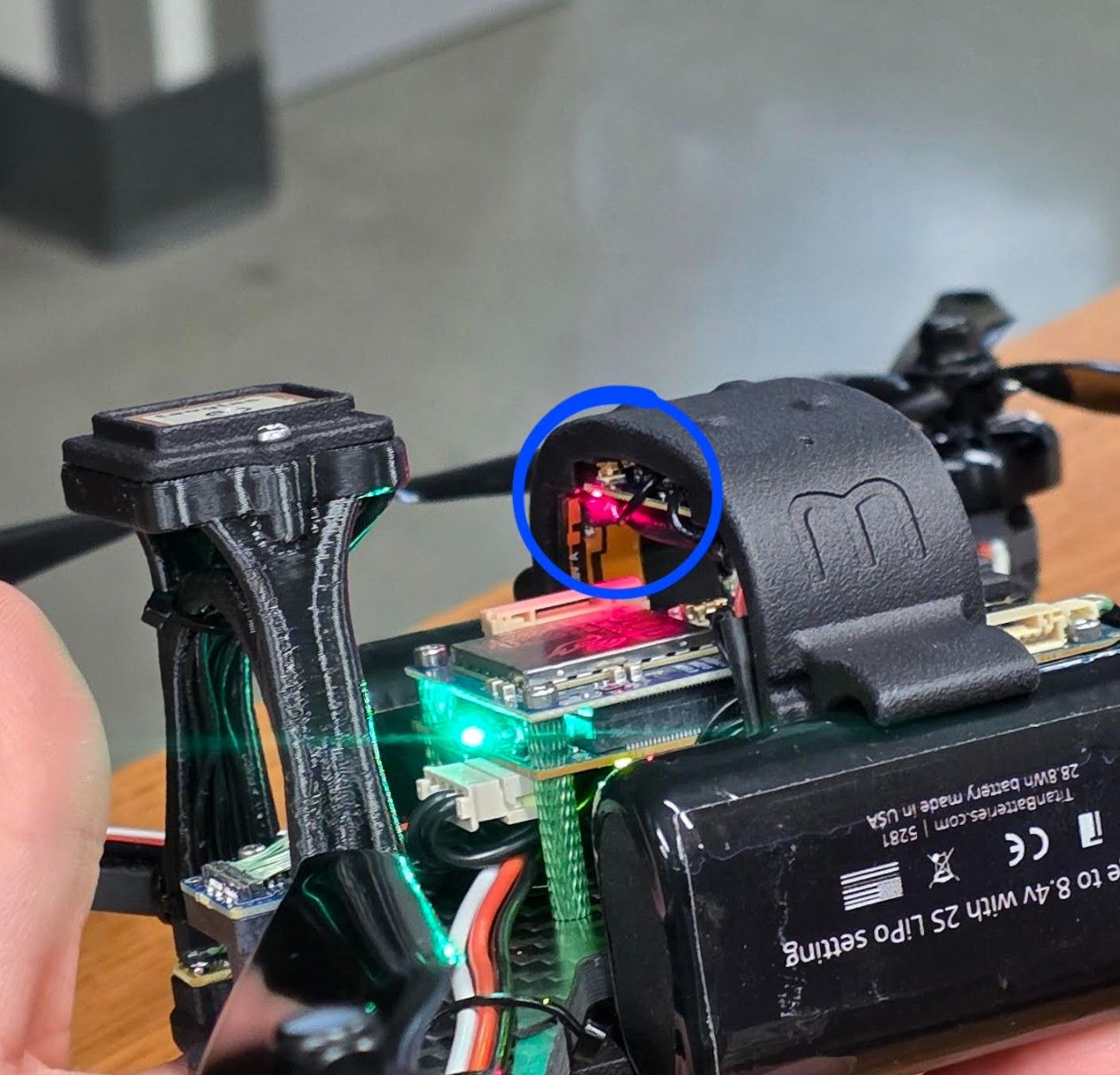
EKF2_EV_CTRLto0and report back. I am not sure which component contains the flashing red light, since I could not find a labeled diagram of the drone’s parts. I attached additional photos that hopefully make its location clearer: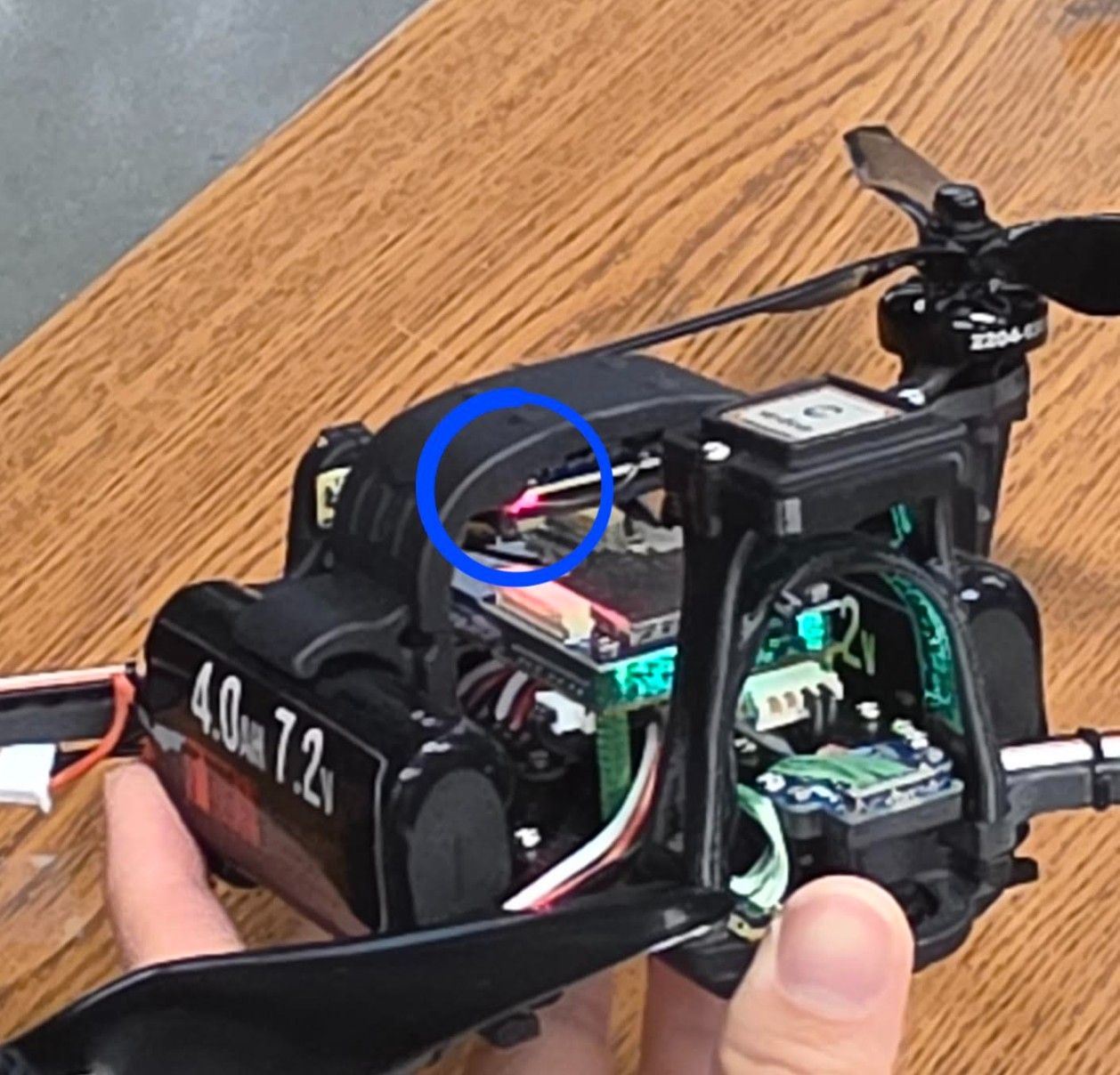
-
That red light is for the M0184 ELRS receiver. A constant slow blink from the light means it is disconnected. It will turn solid with a connection. Other LED states are documented here.


Reading along? Create a free ModalAI Forum account to join in.
With an account you can reply, ask your own question, get an email when a ModalAI engineer answers, and mark the reply that solved it. Your place in each thread is saved between visits.
Questions about VOXL, Flight Core, ESCs and ModalAI drones are answered here by the engineers who build them.
Register Login