
IMX412-Flip
-
Hi everyone,
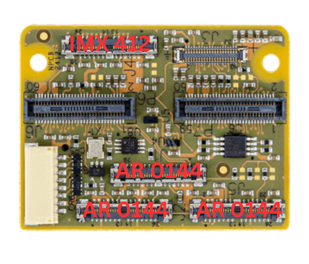
I'm working with a VOXL2 setup using the microcoax adapter (MDK-M0173-1-00), and I have three AR0144 and IMX412 cameras connected. (same connection used on starling2, without ToF sensor - image attached)
I need to flip the IMX412 camera image upside down, but I haven't found a way to do this via the voxl-camera-server.conf file. In the past, I've managed this using the "imx412-flip" drivers found under /usr/share/modalai/chi-cdk, but the problem is that my IMX412 camera is assigned to ID 1, and there is no driver for that ID
Is there a way to solve this problem?
Thanks in advance for any help
-
Hi everyone,
I'm working with a VOXL2 setup using the microcoax adapter (MDK-M0173-1-00), and I have three AR0144 and IMX412 cameras connected. (same connection used on starling2, without ToF sensor - image attached)
I need to flip the IMX412 camera image upside down, but I haven't found a way to do this via the voxl-camera-server.conf file. In the past, I've managed this using the "imx412-flip" drivers found under /usr/share/modalai/chi-cdk, but the problem is that my IMX412 camera is assigned to ID 1, and there is no driver for that ID
Is there a way to solve this problem?
Thanks in advance for any help
I just built the sensormodules for ID 1 and 5. Please test it out. A while ago we did not have hires camera support in these camera slots, so the sensormodules were not built. Please let me know if that works for you.
Alex
-
I just built the sensormodules for ID 1 and 5. Please test it out. A while ago we did not have hires camera support in these camera slots, so the sensormodules were not built. Please let me know if that works for you.
Alex
-
@robertociuch , thanks for letting me know! I will make sure this update makes it into a future SDK release.
Alex
-
@robertociuch , thanks for letting me know! I will make sure this update makes it into a future SDK release.
Alex
@Alex-Kushleyev , one more question;
I'm using two AR0144 cameras as a stereo setup. Should I use the "combo driver" to synchronize them?
I remember that about a year ago I had an issue with a different setup where the cameras weren't perfectly synchronized, and the images were captured with a slight time offset.
In this case, how should I set the IDs in the camera server, and what connections should I use to ensure they work correctly? -
@Alex-Kushleyev , one more question;
I'm using two AR0144 cameras as a stereo setup. Should I use the "combo driver" to synchronize them?
I remember that about a year ago I had an issue with a different setup where the cameras weren't perfectly synchronized, and the images were captured with a slight time offset.
In this case, how should I set the IDs in the camera server, and what connections should I use to ensure they work correctly?Hi @robertociuch ,
There are no sync issues with AR0144 that we are aware of right now. If you want the cameras to by sync'ed, you have to use the "combo" or "fsin" drivers for the AR0144 camera (see below re
fsin). The non-combo / non-fsin drivers do not use the sync line as the sync input and will be free-running.The only additional limitation for the sync'ed AR0144 vs non-synced, the maximum exposure is limited to 12ms (compared to 33ms in non-synced use case). The actual limitation is slightly higher than 12ms (maybe 14-15) and it is coming from the way the camera operates in the sync'ed mode (this is specific to AR0144 only). This 12ms limit is set in voxl-camera-server (per each camera)
"exposure_max_us": 12000, so you want to double check that. If you don't limit the exposure, then if the exposure setting extceeds this limit (well, exceeds 15ms or so), the frame rate will drop in half from 30 to 15. When you runvoxl-configure-cameras 26, the correct sensormodules will be coped to/usr/lib/camera/and correct config with appropriate exposure limits applied to/etc/modalai/voxl-camera-server.conf.In terms of sensormodule IDs for AR0144, you need to look where they are connected.
If we look at C27 use case, from the following link:
https://docs.modalai.com/voxl2-coax-camera-bundles/there are 3 AR0144 cameras connected and the following sensormodules are present:
com.qti.sensormodule.ar0144_combo_0.bin
com.qti.sensormodule.ar0144_combo_6.bin
com.qti.sensormodule.ar0144_fsin_2.bin
Actually the combo sensormodules are not only sync'ed but they also use a single MIPI interface to connect two cameras (nice trick). That is really whey they are called combo (the streams are combined into a single mipi interface). The third camera takes up the whole 4-lane mipi camera port and that is why it is not a combo mode driver.
fsinmeans it is usingframe sync input.So all 3 of those camera drivers will use the sync input, generated by VOXL 2 for sync signal. BTW, the
voxl-camera-server.confcontains information about the frame sync pin and whether it is enabled or not. You have to make sure that you enable it and use correct pin when using M0173:"fsync_en": true, "fsync_gpio": 109,This is also mentioned here : https://docs.modalai.com/M0173/
If you are only connecting two AR0144 cameras, you should connect them as shown in C26 config and you would want to have the following sensormodules:
com.qti.sensormodule.ar0144_combo_0.bin
com.qti.sensormodule.ar0144_combo_6.bin
Finally, in order to confirm time sync. You can do it indirectly by looking at the timestamp of the frames coming from two cameras. I actually wrote a tool which subscribes to two camera streams and will compare the incoming timestamps to tell you how much out of sync they are. I will find the tool and share it.
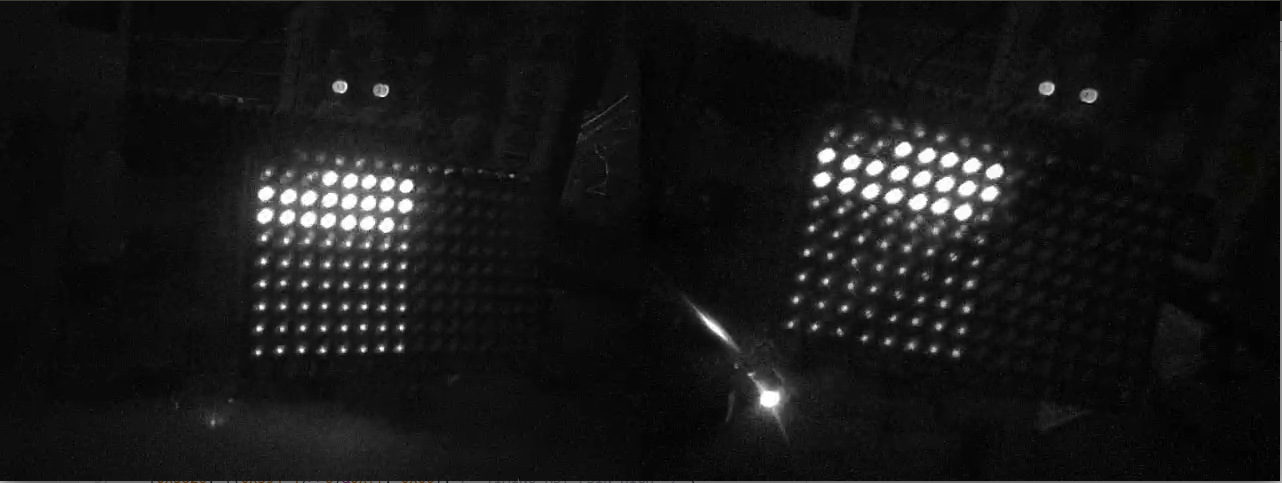
There is also a direct way of checking sync of looking at the camera images. We have a special LED array where we can light up each LED for a fixed number of microseconds. Each LED is lit up for that short amount of time and the LEDs light up in a scanning pattern across a 2D array. And then we set the camera exposure to a small value (1ms lets say) for both cameras. In the image below, each LED lights up for 50us and the camera exposure was set to 1ms, so we see 20 LEDs lit up at the same time (50*20 = 1000us) and they are also aligned in time to within 50us). This specific capture was from an older ov7251 test, but we have also done ar0144 sync test.
I just did a quick test using two sync'ed AR144, showing 0 delay in timestamps:
voxl2:~$ ./voxl-cam-sync-check -a tracking_front -b tracking_rear
camera a: /run/mpa/tracking_front/
camera b: /run/mpa/tracking_rear/
ab delta: 0.000000
Of course the sync cannot be EXACTLY zero, but it is as close to zero as the system can measure (way below 100us), just based on the timestamp test.
If I do a comparison with a non-sync'ed hires cameras:
voxl2:~$ ./voxl-cam-sync-check -a tracking_front -b hires_bayer
camera a: /run/mpa/tracking_front/
camera b: /run/mpa/hires_bayer/
ab delta: 0.053434a ahead, trying to re-sync
ab delta: -0.013322  dt too large!
ab delta: -0.013265  dt too large!
ab delta: -0.013148  dt too large!
ab delta: -0.013226  dt too large!
Please let me know if you have any more questions.
Alex
-
Hi @Alex-Kushleyev ,
Following up on this thread ... I have nearly the same setup as @robertociuch and need the same flip, but with one twist.
Our setup:
VOXL 2 (M0054), SDK 1.5.1, system-image 1.8.04, with the M0173 microcoax front-end; three AR0144 tracking cameras + an IMX412 hires, same layout as Starling 2 without the ToF.
The IMX412 is on camera ID 1 and is physically mounted inverted (only way we were able to), so the image comes through upside down. As you noted here, en_rotate has no effect on the IMX412.
The difference from the earlier case: we're running the FPV low-latency IMX412 driver on that slot, not the standard one:
com.qti.sensor.imx412_fpv.so
com.qti.sensormodule.imx412_fpv_1.bin
com.qti.tuned.imx412_fpv.binThe IMX412 is the pilot's live video feed on a commercial cleaning drone, so we need to keep the low-latency FPV behavior ... the imx412_flip_1.bin you built earlier would flip the image but drop us back to the standard (non-FPV) driver.
Would you be able to build a combined FPV + 180° flip sensormodule for camera ID 1 ( i.e. com.qti.sensormodule.imx412_fpv_flip_1.bin ) so we get the flip while keeping the FPV variant?
Any install guidance would also be appreciated: where to place it (/usr/lib/camera/?) and whether the imx412_fpv.so / tuned files need a matching update, or if swapping the sensormodule .bin alone is enough.
Thanks!
John -
Hi @john.almasi ,
Can you please let me know which output stream(s) you are using for the IMX412 camera. For example: preview, small_video, large_video, misp, etc..
If you are using
small_encoded/large_encoded, then those are going through the ISP and will automatically adjust the decoding for the bayer pattern from RGGB to BGGR (because the image read-out is backwards, the pattern flips). See the directions below. If you are using MISP output, then your current camera server version does not support this method and will show incorrect colors (red and blue swapped).The rotated version of the driver is available in this zip : https://storage.googleapis.com/modalai_public/temp/imx412_test_bins/20250919/imx412_fpv_eis_20250919_drivers.zip
Directions:
- unzip
- back up your current
com.qti.sensormodule.imx412_fpv_1.binandcom.qti.sensor.imx412_fpv.soon your voxl2 (in/usr/lib/camera/). -- you need to rename or remove them from that location - copy the new
com.qti.sensor.imx412_fpv.soandcom.qti.sensormodule.imx412_fpv_flip_20250919_1.binto/usr/lib/camera. - restart
voxl-camera-server. - the rotation is done (in this case) by adding a configuration register in the sensormodule file, which instructs the camera to send the image backwards. The sensormodule file also has information to tell the ISP to debayer the image properly as BGGR (rotated) as opposed to RGGB (normal).
If you are using MISP streams, then we will need to do some update to your camera server.
Final note, If you are using GPS with your drone, we recently found that old IMX412 drivers (including what i just linked) interfere with GPS signal. The non-flip drivers for IMX412 that fix the GPS interference issue can be found here : https://storage.googleapis.com/modalai_public/temp/imx412_test_bins/20260529/imx412_drivers_20260529.zip. Please let me know if you are using GPS and we can go from there.
Alex
-
Hi @john.almasi ,
Can you please let me know which output stream(s) you are using for the IMX412 camera. For example: preview, small_video, large_video, misp, etc..
If you are using
small_encoded/large_encoded, then those are going through the ISP and will automatically adjust the decoding for the bayer pattern from RGGB to BGGR (because the image read-out is backwards, the pattern flips). See the directions below. If you are using MISP output, then your current camera server version does not support this method and will show incorrect colors (red and blue swapped).The rotated version of the driver is available in this zip : https://storage.googleapis.com/modalai_public/temp/imx412_test_bins/20250919/imx412_fpv_eis_20250919_drivers.zip
Directions:
- unzip
- back up your current
com.qti.sensormodule.imx412_fpv_1.binandcom.qti.sensor.imx412_fpv.soon your voxl2 (in/usr/lib/camera/). -- you need to rename or remove them from that location - copy the new
com.qti.sensor.imx412_fpv.soandcom.qti.sensormodule.imx412_fpv_flip_20250919_1.binto/usr/lib/camera. - restart
voxl-camera-server. - the rotation is done (in this case) by adding a configuration register in the sensormodule file, which instructs the camera to send the image backwards. The sensormodule file also has information to tell the ISP to debayer the image properly as BGGR (rotated) as opposed to RGGB (normal).
If you are using MISP streams, then we will need to do some update to your camera server.
Final note, If you are using GPS with your drone, we recently found that old IMX412 drivers (including what i just linked) interfere with GPS signal. The non-flip drivers for IMX412 that fix the GPS interference issue can be found here : https://storage.googleapis.com/modalai_public/temp/imx412_test_bins/20260529/imx412_drivers_20260529.zip. Please let me know if you are using GPS and we can go from there.
Alex
Hi @Alex-Kushleyev,
Thanks, this is really helpful and the GPS note is critical for us.
Output stream: For the IMX412 we're using an encoded stream (small_encoded / large_encoded, H.264/H.265) via voxl-streamer for the pilot's low-latency FPV feed ... not MISP. So we're on the ISP path you described, where the RGGB→BGGR bayer adjustment is handled automatically. Good to know MISP would've been a problem though.
GPS: Yes, we're using GNSS, and heavily a Septentrio mosaic dual-antenna receiver running moving-baseline heading (GPS-derived yaw feeding the EKF, with a heading pre-arm gate). So the GPS-interference issue in the older IMX412 drivers is a hard blocker for us: we can't run a driver that degrades GNSS reception, since it would compromise our heading solution and arming logic.
That's the bind with the two builds you linked ... the imx412_fpv_flip_20250919 fixes our upside-down image but sits on the old base that interferes with GPS, while the 20260529 GPS-interference fix is non-flip. Neither one alone works for us.
Request: Would you be able to build a combined sensormodule; the FPV variant + 180° flip, built on top of the 2026-05-29 GPS-interference-fix base ... that way we get the low-latency FPV behavior, the correct (flipped) orientation, and the GPS fix in a single driver?
Essentially com.qti.sensormodule.imx412_fpv_flip_1.bin derived from the 20260529 drivers rather than the 20250919 ones.
Install questions for when it's ready: is swapping the com.qti.sensormodule.*_flip_1.bin and matching com.qti.sensor.imx412_fpv.so into /usr/lib/camera/ (with backups) and restarting voxl-camera-server sufficient, or do the .so / tuned .bin files also need a matching update for this combined build?
Really appreciate the help ... this is the last blocker on our FPV video path.
Thanks,
John -
Yes, no problem, i will provide the flipped version, just for completeness. I’ll follow up tomorrow.
-
Hi @john.almasi ,
We just posted the updated drivers for IMX412 camera : imx412_drivers_20260709.zip
These drivers include:
- three variants with the following MIPI data rates: 2004, 2088, 2200 Mbps
- I believe all three should be pretty much interference-free, but you should test and check the spectral coincidence plots from (see note below)
- *** note that 2200Mbps is 5% above maximum recommended specification for the camera, but so far we had no issues (use at own risk). For most use cases, 2088 Mbps should be a good choice.
- regular and flip versions
- alternate i2c slave register option (0x20 instead of 0x34)
-
- please note that in the driver versions of 2004 and 2088 Mbps, the following modes still use 2200 Mbps in order to achieve desired throughput:
- 4040x3040 60FPS
- 3840x2160 80FPS
- 1936x1080 240FPS
Here is the full mode list table for this driver set (mbps is one of 2004, 2088, 2200 respectively):
['bpp','mbps','width','height', 'fps']
[ 10,   mbps,  4056,    3040,    30.0]
[ 10,   mbps,  4040,    3040,    30.0]
[ 10,   2200,  4040,    3040,    60.0]
[ 10,   mbps,  3840,    2160,    30.0]
[ 10,   mbps,  3840,    2160,    60.0]
[ 10,   2200,  3840,    2160,    80.0]
[ 10,   mbps,  2028,    1520,    30.0]
[ 10,   mbps,  1996,    1520,    30.0]
[ 10,   mbps,  1996,    1520,    60.0]
[ 10,   mbps,  1996,    1520,   120.0]
[ 10,   mbps,  1936,    1080,    30.0]
[ 10,   mbps,  1936,    1080,    60.0]
[ 10,   mbps,  1936,    1080,    90.0]
[ 10,   mbps,  1936,    1080,   120.0]
[ 10,   2200,  1936,    1080,   240.0]
[ 10,   mbps,  1920,    1080,    30.0]
[ 10,   mbps,  1920,    1080,    60.0]
[ 10,   mbps,  1920,    1080,    90.0]
[ 10,   mbps,  1920,    1080,   120.0]
Additionally, we added some information that clarifies what are different components of the camera drivers and also explains how to achieve the image rotation in different use cases (and versions of
voxl-camera-server) : https://docs.modalai.com/voxl-camera-drivers/You should also check out the following post regarding GNSS interference, which includes some analysis showing how different MIPI bit rates can interfere with GNSS bands (bitrate and content-dependent) : https://forum.modalai.com/topic/5116/gnss-emi-mitigation-guidelines
Please test it out and let me know if you have any issues.
Alex
- three variants with the following MIPI data rates: 2004, 2088, 2200 Mbps
-
Hi @john.almasi ,
We just posted the updated drivers for IMX412 camera : imx412_drivers_20260709.zip
These drivers include:
- three variants with the following MIPI data rates: 2004, 2088, 2200 Mbps
- I believe all three should be pretty much interference-free, but you should test and check the spectral coincidence plots from (see note below)
- *** note that 2200Mbps is 5% above maximum recommended specification for the camera, but so far we had no issues (use at own risk). For most use cases, 2088 Mbps should be a good choice.
- regular and flip versions
- alternate i2c slave register option (0x20 instead of 0x34)
-
- please note that in the driver versions of 2004 and 2088 Mbps, the following modes still use 2200 Mbps in order to achieve desired throughput:
- 4040x3040 60FPS
- 3840x2160 80FPS
- 1936x1080 240FPS
Here is the full mode list table for this driver set (mbps is one of 2004, 2088, 2200 respectively):
['bpp','mbps','width','height', 'fps']
[ 10,   mbps,  4056,    3040,    30.0]
[ 10,   mbps,  4040,    3040,    30.0]
[ 10,   2200,  4040,    3040,    60.0]
[ 10,   mbps,  3840,    2160,    30.0]
[ 10,   mbps,  3840,    2160,    60.0]
[ 10,   2200,  3840,    2160,    80.0]
[ 10,   mbps,  2028,    1520,    30.0]
[ 10,   mbps,  1996,    1520,    30.0]
[ 10,   mbps,  1996,    1520,    60.0]
[ 10,   mbps,  1996,    1520,   120.0]
[ 10,   mbps,  1936,    1080,    30.0]
[ 10,   mbps,  1936,    1080,    60.0]
[ 10,   mbps,  1936,    1080,    90.0]
[ 10,   mbps,  1936,    1080,   120.0]
[ 10,   2200,  1936,    1080,   240.0]
[ 10,   mbps,  1920,    1080,    30.0]
[ 10,   mbps,  1920,    1080,    60.0]
[ 10,   mbps,  1920,    1080,    90.0]
[ 10,   mbps,  1920,    1080,   120.0]
Additionally, we added some information that clarifies what are different components of the camera drivers and also explains how to achieve the image rotation in different use cases (and versions of
voxl-camera-server) : https://docs.modalai.com/voxl-camera-drivers/You should also check out the following post regarding GNSS interference, which includes some analysis showing how different MIPI bit rates can interfere with GNSS bands (bitrate and content-dependent) : https://forum.modalai.com/topic/5116/gnss-emi-mitigation-guidelines
Please test it out and let me know if you have any issues.
Alex
Hello @Alex-Kushleyev ,
This is exactly what we needed ... thank you for turning the combined flip + GNSS-fix driver around so fast!
Confirming our plan against your docs:
We're on the encoded (ISP) path ... large_encoded for the pilot's low-latency FPV feed, not MISP ... so the ISP should pull the reversed bayer from the flip sensormodule and debayer correctly (no R/B swap). We'll run the version-agnostic combo: the flip sensormodule + en_rotate = true, plus maxRAWSizes=20 in camxoverridesettings.txt.
Bit rate: going with 2088 Mbps. Our GNSS is a Septentrio mosaic dual-antenna running moving-baseline heading, so GPS L1 integrity is critical for us ... your analysis showing 2088 sitting ~10 MHz off L1 center with only a 1–2 dB drop is exactly the margin we need. We'll keep our FPV mode clear of the three forced-2200 modes (staying 1080p ≤120 fps).
We'll validate by logging the Septentrio C/N0 and satellite count with the camera streaming vs. off, in representative daylight (noting your point that under-exposed frames worsen the interference).
One quick check: for our single hires IMX412 on the M0173, is the default i2c 0x34 the right choice, or is there a scenario where we'd want the 0x20 variant?
I'll report back the before/after GNSS numbers once we've tested ... happy to share the data if it's useful.
Thanks again,
John - three variants with the following MIPI data rates: 2004, 2088, 2200 Mbps

Reading along? Create a free ModalAI Forum account to join in.
With an account you can reply, ask your own question, get an email when a ModalAI engineer answers, and mark the reply that solved it. Your place in each thread is saved between visits.
Questions about VOXL, Flight Core, ESCs and ModalAI drones are answered here by the engineers who build them.
Register Login